


“I don’t have a plan,” says Jason Kottke of his eponymous blog. He had, instead, a love for the then-young internet and for the World Book Encyclopedia. So he built his own collection of curiosities on the web. One post at a time, weekly, for one score and seven years.
Kottke’s trick isn’t to write about everything. Nor is it to go in-depth on a single topic. Instead, he’s a curator, a tastemaker. He finds the stuff that strikes his fancy and shares it with the world. It’s an eclectic collection, with recent posts about the phrase “experts said...” and a new Commodore 64 and a Mayan tomb in Belize, curated from Kottke’s wide-ranging exploration of the web.
Curation is one of the few ways to keep from burning out while publishing a newsletter for years on end. It’s also one of the only ways to cut through the noise in social media and communities, where nobody has the time to read every post.
You could do it manually, Kottke-style, researching and sharing your favorites yourself. Or you could crowdsource and curate as a community. Share your favorite things in Slack, Discord, or another community tool or social network, then build a weekly newsletter featuring the things that struck others’ fancy (and the things others in the community shared, too). The same trick could quickly build manageable summary emails of your team’s Slack conversations, or of any other bit of data where the onslaught is too much but the curated best-of bits are valuable.
Best of all, you could automate it all, with a bit of code and Buttondown.
How to automate community curation
The recipe’s fairly simple: Use your community’s discussions as a metric for what’s interesting, then automatically turn that into an email for a quick weekly digest.
Say your community is in Slack. You could use the Slack API to check for threads with the most replies and sort them by popularity. You could tweak the basic formula for your community. Maybe your community’s in Discord chats instead, or in a Discourse forum, or on a WordPress blog with comments. Swap those apps’ APIs for Slack’s for similar results. Or maybe in your Slack group, people react with emojis more than they comment in threads; swap reactions for replies to filter for what your community likes.
Then, you’d use the Buttondown’s API to merge those top discussions into a template email. That’ll create a curated community newsletter, automatically, every time you run it.
You could do this in an automation tool like Make or Zapier; they’ll handle authentication and parse data automatically, making things a bit easier. Or you could hand-code it—and learn a bit more along the way.
Here’s how to build it, with Slack.
Build a basic Slack app to access Slack’s API
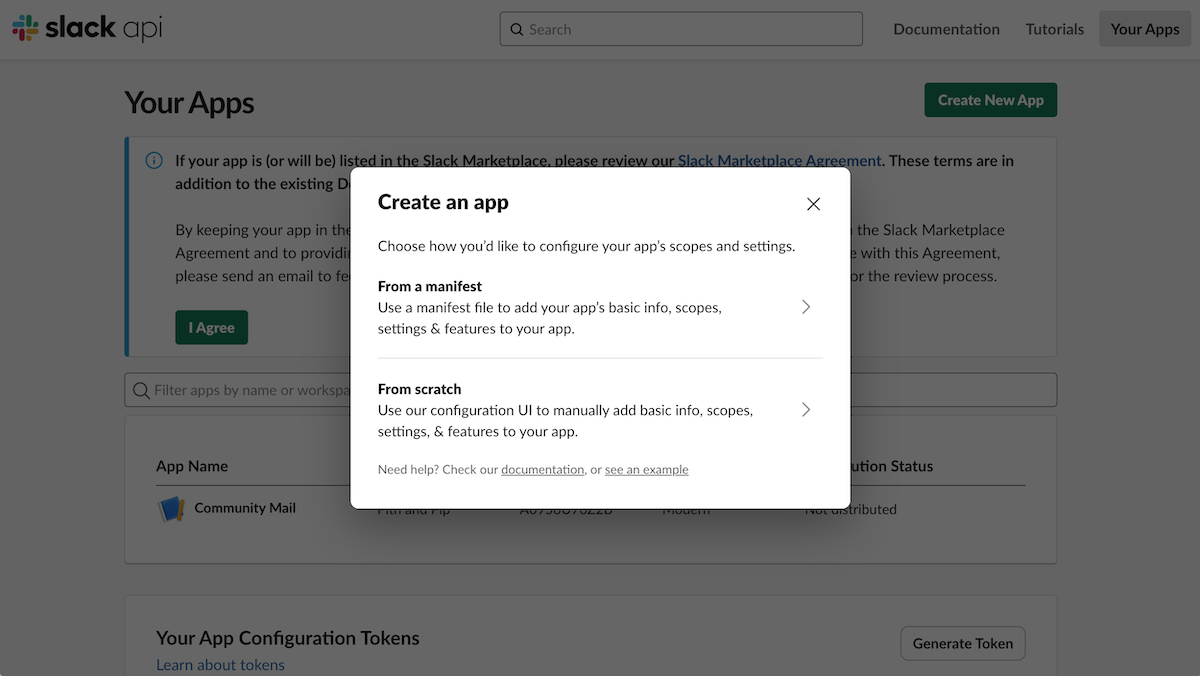
Create a Slack app to get access to Slack's API
Start out by setting up authentication. In Slack, that requires creating a new app (not a full app, but an app placeholder in Slack, with permissions to access your account’s data). Go to api.slack.com/apps, click “Create New App”, choose “From Scratch”, then name your app and select your Slack workspace.
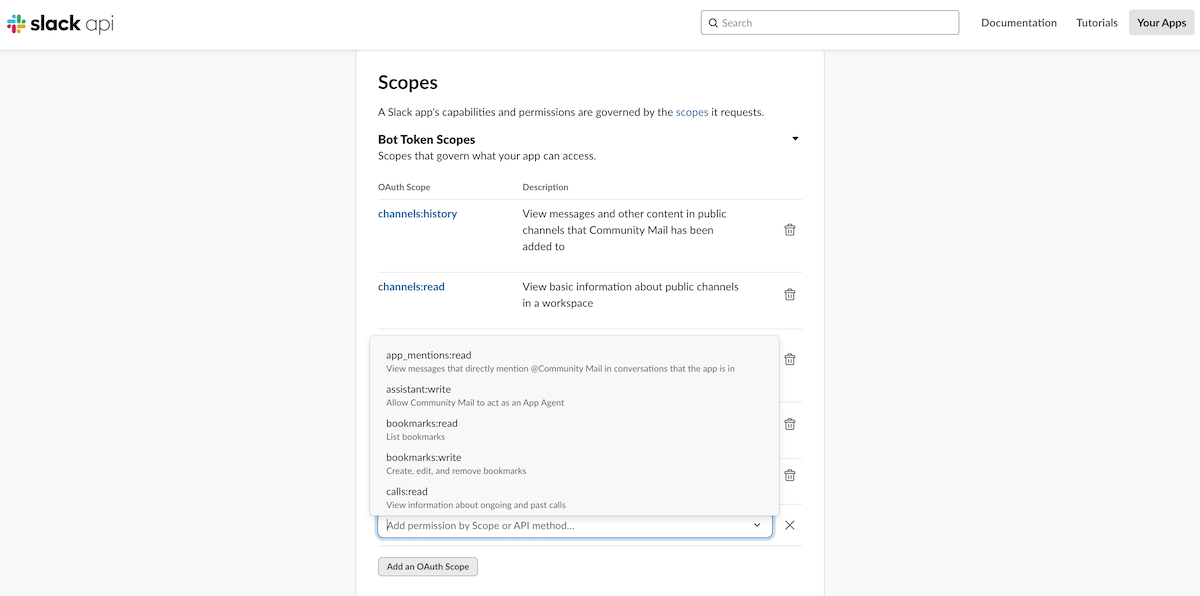
Select Slack API scopes to allow access to Slack data
That’ll create a basic Slack app. Now you need to tell Slack which data to share with your app. In the app’s settings page, click the “OAuth & Permissions” tab, scroll to “Scopes”, and add permission for the data you need (we added channels:history, channels:read, groups:history, users:read, and users.profile:read for our app).
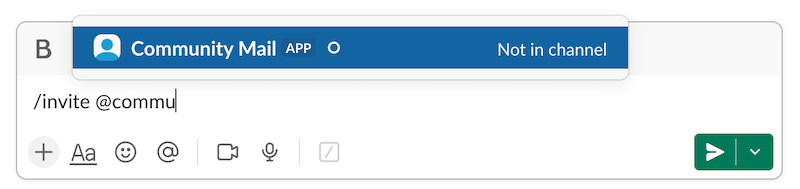
Invite your app to your Slack group to finalize API access
Finally, it’s time to install your Slack app. Scroll back up in the settings, and under “OAuth Tokens” install the Slack app to your workspace. Copy the Bot User OAuth Token; you’ll need that later to fetch data from your Slack app. Then switch over to Slack (the actual Slack app where you chat with folks), open the channel with your community conversations, and type /invite @yourAppName with your app’s name swapped in.
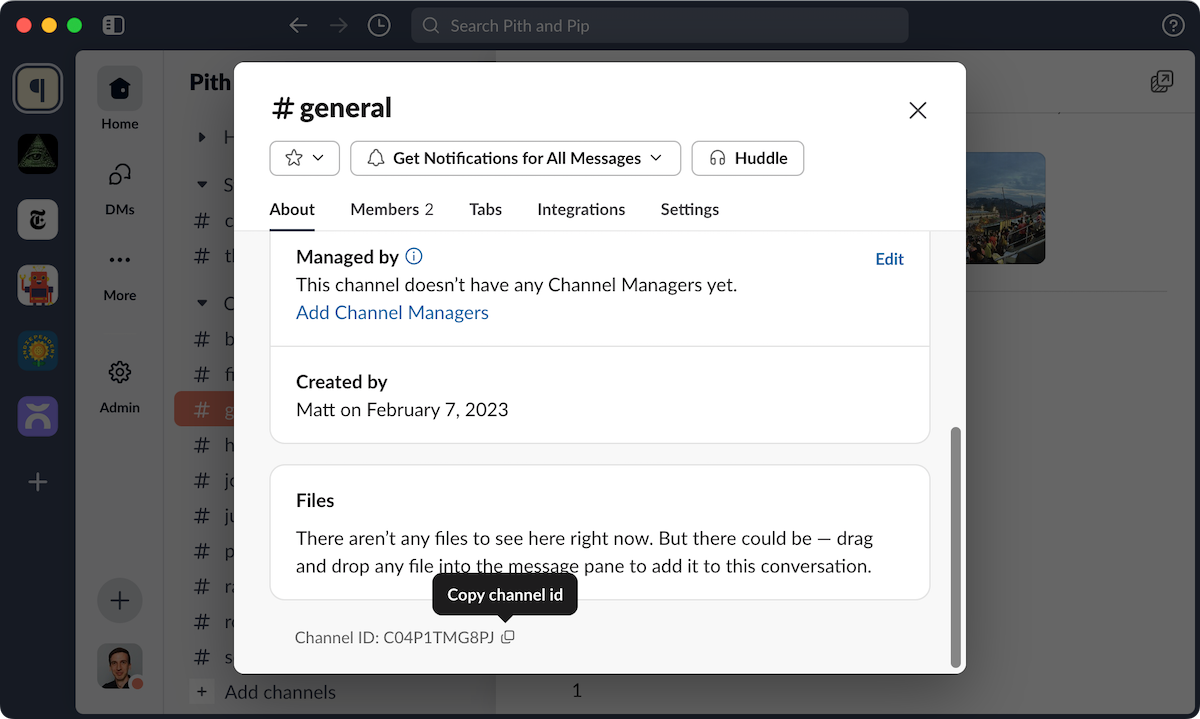
Copy your Slack Channel ID to use with Slack's API
And while you’re there, grab your channel’s ID. Click the channel name in the top toolbar, scroll to the bottom of the popover, then click the copy button beside the Channel ID and save it somewhere to reference easily.
Now you’re ready to fetch the most popular Slack discussions via Slack’s API.
Fetch the most popular discussions from your community
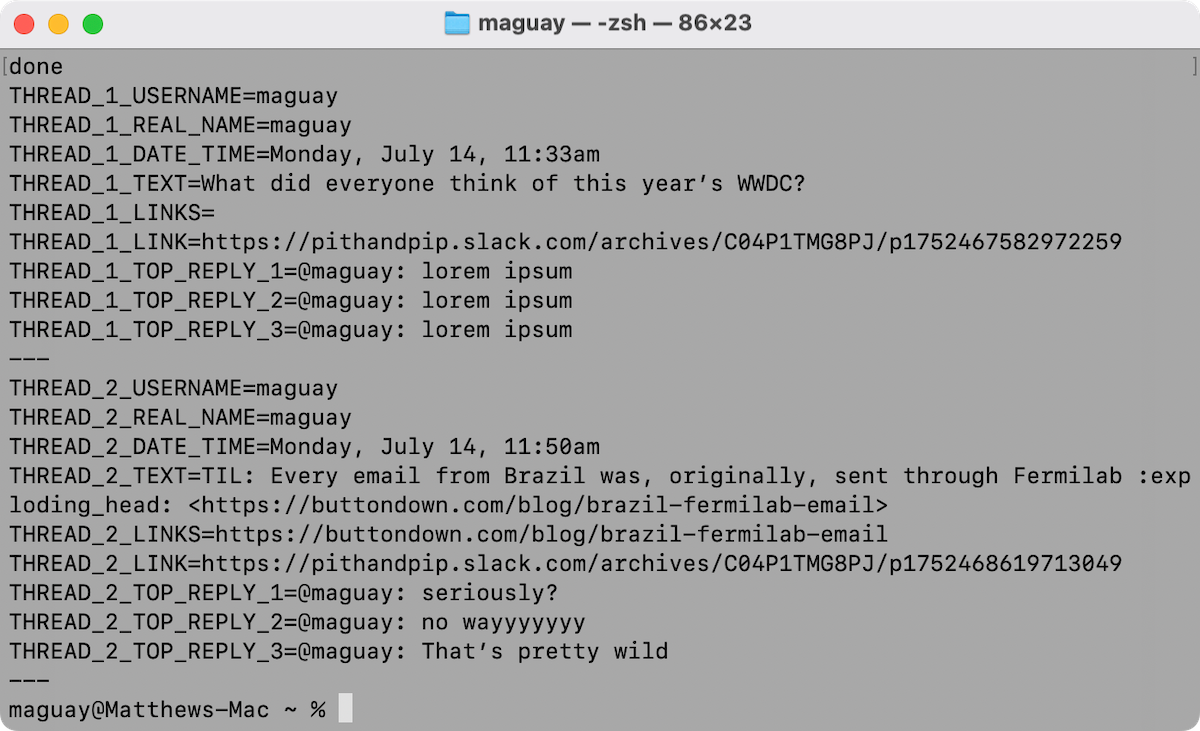
Your most popular Slack threads, summarized in Terminal
Slack’s API is pretty straightforward, with a URL to fetch data, a token to authenticate, and parameters to set what data you want in response.
Start out simple with a cURL command in Terminal. The script in this Gist, for example, will give you the most recent discussion in a Slack group; check Slack’s API docs for more details.
Then, tweak the code to your purposes. A few tweaks and a few Claude prompts, and you can build that prompt into a Slack Top Conversations script that can grab your top three most popular Slack threads from the past week, pulls their top three replies, and turn them all into easy-to-use variables (copy from this gist, add in your variables, then run in Terminal).
Want different data in your community email? Tweak away!
Build a template email with Buttondown’s API
Then you need to do something with your newly parsed Slack data. That’s where Buttondown’s email API comes in. You can draft emails from Terminal, complete with any text you want—including your community’s most popular Slack discussions.
Authentication comes first, again. Open your Buttondown settings, and click the API Key button (or just go directly to buttondown.com/keys). Copy and save your API key.
Then start simple again. Buttondown’s API Recipe to draft an email includes the cURL code you need to draft email in your newsletter (emphasis on draft; if you send a Buttondown emails POST command without including "status": "draft", it’ll get sent immediately to your entire audience, and that wouldn’t be great).
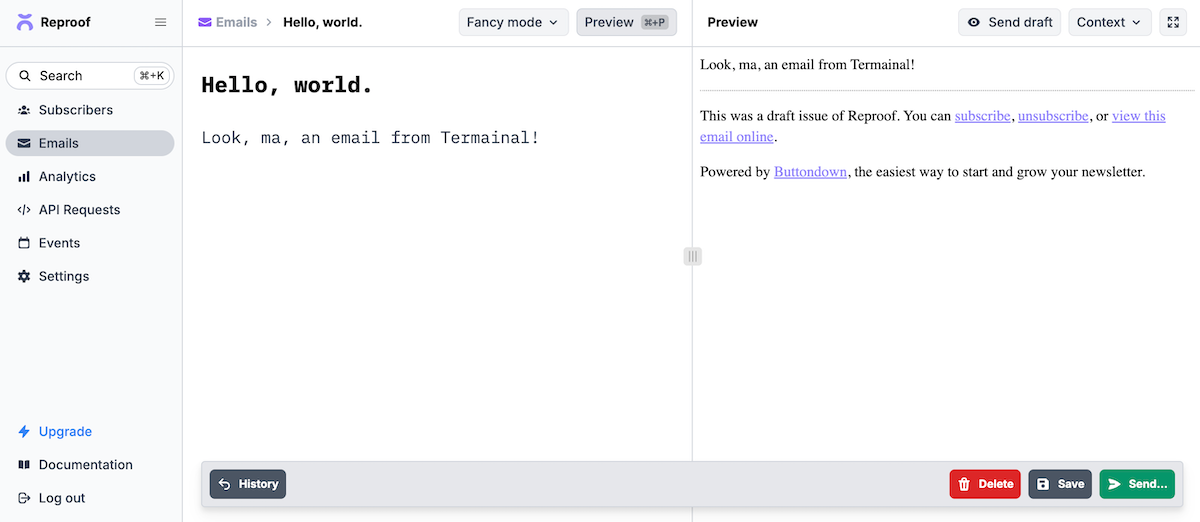
A draft Buttondown email, created by cURL
A second later, and your Buttondown Emails tab will have the draft ready to edit and send (or, in this case, to delete so you don’t accidentally send a test message to your subscribers).
Once again, you can tweak things from there.
Say you write your emails in Markdown, with the subject as a heading on the first line, then the email body underneath, and some variables included like $this. That approach would let you turn a text file into an email, automatically updated with up-to-date text—that you added manually, or that you fetched from an API like Slack’s. Check Buttondown’s Creating template emails via the API recipe for example templates and the code you need to turn a template into a Buttondown draft.
Now, tweak that template into your community newsletter, run the two scripts back-to-back, and you’re in business.
Merge API data with Buttondown’s API
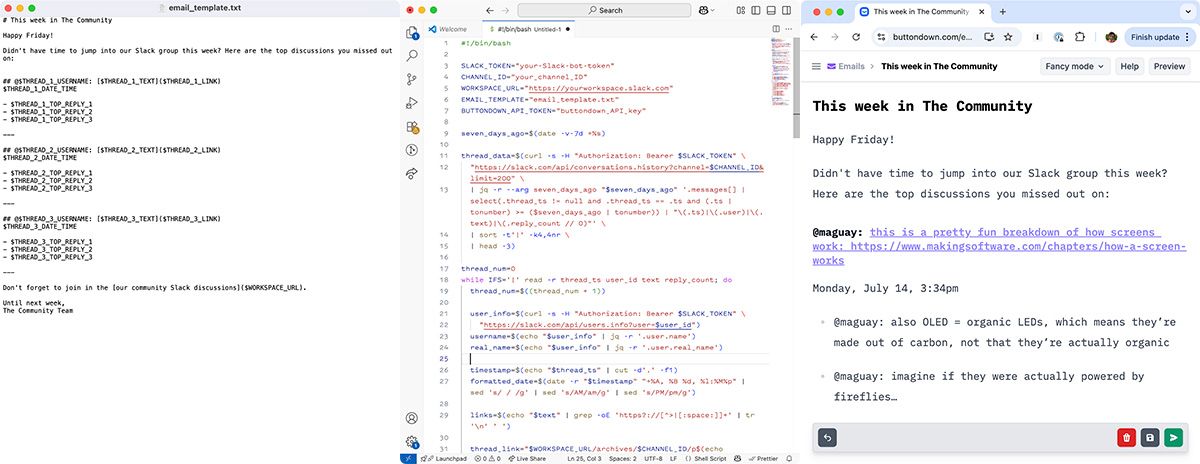
Template + code = automated community email
Or you could do it all in a single step.
Start with your email template. You’ll want to add variables for your top three threads, the links to the threads, and their top replies, along with some text reminding people to join in the conversations. Save that as a text file.
Then you’ll need to combine the CURL scripts to run one after another, fetching data from your API, merging it with your template, and sending it along to Buttondown.
For a Slack email, for example, this Slack Top Discussions to Buttondown email script pulls the data from Slack, merges it with your template, and pushes it as an email draft to Buttondown (copy from this Gist and run in Terminal). 9 seconds later, you’ll have a Slack-powered community email ready to send out.
Once your draft is compiled, jump over to your Buttondown dashboard to add your commentary to this week’s top discussions, before emailing them to your followers. Or if you’re brave enough, you could drop the draft flag and send your template email straight from Terminal.
Anything you can run in Terminal, your computer could automatically run on a schedule (every Friday afternoon, say) with a cron job. Or, if you have a server (perhaps DigitalOcean server for your blog, or an EC2 instance for an app), you could run the cron job there. You could rebuild the API calls in a Postman Flow, or go back to a simpler, UI-driven approach and automate your email in Make or Zapier.
Either way, you’ll never have to manually curate your community content again.
Keep your email newsletter going with automation
Nor is that the only way to put Buttondown’s email creation API to use. One of the original personalized email alerts was stock price emails that’d get sent whenever a stock hit a specified price. You could build a Buttondown stock tracker, emailing your list every time NVDA hits a new record high, or a weather bot that cancels park run meetups when the forecast gets too dicey. And for an even simpler, similarly curated email, you could use Buttondown’s built-in RSS to email feature to create a community email from any blog’s feed.
And, with a bit of automation and a bit of perseverance, you have a chance at curating your newsletter to at least one score and a few years, Kottke-style.