


The first SMS message wasn’t sent from a phone. It was, instead, a “Merry Christmas” message sent on December 3, 1992 from a computer to an Orbitel 901 cellphone—itself, a 2.1kg contraption, more of a portable telephone than a cellphone. Thus began a long tradition of texting from computers to phones.
For the longest time—until June 17, 2025, in fact, for AT&T customers—one of the easiest and cheapest ways to text anyone was to email their phone number. With AT&T, for example, you’d email your contact’s phone number with @txt.att.net appended to the end, and your message would get shrunk down to size and delivered via SMS.
No more. Verizon closed their email-to-SMS gateway in October 2024, T-Mobile followed suit in December. Depending on where you live, your carrier might still let you SMS via email, but the writing’s on the wall—most carriers now only support sending SMS from your phone.
You can still send SMS from your computer, via email, if you’d like. Here’s how to set it up, to get an SMS on your phone or send SMS messages to your subscribers.
Send yourself an SMS via email
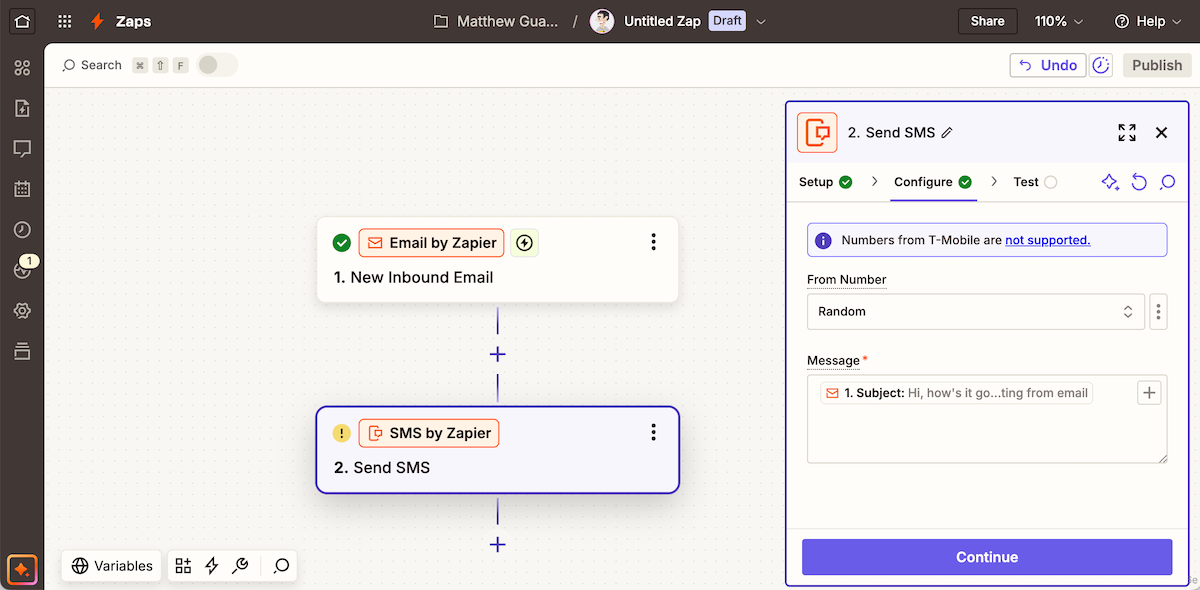
Let anyone email an SMS to your phone, with Zapier
The easiest to set up is a bot that can send you an SMS via email, via automation tools like Zapier or IFTTT, both of which include an SMS tool. Not all that useful, admittedly—unless paired with other apps.
Here’s how it works. You’ll set up an automation that waits for an email. In Zapier (the simplest, with its Buttondown integration), start the automation with the Email by Zapier trigger, customize the email, then send a test message to that new @zapiermail.com address.
Then, add an SMS by Zapier step to send an SMS to your phone number (Zapier’s built-in SMS integration requires you to first verify your phone number, so you can only automate texting yourself and others close to you). An easy option is to only include text in your email’s subject line, then have Zapier send the email subject as an SMS message.
Turn on the workflow. Email your new address. And, ding, you’ll get an SMS message on your phone. Nifty. You could even share that email with friends, so they could email-to-SMS you, just like the old AT&T gateway worked.
Now make that a bit more useful.
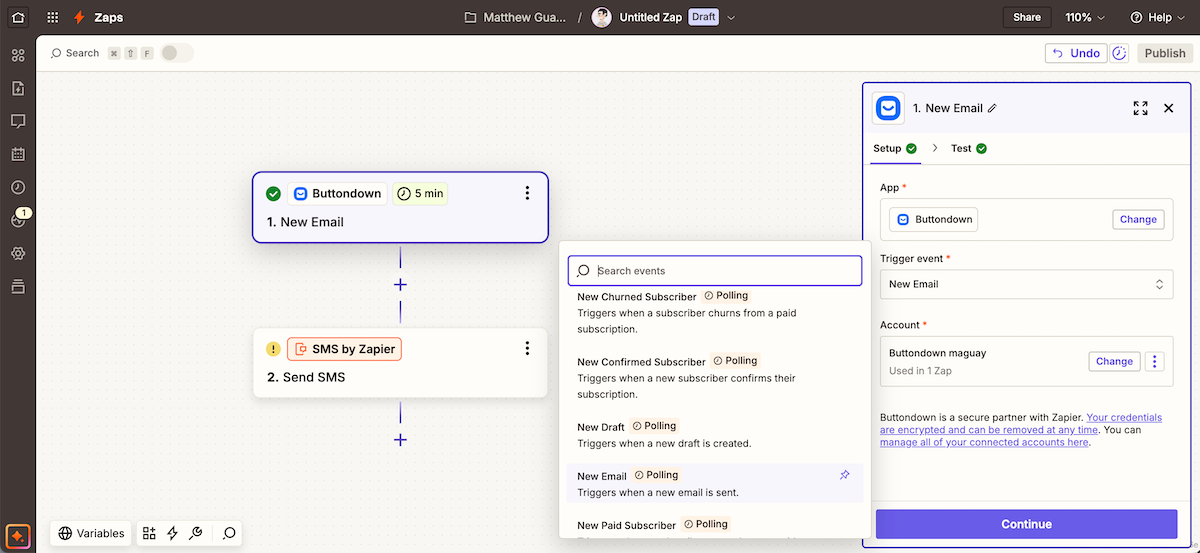
Swap up the triggers, and any app could send you an SMS message
You could build your own filtered Gmail notification system, with SMS. Start the workflow with a Gmail New Email Matching Search trigger, use the same SMS action, and you could get notified when specific emails come in.
Or, along those lines, you could make a Buttondown Email to SMS automation with Buttondown’s Zapier integration. Want to get notified whenever your latest email newsletter is delivered? Start your automation with Buttondown’s New Email trigger, then build your SMS to say something like “Your SUBJECT email was sent to X subscribers,” filling in the blanks with the data from Buttondown. You could, in the same way, get an SMS every time a new subscriber joins your list or (perhaps a worse idea for your mental health) when someone unsubscribes.
Send everyone SMS messages
The beauty (or danger) of traditional email-to-SMS gateways was that you could email an SMS message to anyone—as long as you knew their cell number and carrier. So if your friend used AT&T, you could pound out an email to their number at @txt.att.net and send them an SMS.
You can build the same, today, and make it work with almost any cell number on earth without knowing their cell phone provider. You’ll need a Twilio account (or Amazon SNS, or other SMS gateways), plus your now-familiar email + Zapier setup (or any other automation tool; Make, Microsoft Power Automate, or n8n could all work).
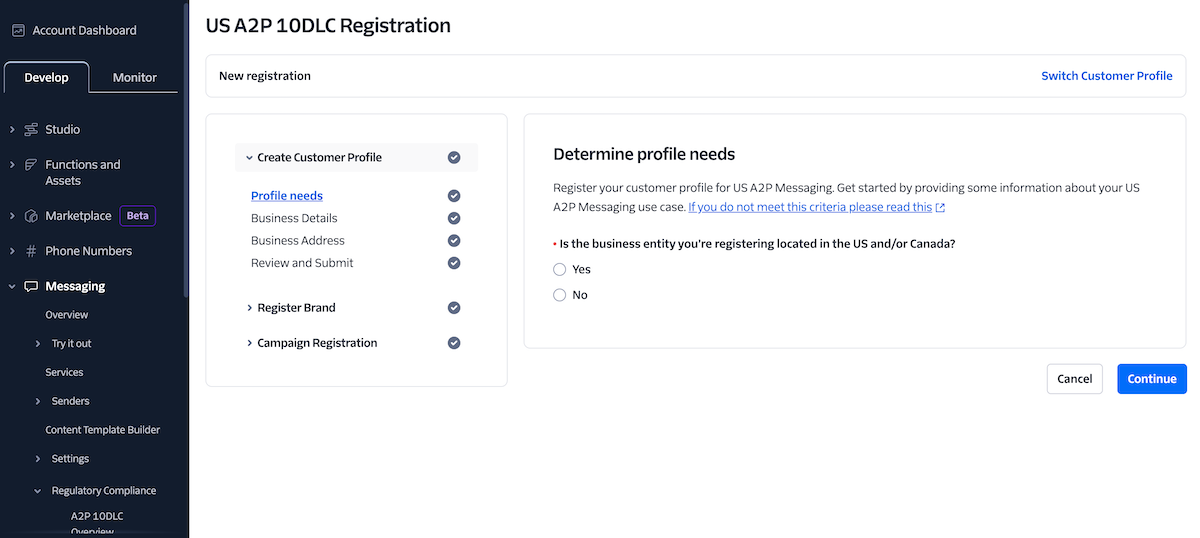
Twilio's application process for a US A2P 10DLC registration
And you’ll need to wade through a bit of bureaucracy. As carriers dropped support for email to SMS, they also tightened the rules for sending application-to-person (or A2P) messages. To send SMS messages to US-based numbers from your computer, you’ll first need to register a US-based number with Twilio (from $1/month).
Then you’ll register that phone number and your company with A2P 10DLC (application-to-person 10-digit long code) from $4 for individuals or small volume sending or $44 for larger brands. Finally, you’ll need to register each campaign to send messages (say you want to send your email newsletter via SMS, you’d have one campaign per newsletter that’d get used with every email you send).
Sending SMS to numbers outside the US is typically easier—but there may be different registration processes depending on your region. In Twilio, make sure the location where you want to send messages is enabled in your Geo settings, then follow any steps shown.
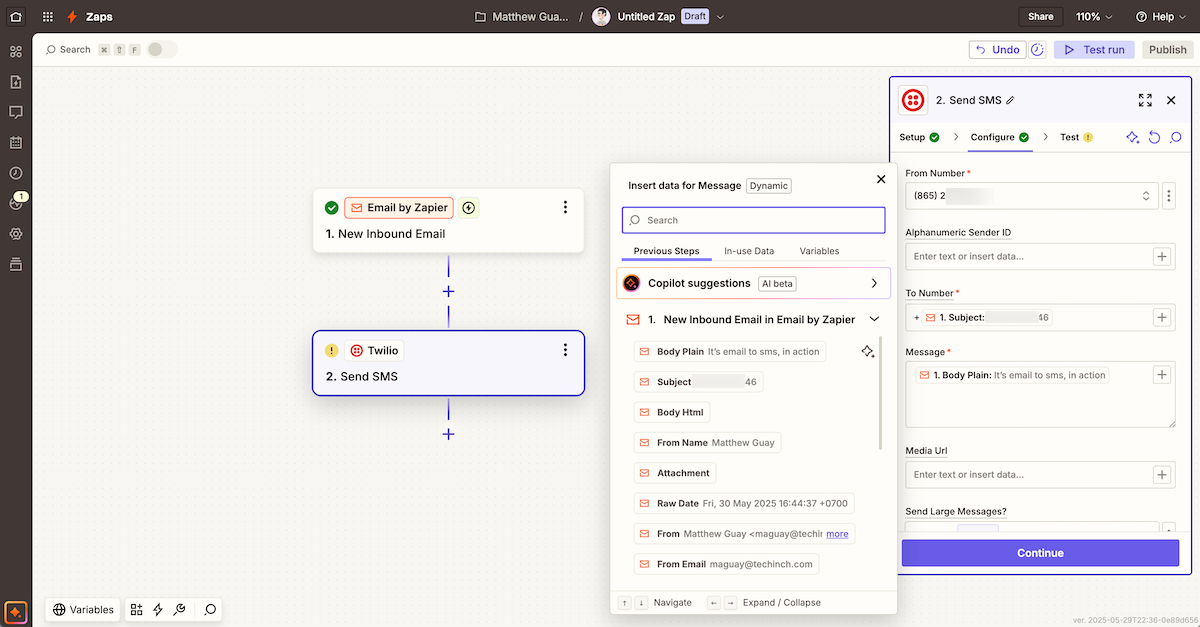
A universal email-to-SMS gateway, via Zapier and Twilio
With the forms out of the way, it’s time to build your universal email-to-SMS gateway.
Start out the same: Have your automation start by watching for an email. This time, perhaps, enter the phone number in the email’s subject (complete with country code, if you’ll be messaging globally), followed by the SMS message in the email body.
Then add a Twilio step to send an SMS. Add your email subject to Twilio’s To line, your email body to the Message field, then test and turn on your automation. Now, whenever you email a phone number and message to your Zapier email address, your recipient will get an SMS.
Send SMS messages to a list of recipients
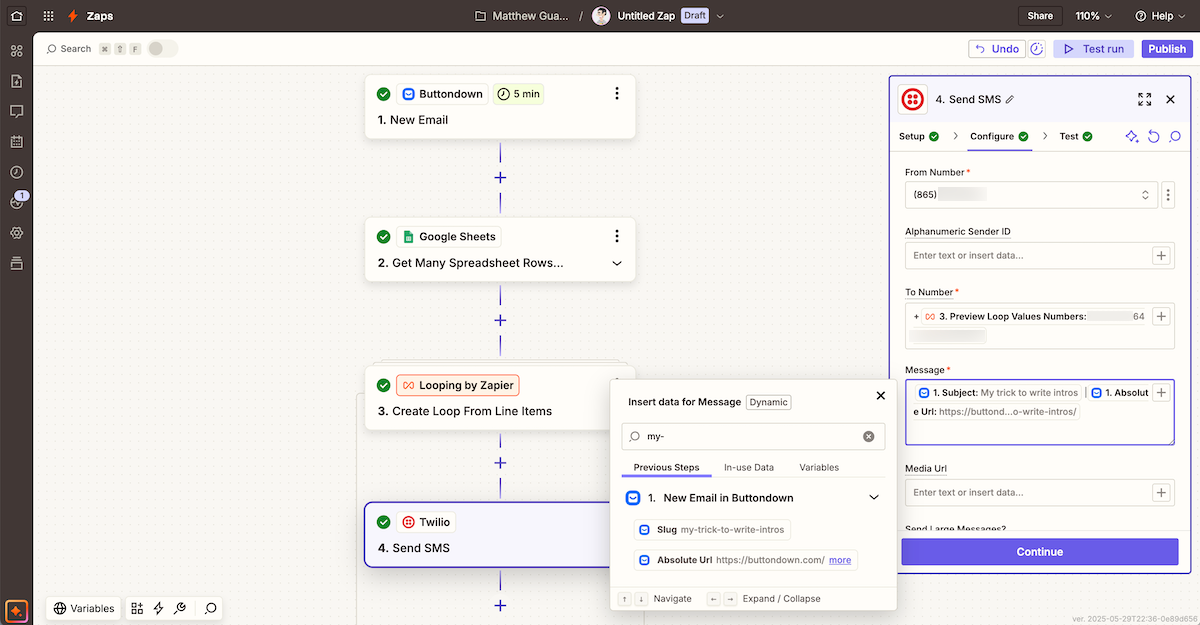
Email to checking a spreadsheet to sending each entry an SMS
Now you’ve got the seeds of a way to send mini-newsletters via SMS. You’ll just need to add a Google Sheets spreadsheet with your subscribers’s phone numbers (make sure you’ve checked and double-checked that you have their permission to text them, first). And you’ll need Zapier to read through the spreadsheet, then send an SMS once per person.
Start your automation with Buttondown’s New Email trigger to kick off the workflow whenever you send a new newsletter. Then add a Google Sheets Get Many Spreadsheet Rows action, connect it to your spreadsheet, and Zapier will check the spreadsheet and pull in every subscriber’s phone number.
Now, add a Looping by Zapier action with the Create Loop from Line Items action, and add the data from your spreadsheet to that action. That’ll have the Zap run once for every phone number.
Finally, add your Twilio Send SMS action, this time using the phone number from the Loop action in the To field, and details from Buttondown in the Message. You could have the SMS include your newsletter subject and a link to read the email on Buttondown’s site—or could tweak the message any way you want.
With a bit of account setup and no-code work, you can turn your email newsletter into an SMS newsletter.
Build your own SMS tools
That’s far from all you could do with SMS and email. You could build your own gateway from scratch, if you want. Twilio’s API is easy to use; you could send an SMS from Terminal in a minute, and with a bit more work could hack together a tool to merge your newsletter data with your subscribers’ phone numbers and SMS everyone.
Or, you could go even more meta, with the Buttondown to email address. Open your email app, and compose your next newsletter as an email. Send it to Buttondown. And when that newsletter gets sent out and triggers your SMS automation, you’ll have both sent an email newsletter and a bulk SMS message push from a single email.