
惯性聚合 高效追踪和阅读你感兴趣的博客、新闻、科技资讯
阅读原文 在惯性聚合中打开

推荐订阅源

博客园 - Franky
N
Netflix TechBlog - Medium
宝玉的分享
宝玉的分享
Google DeepMind News
腾讯CDC
G
Google Developers Blog
Martin Fowler
Martin Fowler
Microsoft Security Blog
Recent Announcements
爱范儿
爱范儿
Engineering at Meta
Engineering at Meta
Microsoft Azure Blog
A
About on SuperTechFans
aimingoo的专栏
aimingoo的专栏
有赞技术团队
有赞技术团队
Jina AI
Jina AI
人人都是产品经理
人人都是产品经理
奇客Solidot–传递最新科技情报
奇客Solidot–传递最新科技情报
M
MIT News - Artificial intelligence
罗磊的独立博客
博客园 - 三生石上(FineUI控件)
美团技术团队
WordPress大学
WordPress大学
阮一峰的网络日志
阮一峰的网络日志

Tech Journey

Restore Tabs Scrolling in Chrome and Brave Uncovering the Many Ways to Earn with ChatGPT “Top 10 Must-Play Video Games You Don’t Want to Miss” Expert Guide to Mastering Database Management for Improved SEO Which Operating System is Best for Developers: Windows, Mac, or Linux? NoSQL Databases: An Introduction to Non-Relational Technology SQL Database Explained: A Beginner’s Guide to Understanding the Fundamentals SQL Databases: Understanding the Benefits and Key Use Cases Maximizing Your Database Potential: A Complete Guide to Choosing between SQL and NoSQL Solutions
How to have faster internet speed on iPhone 15?
TS · 2023-09-24 · via Tech Journey
Skip to content

How to have faster internet speed on iPhone 15?

How to have faster internet speed on iPhone 15?

The Apple iPhone 15 has been a major talking point for the past 2 weeks. When it comes to internet speed, there is a way you can take your internet speed to the next level.
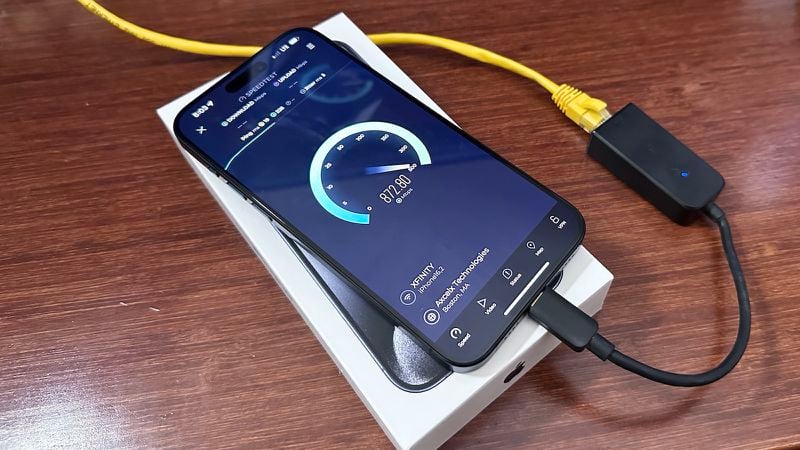
Some people noticed a fascinating detail about the new phone. Devices that support USB-C port to Ethernet adapters enable wired Internet connections, faster download speeds than Wi-Fi, and faster Internet connections.

The good news is that Apple confirmed this information in a support document last week. According to the support document, the USB to Ethernet adapter is listed as compatible with iPhone 15 models.
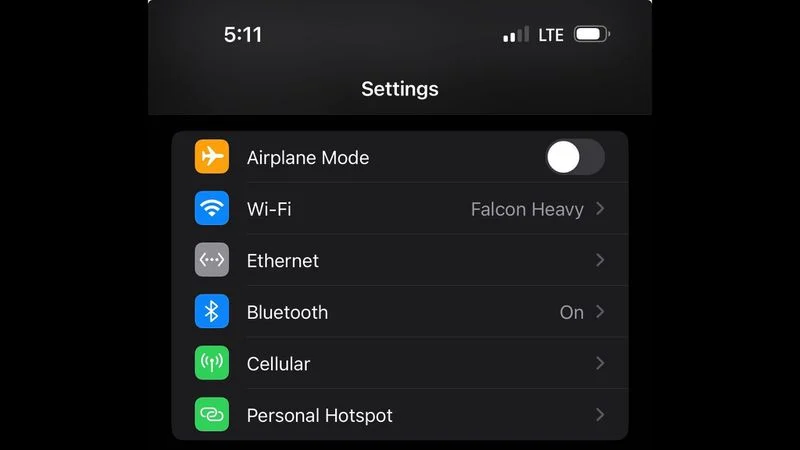
When your iPhone is connected to an Ethernet cable, you’ll find a hidden Ethernet menu appearing in the Settings app that includes IP-related information and various configuration options.

According to MacRumors, a reader reported peak download speeds of over 800 Mbps in a speed test on the iPhone 15 Pro. Old iPhone users may already know this method. It should also work with previous iPhones with Lightning connectors that support Ethernet with adapters.

This is one of many clever ways to use the USB-C port on iPhone 15 models. Therefore, we decided to highlight this information as a helpful tip since it raises concerns.

About the Author:

TS is a computer science graduate from an established university. He is a technology writer for Tech Journey with background in software programming and has been involved in various design, development and implementation of enterprise projects.
Page load link
Go to Top