









用 acme.sh 申请并安装证书后,用宝塔配置了 Nginx ,代码如下:
server {
        listen      443 ssl http2;
        server_name  rj.809022.xyz;
           ssl on;
        ssl_certificate      /www/wwwroot/rj.809022.xyz/rj.809022.xyz.cer;    # 证书路径
        ssl_certificate_key  /www/wwwroot/rj.809022.xyz/rj.809022.xyz.key;    # 证书路径
        ssl_session_timeout 5m;
        ssl_ciphers ECDHE-RSA-AES128-GCM-SHA256:ECDHE:ECDH:AES:HIGH:!NULL:!aNULL:!MD5:!ADH:!RC4;
        ssl_protocols TLSv1 TLSv1.1 TLSv1.2;
        ssl_prefer_server_ciphers on;
        root /www/wwwroot/rj.809022.xyz;
        index index.html index.htm default.htm default.html;
        location / {
                try_files $uri $uri/ =404;
        }
}


server
{
    listen 80;
    server_name rj.809022.xyz rj.809022.xyz;
    return      301 https://$server_name$request_uri;
    index index.php index.html index.htm default.php default.htm default.html;
    root /www/wwwroot/rj.809022.xyz;

    #SSL-START SSL相关配置,请勿删除或修改下一行带注释的404规则
    #error_page 404/404.html;
    #SSL-END

    #ERROR-PAGE-START  错误页配置,可以注释、删除或修改
    #error_page 404 /404.html;
    #error_page 502 /502.html;
    #ERROR-PAGE-END

    #PHP-INFO-START  PHP引用配置,可以注释或修改
    include enable-php-74.conf;
    #PHP-INFO-END

    #REWRITE-START URL重写规则引用,修改后将导致面板设置的伪静态规则失效
    include /www/server/panel/vhost/rewrite/rj.809022.xyz.conf;
    #REWRITE-END

    #禁止访问的文件或目录
    location ~ ^/(\.user.ini|\.htaccess|\.git|\.svn|\.project|LICENSE|README.md)
    {
        return 404;
    }

    #一键申请SSL证书验证目录相关设置
    location ~ \.well-known{
        allow all;
    }

    #禁止在证书验证目录放入敏感文件
    if ( $uri ~ "^/\.well-known/.*\.(php|jsp|py|js|css|lua|ts|go|zip|tar\.gz|rar|7z|sql|bak)$" ) {
        return 403;
    }

    location ~ .*\.(gif|jpg|jpeg|png|bmp|swf)$
    {
        expires      30d;
        error_log /dev/null;
        access_log /dev/null;
    }

    location ~ .*\.(js|css)?$
    {
        expires      12h;
        error_log /dev/null;
        access_log /dev/null;
    }
    access_log  /www/wwwlogs/rj.809022.xyz.log;
    error_log  /www/wwwlogs/rj.809022.xyz.error.log;
}
上面一段 443 是新加的 SSL 解析;后面 80 端口的监听新加了一句 return 用来监听 HTTP 访问 80 端口时,自动转跳到 HTTPS 的 443 端口;
但是配置好重启 Nginx 后(后来发现宝塔的配置实时生效,貌似不用重启 Nginx 了),通过 HTTPS 访问 html 静态网页正常,但是访问 PHP 会自动变成下载。
搜索了多种方法都没成功,大部分是要在配置中加入一段 php 的解析:
location ~ \.php$ {
        try_files $uri =404;
        fastcgi_pass 127.0.0.1:9000;
        fastcgi_index index.php;
        fastcgi_param SCRIPT_FILENAME $document_root$fastcgi_script_name;
        include fastcgi_params;
   }
然而宝塔当前版本下,修改配置文件不起作用;通过上面的调用去查看 enable-php-74.conf 却发现没有修改的必要。
卡了好久才反应过来:直接在 443 下调用 enable-php-74.conf 不就行了,毕竟 HTTP 下访问 80 时,PHP 是可以直不这解析的。于是配置文件修改成:
server {
        listen      443 ssl http2;
        server_name  rj.809022.xyz;
           ssl on;
        ssl_certificate      /www/wwwroot/809022.xyz/rj.809022.xyz.cer;    # 证书路径
        ssl_certificate_key  /www/wwwroot/809022.xyz/rj.809022.xyz.key;    # 证书路径
        ssl_session_timeout 5m;
        ssl_ciphers ECDHE-RSA-AES128-GCM-SHA256:ECDHE:ECDH:AES:HIGH:!NULL:!aNULL:!MD5:!ADH:!RC4;
        ssl_protocols TLSv1 TLSv1.1 TLSv1.2;
        ssl_prefer_server_ciphers on;
        root /www/wwwroot/809022.xyz;
        index index.php index.html index.htm default.php default.htm default.html;
        include enable-php-74.conf;

        location / {
                try_files $uri $uri/ =404;
        }

    location ~ ^/(\.user.ini|\.htaccess|\.git|\.svn|\.project|LICENSE|README.md)
    {
        return 404;
    }
    location ~ .*\.(gif|jpg|jpeg|png|bmp|swf)$
    {
        expires      30d;
        error_log /dev/null;
        access_log /dev/null;
    }

    location ~ .*\.(js|css)?$
    {
        expires      12h;
        error_log /dev/null;
        access_log /dev/null;
    }
    access_log  /www/wwwlogs/80smus.icu.log;
    error_log  /www/wwwlogs/80smus.icu.error.log;
}


server
{
    listen 80;
    server_name rj.809022.xyz;
    return      301 https://$server_name$request_uri;
    index index.php index.html index.htm default.php default.htm default.html;
    root /www/wwwroot/809022.xyz;
}
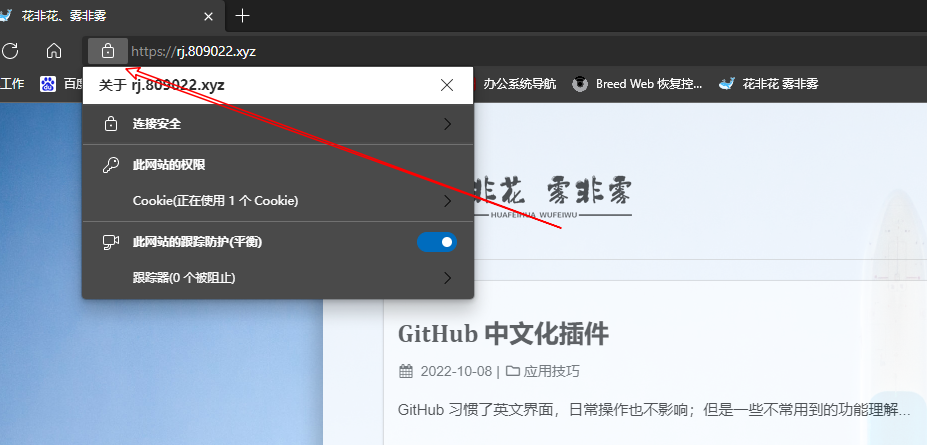
这下终于加上了锁,还算是挺欣慰的。
此内容由惯性聚合(RSS阅读器)自动聚合整理,仅供阅读参考。 原文来自 — 版权归原作者所有。