









默认情况下,捕获的日志显示命令输出是在本地运行容器时在交互式终端上通常看到的内容,即 STDOUT 和 STDERR I/O 流,
Docker默认支持如下日志驱动。有直接写文件的,有使用云服务的。下面简单介绍下。
https://docs.docker.com/config/containers/logging/configure/
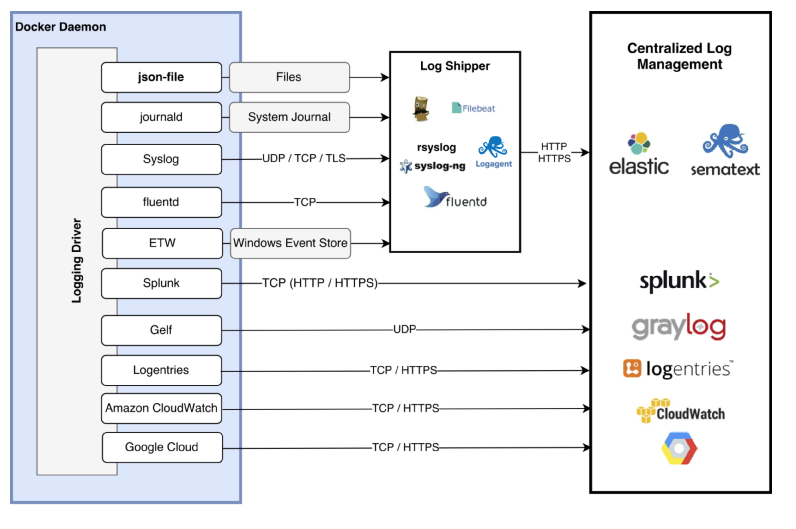
awslogs 日志驱动程序只是将 Docker 中的这些日志传递到 CloudWatch Logs。这个也是默认的驱动
由于 AWS ECS 底层用到 Docker 技术,所以 Docker 支持的日志驱动也是 ECS 支持的。
json-file 是默认的 docker 日志驱动, docker info可以查看
全局的日志驱动设置,可以修改daemon配置文件 /etc/docker/daemon.json。
json
{
  "log-driver": "json-file",
  "log-opts": {
    "max-size": "10m",
    "max-file": "3"
  }
}写入文件的日志格式长这样:{"log":"java.lang.InterruptedException\n","stream":"stderr","time":"2022-08-14T00:43:00.360028811Z"}, 每一行是一个json文件,log字段为容器原来输出的每行内容。
# 查看正在运行的docker
docker ps

# 复制 CONTAINER ID,比如 3b0949ac59d6

dockder logs 3b0949ac59d6

cd /var/lib/docker/containers/3b0949*

tree

root@ip-172-31-30-158:/var/lib/docker/containers/3b0949ac59d63ca27c668fea87a1a1375bae9dde1fa8ee816d2c4961017110c7# tree
.
├── 3b0949ac59d63ca27c668fea87a1a1375bae9dde1fa8ee816d2c4961017110c7-json.log
├── checkpoints
├── config.v2.json
├── hostconfig.json
├── hostname
├── hosts
├── mounts
├── resolv.conf
└── resolv.conf.hash


-json.log 结尾的就是 json 日志文件json-file本身是没有记录上下文信息的。集中存储到日志中心服务器,就无法区分具体是哪个应用产生的日志了。
fluentd也有不少通过docker daemon查询或是解析容器目录下config.v2.json获取metadata的 filter 插件。
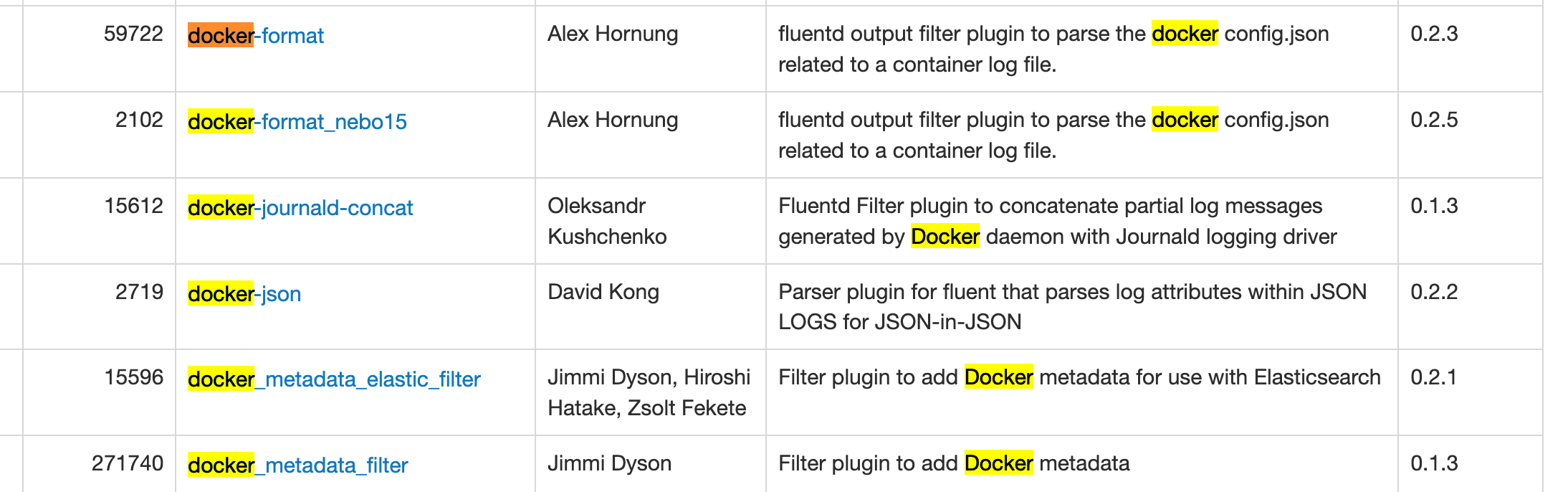
参考 https://www.fluentd.org/plugins
比如这个 https://github.com/zsoltf/fluent-plugin-docker_metadata_elastic_filter
{
  "log": "2015/05/05 19:54:41 \n",
  "stream": "stderr",
  "docker": {
    "id": "df14e0d5ae4c07284fa636d739c8fc2e6b52bc344658de7d3f08c36a2e804115",
    "name": "k8s_fabric8-console-container.efbd6e64_fabric8-console-controller-9knhj_default_8ae2f621-f360-11e4-8d12-54ee7527188d_7ec9aa3e",
    "container_hostname": "fabric8-console-controller-9knhj",
    "image": "fabric8/hawtio-kubernetes:latest",
    "image_id": "b2bd1a24a68356b2f30128e6e28e672c1ef92df0d9ec01ec0c7faea5d77d2303",
    "labels": {}
  }
}
新增了docker结构体,镜像名称也能收集到了
日志量大了,用docker logs看历史数据不大合适。我们就需要考虑将日志存储到日志中心去。
--log-driver指定日志驱动。
cat输出local文件,部分结果乱码。挺不方便日志解析的。
root@ubuntu-parallel:~# docker run --name local_logging_driver --log-driver local hello-world

root@ubuntu-parallel:~# cd /var/lib/docker/containers/$(docker ps --no-trunc -aqf "name=local_logging_driver")

root@ubuntu-parallel:~# cat local-logs/container.log
stdout�������&
stdout�������Hello from Docker!&^
stdout˧�����JThis message shows that your installation appears to be working correctly.^不生成日志文件,docker logs也拿不到日志。实际使用不会考虑
因为日志被写入了syslog,并混在其他应用的日志中,docker logs没办法工作了。
# 观察syslog
root@ubuntu-parallel:~# tail -f /var/log/syslog

root@ubuntu-parallel:~# docker run --name syslog_logging_driver --log-driver syslog hello-world

# 日志不会写本地
root@ubuntu-parallel:~# cd /var/lib/docker/containers/$(docker ps --no-trunc -aqf "name=syslog_logging_driver")

root@ubuntu-parallel:~# docker logs syslog_logging_driver
Error response from daemon: configured logging driver does not support reading写入syslog和journald,应用日志与系统日志混在一起,难以辨认了。
倒是journald驱动下,可以使用docker logs。
参考:https://wiki.archlinux.org/index.php/Systemd/Journal
root@ubuntu-parallel:~# docker run --name journald_logging_driver --log-driver journald hello-world

root@ubuntu-parallel:~# journalctl
Apr 02 10:30:36 ubuntu-parallel 4b948bf091a8[999]: To try something more ambitious, you can run an Ubuntu container with:
Apr 02 10:30:36 ubuntu-parallel 4b948bf091a8[999]:  $ docker run -it ubuntu bash
Apr 02 10:30:36 ubuntu-parallel 4b948bf091a8[999]:
Apr 02 10:30:36 ubuntu-parallel 4b948bf091a8[999]: Share images, automate workflows, and more with a free Docker ID:
Apr 02 10:30:36 ubuntu-parallel 4b948bf091a8[999]:  https://hub.docker.com/

root@ubuntu-parallel:~# cd /var/lib/docker/containers/$(docker ps --no-trunc -aqf "name=journald_logging_driver")

# docker logs管用
root@ubuntu-parallel:~# docker logs journald_logging_driver通过服务请求,让docker吐日志到fluentd进程。https://docs.docker.com/config/containers/logging/fluentd/
使用包括fluentd在很多日志驱动,因为日志写入到远程服务器,会导致docker logs, kubectl logs不可用。
Fluentd是一个挺灵活的工具,可以让fluentd主动监听容器目录下的日志文件。参考另一篇文章 https://xujiahua.github.io/posts/use-fluentd/
比如利用Fluentd将日志打进elasticsearch。
为了兼容可使用docker logs ,kubectl logs,必须使用写本地文件的日志驱动。而json格式更方便工具(比如fluentd,logstash)解析,所以json-file是首选。
然后使用日志收集工具集中采集docker容器日志。k8s中日志收集策略,一般是在每台服务器上以DaemonSet的形式安装logging agent,监听本地文件、文件夹,将日志转发到日志中心。
当然这个前提条件是,应用日志是输出到标准输出和标准错误的。这对应用日志的规范有一定要求:
https://xujiahua.github.io/posts/20200403-docker-logging/
https://docs.docker.com.zh.xy2401.com/config/containers/logging/configure/
此内容由惯性聚合(RSS阅读器)自动聚合整理,仅供阅读参考。 原文来自 — 版权归原作者所有。