惯性聚合 高效追踪和阅读你感兴趣的博客、新闻、科技资讯
阅读原文 在惯性聚合中打开

推荐订阅源

SecWiki News
SecWiki News
Vercel News
Vercel News
博客园 - 聂微东
奇客Solidot–传递最新科技情报
奇客Solidot–传递最新科技情报
月光博客
月光博客
N
News and Events Feed by Topic
Application and Cybersecurity Blog
www.infosecurity-magazine.com
博客园 - 【当耐特】
WordPress大学
WordPress大学
Google Online Security Blog
博客园 - Franky
Attack and Defense Labs
Help Net Security
Help Net Security
V
Visual Studio Blog
Jina AI
Jina AI
H
Heimdal Security Blog
小众软件
小众软件
O
OpenAI News
腾讯CDC
The Last Watchdog
The Last Watchdog
雷峰网
雷峰网
Cloudbric
Cloudbric
量子位
博客园_首页
The GitHub Blog
The GitHub Blog
L
LangChain Blog
K
KPMG report finds enterprise disconnect between AI and its ROI | CIO
T
The Blog of Author Tim Ferriss
cs.AI updates on arXiv.org
Last Week in AI
Last Week in AI
V2EX - 技术
V2EX - 技术
Security Archives - TechRepublic
Microsoft Azure Blog
博客园 - 司徒正美
M
MIT News - Artificial intelligence
大猫的无限游戏
大猫的无限游戏
T
Tor Project blog
C
CERT Recently Published Vulnerability Notes
W
WeLiveSecurity
B
Blog
C
Check Point Blog
TaoSecurity Blog
TaoSecurity Blog
T
Threatpost
Hugging Face - Blog
Hugging Face - Blog
Recent Announcements
Project Zero
Project Zero
Hacker News: Ask HN
Hacker News: Ask HN
U
Unit 42
Simon Willison's Weblog

mafeifan 的编程技术分享

mafengwo-mp3-downloader | mafeifan 的编程技术分享 示例页面 | mafeifan 的编程技术分享 mafeifan 的编程技术分享 mafeifan 的编程技术分享 mafeifan 的编程技术分享 mafeifan 的编程技术分享 mafeifan 的编程技术分享 mafeifan 的编程技术分享 mafeifan 的编程技术分享 mafeifan 的编程技术分享 mafeifan 的编程技术分享 查看 default namespace 下的 default service account名称 mafeifan 的编程技术分享 检查日志 | mafeifan 的编程技术分享 bridge fdb show dev flannel.1 mafeifan 的编程技术分享 mafeifan 的编程技术分享 mafeifan 的编程技术分享 mafeifan 的编程技术分享 mafeifan 的编程技术分享 mafeifan 的编程技术分享 mafeifan 的编程技术分享 mafeifan 的编程技术分享 mafeifan 的编程技术分享 mafeifan 的编程技术分享 mafeifan 的编程技术分享 mafeifan 的编程技术分享 mafeifan 的编程技术分享 mafeifan 的编程技术分享 mafeifan 的编程技术分享 数据收集原理分析 | mafeifan 的编程技术分享 mafeifan 的编程技术分享 mafeifan 的编程技术分享 mafeifan 的编程技术分享 mafeifan 的编程技术分享 mafeifan 的编程技术分享 mafeifan 的编程技术分享 mafeifan 的编程技术分享 mafeifan 的编程技术分享 mafeifan 的编程技术分享 mafeifan 的编程技术分享 mafeifan 的编程技术分享 mafeifan 的编程技术分享 mafeifan 的编程技术分享 mafeifan 的编程技术分享 几种方法 | mafeifan 的编程技术分享 mafeifan 的编程技术分享 mafeifan 的编程技术分享 mafeifan 的编程技术分享 mafeifan 的编程技术分享 mafeifan 的编程技术分享 mafeifan 的编程技术分享 mafeifan 的编程技术分享 mafeifan 的编程技术分享 mafeifan 的编程技术分享 mafeifan 的编程技术分享 mafeifan 的编程技术分享 mafeifan 的编程技术分享 mafeifan 的编程技术分享 mafeifan 的编程技术分享 mafeifan 的编程技术分享 mafeifan 的编程技术分享 mafeifan 的编程技术分享 mafeifan 的编程技术分享 mafeifan 的编程技术分享 mafeifan 的编程技术分享 mafeifan 的编程技术分享 mafeifan 的编程技术分享 mafeifan 的编程技术分享 mafeifan 的编程技术分享 mafeifan 的编程技术分享 mafeifan 的编程技术分享 mafeifan 的编程技术分享 mafeifan 的编程技术分享 mafeifan 的编程技术分享 mafeifan 的编程技术分享 mafeifan 的编程技术分享 mafeifan 的编程技术分享 mafeifan 的编程技术分享 mafeifan 的编程技术分享 mafeifan 的编程技术分享 mafeifan 的编程技术分享 mafeifan 的编程技术分享 mafeifan 的编程技术分享 mafeifan 的编程技术分享 mafeifan 的编程技术分享 mafeifan 的编程技术分享 mafeifan 的编程技术分享 mafeifan 的编程技术分享 mafeifan 的编程技术分享 mafeifan 的编程技术分享 mafeifan 的编程技术分享 mafeifan 的编程技术分享 check the export on the very top of this document so we can use $do mafeifan 的编程技术分享 mafeifan 的编程技术分享 mafeifan 的编程技术分享 mafeifan 的编程技术分享 延伸 -- 关于前端路由 xdebug 3 和 2 的区别
mafeifan 的编程技术分享
2026-01-16 · via mafeifan 的编程技术分享

SSH(Secure Shell 的缩写)是一种网络协议,用于加密两台计算机之间的通信,并且支持各种身份验证机制。

一般情况下我们可以通过 ssh username@xxx.xxx.xxx.xxx 登录远程服务器,如果要管理多台服务器,这样太长了。 可以在家目录的.ssh中新建config文件,设置别名。 比如我有一台个人的云主机。IP是120.163.163.163,端口是4722(一般都是22,这里为了安全我改为了其他),登录用户名是ubuntu,登录方式是私钥登录。

# Host 可跟多个表示别名
Host cloud  alias
    HostName 120.163.163.163
    User ubuntu
    Port 4722
    # 私钥路径
    IdentityFile ~/.ssh/id_rsa

这样执行 ssh cloudssh alias 就无密码登录云主机了

执行远程命令 ​

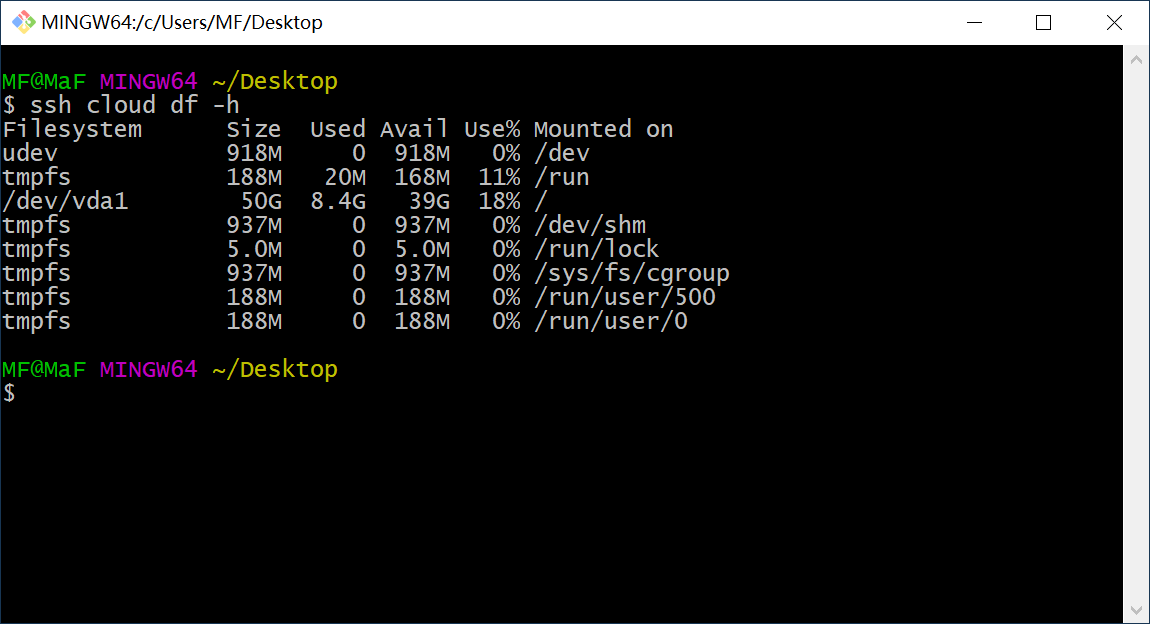
ssh cloud "df -h"

image.png

用分号分隔多个命令,用引号引起来 ​

ssh cloud "df -h; ps;"

遇到需要交互的命令,加 -t 参数 ​

比如 sudo 开头的可能需要用户输入密码,需要 TTY。 添加 -t 参数后,ssh 会保持登录状态,直到你退出需要交互的命令。

image.png

再举个实际例子: ssh -t flux sudo -u fueladminprd ssh 192.168.1.100 这句话实际执行了两步:

  1. ssh -t flux # 登录名为flux的服务器,因为需要交互式,加上-t
  2. sudo -u fueladminprd ssh 192.168.1.100 # 以 fueladminprd 用户在 flux 上执行 ssh 192.168.1.100 为了安全,flux 就是跳板机,192.168.1.100 为实际测试服务器。

使用RemoteCommand登录后执行自定义命令 ​

Host target
    HostName xx.xx.xx.202
    User client_admin
    # 使用RemoteCommand登录后执行自定义命令(需要SSH版本大于等于7.6,可用ssh -V查看)
    RemoteCommand cd /data/www/clients/client3/web160 && /bin/bash
    # 其中RequestTTY为了避免执行ssh target之后hang住
    RequestTTY yes
    Port 22
    IdentityFile ~/.ssh/id_rsa

如果RemoteCommand不生效, 可把ssh config中的RemoteCommand和RequestTTY删除,用如下方式: ssh -t target "cd xxx; bash"

执行多行命令 ​

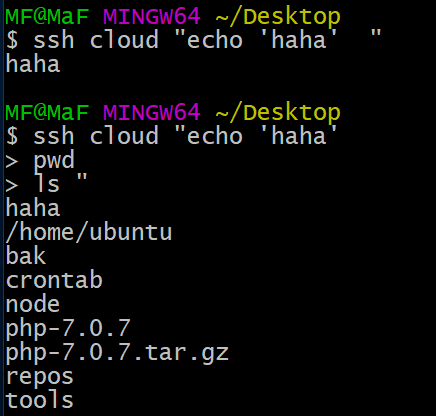
$ ssh cloud "echo 'haha'
> pwd
> ls "

可以用单引号或双引号开头,然后写上几行命令,最后再用相同的引号来结束。 > 开头的就是输入下一行命令 如果需要在命令中使用引号,可以混合使用单双引号。

image.png

在命令中使用变量 ​

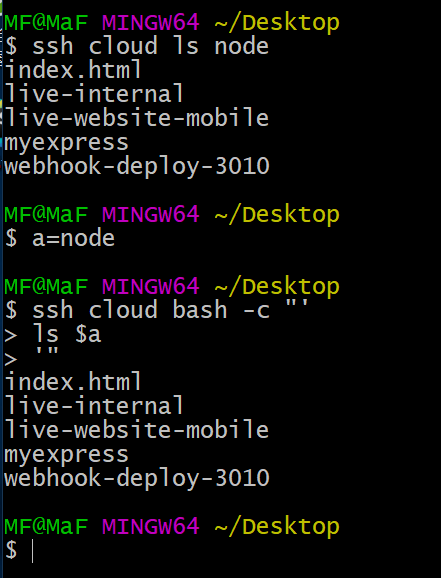
在远程服务器执行 ls node,本地定义变量a,传入到命令中。达到一样的效果。 在下图的命令中为 bash 指定了 -c 参数

$ a=node
$ ssh cloud bash -c " '
> ls $a
> ' "

image.png

执行本地脚本 ​

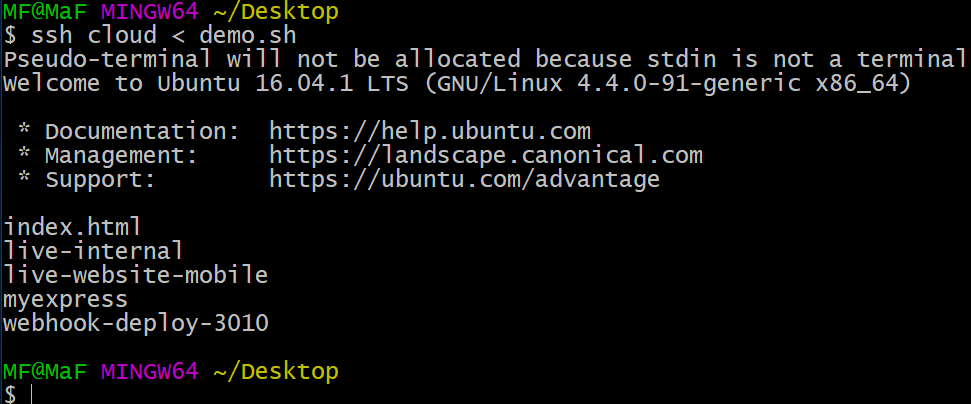
本地创建demo.sh,内容是:ls node 运行 ssh cloud < demo.sh 通过重定向 stdin,本地的脚本 demo.sh 在远程服务器上被执行。

image.png

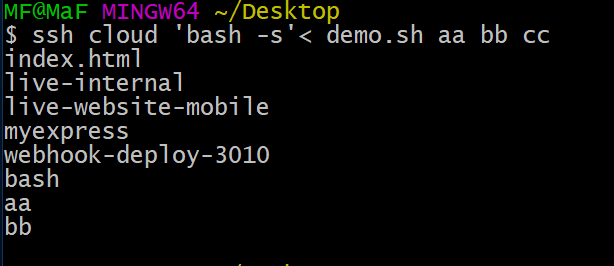
为脚本传入参数 ​

修改 demo.sh 内容为:

ls node
echo $0
echo $1
echo $2

执行 ssh cloud 'bash -s'< demo.sh aa bb cc bash 就是 $0 第一个参数。

image.png

想查看更多配置,打man ssh_config

跳板 ​

有跳板机配置在某些场景下,往往是不能直接访问目标机器的,通常是用先登录一台机器(此机器通常被称为跳板机/堡垒机/gateway),然后再在这台机器上登录目标机器, 我们可以借助ssh config来简化这种操作。

~/.ssh/config中配置:Host gateway

HostName $GATEWAY_HOST
Port $GATEWAY_PORT
IdentityFile ~/.ssh/id_rsa
User $GATEWAY_USER

Host target
    HostName $TARGET_HOST
    User $TARGET_USER
    IdentityFile ~/.ssh/id_rsa
    ProxyCommand ssh gateway nc %h %p 2> /dev/null # 或者 ProxyCommand ssh gateway -W %h:%p

其中:

%h 表示 hostname
%p 表示 port

然后配置免密登录,和上面一样,也只需要第一次输入密码:ssh target 'mkdir -p .ssh && cat > .ssh/authorized_keys' < ~/.ssh/id_rsa.pub 然后可以无感知地ssh/scp/rsync到目标机器,在终端中也只需要输入目标机器的别名就行:

ssh target
scp some_file target:/home/user
rsync -avP * target:/home/user/some_dir

端口转发功能 ​

ssh -L ​

设有三台主机: A, B, C. 其对应ip为 ip_A, ip_B, ip_C.

如果在主机A上执行:

ssh -L 1234:ip_C:5678 root@ip_B

那么访问主机A的1234端口就等价于访问主机 C 的 5678 端口(两者直接会通过主机B作为中介建立一个隧道)

这种转发方式的应用场景为: A可以访问B, B可以访问C, 但是A不能直接访问C.

ssh -R ​

设有两台主机: A, B. 其对应ip为 ip_A, ip_B.

如果在主机A上执行:

ssh -R 1234:127.0.0.1:5678 root@ip_B 注意: 这儿一定要是root用户

那么此时在B上访问 localhost:1234 就等价于访问 A 的 5678 端口.

若想实现可以通过ip_B:1234访问主机A的127.0.0.1:5678还需要配置一层代理, 具体方式后面关于内网穿透的章节会说

这种转发方式的应用场景为: A是一个内网主机, B 是一个公网主机. 用户想随时随地可以访问A, 就需要做一个反向代理实现内网穿透, 使得用户可以通过 B 作为中介访问 A.

ssh -D ​

设有两台主机: A, B. 其对应ip为 ip_A, ip_B.

如果在主机A上执行:

ssh -D 1234 root@ip_B 那么主机A的 localhost:1234 就会有一个socks代理, 所有走这个代理的流量都会通过主机B转发出去.

这种转发方式的应用场景为: 懒得安装/启动socks代理软件客户端.

autossh + xinetd 实现内网穿透 ​

设有两台主机: A, B. 其对应ip为 ip_A, ip_B, A是一个内网主机, B 是一个公网主机. 我们的需求是随时随地可以访问A上的资源.

我们可以使用前面提到的 ssh -R 转发方式, 在A上执行:

ssh -R 1234:127.0.0.1:22 root@ip_B 注意: 22是ssh server的端口

此时我们若在B上执行

ssh root@127.0.0.1 -p 1234 并输入A上root用户的密码, 我们就可以成功登录主机A.

但是B的127.0.0.1只有自己能访问, 别的主机想访问B上的1234端口只能通过ip_B进行访问, 所以我们这儿可以在B上启动一个转发服务: 将ip_B:5678来的流量转发至127.0.0.1:1234(两个端口建议不相同, 避免可能的冲突). 我这儿用的是 xinetd:

$ sudo apt install xinetd
$ cat ./proxy
service http-switch
{
 disable = no
 type = UNLISTED
 socket_type = stream
 protocol = tcp
 wait = no
 redirect = 127.0.0.1 1234
 bind = 0.0.0.0
 port = 5678
 user = nobody
}
$ cp ./proxy /etc/xinetd.d/
$ sudo /etc/init.d/xinetd restart
[ ok ] Restarting xinetd (via systemctl): xinetd.service.

此时我们在任何一台可以访问外网的主机上执行如下命令:

ssh root@ip_B -p 5678

并输入A上root用户的密码, 就可以登录上A了.

autossh和ssh功能差不多, 但是多一个自动断线重连功能, 因此搭建内网穿透服务的时候稳定性更好.

使用命令和ssh类似:

bash

$ sudo apt install autossh
$ autossh -M 7788 -NfR 1234:127.0.0.1:22 root@ip_B

-M 参数声明一个没有被占用的端口, autossh 会使用这个端口检测连接是否存在, 如果断掉的话就需要进行重连操作.

-N 和 -f 参数是让 autossh 不打印信息, 在后台运行. (ssh同样可以加上这两个参数.)

参考: ​

http://www.openssh.com/

https://wangdoc.com/ssh/

https://www.cnblogs.com/sparkdev/p/6842805.html

https://www.zhihu.com/question/28793890

https://www.cnblogs.com/liqiuhao/p/9031803.html