惯性聚合 高效追踪和阅读你感兴趣的博客、新闻、科技资讯
阅读原文 在惯性聚合中打开

推荐订阅源

Hacker News: Ask HN
Hacker News: Ask HN
IT之家
IT之家
S
SegmentFault 最新的问题
T
Tailwind CSS Blog
钛媒体:引领未来商业与生活新知
钛媒体:引领未来商业与生活新知
博客园 - 司徒正美
J
Java Code Geeks
博客园 - 聂微东
雷峰网
雷峰网
阮一峰的网络日志
阮一峰的网络日志
The Cloudflare Blog
博客园_首页
大猫的无限游戏
大猫的无限游戏
博客园 - 三生石上(FineUI控件)
让小产品的独立变现更简单 - ezindie.com
博客园 - 【当耐特】
腾讯CDC
Apple Machine Learning Research
酷 壳 – CoolShell
酷 壳 – CoolShell
V
V2EX
宝玉的分享
宝玉的分享
小众软件
小众软件
OSCHINA 社区最新新闻
OSCHINA 社区最新新闻
Hugging Face - Blog
Hugging Face - Blog
月光博客
月光博客
NISL@THU
NISL@THU
T
The Exploit Database - CXSecurity.com
C
CXSECURITY Database RSS Feed - CXSecurity.com
WordPress大学
WordPress大学
有赞技术团队
有赞技术团队
Blog — PlanetScale
Blog — PlanetScale
aimingoo的专栏
aimingoo的专栏
L
LINUX DO - 热门话题
cs.CL updates on arXiv.org
F
Fortinet All Blogs
博客园 - Franky
L
Lohrmann on Cybersecurity
S
Secure Thoughts
量子位
V
Vulnerabilities – Threatpost
Last Week in AI
Last Week in AI
博客园 - 叶小钗
Cyber Security Advisories - MS-ISAC
L
LINUX DO - 最新话题
I
InfoQ
C
CERT Recently Published Vulnerability Notes
Security Archives - TechRepublic
P
Proofpoint News Feed
G
GRAHAM CLULEY
Cisco Talos Blog
Cisco Talos Blog

mafeifan 的编程技术分享

mafengwo-mp3-downloader | mafeifan 的编程技术分享 示例页面 | mafeifan 的编程技术分享 mafeifan 的编程技术分享 mafeifan 的编程技术分享 mafeifan 的编程技术分享 mafeifan 的编程技术分享 mafeifan 的编程技术分享 mafeifan 的编程技术分享 mafeifan 的编程技术分享 mafeifan 的编程技术分享 mafeifan 的编程技术分享 查看 default namespace 下的 default service account名称 mafeifan 的编程技术分享 检查日志 | mafeifan 的编程技术分享 bridge fdb show dev flannel.1 mafeifan 的编程技术分享 mafeifan 的编程技术分享 mafeifan 的编程技术分享 mafeifan 的编程技术分享 mafeifan 的编程技术分享 mafeifan 的编程技术分享 mafeifan 的编程技术分享 mafeifan 的编程技术分享 mafeifan 的编程技术分享 mafeifan 的编程技术分享 mafeifan 的编程技术分享 mafeifan 的编程技术分享 mafeifan 的编程技术分享 mafeifan 的编程技术分享 mafeifan 的编程技术分享 数据收集原理分析 | mafeifan 的编程技术分享 mafeifan 的编程技术分享 mafeifan 的编程技术分享 mafeifan 的编程技术分享 mafeifan 的编程技术分享 mafeifan 的编程技术分享 mafeifan 的编程技术分享 mafeifan 的编程技术分享 mafeifan 的编程技术分享 mafeifan 的编程技术分享 mafeifan 的编程技术分享 mafeifan 的编程技术分享 mafeifan 的编程技术分享 mafeifan 的编程技术分享 mafeifan 的编程技术分享 几种方法 | mafeifan 的编程技术分享 mafeifan 的编程技术分享 mafeifan 的编程技术分享 mafeifan 的编程技术分享 mafeifan 的编程技术分享 mafeifan 的编程技术分享 mafeifan 的编程技术分享 mafeifan 的编程技术分享 mafeifan 的编程技术分享 mafeifan 的编程技术分享 mafeifan 的编程技术分享 mafeifan 的编程技术分享 mafeifan 的编程技术分享 mafeifan 的编程技术分享 mafeifan 的编程技术分享 mafeifan 的编程技术分享 mafeifan 的编程技术分享 mafeifan 的编程技术分享 mafeifan 的编程技术分享 mafeifan 的编程技术分享 mafeifan 的编程技术分享 mafeifan 的编程技术分享 mafeifan 的编程技术分享 mafeifan 的编程技术分享 mafeifan 的编程技术分享 mafeifan 的编程技术分享 mafeifan 的编程技术分享 mafeifan 的编程技术分享 mafeifan 的编程技术分享 mafeifan 的编程技术分享 mafeifan 的编程技术分享 mafeifan 的编程技术分享 mafeifan 的编程技术分享 mafeifan 的编程技术分享 mafeifan 的编程技术分享 mafeifan 的编程技术分享 mafeifan 的编程技术分享 mafeifan 的编程技术分享 mafeifan 的编程技术分享 mafeifan 的编程技术分享 mafeifan 的编程技术分享 mafeifan 的编程技术分享 mafeifan 的编程技术分享 mafeifan 的编程技术分享 mafeifan 的编程技术分享 mafeifan 的编程技术分享 mafeifan 的编程技术分享 mafeifan 的编程技术分享 check the export on the very top of this document so we can use $do mafeifan 的编程技术分享 mafeifan 的编程技术分享 mafeifan 的编程技术分享 mafeifan 的编程技术分享 延伸 -- 关于前端路由 xdebug 3 和 2 的区别
mafeifan 的编程技术分享
2026-01-16 · via mafeifan 的编程技术分享

更新 2022-05-15 为方便调试,可以开启 Print post content 和 Print contributed variables in job log. 可以看到接收到的payload和自定义变量

更新 2021-06-15 为防止恶意触发,建议在Jenkins->configure Generic Webhook Trigger 中配置white list 添加IP地址,即只接受这个IP去请求webhook地址

更新 2019-07-14

关于 webhook 触发job,其实有更简单的办法,在job的配置页面 勾选Build Triggers选项卡的Trigger builds remotely (e.g., from scripts),填入一个token,但是有时候会报 "Error 403 No valid crumb was included in the request"个人觉得还是Generic Webhook Trigger插件好用
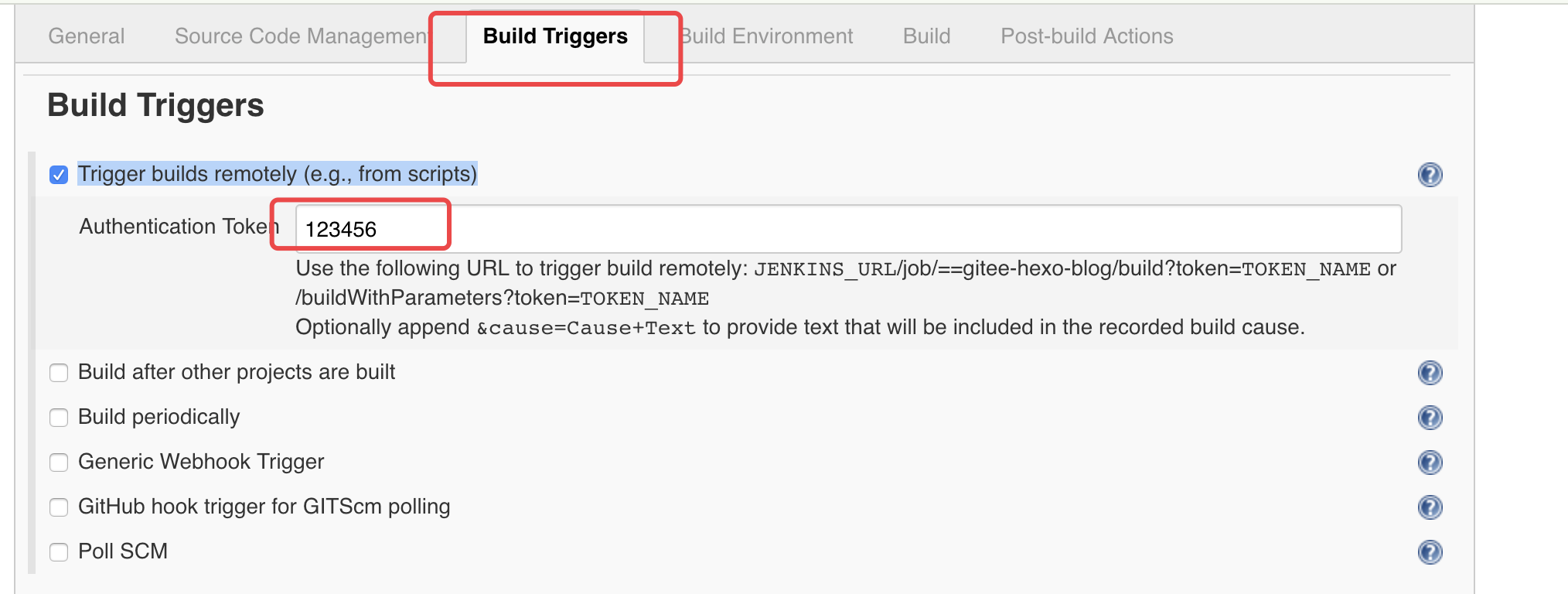
image.png

比如job名称是foo,token是123456,webhook地址就是JENKINS_URL/job/=foo/build?token=123456 经测无论是get还是post请求都可以成功触发。当然如果你的需求更高,需要根据请求头请求或地址中的参数有条件的触发,就可以用Generic Webhook Trigger插件。

如果返回'Authentication required'请检查地址中的token是否正确,还需要保证在Jenkins的'Configure Global Security'配置页面勾选了'Allow anonymous read access'。

使用参数化构建完成流水线动态传参 ​

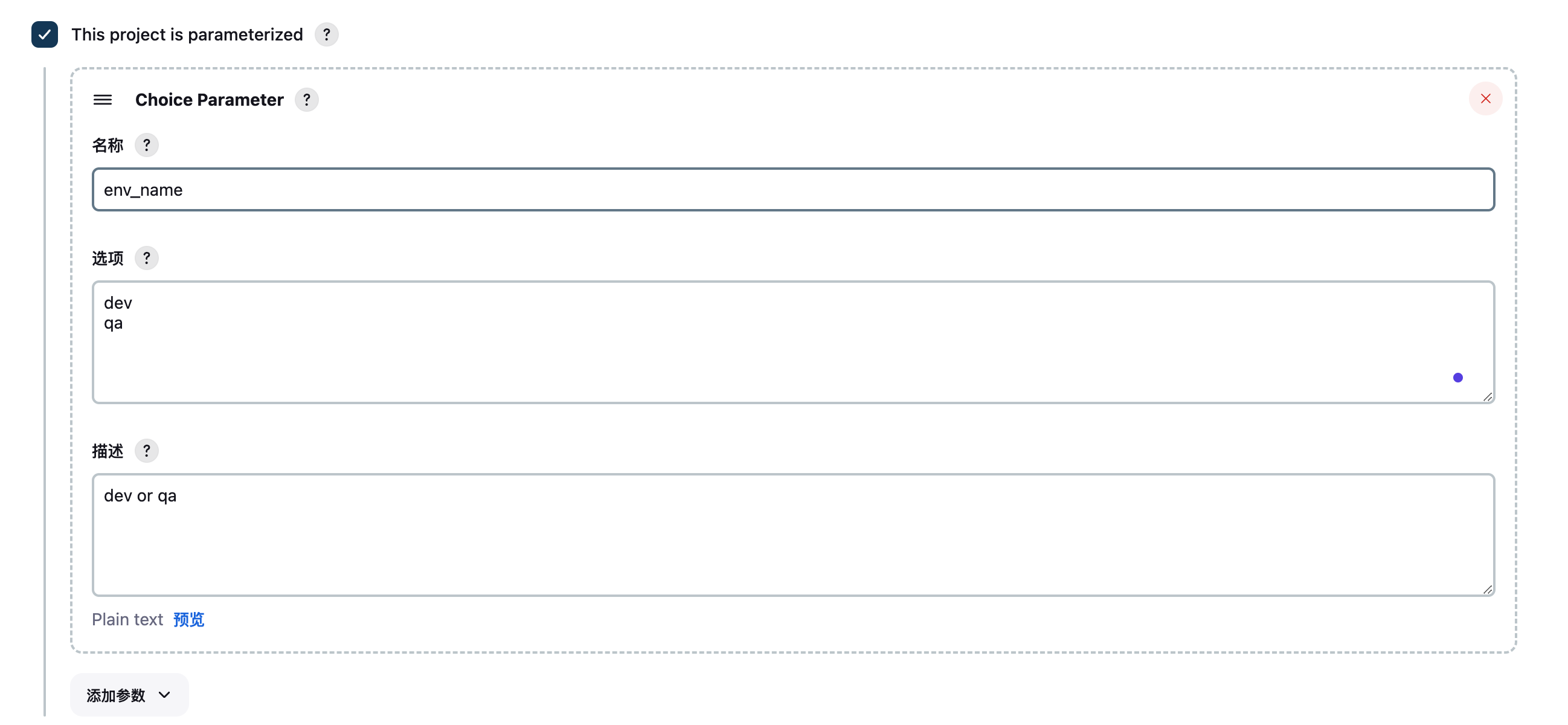
  1. Generic Webhook Trigger中定义一个Request parameters,name 填 env_name env_name 是参数,值可以是qa或dev

  2. 开启参数化流水线,为了接收参数,作为流水线变量 image.png

  3. 流水线脚本中要接收这个参数

以 powershell 为例,当然也可以是 shell

powershell

cd C:\JenkinsWorkSpace\CKFM\Framework
C:\Users\k64145621\AppData\Local\anaconda3\envs\pyAppium312\python.exe run.py %ENV_NAME%
  1. 最终效果
  • 当触发地址 http://JENKINS_URL/generic-webhook-trigger/invoke?token=Mobile_UI_GITLAB-20240927&env_name=qa 运行 python run.py qa
  • 当触发地址 http://JENKINS_URL/generic-webhook-trigger/invoke?token=Mobile_UI_GITLAB-20240927&env_name=dev 运行 python run.py dev

使用Generic Webhook Trigger完成提交代码自动触发流水线 ​

需求:我的博客是用 hexo 搭建的,每次提交完代码都需要在托管的服务器上执行手动发布命令 deploy.sh

bash

git pull
npm install
hexo g # 生成静态文件

现在我需要Jenkins的Generic Webhook Trigger插件来帮我自动完成这些工作。

Generic Webhook Trigger是 Jenkins 提供的一款插件,装好这个插件后会暴露出一个URL地址,格式如 JENKINS_URL/generic-webhook-trigger/invoke

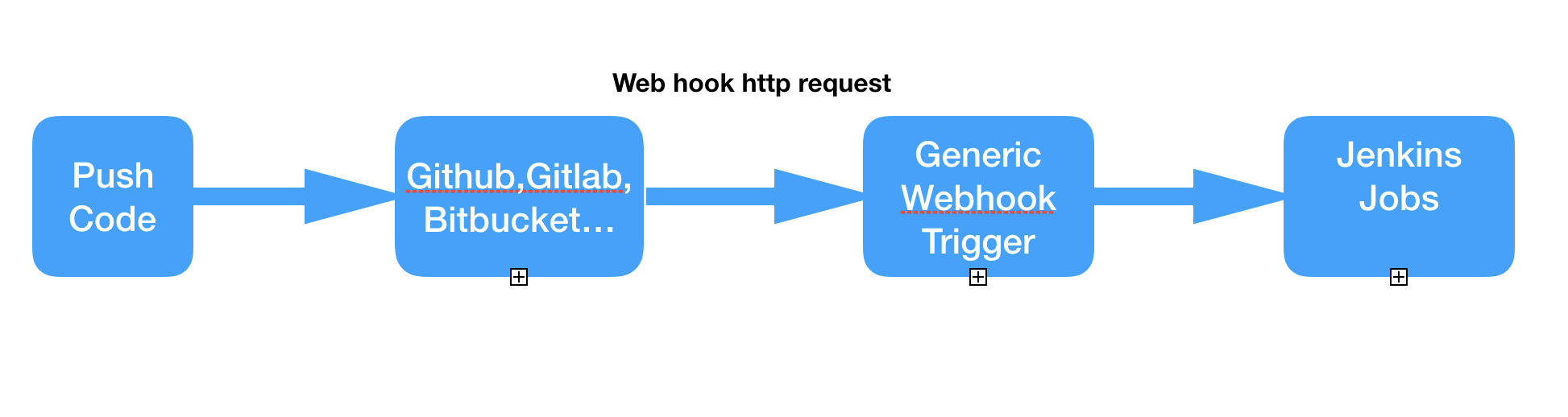
我们往这个地址发请求,请求体或请求头带上要构建的job名称,分支名称等信息,这个插件可以正则提取出这些信息,当作变量进而触发构建。

大致流程如下图: image.png
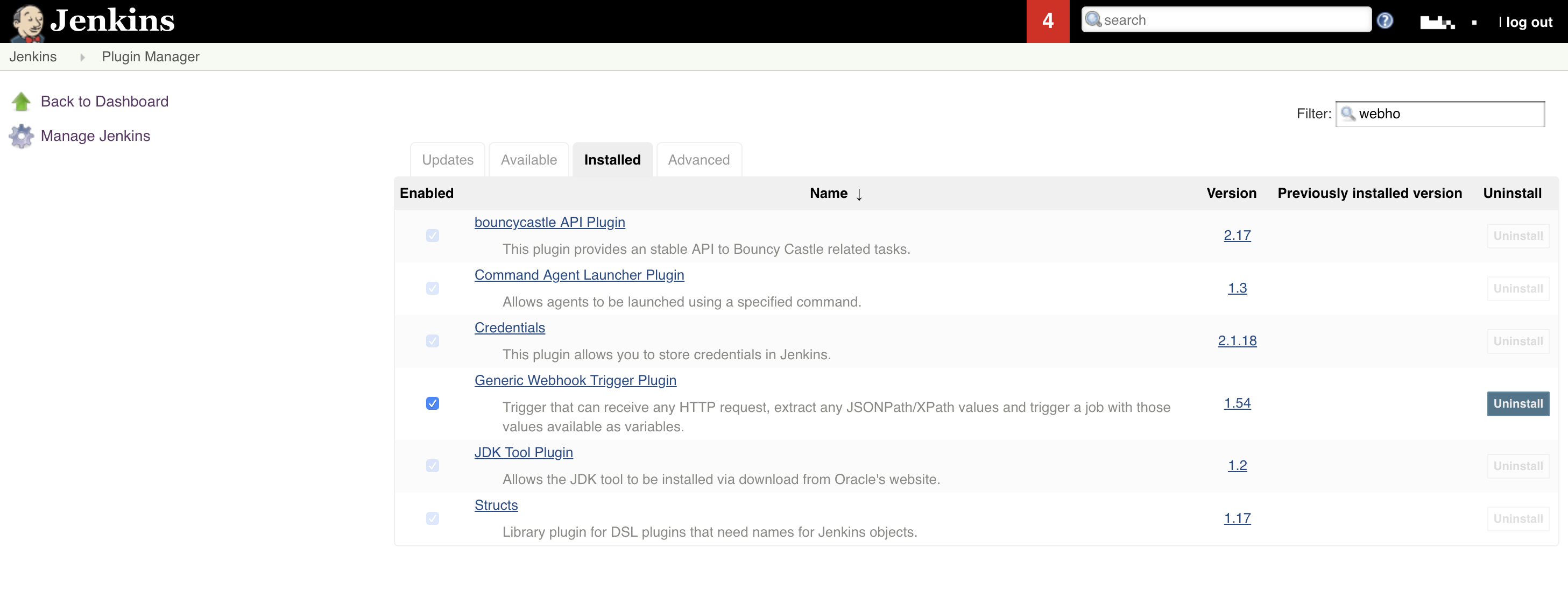
  1. 在 Jenkins 插件管理页面搜索该插件 image.png

  2. 安装之后新建一个item,类型选freestyle,pipeline都行,在 Build Trigger 选项卡中会看到多出了一项 "Generic Webhook Trigger",勾选之后多出了很多信息。这里只填写Token image.png
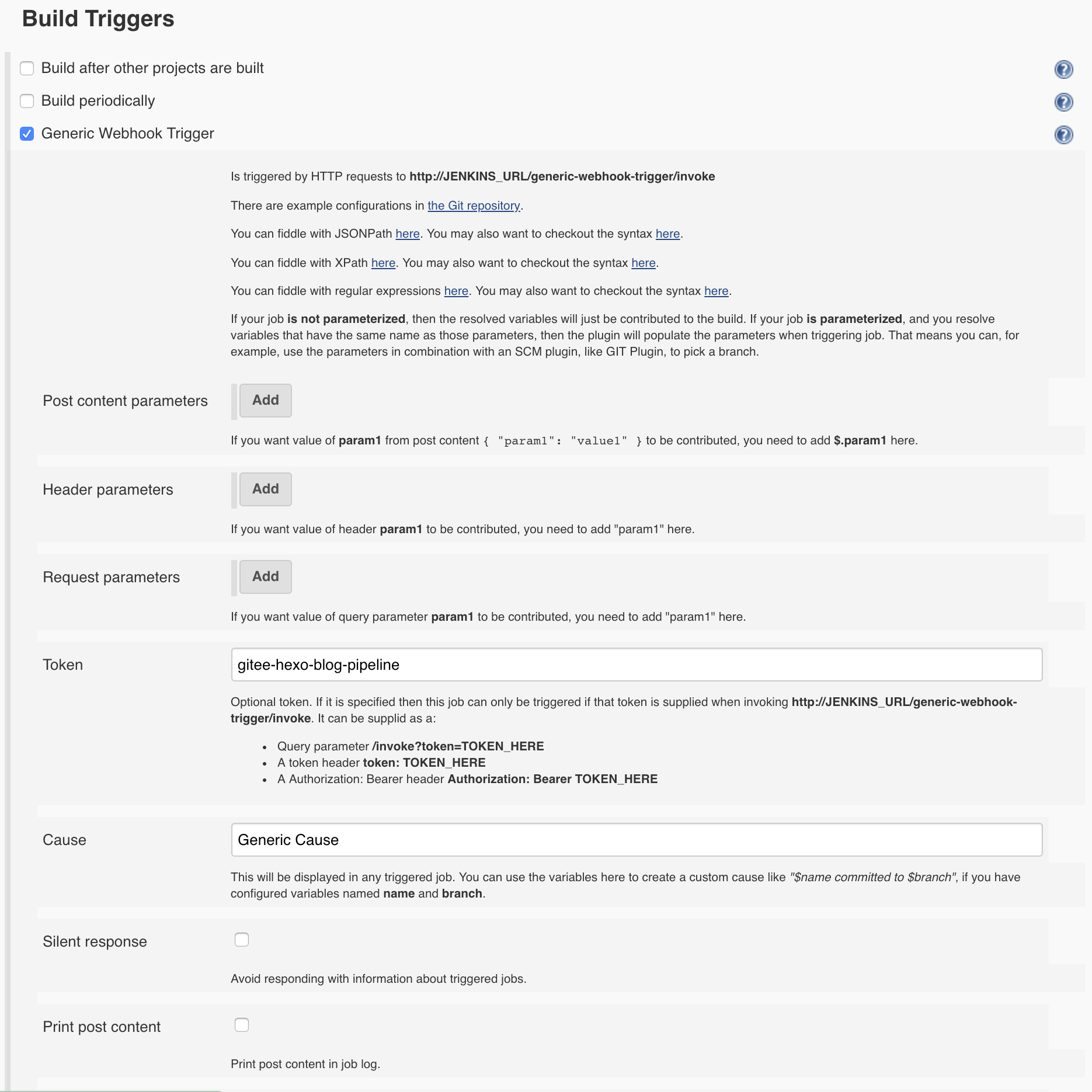
  3. 这里我创建的是个Pipeline的job,pipeline script 就是调用deploy.sh。注意这里我的博客和Jenkins都部署在了同一台服务器上面。

groovy

pipeline {
    agent any
    // 避免 npm install 报权限问题
    environment {
        PATH="/bin:/sbin:/usr/bin:/usr/sbin:/usr/local/bin"
    }
    stages {
        stage('build') {
            steps {
                sh 'node -v'
                sh 'npm -v'
                dir ("/var/www/www.mafeifan.com/") {
                   sh 'git pull'
                   sh 'npm install'
                   sh 'hexo g'
                }
            }
        }
    }
}
  1. 来到Gitee/Github,添加一个webhook地址,如果你的Jenkins地址是http://110.110.110.110:8080,job名称为gitee-hexo-blog-pipeline, 那么根据规则,Generic Webhook Trigger的地址是http://110.110.110.110:8080/generic-webhook-trigger/invoke?token=gitee-hexo-blog-pipeline 配置完成,点测试,看返回内容是否是成功的。 image.png
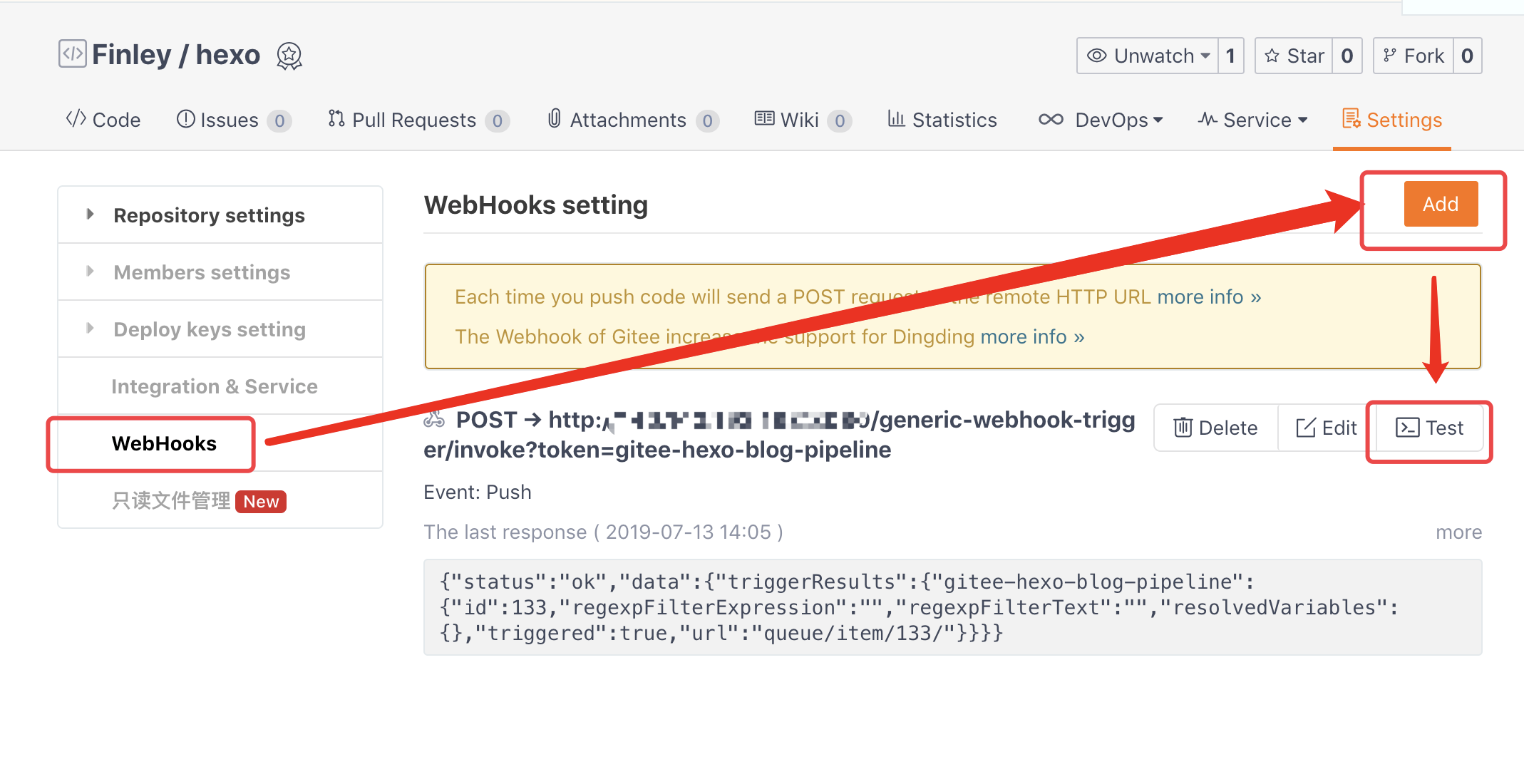
  2. 测试,我们修改代码内容,并且push,发现Jenkins果然自动触发了build。
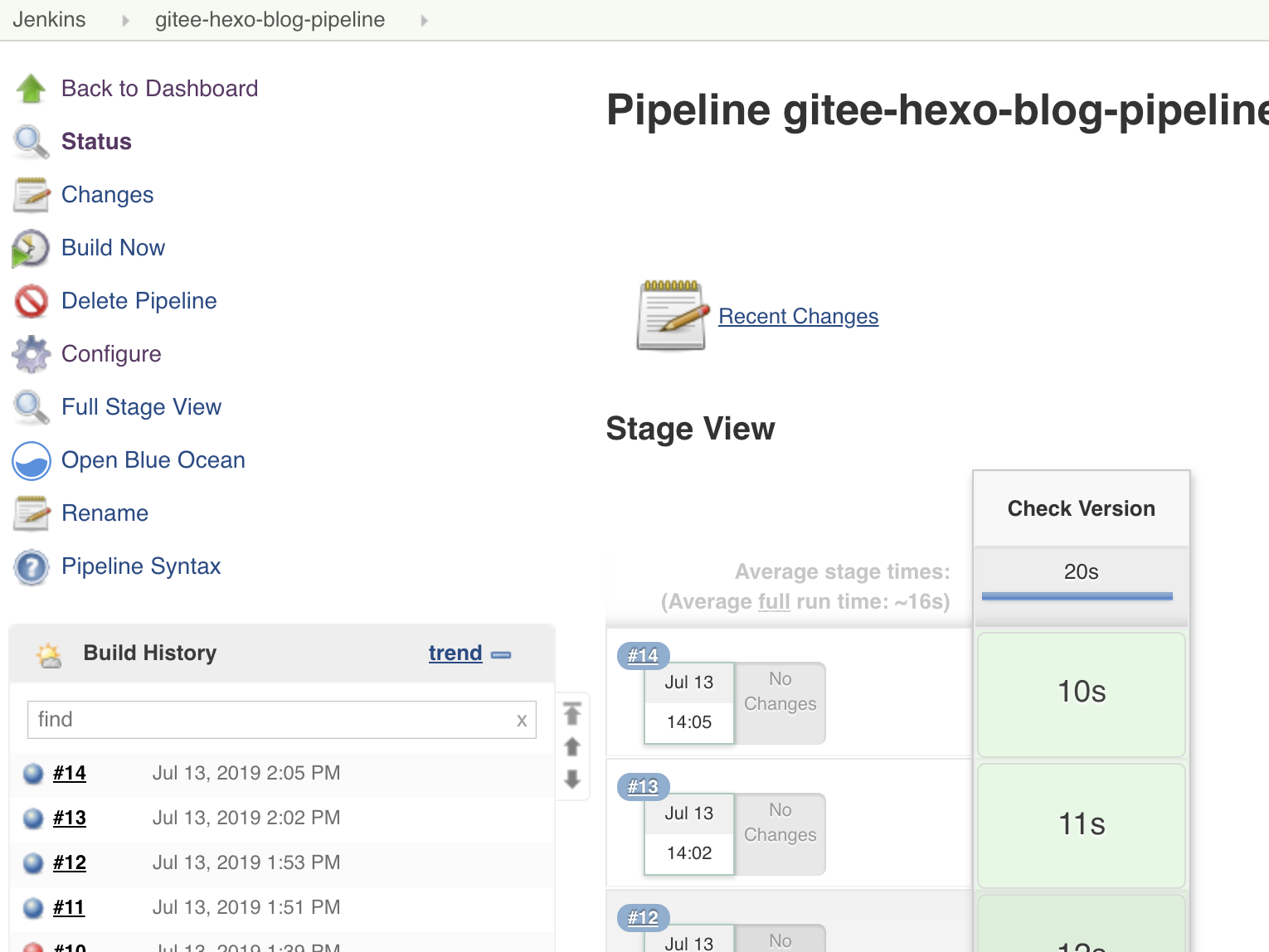
image.png

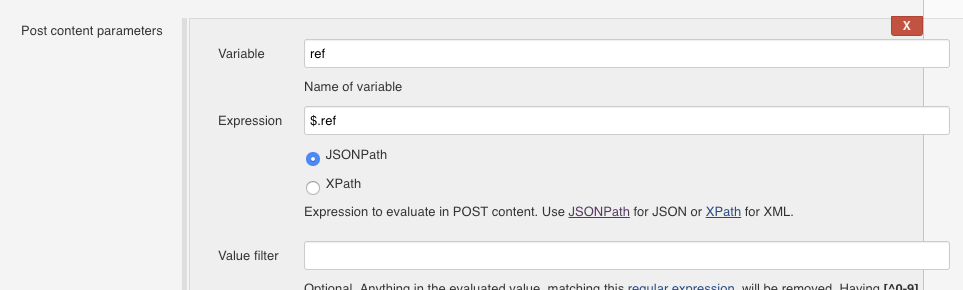
  1. 如果我们需要限制分支,比如只有往develop上push代码才触发, 在 Build Triggers 选项卡中填写 Post content parameters 内容。 即将请求体中的ref内容提取出来赋给$ref image.png

然后在 Optional filter 选项卡中填写要过滤的分支名称。 Expression 填写正则 ^(refs/heads/develop)$, Text 可以填写变量 $refimage.png
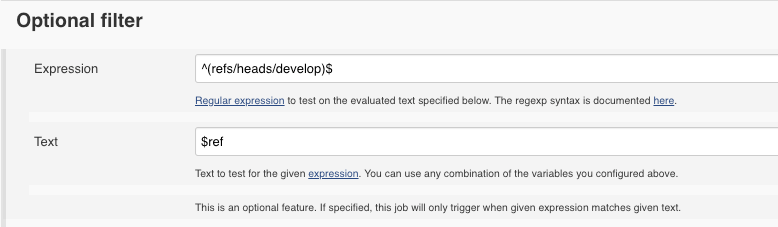
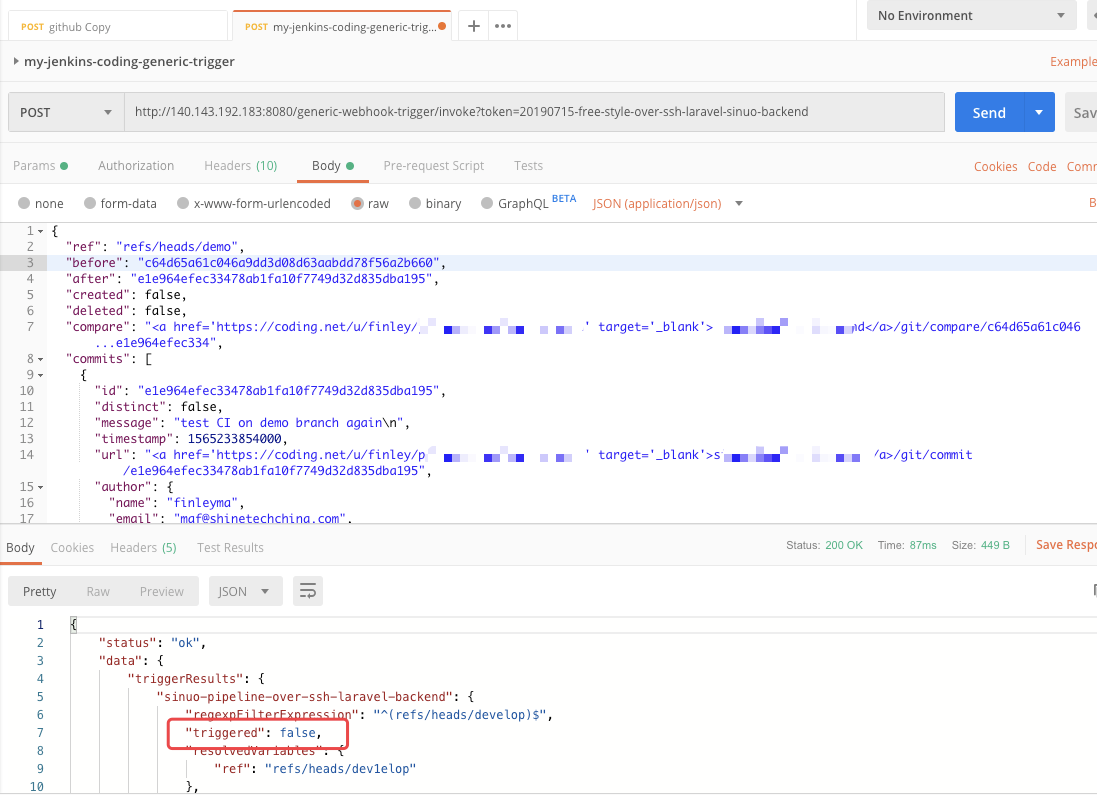
测试时候建议用Postman。触发地址 GWT 会告诉咱们,请求体可以在仓库托管平台获取,然后手动修改内容进行测试 image.png