惯性聚合 高效追踪和阅读你感兴趣的博客、新闻、科技资讯
阅读原文 在惯性聚合中打开

推荐订阅源

Vercel News
Vercel News
Recorded Future
Recorded Future
CTFtime.org: upcoming CTF events
The GitHub Blog
The GitHub Blog
Application and Cybersecurity Blog
Google DeepMind News
cs.AI updates on arXiv.org
Microsoft Azure Blog
K
KPMG report finds enterprise disconnect between AI and its ROI | CIO
M
MIT News - Artificial intelligence
云风的 BLOG
云风的 BLOG
Y
Y Combinator Blog
N
News | PayPal Newsroom
freeCodeCamp Programming Tutorials: Python, JavaScript, Git & More
Help Net Security
Help Net Security
博客园 - Franky
SecWiki News
SecWiki News
Recent Announcements
T
Troy Hunt's Blog
The Register - Security
The Last Watchdog
The Last Watchdog
Webroot Blog
Webroot Blog
S
Security Affairs
博客园 - 司徒正美
S
Schneier on Security
I
InfoQ
博客园_首页
www.infosecurity-magazine.com
T
Threat Research - Cisco Blogs
Forbes - Security
Forbes - Security
腾讯CDC
N
Netflix TechBlog - Medium
N
News and Events Feed by Topic
Cloudbric
Cloudbric
T
The Exploit Database - CXSecurity.com
P
Proofpoint News Feed
A
About on SuperTechFans
Engineering at Meta
Engineering at Meta
Recent Commits to openclaw:main
B
Blog
V
Vulnerabilities – Threatpost
C
Check Point Blog
Google DeepMind News
Google Online Security Blog
C
Cyber Attacks, Cyber Crime and Cyber Security
Hacker News - Newest:
Hacker News - Newest: "LLM"
C
Cisco Blogs
Schneier on Security
O
OpenAI News
K
Kaspersky official blog

mafeifan 的编程技术分享

mafengwo-mp3-downloader | mafeifan 的编程技术分享 示例页面 | mafeifan 的编程技术分享 mafeifan 的编程技术分享 mafeifan 的编程技术分享 mafeifan 的编程技术分享 mafeifan 的编程技术分享 mafeifan 的编程技术分享 mafeifan 的编程技术分享 mafeifan 的编程技术分享 mafeifan 的编程技术分享 mafeifan 的编程技术分享 查看 default namespace 下的 default service account名称 mafeifan 的编程技术分享 检查日志 | mafeifan 的编程技术分享 bridge fdb show dev flannel.1 mafeifan 的编程技术分享 mafeifan 的编程技术分享 mafeifan 的编程技术分享 mafeifan 的编程技术分享 mafeifan 的编程技术分享 mafeifan 的编程技术分享 mafeifan 的编程技术分享 mafeifan 的编程技术分享 mafeifan 的编程技术分享 mafeifan 的编程技术分享 mafeifan 的编程技术分享 mafeifan 的编程技术分享 mafeifan 的编程技术分享 mafeifan 的编程技术分享 mafeifan 的编程技术分享 数据收集原理分析 | mafeifan 的编程技术分享 mafeifan 的编程技术分享 mafeifan 的编程技术分享 mafeifan 的编程技术分享 mafeifan 的编程技术分享 mafeifan 的编程技术分享 mafeifan 的编程技术分享 mafeifan 的编程技术分享 mafeifan 的编程技术分享 mafeifan 的编程技术分享 mafeifan 的编程技术分享 mafeifan 的编程技术分享 mafeifan 的编程技术分享 mafeifan 的编程技术分享 mafeifan 的编程技术分享 几种方法 | mafeifan 的编程技术分享 mafeifan 的编程技术分享 mafeifan 的编程技术分享 mafeifan 的编程技术分享 mafeifan 的编程技术分享 mafeifan 的编程技术分享 mafeifan 的编程技术分享 mafeifan 的编程技术分享 mafeifan 的编程技术分享 mafeifan 的编程技术分享 mafeifan 的编程技术分享 mafeifan 的编程技术分享 mafeifan 的编程技术分享 mafeifan 的编程技术分享 mafeifan 的编程技术分享 mafeifan 的编程技术分享 mafeifan 的编程技术分享 mafeifan 的编程技术分享 mafeifan 的编程技术分享 mafeifan 的编程技术分享 mafeifan 的编程技术分享 mafeifan 的编程技术分享 mafeifan 的编程技术分享 mafeifan 的编程技术分享 mafeifan 的编程技术分享 mafeifan 的编程技术分享 mafeifan 的编程技术分享 mafeifan 的编程技术分享 mafeifan 的编程技术分享 mafeifan 的编程技术分享 mafeifan 的编程技术分享 mafeifan 的编程技术分享 mafeifan 的编程技术分享 mafeifan 的编程技术分享 mafeifan 的编程技术分享 mafeifan 的编程技术分享 mafeifan 的编程技术分享 mafeifan 的编程技术分享 mafeifan 的编程技术分享 mafeifan 的编程技术分享 mafeifan 的编程技术分享 mafeifan 的编程技术分享 mafeifan 的编程技术分享 mafeifan 的编程技术分享 mafeifan 的编程技术分享 mafeifan 的编程技术分享 mafeifan 的编程技术分享 mafeifan 的编程技术分享 check the export on the very top of this document so we can use $do mafeifan 的编程技术分享 mafeifan 的编程技术分享 mafeifan 的编程技术分享 mafeifan 的编程技术分享 延伸 -- 关于前端路由 xdebug 3 和 2 的区别
mafeifan 的编程技术分享
2026-01-16 · via mafeifan 的编程技术分享

先说总结:

  • docker save保存的是镜像(image),docker export保存的是容器(container);
  • docker load用来载入镜像包,docker import用来载入容器,但两者都会恢复为镜像;
  • docker load不能对载入的镜像重命名,而docker import可以为镜像指定新名称。

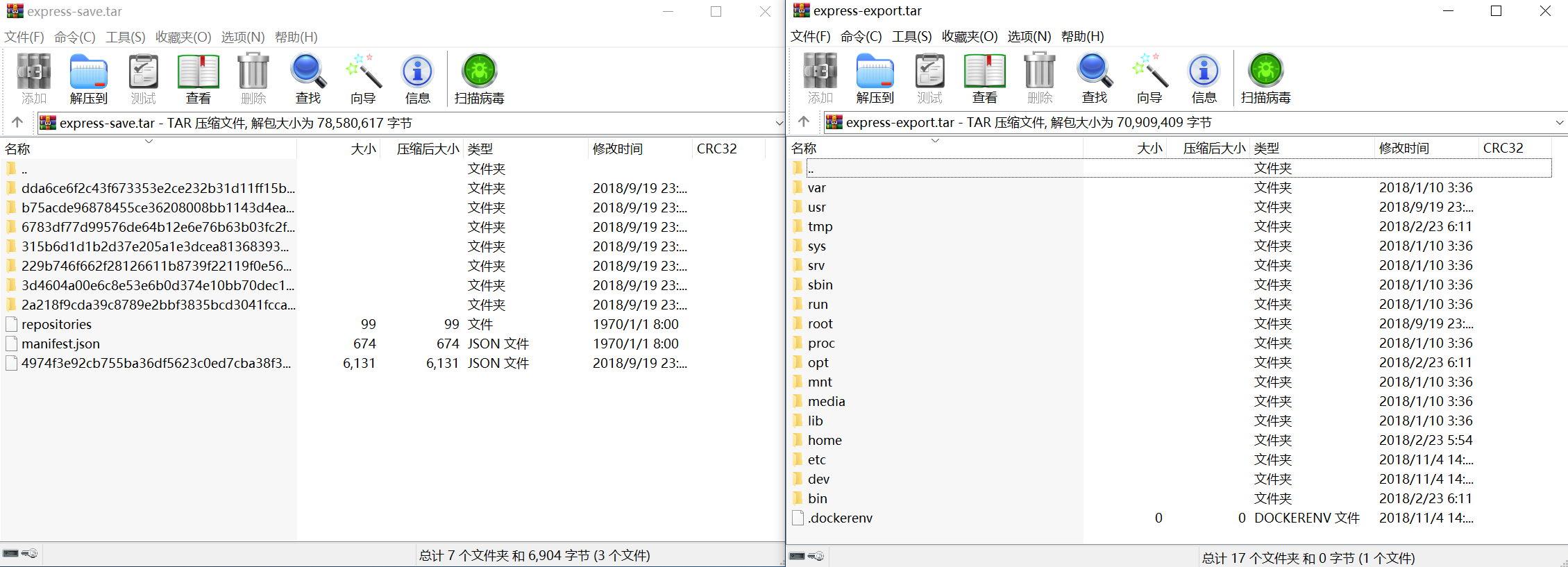
比如我本机上有一个 finleyma/express的镜像,容器ID为4a655b443069 使用如下命令分别导出镜像和容器 docker save -o image-express-save.tar finleyma/expressdocker export -o container-express-export.tar 4a655b443069

发现如下特点:

  1. 镜像压缩包比容器要大。
  2. 目录结构不太一样

image.png

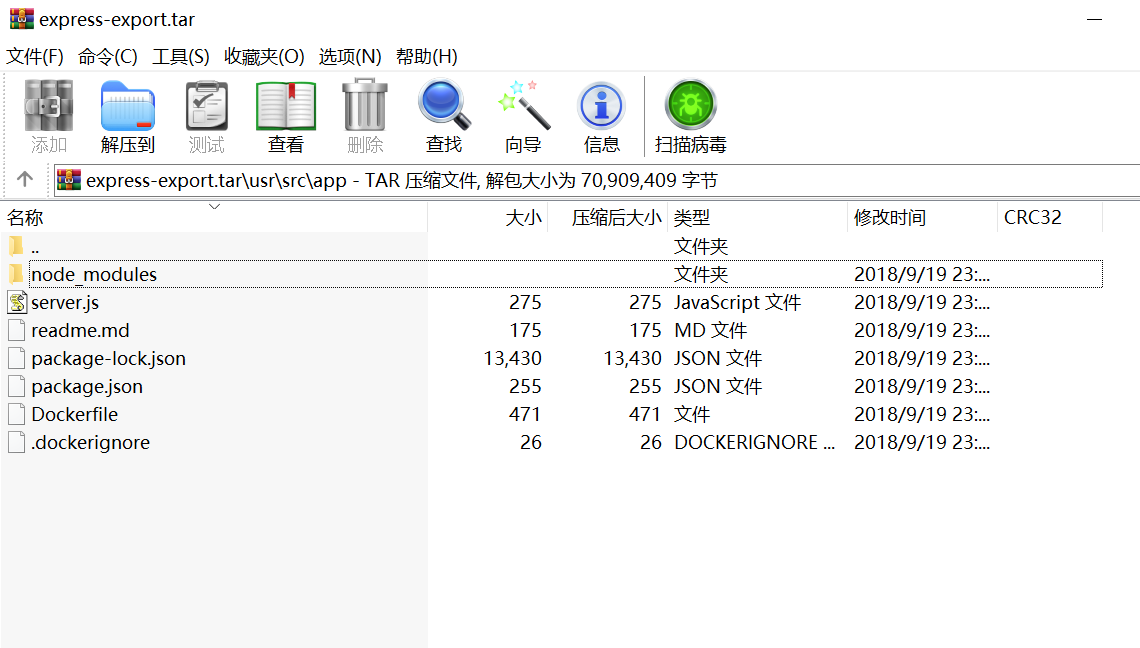
  1. 容器压缩包 是很典型的Linux目录结构,还找到当初build时被ADD进的源码文件

image.png

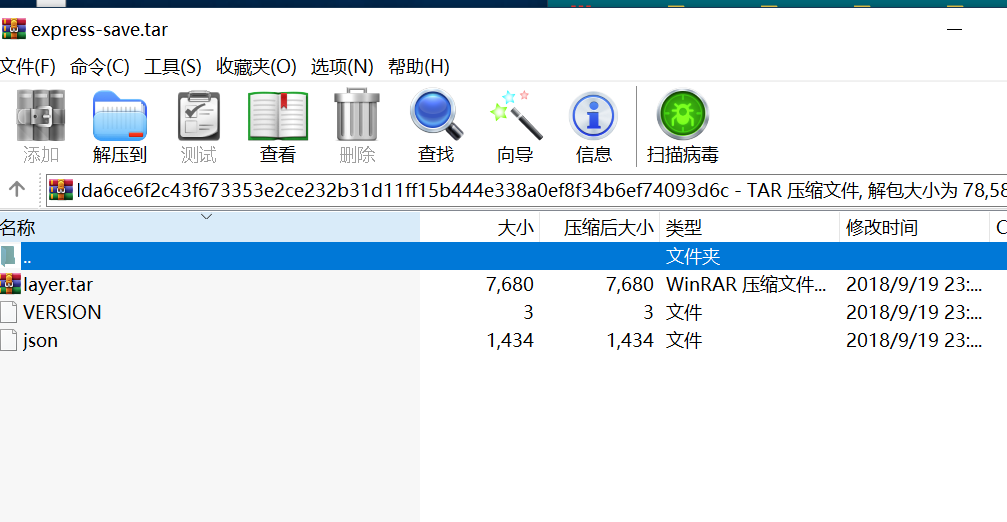
  1. 镜像压缩包 其实就是分层的文件系统。Docker镜像就是由这样一层层的文件叠加起来。 打开压缩包内的 repositories, 内容为 {"finleyma/express":{"latest":"dda6ce6f2c43f673353e2ce232b31d11ff15b444e338a0ef8f34b6ef74093d6c"}} 既这个镜像的名称,tag是latest,id为dda6ce6f2c43f673353e2ce232b31d11ff15b444e338a0ef8f34b6ef74093d6c 而且tar内有相同ID的目录。

image.png

json文件的内容如下:里面记录着这一层容器文件的元信息,通过parent,还能知道依赖的上一层的文件系统是什么。

json

{
	"id": "dda6ce6f2c43f673353e2ce232b31d11ff15b444e338a0ef8f34b6ef74093d6c",
	"parent": "b75acde96878455ce36208008bb1143d4ea17723257c991f8bfb33ad9e27251d",
	"created": "2018-09-19T15:41:54.6130547Z",
	"container": "3cd78865317bce73179abc7d21fcbe860a96d14fc980c01566fa2c9412b17d7d",
	"container_config": {
		"Hostname": "3cd78865317b",
		"Domainname": "",
		"User": "",
		"AttachStdin": false,
		"AttachStdout": false,
		"AttachStderr": false,
		"ExposedPorts": {
			"8081/tcp": {}
		},
		"Tty": false,
		"OpenStdin": false,
		"StdinOnce": false,
		"Env": ["PATH=/usr/local/sbin:/usr/local/bin:/usr/sbin:/usr/bin:/sbin:/bin", "NODE_VERSION=8.9.4", "YARN_VERSION=1.3.2"],
		"Cmd": ["/bin/sh", "-c", "#(nop) ", "CMD [\"npm\" \"start\"]"],
		"ArgsEscaped": true,
		"Image": "sha256:91f850e6adbd56df68088dffe63c56e6f48fc24f763ff9d22c739742be71212a",
		"Volumes": null,
		"WorkingDir": "/usr/src/app",
		"Entrypoint": null,
		"OnBuild": [],
		"Labels": {}
	},
	"docker_version": "18.06.1-ce",
	"config": {
		"Hostname": "",
		"Domainname": "",
		"User": "",
		"AttachStdin": false,
		"AttachStdout": false,
		"AttachStderr": false,
		"ExposedPorts": {
			"8081/tcp": {}
		},
		"Tty": false,
		"OpenStdin": false,
		"StdinOnce": false,
		"Env": ["PATH=/usr/local/sbin:/usr/local/bin:/usr/sbin:/usr/bin:/sbin:/bin", "NODE_VERSION=8.9.4", "YARN_VERSION=1.3.2"],
		"Cmd": ["npm", "start"],
		"ArgsEscaped": true,
		"Image": "sha256:91f850e6adbd56df68088dffe63c56e6f48fc24f763ff9d22c739742be71212a",
		"Volumes": null,
		"WorkingDir": "/usr/src/app",
		"Entrypoint": null,
		"OnBuild": [],
		"Labels": null
	},
	"architecture": "amd64",
	"os": "linux"
}

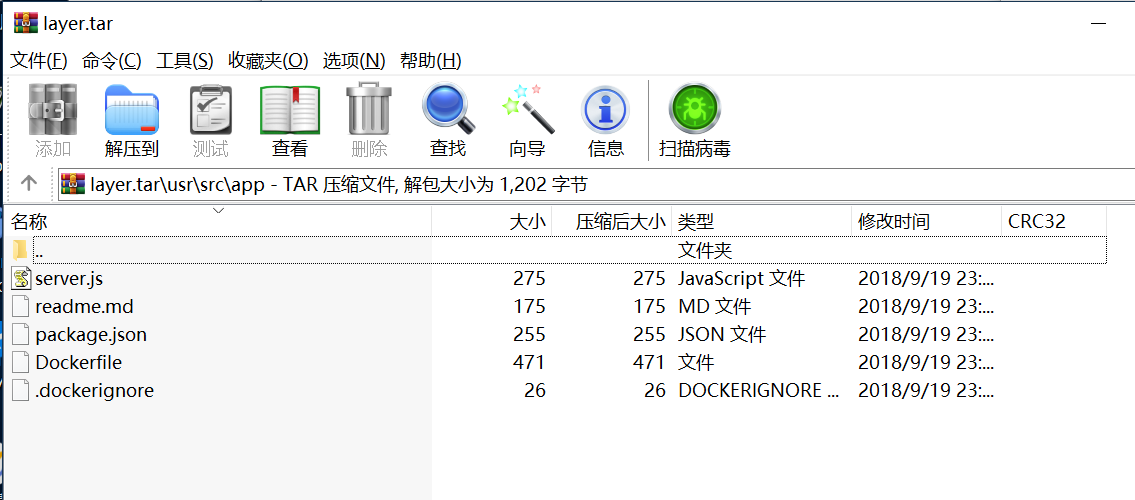
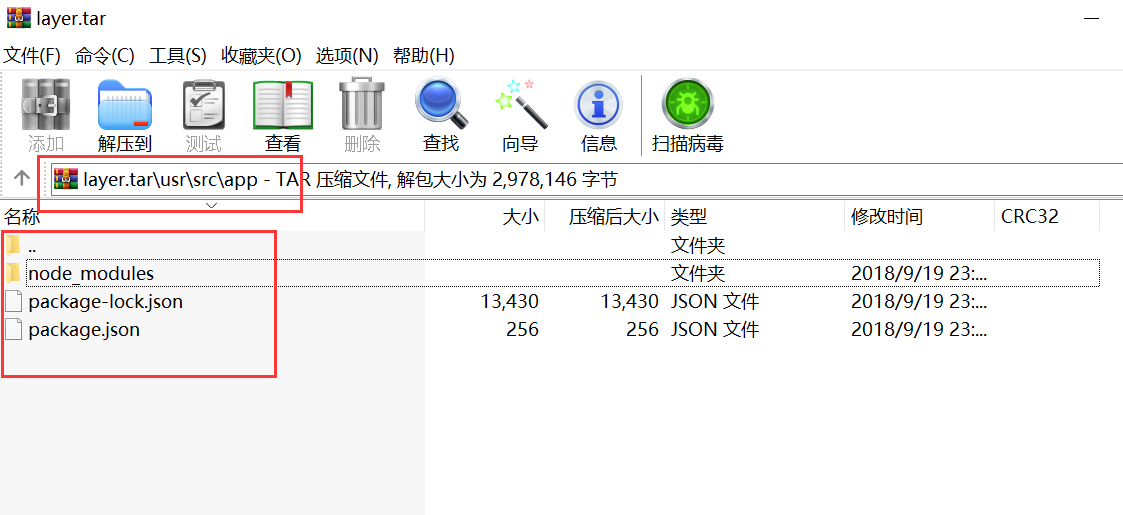
打开lay.tar, 对于的原来就是当初dockerfile中的ADD . /app/

image.png

那 node_modules 跑哪了,你很快就能猜测到,肯定在上一层文件中。事实确实是这样的。ADD . /app/ 之前对于的命令是 RUN npm install

image.png

所以写dockerfile时,一行命令对于一层文件系统,要充分利用这样机制,层的数量尽可能少,只安装必要的依赖包。

参考: