


Express号称web框架,我不以为然,我理解的框架应该包含很多东西,Express的核心思想是中间件。 你需要什么功能搜相应的中间件就可以了。
支持 callback1,callback2、[callback1, callback2]、function callback(req, res, next) 或混合写法
function cb1(req, res, next) {
  console.log('--cb1--');
  next();
}

function cb2(req, res, next) {
  console.log('--cb2--');
  next();
}

app.get('/',
  cb1, [cb2],
  (req, res, next) => {
    console.log('--cb3--');
    next();
  },
  (req, res, next) => {
  res.send('hello');
});使用 res.locals.key=value;
app.use(function(req, res, next) {
    res.locals.user = req.user;
    res.locals.authenticated = ! req.user.anonymous;
    next();
});
传给下一个
app.use(function(req, res, next) {
    if (res.locals.authenticated) {
        console.log(res.locals.user.id);
    }
    next();
});var express = require('express');
var app = express();
var bodyParser = require('body-parser');
// 支持解析json格式
app.use(bodyParser.json());
// 支持解析 application/x-www-form-urlencoded 编码,就是表单提交
var urlencodedParser = bodyParser.urlencoded({ extended: false })
// 这个urlencodedParser必须带,不然 request.body 为 undefined
app.post('/', urlencodedParser, function(request, response) {
console.dir(request.body);
response.send('It works');
}
});不带 app.use(bodyParser.json()); 不支持下面的提交  也就是
也就是 Content-Type: application/json
带 var urlencodedParser = bodyParser.urlencoded({ extended: false }) 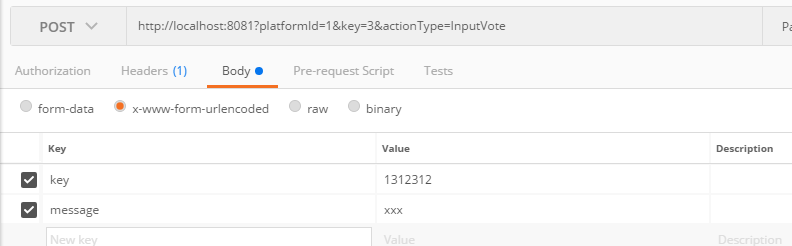
参考: http://expressjs.com/en/resources/middleware/body-parser.html
此内容由惯性聚合(RSS阅读器)自动聚合整理,仅供阅读参考。 原文来自 — 版权归原作者所有。