惯性聚合 高效追踪和阅读你感兴趣的博客、新闻、科技资讯
阅读原文 在惯性聚合中打开

推荐订阅源

C
CXSECURITY Database RSS Feed - CXSecurity.com
爱范儿
爱范儿
Martin Fowler
Martin Fowler
有赞技术团队
有赞技术团队
A
About on SuperTechFans
H
Hackread – Cybersecurity News, Data Breaches, AI and More
freeCodeCamp Programming Tutorials: Python, JavaScript, Git & More
Google DeepMind News
G
Google Developers Blog
N
News and Events Feed by Topic
Microsoft Azure Blog
B
Blog
H
Help Net Security
H
Hacker News: Front Page
H
Heimdal Security Blog
Exploit-DB.com RSS Feed
D
Docker
Application and Cybersecurity Blog
Recent Commits to openclaw:main
W
WeLiveSecurity
Webroot Blog
Webroot Blog
博客园 - 聂微东
D
Darknet – Hacking Tools, Hacker News & Cyber Security
TaoSecurity Blog
TaoSecurity Blog
PCI Perspectives
PCI Perspectives
Stack Overflow Blog
Stack Overflow Blog
AWS News Blog
AWS News Blog
Project Zero
Project Zero
N
News | PayPal Newsroom
The GitHub Blog
The GitHub Blog
Forbes - Security
Forbes - Security
V
Vulnerabilities – Threatpost
G
GRAHAM CLULEY
Blog — PlanetScale
Blog — PlanetScale
美团技术团队
博客园 - Franky
A
Arctic Wolf
L
LINUX DO - 最新话题
K
KPMG report finds enterprise disconnect between AI and its ROI | CIO
L
Lohrmann on Cybersecurity
P
Proofpoint News Feed
Help Net Security
Help Net Security
Security Archives - TechRepublic
Latest news
Latest news
T
The Blog of Author Tim Ferriss
MongoDB | Blog
MongoDB | Blog
www.infosecurity-magazine.com
Last Week in AI
Last Week in AI
aimingoo的专栏
aimingoo的专栏
S
Security @ Cisco Blogs

mafeifan 的编程技术分享

mafengwo-mp3-downloader | mafeifan 的编程技术分享 示例页面 | mafeifan 的编程技术分享 mafeifan 的编程技术分享 mafeifan 的编程技术分享 mafeifan 的编程技术分享 mafeifan 的编程技术分享 mafeifan 的编程技术分享 mafeifan 的编程技术分享 mafeifan 的编程技术分享 mafeifan 的编程技术分享 mafeifan 的编程技术分享 查看 default namespace 下的 default service account名称 mafeifan 的编程技术分享 检查日志 | mafeifan 的编程技术分享 bridge fdb show dev flannel.1 mafeifan 的编程技术分享 mafeifan 的编程技术分享 mafeifan 的编程技术分享 mafeifan 的编程技术分享 mafeifan 的编程技术分享 mafeifan 的编程技术分享 mafeifan 的编程技术分享 mafeifan 的编程技术分享 mafeifan 的编程技术分享 mafeifan 的编程技术分享 mafeifan 的编程技术分享 mafeifan 的编程技术分享 mafeifan 的编程技术分享 mafeifan 的编程技术分享 mafeifan 的编程技术分享 数据收集原理分析 | mafeifan 的编程技术分享 mafeifan 的编程技术分享 mafeifan 的编程技术分享 mafeifan 的编程技术分享 mafeifan 的编程技术分享 mafeifan 的编程技术分享 mafeifan 的编程技术分享 mafeifan 的编程技术分享 mafeifan 的编程技术分享 mafeifan 的编程技术分享 mafeifan 的编程技术分享 mafeifan 的编程技术分享 mafeifan 的编程技术分享 mafeifan 的编程技术分享 mafeifan 的编程技术分享 几种方法 | mafeifan 的编程技术分享 mafeifan 的编程技术分享 mafeifan 的编程技术分享 mafeifan 的编程技术分享 mafeifan 的编程技术分享 mafeifan 的编程技术分享 mafeifan 的编程技术分享 mafeifan 的编程技术分享 mafeifan 的编程技术分享 mafeifan 的编程技术分享 mafeifan 的编程技术分享 mafeifan 的编程技术分享 mafeifan 的编程技术分享 mafeifan 的编程技术分享 mafeifan 的编程技术分享 mafeifan 的编程技术分享 mafeifan 的编程技术分享 mafeifan 的编程技术分享 mafeifan 的编程技术分享 mafeifan 的编程技术分享 mafeifan 的编程技术分享 mafeifan 的编程技术分享 mafeifan 的编程技术分享 mafeifan 的编程技术分享 mafeifan 的编程技术分享 mafeifan 的编程技术分享 mafeifan 的编程技术分享 mafeifan 的编程技术分享 mafeifan 的编程技术分享 mafeifan 的编程技术分享 mafeifan 的编程技术分享 mafeifan 的编程技术分享 mafeifan 的编程技术分享 mafeifan 的编程技术分享 mafeifan 的编程技术分享 mafeifan 的编程技术分享 mafeifan 的编程技术分享 mafeifan 的编程技术分享 mafeifan 的编程技术分享 mafeifan 的编程技术分享 mafeifan 的编程技术分享 mafeifan 的编程技术分享 mafeifan 的编程技术分享 mafeifan 的编程技术分享 mafeifan 的编程技术分享 mafeifan 的编程技术分享 mafeifan 的编程技术分享 mafeifan 的编程技术分享 check the export on the very top of this document so we can use $do mafeifan 的编程技术分享 mafeifan 的编程技术分享 mafeifan 的编程技术分享 mafeifan 的编程技术分享 延伸 -- 关于前端路由 xdebug 3 和 2 的区别
mafeifan 的编程技术分享
2026-01-16 · via mafeifan 的编程技术分享

playbook ​

使用 Ansible 时,绝大部分时间将花费在编写playbook上。 playbook 英文直译是剧本的意思,是一个Ansible术语,它指的是用于配置管理的脚本。

playbook 是 YAML 格式的,yaml格式可以很方便的被转换为json供开发语言使用

顺便推荐一个在线的 YAML转json服务

playbook是一个非常简单的配置管理和多主机部署系统,不同于任何已经存在的模式,可作为一个适合部署复杂应用程序的基础。playbook可以定制配置,可以按指定的操作步骤有序执行,支持同步及异步方式。

playbook是Ansible实现批量自动化最重要的手段。在其中可以使用变量、引用、循环等功能,功能比较强大。

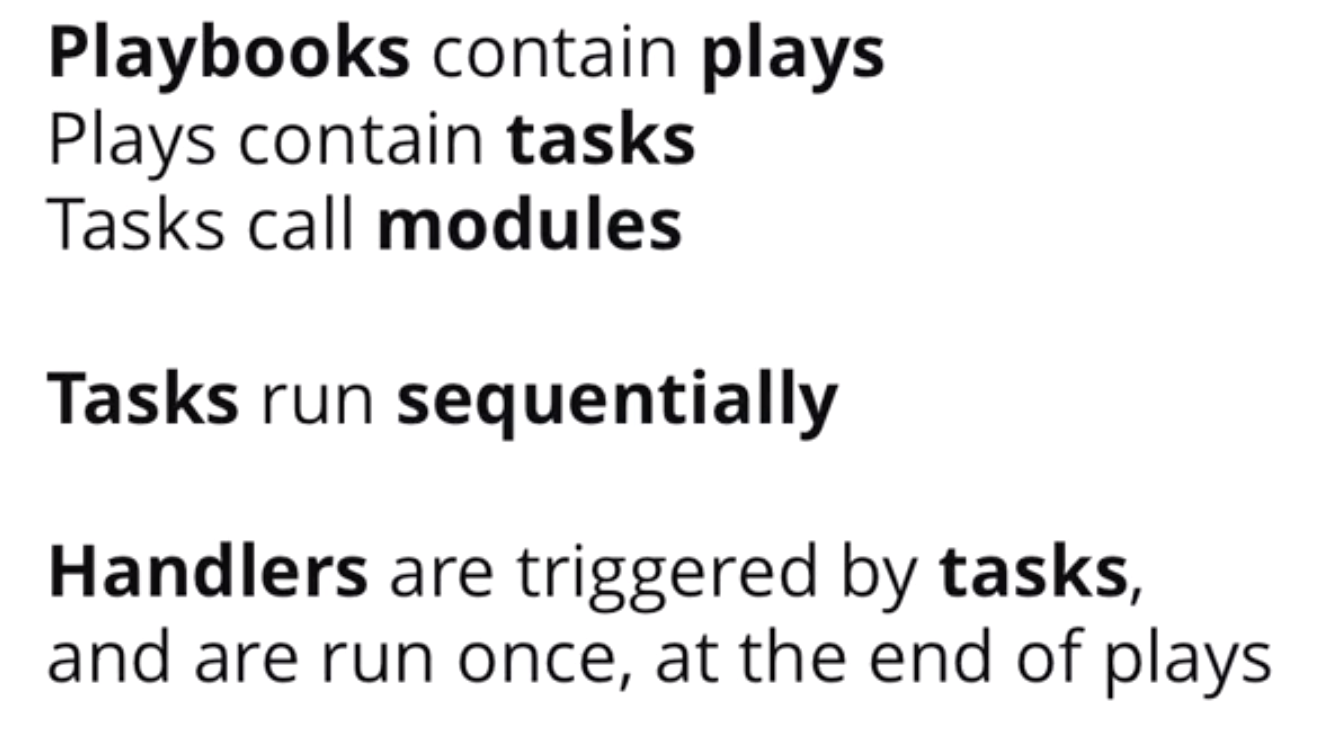
一个playbook就是一组play组成的列表

每个play必须包含host和task,play就可以想象为连接到主机(host)上执行任务(task)的事物

host就是inventory中定义的主机

tasks下定义一系列的task任务列表,依次执行,如果执行某任务失败了,后续的任务不会执行

image.png

示例 ​

playbook.yml

yaml

---  # yaml文件可以以 --- 开头
  - name: the first demo  # 使用 '-' 减号作为列表项,会被解析为json数组,注意在playbook中name属性不是必须的,表示描述,表示圈定一个范围,范围内的项都属于该列表。
    hosts: cloud  # cloud 是定义的主机,每一个playbook中必须包含"hosts"和"tasks"项
    tasks:
      - name: execute date command  # 描述这个task
        command: /bin/date # 本质是加载并执行ansible对应的模块

转换为JSON

[ { 
   name: 'the first demo',
    hosts: 'cloud',
    tasks: [ 
       { 
          name: 'execute date cmd', 
          command: '/bin/date' 
       } 
   ] 
} ]

执行前先检查 ansible-playbook playbook.yml --check

有用的flag ​

--check 对支持check的大部分核心模块,输出真正执行会进行哪些更改 --diff 报告更改,比如操作文件,会告诉用户之前之后发生了哪些变化,由于会产生大量输出,最好在单一主机使用

另外例子

yaml

 ---
- hosts: localhost # 列表1
  remote_user: root
  tasks:
    - name: test1 # 子列表,下面是shell模块,是一个动作,所以定义为列表,只不过加了个name
      shell: echo /tmp/a.txt
      register: hi_var
    - debug: var=hi_var.stdout # 调用模块,这是动作,所以也是列表 # 同样是动作,包含文件
    - include: /tmp/nginx.yml
    - include: /tmp/mysql.yml
- copy:   # 调用模块,定义为列表。但模块参数是虚拟性内容,应定义为字典而非列表 
        src: /etc/resolv.conf  # 模块参数1
        dest: /tmp   # 模块参数2
- hosts: 192.168.100.65  # 列表2
  remote_user: root
  vars:
    nginx_port: 80  # 定义变量,是虚拟性的内容,应定义为字典而非列表
    mysql_port: 3306
  vars_files:
    - nginx_port.yml  # 无法写成key/value格式,且是实体文件,因此定义为列表
  tasks:
    - name: test2
      shell: echo /tmp/a.txt
      register: hi_var  # register是和最近一个动作绑定的
    - debug: var=hi_var.stdout

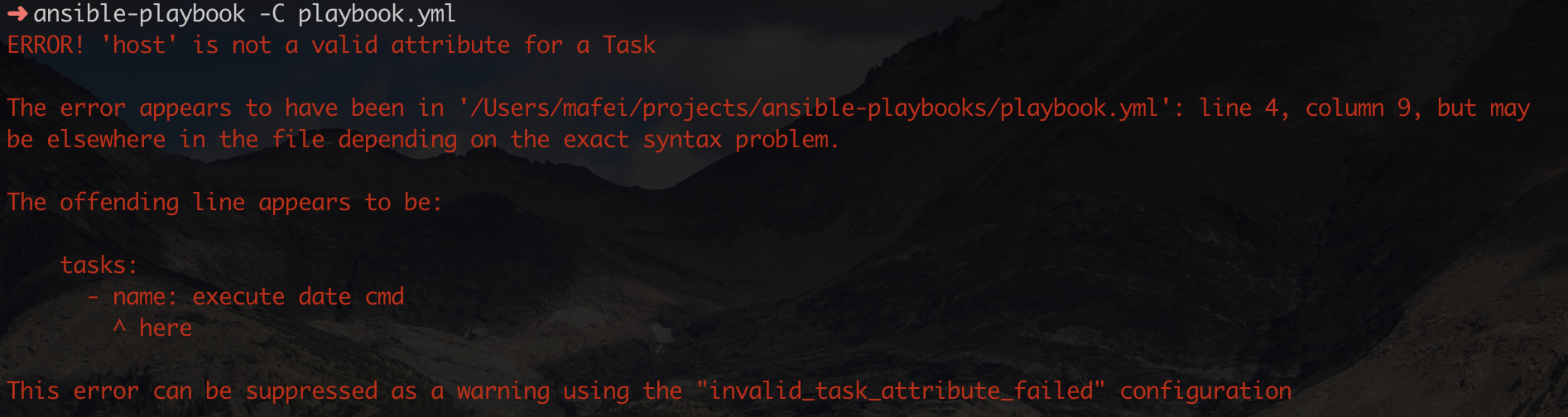
通过 ansible-playbook -h 获取所有参数列表 首先ansible-playbook -C playbook.yml检查语法。这里我故意写错了,在 -name同级添加了 hosts,这是不允许的,所以报错了。Ansible 的错误提示还是很方便的。

image.png

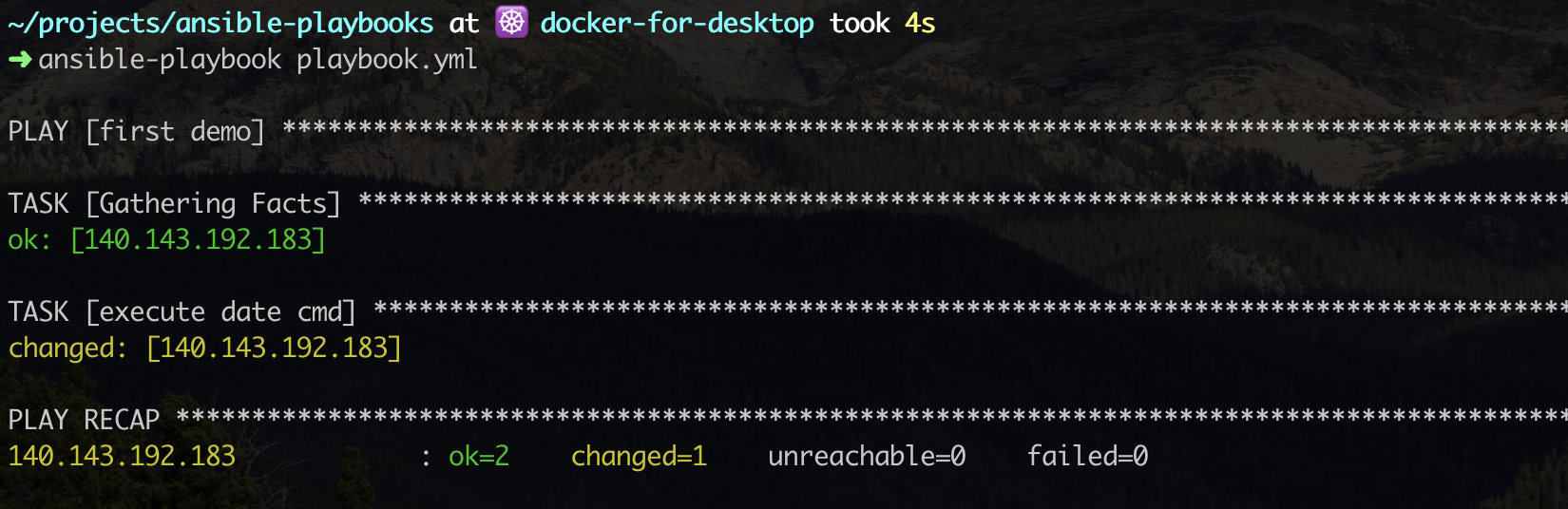
修改后:

image.png

playbook 中的配置项 ​

playbook 除了hoststasks还有其他配置项:

  • name play的描述,Ansible执行时会打印出来
  • remote_user 指定在远程主机上执行任务的用户
  • vars
  • vars_files

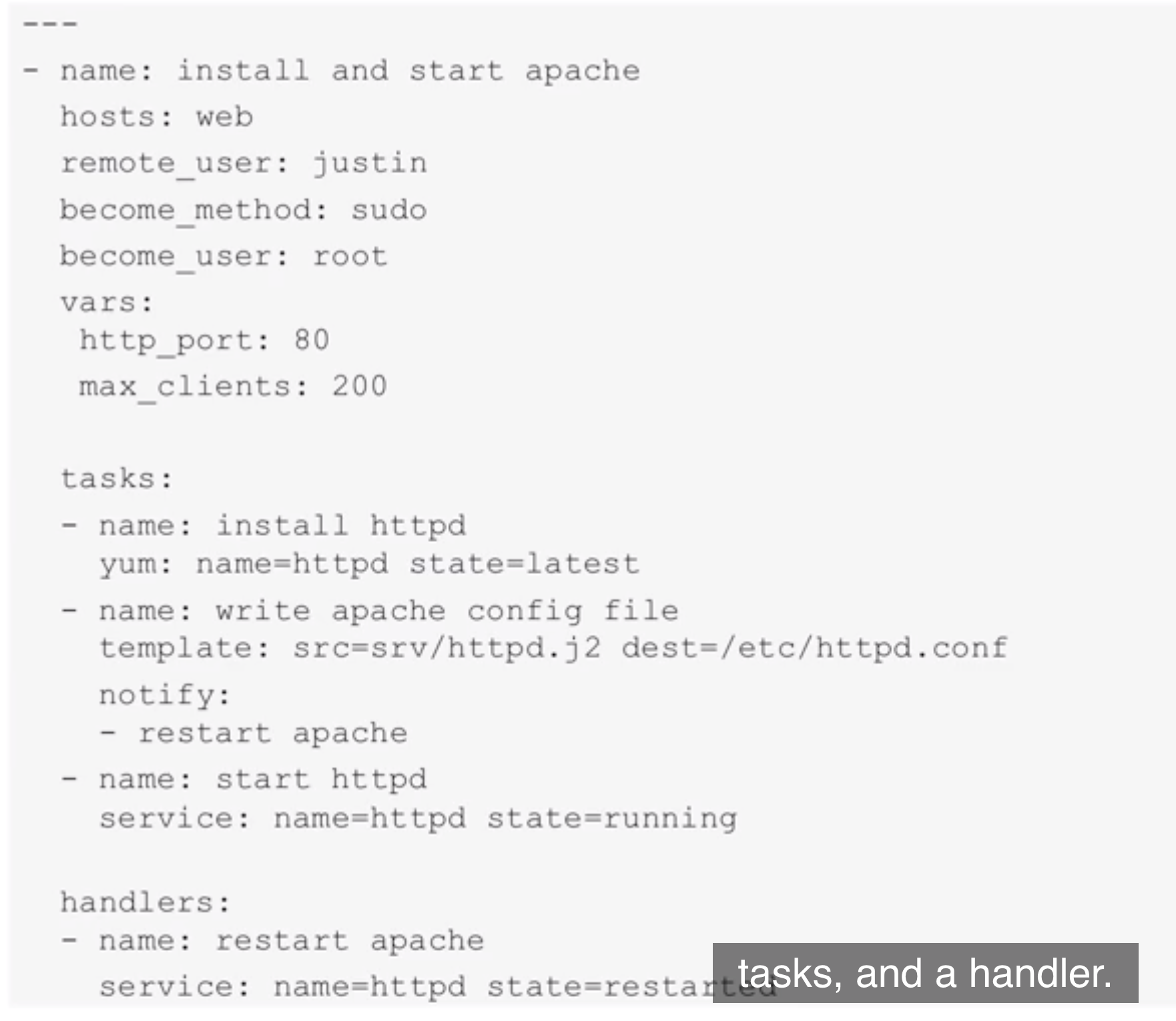
配置 playbook 例子,包含了1个play,3个tasks,1个handlers

image.png

notify 和 handler ​

ansible中几乎所有的模块都具有幂等性,这意味着被控主机的状态是否发生改变是能被捕捉的,即每个任务的 changed=true或changed=false。 ansible在捕捉到changed=true时,可以触发notify组件(如果定义了该组件)。 notify是一个组件,并非一个模块,它可以直接定义action,其主要目的是调用handler。 例如:

yaml

tasks:
     - name: copy template file to remote host
       template: src=/etc/ansible/nginx.conf.j2 dest=/etc/nginx/nginx.conf
       notify:
         - restart nginx
         - test web page
       copy: src=nginx/index.html.j2 dest=/usr/share/nginx/html/index.html
       notify:
         - restart nginx
 handlers:
     - name: restart nginx
       service: name=nginx state=restarted
     - name: test web page
       shell: curl -I http://192.168.100.10/index.html | grep 200 || /bin/false

这表示当执行template模块的任务时,如果捕捉到changed=true,那么就会触发notify,如果分发的index.html改变了,那么也重启nginx(当然这是没必要的)。 notify下定义了两个待调用的handler。 handler主要用于重启服务或者触发系统重启,除此之外很少使用handler。

handler的定义和tasks的定义完全一样,唯一需要限定的是handler中task的name必须和notify中定义的名称相同。

注意,notify是在执行完一个play中所有task后被触发的,在一个play中也只会被触发一次。

意味着如果一个play中有多个task出现了changed=true,它也只会触发一次。例如上面的示例中,向nginx复制配置文件和复制 index.html时如果都发生了改变,都会触发重启nginx操作。但是只会在执行完play后重启一次,以避免多余的重启。