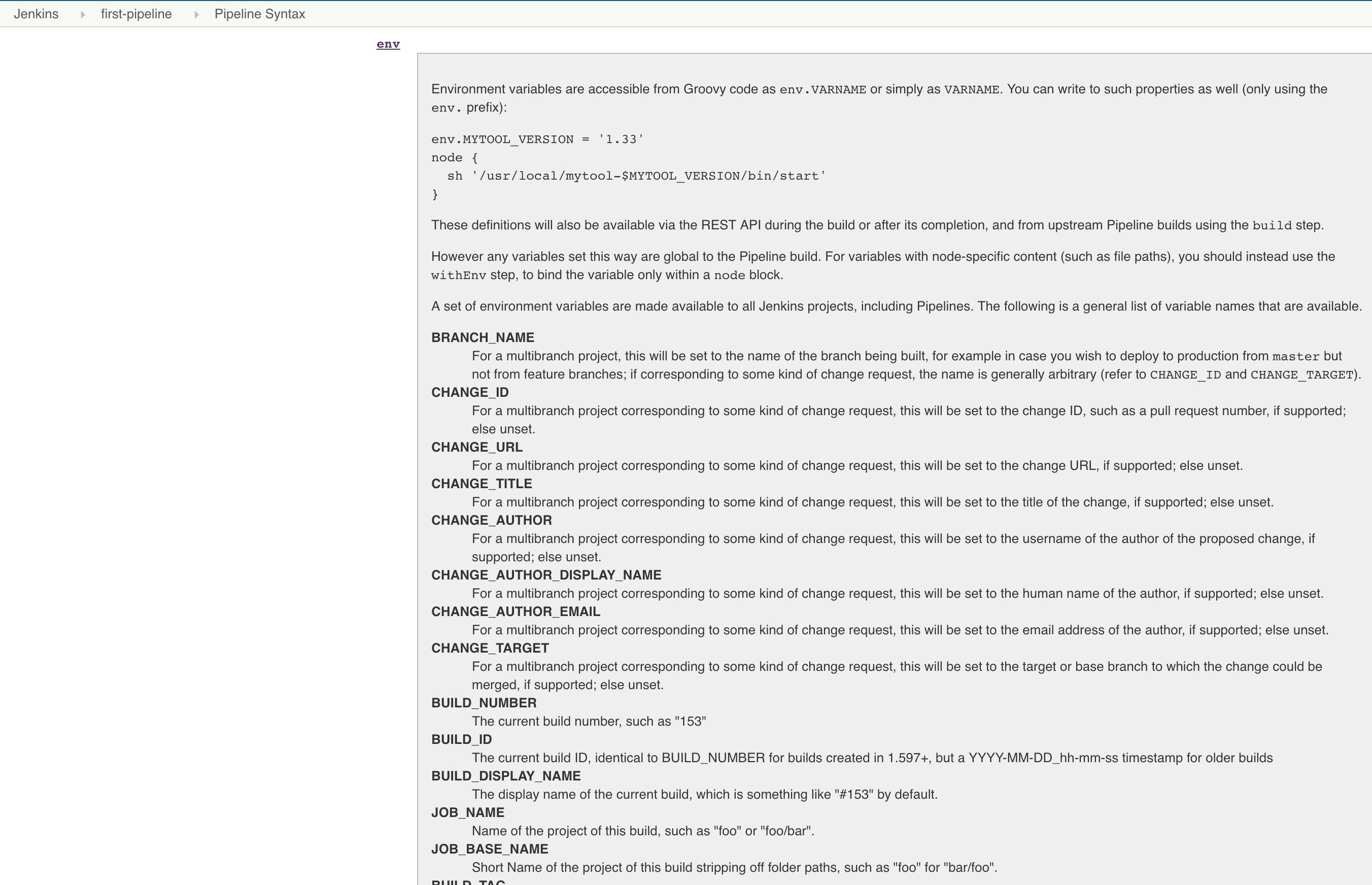
环境变量可以被看作是pipeline与Jenkins交互的媒介。 比如,可以在pipeline中通过BUILD_ NUMBER变量知道构建任务的当前构建次数。环境变量可以分为Jenkins内置变量和自定义变量。
在pipeline执行时,Jenkins通过一个名为env的全局变量,将Jenkins内置环境变量暴露出来。其使用方法有多种,示例如下:
groovy
pipeline {
  agent any
  stages {
    stage('debug-列出当前流水线的所有环境变量) {
      setps {
        sh "printenv | sort"
      }
    }
    stage('Example') {
      steps {
         echo "Running ${env.BUILDNUMBER} on ${env.JENKINS_URL}" # 方法1
         echo "Running $env.BUILDNUMBER on $env.JENKINS_URL"  # 方法2
         echo "Running ${BUILDNUMBER} on ${JENKINS_URL}"   # 方法3 简写版本不推荐,难排查
      }
    }
  }
}
默认env的属性可以直接在pipeline中引用。所以以上方法都是合法的。但是不推荐方法三,因为出现变量冲突时,非常难查问题。
那么,env变量都有哪些可用属性呢? 通过访问<Jenkins master的地址>/pipeline-syntax/globals#env来获取完整列表。 在列表中,当一个变量被声明为"For a multibranch project"时,代表只有多分支项目才会有此变量。
下面我们简单介绍几个在实际工作中经常用到的变量:
在使用env变量时,需要注意不同类型的项目,env变量所包含的属性及其值是不一样的。 比如普通pipeline任务中的GIT BRANCH变量的值为origin/master,而在多分支pipeline任务中GIT BRANCH变量的值为master。
所以,在pipeline中根据分支进行不同行为的逻辑处理时,需要留意。
groovy
pipeline {
    agent any
    environment {
        // 覆盖默认的PATH变量值
        PATH="/bin:/sbin:/usr/bin:/usr/sbin:/usr/local/bin"
        name='jack'
    }
    stages {
        stage("test env") {
          steps {
            sh "printenv"  #调试,打印所有env变量
            echo "${name}"  # jack
            echo "${env.name}"  # jack
          }
        }
     }
  }
groovy
pipeline {
    agent any

    environment {
        FOO = "bar"
    }

    stages {
        stage("Env Variables") {
            environment {
                NAME = "Alan"
            }

            steps {
                echo "FOO = ${env.FOO}"
                echo "NAME = ${env.NAME}"

                script {
                    env.TEST_VARIABLE = "some test value"
                }

                echo "TEST_VARIABLE = ${env.TEST_VARIABLE}"

                withEnv(["ANOTHER_ENV_VAR=here is some value"]) {
                    echo "ANOTHER_ENV_VAR = ${env.ANOTHER_ENV_VAR}"
                }
            }
        }
    }
}Jenkins Pipeline支持覆盖环境变量。您需要注意一些规则。
withEnv(["env=value]) { }语句块可以覆盖任何环境变量。environment {}语句块设置的变量不能使用命令式env.VAR = "value"赋值覆盖。env.VAR = "value"分配只能覆盖使用命令式创建的环境变量。这是一个示例性的Jenkinsfile,显示了所有三种不同的用例。
groovy
pipeline {
    agent any

    environment {
        FOO = "bar"
        NAME = "Joe"
    }

    stages {
        stage("Env Variables") {
            environment {
                NAME = "Alan" // overrides pipeline level NAME env variable
                BUILD_NUMBER = "2" // overrides the default BUILD_NUMBER
            }

            steps {
                echo "FOO = ${env.FOO}" // prints "FOO = bar"
                echo "NAME = ${env.NAME}" // prints "NAME = Alan"
                echo "BUILD_NUMBER =  ${env.BUILD_NUMBER}" // prints "BUILD_NUMBER = 2"

                script {
                    env.SOMETHING = "1" // creates env.SOMETHING variable
                }
            }
        }

        stage("Override Variables") {
            steps {
                script {
                    env.FOO = "IT DOES NOT WORK!" // it can't override env.FOO declared at the pipeline (or stage) level
                    env.SOMETHING = "2" // it can override env variable created imperatively
                }

                echo "FOO = ${env.FOO}" // prints "FOO = bar"
                echo "SOMETHING = ${env.SOMETHING}" // prints "SOMETHING = 2"

                withEnv(["FOO=foobar"]) { // it can override any env variable
                    echo "FOO = ${env.FOO}" // prints "FOO = foobar"
                }

                withEnv(["BUILD_NUMBER=1"]) {
                    echo "BUILD_NUMBER = ${env.BUILD_NUMBER}" // prints "BUILD_NUMBER = 1"
                }
            }
        }
    }
}
environment指令可以用在pipeline中定义,作用域就是整个pipeline,当定义在stage阶段,只在当前stage有效。
groovy
environment {
  __server_name = 'email-server'
  __version = "${BUILD_NUMBER}"
  __artifact_name = "${__server_name}-${__version}.jar"
}关于使用环境变量,存在一种普遍的误解。存储为环境变量的每个值都将转换为String。 当您存储布尔false值时,它将转换为"false"。如果要在布尔表达式中正确使用该值,则需要调用"false".toBoolean()method。
groovy
pipeline {
    agent any

    environment {
        IS_BOOLEAN = false
    }

    stages {
        stage("Env Variables") {
            steps {
                script {
                    if (env.IS_BOOLEAN) {
                        echo "You can see this message, because \"false\" String evaluates to Boolean.TRUE value"
                    }

                    if (env.IS_BOOLEAN.toBoolean() == false) {
                        echo "You can see this message, because \"false\".toBoolean() returns Boolean.FALSE value"
                    }
                }
            }
        }
    }
}您还可以将shell命令的输出捕获为环境变量。 请记住,需要使用sh(script: 'cmd', returnStdout:true)格式来强制sh步骤返回输出,以便可以捕获它并将其存储在变量中。
groovy
pipeline {
    agent any

    environment {
        LS = "${sh(script:'ls -lah', returnStdout: true)}"
    }

    stages {
        stage("Env Variables") {
            steps {
                echo "LS = ${env.LS}"
            }
        }
    }
}
TIP
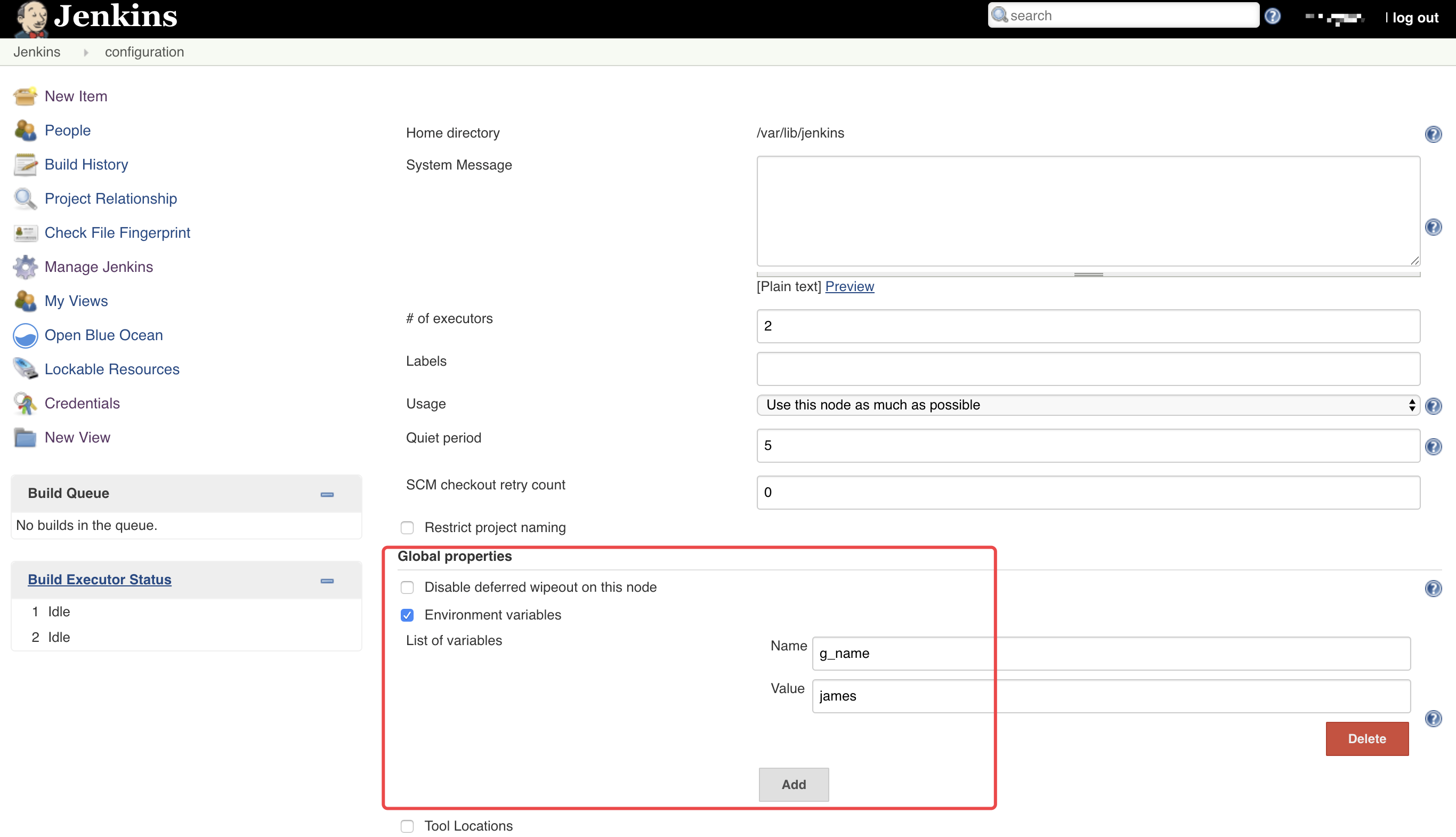
sh 'printenv' 将所有env变量打印出来。__server_name,__就是前缀。定义全局环境变量可以跨pipeline使用 进入Jenkins -- Manage Jenkins -- 找到Global properties -- 勾选Environment variables
自定义全局环境变量会被加入env属性列表中,所以使用时可以直接用${env.g_name}引用。
上面的例子都是定义式pipeline,下面的例子是脚本式
groovy
node {
  /* .. snip .. */
  withEnv(["PATH+MAVEN=${tool 'M3'}/bin"]) {
    sh 'mvn -B verify'
  }
}
此内容由惯性聚合(RSS阅读器)自动聚合整理,仅供阅读参考。 原文来自 — 版权归原作者所有。