惯性聚合 高效追踪和阅读你感兴趣的博客、新闻、科技资讯
阅读原文 在惯性聚合中打开

推荐订阅源

爱范儿
爱范儿
钛媒体:引领未来商业与生活新知
钛媒体:引领未来商业与生活新知
G
GRAHAM CLULEY
www.infosecurity-magazine.com
V2EX - 技术
V2EX - 技术
The Last Watchdog
The Last Watchdog
S
Secure Thoughts
Webroot Blog
Webroot Blog
PCI Perspectives
PCI Perspectives
L
LINUX DO - 最新话题
Hacker News: Ask HN
Hacker News: Ask HN
N
News and Events Feed by Topic
H
Heimdal Security Blog
H
Help Net Security
T
The Blog of Author Tim Ferriss
P
Proofpoint News Feed
The GitHub Blog
The GitHub Blog
Jina AI
Jina AI
Recent Commits to openclaw:main
F
Full Disclosure
小众软件
小众软件
S
Securelist
罗磊的独立博客
NISL@THU
NISL@THU
D
Darknet – Hacking Tools, Hacker News & Cyber Security
C
Cisco Blogs
云风的 BLOG
云风的 BLOG
C
CERT Recently Published Vulnerability Notes
Cisco Talos Blog
Cisco Talos Blog
Know Your Adversary
Know Your Adversary
S
Schneier on Security
D
DataBreaches.Net
M
MIT News - Artificial intelligence
V
Vulnerabilities – Threatpost
N
News and Events Feed by Topic
有赞技术团队
有赞技术团队
F
Fortinet All Blogs
T
Tenable Blog
The Register - Security
C
Check Point Blog
AWS News Blog
AWS News Blog
Cloudbric
Cloudbric
C
CXSECURITY Database RSS Feed - CXSecurity.com
cs.AI updates on arXiv.org
C
Cyber Attacks, Cyber Crime and Cyber Security
Cyber Security Advisories - MS-ISAC
Google Online Security Blog
博客园 - 叶小钗
Hacker News - Newest:
Hacker News - Newest: "LLM"
博客园 - 司徒正美

mafeifan 的编程技术分享

mafengwo-mp3-downloader | mafeifan 的编程技术分享 示例页面 | mafeifan 的编程技术分享 mafeifan 的编程技术分享 mafeifan 的编程技术分享 mafeifan 的编程技术分享 mafeifan 的编程技术分享 mafeifan 的编程技术分享 mafeifan 的编程技术分享 mafeifan 的编程技术分享 mafeifan 的编程技术分享 mafeifan 的编程技术分享 查看 default namespace 下的 default service account名称 mafeifan 的编程技术分享 检查日志 | mafeifan 的编程技术分享 bridge fdb show dev flannel.1 mafeifan 的编程技术分享 mafeifan 的编程技术分享 mafeifan 的编程技术分享 mafeifan 的编程技术分享 mafeifan 的编程技术分享 mafeifan 的编程技术分享 mafeifan 的编程技术分享 mafeifan 的编程技术分享 mafeifan 的编程技术分享 mafeifan 的编程技术分享 mafeifan 的编程技术分享 mafeifan 的编程技术分享 mafeifan 的编程技术分享 mafeifan 的编程技术分享 mafeifan 的编程技术分享 数据收集原理分析 | mafeifan 的编程技术分享 mafeifan 的编程技术分享 mafeifan 的编程技术分享 mafeifan 的编程技术分享 mafeifan 的编程技术分享 mafeifan 的编程技术分享 mafeifan 的编程技术分享 mafeifan 的编程技术分享 mafeifan 的编程技术分享 mafeifan 的编程技术分享 mafeifan 的编程技术分享 mafeifan 的编程技术分享 mafeifan 的编程技术分享 mafeifan 的编程技术分享 mafeifan 的编程技术分享 几种方法 | mafeifan 的编程技术分享 mafeifan 的编程技术分享 mafeifan 的编程技术分享 mafeifan 的编程技术分享 mafeifan 的编程技术分享 mafeifan 的编程技术分享 mafeifan 的编程技术分享 mafeifan 的编程技术分享 mafeifan 的编程技术分享 mafeifan 的编程技术分享 mafeifan 的编程技术分享 mafeifan 的编程技术分享 mafeifan 的编程技术分享 mafeifan 的编程技术分享 mafeifan 的编程技术分享 mafeifan 的编程技术分享 mafeifan 的编程技术分享 mafeifan 的编程技术分享 mafeifan 的编程技术分享 mafeifan 的编程技术分享 mafeifan 的编程技术分享 mafeifan 的编程技术分享 mafeifan 的编程技术分享 mafeifan 的编程技术分享 mafeifan 的编程技术分享 mafeifan 的编程技术分享 mafeifan 的编程技术分享 mafeifan 的编程技术分享 mafeifan 的编程技术分享 mafeifan 的编程技术分享 mafeifan 的编程技术分享 mafeifan 的编程技术分享 mafeifan 的编程技术分享 mafeifan 的编程技术分享 mafeifan 的编程技术分享 mafeifan 的编程技术分享 mafeifan 的编程技术分享 mafeifan 的编程技术分享 mafeifan 的编程技术分享 mafeifan 的编程技术分享 mafeifan 的编程技术分享 mafeifan 的编程技术分享 mafeifan 的编程技术分享 mafeifan 的编程技术分享 mafeifan 的编程技术分享 mafeifan 的编程技术分享 mafeifan 的编程技术分享 mafeifan 的编程技术分享 check the export on the very top of this document so we can use $do mafeifan 的编程技术分享 mafeifan 的编程技术分享 mafeifan 的编程技术分享 mafeifan 的编程技术分享 延伸 -- 关于前端路由 xdebug 3 和 2 的区别
mafeifan 的编程技术分享
2026-01-16 · via mafeifan 的编程技术分享

之前分享过一个 ngrok内网穿透工具,这个不是开源的,再推荐一个国人开发的免费开源工具 frp,配置项更多,功能更强大。 不过需要你有一台公网IP的服务器,如果要访问内网的web服务,还需要一个域名。

准备 ​

  • 公网服务器,假设 系统 Linux Ubuntu, 公网IP 140.140.192.192, 绑定了域名 www.good.com
  • 本机 Mac 系统,跑着一个Angular程序,在本地访问,地址是 localhost:4200

效果 ​

利用frp,可以实现任何人都可以通过配置的端口如 www.good.com:7001 访问我本机的Angular程序

方法 ​

  1. 服务器和内网本机分别下载对应系统平台的frp, 这里ubuntu服务器需要下载linux_arm_64, mac本机是darwin_amd64。
  2. 先配服务端,在服务器上下载解压,编辑 frps.ini, 然后启动 ./frps -c ./frps.ini 后台启动命令 nohup ./frps -c ./frps.ini &
[common]
bind_port = 7000
# 客户端定义的端口
vhost_http_port = 7001
  1. 配置客户端,同样下载解压
wget https://github.com/fatedier/frp/releases/download/v0.23.1/frp_0.23.1_darwin_amd64.tar.gz
tar -zxvf  frp_0.23.1_darwin_amd64.tar.gz

编辑 frpc.ini

[common]
server_addr = 140.140.192.192   #公网服务器ip
server_port = 7001                       #与服务端bind_port一致
 
#公网访问内部web服务器以http方式
[web]
type = http         #访问协议
local_port = 4200   #内网web服务的端口号
custom_domains = www.good.com   #所绑定的公网服务器域名,一级、二级域名都可以
  1. 浏览器打开 www.good.com:4300 测试

进阶 ​

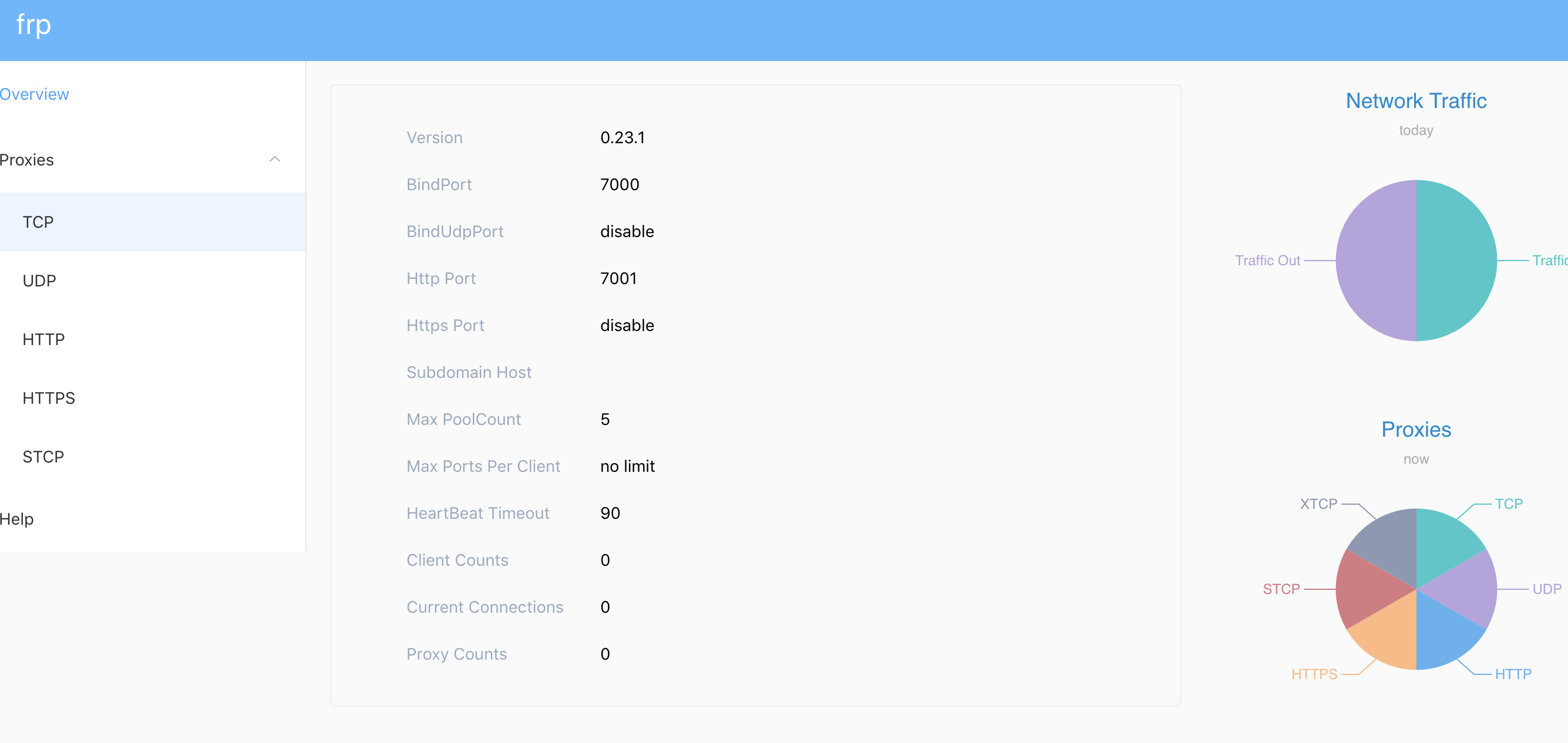
修改服务端的 frps.ini, 添加 dashboard 信息,重启启动后可以通过140.140.192.192:7500打开控制面板

[common]
bind_port = 7000
# 客户端定义的端口
vhost_http_port = 7001

dashboard_port = 7500
# dashboard 用户名密码,默认都为 admin
dashboard_user = admin
dashboard_pwd = admin

image.png

注意事项 ​

报 Invalid Host header

如果本机的web项目用了webpack server(目前vue cli, react cli, angular 本地开发用的都是这个) 这个是webpack server的安全策略,如果是angular项目,需要在启动配置中加上 --disable-host-check 类似 ng serve --open --host $IP --port $PORT --disable-host-check

参考 ​

https://blog.csdn.net/u013144287/article/details/78589643/