惯性聚合 高效追踪和阅读你感兴趣的博客、新闻、科技资讯
阅读原文 在惯性聚合中打开

推荐订阅源

The GitHub Blog
The GitHub Blog
S
SegmentFault 最新的问题
L
LangChain Blog
Simon Willison's Weblog
N
News and Events Feed by Topic
Exploit-DB.com RSS Feed
WordPress大学
WordPress大学
M
MIT News - Artificial intelligence
A
About on SuperTechFans
Microsoft Security Blog
I
Intezer
Know Your Adversary
Know Your Adversary
H
Heimdal Security Blog
博客园 - 叶小钗
B
Blog RSS Feed
F
Fortinet All Blogs
Hacker News: Ask HN
Hacker News: Ask HN
A
Arctic Wolf
小众软件
小众软件
Help Net Security
Help Net Security
MongoDB | Blog
MongoDB | Blog
aimingoo的专栏
aimingoo的专栏
G
Google Developers Blog
Forbes - Security
Forbes - Security
Latest news
Latest news
AI
AI
I
InfoQ
H
Hackread – Cybersecurity News, Data Breaches, AI and More
C
CXSECURITY Database RSS Feed - CXSecurity.com
W
WeLiveSecurity
C
Cybersecurity and Infrastructure Security Agency CISA
人人都是产品经理
人人都是产品经理
Cyberwarzone
Cyberwarzone
奇客Solidot–传递最新科技情报
奇客Solidot–传递最新科技情报
J
Java Code Geeks
Engineering at Meta
Engineering at Meta
C
Cyber Attacks, Cyber Crime and Cyber Security
O
OpenAI News
博客园 - 【当耐特】
T
Threat Research - Cisco Blogs
GbyAI
GbyAI
U
Unit 42
D
Darknet – Hacking Tools, Hacker News & Cyber Security
G
GRAHAM CLULEY
Apple Machine Learning Research
宝玉的分享
宝玉的分享
Google DeepMind News
T
Threatpost
T
The Blog of Author Tim Ferriss
罗磊的独立博客

mafeifan 的编程技术分享

mafengwo-mp3-downloader | mafeifan 的编程技术分享 示例页面 | mafeifan 的编程技术分享 mafeifan 的编程技术分享 mafeifan 的编程技术分享 mafeifan 的编程技术分享 mafeifan 的编程技术分享 mafeifan 的编程技术分享 mafeifan 的编程技术分享 mafeifan 的编程技术分享 mafeifan 的编程技术分享 mafeifan 的编程技术分享 查看 default namespace 下的 default service account名称 mafeifan 的编程技术分享 检查日志 | mafeifan 的编程技术分享 bridge fdb show dev flannel.1 mafeifan 的编程技术分享 mafeifan 的编程技术分享 mafeifan 的编程技术分享 mafeifan 的编程技术分享 mafeifan 的编程技术分享 mafeifan 的编程技术分享 mafeifan 的编程技术分享 mafeifan 的编程技术分享 mafeifan 的编程技术分享 mafeifan 的编程技术分享 mafeifan 的编程技术分享 mafeifan 的编程技术分享 mafeifan 的编程技术分享 mafeifan 的编程技术分享 mafeifan 的编程技术分享 数据收集原理分析 | mafeifan 的编程技术分享 mafeifan 的编程技术分享 mafeifan 的编程技术分享 mafeifan 的编程技术分享 mafeifan 的编程技术分享 mafeifan 的编程技术分享 mafeifan 的编程技术分享 mafeifan 的编程技术分享 mafeifan 的编程技术分享 mafeifan 的编程技术分享 mafeifan 的编程技术分享 mafeifan 的编程技术分享 mafeifan 的编程技术分享 mafeifan 的编程技术分享 mafeifan 的编程技术分享 几种方法 | mafeifan 的编程技术分享 mafeifan 的编程技术分享 mafeifan 的编程技术分享 mafeifan 的编程技术分享 mafeifan 的编程技术分享 mafeifan 的编程技术分享 mafeifan 的编程技术分享 mafeifan 的编程技术分享 mafeifan 的编程技术分享 mafeifan 的编程技术分享 mafeifan 的编程技术分享 mafeifan 的编程技术分享 mafeifan 的编程技术分享 mafeifan 的编程技术分享 mafeifan 的编程技术分享 mafeifan 的编程技术分享 mafeifan 的编程技术分享 mafeifan 的编程技术分享 mafeifan 的编程技术分享 mafeifan 的编程技术分享 mafeifan 的编程技术分享 mafeifan 的编程技术分享 mafeifan 的编程技术分享 mafeifan 的编程技术分享 mafeifan 的编程技术分享 mafeifan 的编程技术分享 mafeifan 的编程技术分享 mafeifan 的编程技术分享 mafeifan 的编程技术分享 mafeifan 的编程技术分享 mafeifan 的编程技术分享 mafeifan 的编程技术分享 mafeifan 的编程技术分享 mafeifan 的编程技术分享 mafeifan 的编程技术分享 mafeifan 的编程技术分享 mafeifan 的编程技术分享 mafeifan 的编程技术分享 mafeifan 的编程技术分享 mafeifan 的编程技术分享 mafeifan 的编程技术分享 mafeifan 的编程技术分享 mafeifan 的编程技术分享 mafeifan 的编程技术分享 mafeifan 的编程技术分享 mafeifan 的编程技术分享 mafeifan 的编程技术分享 mafeifan 的编程技术分享 check the export on the very top of this document so we can use $do mafeifan 的编程技术分享 mafeifan 的编程技术分享 mafeifan 的编程技术分享 mafeifan 的编程技术分享 延伸 -- 关于前端路由 xdebug 3 和 2 的区别
mafeifan 的编程技术分享
2026-01-16 · via mafeifan 的编程技术分享

在做前后台分离的项目中,认证是必须的,由于http是无状态的。前台用户登录成功后,后台给前台返回token。之后前台给后台发请求每次携带token。

原理也非常简单:
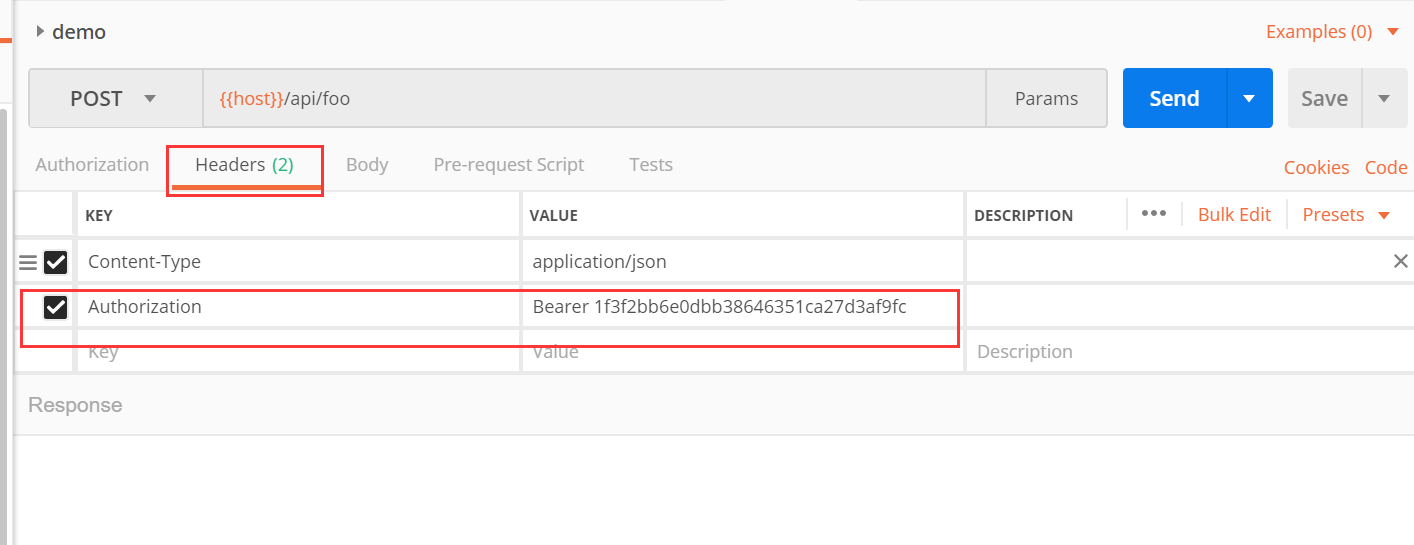
  1. 前天在请求头中添加 Authorization,如下 image.png
  2. 后台取到值,然后去用户表的api_token列进行匹配,如果查到说明验证成功,并且返回相关信息。

Laravel本身自带几种验证方式,下面介绍下token认证的实现的方法。

前台在向后台发起请求时要携带一个token

后台需要做一个返回当前登录用户的信息的api,地址是 /api/user

  1. 先添加路由,当给 route/api.php 添加
Route::middleware('auth:api')->get('/user', function (Request $request) {
	echo $request->user();
});

如果浏览器直接访问 http://mydomain.com/api/user 会返回 401 Unauthorized 原因是在config/auth.php中有下面的关键配置

    'guards' => [
        'web' => [
            'driver' => 'session',
            'provider' => 'users',
        ],

        'api' => [
            'driver' => 'token',
            'provider' => 'users',
        ],
    ],

可以看到通过api访问走的是token认证,这里没有提供token所以就认证失败返回401了。

  1. 'driver' => 'token' 实际调用的是\vendor\laravel\framework\src\Illuminate\Auth\TokenGuard.php 上面说到我们需要在request里提供api_token参数,为了区别是哪个用户,需要在user表添加api_token字段
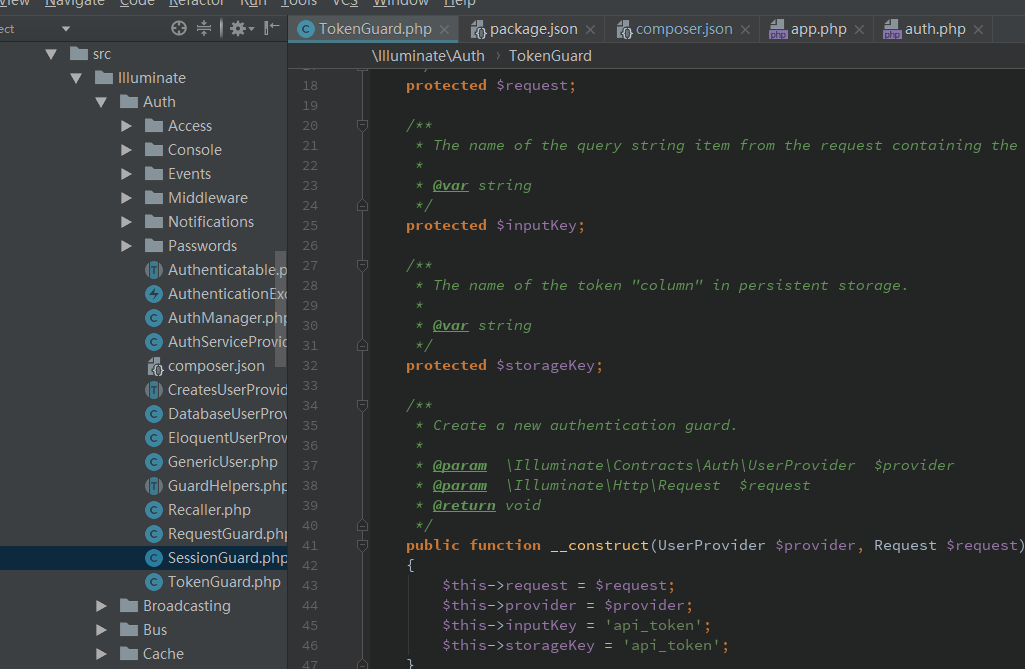
image.png

  1. 认证过程调用的是getTokenForRequest方法
    public function getTokenForRequest()
    {
        $token = $this->request->query($this->inputKey);

        if (empty($token)) {
            $token = $this->request->input($this->inputKey);
        }

        if (empty($token)) {
            $token = $this->request->bearerToken();
        }

        if (empty($token)) {
            $token = $this->request->getPassword();
        }

        return $token;
    }

这个bearerToken实际找header中是否存在Authorization

    public function bearerToken()
    {
        $header = $this->header('Authorization', '');

        if (Str::startsWith($header, 'Bearer ')) {
            return Str::substr($header, 7);
        }
    }
  1. 先给user表添加api_token字段 php artisan make:migration add_api_token_to_users --table=users 内容
class AddApiTokenToUsers extends Migration
{
    /**
     * Run the migrations.
     *
     * @return void
     */
    public function up()
    {
        Schema::table('users', function (Blueprint $table) {
	        $table->string('api_token', 60)->unique();
        });
    }

    /**
     * Reverse the migrations.
     *
     * @return void
     */
    public function down()
    {
        Schema::table('users', function (Blueprint $table) {
            $table->dropColumn('api_token');
        });
    }
}
  1. 打开navicat进到user表里,更新users的api_token。 image.png

  2. 打开postman image.png 注意这里的header,key是Authorization,值就是Bearer+空格+刚才数据库里设的api_token

这样就能返回内容啦,修改其他用户的token能返回相应的用户信息,说明认证成功,功能基本完成! 下面完善细节

  1. 完善逻辑 修改 \app\Http\Controllers\Auth\RegisterController.php
    protected function create(array $data)
    {
        return User::create([
            'name' => $data['name'],
            'email' => $data['email'],
            'password' => bcrypt($data['password']),
            // 添加这行
	        'api_token' => str_random(60),
        ]);
    }

User Model 的 $fillable也改下

    protected $fillable = [
        'name', 'email', 'password', 'api_token',
    ];
  1. 如果在前台页面,发起请求时如何给后台传这个Authorization header? 方法如下 注意,下面的是Laravel5.4的修改方法。新版本可能有细微区别,只要知道原理就能自己改了。

打开 \resources\assets\js\bootstrap.js 参照着csrf-token。合适的地方添加下面的代码

let token     = document.head.querySelector('meta[name="csrf-token"]');
let api_token = document.head.querySelector('meta[name="api-token"]');

if (token) {
    // 这个要参考axios的文档
    window.axios.defaults.headers.common['X-CSRF-TOKEN'] = Laravel.csrfToken =token.content;
    // 如果用的jquery
    // Fix jquery ajax crossDomain without Token
    // jQuery.ajaxPrefilter(function (options, originalOptions, jqXHR) {
    //     // if (options.crossDomain) {
    //     jqXHR.setRequestHeader('Authorization', api_token.content);
    //     jqXHR.setRequestHeader('X-CSRF-TOKEN', token.content);
    //     //}
    // });
} else {
    console.error('CSRF token not found: https://laravel.com/docs/csrf#csrf-x-csrf-token');
}


if (api_token) {
    window.axios.defaults.headers.common['Authorization'] = api_token.content;
} else {
    console.error('Authorization token not found: https://laravel.com/docs/csrf#csrf-x-csrf-token');
}

最后修改公共视图模版中 \views\layouts\app.blade.php

    <meta name="csrf-token" content="{{ csrf_token() }}">
    <meta name="api-token" content="{{ Auth::check() ? 'Bearer '.Auth::user()->api_token : 'Bearer ' }}">

总结: 本质上给用户表添加api_token,后台根据这个字段判断是否是有效的用户,无效返回401,有效返回查询结果。 优点是容易理解,缺点太简单,安全也不够。 为了安全,可以实现下面的功能:

  1. 每次登录成功后刷新api_token为新值 其实 Laravel 官方提供了一个 Laravel Passport 的包。Laravel Passport is an OAuth2 server and API authentication package 。 具体使用请等更新。

问题: 如何修改默认的api_token列?