惯性聚合 高效追踪和阅读你感兴趣的博客、新闻、科技资讯
阅读原文 在惯性聚合中打开

推荐订阅源

Spread Privacy
Spread Privacy
L
LangChain Blog
爱范儿
爱范儿
OSCHINA 社区最新新闻
OSCHINA 社区最新新闻
Google DeepMind News
有赞技术团队
有赞技术团队
博客园 - 【当耐特】
人人都是产品经理
人人都是产品经理
H
Hackread – Cybersecurity News, Data Breaches, AI and More
www.infosecurity-magazine.com
Engineering at Meta
Engineering at Meta
P
Privacy International News Feed
I
Intezer
NISL@THU
NISL@THU
Jina AI
Jina AI
G
GRAHAM CLULEY
C
CERT Recently Published Vulnerability Notes
S
Schneier on Security
Threat Intelligence Blog | Flashpoint
Cisco Talos Blog
Cisco Talos Blog
Scott Helme
Scott Helme
MyScale Blog
MyScale Blog
IT之家
IT之家
Security Latest
Security Latest
C
Cisco Blogs
Cyberwarzone
Cyberwarzone
aimingoo的专栏
aimingoo的专栏
V
Vulnerabilities – Threatpost
L
LINUX DO - 热门话题
Recorded Future
Recorded Future
The Hacker News
The Hacker News
C
CXSECURITY Database RSS Feed - CXSecurity.com
月光博客
月光博客
A
Arctic Wolf
云风的 BLOG
云风的 BLOG
N
Netflix TechBlog - Medium
K
Kaspersky official blog
S
Securelist
M
MIT News - Artificial intelligence
T
Threat Research - Cisco Blogs
P
Palo Alto Networks Blog
Simon Willison's Weblog
Know Your Adversary
Know Your Adversary
WordPress大学
WordPress大学
Project Zero
Project Zero
freeCodeCamp Programming Tutorials: Python, JavaScript, Git & More
N
News and Events Feed by Topic
AWS News Blog
AWS News Blog
T
The Exploit Database - CXSecurity.com
T
The Blog of Author Tim Ferriss

mafeifan 的编程技术分享

mafengwo-mp3-downloader | mafeifan 的编程技术分享 示例页面 | mafeifan 的编程技术分享 mafeifan 的编程技术分享 mafeifan 的编程技术分享 mafeifan 的编程技术分享 mafeifan 的编程技术分享 mafeifan 的编程技术分享 mafeifan 的编程技术分享 mafeifan 的编程技术分享 mafeifan 的编程技术分享 mafeifan 的编程技术分享 查看 default namespace 下的 default service account名称 mafeifan 的编程技术分享 检查日志 | mafeifan 的编程技术分享 bridge fdb show dev flannel.1 mafeifan 的编程技术分享 mafeifan 的编程技术分享 mafeifan 的编程技术分享 mafeifan 的编程技术分享 mafeifan 的编程技术分享 mafeifan 的编程技术分享 mafeifan 的编程技术分享 mafeifan 的编程技术分享 mafeifan 的编程技术分享 mafeifan 的编程技术分享 mafeifan 的编程技术分享 mafeifan 的编程技术分享 mafeifan 的编程技术分享 mafeifan 的编程技术分享 mafeifan 的编程技术分享 数据收集原理分析 | mafeifan 的编程技术分享 mafeifan 的编程技术分享 mafeifan 的编程技术分享 mafeifan 的编程技术分享 mafeifan 的编程技术分享 mafeifan 的编程技术分享 mafeifan 的编程技术分享 mafeifan 的编程技术分享 mafeifan 的编程技术分享 mafeifan 的编程技术分享 mafeifan 的编程技术分享 mafeifan 的编程技术分享 mafeifan 的编程技术分享 mafeifan 的编程技术分享 mafeifan 的编程技术分享 几种方法 | mafeifan 的编程技术分享 mafeifan 的编程技术分享 mafeifan 的编程技术分享 mafeifan 的编程技术分享 mafeifan 的编程技术分享 mafeifan 的编程技术分享 mafeifan 的编程技术分享 mafeifan 的编程技术分享 mafeifan 的编程技术分享 mafeifan 的编程技术分享 mafeifan 的编程技术分享 mafeifan 的编程技术分享 mafeifan 的编程技术分享 mafeifan 的编程技术分享 mafeifan 的编程技术分享 mafeifan 的编程技术分享 mafeifan 的编程技术分享 mafeifan 的编程技术分享 mafeifan 的编程技术分享 mafeifan 的编程技术分享 mafeifan 的编程技术分享 mafeifan 的编程技术分享 mafeifan 的编程技术分享 mafeifan 的编程技术分享 mafeifan 的编程技术分享 mafeifan 的编程技术分享 mafeifan 的编程技术分享 mafeifan 的编程技术分享 mafeifan 的编程技术分享 mafeifan 的编程技术分享 mafeifan 的编程技术分享 mafeifan 的编程技术分享 mafeifan 的编程技术分享 mafeifan 的编程技术分享 mafeifan 的编程技术分享 mafeifan 的编程技术分享 mafeifan 的编程技术分享 mafeifan 的编程技术分享 mafeifan 的编程技术分享 mafeifan 的编程技术分享 mafeifan 的编程技术分享 mafeifan 的编程技术分享 mafeifan 的编程技术分享 mafeifan 的编程技术分享 mafeifan 的编程技术分享 mafeifan 的编程技术分享 mafeifan 的编程技术分享 mafeifan 的编程技术分享 check the export on the very top of this document so we can use $do mafeifan 的编程技术分享 mafeifan 的编程技术分享 mafeifan 的编程技术分享 mafeifan 的编程技术分享 延伸 -- 关于前端路由 xdebug 3 和 2 的区别
mafeifan 的编程技术分享
2026-01-16 · via mafeifan 的编程技术分享

chrome浏览器是世界上最适合开发人员使用的浏览器的,没有之一。

Live Expression ​

从 chrome70起,我们可以在控制台上方可以放一个动态表达式,用于实时监控它的值。

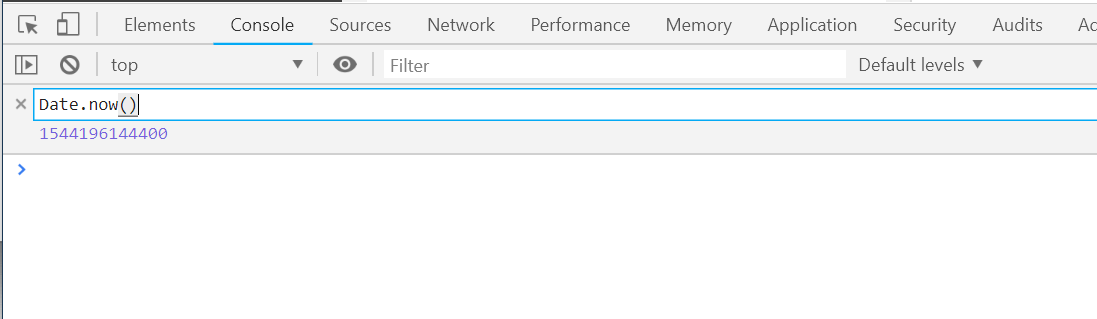
  1. 点击 "Create Live Expression" 眼睛图标,打开动态表达式界面。

image.png

  1. 输入要监控的表达式,比如查看当前的时间戳,输入 Date.now()
  2. 会发现当前时间戳会一直变动。也就是表示式被重新计算了,Live Expression 的执行频率是250毫秒。

下面是一些有用的表达式:

  • document.activeElement 高亮当前focus的node
  • document.querySelector(s) 高亮任意node,参数s是css选择器表达式,相当于在hover这个node。
  • $0 高亮当前所选中的node
  • $0.parentElement 高亮当前所选中的node的父节点

Store DOM nodes as global variables ​

我们可以把页面上的某元素节点作为全局变量。

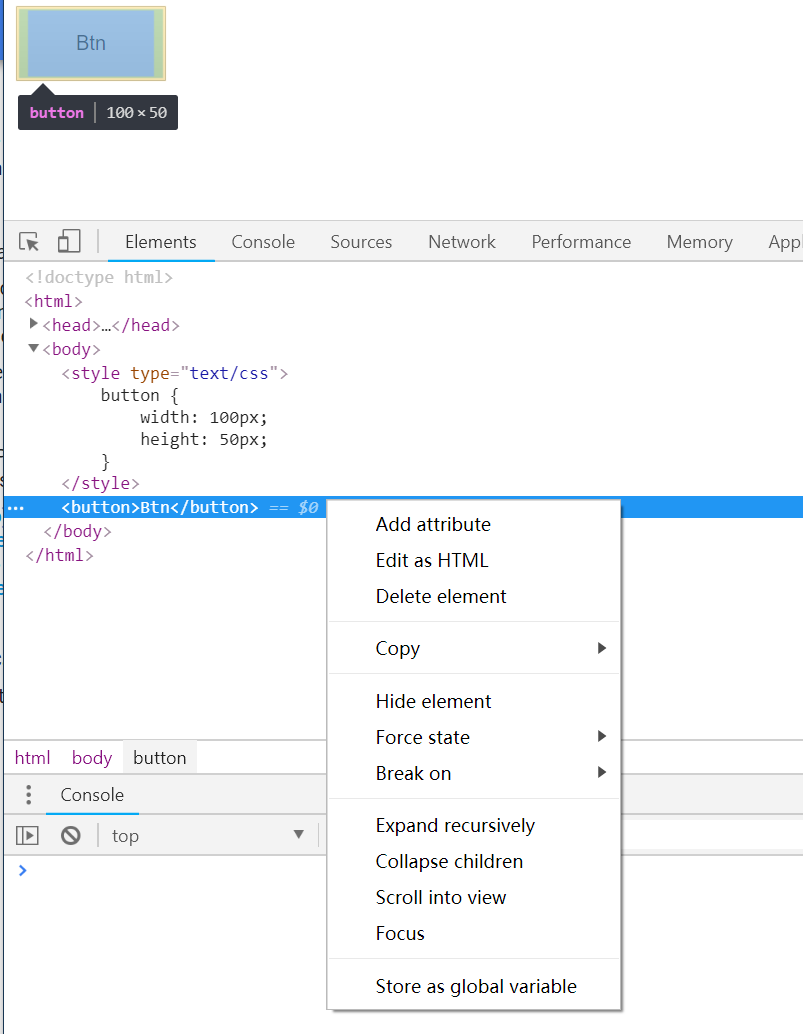
  1. 比如当前页面有一个按钮,我们审核该元素,右键选择 "store as global variable"

image.png

  1. console面板中会显示该元素的引用名称,一般是 temp1 temp2。
  2. 在console中输入 monitorEvents(temp1) 会监视并打印出该元素的所有事件。
  3. 这个你可以在按钮上点击,移动,甚至按键,会发现一系列的mouse, click等事件
  4. 使用 unmonitorEvents(temp1) 停止记录事件。
  5. 使用 monitorEvents(temp1, ['mouse', 'focus']) 只记录某类型的事件。可以填 mouse, key, click, touch和control等。

参考: ​

https://developers.google.com/web/updates/2018/08/devtoolshttps://developers.google.com/web/updates/2018/10/devtools#bonushttps://developers.google.com/web/tools/chrome-devtools/console/command-line-reference