惯性聚合 高效追踪和阅读你感兴趣的博客、新闻、科技资讯
阅读原文 在惯性聚合中打开

推荐订阅源

H
Heimdal Security Blog
P
Privacy International News Feed
S
Schneier on Security
P
Proofpoint News Feed
L
Lohrmann on Cybersecurity
Spread Privacy
Spread Privacy
P
Privacy & Cybersecurity Law Blog
D
Darknet – Hacking Tools, Hacker News & Cyber Security
Scott Helme
Scott Helme
K
Kaspersky official blog
大猫的无限游戏
大猫的无限游戏
freeCodeCamp Programming Tutorials: Python, JavaScript, Git & More
aimingoo的专栏
aimingoo的专栏
Simon Willison's Weblog
S
Securelist
Help Net Security
Help Net Security
B
Blog
H
Hackread – Cybersecurity News, Data Breaches, AI and More
Security Archives - TechRepublic
云风的 BLOG
云风的 BLOG
The GitHub Blog
The GitHub Blog
N
News and Events Feed by Topic
Hacker News: Ask HN
Hacker News: Ask HN
cs.CV updates on arXiv.org
CTFtime.org: upcoming CTF events
M
MIT News - Artificial intelligence
雷峰网
雷峰网
博客园 - 司徒正美
V
V2EX
AWS News Blog
AWS News Blog
Know Your Adversary
Know Your Adversary
N
News | PayPal Newsroom
T
Tor Project blog
Cisco Talos Blog
Cisco Talos Blog
OSCHINA 社区最新新闻
OSCHINA 社区最新新闻
PCI Perspectives
PCI Perspectives
Google DeepMind News
Threat Intelligence Blog | Flashpoint
U
Unit 42
C
Cybersecurity and Infrastructure Security Agency CISA
P
Palo Alto Networks Blog
G
Google Developers Blog
T
Threat Research - Cisco Blogs
博客园 - Franky
I
InfoQ
D
DataBreaches.Net
爱范儿
爱范儿
Y
Y Combinator Blog
博客园 - 叶小钗
奇客Solidot–传递最新科技情报
奇客Solidot–传递最新科技情报

mafeifan 的编程技术分享

mafengwo-mp3-downloader | mafeifan 的编程技术分享 示例页面 | mafeifan 的编程技术分享 mafeifan 的编程技术分享 mafeifan 的编程技术分享 mafeifan 的编程技术分享 mafeifan 的编程技术分享 mafeifan 的编程技术分享 mafeifan 的编程技术分享 mafeifan 的编程技术分享 mafeifan 的编程技术分享 mafeifan 的编程技术分享 查看 default namespace 下的 default service account名称 mafeifan 的编程技术分享 检查日志 | mafeifan 的编程技术分享 bridge fdb show dev flannel.1 mafeifan 的编程技术分享 mafeifan 的编程技术分享 mafeifan 的编程技术分享 mafeifan 的编程技术分享 mafeifan 的编程技术分享 mafeifan 的编程技术分享 mafeifan 的编程技术分享 mafeifan 的编程技术分享 mafeifan 的编程技术分享 mafeifan 的编程技术分享 mafeifan 的编程技术分享 mafeifan 的编程技术分享 mafeifan 的编程技术分享 mafeifan 的编程技术分享 mafeifan 的编程技术分享 数据收集原理分析 | mafeifan 的编程技术分享 mafeifan 的编程技术分享 mafeifan 的编程技术分享 mafeifan 的编程技术分享 mafeifan 的编程技术分享 mafeifan 的编程技术分享 mafeifan 的编程技术分享 mafeifan 的编程技术分享 mafeifan 的编程技术分享 mafeifan 的编程技术分享 mafeifan 的编程技术分享 mafeifan 的编程技术分享 mafeifan 的编程技术分享 mafeifan 的编程技术分享 mafeifan 的编程技术分享 几种方法 | mafeifan 的编程技术分享 mafeifan 的编程技术分享 mafeifan 的编程技术分享 mafeifan 的编程技术分享 mafeifan 的编程技术分享 mafeifan 的编程技术分享 mafeifan 的编程技术分享 mafeifan 的编程技术分享 mafeifan 的编程技术分享 mafeifan 的编程技术分享 mafeifan 的编程技术分享 mafeifan 的编程技术分享 mafeifan 的编程技术分享 mafeifan 的编程技术分享 mafeifan 的编程技术分享 mafeifan 的编程技术分享 mafeifan 的编程技术分享 mafeifan 的编程技术分享 mafeifan 的编程技术分享 mafeifan 的编程技术分享 mafeifan 的编程技术分享 mafeifan 的编程技术分享 mafeifan 的编程技术分享 mafeifan 的编程技术分享 mafeifan 的编程技术分享 mafeifan 的编程技术分享 mafeifan 的编程技术分享 mafeifan 的编程技术分享 mafeifan 的编程技术分享 mafeifan 的编程技术分享 mafeifan 的编程技术分享 mafeifan 的编程技术分享 mafeifan 的编程技术分享 mafeifan 的编程技术分享 mafeifan 的编程技术分享 mafeifan 的编程技术分享 mafeifan 的编程技术分享 mafeifan 的编程技术分享 mafeifan 的编程技术分享 mafeifan 的编程技术分享 mafeifan 的编程技术分享 mafeifan 的编程技术分享 mafeifan 的编程技术分享 mafeifan 的编程技术分享 mafeifan 的编程技术分享 mafeifan 的编程技术分享 mafeifan 的编程技术分享 check the export on the very top of this document so we can use $do mafeifan 的编程技术分享 mafeifan 的编程技术分享 mafeifan 的编程技术分享 mafeifan 的编程技术分享 运维自动化之ANSIBLE | mafeifan 的编程技术分享 延伸 -- 关于前端路由 xdebug 3 和 2 的区别
mafeifan 的编程技术分享
2026-01-16 · via mafeifan 的编程技术分享

第一个示例 ​

注册事件监听器的常规写法。

javascript

var button = document.querySelector('button');
button.addEventListener('click', () => console.log('Clicked!'));

使用 RxJS 的话,创建一个 observable 来代替(基于最新的Rxjs6版本写法)

html

<script src='https://cdn.bootcss.com/rxjs/6.5.1/rxjs.umd.js'></script>
<script>
const { fromEvent } = rxjs;

const button = document.querySelector('button');
fromEvent(button, 'click')
  .subscribe(() => console.log('Clicked!'));
</script>

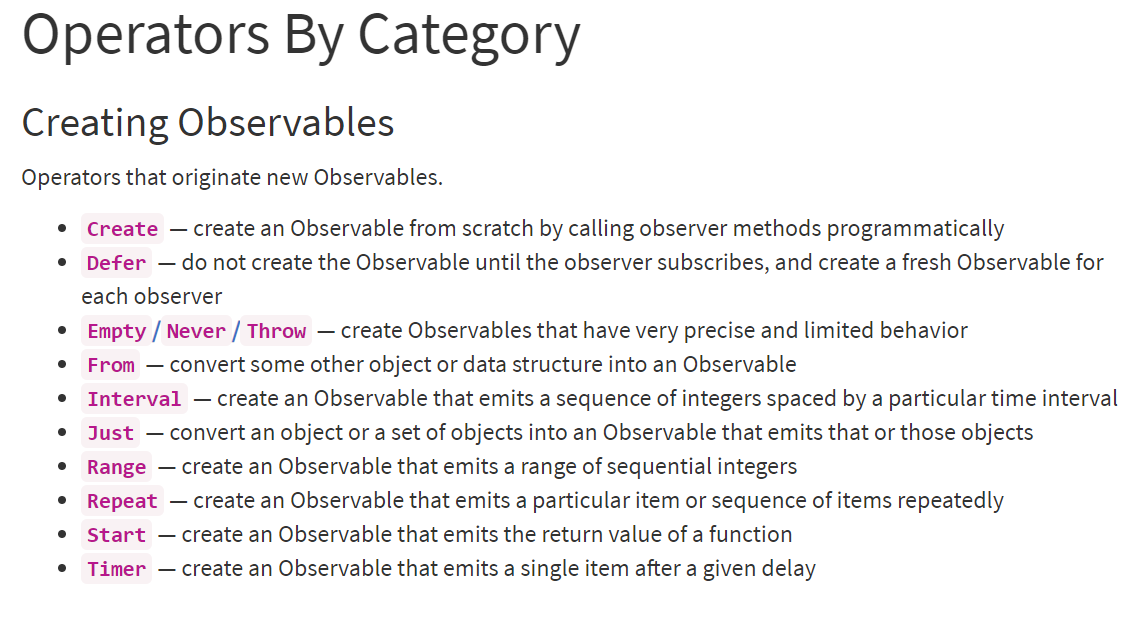
上面例子中的fromEvent就是基于Event 建立 Observable,fromEvent 的第一个参数要传入 DOM 对象,第二个参数传入要监听的事件名。 创建 Observable 有很多操作符

image.png

使用Create操作符从头开始创建一个Observable, 这个接收一个回调函数,把observer作为参数

javascript

  // Observer 是一个对象,这个对象具有三个方法,分别是 next, error, complete
  // 建立 Observable 最简单方法是用 create 方法
  // create 接收一个回调函数,把 observer 作为参数
  const observer = {
    next: value => {
      console.log(`observer:` + value)
    },
    error: error => {
      console.log('Error:', error);
    },
    complete: () => {
      console.log('complete');
    }
  }

  var observable = rxjs.Observable
    .create(observer => {
      observer.next('Jerry');
      observer.next('Anna');
      observer.complete();
      observer.next('not work');
    })

  // 建立观察者来订阅 observable
  // 订阅一个 Observable 就像是执行一个 function
  observable.subscribe(
    observer
  )

from操作符:将对象、字符串,数组,promise 等其他类型转换为Observable。 请自己敲一遍看结果。

javascript

  const {from} = rxjs;

  function f() {
    return from(arguments);
  }

  const observer = {
    next: value => {
      console.log('Next: ' + value);
    },
    error: error => {
      console.log('Error:', error);
    },
    complete: () => {
      console.log('Complete');
    }
  }

  // Array Like Object
  f(1, 2, 3).subscribe(observer);

  // string
  from('foo').subscribe(observer);

  // Set, any iterable object
  const s = new Set(['foo', window]);
  from(s).subscribe(observer);

  // Promise
  const source = from(new Promise((resolve, reject) => {
      setTimeout(() => {
        resolve('Hello RxJS!');
      }, 3000)
    }))

  source.subscribe(observer);