惯性聚合 高效追踪和阅读你感兴趣的博客、新闻、科技资讯
阅读原文 在惯性聚合中打开

推荐订阅源

Martin Fowler
Martin Fowler
D
Darknet – Hacking Tools, Hacker News & Cyber Security
H
Hackread – Cybersecurity News, Data Breaches, AI and More
小众软件
小众软件
V
Visual Studio Blog
T
Tailwind CSS Blog
博客园 - Franky
F
Fortinet All Blogs
D
DataBreaches.Net
Recorded Future
Recorded Future
雷峰网
雷峰网
GbyAI
GbyAI
博客园 - 聂微东
V
V2EX
Security Archives - TechRepublic
SecWiki News
SecWiki News
N
News and Events Feed by Topic
PCI Perspectives
PCI Perspectives
Help Net Security
Help Net Security
Y
Y Combinator Blog
K
KPMG report finds enterprise disconnect between AI and its ROI | CIO
云风的 BLOG
云风的 BLOG
TaoSecurity Blog
TaoSecurity Blog
K
Kaspersky official blog
AI
AI
The Hacker News
The Hacker News
C
Cybersecurity and Infrastructure Security Agency CISA
Project Zero
Project Zero
freeCodeCamp Programming Tutorials: Python, JavaScript, Git & More
Microsoft Azure Blog
Security Latest
Security Latest
Hacker News: Ask HN
Hacker News: Ask HN
H
Help Net Security
让小产品的独立变现更简单 - ezindie.com
I
Intezer
Spread Privacy
Spread Privacy
Blog — PlanetScale
Blog — PlanetScale
宝玉的分享
宝玉的分享
Cyberwarzone
Cyberwarzone
T
Threatpost
C
CERT Recently Published Vulnerability Notes
L
Lohrmann on Cybersecurity
S
SegmentFault 最新的问题
P
Privacy & Cybersecurity Law Blog
S
Securelist
A
About on SuperTechFans
WordPress大学
WordPress大学
G
Google Developers Blog
L
LINUX DO - 热门话题
CTFtime.org: upcoming CTF events

mafeifan 的编程技术分享

mafengwo-mp3-downloader | mafeifan 的编程技术分享 示例页面 | mafeifan 的编程技术分享 mafeifan 的编程技术分享 mafeifan 的编程技术分享 mafeifan 的编程技术分享 mafeifan 的编程技术分享 mafeifan 的编程技术分享 mafeifan 的编程技术分享 mafeifan 的编程技术分享 mafeifan 的编程技术分享 mafeifan 的编程技术分享 查看 default namespace 下的 default service account名称 mafeifan 的编程技术分享 检查日志 | mafeifan 的编程技术分享 bridge fdb show dev flannel.1 mafeifan 的编程技术分享 mafeifan 的编程技术分享 mafeifan 的编程技术分享 mafeifan 的编程技术分享 mafeifan 的编程技术分享 mafeifan 的编程技术分享 mafeifan 的编程技术分享 mafeifan 的编程技术分享 mafeifan 的编程技术分享 mafeifan 的编程技术分享 mafeifan 的编程技术分享 mafeifan 的编程技术分享 mafeifan 的编程技术分享 mafeifan 的编程技术分享 mafeifan 的编程技术分享 数据收集原理分析 | mafeifan 的编程技术分享 mafeifan 的编程技术分享 mafeifan 的编程技术分享 mafeifan 的编程技术分享 mafeifan 的编程技术分享 mafeifan 的编程技术分享 mafeifan 的编程技术分享 mafeifan 的编程技术分享 mafeifan 的编程技术分享 mafeifan 的编程技术分享 mafeifan 的编程技术分享 mafeifan 的编程技术分享 mafeifan 的编程技术分享 mafeifan 的编程技术分享 mafeifan 的编程技术分享 几种方法 | mafeifan 的编程技术分享 mafeifan 的编程技术分享 mafeifan 的编程技术分享 mafeifan 的编程技术分享 mafeifan 的编程技术分享 mafeifan 的编程技术分享 mafeifan 的编程技术分享 mafeifan 的编程技术分享 mafeifan 的编程技术分享 mafeifan 的编程技术分享 mafeifan 的编程技术分享 mafeifan 的编程技术分享 mafeifan 的编程技术分享 mafeifan 的编程技术分享 mafeifan 的编程技术分享 mafeifan 的编程技术分享 mafeifan 的编程技术分享 mafeifan 的编程技术分享 mafeifan 的编程技术分享 mafeifan 的编程技术分享 mafeifan 的编程技术分享 mafeifan 的编程技术分享 mafeifan 的编程技术分享 mafeifan 的编程技术分享 mafeifan 的编程技术分享 mafeifan 的编程技术分享 mafeifan 的编程技术分享 mafeifan 的编程技术分享 mafeifan 的编程技术分享 mafeifan 的编程技术分享 mafeifan 的编程技术分享 mafeifan 的编程技术分享 mafeifan 的编程技术分享 mafeifan 的编程技术分享 mafeifan 的编程技术分享 mafeifan 的编程技术分享 mafeifan 的编程技术分享 mafeifan 的编程技术分享 mafeifan 的编程技术分享 mafeifan 的编程技术分享 mafeifan 的编程技术分享 mafeifan 的编程技术分享 mafeifan 的编程技术分享 mafeifan 的编程技术分享 mafeifan 的编程技术分享 mafeifan 的编程技术分享 mafeifan 的编程技术分享 mafeifan 的编程技术分享 check the export on the very top of this document so we can use $do mafeifan 的编程技术分享 mafeifan 的编程技术分享 mafeifan 的编程技术分享 mafeifan 的编程技术分享 延伸 -- 关于前端路由 xdebug 3 和 2 的区别
mafeifan 的编程技术分享
2026-01-16 · via mafeifan 的编程技术分享

原文:https://developers.google.com/web/updates/2017/08/devtools-release-notes#await

1. 截图 ​

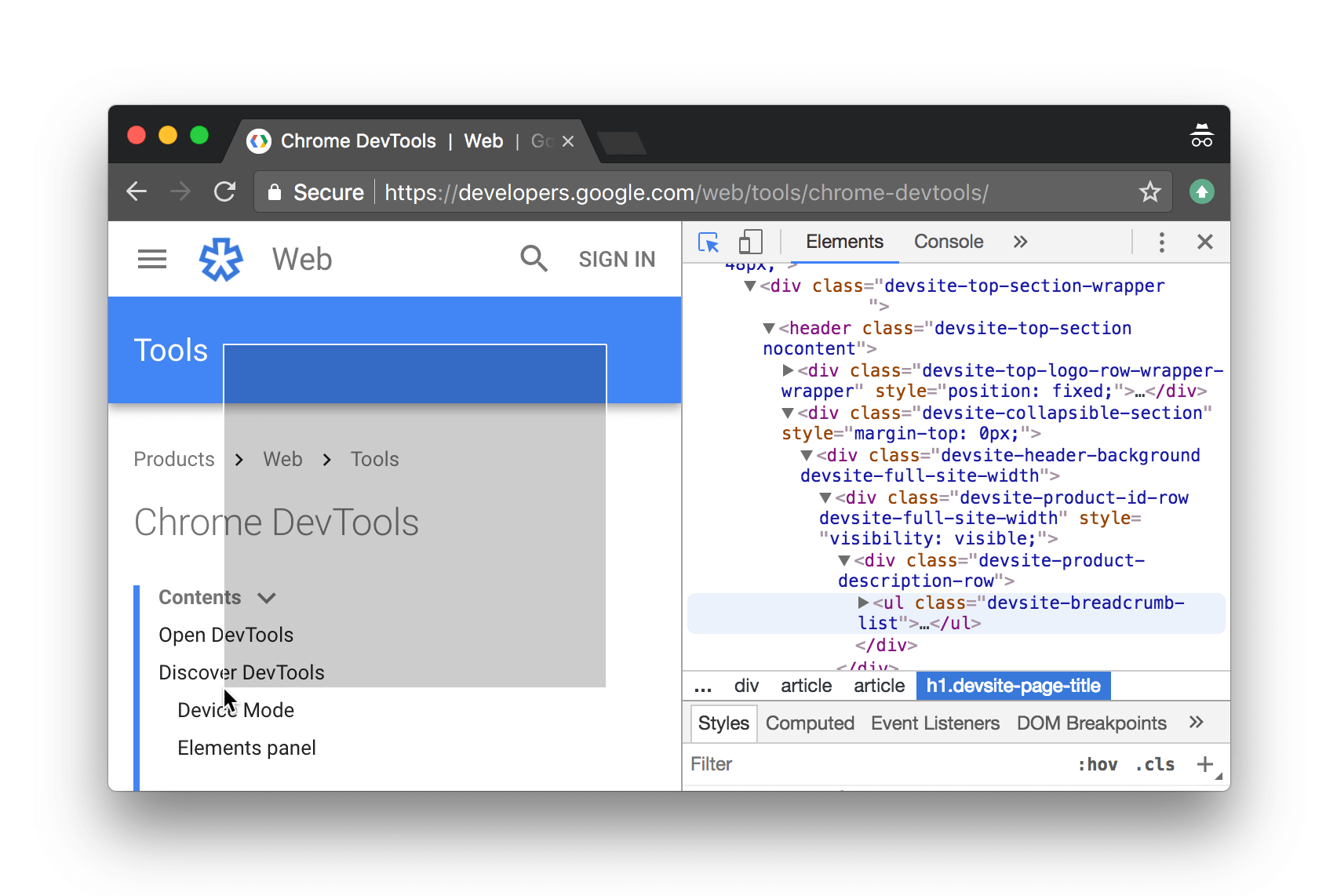
以前截取网页我都用qq,直接ctrl+alt+a。现在chrome自带了截图功能,可以截取指定区域或者指定dom元素。

screenshot.png

截取指定区域:按ctrl+shift+c, 然后按住鼠标左键不放,选取网页区域,最后松手会下载截图的图片。 截取指定dom元素:右键检查元素,按ctrl+shift+P打开命令面板。输入"capture node"。然后回车,就会下载内容为指定元素的图片。

2. 新api ​

在console中,可以直接使用queryObjects查询特定的constructor

  • queryObjects(Promise). 返回所有的 Promises.
  • queryObjects(HTMLElement). 返回所有的 HTML elements.
  • queryObjects(foo), foo是函数名。返回所有实例化new foo()后的对象。

console ​

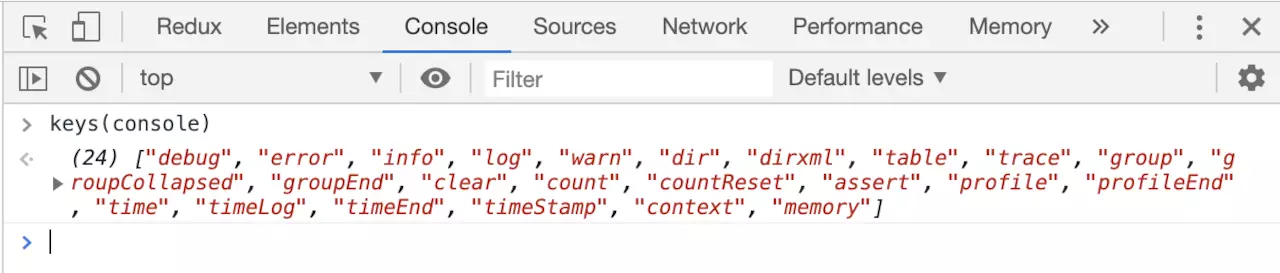
大部分人经常用 console.log() 使用 keys(console) 打印所有方法,keys 和 values 类似 Object.keys,Object.values 只在调试面板有用。

image.png

各个方法的详细用法请查看 https://developers.google.com/web/tools/chrome-devtools/console/utilities

$ ​

看到$大家不要以为是jquery,其实是浏览器自带的一些api。这个在调试上就比较方便!

$:返回第一个符合条件的元素,相当于document.querySelector

$$:返回所有符合条件的元素,相当于document.querySelectorAll

查找和监控事件 ​

getEventListeners作用就是查找并获取选定元素的事件。用法如下
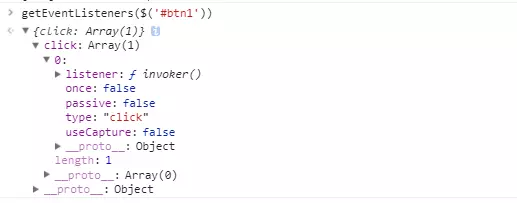
image.png

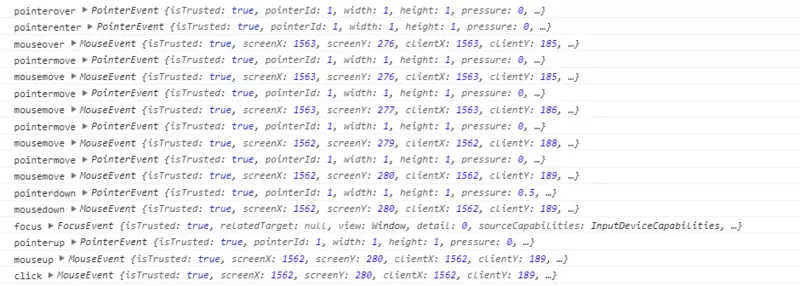
monitorEvents作用是监控你所选元素关联的所有事件,事件触发时,在控制台打印它们。 image.png

image.png

getEventListenersmonitorEvents感觉在开发上用得并不多了,至少我没用过。但是感觉会有用,就提及一下

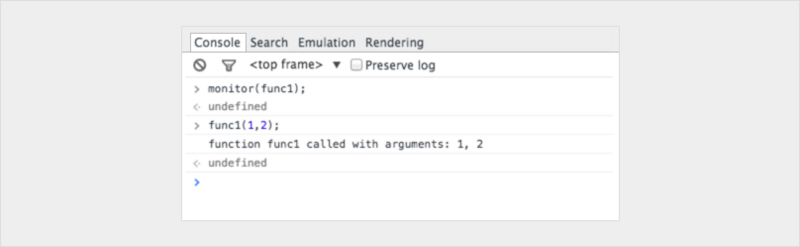
类似可以使用 monitor 来监控函数,每次调用该函数,就会打印出传入的参数。

var func1 = function(x, y, z) {
//....
};

输出:

image.png

参考: