
惯性聚合 高效追踪和阅读你感兴趣的博客、新闻、科技资讯
阅读原文 在惯性聚合中打开

推荐订阅源

Cisco Talos Blog
Cisco Talos Blog
V
V2EX
C
Check Point Blog
GbyAI
GbyAI
D
Docker
Cyber Security Advisories - MS-ISAC
B
Blog RSS Feed
H
Hackread – Cybersecurity News, Data Breaches, AI and More
N
Netflix TechBlog - Medium
T
Troy Hunt's Blog
博客园 - Franky
Threat Intelligence Blog | Flashpoint
Microsoft Security Blog
P
Privacy & Cybersecurity Law Blog
WordPress大学
WordPress大学
The Cloudflare Blog
S
SegmentFault 最新的问题
Latest news
Latest news
Microsoft Azure Blog
P
Proofpoint News Feed
I
InfoQ
博客园 - 【当耐特】
NISL@THU
NISL@THU
A
About on SuperTechFans
T
Tailwind CSS Blog
酷 壳 – CoolShell
酷 壳 – CoolShell
The Hacker News
The Hacker News
奇客Solidot–传递最新科技情报
奇客Solidot–传递最新科技情报
Scott Helme
Scott Helme
雷峰网
雷峰网
C
CXSECURITY Database RSS Feed - CXSecurity.com
Security Latest
Security Latest
V
Vulnerabilities – Threatpost
Security Archives - TechRepublic
A
Arctic Wolf
Hacker News: Ask HN
Hacker News: Ask HN
N
News and Events Feed by Topic
IT之家
IT之家
cs.CL updates on arXiv.org
aimingoo的专栏
aimingoo的专栏
T
Threat Research - Cisco Blogs
OSCHINA 社区最新新闻
OSCHINA 社区最新新闻
阮一峰的网络日志
阮一峰的网络日志
SecWiki News
SecWiki News
大猫的无限游戏
大猫的无限游戏
S
Security Affairs
The Register - Security
www.infosecurity-magazine.com
L
LINUX DO - 热门话题
T
Tor Project blog

mafeifan 的编程技术分享

mafengwo-mp3-downloader | mafeifan 的编程技术分享 示例页面 | mafeifan 的编程技术分享 mafeifan 的编程技术分享 mafeifan 的编程技术分享 mafeifan 的编程技术分享 mafeifan 的编程技术分享 mafeifan 的编程技术分享 mafeifan 的编程技术分享 mafeifan 的编程技术分享 mafeifan 的编程技术分享 mafeifan 的编程技术分享 查看 default namespace 下的 default service account名称 mafeifan 的编程技术分享 检查日志 | mafeifan 的编程技术分享 bridge fdb show dev flannel.1 mafeifan 的编程技术分享 mafeifan 的编程技术分享 mafeifan 的编程技术分享 mafeifan 的编程技术分享 mafeifan 的编程技术分享 mafeifan 的编程技术分享 mafeifan 的编程技术分享 mafeifan 的编程技术分享 mafeifan 的编程技术分享 mafeifan 的编程技术分享 mafeifan 的编程技术分享 mafeifan 的编程技术分享 mafeifan 的编程技术分享 mafeifan 的编程技术分享 mafeifan 的编程技术分享 数据收集原理分析 | mafeifan 的编程技术分享 mafeifan 的编程技术分享 mafeifan 的编程技术分享 mafeifan 的编程技术分享 mafeifan 的编程技术分享 mafeifan 的编程技术分享 mafeifan 的编程技术分享 mafeifan 的编程技术分享 mafeifan 的编程技术分享 mafeifan 的编程技术分享 mafeifan 的编程技术分享 mafeifan 的编程技术分享 mafeifan 的编程技术分享 mafeifan 的编程技术分享 mafeifan 的编程技术分享 几种方法 | mafeifan 的编程技术分享 mafeifan 的编程技术分享 mafeifan 的编程技术分享 mafeifan 的编程技术分享 mafeifan 的编程技术分享 mafeifan 的编程技术分享 mafeifan 的编程技术分享 mafeifan 的编程技术分享 mafeifan 的编程技术分享 mafeifan 的编程技术分享 mafeifan 的编程技术分享 mafeifan 的编程技术分享 mafeifan 的编程技术分享 mafeifan 的编程技术分享 mafeifan 的编程技术分享 mafeifan 的编程技术分享 mafeifan 的编程技术分享 mafeifan 的编程技术分享 mafeifan 的编程技术分享 mafeifan 的编程技术分享 mafeifan 的编程技术分享 mafeifan 的编程技术分享 mafeifan 的编程技术分享 mafeifan 的编程技术分享 mafeifan 的编程技术分享 mafeifan 的编程技术分享 mafeifan 的编程技术分享 mafeifan 的编程技术分享 mafeifan 的编程技术分享 mafeifan 的编程技术分享 mafeifan 的编程技术分享 mafeifan 的编程技术分享 mafeifan 的编程技术分享 mafeifan 的编程技术分享 mafeifan 的编程技术分享 mafeifan 的编程技术分享 mafeifan 的编程技术分享 mafeifan 的编程技术分享 mafeifan 的编程技术分享 mafeifan 的编程技术分享 mafeifan 的编程技术分享 mafeifan 的编程技术分享 mafeifan 的编程技术分享 mafeifan 的编程技术分享 mafeifan 的编程技术分享 mafeifan 的编程技术分享 mafeifan 的编程技术分享 mafeifan 的编程技术分享 check the export on the very top of this document so we can use $do mafeifan 的编程技术分享 mafeifan 的编程技术分享 mafeifan 的编程技术分享 mafeifan 的编程技术分享 延伸 -- 关于前端路由 xdebug 3 和 2 的区别
mafeifan 的编程技术分享
2026-01-16 · via mafeifan 的编程技术分享

概念 ​

K8s集群对外暴露服务的方式目前只有三种:Loadbalancer;NodePort;Ingress

  • Loadbalancer 缺点:需要阿里云等公有云支持,而且需要额外支付费用
  • NodePort 缺点:要暴露端口,端口默认是 30000-32767
  • Ingress 好处:Ingress 不会公开任意端口或协议。可能就是带来一些学习成本,需要了解 Traefik 和 Nginx 的常用配置和反向代理。

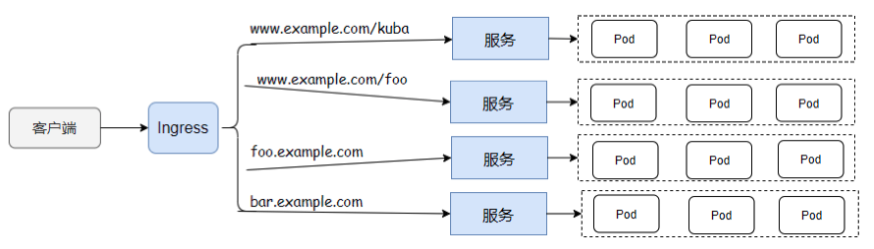
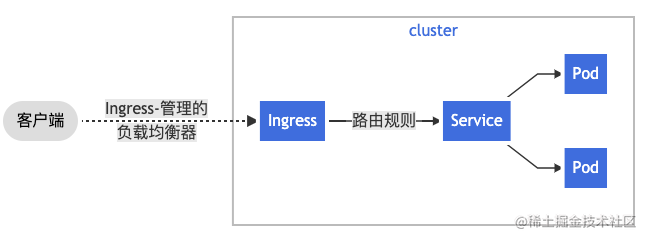
一图看 Ingress 流程,由图可知,ingress 充当的是代理的角色,把外部来的请求,根据路由地址转发到k8s中匹配到的后端service,而且service又连接了deployment,一个deployment又跑了N个Pod,达到了流量转发的目的。
知识点: ​

  • 为了让 Ingress 资源工作,集群必须有一个正在运行的 Ingress Controller。
  • 可以在集群中部署任意数量的 ingress 控制器。 创建 ingress 时,应该使用适当的 ingress.class 注解每个 Ingress 以表明在集群中如果有多个 Ingress 控制器时,应该使用哪个 Ingress 控制器。
  • 比较流行的Ingress 控制器有nginx-ingress-controllerTraefik & Kubernetes
  • Traefik是用Go编写的边缘路由程序,自带UI界面,有反向代理,负载均衡,自动配置并SSL证书,最近很火,但是官方文档比较垃圾,配置很灵活,使用起来有些难度。

平台 ​

  • MacOS 11.2.3
  • Docker Desktop 3.3.3
  • Docker Engine: 20.10.6
  • Kubernetes: v1.19.7

坑 ​

目前常用的K8S镜像库有

  • docker.io (docker hub公共镜像库)
  • gcr.io (Google container registry)
  • k8s.gcr.io (等同于 gcr.io/google-containers)
  • quay.io (Red Hat运营的镜像库)

k8s.gcr.io 被墙,拉image可能会失败而且阿里云啥的没有最新的镜像库,没办法,我是去docker hub找别人的。具体参见

步骤 ​

  1. 本地启动docker,检查k8s版本,是1.19.7
  2. 版本 kubectl version
Client Version: version.Info{Major:"1", Minor:"19", GitVersion:"v1.19.7", GitCommit:"1dd5338295409edcfff11505e7bb246f0d325d15", GitTreeState:"clean", BuildDate:"2021-01-13T13:23:52Z", GoVersion:"go1.15.5", Compiler:"gc", Platform:"darwin/amd64"}
Server Version: version.Info{Major:"1", Minor:"19", GitVersion:"v1.19.7", GitCommit:"1dd5338295409edcfff11505e7bb246f0d325d15", GitTreeState:"clean", BuildDate:"2021-01-13T13:15:20Z", GoVersion:"go1.15.5", Compiler:"gc", Platform:"linux/amd64"}
  1. 安装NGINX Ingress Controller,打开官网

提示安装kubectl apply -f https://raw.githubusercontent.com/kubernetes/ingress-nginx/controller-v0.46.0/deploy/static/provider/cloud/deploy.yaml

先浏览器打开https://raw.githubusercontent.com/kubernetes/ingress-nginx/controller-v0.46.0/deploy/static/provider/cloud/deploy.yamlimage:

会搜到这个镜像地址k8s.gcr.io/ingress-nginx/controller:v0.46.0@sha256:....

本地先尝试拉下docker pull k8s.gcr.io/ingress-nginx/controller:v0.46.0... 发现失败,很简单,这个镜像地址被墙了,得找替换!

打开 docker hub 搜 ingress-nginx-controller, 只找到了最新的v0.45.0

猜测差距不大,把文件下载到并编辑器打开 https://raw.githubusercontent.com/kubernetes/ingress-nginx/controller-v0.45.0/deploy/static/provider/cloud/deploy.yaml

image: k8s.gcr.io/ingress-nginx/controller:v0.45.0 替换为 image: willdockerhub/ingress-nginx-controller:v0.45.0

这步非常重要哦

  1. 我重命名为了v0.45.0-deploy.yaml接下来运行他! kubectl apply -f v0.45.0-deploy.yaml

验证一下

kubectl get pods --all-namespaces -l app.kubernetes.io/name=ingress-nginx

kubectl describe pod

  1. 跑一个例子

准备文件,下载三个实例文件,镜像hashicorp/http-echo就是个http服务器

yaml

# apple.yaml 
kind: Pod
apiVersion: v1
metadata:
  name: apple-app
  labels:
    app: apple
spec:
  containers:
    - name: apple-app
      image: hashicorp/http-echo
      args:
        - "-text=apple"
---
kind: Service
apiVersion: v1
metadata:
  name: apple-service
spec:
  selector:
    app: apple
  ports:
    - port: 5678 # Default port for image

yaml

# banana.yaml
kind: Pod
apiVersion: v1
metadata:
  name: banana-app
  labels:
    app: banana
spec:
  containers:
    - name: banana-app
      image: hashicorp/http-echo
      args:
        - "-text=banana"

---

kind: Service
apiVersion: v1
metadata:
  name: banana-service
spec:
  selector:
    app: banana
  ports:
    - port: 5678 # Default port for image

yaml

# ingress.yaml
apiVersion: extensions/v1beta1
kind: Ingress
metadata:
  name: example-ingress
  annotations:
    kubernetes.io/ingress.class: "nginx"
    ingress.kubernetes.io/rewrite-target: /
spec:
  rules:
  - host: ingress.finley.demo
    http:
      paths:
        - path: /apple
          backend:
            serviceName: apple-service
            servicePort: 5678
        - path: /banana
          backend:
            serviceName: banana-service
            servicePort: 5678

service不作解释。ingress就是定义一个地址,当访问/apple就调用apple-service中暴露的5678端口,而apple-service是为apple-app这个pod提供网络服务的

运行他们

 kubectl apply -f sample/apple.yaml 
 kubectl apply -f sample/banana.yaml 
 kubectl apply -f sample/ingress.yaml

注意ingress.yaml我配置的域名是ingress.finley.demo需要让本地访问

  1. 打开 /etc/hosts

添加127.0.0.1 ingress.finley.demo

  1. 见证奇迹时刻

浏览器打开 http://ingress.finley.demo/apple 页面显示 apple 浏览器打开 http://ingress.finley.demo/banana 页面显示 banana

其实ingress就是个代理功能,可以作为Service的统一网关入口

各个 Kubernetes Ingress Controllers 的对比: https://docs.google.com/spreadsheets/d/191WWNpjJ2za6-nbG4ZoUMXMpUK8KlCIosvQB0f-oq3k/htmlview

参考 ​

https://docs.google.com/spreadsheets/d/191WWNpjJ2za6-nbG4ZoUMXMpUK8KlCIosvQB0f-oq3k/htmlview

https://kubernetes.io/zh/docs/concepts/services-networking/ingress/

https://kubernetes.github.io/ingress-nginx/deploy/#docker-desktop

https://developer.aliyun.com/article/759310

https://juejin.cn/post/7038905185137066014

https://blog.csdn.net/mshxuyi/article/details/110210380