惯性聚合 高效追踪和阅读你感兴趣的博客、新闻、科技资讯
阅读原文 在惯性聚合中打开

推荐订阅源

V
V2EX
J
Java Code Geeks
月光博客
月光博客
博客园_首页
The GitHub Blog
The GitHub Blog
Vercel News
Vercel News
B
Blog RSS Feed
博客园 - 聂微东
宝玉的分享
宝玉的分享
T
Tailwind CSS Blog
Jina AI
Jina AI
S
SegmentFault 最新的问题
B
Blog
钛媒体:引领未来商业与生活新知
钛媒体:引领未来商业与生活新知
有赞技术团队
有赞技术团队
Hugging Face - Blog
Hugging Face - Blog
Google DeepMind News
阮一峰的网络日志
阮一峰的网络日志
The Cloudflare Blog
量子位
Martin Fowler
Martin Fowler
博客园 - Franky
大猫的无限游戏
大猫的无限游戏
博客园 - 叶小钗

mafeifan 的编程技术分享

mafengwo-mp3-downloader | mafeifan 的编程技术分享 示例页面 | mafeifan 的编程技术分享 mafeifan 的编程技术分享 mafeifan 的编程技术分享 mafeifan 的编程技术分享 mafeifan 的编程技术分享 mafeifan 的编程技术分享 mafeifan 的编程技术分享 mafeifan 的编程技术分享 mafeifan 的编程技术分享 mafeifan 的编程技术分享 查看 default namespace 下的 default service account名称 mafeifan 的编程技术分享 检查日志 | mafeifan 的编程技术分享 bridge fdb show dev flannel.1 mafeifan 的编程技术分享 mafeifan 的编程技术分享 mafeifan 的编程技术分享 mafeifan 的编程技术分享 mafeifan 的编程技术分享 mafeifan 的编程技术分享 mafeifan 的编程技术分享 mafeifan 的编程技术分享 mafeifan 的编程技术分享 mafeifan 的编程技术分享 mafeifan 的编程技术分享 mafeifan 的编程技术分享 mafeifan 的编程技术分享 mafeifan 的编程技术分享 mafeifan 的编程技术分享
mafeifan 的编程技术分享
2026-01-16 · via mafeifan 的编程技术分享

localStorage 大家应该都不会陌生,可以记录一些非敏感的网站数据,比如购物车内的商品数量。 但是有个问题是,如果用户用浏览器打开了多个Tab。在一个 Tab 中添加一个商品到购物车,其他 Tab 的购物车数量并不会发生变化。 这时候可以考虑使用 StorageEvent 当修改了(localStorage或sessionStorage)数据时,会触发此事件。

使用StorageEvent非常简单,代码如下:

window.addEventListener('storage', () => {
  // When local storage changes, dump the list to
  // the console.
  console.log(JSON.parse(window.localStorage.getItem('sampleList')));    
});

其他写法:

window.onstorage = () => {
  // When local storage changes, dump the list to
  // the console.
  console.log(JSON.parse(window.localStorage.getItem('sampleList')));    
};

购物车的完整例子,你可以开多个tab实验: https://jsbin.com/radekilosu/1/edit?html,css,js,output

image.png

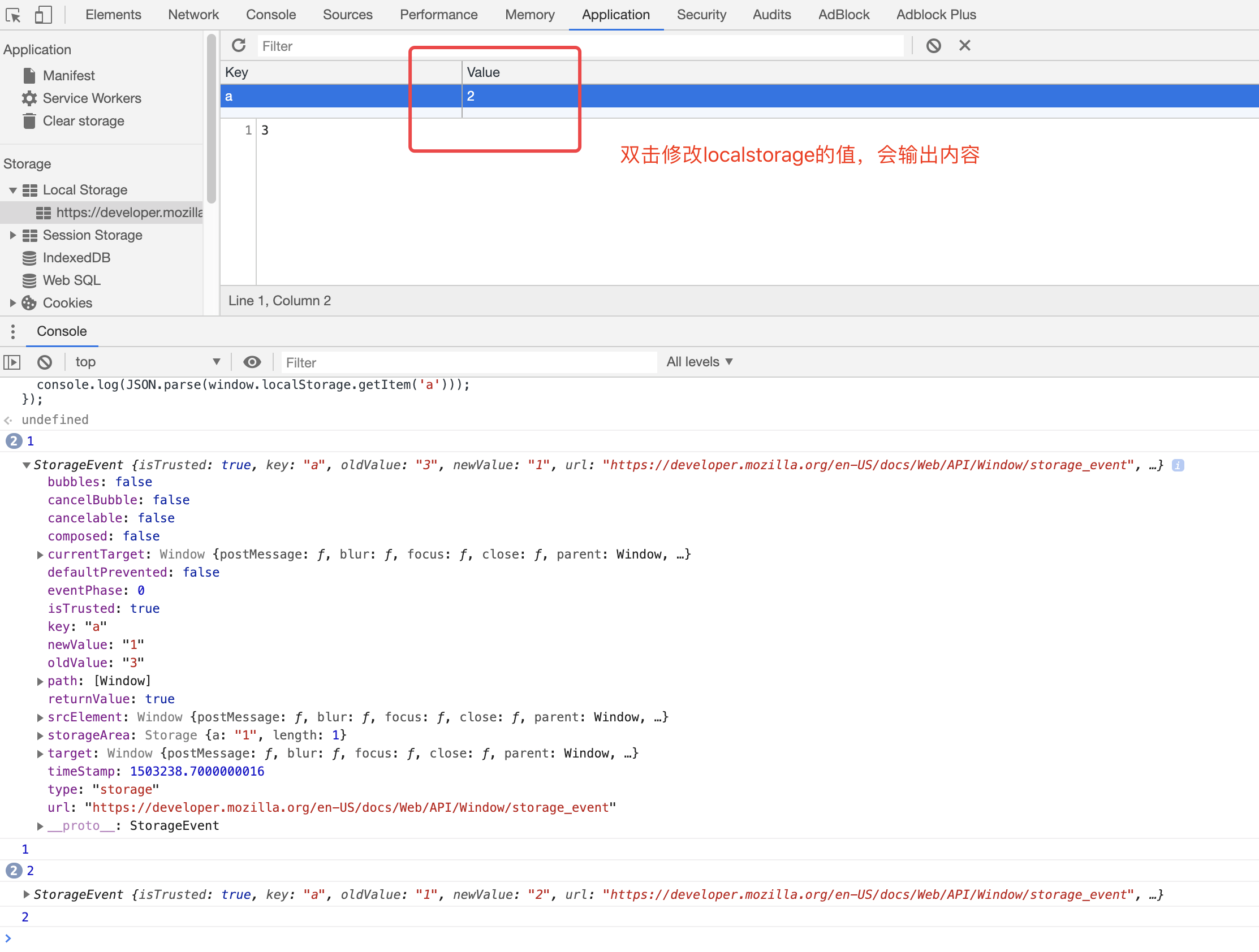
另外事件e上还带有很多信息,方便做更多控制。

字段含义
key发生变化的storageKey
newValue变换后新值
oldValue变换前原值
storageArea相关的变化对象
url触发变化的URL,如果是frameset内,则是触发帧的URL

关于兼容性:最新的火狐,Chrome,Edge的支持,IE未知