


Kali Linux 是一个基于 Debian 的安全发行版,最初设计用于渗透测试和网络分析。Kali Linux 的开发者是 2013 年的 Devon Kearns 和 Mati Aharoni。这个操作系统是完全免费的,你可以在笔记本电脑/电脑和智能手机上使用它。
Kali Linux 号称道德黑客的操作系统,支持超过 500 种渗透测试和网络安全相关的应用程序。
下面介绍几款简单的网络安全相关的工具
docker pull kalilinux/kali-rolling docker run --tty --interactive kalilinux/kali-rolling /bin/bash cat /etc/os-release apt update -y apt upgrade -y exit
Network Mapper,是Linux下的网络扫描和嗅探工具包。
扫描目标可以是主机名、ip地址或网络地址等,多个目标以空格分隔;常用的选项有”-p”、”-n”,分别用来指定扫描的端口、禁止反向解析(以加快扫描速度);扫描类型决定着扫描的方式,也直接影响扫描结果。
bash
apt install -y nmap
# 对本机进行扫描,检测开放了哪些常用的TCP端口、UDP端口
nmap 127.0.0.1
Starting Nmap 7.91 ( https://nmap.org ) at 2022-04-18 11:50 CST
Nmap scan report for ingress.finley.demo (127.0.0.1)
Host is up (0.000081s latency).
Not shown: 993 closed ports
PORT      STATE SERVICE
53/tcp    open  domain
80/tcp    open  http
443/tcp   open  https
3306/tcp  open  mysql
5000/tcp  open  upnp
7000/tcp  open  afs3-fileserver
49165/tcp open  unknown

Nmap done: 1 IP address (1 host up) scanned in 0.15 seconds

# 扫描百度
nmap www.baidu.com
Starting Nmap 7.92 ( https://nmap.org ) at 2022-04-13 09:57 CST
Nmap scan report for www.baidu.com (103.235.46.39)
Host is up (0.22s latency).
Not shown: 998 filtered tcp ports (no-response)
PORT    STATE SERVICE
80/tcp  open  http
443/tcp open  https

Nmap done: 1 IP address (1 host up) scanned in 73.88 seconds

# 扫描一个IP的多个端口
nmap  10.0.1.161   -p20-200,7777,8888

# 扫描多个IP用法
nmap 10.0.1.161  10.0.1.162

# 扫描一个子网网段所有IP
nmap  10.0.3.0/24

# 扫描连续的ip地址
nmap 10.0.1.161-162特点:
bash
sudo apt-get install whatweb
whatweb  https://www.mafeifan.com

https://www.mafeifan.com [200 OK] Country[CHINA][CN], HTML5, HTTPServer[Ubuntu Linux][nginx/1.14.0 (Ubuntu)], IP[49.232.138.70], Meta-Author[FinleyMa], MetaGenerator[VuePress 1.8.2], Script, Title[hello world! | mafeifan 的技术博客], nginx[1.14.0]

# 列出所有插件
whatweb --list-plugins

# 列出详情

# 会看到把nginx版本也打印出来了,暴露版本号这是一种不安全的做法
whatweb -v https://www.mafeifan.com

WhatWeb report for https://www.mafeifan.com
Status    : 200 OK
Title     : hello world! | mafeifan 的技术博客
IP        : 49.232.138.70
Country   : CHINA, CN

Summary   : MetaGenerator[VuePress 1.8.2], Meta-Author[FinleyMa], Script, HTTPServer[Ubuntu Linux][nginx/1.14.0 (Ubuntu)], nginx[1.14.0], HTML5

Detected Plugins:
[ HTML5 ]
	HTML version 5, detected by the doctype declaration


[ HTTPServer ]
	HTTP server header string. This plugin also attempts to
	identify the operating system from the server header.

	OS           : Ubuntu Linux
	String       : nginx/1.14.0 (Ubuntu) (from server string)

[ Meta-Author ]
	This plugin retrieves the author name from the meta name
	tag - info:
	http://www.webmarketingnow.com/tips/meta-tags-uncovered.html
	#author

	String       : FinleyMa

[ MetaGenerator ]
	This plugin identifies meta generator tags and extracts its
	value.

	String       : VuePress 1.8.2

[ Script ]
	This plugin detects instances of script HTML elements and
	returns the script language/type.


[ nginx ]
	Nginx (Engine-X) is a free, open-source, high-performance
	HTTP server and reverse proxy, as well as an IMAP/POP3
	proxy server.

	Version      : 1.14.0
	Website     : http://nginx.net/

HTTP Headers:
	HTTP/1.1 200 OK
	Server: nginx/1.14.0 (Ubuntu)
	Date: Thu, 14 Apr 2022 02:18:26 GMT
	Content-Type: text/html
	Last-Modified: Wed, 06 Apr 2022 03:53:33 GMT
	Transfer-Encoding: chunked
	Connection: close
	ETag: W/"624d0ebd-b2bf"
Content-Encoding: gzipbash
vim /etc/nginx/conf/nginx.conf
# 在http段中加入
server_tokens off;theHarvester是一款信息收集工具,它可以通过搜索引擎等公开库去收集用户的email,子域名,主机IP,开放端口等等信息。
https://github.com/laramies/theHarvester
-d:用来确定搜索的域或网址,也就是你要收集哪个目标的信息,这个参数的作用就是确定目标(d指的就是domain,域名的意思)。
-b:用来确定收集信息的来源,比如:baidu, bing, google等等,这个参数是确定从哪里收集信息,信息的来源可以是baidu,也可以是bing或者google。
-l:该选项用来设置theHarvester要收集多少信息,用来限制要收集信息的数量,量越大速度也就越慢。
-f:用来保存收集到的所有信息,可以保存为HTML文件,也可以是XML文件。如果不想保存,只是想看一遍结果,就不需要添加这个参数。
bash
apt install theharvester
# -d 搜索域名 -l 搜索结果数 -b 搜索引擎
theHarvester -d apple.com -l 100 -b baidu

[*] Target: apple.com

[*] Searching Baidu.

[*] No IPs found.

[*] Emails found: 15
----------------------
2.devprograms@apple.com
5.itsbanking@apple.com
6.appstorenotices@apple.com
8.devprograms@apple.com
appleid@id.apple.com
appreview@apple.com
appstorepromotion@apple.com
donotreply@apple.com
gc_edu_bts_cn@email.apple.com
itunesconnect@apple.com
no_reply@email.apple.com
noreply@email.apple.com
rememberingsteve@apple.com
wasistno_reply@email.apple.com
ytpgw@yantaiapple.com

[*] Hosts found: 21
---------------------
apple-lists.apple.com
appleid.apple.com:17.111.105.242
communities.apple.com:113.24.194.97, 150.138.167.141
connect.apple.com
developer.apple.com:17.253.83.204, 17.253.118.202
devforums.apple.com:118.214.35.197
discussions.apple.com:23.47.242.238
discussionschinese.apple.com:103.254.191.161, 124.236.67.184
email.apple.com
forums.developer.apple.com:23.37.149.157
group.apple.com
help.apple.com:23.217.250.176
id.apple.com:17.179.252.3
iforgot.apple.com:17.111.105.243
lists.apple.com:17.179.124.160, 17.32.208.205
mfi.apple.com:17.179.124.158
mysupport.apple.com:104.123.24.25
store.apple.com:61.147.219.208
support.apple.com:113.24.194.97, 124.236.67.184
www.apple.com:221.194.155.186

# 通过所有来源来扫码网站
theHarvester -d apple.com -l 100 -b all基于PHP的网站信息收集及漏洞扫描工具,提供的功能有
等等,详见官网
https://github.com/Tuhinshubhra/RED_HAWK
使用方法非常简单。
执行以下步骤,并按提示操作即可
bash
git clone https://github.com/Tuhinshubhra/RED_HAWK.git
cd RED_HAWK
php rhawk.php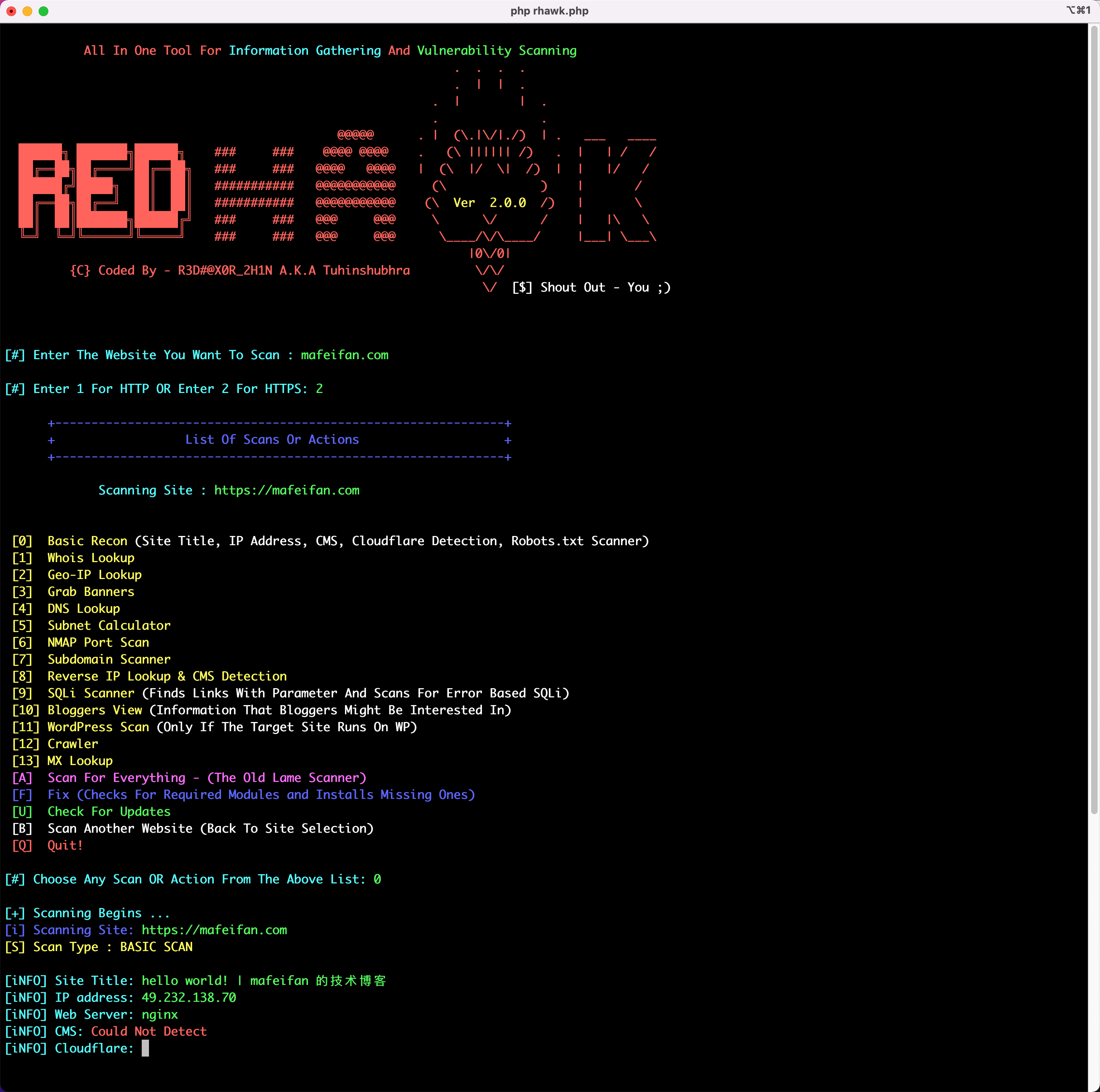
https://github.com/sullo/nikto
bash
sudo apt install -y nikto

nikto -host  www.mafeifan.com

- Nikto v2.1.5
---------------------------------------------------------------------------
+ Target IP:          49.232.138.70
+ Target Hostname:    www.mafeifan.com
+ Target Port:        80
+ Start Time:         2022-04-14 16:50:29 (GMT8)
---------------------------------------------------------------------------
+ Server: nginx
+ The anti-clickjacking X-Frame-Options header is not present.
+ Root page / redirects to: https://www.mafeifan.com/
+ No CGI Directories found (use '-C all' to force check all possible dirs)
+ 6544 items checked: 0 error(s) and 1 item(s) reported on remote host
+ End Time:           2022-04-14 16:50:40 (GMT8) (11 seconds)
---------------------------------------------------------------------------
+ 1 host(s) tested


nikto -host  www.osvlabs.com

- Nikto v2.1.5
---------------------------------------------------------------------------
+ Target IP:          39.100.198.227
+ Target Hostname:    www.osvlabs.com
+ Target Port:        80
+ Start Time:         2022-04-14 16:52:15 (GMT8)
---------------------------------------------------------------------------
+ Server: nginx/1.14.0 (Ubuntu)
+ The anti-clickjacking X-Frame-Options header is not present.
+ Root page / redirects to: https://www.osvlabs.com/
+ No CGI Directories found (use '-C all' to force check all possible dirs)
+ Server leaks inodes via ETags, header found with file /, fields: 0x5dceb91d 0x264
+ 6544 items checked: 0 error(s) and 2 item(s) reported on remote host
+ End Time:           2022-04-14 16:53:05 (GMT8) (50 seconds)
---------------------------------------------------------------------------
+ 1 host(s) tested此内容由惯性聚合(RSS阅读器)自动聚合整理,仅供阅读参考。 原文来自 — 版权归原作者所有。