

惯性聚合 高效追踪和阅读你感兴趣的博客、新闻、科技资讯
阅读原文 在惯性聚合中打开

推荐订阅源

V2EX - 技术
V2EX - 技术
L
LangChain Blog
IT之家
IT之家
S
SegmentFault 最新的问题
博客园 - 三生石上(FineUI控件)
H
Hackread – Cybersecurity News, Data Breaches, AI and More
T
The Blog of Author Tim Ferriss
Blog — PlanetScale
Blog — PlanetScale
N
Netflix TechBlog - Medium
U
Unit 42
B
Blog RSS Feed
GbyAI
GbyAI
Microsoft Security Blog
博客园 - 司徒正美
Apple Machine Learning Research
T
Threatpost
C
CERT Recently Published Vulnerability Notes
Cisco Talos Blog
Cisco Talos Blog
The Register - Security
Vercel News
Vercel News
S
Schneier on Security
Spread Privacy
Spread Privacy
C
Cyber Attacks, Cyber Crime and Cyber Security
cs.CL updates on arXiv.org
博客园 - 叶小钗
雷峰网
雷峰网
博客园_首页
人人都是产品经理
人人都是产品经理
P
Palo Alto Networks Blog
The Hacker News
The Hacker News
T
Tor Project blog
L
Lohrmann on Cybersecurity
Know Your Adversary
Know Your Adversary
D
Darknet – Hacking Tools, Hacker News & Cyber Security
C
Cybersecurity and Infrastructure Security Agency CISA
P
Privacy International News Feed
钛媒体:引领未来商业与生活新知
钛媒体:引领未来商业与生活新知
T
Tenable Blog
V
Vulnerabilities – Threatpost
大猫的无限游戏
大猫的无限游戏
博客园 - 【当耐特】
V
V2EX
Security Latest
Security Latest
A
About on SuperTechFans
Cloudbric
Cloudbric
S
Security Affairs
MongoDB | Blog
MongoDB | Blog
Y
Y Combinator Blog
Martin Fowler
Martin Fowler
TaoSecurity Blog
TaoSecurity Blog

mafeifan 的编程技术分享

mafengwo-mp3-downloader | mafeifan 的编程技术分享 示例页面 | mafeifan 的编程技术分享 mafeifan 的编程技术分享 mafeifan 的编程技术分享 mafeifan 的编程技术分享 mafeifan 的编程技术分享 mafeifan 的编程技术分享 mafeifan 的编程技术分享 mafeifan 的编程技术分享 mafeifan 的编程技术分享 mafeifan 的编程技术分享 查看 default namespace 下的 default service account名称 mafeifan 的编程技术分享 检查日志 | mafeifan 的编程技术分享 bridge fdb show dev flannel.1 mafeifan 的编程技术分享 mafeifan 的编程技术分享 mafeifan 的编程技术分享 mafeifan 的编程技术分享 mafeifan 的编程技术分享 mafeifan 的编程技术分享 mafeifan 的编程技术分享 mafeifan 的编程技术分享 mafeifan 的编程技术分享 mafeifan 的编程技术分享 mafeifan 的编程技术分享 mafeifan 的编程技术分享 mafeifan 的编程技术分享 mafeifan 的编程技术分享 mafeifan 的编程技术分享 数据收集原理分析 | mafeifan 的编程技术分享 mafeifan 的编程技术分享 mafeifan 的编程技术分享 mafeifan 的编程技术分享 mafeifan 的编程技术分享 mafeifan 的编程技术分享 mafeifan 的编程技术分享 mafeifan 的编程技术分享 mafeifan 的编程技术分享 mafeifan 的编程技术分享 mafeifan 的编程技术分享 mafeifan 的编程技术分享 mafeifan 的编程技术分享 mafeifan 的编程技术分享 mafeifan 的编程技术分享 几种方法 | mafeifan 的编程技术分享 mafeifan 的编程技术分享 mafeifan 的编程技术分享 mafeifan 的编程技术分享 mafeifan 的编程技术分享 mafeifan 的编程技术分享 mafeifan 的编程技术分享 mafeifan 的编程技术分享 mafeifan 的编程技术分享 mafeifan 的编程技术分享 mafeifan 的编程技术分享 mafeifan 的编程技术分享 mafeifan 的编程技术分享 mafeifan 的编程技术分享 mafeifan 的编程技术分享 mafeifan 的编程技术分享 mafeifan 的编程技术分享 mafeifan 的编程技术分享 mafeifan 的编程技术分享 mafeifan 的编程技术分享 mafeifan 的编程技术分享 mafeifan 的编程技术分享 mafeifan 的编程技术分享 mafeifan 的编程技术分享 mafeifan 的编程技术分享 mafeifan 的编程技术分享 mafeifan 的编程技术分享 mafeifan 的编程技术分享 mafeifan 的编程技术分享 mafeifan 的编程技术分享 mafeifan 的编程技术分享 mafeifan 的编程技术分享 mafeifan 的编程技术分享 mafeifan 的编程技术分享 mafeifan 的编程技术分享 mafeifan 的编程技术分享 mafeifan 的编程技术分享 mafeifan 的编程技术分享 mafeifan 的编程技术分享 mafeifan 的编程技术分享 mafeifan 的编程技术分享 mafeifan 的编程技术分享 mafeifan 的编程技术分享 mafeifan 的编程技术分享 mafeifan 的编程技术分享 mafeifan 的编程技术分享 mafeifan 的编程技术分享 check the export on the very top of this document so we can use $do mafeifan 的编程技术分享 mafeifan 的编程技术分享 mafeifan 的编程技术分享 mafeifan 的编程技术分享 运维自动化之ANSIBLE | mafeifan 的编程技术分享 延伸 -- 关于前端路由 xdebug 3 和 2 的区别
mafeifan 的编程技术分享
2026-01-16 · via mafeifan 的编程技术分享

通常情况下我们都是将项目托管到Github,Coding等服务商。如果你有一台自己的Linux云主机,在上面搭建Git服务器比想象中要简单的多。这篇文章讲解如何搭建Git服务器及使用git的hook机制(使用post-receive这个hook,在git服务器受到push请求,并且接受完代码提交时触发)

大致要执行下面的命令

# 创建一个名为git的用户,专门访问仓库,这里会问一系列问题,包括设置用户密码,请牢记
sudo adduser git
# 配置SSH,无密码访问服务器,这里不是本文重点,关于SSH配置请自行搜索,要创建 home/git/.ssh 目录,并设置权限
sudo chmod 700 /home/git/.ssh  
chmod 600 authorized_keys
# 创建项目目录,这里没有放到用户目录下
mkdir -p /usr/git_repo/gittest.git && cd ..  
# 建立一个裸仓库并设置该仓库目录的组权限为可写。
# 裸仓库就是一个只包含.git子目录的内容,不包含其他资料。
git init --bare --shared

# 好,服务端的仓库已经创建,下面是本地操作

# 开发人员小马先在本地创建一个git项目,将刚才创建的仓库设置为项目的远程仓库并推送分支。
git init
touch readme && vi readme
git add .
git commit -m 'add readme'
git remote add origin git@cloud:/usr/git_repo/gittest.git
git push origin master

# 小张作为另外一个开发人员,可以直接clone项目,并推送自己的改动
# 本地尝试访问并拉仓库。cloud是我配置ssh主机名称,也可以是IP地址或域名
# 如果不成功检查SSH的配置
git clone git@cloud:/usr/git_repo/gittest.git
cd gittest
vi readme
git commit -am 'fix the readme file'
git push origin master

是不是和Github的 git clone git@github.com:mafeifan/smzdm.git 很类似?但是Github还支持HTTP协议,比如 https://github.com/mafeifan/smzdm.git 想达到同样的目的,需要在服务器上针对apache或nginx配置 git-http-backend

使用服务器的hook ​

每当本地push代码,还得在服务器上git pull。这样太麻烦了。git支持hook机制,类似事件通知,比如git服务器收到push请求,并且接受完代码提交时触发。需要在hooks目录下创建post-receive文件 服务器操作

cd /usr/git_repo/gittest.git/hooks
sudo cp post-update.sample  post-receive
# 编辑post-receive内容为
echo $(date) >> hook.log

这样push代码到服务器,就会多出一个记录时间的hook.log 你可以优化内容,比如执行代码检查,git pull代码到/var/www,npm install,等操作。

使用托管网站的web-hook ​

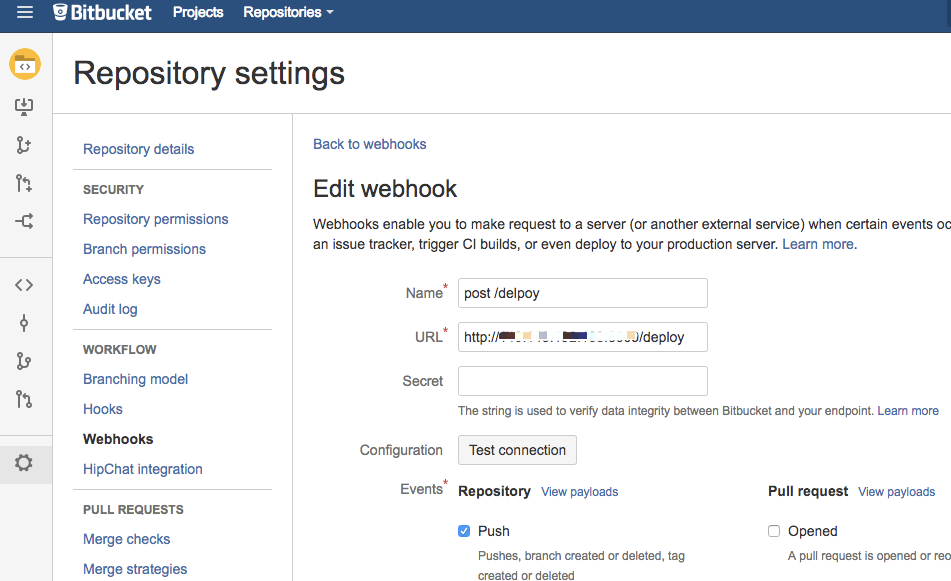
以bitbucket为例,我在上面创建一个nodejs项目叫git-deploy-demo,暴露一个接口叫deploy,必须是post方法。项目跑在我自己的主机叫cloud。每次push代码,我让他调用这个deploy接口 image.png 关于deploy接口,接收调用后执行update.sh脚本
const exec = require('child_process').exec;
app.post('/deploy', (req, res) => {
  const commands = 'sh ./update.sh';
  exec(commands, (err, out, code) => {
  	if (res.statusCode === 200) {
  		res.send('deploy done');
  	}else {
  		res.send(out)
  	}
  })

update.sh内容如下:

#!/bin/bash
git pull
npm install
sudo pm2 restart git-deploy-demo

参考: ​