







首先记录几个第三方套件源地址:
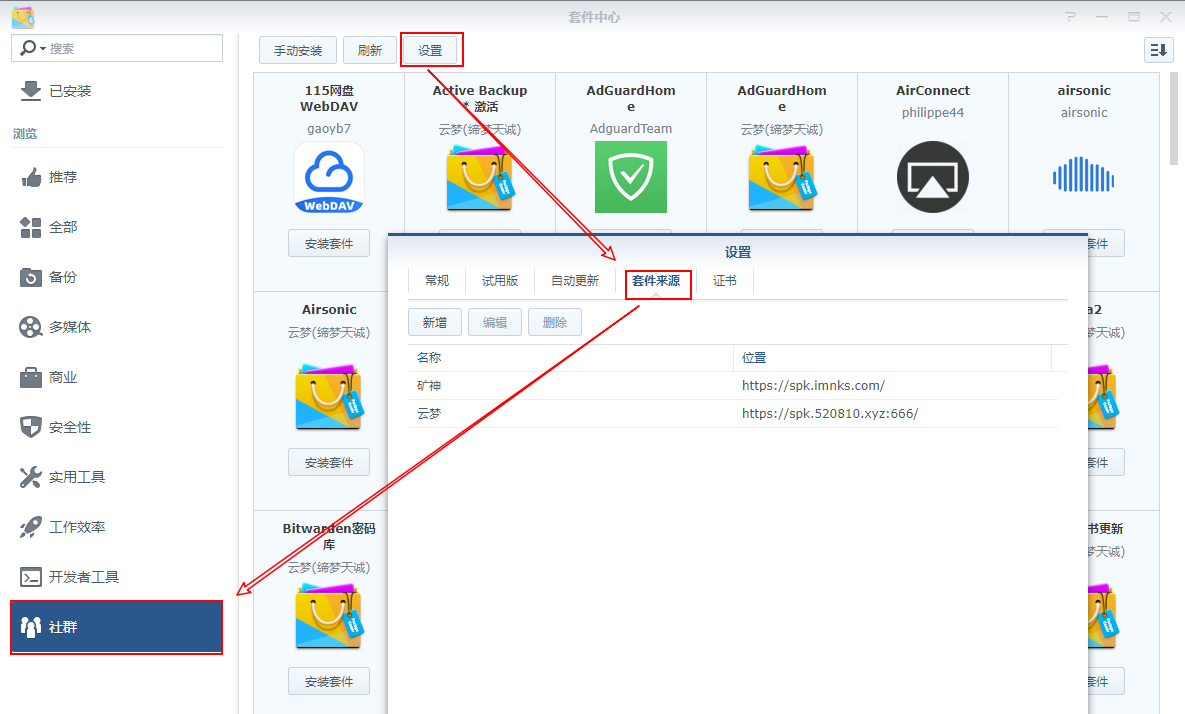
矿神的套件源
DSM6
https://spk.imnks.com/DSM7
https://spk7.imnks.com/云梦
https://spk.520810.xyz:666/这个不常用
http://packages.synocommunity.comDocker 镜像加速可以用阿里云的,这个教程太多,随便百度。
群晖官方的下载地址,包含固件和套件以及 APP 等应用
https://archive.synology.cn/download
有关 frp 的一些技巧(群晖通过 Docker 安装配置很简单,主要是 CentOS 的服务器配置)
使用 systemd
这个示例将会演示在 Linux 系统下使用 systemd 控制 frps 及配置开机自启。
在 Linux 系统下,使用systemd 可以方便地控制 frp 服务端 frps 的启动和停止、配置后台运行和开启自启。
要使用 systemd 来控制 frps,需要先安装 systemd,然后在 /etc/systemd/system 目录下创建一个 frps.service 文件。
如Linux服务端上没有安装 systemd,可以使用 yum 或 apt 等命令安装 systemd。
# yum
yum install systemd
# apt
apt install systemd
使用文本编辑器,如 vim 创建并编辑 frps.service 文件。
$ vim /etc/systemd/system/frps.service写入内容
[Unit]
# 服务名称,可自定义
Description = frp server
After = network.target syslog.target
Wants = network.target

[Service]
Type = simple
# 启动frps的命令,需修改为您的frps的安装路径
ExecStart = /path/to/frps -c /path/to/frps.ini

[Install]
WantedBy = multi-user.target
使用 systemd 命令,管理 frps。
可能会用到的命令
# 启动frp
systemctl start frps
# 停止frp
systemctl stop frps
# 重启frp
systemctl restart frps
# 查看frp状态
systemctl status frps
配置 frps 开机自启。
systemctl enable frps
对于使用 Emby 或者 Jellyfin 之类影音服务的,修改 hosts
SSH 切换 root 帐号
vi /etc/hosts按键盘上 i 键编辑,添加下面的内容
52.84.18.87    api.themoviedb.org
52.84.18.75    api.themoviedb.org
52.84.18.58    api.themoviedb.org
52.84.18.78    api.themoviedb.org
84.17.46.53    image.tmdb.org
52.84.125.81    api.tmdb.org
52.84.125.44    api.tmdb.org
52.84.125.74    api.tmdb.org
52.84.125.73    api.tmdb.org
54.68.224.42    aip.thetvdb.com
52.12.255.201    aip.thetvdb.com
35.167.171.52    aip.thetvdb.com
52.84.125.129    www.themoviedb.org
52.84.125.33    www.themoviedb.org
52.84.125.16    www.themoviedb.org
52.84.125.124    www.themoviedb.org
编辑完成后按键盘 Esc 键,输入“:wq”保存退出
此内容由惯性聚合(RSS阅读器)自动聚合整理,仅供阅读参考。 原文来自 — 版权归原作者所有。