



惯性聚合 高效追踪和阅读你感兴趣的博客、新闻、科技资讯
阅读原文 在惯性聚合中打开

推荐订阅源

AI
AI
TaoSecurity Blog
TaoSecurity Blog
H
Heimdal Security Blog
Help Net Security
Help Net Security
cs.CV updates on arXiv.org
Microsoft Azure Blog
www.infosecurity-magazine.com
Google DeepMind News
爱范儿
爱范儿
The Cloudflare Blog
OSCHINA 社区最新新闻
OSCHINA 社区最新新闻
人人都是产品经理
人人都是产品经理
大猫的无限游戏
大猫的无限游戏
N
News | PayPal Newsroom
V2EX - 技术
V2EX - 技术
博客园 - 【当耐特】
D
Darknet – Hacking Tools, Hacker News & Cyber Security
S
Secure Thoughts
C
CERT Recently Published Vulnerability Notes
罗磊的独立博客
Exploit-DB.com RSS Feed
钛媒体:引领未来商业与生活新知
钛媒体:引领未来商业与生活新知
P
Privacy & Cybersecurity Law Blog
有赞技术团队
有赞技术团队
S
Schneier on Security
S
SegmentFault 最新的问题
Google Online Security Blog
H
Hacker News: Front Page
The Last Watchdog
The Last Watchdog
Schneier on Security
PCI Perspectives
PCI Perspectives
IT之家
IT之家
Project Zero
Project Zero
博客园 - 司徒正美
P
Privacy International News Feed
Recent Commits to openclaw:main
Jina AI
Jina AI
Security Latest
Security Latest
Hacker News - Newest:
Hacker News - Newest: "LLM"
腾讯CDC
C
CXSECURITY Database RSS Feed - CXSecurity.com
阮一峰的网络日志
阮一峰的网络日志
C
Check Point Blog
aimingoo的专栏
aimingoo的专栏
V
Vulnerabilities – Threatpost
W
WeLiveSecurity
NISL@THU
NISL@THU
Webroot Blog
Webroot Blog
N
Netflix TechBlog - Medium
L
Lohrmann on Cybersecurity

雾非雾 - frp

暂无文章

frp 相关
花非花 · 2022-10-31 · via 雾非雾 - frp

frps

之前在 CloudCone 上安装、配置好了 frp 的服务端,运行一个月了一直很稳定,但昨天群晖 Docker 上的客户端突然连接不上了;想着 frp 的程序有可能有新版本,索性把配置流程重新走一次吧。

之前记得图省事,frp 服务端用的是后台启动的方法:

nohup ./frps -c frps.ini >/dev/null 2>&1 &

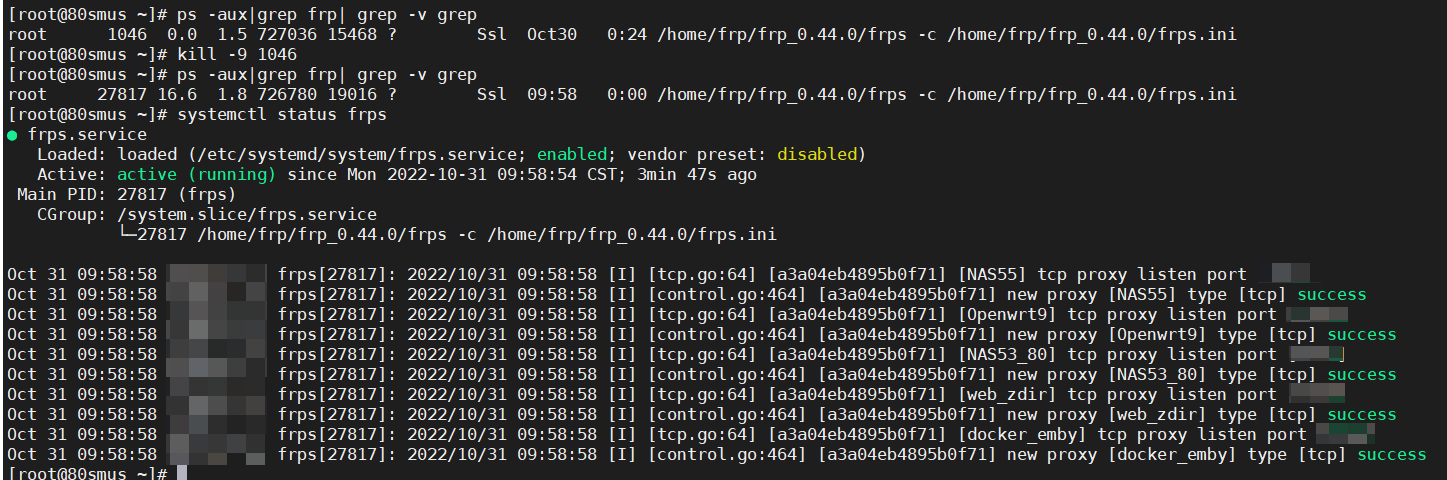
所以首先想到的是先终止 frps 的进程,用 kill 命令;首先查看 frp 进程 ID

# ps -aux|grep frp| grep -v grep
root      1046  0.0  1.5 727036 15468 ?        Ssl  Oct30   0:24 /home/frp/frp_0.44.0/frps -c /home/frp/frp_0.44.0/frps.ini

得到了进程号为 1046 后,杀掉进程:

kill -9 1046

本来这之后,我在宝塔的图形界面下,上传了当前最新版本的 frp ,并把 frps 想复制粘贴覆盖掉原来的版本,但是,覆盖失败;再次查进程,发现 frps 还在;重复杀了几次,才想起,可能。。。我把 frps 做成了服务?

按服务的命令查看一下 frp 运行的状态:

systemctl status frps

事实证明,frps 果然是以服务的方式启动运行的;所以:

开机启动frps:
systemctl enable frps
启动frps:
systemctl start frps
停止frps:
systemctl stop frps
重启frps:
systemctl restart frps
查看frps状态:
systemctl status frps

之后替换掉 frps 重启启动服务即可。

<!--more-->

关于安装、配置服务,记录二个网址吧:

https://gofrp.org/docs/setup/systemd/

https://www.iyuu.cn/archives/286/