惯性聚合 高效追踪和阅读你感兴趣的博客、新闻、科技资讯
阅读原文 在惯性聚合中打开

推荐订阅源

PCI Perspectives
PCI Perspectives
Microsoft Security Blog
MongoDB | Blog
MongoDB | Blog
T
The Blog of Author Tim Ferriss
罗磊的独立博客
人人都是产品经理
人人都是产品经理
The Cloudflare Blog
Engineering at Meta
Engineering at Meta
Y
Y Combinator Blog
宝玉的分享
宝玉的分享
Recorded Future
Recorded Future
钛媒体:引领未来商业与生活新知
钛媒体:引领未来商业与生活新知
月光博客
月光博客
Recent Announcements
Threat Intelligence Blog | Flashpoint
D
Darknet – Hacking Tools, Hacker News & Cyber Security
Apple Machine Learning Research
T
Threatpost
The GitHub Blog
The GitHub Blog
M
MIT News - Artificial intelligence
Scott Helme
Scott Helme
P
Palo Alto Networks Blog
T
Tenable Blog
P
Privacy International News Feed
V
Visual Studio Blog
F
Fortinet All Blogs
酷 壳 – CoolShell
酷 壳 – CoolShell
I
Intezer
cs.CL updates on arXiv.org
AI
AI
cs.CV updates on arXiv.org
S
Security Affairs
S
SegmentFault 最新的问题
C
Cisco Blogs
博客园 - 聂微东
MyScale Blog
MyScale Blog
V
Vulnerabilities – Threatpost
量子位
T
The Exploit Database - CXSecurity.com
奇客Solidot–传递最新科技情报
奇客Solidot–传递最新科技情报
Security Latest
Security Latest
P
Proofpoint News Feed
阮一峰的网络日志
阮一峰的网络日志
K
KPMG report finds enterprise disconnect between AI and its ROI | CIO
T
Troy Hunt's Blog
T
Tailwind CSS Blog
Stack Overflow Blog
Stack Overflow Blog
云风的 BLOG
云风的 BLOG
A
About on SuperTechFans
The Last Watchdog
The Last Watchdog

Posts on WKLKEN THINKING

apisix 中的 lrucache apisix 中的服务发现机制 apisix 中的负载均衡 apisix etcd机制 聊聊框架 关于 k8s 的 zero downtime deployment 一些建议 apisix 遇到的一些问题 关于在除夕前一天换了一个洗衣机的故事 Django DRF 性能优化 DRF 的一些实践 Part1: Serializer DRF继承关系图 Better Code: 关于接口的灵活性 新的仓库: wklken/naming 缓存使用的一些经验 Better Code: 抽象: 可扩展性与可维护性的抉择 Better Code: 异常时, 该提示用户哪些信息? Better Code: 更好的异常日志打印 Go: some libs Go: go-redis/cache升级的坑 Go: logrus性能提升 Go: gin validation 远程办公的一点总结 Go: 开发过程中的一些bug 项目管理实践: 风险驱动开发 Go: 一种error wrap调用链处理方式 漫谈技术选型 Go: 基于 apitest 做handler层单元测试 Go: go-sql-driver interpolateparams参数优化 [分享]深度工作 你需要更多的思考时间 Django项目重构小结 工作七年小结: 学习,生活及其他 [分享]bash日常: bash-utils 极客时间推广海报 2017总结: 予时光以意义 k8s APIServer源码: api注册详细细节 k8s APIServer源码: api注册主体流程 k8s APIServer源码: 服务启动 k8s APIServer源码: go-restful框架 重构 - 读书笔记(Python示例) 写给新人的沟通建议 vim 杂谈 - 关于快速编辑 vim 杂谈 - 关于移动 读书笔记-重构: 章11 处理概括关系 读书笔记-重构: 章10 简化函数调用 读书笔记-重构: 章9 简化表达式 读书笔记-重构: 章8 重新组织数据 读书笔记-重构: 章7 在对象之间搬移特性 读书笔记-重构: 章6 重新组织函数 Python 代码规范小结 [分享]关于vim ElasticSearch集群部署文档 Logstash+ElasticSearch处理mysql慢查询日志 [分享]关于代码调试DE那些事 Logstash+ElasticSearch+Kibana- 实现相对通用的数据收集分析 ELK维护的一些点(二) [分享]Python源码剖析-数据结构 一些Centos Python生产环境的部署命令 摘录<<6个月学会任何一种外语>> ELK 维护的一些点 也许是一个新的开始 一些vim的个性化配置 读书笔记-调试九法 这段时间的一些想法 Python 源码阅读 - 垃圾回收机制 我为什么要写博客 APUE笔记-第一章 UNIX基础知识 Python源码阅读-闭包的实现 Python源码阅读-内存管理机制(二) Python源码阅读-内存管理机制(一) Python-基础-数据结构小结 '活动'设计的一些trick 一些简单的Python测试题 我的tmux配置及说明【k-tmux】 Review and Restart 工作四周年小结 vim插件: surround & repeat[成对符号编辑] vim插件: gundo[时光机] vim插件: expand-region[区域选中] vim插件: quickrun[快速执行] vim插件: trailing-whitespace[行尾空格处理] vim插件: closetag[成对标签补全] vim插件: ctrlp[文件搜索] vim插件: airline[状态栏增强] vim插件: theme[主题] vim插件: tagbar[大纲式导航] vim插件: nerdcommenter[快速注释] vim插件: rainbow_parentheses[括号高亮] vim插件: syntastic[语法检查] vim插件: delimitmate[符号自动补全] vim插件: matchit[成对标签跳转] vim插件: easy-align[快速对齐] vim插件: multiple-cursors[多光标操作] vim插件: vim-signature[快速标记跳转] vim插件: easymotion[快速跳转] vim插件: vundle[管理插件] Elasticsearch几个问题的解决 分享一份 Vim 简介PPT k-vim 更新9.0版本 关于知识管理工具的思考
Git操作小结
2013-12-01 · via Posts on WKLKEN THINKING

git操作小结,资料来源于网络

教程资源

在线教程(重点推荐)

TryGit

LearnGitBranchin

廖雪峰git教程

githug (通关游戏,攻略)

Git Tutorials

Git Immersion

资源

Git 参考手册

Pro git

Git Pocket Guide

git自下而上方法-爱看豆

文章

写给Git初学者的7个建议

git简易指南

图解git

通过示例学习git构造

git分支管理策略

Git log diff config高级进阶

10个很有用的高级git命令

高富帅们的git技巧

一些实用的GitHub模式

git config

git配置文件~/.gitconfig

#查看帮助
git config --help

git config --global user.name "Your Name Here"

其他常用config
git config --global user.name "robbin"
git config --global user.email "fankai#gmail.com"
git config --global color.ui true

#alias
git config --global alias.co checkout
git config --global alias.ci commit
git config --global alias.st status
git config --global alias.br branch

git config --global core.editor "mate -w"    # 设置Editor使用textmate
git config -1 #列举所有配置

仓库基本操作

1.检出一个项目

git clone path-to-git-repository

2.更新本地仓库到最新改动

git pull

2.将现有项目推送到远程

cd test   #跳到要提交的目录下
git init  #初始化git
git add . #将所有文件加入到索引
git commit #提交到HEAD
git remote add origin <server> #增加到remote
git push origin master #推送过去! DONE

3.丢弃本地所有改动与提交,获取服务器上最新版本并将主干分支指向它

git fetch origin
git reset --hard origin/master

基本操作

git-flow-structure

1.添加(CurrentDir -> Stage)

git add file_name
git add *

3.删除(CurrentDir -> Stage)

git rm file_name  #从版本控制中删除,并删除磁盘上的文件
git rm --cached file_name #不删除磁盘上的

3.取消add/rm(Stage -> CurrentDir)

git reset HEAD file_name

2.提交(Stage -> HEAD)

git commit file_name -m '提交信息'

4.推送改动(HEAD -> Remote)

git push origin master

4.diff

git diff  #diff CurrentDir Stage, 查看有哪些需要add
git diff --cached/--staged     #哪些需要commit

5.log

git log  #查看日志

7.替换掉本地改动(Stage -> CurrentDir)

git checkout -- <filename>

8.mv

git mv old_name new_name #重命名

BEGIN: add -> commit -> push -> DONE

文件变化状态图
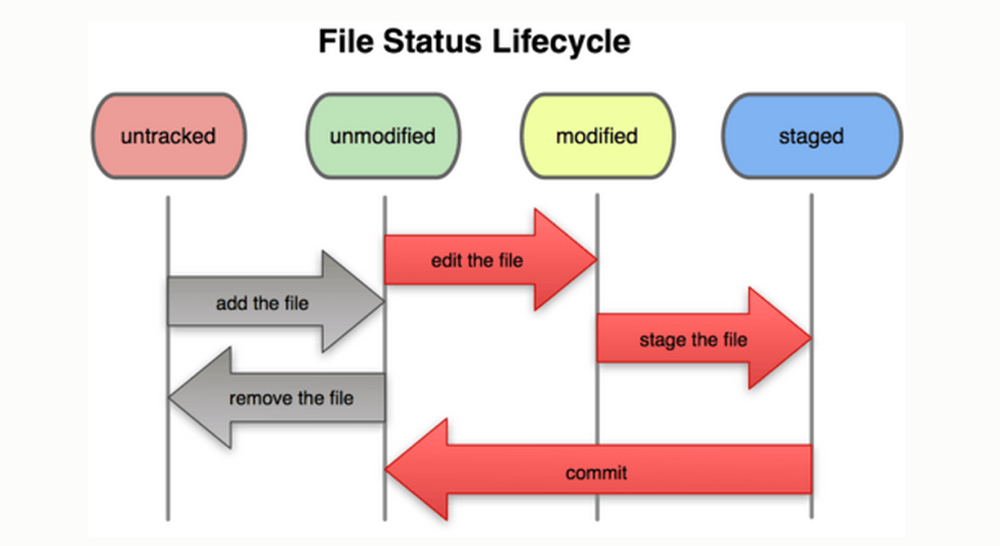
git-file-status-lifecycle

分支操作

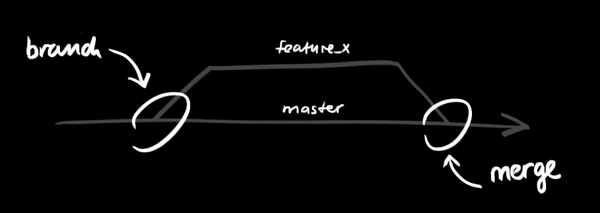
git-branch

1.创建分支

git branch new_br_name #创建
git branch             #查看当前有的分支

git checkout new_br_name #切换到新分支

git checkout -b new_br_name #创建并切过去

2.远程分支

git push origin new_br_name  #推送branch到远端维护起来

#删除
git push origin : <new_br_name>
or
git push origin --delete <new_br_name>

3.合并分支(merge)

git branch  #查看当前分支
git checkout master #切换回主干
git merge new_br_name  #合并new_br_name分支到主干, 自动合并

1.没冲突(no conflicts) -> fine -> commit -> push to remote

2.有冲突(conflicts)
git diff   #查看当前哪些文件有冲突, 标识 unmerged
vim xxx    #手动编辑解决冲突

    冲突文件中标识
    <<<<<<< HEAD:file.txt
    Hello world  #当前branch的
    =======
    Goodbye      #要合并branch的
    >>>>>>> 77976da35a11db4580b80ae27e8d65caf5208086:file.txt

git add xxx #加入

-> 解决所有冲突之后 -> commit -> push to remote

3.删除无用分支

git branch -d new_br_name  #只能删除已经被当前分支合并的分支
git branch -D new_br_name  #强删

4.撤销一个合并

git reset --hard HEAD

tag操作

BP:在发布之前,创建标签

1.创建删除

创建
git tag tag_name <commit ID> #commit ID可以通过git log来查看

删除
git tag -d tag_name

3.远程tag

推送所有tags
git push --tags

删除
git push origin --delete tag <tag_name>

忽略某些文件

项目中那些不需要的文件(untracked),可以忽略

顶层工作目录中添加一个叫".gitignore"的文件 语法文档

# 以'#' 开始的行,被视为注释.
# 忽略掉所有文件名是 foo.txt 的文件.
foo.txt
# 忽略所有生成的 html 文件,
*.html
# foo.html是手工维护的,所以例外.
!foo.html
#  忽略所有.o 和 .a文件.
*.[oa]

常见问题

1.如何让git能处理汉字文件名

git默认quote任何非ascii文件名字符,想要支持非

git config --global core.quotepath false

或者在$HOME/.gitconfig 配置
[core]
    quotepath = false

2.git add -A 和 git add .的区别

"git add -A"  = "git add .; git add -u".

- git add -A stages All
- git add . stages new and modified, without deleted
- git add -u stages modified and deleted, without new

3.怎么配置git结果显示颜色

[color]
#开启着色功能
    status = auto
    diff = auto
    branch = auto
    interactive = auto

4.获得帮助

git help <command>  # 显示command的help

其他

1.更好的git log

git config --global alias.lg "log --color --graph --pretty=format:'%Cred%h%Creset -%C(yellow)%d%Creset %s %Cgreen(%cr) %C(bold blue)<%an>%Creset' --abbrev-commit"
#然后使用 git lg

2.自己搭建代码库

类似github的应用,gitlab(google之)

3.git-flow

git-flow备忘清单

4.基于git的wiki

gollum(google之)


wklken

2013-12-01