

惯性聚合 高效追踪和阅读你感兴趣的博客、新闻、科技资讯
阅读原文 在惯性聚合中打开

推荐订阅源

W
WeLiveSecurity
博客园 - 【当耐特】
Microsoft Azure Blog
WordPress大学
WordPress大学
Stack Overflow Blog
Stack Overflow Blog
cs.AI updates on arXiv.org
IT之家
IT之家
Cloudbric
Cloudbric
The Register - Security
小众软件
小众软件
PCI Perspectives
PCI Perspectives
G
Google Developers Blog
AI
AI
OSCHINA 社区最新新闻
OSCHINA 社区最新新闻
Google DeepMind News
宝玉的分享
宝玉的分享
Recent Commits to openclaw:main
量子位
TaoSecurity Blog
TaoSecurity Blog
cs.CV updates on arXiv.org
F
Full Disclosure
N
Netflix TechBlog - Medium
博客园_首页
Last Week in AI
Last Week in AI
A
Arctic Wolf
B
Blog RSS Feed
J
Java Code Geeks
C
Cybersecurity and Infrastructure Security Agency CISA
I
InfoQ
aimingoo的专栏
aimingoo的专栏
云风的 BLOG
云风的 BLOG
NISL@THU
NISL@THU
MyScale Blog
MyScale Blog
H
Hackread – Cybersecurity News, Data Breaches, AI and More
Jina AI
Jina AI
有赞技术团队
有赞技术团队
S
Schneier on Security
L
Lohrmann on Cybersecurity
P
Privacy & Cybersecurity Law Blog
T
Threat Research - Cisco Blogs
P
Palo Alto Networks Blog
S
Security @ Cisco Blogs
Security Archives - TechRepublic
Security Latest
Security Latest
Vercel News
Vercel News
博客园 - 司徒正美
Webroot Blog
Webroot Blog
Hacker News: Ask HN
Hacker News: Ask HN
A
About on SuperTechFans

Posts on WKLKEN THINKING

apisix 中的 lrucache apisix 中的服务发现机制 apisix 中的负载均衡 apisix etcd机制 聊聊框架 关于 k8s 的 zero downtime deployment 一些建议 apisix 遇到的一些问题 关于在除夕前一天换了一个洗衣机的故事 Django DRF 性能优化 DRF 的一些实践 Part1: Serializer DRF继承关系图 Better Code: 关于接口的灵活性 新的仓库: wklken/naming 缓存使用的一些经验 Better Code: 抽象: 可扩展性与可维护性的抉择 Better Code: 异常时, 该提示用户哪些信息? Better Code: 更好的异常日志打印 Go: some libs Go: go-redis/cache升级的坑 Go: logrus性能提升 Go: gin validation 远程办公的一点总结 Go: 开发过程中的一些bug 项目管理实践: 风险驱动开发 Go: 一种error wrap调用链处理方式 漫谈技术选型 Go: 基于 apitest 做handler层单元测试 Go: go-sql-driver interpolateparams参数优化 [分享]深度工作 你需要更多的思考时间 Django项目重构小结 工作七年小结: 学习,生活及其他 [分享]bash日常: bash-utils 极客时间推广海报 2017总结: 予时光以意义 k8s APIServer源码: api注册详细细节 k8s APIServer源码: api注册主体流程 k8s APIServer源码: 服务启动 k8s APIServer源码: go-restful框架 重构 - 读书笔记(Python示例) 写给新人的沟通建议 vim 杂谈 - 关于快速编辑 vim 杂谈 - 关于移动 读书笔记-重构: 章11 处理概括关系 读书笔记-重构: 章10 简化函数调用 读书笔记-重构: 章9 简化表达式 读书笔记-重构: 章8 重新组织数据 读书笔记-重构: 章7 在对象之间搬移特性 读书笔记-重构: 章6 重新组织函数 Python 代码规范小结 [分享]关于vim ElasticSearch集群部署文档 Logstash+ElasticSearch处理mysql慢查询日志 [分享]关于代码调试DE那些事 Logstash+ElasticSearch+Kibana- 实现相对通用的数据收集分析 ELK维护的一些点(二) [分享]Python源码剖析-数据结构 一些Centos Python生产环境的部署命令 摘录<<6个月学会任何一种外语>> ELK 维护的一些点 也许是一个新的开始 一些vim的个性化配置 读书笔记-调试九法 这段时间的一些想法 Python 源码阅读 - 垃圾回收机制 我为什么要写博客 APUE笔记-第一章 UNIX基础知识 Python源码阅读-闭包的实现 Python源码阅读-内存管理机制(二) Python源码阅读-内存管理机制(一) Python-基础-数据结构小结 '活动'设计的一些trick 一些简单的Python测试题 我的tmux配置及说明【k-tmux】 Review and Restart 工作四周年小结 vim插件: surround & repeat[成对符号编辑] vim插件: gundo[时光机] vim插件: expand-region[区域选中] vim插件: quickrun[快速执行] vim插件: trailing-whitespace[行尾空格处理] vim插件: closetag[成对标签补全] vim插件: airline[状态栏增强] vim插件: theme[主题] vim插件: tagbar[大纲式导航] vim插件: nerdcommenter[快速注释] vim插件: rainbow_parentheses[括号高亮] vim插件: syntastic[语法检查] vim插件: delimitmate[符号自动补全] vim插件: matchit[成对标签跳转] vim插件: easy-align[快速对齐] vim插件: multiple-cursors[多光标操作] vim插件: vim-signature[快速标记跳转] vim插件: easymotion[快速跳转] vim插件: vundle[管理插件] Elasticsearch几个问题的解决 分享一份 Vim 简介PPT k-vim 更新9.0版本 关于知识管理工具的思考 Logstash+ElasticSearch+Kibana处理nginx访问日志
vim插件: ctrlp[文件搜索]
2015-06-07 · via Posts on WKLKEN THINKING

k-vim配置 github


使用频率最高的插件之一

作用: 模糊搜索, 可以搜索文件/buffer/mru/tag等等

github: 原始kien/ctrlp, 使用的是国人改进版本 ctrlpvim/ctrlp.vim

安装

Bundle 'ctrlpvim/ctrlp.vim'

使用

绑定快捷键

<leader>-f模糊搜索最近打开的文件(MRU)

<leader>-p模糊搜索当前目录及其子目录下的所有文件

搜索框出来后, 输入关键字, 然后

ctrl + j/k 进行上下选择

ctrl + x 在当前窗口水平分屏打开文件

ctrl + v 同上, 垂直分屏

ctrl + t 在tab中打开
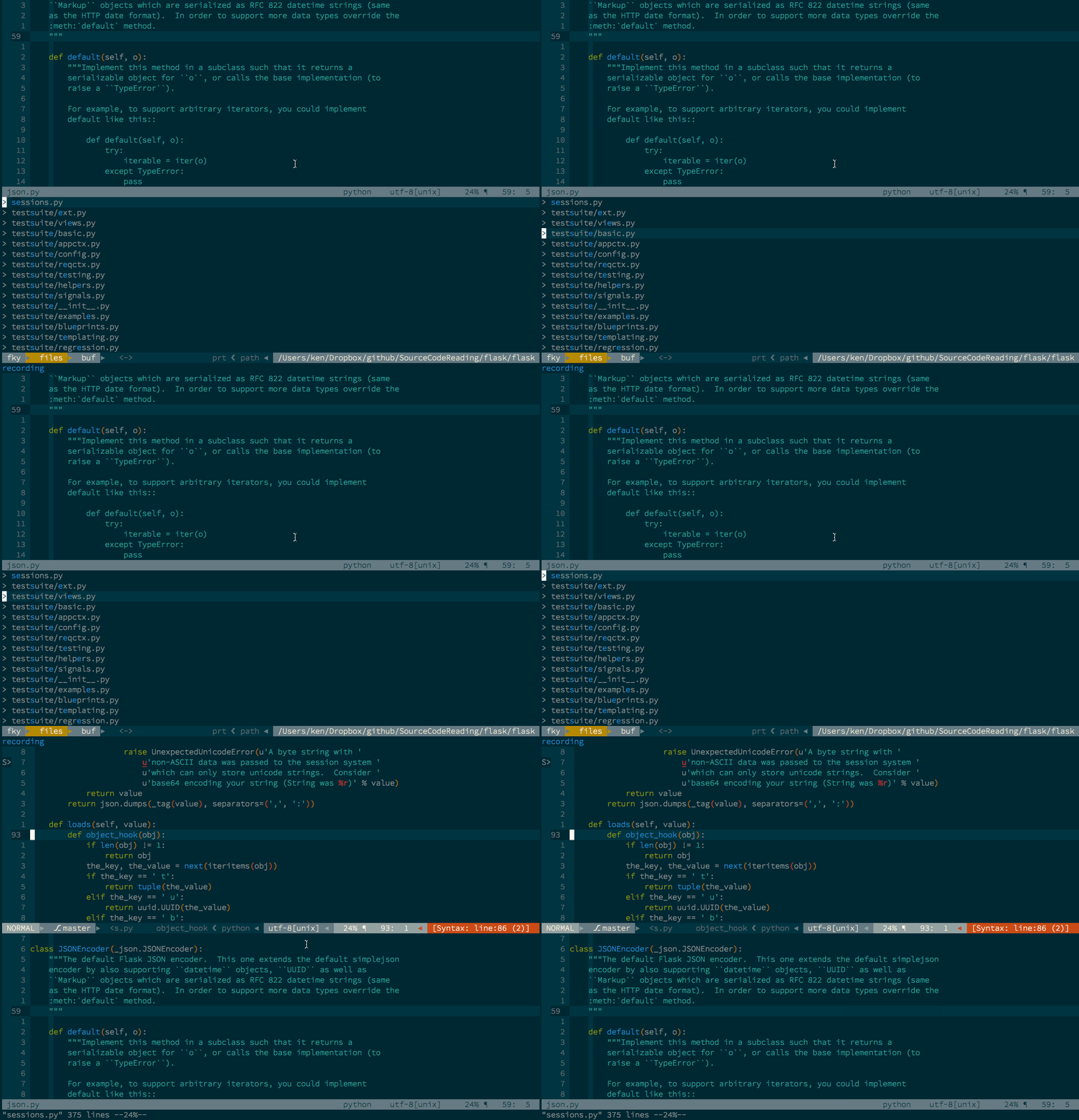
ctrlp.gif

最终配置

Bundle 'ctrlpvim/ctrlp.vim'
let g:ctrlp_map = '<leader>p'
let g:ctrlp_cmd = 'CtrlP'
map <leader>f :CtrlPMRU<CR>
let g:ctrlp_custom_ignore = {
    \ 'dir':  '\v[\/]\.(git|hg|svn|rvm)$',
    \ 'file': '\v\.(exe|so|dll|zip|tar|tar.gz|pyc)$',
    \ }
let g:ctrlp_working_path_mode=0
let g:ctrlp_match_window_bottom=1
let g:ctrlp_max_height=15
let g:ctrlp_match_window_reversed=0
let g:ctrlp_mruf_max=500
let g:ctrlp_follow_symlinks=1

其他

  1. 更多操作, 详见 文档
  2. 可以考虑废弃fuzzyfinder / Command-T
  3. 可以考虑只用一个快捷键, 配置映射到:CtrlPMixed, 就可以一键搜索文件/buffer/mru

附: ctrlp的插件ctrlp-funky

作用: 模糊搜索当前文件中所有函数

github: ctrlp-funky

安装

Bundle 'tacahiroy/ctrlp-funky'

使用

绑定快捷键

<leader>fu 进入当前文件的函数列表搜索

<leader>fU 搜索当前光标下单词对应的函数
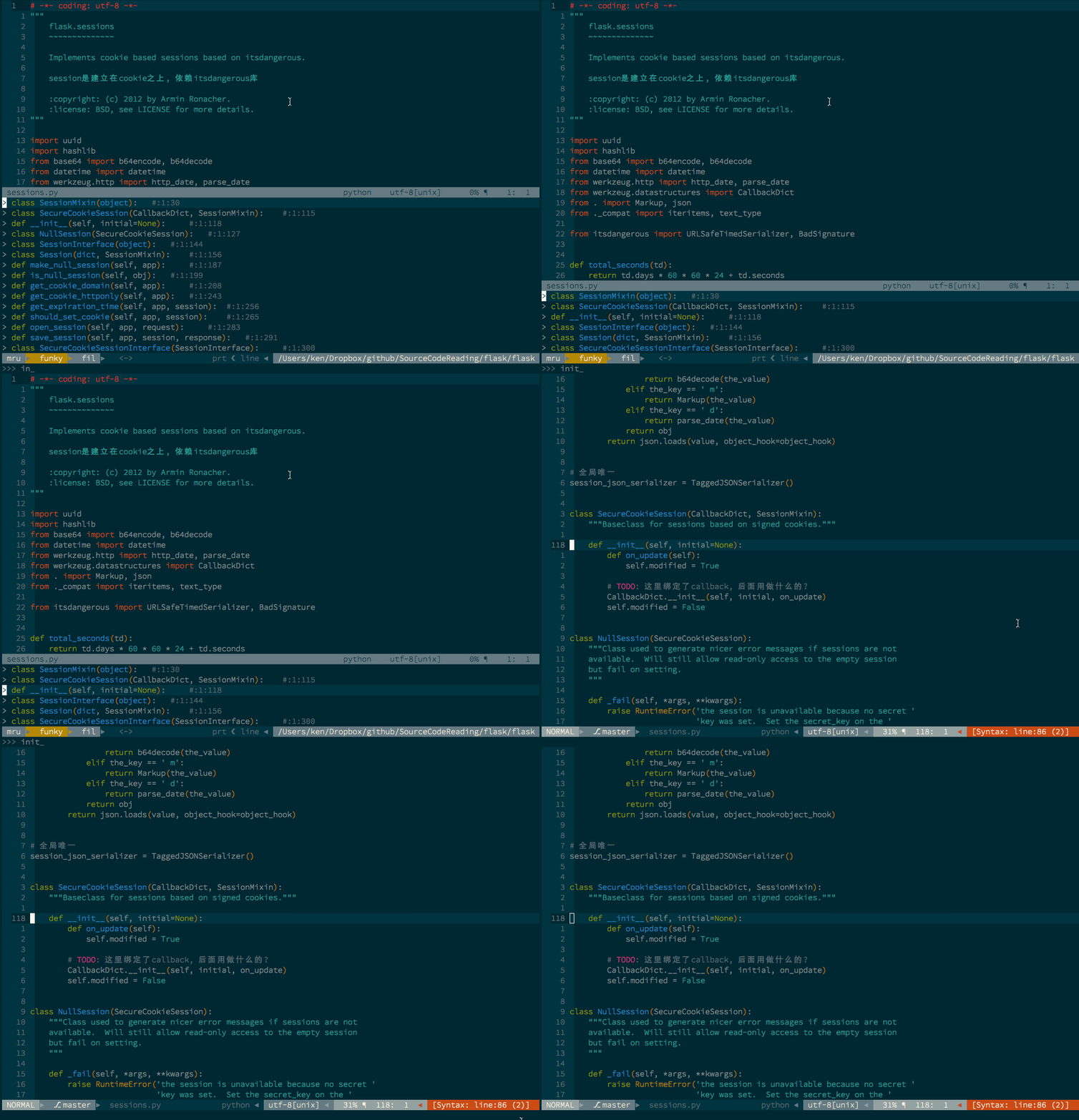
ctrlp-funky.gif

最终配置

Bundle 'tacahiroy/ctrlp-funky'
nnoremap <Leader>fu :CtrlPFunky<Cr>
" narrow the list down with a word under cursor
nnoremap <Leader>fU :execute 'CtrlPFunky ' . expand('<cword>')<Cr>
let g:ctrlp_funky_syntax_highlight = 1

let g:ctrlp_extensions = ['funky']