惯性聚合 高效追踪和阅读你感兴趣的博客、新闻、科技资讯
阅读原文 在惯性聚合中打开

推荐订阅源

腾讯CDC
N
Netflix TechBlog - Medium
aimingoo的专栏
aimingoo的专栏
P
Proofpoint News Feed
F
Fortinet All Blogs
大猫的无限游戏
大猫的无限游戏
I
InfoQ
V
V2EX
Cyber Security Advisories - MS-ISAC
有赞技术团队
有赞技术团队
G
Google Developers Blog
L
LangChain Blog
博客园_首页
M
MIT News - Artificial intelligence
H
Hackread – Cybersecurity News, Data Breaches, AI and More
月光博客
月光博客
IT之家
IT之家
量子位
宝玉的分享
宝玉的分享
S
SegmentFault 最新的问题
Stack Overflow Blog
Stack Overflow Blog
V
Visual Studio Blog
奇客Solidot–传递最新科技情报
奇客Solidot–传递最新科技情报
雷峰网
雷峰网

Posts on WKLKEN THINKING

apisix 中的 lrucache apisix 中的服务发现机制 apisix 中的负载均衡 apisix etcd机制 聊聊框架 关于 k8s 的 zero downtime deployment 一些建议 apisix 遇到的一些问题 关于在除夕前一天换了一个洗衣机的故事 Django DRF 性能优化 DRF 的一些实践 Part1: Serializer DRF继承关系图 Better Code: 关于接口的灵活性 新的仓库: wklken/naming 缓存使用的一些经验 Better Code: 抽象: 可扩展性与可维护性的抉择 Better Code: 异常时, 该提示用户哪些信息? Better Code: 更好的异常日志打印 Go: some libs Go: go-redis/cache升级的坑 Go: logrus性能提升 Go: gin validation 远程办公的一点总结 Go: 开发过程中的一些bug 项目管理实践: 风险驱动开发 Go: 一种error wrap调用链处理方式 漫谈技术选型 Go: 基于 apitest 做handler层单元测试 Go: go-sql-driver interpolateparams参数优化 [分享]深度工作 你需要更多的思考时间
vim插件: surround & repeat[成对符号编辑]
2015-06-13 · via Posts on WKLKEN THINKING

k-vim配置 github


作用: 快速给词加环绕符号,例如单引号/双引号/括号/成对标签等

github: vim-surround

安装

Bundle 'tpope/vim-surround'

使用

注意(括号, 左括号会加空格, 右括号不会)

示例:

# 替换: cs"'
"Hello world!" -> 'Hello world!'

# 替换-标签(t=tag): cst"
<a>abc</a>  -> "abc"

cst<html>
<a>abc</a>  -> <html>abc</html>

# 删除: ds"
"Hello world!" -> Hello world!

# 添加(ys=you surround): ysiw"
Hello -> "Hello"

# 添加: csw"
Hello -> "Hello"

# 添加-整行: yss"
Hello world -> "Hello world"

# ySS"
Hello world ->
"
    hello world
"

# 添加-两个词: veeS"
hello world -> "hello world"

# 添加-当前到行尾: ys$"

# 左符号/右符号 => 带不带空格
cs([
(hello) -> [ hello ]

cs(]
(hello) -> [hello]

演示:
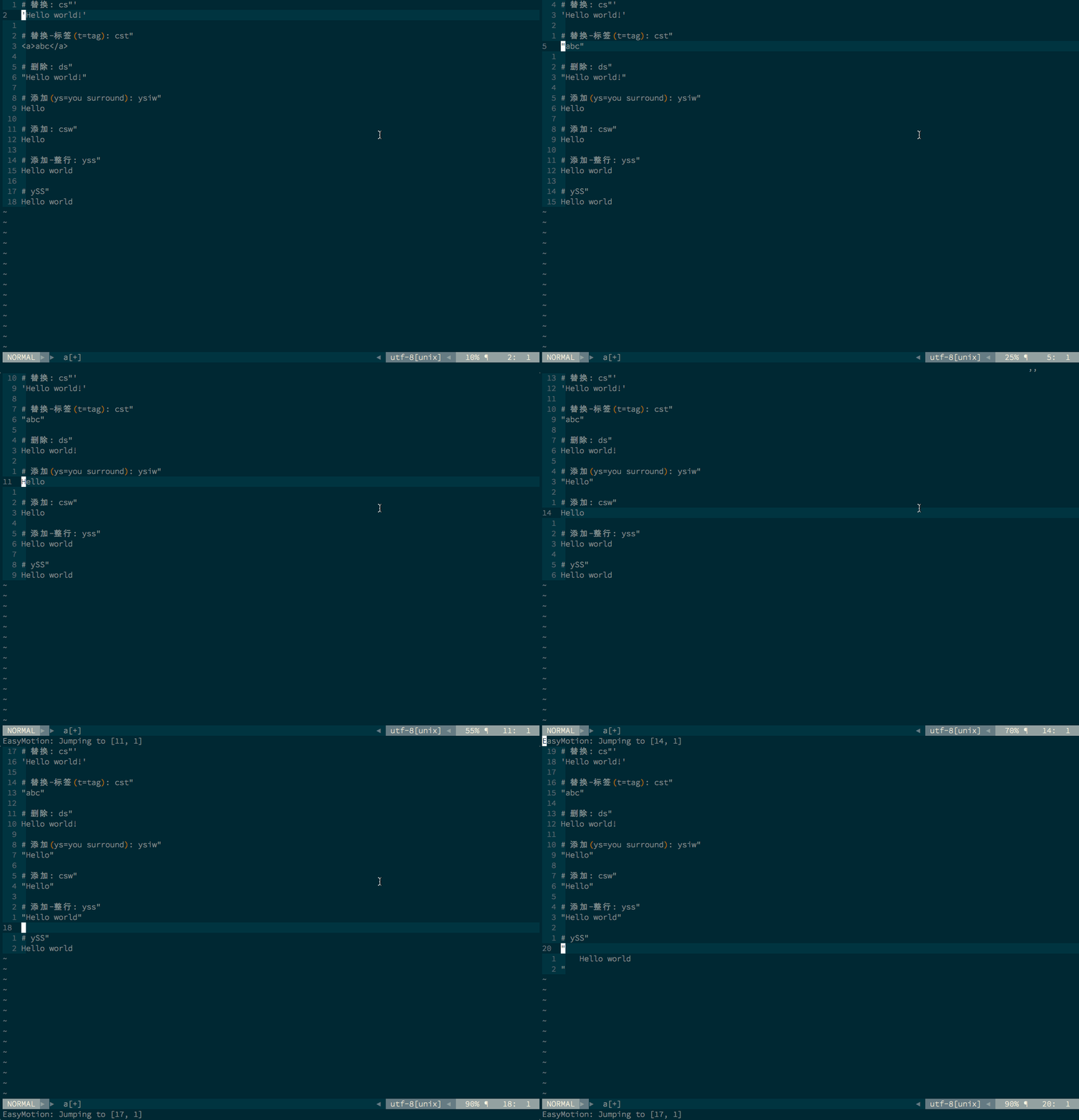
surround.gif


vim-repeat

作用: 重复一个插件的操作, 支持surround.vim, 通过 surround 操作之后的行为, .号重复

github: vim-repeat

安装

" for repeat -> enhance surround.vim, . to repeat command
Bundle 'tpope/vim-repeat'

使用

演示:

repeat.gif

最终配置

Bundle 'tpope/vim-surround'
Bundle 'tpope/vim-repeat'

建议

  1. 善用.
  2. repeat同时还支持的插件 doc