
惯性聚合 高效追踪和阅读你感兴趣的博客、新闻、科技资讯
阅读原文 在惯性聚合中打开

推荐订阅源

K
Kaspersky official blog
Martin Fowler
Martin Fowler
CTFtime.org: upcoming CTF events
V
Visual Studio Blog
博客园_首页
Engineering at Meta
Engineering at Meta
The Cloudflare Blog
MongoDB | Blog
MongoDB | Blog
Blog — PlanetScale
Blog — PlanetScale
T
The Blog of Author Tim Ferriss
雷峰网
雷峰网
D
Docker
博客园 - 司徒正美
S
SegmentFault 最新的问题
M
MIT News - Artificial intelligence
博客园 - 叶小钗
博客园 - 三生石上(FineUI控件)
U
Unit 42
J
Java Code Geeks
A
About on SuperTechFans
N
Netflix TechBlog - Medium
freeCodeCamp Programming Tutorials: Python, JavaScript, Git & More
S
Security Affairs
I
Intezer
Cisco Talos Blog
Cisco Talos Blog
C
Cyber Attacks, Cyber Crime and Cyber Security
Threat Intelligence Blog | Flashpoint
B
Blog RSS Feed
P
Privacy & Cybersecurity Law Blog
T
Tenable Blog
T
Threatpost
H
Hacker News: Front Page
G
Google Developers Blog
博客园 - 【当耐特】
Hugging Face - Blog
Hugging Face - Blog
Apple Machine Learning Research
L
Lohrmann on Cybersecurity
大猫的无限游戏
大猫的无限游戏
Google DeepMind News
A
Arctic Wolf
S
Secure Thoughts
GbyAI
GbyAI
NISL@THU
NISL@THU
S
Security @ Cisco Blogs
Exploit-DB.com RSS Feed
Webroot Blog
Webroot Blog
C
CXSECURITY Database RSS Feed - CXSecurity.com
O
OpenAI News
Spread Privacy
Spread Privacy
Application and Cybersecurity Blog

nextcloud – ACEVS

next安装.插件很多的云盘.看到有同学写了一系列教程.就折腾一下.教程搬运链接. – ACEVS 如何在Nextcloud用户启用2FA 两步验证 google或者微软验证 – ACEVS
黑裙 docker安装nextcloud 局域网速度跑不满千兆。filerun就可以。优化 – ACEVS
2026-05-30 · via nextcloud – ACEVS

原因next按照教程安装好了。二步验证也开启了。之前发了文章。可以搜索nextcloud
ssh登陆群晖后台
login root
docker
docker ps #列出容器正在运行的
sudo docker exec --user root -it -it containID /bin/bash
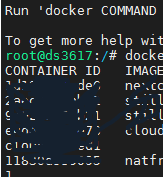
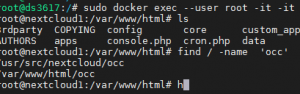
找到nextcloud的安装文件见,我们搜occ来找
find / -name 'occ'

执行以下语句

php occ config:app:set files max_chunk_size --value 0(解除块大小限制)
遇到问题
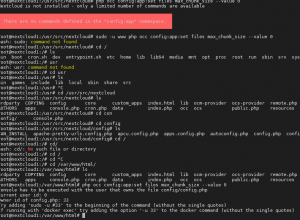
前面扯淡了一会儿。其实最后复制两行代码就可以了。
ssh root 登陆群晖
然后
进入docker

sudo docker exec -u 33 -it 651c7df95718 /bin/bash

651c7df95718替换为你的nextcloud容器id就可以了。 -u 33 这个我也不明白。不过前面错误提示需要这个权限的id。

进入html 直接复制
php occ config:app:set files max_chunk_size --value 0
提示成功
遗憾的是测速40m左右 上传视频。对比了一下 filerun 上传速度一样。播放视频 不知道用的什么解码。filerun是ffmpeg。继续研究
如图
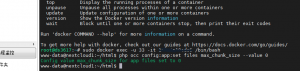
最后nextcloud看完视频。docker内存用到1.2g 。关掉重启nextcloud就好了。后期继续观察。
参考
记录一下搞nextcloud的辛酸事吧
https://www.cnblogs.com/undefined-j/p/15609088.html
docker安装nextcloud,在局域网内的速度很慢,这是怎么回事?
https://www.zhihu.com/question/433714612
NextCloud终极优化,内网上传破100M/s优化)nextcloud优化
https://cxybb.com/article/qq_28718329/112687699
NextCloud终极优化,内网上传破100M/s优化)
https://blog.csdn.net/qq_28718329/article/details/112687699