


惯性聚合 高效追踪和阅读你感兴趣的博客、新闻、科技资讯
阅读原文 在惯性聚合中打开

推荐订阅源

W
WeLiveSecurity
博客园 - 【当耐特】
Microsoft Azure Blog
WordPress大学
WordPress大学
Stack Overflow Blog
Stack Overflow Blog
cs.AI updates on arXiv.org
IT之家
IT之家
Cloudbric
Cloudbric
The Register - Security
小众软件
小众软件
PCI Perspectives
PCI Perspectives
G
Google Developers Blog
AI
AI
OSCHINA 社区最新新闻
OSCHINA 社区最新新闻
Google DeepMind News
宝玉的分享
宝玉的分享
Recent Commits to openclaw:main
量子位
TaoSecurity Blog
TaoSecurity Blog
cs.CV updates on arXiv.org
F
Full Disclosure
N
Netflix TechBlog - Medium
博客园_首页
Last Week in AI
Last Week in AI
A
Arctic Wolf
B
Blog RSS Feed
J
Java Code Geeks
C
Cybersecurity and Infrastructure Security Agency CISA
I
InfoQ
aimingoo的专栏
aimingoo的专栏
云风的 BLOG
云风的 BLOG
NISL@THU
NISL@THU
MyScale Blog
MyScale Blog
H
Hackread – Cybersecurity News, Data Breaches, AI and More
Jina AI
Jina AI
有赞技术团队
有赞技术团队
S
Schneier on Security
L
Lohrmann on Cybersecurity
P
Privacy & Cybersecurity Law Blog
T
Threat Research - Cisco Blogs
P
Palo Alto Networks Blog
S
Security @ Cisco Blogs
Security Archives - TechRepublic
Security Latest
Security Latest
Vercel News
Vercel News
博客园 - 司徒正美
Webroot Blog
Webroot Blog
Hacker News: Ask HN
Hacker News: Ask HN
A
About on SuperTechFans

Nemo

再见,2025 Complete ORB-SLAM3 Setup Guide for Jetson Xavier NX with RealSense D455 20250723 再见,2024 Using CertBot for Automatic Secure EMQX Broker Create Your Own GPS Data Publisher Support SSL AGV Dispatching System Technical Documentation Finding Nemo No title 香港賽馬會呈獻系列:黑白——攝影敘事 再见,2023 团团是只猫 Design an FSM for Robot State Machines – Basics of Computer Science Data-driven robot lifespan: Collection 数据驱动的机器人寿命:收集、诊断、预测 Exploring the design space of binary search trees 特首来了 Large language models, explained with a minimum of math and jargon 设计有缓存异步逻辑的监控脚本并测试其资源占用 使用loguru记录串口数据并使用Docker搭建ARM开发环境 在vscode的Dev Container中构建.NET开发环境及使用doxygen和graphviz绘制函数调用图 State or Status? A*算法两种时间复杂度 /A* Algorithm: Two Types of Time Complexity 使用KD-Tree快速收敛到最近坐标点/Fast convergence to the nearest coordinate point using KD-Tree 翻译 || 总结 - Go语言中的空结构体(The empty struct) 再见,2022 从PE工作报告中能读出什么 Give me miles, give me truth AMR调度系统性能优化/AMR Dispatch System Performance Optimization 条件触发AMR避让流程/Conditionally triggered AMR avoidance process Docker实现调度系统整体部署/Docker implementation of dispatching system overall deployment 调度系统中加密算法的使用/增加SM4补0方法/Use of encryption algorithms in scheduling systems/add SM4 complementary 0 method 一篇关于北京四天三夜的攻略 2022 藏疆自驾 策划/招募书 AMR仿真模型/AMR Simulation Model 东东有鱼2022年会分享 使用perf-FlameGraph监控系统性能 Beyond Compare 4删除试用 你的灵魂有香气 [转载]Python中的单例模式的几种实现方式的及优化 - Nemo 再见! 2020 1024 UML软件建模 入职优必选一个月 写论文时 那些让你开心的软件 - Nemo 分享一个记录刷题次数的模版 LeetCode-查找表类算法题精析 PyCharm 调用vs 2010 C++库导致提示报错R6034解决方法 MySQL基础教程 多种数据结构的Python实现形式 字节跳动-挑战字符串 选择排序 二分查找和大O表示法 算法中的动态规划问题 高高手课程-青山裕企人像摄影 笔记(内含福利)
Pyinstaller打包Python项目
Nemo · 2021-03-25 · via Nemo

Python项目打包流程

Linux下使用PyInstaller打包Python程序

Python利用PyInstaller打包

PyInstaller 手册

python应用打包笔记

谈谈 Pyinstaller 的编译和反编译

Using PyInstaller to Easily Distribute Python Applications

pip install pyinstaller
pyinstaller -F xx.py
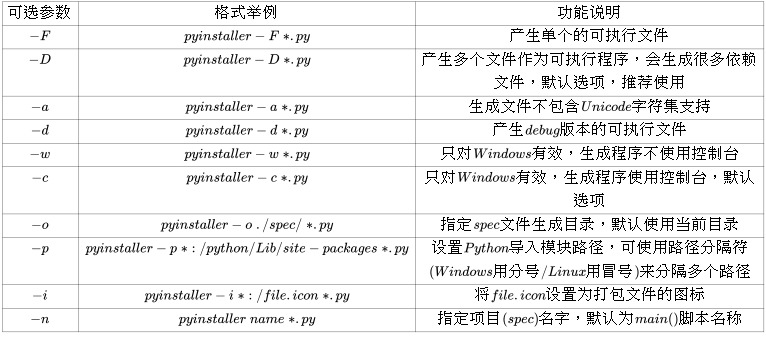
a7ppi-ujv4p.jpg

Pyinstaller使用注意事项

  1. 避免在入口文件中使用显式的相对导入

    相对导入的语法取决于当前位置以及要导入的模块,包或对象的位置。以下是相对导入的一些示例:

    from .some_module import some_class
    from ..some_package import some_function
    from . import some_class
    

    单点表示所引用的模块或软件包与当前位置位于同一目录中。两个点表示它位于当前位置的父目录(即上面的目录)中。三个点表示该文件位于祖父母目录中,依此类推。

  2. Pyinstaller运行时会产生三个文件夹:

  • A *.spec file

  • A build/ folder

  • A dist/ folder

    1. Spec File

      该文件将由pyinstaller命令自动创建。可以修改此文件并在以后重新使用它来创建可执行文件。通过提供此spec文件而不是pyinstaller命令的入口点脚本,可以使以后的构建更快一些。官网用例,但是,对于简单的项目,除非您想大量自定义项目的构建方式,否则无需担心这些细节。

    2. Build Folder

      在该build/文件夹中,PyInstaller会将大多数元数据和内部簿记放入该文件夹中,以构建可执行文件。默认内容如下所示:

      build/
      |
      └── cli/
          ├── Analysis-00.toc
          ├── base_library.zip
          ├── COLLECT-00.toc
          ├── EXE-00.toc
          ├── PKG-00.pkg
          ├── PKG-00.toc
          ├── PYZ-00.pyz
          ├── PYZ-00.toc
          ├── warn-cli.txt
          └── xref-cli.html
      

      build文件夹对于调试很有用,但是除非遇到问题,否则在很大程度上可以忽略此文件夹。

    3. Dist Folder

      构建后,将得到一个dist/类似于以下内容的文件夹:

      dist/
      |
      └── cli/
          └── cli
      

      dist/文件夹包含要交付给用户的最终工件。在该dist/文件夹内,有一个以入口点命名的文件夹。因此,在此示例中,您将拥有一个dist/cli文件夹,其中包含我们应用程序的所有依赖关系和可执行文件。要运行的可执行文件为,dist/cli/cli或者dist/cli/cli.exe如果您使用的是Windows。

      还可以找到大量的文件扩展名为.so.pyd以及.dll根据您的操作系统。这些是共享库,表示PyInstaller创建和收集的项目的依赖项。

      Note: You can add *.spec, build/, and dist/ to your .gitignore file to keep git status clean if you’re using git for version control. The default GitHub gitignore file for Python projects already does this for you.
      
  1. Pyinstaller自定义参数
  • --name

    更改可执行文件的名称

    “`
    pyinstaller cli.py –name realpython
    “`

  • --onefile

    将整个应用程序打包到一个可执行文件中

    “`
    pyinstaller cli.py –onefile
    “`

    使用上面的命令,dist/文件夹将只包含一个可执行文件,而不是所有依赖关系都位于单独文件中的文件夹。

  • --hidden-import

    列出PyInstaller无法自动检测到的多个顶级导入

    这是使用import内部函数和来解决代码的一种方法__import__()。您也可以在同一命令中多次使用--hidden-import

    此选项需要您要包含在可执行文件中的软件包的名称。例如,如果您的项目将requests库导入到函数内部,则PyInstaller不会自动包含requests在可执行文件中。您可以使用以下命令强制requests将其包括在内:

    “`
    pyinstaller cli.py –hiddenimport=requests
    “`

    您可以在构建命令中多次指定此选项,每次隐藏导入一次。

  • --add-data--add-binary

    指示PyInstaller将其他数据或二进制文件插入到您的版本中。

    当您希望捆绑配置文件,示例或其他非代码数据时,此功能很有用。

  • --exclude-module

    从可执行文件中排除某些模块

    例如,如果使用pytest,则可能要从可执行文件中排除它:

    “`
    pyinstaller cli.py –exclude-module=pytest
    “`

  • -w

    避免自动打开控制台窗口进行stdout日志记录。

    仅在构建支持GUI的应用程序时,此功能才有用。通过允许用户从不查看终端,这可以帮助您隐藏实现的详细信息。

    类似于该--onefile选项,-w不带任何参数:

    “`
    pyinstaller cli.py -w
    “`

  • --log-level=DEBUG

    重建可执行文件并查看输出

    当使用来增加详细程度时,PyInstaller将创建大量输出--log-level=DEBUG。将输出保存到以后可以参考的文件中很有用,而不是在终端中滚动。为此,您可以使用外壳程序的重定向功能。这是一个例子:

    “`shell
    $ pyinstaller –log-level=DEBUG cli.py 2> build.txt
    “`

    使用的标准重定向>是不够的。PyInstaller打印到stderr流,而不是 stdout。这意味着您需要将stderr流重定向到文件,可以使用上一个2命令中的as来完成。

  1. Pyinstaller加密打包

    加密过程需要依赖pycrypto

    pip install pycrypto
    

    只要在打包时加个key参数就能加密:

    pyinstaller.exe -F --key 123456 xxx.py