





设计有缓存异步逻辑的监控脚本并测试其资源占用
接上回:
Buffer
最开始的想法无法满足缓存需求以及觉得资源占用还是有点多,就重新设想程序逻辑:
- 增加缓存
- 判断ARM发出的关机指令,最大限度保存日志
- 实现运行、按天、大小打包日志文件
- 异步架构
主要目的还是降低eMMC的IO压力,提高使用寿命
eMMC芯片的读写速度和寿命是使用这些设备的用户关心的重要参数。多次小IO合并成一个大IO对于eMMC芯片的读写寿命有一定的影响。以下是详细的调研说明:
- 读写次数限制 eMMC芯片的一个重要性能指标是擦写次数,即每个存储单元在失效前可以承受的读写操作次数。擦写次数受到存储单元的物理特性限制,一般在几千到几十万次之间。这意味着在eMMC芯片的使用过程中,每个存储单元的读写次数都需要尽可能地分摊,以避免某些存储单元过早失效。
- 读写寿命的影响 将多次的小IO合并成一个大IO可以减少芯片的读写次数。对于eMMC芯片,读写操作的粒度是页(page),而擦除操作的粒度是块(block)。在没有合并的情况下,多次小IO操作可能需要对多个块进行擦除和写入,从而增加芯片的读写次数。通过合并多次小IO操作,可以减少对块的擦除和写入次数,从而延长芯片的读写寿命。
- 性能优化 除了对读写寿命的影响,合并多次小IO操作还可以提高eMMC芯片的性能。随机读写操作的速度通常低于顺序读写操作,因为随机操作需要在多个位置进行寻址。通过合并多次小IO操作,可以将随机操作转换为顺序操作,从而提高芯片的读写速度。 4. Wear Leveling技术 为了延长eMMC芯片的读写寿命,芯片控制器通常会采用一种称为Wear Leveling的技术。Wear Leveling可以将擦除和写入操作在整个芯片的存储单元上均匀分布,从而避免某些存储单元过早失效。将多次的小IO合并成一个大IO可以降低Wear Leveling算法的复杂性,提高其效果。 综上所述,将多次的小IO合并成一个大IO对eMMC芯片的读写寿命有积极影响。这种操作方式可以降低擦除和写入次数,提高芯片的性能,并有利于Wear Leveling技术的实现。当然,这种优化需要在保证数据完整性和实时性的前提下
参考文献:
Micheloni, R., Crippa, L., & Marelli, A. (2010). Inside NAND Flash Memories. Springer Science & Business Media.
Grupp, L. M., Davis, J. D., & Swanson, S. (2012). The bleak future of NAND flash memory. In 10th {USENIX} Conference on File and Storage Technologies ({FAST} 12).
根据这些理论依据,我们可以得出结论:在处理串口数据时,使用缓冲区(buf)先存储数据,然后再进行批量写入的方式,相比于收到数据后立即写入,更有利于延长eMMC芯片的寿命。
重新设计后的伪代码如下:
import os
import zipfile
import asyncio
import serial_asyncio
import configparser
from datetime import datetime, timedelta
import re
import logging
from logging.handlers import TimedRotatingFileHandler
import traceback

ShutDownFlag = "AGV Key Shutdown"

# pre-compile regex
re_printable_ascii = re.compile(r'[^\x20-\x7E]+')
re_log_file_suffix = re.compile(r"^\d{4}-\d{2}-\d{2}.log$")

# read config file
config = configparser.ConfigParser()
config.read("/etc/xx.ini", encoding="utf-8")

# read serial config
serialPort = config.get("SERIAL_INFO", "serialPort")
serialBaudrate = config.getint("SERIAL_INFO", "serialBaudrate")
serialDatabits = config.getint("SERIAL_INFO", "serialDatabits")
serialStopbits = config.getint("SERIAL_INFO", "serialStopbits")
serialTimeout = config.getint("SERIAL_INFO", "serialTimeout")

# read log config
logPath = config.get("LOG_INFO", "logPath")
logRetention = config.get("LOG_INFO", "logRetention")
logRotaSize = config.get("LOG_INFO", "logRotaSize")
logRotaTime = config.get("LOG_INFO", "logRotaTime")
logCompression = config.get("LOG_INFO", "logCompression")
logEncoding = config.get("LOG_INFO", "logEncoding")

# get log retention days
log_retention_days = int(''.join(filter(str.isdigit, logRetention)))

BUFFER_SIZE = xx  # Set buffer size according to your requirement
log_buffer = []

# Configure logging
logger = logging.getLogger(__name__)
logger.setLevel(logging.INFO)

# Create log file handler with rotation
file_handler = TimedRotatingFileHandler(
    logPath, when='midnight', backupCount=log_retention_days, delay=True)
file_handler.setFormatter(logging.Formatter('%(message)s'))
# Set the log file suffix to include the date
file_handler.suffix = "%Y-%m-%d.log"
# Match log files with the correct suffix
file_handler.extMatch = re_log_file_suffix

# Set the handler to append mode
file_handler.mode = 'a'

logger.addHandler(file_handler)

RSDEXCEPTION = None
RUNEXCEPTION = None
ZIP_EXCEPTION = None

async def handle_serial_data(reader, writer):
    global RSDEXCEPTION, log_buffer, BUFFER_SIZE

    while True:
        try:
            ...
            if byte_data and len(byte_data) > 3:
               ..
                # Keep only printable ASCII characters
                ...

                # Get the current time when the data is received
                ..

                # Add log with timestamp to buffer
                ...

                if ShutDownFlag in str_data: # if agv shutdown, then shutdown this program
                    BUFFER_SIZE = 1

                # If buffer reaches its limit, write logs to file and reset buffer
                if len(log_buffer) >= BUFFER_SIZE:
                    await write_log(log_buffer)
                    log_buffer = []  # Reset the buffer after writing logs
            else:
                pass

        except Exception as e:
            if e != RSDEXCEPTION:
                logger.error("Receive SerialData error: {0}", type(e).__name__)
                RSDEXCEPTION = e
            elif e == RSDEXCEPTION:
                print("dump!", e)

            await write_log(log_buffer)  # Write logs to file before exiting

        else:
            RSDEXCEPTION = None

        # Ensure that logs in the buffer are written to the file before the function exits
        finally:
            pass

def write_log_sync(log_buffer):
    logs_to_write = '\n'.join(log_buffer)
    logger.info(logs_to_write)

    # Flush the logger to ensure logs are written to the file
    logger.handlers[0].flush()

async def write_log(log_buffer):
    loop = asyncio.get_event_loop()
    await loop.run_in_executor(None, write_log_sync, log_buffer)

async def zip_log_file():
    global ZIP_EXCEPTION
    while True:
        try:
            ...
            if os.path.exists(logPath) and os.path.getsize(logPath) > 0:
               ..
                with zipfile.ZipFile(zip_name, 'w', zipfile.ZIP_DEFLATED) as zf:
                    zf.write(logPath, arcname=os.path.basename(logPath))

                os.remove(logPath)
        except Exception as e:
            if e != ZIP_EXCEPTION:
                logger.error("zip_log_file error: {0}", type(e).__name__)
                print("zip_log_file error: {0}", type(e).__name__)
                ZIP_EXCEPTION = e
        else:
            ZIP_EXCEPTION = None

async def main():
    # Check if log file exists and is not empty, zip and remove it before starting the program
    if os.path.exists(logPath) and os.path.getsize(logPath) > 0:
        ..

        with zipfile.ZipFile(zip_name, 'w', zipfile.ZIP_DEFLATED) as zf:
            zf.write(logPath, arcname=os.path.basename(logPath))

        os.remove(logPath)

    global RUNEXCEPTION

    try:
        loop = asyncio.get_event_loop()
        reader, writer = await serial_asyncio.open_serial_connection(
            loop=loop, url=serialPort, baudrate=serialBaudrate
        )

    except Exception:
        exc = traceback.format_exc()
        if exc != RUNEXCEPTION:
            logger.error("main error: {0}", exc)
            RUNEXCEPTION = exc
        return
    else:
        RUNEXCEPTION = None

    try:
        asyncio.create_task(zip_log_file())
        await handle_serial_data(reader, writer)
    finally:
        writer.close()
        await writer.wait_closed()

if __name__ == '__main__':
    try:
        asyncio.run(main())
    except Exception as e:
        logger.exception("main error!", type(e).__name__)
关于异步逻辑的使用,需要根据:
- I/O 密集型操作:异步编程特别适用于 I/O 密集型任务,如网络请求、文件读写等。在这些情况下,异步编程可以避免阻塞主线程,从而提高程序的性能和响应速度。
- 并发:如果程序需要同时处理多个任务,异步编程可以实现任务之间的并发执行。这可以在不增加额外线程开销的情况下,提高程序的吞吐量。
- 可扩展性:异步编程在处理大量请求时有更好的可扩展性。与多线程相比,异步编程通常使用更少的系统资源(如内存、线程等),因此在资源有限的环境中会更加高效。
- 响应性:对于需要快速响应用户操作或其他事件的程序,异步编程可以帮助保持程序的响应性。通过避免阻塞主线程,异步编程确保程序能够在处理耗时操作时仍然对用户操作做出及时响应。
- 任务依赖关系:异步编程在处理具有复杂依赖关系的任务时具有优势。通过使用
asyncio等库,可以方便地组织和编排任务,确保它们按照正确的顺序和优先级执行。
资源占用监控
为了测试新方案的效果,使用psutil获取系统资源数据比较两者差别,
代码如下:
import time
from datetime import datetime
import psutil
import csv

# Interval in seconds
INTERVAL = 5

# Output file
OUTPUT_FILE = "xx.csv"
SUMMARY_FILE = "xx.csv"

# Number of top processes to display
NUM_PROCESSES = 7

# Write header to the output file
with open(OUTPUT_FILE, "w", newline="") as f:
    csv_writer = csv.writer(f)
    csv_writer.writerow(["Timestamp", "PID", "Process Name", "Read Bytes (B)", "Write Bytes (B)", "CPU Time (s)", "RAM Usage (B)", "Open Files", "Read Count", "Write Count"])

prev_io_data = {}
total_io_data = {}

try:
    while True:
        # Get a list of all running processes
        processes = [proc for proc in psutil.process_iter()]

        # Get I/O and CPU data for each process and store it in a list
        process_io_data = []
        for process in processes:
            try:
                io_data = process.io_counters()
                read_bytes = io_data.read_bytes
                write_bytes = io_data.write_bytes
                read_count = io_data.read_count
                write_count = io_data.write_count
                process_path = process.exe()
                process_cmdline = " ".join(process.cmdline())

                cpu_time = process.cpu_times().user + process.cpu_times().system

                # Calculate the difference in read and write bytes and counts from last interval
                if process.pid in prev_io_data:
                    prev_read_bytes, prev_write_bytes, prev_cpu_time, prev_read_count, prev_write_count = prev_io_data[process.pid]
                    read_bytes_diff = read_bytes - prev_read_bytes
                    write_bytes_diff = write_bytes - prev_write_bytes
                    read_count_diff = read_count - prev_read_count
                    write_count_diff = write_count - prev_write_count
                    cpu_time_diff = cpu_time - prev_cpu_time
                else:
                    read_bytes_diff = read_bytes
                    write_bytes_diff = write_bytes
                    read_count_diff = read_count
                    write_count_diff = write_count
                    cpu_time_diff = cpu_time

                prev_io_data[process.pid] = (read_bytes, write_bytes, cpu_time, read_count, write_count)

                # Get RAM usage (resident set size) for the process
                ram_usage = process.memory_info().rss

                # Get the list of open files for the process
                open_files = process.open_files()
                open_files_list = [open_file.path for open_file in open_files]

                process_io_data.append((process.pid, process_cmdline, read_bytes_diff, write_bytes_diff, cpu_time_diff, ram_usage, open_files_list, read_count_diff, write_count_diff))

                # Update the total I/O data
                if process.pid in total_io_data:
                    process_name, total_read_bytes, total_write_bytes, total_cpu_time = total_io_data[process.pid]
                    total_read_bytes += read_bytes_diff
                    total_write_bytes += write_bytes_diff
                    total_cpu_time += cpu_time_diff
                else:
                    process_name = process_cmdline
                    total_read_bytes = read_bytes_diff
                    total_write_bytes = write_bytes_diff
                    total_cpu_time = cpu_time_diff

                total_io_data[process.pid] = (process_name, total_read_bytes, total_write_bytes, total_cpu_time)

            except (psutil.AccessDenied, psutil.NoSuchProcess):
                pass

        # Sort the list by total I/O (read + write) in descending order
        process_io_data.sort(key=lambda x: x[2] + x[3], reverse=True)

        # Get the top I/O processes
        top_io_processes = process_io_data[:NUM_PROCESSES]

        # Get the current timestamp
        timestamp = datetime.now().strftime("%Y-%m-%d %H:%M:%S")

        # Append the top I/O processes data to OUTPUT_FILE
        with open(OUTPUT_FILE, "a", newline="") as f:
            csv_writer = csv.writer(f)
            for proc in top_io_processes:
                csv_writer.writerow([timestamp, proc[0], proc[1], proc[2], proc[3], proc[4], proc[5], ", ".join(proc[6]), proc[7], proc[8]])

        # Wait for the specified interval
        time.sleep(INTERVAL)
except KeyboardInterrupt:
    # Sort the total I/O data by total I/O (read + write) in descending order
    sorted_total_io_data = sorted(total_io_data.items(), key=lambda x: x[1][1]+ x[1][2], reverse=True)

    # Write the summary to SUMMARY_FILE
    with open(SUMMARY_FILE, "w", newline="") as f:
        csv_writer = csv.writer(f)
        csv_writer.writerow(["PID", "Process Name", "Total Read Bytes (B)", "Total Write Bytes (B)", "Total CPU Time (s)"])
        for proc in sorted_total_io_data:
            csv_writer.writerow([proc[0], proc[1][0], proc[1][1], proc[1][2], proc[1][3]])
根据csv文件绘制曲线图直观比较:
import pandas as pd
import matplotlib.pyplot as plt
import sys
from datetime import datetime
from dateutil import parser

def parse_log(file_path):
    data = pd.read_csv(file_path)
    data['Timestamp'] = pd.to_datetime(data['Timestamp'])
    return data

def find_shortest_period(df1, df2):
    start1, end1 = df1['Timestamp'].min(), df1['Timestamp'].max()
    start2, end2 = df2['Timestamp'].min(), df2['Timestamp'].max()

    if start1 < start2:
        common_start = start2
    else:
        common_start = start1

    if end1 < end2:
        common_end = end1
    else:
        common_end = end2

    return common_start, common_end

def compare_logs(log1, log2, pid1, pid2):
    df1 = parse_log(log1)
    df2 = parse_log(log2)

    process_name1 = df1[df1['PID'] == pid1]['Process Name'].iloc[0]
    process_name2 = df2[df2['PID'] == pid2]['Process Name'].iloc[0]

    df1 = df1[df1['PID'] == pid1].reset_index(drop=True)
    df2 = df2[df2['PID'] == pid2].reset_index(drop=True)

    # Determine the longest period
    maxlen = min(len(df1), len(df2))

    # Pad the shorter dataframe with NaNs
    if len(df1) < maxlen:
        df1 = df1.reindex(range(maxlen))
    elif len(df2) < maxlen:
        df2 = df2.reindex(range(maxlen))

    # Replace NaNs with zeros
    df1.fillna(0, inplace=True)
    df2.fillna(0, inplace=True)

    # Remove rows where both data points are zero
    mask = (df1['Write Bytes (B)'] != 0) | (df2['Write Bytes (B)'] != 0) | (df1['CPU Time (s)'] != 0) | (df2['CPU Time (s)'] != 0)
    df1 = df1[mask]
    df2 = df2[mask]

    # Plotting
    fig, (ax1, ax2, ax3,ax4,ax5) = plt.subplots(5, 1, figsize=(10, 15))

    # Plot Write Bytes (B)
    ax1.plot(df1.index, df1['Write Bytes (B)'], label=f"{process_name1} - PID {pid1}", color='b')
    ax1.plot(df2.index, df2['Write Bytes (B)'], label=f"{process_name2} - PID {pid2}", color='r')
    ax1.set_xlabel('Count')
    ax1.set_ylabel('Write Bytes (B)')
    ax1.legend()

    # Plot Write Count
    ax2.plot(df1.index, df1['Write Count'], label=f"{process_name1} - PID {pid1}", color='b')
    ax2.plot(df2.index, df2['Write Count'], label=f"{process_name2} - PID {pid2}", color='r')
    ax2.set_xlabel('Count')
    ax2.set_ylabel('Write Count')
    ax2.legend()

    # Plot RAM Usage (B)
    ax3.plot(df1.index, df1['RAM Usage (B)'], label=f"{process_name1} - PID {pid1}", color='b')
    ax3.plot(df2.index, df2['RAM Usage (B)'], label=f"{process_name2} - PID {pid2}", color='r')
    ax3.set_xlabel('Count')
    ax3.set_ylabel('RAM Usage (B)')
    ax3.legend()

    # Plot CPU Usage
    ax4.plot(df1.index, df1['CPU Time (s)'], label=f"{process_name1} - PID {pid1}", color='b')
    ax4.plot(df2.index, df2['CPU Time (s)'], label=f"{process_name2} - PID {pid2}", color='r')
    ax4.set_xlabel('Count')
    ax4.set_ylabel('CPU Time (s)')
    ax4.legend()

    # Plot RAM Usage (B)
    ax5.plot(df1.index, df1['RAM Usage (B)'], label=f"{process_name1} - PID {pid1}", color='b')
    ax5.plot(df2.index, df2['RAM Usage (B)'], label=f"{process_name2} - PID {pid2}", color='r')
    ax5.set_xlabel('Count')
    ax5.set_ylabel('RAM Usage (B)')
    ax5.legend()

    plt.show()

    # Calculate IO and CPU pressure
    df1['IO Pressure'] = df1['Write Bytes (B)']
    df2['IO Pressure'] = df2['Write Bytes (B)']

    io_pressure_diff = df1['IO Pressure'].sum() - df2['IO Pressure'].sum()
    cpu_usage_diff = df1['CPU Time (s)'].sum() - df2['CPU Time (s)'].sum()

    # Generate report
    report = f"""Report for comparing IO and CPU usage between {log1} (PID {pid1}) and {log2} (PID {pid2}):

Charts:
1. Write Bytes (B): Shows the Write Bytes (B) for each process during the same period.
   Y-axis: Write Bytes (B)

2. CPU Usage: Displays the CPU usage for each process during the same period.
   Y-axis: CPU Usage (in CPU Time (s))

Please refer to the displayed charts for a visual comparison.

Results:
- IO Pressure Difference: {io_pressure_diff}
  (Positive value means {log1} has more IO pressure, Negative value means {log2} has more IO pressure)

- CPU Usage Difference: {cpu_usage_diff}
  (Positive value means {log1} has higher CPU usage, Negative value means {log2} has higher CPU usage)
"""
    print(report)

if __name__ == '__main__':
    log1 = "xx.csv"
    log2 = "xx.csv"
    pid1 = xx
    pid2 = xx
    compare_logs(log1, log2, pid1, pid2)
结果如下:
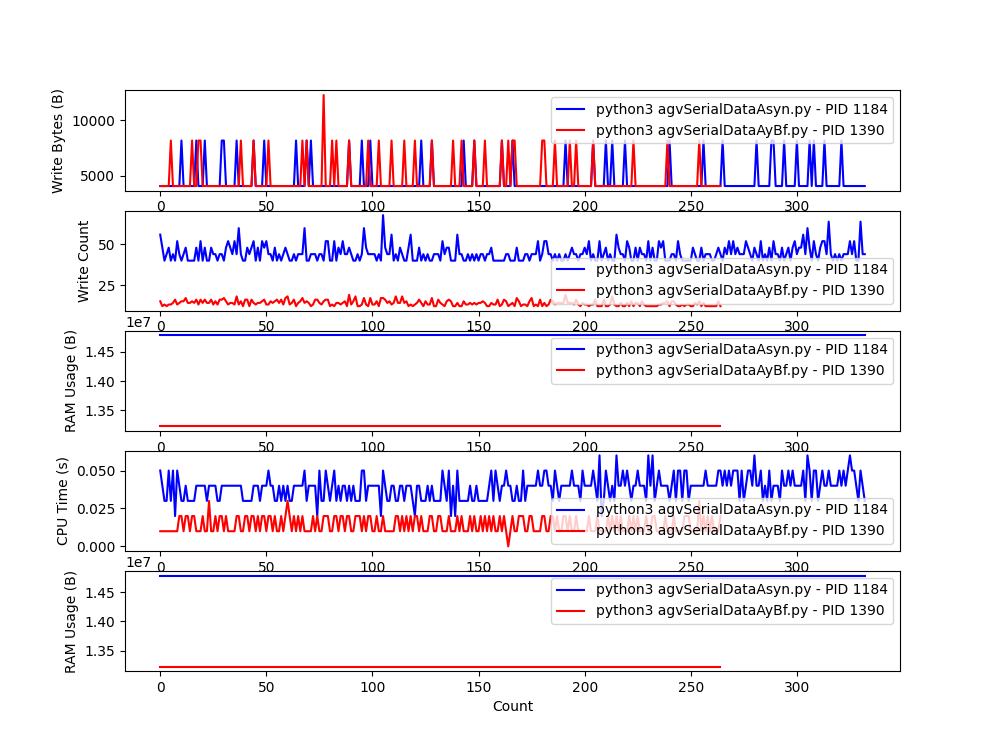
可以很直观的看到在缓存设置为5的情况下,明显降低IO读写次数,同时内存及CPU占用也优于使用loguru,同时在接收机器人关机信号能够及时保存缓存中的日志,满足预期。
~
(趁着下班前一小时总结的~ 猪肉末一块)