


背景
传统的AMR调度系统架构的部署方式和操作面板限制较高。为了打破这种限制,本文提出了使用容器技术实现AMR调度系统迁移性强、成本低廉、多平台化的方案。
涉及到以下内容:
- Docker镜像自动化部署
- Django代码加密
- Dispatching代码加密
Docker
使用centos8.2镜像搭建服务:
- ssh
- nginx
- python
- mysql
- redis
- django
- mqtt
搭建过程很简单,就不赘述了。规划好各个服务之间的端口区间和统一配置文件,自启动服务,再打包就好了。
自动化部署脚本
利用Docker便于迁移的特性,实现Linux/win的自动化部署
利用Docker便于迁移的特性,实现Linux/win的自动化部署。部署前需要查看宿主机空闲的端口区间是否满足系统部署需要。例如,win下可以使用以下命令查看占用的ipv4的端口区间:
netsh interface ipv4 show excludedportrange protocol=tcp建议自动化部署脚本具备全离线安装,适应局域网环境。以下是简易版的部署手册:
确认安装清单
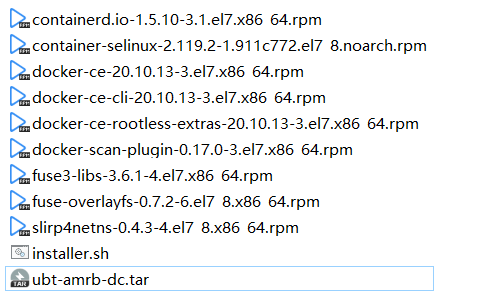
共11个文件,其中镜像ubt-amrb-dc.tar的MD5为:f4094908523158f0dd9d66fb4eab56cd,建议复制完成后检查其MD5值是否相同。
确认客户机环境
为保障性能和稳定性,不推荐在Windows下使用虚拟机搭建业务环境,且需确保环境配置最低为:内存:4G,硬盘空间:60G
确认客户机环境为Centos:
cat /etc/redhat-release如果显示:CentOS Linux release 7.9.2009 (Core)则符合要求,版本大数为7.9即可。
创建工作目录
如果权限不够,输入:
sudo su在/home下创建rcs目录:
mkdir /home/rcs拷贝安装文件
确定U盘文件格式为exfat,复制文件到工作目录
mv ./rcs /home/rcs自动化安装
提升脚本权限:
chmod +x installer.x运行安装脚本:
./installer.x导入镜像 ubt-amrb-dc.tar 中...
sha256:97ee8a0f2bf1389ceb2e1703a0328ff86f3400b3d511eacfd2b2b4200e570736
启动容器 with ubt-amrb-dc.tar...
b699b460410477cde69bf730acb5b6f67067f1c1aa2790a1050460b4344acd4e
部署完成!等待安装完成后,检测docker容器是否运行:
docker ps -a如果看到ubt-amrb容器运行则安装成功
调试
建议执行诸如重启客户机器和常规冒烟操作测试是否安装成功
tips
-
进行必要的容器安全设置,不暴露非必要端口、使用秘钥登录、定时清理其他服务、宿主机使用安全策略等
-
推荐使用
systemctl代替/etc/rc.loacl -
统一配置文件存放
-
测试系统周期运行日志文件大小,设定最小需求空间
…
Django代码加密
常见的有:
- pyarmor
- 混淆加密:注意提示语别混淆了,不然显示乱码
按需选择,测试通过就好了
Dispatching代码加密
纯Python程序可以使用pyinstall加密,加密过程见博客:
Background
The traditional architecture of the AMR scheduling system has high deployment and operation panel limitations. To break this limitation, this article proposes a solution that uses container technology to achieve strong migration, low cost, and multi-platform AMR scheduling system.
The following contents are involved:
- Docker image automation deployment
- Django code encryption
- Dispatching code encryption
Docker
Use the centos8.2 image to build the following services:
- ssh
- nginx
- python
- mysql
- redis
- django
- mqtt
The installation process is very simple and will not be repeated here. Plan the port range between each service and the unified configuration file, start the service automatically, and then package it.
Automation Deployment Script
Use the feature that Docker is easy to migrate to achieve automated deployment on Linux/win.
Before deployment, you need to check whether the available port range of the host meets the system deployment needs. For example, you can use the following command to view the IPv4 port range occupied by win:
netsh interface ipv4 show excludedportrange protocol=tcpIt is recommended that the automated deployment script have full offline installation capabilities to adapt to the local area network environment. Following is the simplified deployment manual:
Confirm Installation List
There are a total of 11 files, among which the MD5 of the image ubt-amrb-dc.tar is: f4094908523158f0dd9d66fb4eab56cd, it is recommended to check whether their MD5 values are the same after copying is completed.
Confirm Client Environment
To ensure performance and stability, it is not recommended to use virtual machines to build business environments under Windows, and it is necessary to ensure that the environment configuration is at least: memory: 4G, disk space: 60G.
Confirm that the client environment is CentOS:
cat /etc/redhat-releaseIf it displays: CentOS Linux release 7.9.2009 (Core), it meets the requirements, and the version number is greater than or equal to 7.9.
Create Working Directory
If the permission is not enough, enter:
sudo suCreate the rcs directory under /home:
mkdir /home/rcsCopy Installation Files
Make sure the USB file format is exfat and copy the files to the working directory.
mv ./rcs /home/rcsAutomated Installation
Elevate the script permissions:
chmod +x installer.xRun the installation script:
./installer.x
Importing image ubt-amrb-dc.tar...
sha256:97ee8a0f2bf1389ceb2e1703a0328ff86f3400b3d511eacfd2b2b4200e570736
Starting container with ubt-amrb-dc.tar...
b699b460410477cde69bf730acb5b6f67067f1c1aa2790a1050460b4344acd4e
Deployment completed!
After waiting for the installation to complete, check whether the docker container is running:
docker ps -aIf you see the ubt-amrb container running, the installation is successful.
Debugging
It is recommended to perform necessary container security settings, do not expose unnecessary ports, use key login, regularly clean up other services, and use security policies on the host.
- Recommend using
systemctlinstead of/etc/rc.local - Unified configuration file storage
- Test the size of the running log file of the system and set the minimum space requirement
…
Django Code Encryption
Common ones are:
- pyarmor
- Obfuscation encryption: pay attention to not obfuscate the prompt language, otherwise it will display garbled characters.
Choose as needed, and pass the test.
Dispatching Code Encryption
Pure Python programs can use PyInstall encryption, and the encryption process is shown in the blog: