





我们写程序不需要写 ARP request 和 response 相关的逻辑,因为这部分是操作系统帮我们做的。
Linux 处理 ARP 请求的逻辑是:
如果操作系统收到了一个 ARP reuqest,并且本机中某一个接口配置了 ARP request 中请求的 IP,那就回复这个 ARP request,回复的 ARP response 中,使用收到此 ARP request 的 interface 的 MAC 地址作为答案。
这个逻辑看起来没有问题:从 Linux 的视角,既然我能从一个 interface 收到 ARP 请求,那么对方向这个 interface 发送数据包,我也可以从这个 interface 收到,所以,回复 interface 的 MAC 地址即可。
但是,在下面这种情况就会出问题:
- Linux 有两个 interface 接入到了同一个交换机上;
- 这两个 interface 配置的 IP 地址在同一个广播域;
满足这两个条件的话,当有 LAN 中有主机发送 ARP request 广播包,交换机会转发到自己的所有端口,Linux 会从这两个端口都收到此 ARP request 广播包。按照以上处理逻辑,Linux 会回复 2 个 ARP reply,因为收到了两个 request,两个 interface 各回复一次,并且这两个 ARP reply 分别是两个 interface 的 MAC 地址。
实验环境如下图所示:
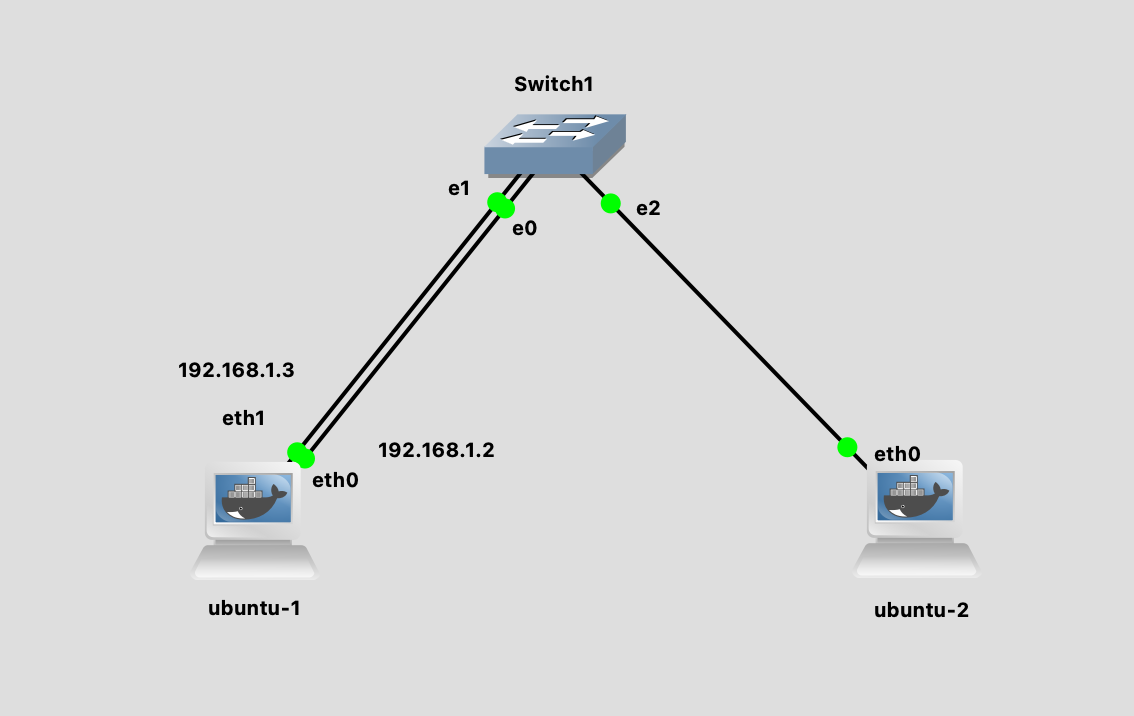
配置好 IP 之后,我们在 ubuntu-2 主机发送 ARP request。
|
1 2 3 4 5 6 7 8 9 10 11 12 |
root@ubuntu-2:/$ arping 192.168.1.2 -c 3 ARPING 192.168.1.2 42 bytes from aa:b6:66:3c:98:45 (192.168.1.2): index=0 time=1.017 msec 42 bytes from 4a:ae:15:cc:55:69 (192.168.1.2): index=1 time=1.032 msec 42 bytes from aa:b6:66:3c:98:45 (192.168.1.2): index=2 time=300.636 usec 42 bytes from 4a:ae:15:cc:55:69 (192.168.1.2): index=3 time=557.981 usec 42 bytes from aa:b6:66:3c:98:45 (192.168.1.2): index=4 time=308.836 usec 42 bytes from 4a:ae:15:cc:55:69 (192.168.1.2): index=5 time=546.011 usec --- 192.168.1.2 statistics --- 3 packets transmitted, 6 packets received, 0% unanswered (3 extra) rtt min/avg/max/std-dev = 0.301/0.627/1.032/0.299 ms |
一共发送了 3 个 request,却收到了 6 个 ARP reply。并且有两种 MAC 地址。
这个就是 ARP Flux 问题。
解决方法0: 配置不同的 IP subnet
因为 ARP 是在 LAN 内的,如果两个 interface 分别配置在不同的 subnet,就不会有这个问题了。
但是有时候我们的软件守交换机网段的限制,只能配置在一个网段。并且有些场景需要两个线路和两个 IP,比如管理和数据面分开(带外管理),就又会遇到这个问题。
解决方法1: 隐藏其中一个接口
使用 ip link set dev eth0 arp off 可以禁用 interface 的 ARP 恢复,这样,在 LAN 上就相当于把这个 interface 隐藏了,因为没有人可以发现它的 MAC 地址了。在四层负载均衡中,如果使用 DSR 的模式并且不加隧道的话,就需要对 RS 的 VIP 禁用 ARP 回复1。
这里有一个有意思的现象:假设 192.168.1.2 配置在 eth0 上,但是我们把 eth0 的 ARP 禁用了。
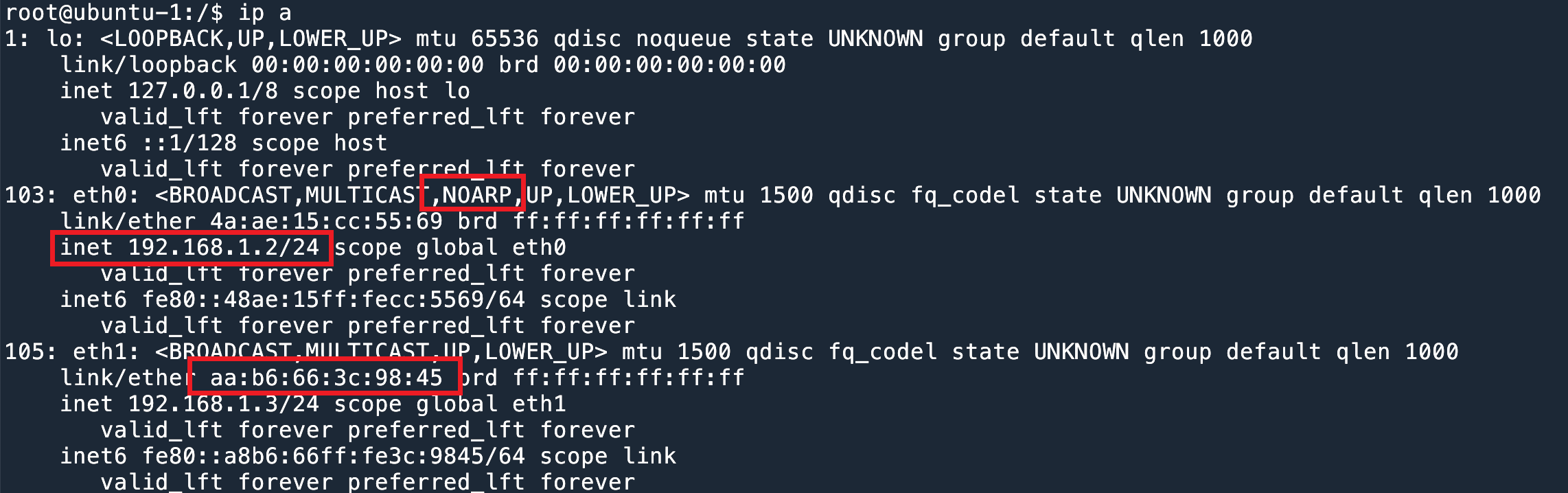
192.168.1.2 所在的 eth0 ARP禁用这时候如果请求 192.168.1.2 的地址,会拿到 eth1 的 MAC 地址。参考上文讨论过的 Linux ARP 工作原理。
|
1 2 3 4 5 6 7 8 9 |
root@ubuntu-2:/$ arping 192.168.1.2 -c 3 ARPING 192.168.1.2 42 bytes from aa:b6:66:3c:98:45 (192.168.1.2): index=0 time=313.417 usec 42 bytes from aa:b6:66:3c:98:45 (192.168.1.2): index=1 time=240.823 usec 42 bytes from aa:b6:66:3c:98:45 (192.168.1.2): index=2 time=294.223 usec --- 192.168.1.2 statistics --- 3 packets transmitted, 3 packets received, 0% unanswered (0 extra) rtt min/avg/max/std-dev = 0.241/0.283/0.313/0.031 ms |
这个方法只能通过 interface 级别来设置,如果一个 interface 上有多个 IP 地址,那么只能全部禁用或者开启。
如果要 by IP 来禁用 ARP,可以使用 arptables(8)2 3.
解决方法 2: arp_ignore
直接禁用 ARP 差不多等于把这个 interface 关闭了,大部分情况下不是我们想要的结果。
我们希望的效果是对于 ARP request 只回复一次,并且只有 IP 在自己的 interface 上才回复,不要代替其他 interface 回复。
通过 arp_ignore4 可以改变 Linux 的 ARP 行为:
0– 默认,只要本地有的 IP 就会回复,无论是哪一个 interface;1– 只有当 ARP request 询问的 IP 配置在收到 ARP 的接口上时,才会回复;- 2 – 同
1,并且 sender 的 IP 在本地 IP 的相同 subnet 内,才会回复; 3–scope host不会回复,只有scope link和scope global才会回复 (可以通过ip address命令查看配置的 IP scope);4–7– 保留字段;8– 所有 local address 都不回复;
配置方法:通过 sysctl -w 可以修改配置。arp_ignore 是 per interface 的配置。
|
1 2 3 4 5 6 7 8 |
root@ubuntu-1:/$ sysctl -a | grep arp_ignore net.ipv4.conf.all.arp_ignore = 0 net.ipv4.conf.default.arp_ignore = 0 net.ipv4.conf.eth0.arp_ignore = 0 net.ipv4.conf.eth1.arp_ignore = 0 net.ipv4.conf.eth2.arp_ignore = 0 net.ipv4.conf.eth3.arp_ignore = 0 net.ipv4.conf.lo.arp_ignore = 0 |
其中 all 是一个全局变量,最终在 interface 上生效的值是 max(all, eth0)。以最大的为准。
default 是模板变量,在新建一个 interface 的时候,会自动使用这个值。
我们可以给所有的 interface 都设置为 1.
|
1 2 |
root@ubuntu-1:/$ sysctl -w net.ipv4.conf.all.arp_ignore=1 net.ipv4.conf.all.arp_ignore = 1 |
然后再发送 arp 请求,就会发现回复之后一个了,并且是正确的那个。
|
1 2 3 4 5 6 7 8 9 |
root@ubuntu-2:/$ arping 192.168.1.2 -c 3 ARPING 192.168.1.2 42 bytes from 4a:ae:15:cc:55:69 (192.168.1.2): index=0 time=602.926 usec 42 bytes from 4a:ae:15:cc:55:69 (192.168.1.2): index=1 time=312.438 usec 42 bytes from 4a:ae:15:cc:55:69 (192.168.1.2): index=2 time=236.994 usec --- 192.168.1.2 statistics --- 3 packets transmitted, 3 packets received, 0% unanswered (0 extra) rtt min/avg/max/std-dev = 0.237/0.384/0.603/0.158 ms |
解决方法3: arp_filter
另一个方法是使用 arp_filter 参数,这个参数是一个 bool,默认是 0 ,如果开启为 1,就意味着,如果收到 ARP request,ARP 请求的 IP 为 A,收到 ARP 的 interface 为 X 和 Y,那么 kernel 就测试路由,假设要发出去 source IP 为 A 的包,从 X 发出去还是从 Y 发出去。如果从 X 发出去,那么只有 X 会回复。(source based rotuing).
举例来说,我们现在有两个接口和两个 IP,回复 192.168.1.10 的 ARP 时,可以测试当前的路由情况:
|
1 2 3 4 5 6 |
root@ubuntu-1:/$ ip route get 192.168.1.10 from 192.168.1.2 192.168.1.10 from 192.168.1.2 dev eth0 uid 0 cache root@ubuntu-1:/$ ip route get 192.168.1.10 from 192.168.1.3 192.168.1.10 from 192.168.1.3 dev eth0 uid 0 cache |
可以看到无论 source IP 是哪一个,都会从 eth0 口出。
这是因为我们的 ip route 配置:
|
1 2 3 |
root@ubuntu-1:/$ ip route show table all 192.168.1.0/24 dev eth0 proto kernel scope link src 192.168.1.2 192.168.1.0/24 dev eth1 proto kernel scope link src 192.168.1.3 |
会永远走第一条路由。
所以我们如果发送 ARP request,对 .2 和 .3 两个地址,得到的结果会是一样的,因为都是 eth0 在回复。
|
1 2 3 4 5 6 7 8 9 10 11 12 13 14 15 16 17 18 |
root@ubuntu-2:/$ arping 192.168.1.2 -c 3 ARPING 192.168.1.2 42 bytes from 4a:ae:15:cc:55:69 (192.168.1.2): index=0 time=165.606 usec 42 bytes from 4a:ae:15:cc:55:69 (192.168.1.2): index=1 time=161.927 usec 42 bytes from 4a:ae:15:cc:55:69 (192.168.1.2): index=2 time=179.383 usec --- 192.168.1.2 statistics --- 3 packets transmitted, 3 packets received, 0% unanswered (0 extra) rtt min/avg/max/std-dev = 0.162/0.169/0.179/0.008 ms root@ubuntu-2:/$ arping 192.168.1.3 -c 3 ARPING 192.168.1.3 42 bytes from 4a:ae:15:cc:55:69 (192.168.1.3): index=0 time=230.590 usec 42 bytes from 4a:ae:15:cc:55:69 (192.168.1.3): index=1 time=182.955 usec 42 bytes from 4a:ae:15:cc:55:69 (192.168.1.3): index=2 time=149.800 usec --- 192.168.1.3 statistics --- 3 packets transmitted, 3 packets received, 0% unanswered (0 extra) rtt min/avg/max/std-dev = 0.150/0.188/0.231/0.033 ms |
如果我们把第一条路由删了,那么现在就都走 eth1 了,这时候 ARP 结果就都是 eth1 了。
|
1 2 3 4 5 6 7 |
root@ubuntu-1:/$ ip route del 192.168.1.0/24 dev eth0 proto kernel scope link src 192.168.1.2 root@ubuntu-1:/$ ip route get 192.168.1.10 from 192.168.1.3 192.168.1.10 from 192.168.1.3 dev eth1 uid 0 cache root@ubuntu-1:/$ ip route get 192.168.1.10 from 192.168.1.2 192.168.1.10 from 192.168.1.2 dev eth1 uid 0 cache |
Lookback 接口是否会回复 ARP?
答案是是的(虽然听起来很没道理)。这个主要是跟路由有关。
当我们在给 lo 绑定一个地址的时候,kernel 会默认添加 2 条路由,lo 所在网段和 lo 的地址会被标记成 dev lo 的本地路由。
|
1 2 3 4 5 6 7 |
root@ubuntu-1:/$ ip route show table local local 127.0.0.0/8 dev lo proto kernel scope host src 127.0.0.1 local 127.0.0.1 dev lo proto kernel scope host src 127.0.0.1 broadcast 127.255.255.255 dev lo proto kernel scope link src 127.0.0.1 local 192.168.1.0/24 dev lo proto kernel scope host src 192.168.1.2 local 192.168.1.2 dev lo proto kernel scope host src 192.168.1.2 broadcast 192.168.1.255 dev lo proto kernel scope link src 192.168.1.2 |
其实,当我们给 lo 地址添加 192.168.1.2/24 的时候,由于自动添加的 192.168.1.0/24 的 route (第5行),导致我们其他的接口也不会回复这个网段的 ARP 请求了。这个时候从 ubuntu-2 上 arping 192.168.1.10 和 192.168.1.11 都会 timeout。
这个是默认的行为。但是如果我们改一下,删除这两条路由,添加另一条从 eth0 口出的路由的话,就会发现,arping lo 接口的 IP,也会收到 ARP response 了。
|
1 2 3 |
root@ubuntu-1:/$ ip route del local 192.168.1.0/24 dev lo proto kernel scope host src 192.168.1.2 root@ubuntu-1:/$ route del local 192.168.1.2 dev lo table local proto kernel scope host src 192.168.1.2 root@ubuntu-1:/$ ip route add local 192.168.1.2 dev eth0 proto kernel scope host src 192.168.1.2 |
ubuntu-1 lo 的地址
|
1 2 3 4 5 6 7 8 9 |
root@ubuntu-1:/$ ip address show dev lo 1: lo: <LOOPBACK,UP,LOWER_UP> mtu 65536 qdisc noqueue state UNKNOWN group default qlen 1000 link/loopback 00:00:00:00:00:00 brd 00:00:00:00:00:00 inet 127.0.0.1/8 scope host lo valid_lft forever preferred_lft forever inet 192.168.1.2/24 scope global lo valid_lft forever preferred_lft forever inet6 ::1/128 scope host valid_lft forever preferred_lft forever |
在 ubuntu-2 可以 ping 通。
|
1 2 3 4 5 6 7 8 9 |
root@ubuntu-2:/$ arping 192.168.1.2 -c 3 ARPING 192.168.1.2 42 bytes from 56:6b:38:20:7e:56 (192.168.1.2): index=0 time=274.702 usec 42 bytes from 56:6b:38:20:7e:56 (192.168.1.2): index=1 time=299.748 usec 42 bytes from 56:6b:38:20:7e:56 (192.168.1.2): index=2 time=296.380 usec --- 192.168.1.2 statistics --- 3 packets transmitted, 3 packets received, 0% unanswered (0 extra) rtt min/avg/max/std-dev = 0.275/0.290/0.300/0.011 ms |
所以说 lo 接口是否回复 ARP request,主要和 ip route 的设置有关。
- 四层负载均衡漫谈 ↩︎
- arptables(8) – Linux man page ↩︎
- Using arptables to disable ARP ↩︎
- Kernel 的 ip sysctl 文档 ↩︎