





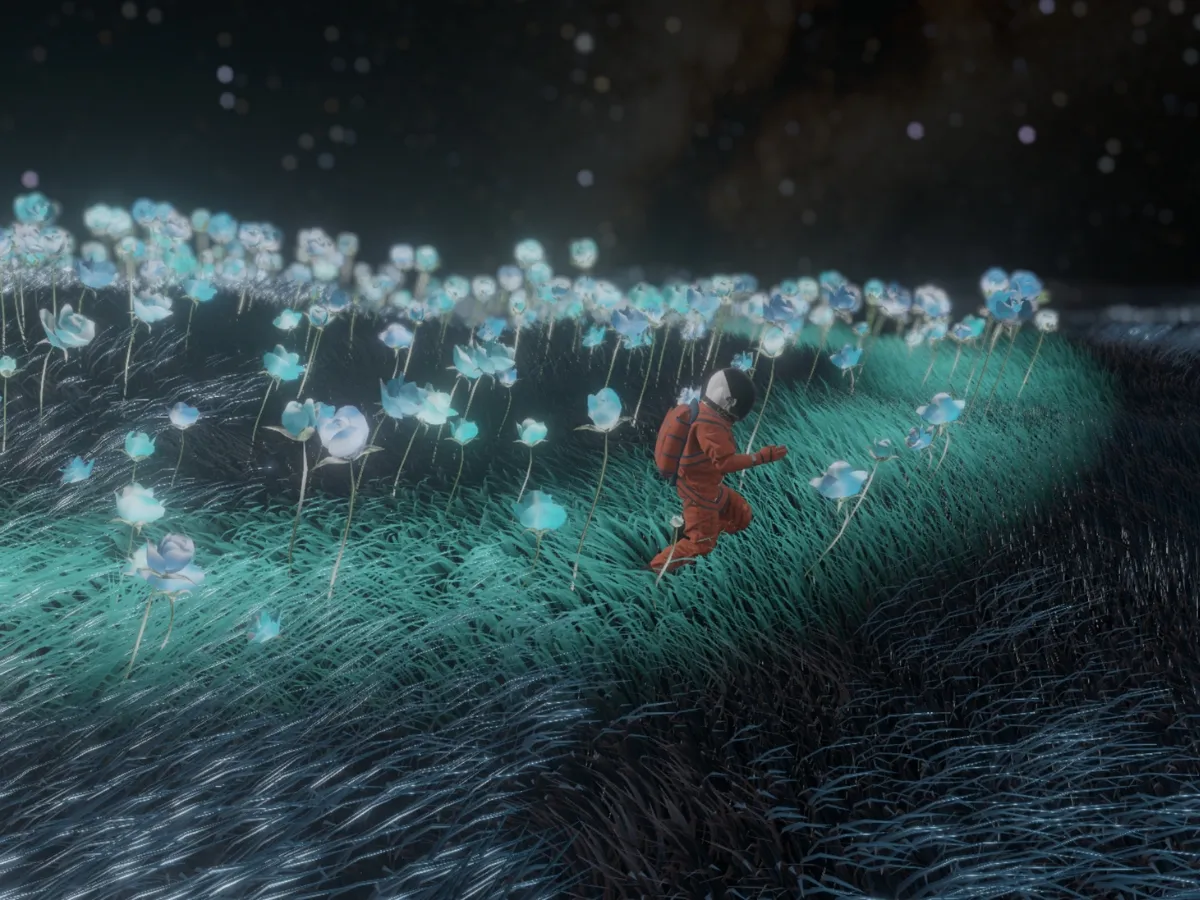
False Earth is an interactive WebGPU project and the sequel to my first work, Drift.
In Drift, an astronaut is lost in space, drifting, longing to return home. An AI-generated diary reflects his mental state — the loneliness, the depression, the memories of time spent with his family.
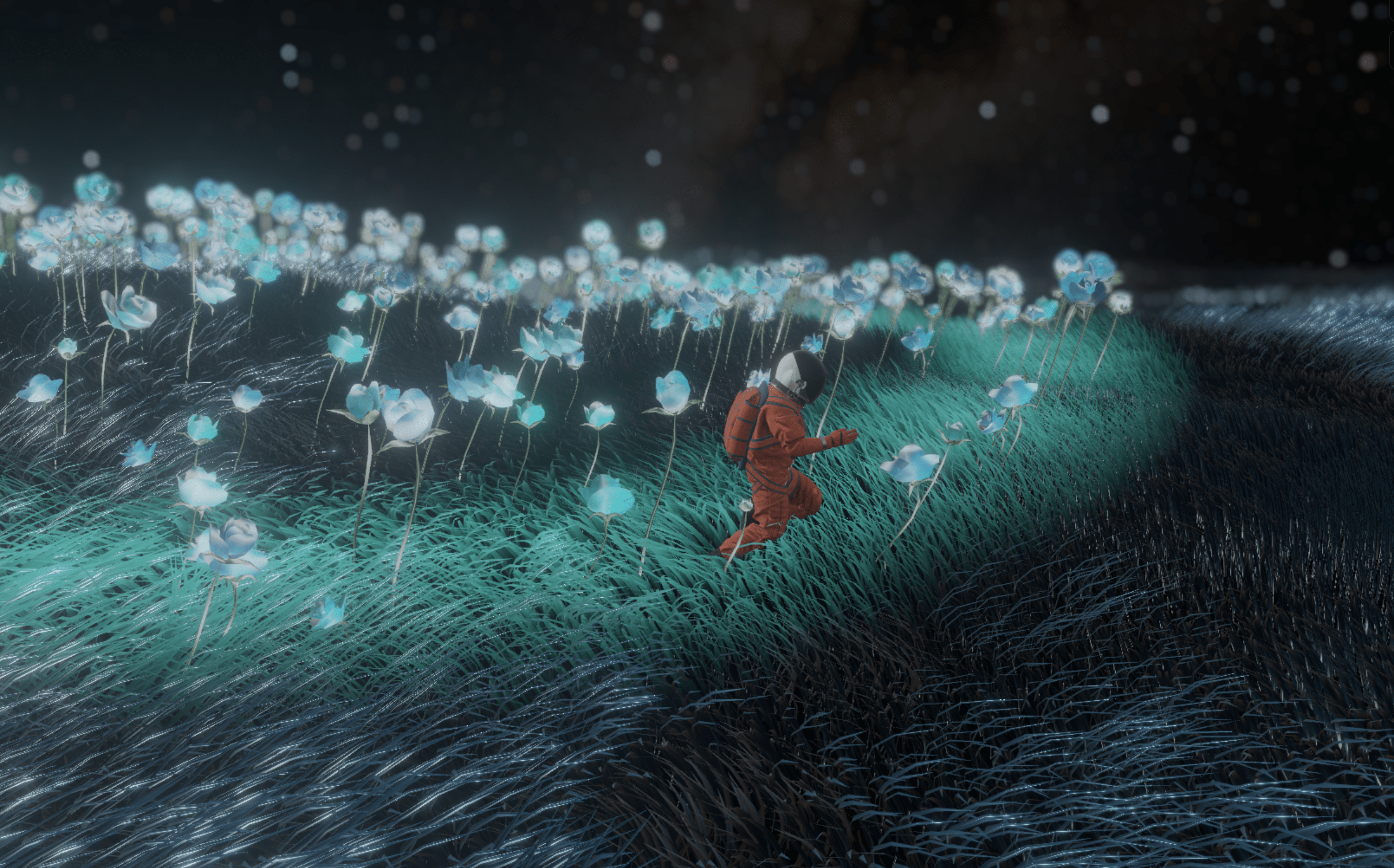
Now, the story continues. The astronaut has landed on a new planet. It looks like Earth — there is grass, there is sky, there is ground, but it feels strange and “false.” The grass never ends. Cosmic beams fall from the sky. Flowers bloom and die in seconds.
He made it somewhere. But this isn’t home.
Before diving into False Earth, I ran two experiments to test what the browser could handle.
Rendering thousands of animated vertices was too heavy for the CPU. I moved the work to the GPU using instancing and VAT — a technique where animation data (positions and normals) is baked into a texture and replayed in the shader. In this demo, hundreds of flowers bloomed, grew, and died as the user moved the mouse.
Realistic grass is the soul of False Earth. I wanted blades that reacted to lighting and interaction, not just static geometry. Inspired by the Ghost of Tsushima team’s technical breakdown, I built a procedural system that gave me full control over every blade’s shape, color, and movement.
But I quickly hit a wall. More flowers, more grass — and the frame rate dropped. Beyond draw calls, GPGPU in WebGL meant encoding data as pixels and juggling framebuffer object (FBO) read/write operations, which felt clunky and limited.
That led me to WebGPU. It was my first time using it along with TSL (Three.js Shading Language), and the difference was immediate. Storage buffers let me write structured data directly on the GPU and read it from any shader — no more pixel-packing workarounds. I could focus on the logic of the world rather than fighting the API.
There is no way to generate enough individual blades to cover an entire world. Instead, I divided the field into a grid system. As the camera crosses a grid boundary, the entire vertex group snaps forward. This infinite scrolling trick keeps the grass surrounding the character no matter how far they travel. I used world position as a deterministic seed to generate parameters for each blade’s shape, color, and local elevation, which stays consistent across every grid snap.
I stored the parameters for each blade in a structured storage buffer, computed them in a compute shader, and passed the result into the rendering pipeline. Each blade’s data package is packed into four vec4 values (64 bytes per instance) for GPU-friendly alignment:
xyz) and a blade type index (w) for shape variation.x, z)—the y component is reconstructed in the vertex shader via sqrt(1 − x² − z²), halving normal storage cost. The remaining two floats carry the character push vector.To populate these fields with natural variation, I adopted a Voronoi clustering approach. Each blade finds its two nearest Voronoi centers and blends their parameters (height, width, bend) based on the distance to each center. This prevents hard seams at clump boundaries—blades near an edge transition gradually between their neighbors’ properties rather than snapping abruptly.
Each blade is just a flat plane. To make it feel like organic matter, I layered multiple displacement passes in the vertex shader, each adding a different kind of motion:
Each blade follows a cubic Bézier curve with four control points. A parameter t runs from 0 at the root to 1 at the tip, and two inner control points (p1, p2) control how the blade bends:
// Cubic Bézier: 4 control points define the blade's curvature
const spine = bezier3(p0, p1, p2, p3, t);
const tangent = normalize(bezier3Tangent(p0, p1, p2, p3, t));
const side = normalize(cross(vec3(0.0, 0.0, 1.0), tangent));
Wind pushes the control points directly — mid-points shift gently, the tip more aggressively — bending the whole blade in a natural arc rather than applying a flat offset:
// Wind pushes control points proportionally (root stable, tip strongest)
const p1Pushed = p1.add(windDir.mul(windScale.mul(height).mul(0.08)));
const p2Pushed = p2.add(windDir.mul(windScale.mul(height).mul(0.15)));
const p3Pushed = p3.add(windDir.mul(windScale.mul(height).mul(0.25)));
On top of the Bézier spine I layered a dual-frequency sine-wave sway: a low-frequency oscillation for the main body and a high-frequency flutter for fine detail. Both grow stronger toward the tip, and a slow “gust” envelope modulates the amplitude so the whole field appears to breathe. For distant blades, I faded the wind intensity with a distance-based falloff to keep things stable.
// Only affects vertices near the tip
const topSwayMask = smoothstep(float(0.5), float(1.0), t);

// Gust envelope — slow breathing that modulates overall amplitude
const gust = float(0.65).add(
  float(0.35).mul(sin(uTime.mul(0.35).add(seed.mul(6.28318))))
);

// Low freq (main sway) + high freq (small flutter)
const low  = sin(uTime.mul(baseFreq).add(phase).add(t.mul(2.2)));
const high = sin(uTime.mul(baseFreq.mul(5.0)).add(phase.mul(1.7)).add(t.mul(5.0)));

// Gust drives the low-frequency sway, high-freq stays constant
const swayLow  = amp.mul(gust).mul(uWindSwayStrength);
const swayHigh = amp.mul(0.8).mul(uWindSwayStrength);

const swayAmount = low.mul(swayLow).add(high.mul(swayHigh));
return side.mul(swayAmount).mul(topSwayMask);Blades need to sit flush with the terrain. I computed a rotation from the local up-vector (0, 1, 0) to the terrain normal using a cross-product axis and acos(dot) angle. Since the normal is already in the storage buffer, grass, flowers, and the character all share the same elevation data.
Since the blades are flat 2D planes, they can disappear when viewed edge-on. I added a view-dependent tilt that pushes vertices outward along the face normal, scaled by how edge-on the blade is to the camera. An edge mask (stronger on the sides) combined with a center mask (stronger at the base) keeps the effect from distorting the tip or adding bulk where it is not needed.
// How edge-on is this blade to the camera?
const camDirLocalY = dot(camDirW, sideW);

// Edge mask: stronger on the sides when viewed head-on
const edgeMask = uvCoords.x.sub(0.5).mul(camDirLocalY);
edgeMask.mulAssign(pow(abs(camDirLocalY), float(1.2)));

// Center mask: stronger at the base, weaker at the tip
const centerMask = pow(float(1.0).sub(t), float(0.5)).mul(pow(t.add(0.05), float(0.33)));

// Push vertices outward along the face normal
return posObj.add(normalXZ.mul(thicknessStrength.mul(edgeMask).mul(centerMask)));I wanted the grass to part when the character walks through it. The compute shader gives each blade an outward push vector that falls off with distance from the character, and the vertex shader weights that displacement by t² — strongest at the tip, zero at the root. I also flatten the blade’s height toward the ground so it doesn’t just slide sideways but compresses down as the character passes over:
// Compute shader: radial falloff from character
const pushFactor = smoothstep(pushRadius, float(0.0), charDist);
const pushVector = safeCharDir.mul(pushFactor).mul(pushAmount);

// Vertex shader: push outward + flatten height
lpos = vec3(
  lpos.x.add(pushVector.x.mul(pow(t, float(2.0)))),
  lpos.y.mul(oneMinus(pushLen.mul(flattenAmount).mul(t))),
  lpos.z.add(pushVector.y.mul(pow(t, float(2.0))))
);
In False Earth, cosmic beams fall from the sky and send energy waves rippling across the ground. Each wave’s origin, start time, radius, and lifetime live in a storage buffer, and multiple waves can overlap — the shader loops through all active entries per blade.
Each wave expands as a ring-shaped wavefront, not a filled circle. The ring width is 20% of the maximum radius, with a smoothstep falloff at the edge. A separate fade curve ramps intensity up at birth and down before death, so the ring appears, swells outward, and dissolves naturally.
The same wave strength drives both the emissive glow and the outward vertex push, so the visual ring and the physical ripple through the grass stay perfectly synchronized:
// Ring shape: distance from the expanding wavefront
const distFromWavefront = abs(dist.sub(currentRadius));
const ringWidth = maxRadius.mul(0.2);
const shape = smoothstep(ringWidth, float(0.0), distFromWavefront);

// Lifetime fade: ramp up at birth, fade out before death
const fade = smoothstep(float(1.0), float(0.5), progress)
            .mul(smoothstep(float(0.0), float(0.1), progress));

const combinedStrength = shape.mul(fade);

// Same strength drives both glow (scalar) and push (vector)
result.strength += combinedStrength;
result.force += pushDir.mul(combinedStrength);There are no textures on the blades — everything is computed in the shader. Here is how I achieved a convincing look without the overhead:
Flowers in False Earth bloom wherever energy waves touch the ground. I wanted them to feel alive — appearing, growing, and dying on their own schedule — so the entire spawning logic runs in a compute shader, with each instance getting its own position, lifetime, and seed.
To keep spawning GPU-side without CPU readbacks, I used a circular buffer backed by a storage index.
atomicAdd.// Each spawn atomically claims the next slot, wrapping to reuse old instances
const headIndex = atomicAdd(spawnStorage.get("index"), uint(1)).mod(uint(maxCount));
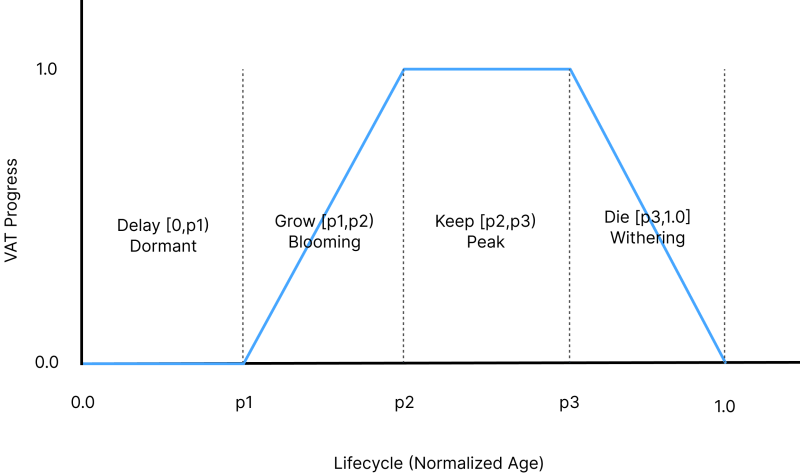
const instance = vatData.element(headIndex);Once spawned, each flower moves through four phases driven by its normalized age (progress = age / lifetime). Phase boundaries (p1, p2, p3) vary per instance so they don’t all bloom in lockstep:
If(progress.lessThan(p1), () => {
    currentFrame.assign(0.0);
}).ElseIf(progress.lessThan(p2), () => {
    currentFrame.assign(progress.sub(p1).div(p2.sub(p1)));
}).ElseIf(progress.lessThan(p3), () => {
    currentFrame.assign(1.0);
}).Else(() => {
    const die = progress.sub(p3).div(float(1.0).sub(p3));
    currentFrame.assign(float(1.0).sub(die));
});
When the sequence finishes, the instance is marked inactive and its slot is free for the next spawn.
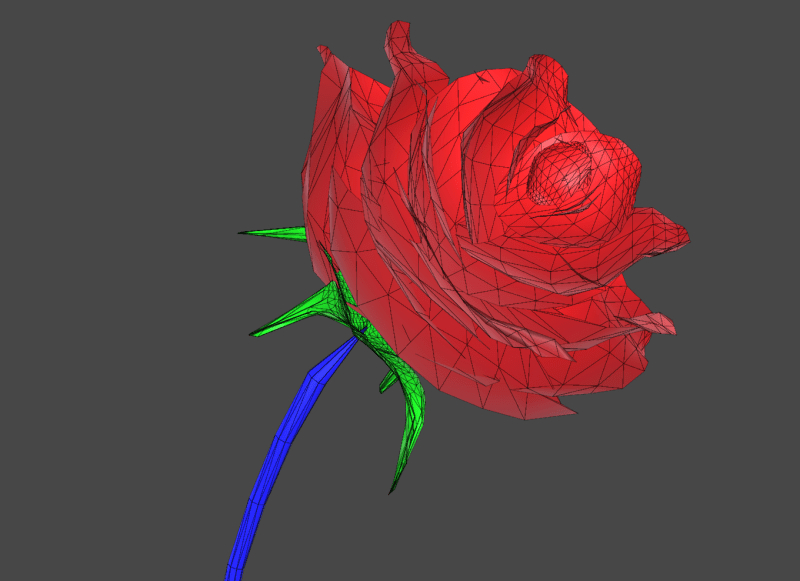
In the vertex shader, the VAT texture is sampled at the current frame index to reconstruct animated positions. Per-instance size variation — derived from each instance’s seed — keeps the flowers from looking stamped out.
Like the grass, flowers are aligned to terrain, affected by wind, and pushed by the character. Petals, stems, and leaves share one mesh, but I encoded a material mask into the vertex color R channel during preprocessing: 0.0 for stems, 0.5 for petals, 1.0 for leaves. In the fragment shader, a step(abs(value − threshold), 0.05) recovers each mask, letting me shade all three materials in a single draw call.
For the finishing touch, I combined a Fresnel rim glow with a traveling wave that sweeps across each petal over time. The wave offset comes from fract(time) per instance, so every flower pulses at its own rhythm — giving the flora a mystical, ethereal quality.
Even with everything running on the GPU, drawing millions of blades is still expensive. The first thing I wanted was frustum culling — only submitting what the camera can actually see. But since blade positions live on the GPU, CPU-side culling was out of the question. WebGPU indirect drawing solved this. The same architecture described below is reused for both the grass field and the flowers.
Indirect draw lets the GPU itself decide how many instances to draw by reading from an indirect buffer. WebGPU defines this buffer as a Uint32Array with five fields:
vertexCount: Number of vertices per instance.instanceCount: Number of instances to draw (updated atomically).firstVertex: Offset in the vertex buffer.firstInstance: Offset in the instance buffer.offset: Base instance offset.In Three.js, connect the geometry to that buffer with a single call:
geometry.setIndirect(drawBuffer)With the indirect buffer in place, a compute pass decides what gets drawn each frame. It resets instanceCount to zero, checks each blade’s visibility, and appends surviving indices into a visibleIndicesBuffer while incrementing the count atomically. Blades very close to the camera are always included so nearby grass never pops out:
// Always include blades near the camera
const isCloseEnough = abs(diff.x).add(abs(diff.z)).lessThan(float(3));
const isVisible = isCloseEnough.or(performCulling(worldPos));

If(isVisible, () => {
    const slot = atomicAdd(drawStorage.get("instanceCount"), uint(1));
    visibleIndicesBuffer.element(slot).assign(uint(instanceIndex));
});
Then, in the vertex shader, visibleIndicesBuffer is read to resolve the real instance index:
const trueIndex = visibleIndicesBuffer.element(instanceIndex);
const data = grassData.element(trueIndex);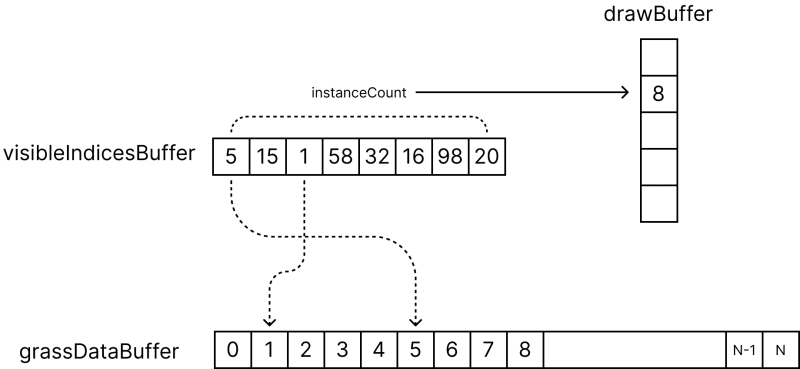
This means the vertex shader only runs on instances that are actually on screen. With blades spread around the camera, a ~75° field of view covers roughly one-fifth of the surroundings — so around 80% of instances never reach the vertex shader at all.
Culling alone was not enough — I also needed level of detail (LOD). I reused the same indirect pattern, but this time with multiple buffers — one per mesh density. Three tiers:
The compute pass measures each blade’s distance and routes it into the right bucket. Because the far ring covers vastly more area than the near ring, most visible blades land in the lowest tier (2 segments instead of 15) — drastically cutting triangle count while keeping nearby blades crisp.
Without care, the LOD tiers create a visible ring artifact. I broke it up with a per-instance noise jitter on the distance test:
// Jitter the distance test to soften LOD transition rings
const noiseSeed = fract(float(instanceIndex).mul(0.12345)).mul(2.0).sub(1.0);
const noisyDist = distToCamera.add(distToCamera.mul(noiseScale).mul(noiseSeed));

If(noisyDist.greaterThanEqual(minDist).and(noisyDist.lessThan(maxDist)), () => {
    const lodIndex = atomicAdd(drawStorage.get("instanceCount"), uint(1));
    indices.element(lodIndex).assign(uint(instanceIndex));
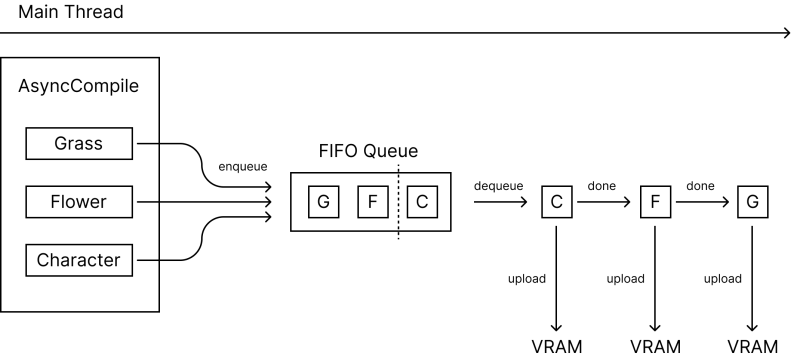
});Shader compilation can freeze the browser during load. I wanted the intro animation to stay smooth, so I wrapped every heavy component (grass, flowers, character) in an AsyncCompile wrapper that uses Three.js’s compileAsync and manages a three-stage pipeline:
compileAsync in parallel so shaders build simultaneously. Each compile races against a timeout — on some mobile GPUs, compilation can stall. If the timeout fires, the component skips the wait and renders immediately, accepting a small stutter rather than a frozen loading screen.The result: a smooth idle → compiled → uploading → done state machine per component, and the loading animation runs uninterrupted throughout.
False Earth has a first-person mode, so visitors can experience the world from the astronaut’s perspective. The post-processing chain builds up layer by layer: chromatic aberration (R, G, B sampled at slightly offset UVs for lens fringing), a vignette with a cool-blue tint to suggest a helmet visor, bloom for emissive glow, and finally tone mapping for overall exposure.
In TSL, the whole chain is wired as a node graph — color and depth come out of the scene pass as nodes, and each effect plugs in as a transform:
const scenePass = pass(scene, camera);
const colorTex = scenePass.getTextureNode('output');
const depthTex = scenePass.getViewZNode();

// Each effect transforms the node chain
let finalNode = applyAberration(colorTex);
finalNode = applyVignette(finalNode);
finalNode = finalNode.add(bloom(finalNode));

const pp = new THREE.PostProcessing(renderer);
pp.outputNode = finalNode;
I also added depth of field to blur distant geometry. A side effect: thin, emissive elements like the cosmic beams got blurred too, losing their sharp, high-energy look.
To fix this, I render beams in a separate beamScene. In post-processing, I compare the two depth buffers and composite with occlusion — beams stay sharp where they read as foreground, but still disappear behind terrain.
const depthDiff = beamDepth.sub(sceneDepth);
const beamOcclusion = smoothstep(float(0), float(10), depthDiff);
finalNode = finalNode.add(beamColor.mul(beamOcclusion));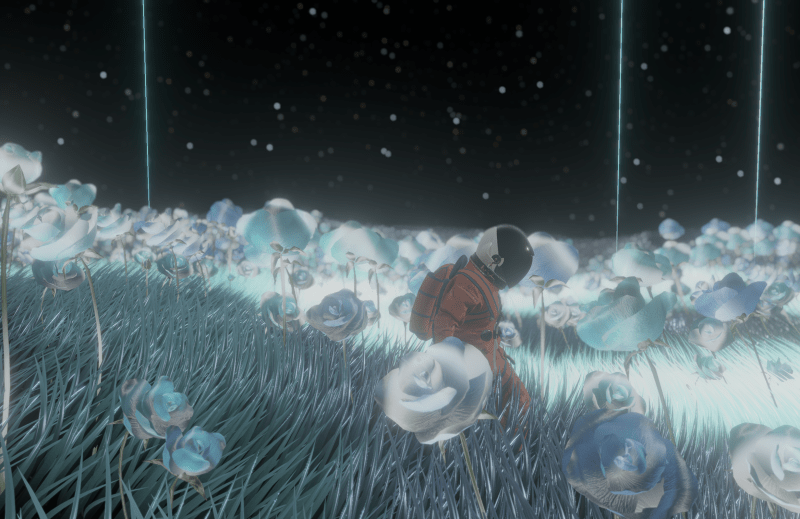
Sound was the last piece that made the world feel tangible. Footsteps are triggered from the walk/run animation phases, so timing stays in sync at both speeds. I use five samples with ±200-cent pitch randomization to avoid obvious repetition, and volume attenuates with distance using the Web Audio API. Short-lived BufferSource nodes keep CPU overhead low even with many concurrent one-shots.
I started my career building interactive works for physical installations. Years ago, when I first discovered Three.js, I remember thinking: I can make something and anyone with a browser can open it. No gallery, no special hardware. Just a link. That felt huge to me.
Moving from WebGL to WebGPU felt like that same leap again. Compute shaders, indirect drawing, and storage buffers gave me the tools to render over a million grass blades, drive flower lifecycles entirely on the GPU, and keep everything interactive — all inside a browser.
For me, False Earth is one step in learning what I can build beyond the constraints I used to work within. As web graphics keep advancing, I want to push further into immersive storytelling and build digital experiences that feel more alive, responsive, and emotionally grounded.
And the astronaut — I think he still has somewhere to go.
此内容由惯性聚合(RSS阅读器)自动聚合整理,仅供阅读参考。 原文来自 — 版权归原作者所有。