


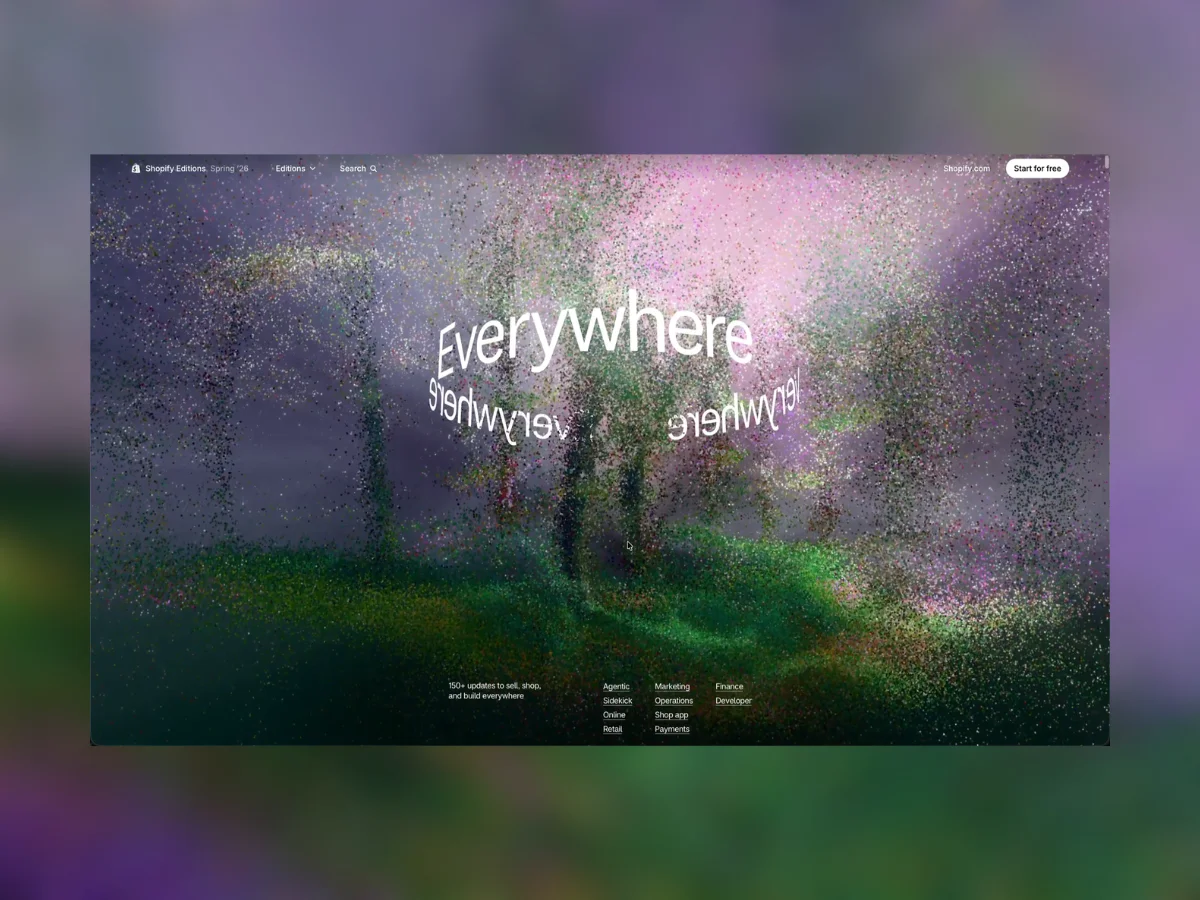
Editor’s Note: Every Shopify Editions release is accompanied by an interactive web experience that explores new ideas on the web. For the Spring ’26 Edition, Everywhere, the team set out to build an experience that felt cinematic while remaining true to the web: responsive, accessible, performant, and usable across a wide range of devices. Ahead of the launch, we spoke with Creative Director Maggie Fost and Principal Product Designer Andy Thelander about the making of the experience, and we’re thrilled that Andy expanded on many of the topics we discussed and turned them into this in-depth technical walkthrough for Codrops. What follows is a rare look at the engineering decisions, rendering architecture, custom asset pipeline, and creative workflow behind Spring ’26 Edition: Everywhere.
Every edition has high ambitions for injecting new & impressive techniques into rendering content on the web. Spring 2026 Editions ended up feeling closer to a motion piece than a normal product page, but it still had to fit within the tight constraints of a performant, quick loading page of easily readable information.
The main visual layer as a small rendering system that updates in the background with scroll through a unified canvas and many nested frame buffers. The DOM handled the content and interaction layer and WebGL handled atmosphere, point clouds, volumetric light, and scroll transitions.
There are many smart technical decisions that went into the build but let’s focus on the creative workflow for how 2 WebGL techniques were developed in-house
Some scenes needed soft moving light rather than flat video. For those, video was preprocessed into KTX2 array textures and rendered as raymarched boxes in Three.js.
The shader treats the texture as a stack of frames or slices:
sampler2DArray for KTX2 volume texturessampler2D plus a depth map for depth-extruded stillsThe KTX2 files carry the compressed image data, but not all of the timing metadata we need, so the app keeps a small source-to-volume map with duration, dimensions, and layer count. Authored KTX2 URLs can also be passed directly from the scene preset.
This is not true volumetric video. It is a pragmatic browser version: a textured volume, raymarched just enough to read as light and depth, with a hard cap on grid count and raymarch steps so an art-directed preset cannot accidentally turn into a performance cliff.
The simple way to think about the technique is putting the camera inside a video. We extracted the video into frames, placed those frames through depth like a light box, and then let the camera move inside that stack. It created a soft spatial lighting layer that felt much richer than a flat background plate.
For authored motion, we used Rive where interactivity was needed and exported non-interactive motion to video when runtime animation was not worth the cost.
Transparent video support is still uneven across browsers. Chrome and Firefox can play native-alpha VP9 WebM in the path we need, but Safari and unknown browsers need another route. For those, we use a stacked-video technique:
┌──────────────┐
│ RGB frame    │
├──────────────┤
│ alpha frame  │
└──────────────┘
The video is twice as tall as the visible frame. The top half stores color. The bottom half stores alpha. A tiny WebGL2 shader reconstructs the transparent frame into a canvas:
vec3 rgb = texture(u_tex, vec2(v_uv.x, v_uv.y * 0.5)).rgb;
float alpha = texture(u_tex, vec2(v_uv.x, 0.5 + v_uv.y * 0.5)).r;
outColor = vec4(rgb * alpha, alpha);
A few details mattered here:
NEAREST filtering so RGB and alpha rows do not bleed across the midpoint.requestVideoFrameCallback when available; fall back to requestAnimationFrame.webglcontextlost, especially on mobile Safari.crossOrigin="anonymous", or texImage2D(video) will fail for CDN video.This path let us keep the authoring freedom of transparent motion without betting the whole experience on a single browser’s video-alpha implementation.
The point-cloud direction started from Gaussian splat experiments. Gaussian splats are a great way to visualize spaces with points, but the assets were heavy for this kind of page. One scene at three to five megabytes is fine. Ten or twenty scenes loaded through a scrolling experience gets big quickly. What we liked most was not the full splat data, it was the aesthetic of the point cloud loading in. So we threw away a lot of the data that became big blurry circles and leaned into the smaller point-cloud layer instead.
We also built a local point-cloud generation tool. A short source clip was run through VGGT to extract point cloud data. Camera movement mattered a lot. A slow orbit around a room could create a believable space, but pushing the camera forward through a scene often worked even better. That became a useful recipe for generating landscape and retail scenes from video: make or source a short camera move, turn it into a point cloud, then tune the camera position until the space felt usable on the page.
That gave us a bridge between motion exploration and production assets. Instead of manually modeling every atmospheric field, we could make or source a small video, generate a spatial point cloud from it, then clean and recompress it in the Pointcloud Suite. The suite let us paint away reconstruction junk, protect areas we wanted to keep, remove dark speckles, and export density-weighted 1024 / 512 / 256 variants for the runtime tiers.
The atmospheric hero scenes use point clouds heavily. Shipping raw position and color buffers would have been too expensive, so we used a small project-specific point-cloud format: .mdpc.
The metadata stores the point count, bounding box, position quantization, chroma subsampling, stream lengths, and compression codec. Positions are quantized inside the bounding box and decoded back into Float32Array data in a worker. Color is stored as luma/chroma streams rather than full RGB for every point, then reconstructed in the worker as normalized RGB.
Newer assets use deflate, which can be decoded with DecompressionStream in the browser. Older assets can still fall back to Brotli through a small wasm path. The loader also keeps a legacy .bin/Draco fallback, but .mdpc is the preferred path because it lets us control the exact data layout and avoid doing more work than the scene needs.
The point cloud loader returns typed arrays:
type PointCloudData = {
  positions: Float32Array;
  colors: Float32Array;
  count: number;
  bounds?: {
    min: [number, number, number];
    max: [number, number, number];
  };
};
From there, the renderer builds a Three.js BufferGeometry, samples an appropriate number of points for the current tier, and drives the visible behaviour through shader uniforms: size, opacity, flow, caustics, color correction, camera fade, transition progress, SDF collision, and fluid displacement.
One small but important performance detail: the loaded point-cloud object is not passed around as React state. These objects can hold multi-megabyte geometries and materials. Keeping them in refs avoids React walking large Three.js object graphs during commits.
Several effects needed to react to cursor movement and scroll velocity: point-cloud displacement, light-volume distortion, and some post-processing. Instead of each system owning its own simulation, the page uses a shared fluid field per renderer.
A FluidField component renders nothing. It owns the fluid simulation, steps it in useFrame, and writes the velocity texture into a ref. Consumers sample that texture in their own shaders.
Only the active section is allowed to drive the simulation. Passive sections can read the current texture, but they do not resize or step the shared FBO. This avoids different sections fighting over renderer-level resources during scroll transitions.
Reduced motion is handled inside the same system. The simulation can keep running so pointer interaction still feels responsive, but scroll-driven splats are removed and the splat force is reduced before downstream effects sample the velocity field.
The page had to run across a wide range of GPUs, so the renderer uses a single runtime tier as the main performance knob:
The tier is resolved with GPU detection, WebGL support checks, and runtime fallback paths. Mobile is capped aggressively because memory pressure matters more than peak benchmark score. In practice, this means mobile gets smaller point-cloud variants and lower render cost even on devices that can technically run heavier scenes for a short time.
DPR is clamped too. Rather than blindly using window.devicePixelRatio, the renderer caps DPR by quality level and viewport size.
Each content section maps to a scene preset. As the user scrolls, the app resolves which scene is active, mounts the active scene and its immediate neighbours, and composites between them in a fullscreen WebGL canvas.
The rough flow looks like this:
scroll position
  → section visibility
  → active scene state
  → Three.js / R3F scene
  → offscreen framebuffer
  → GLSL composite pass
  → fullscreen canvas behind the DOM
The important part is that the scroll position drives uniforms, not React renders. Camera motion, section transitions, screen offset, point-cloud displacement, and post-processing parameters are read from refs inside the render loop. That kept high-frequency scroll updates out of React while still letting the DOM page and the WebGL scene stay visually locked together.
Only a small scene window stays mounted at once. The active section and adjacent sections are kept alive; everything else is unmounted and disposed. That gave us enough overlap for scroll transitions without keeping every point cloud, video texture, and shader pipeline in memory at the same time
The creative workflow was built around a shared scene preset rather than a separate prototype format. A preset describes the camera, environment, point cloud, post-processing, video light volumes, SDF shapes, mobile offsets, and transition behaviour.
The playground and the production app consume the same preset shape. Designers and creative developers could tune WebGL scenes, lighting, layout, and motion in a browser, then move the same values toward production instead of asking engineering to reinterpret a mockup.
That changed the collaboration loop. Instead of “design hands-off, engineering rebuilds,” the loop became: tune the real scene, test it in the browser, check the tiered fallbacks, then ship the same underlying configuration.
The biggest lesson was that high-end browser work is mostly pipeline work, building the factory to build the item at scale. The final page looks like a visual system, but the stability comes from a set of practical constraints:
The visual pipeline explores AI generation in novel ways by combining multiple generative methods in a sequence. The final visuals are the onion layers of tooling around a few tricks. A video could become a point cloud. The same video could become a light volume. A designer could open the playground, mix those pieces with camera and shader controls, save a preset, and see the same data shape move toward the real site.
That mix lets the site keep the feeling of a cinematic launch while still behaving like a production web page.
此内容由惯性聚合(RSS阅读器)自动聚合整理,仅供阅读参考。 原文来自 — 版权归原作者所有。