惯性聚合 高效追踪和阅读你感兴趣的博客、新闻、科技资讯
阅读原文 在惯性聚合中打开

推荐订阅源

大猫的无限游戏
大猫的无限游戏
博客园 - 【当耐特】
Cloudbric
Cloudbric
H
Hackread – Cybersecurity News, Data Breaches, AI and More
Attack and Defense Labs
爱范儿
爱范儿
The Cloudflare Blog
腾讯CDC
Security Archives - TechRepublic
TaoSecurity Blog
TaoSecurity Blog
云风的 BLOG
云风的 BLOG
Recent Announcements
C
Check Point Blog
Schneier on Security
S
Schneier on Security
J
Java Code Geeks
B
Blog RSS Feed
Cisco Talos Blog
Cisco Talos Blog
Vercel News
Vercel News
Stack Overflow Blog
Stack Overflow Blog
博客园_首页
cs.AI updates on arXiv.org
A
About on SuperTechFans
Threat Intelligence Blog | Flashpoint
Google DeepMind News
阮一峰的网络日志
阮一峰的网络日志
罗磊的独立博客
A
Arctic Wolf
S
Secure Thoughts
P
Palo Alto Networks Blog
The Last Watchdog
The Last Watchdog
SecWiki News
SecWiki News
cs.CV updates on arXiv.org
博客园 - 三生石上(FineUI控件)
D
Darknet – Hacking Tools, Hacker News & Cyber Security
量子位
U
Unit 42
I
InfoQ
D
DataBreaches.Net
P
Privacy International News Feed
T
Troy Hunt's Blog
博客园 - 叶小钗
T
Threatpost
博客园 - Franky
K
Kaspersky official blog
Hugging Face - Blog
Hugging Face - Blog
IT之家
IT之家
www.infosecurity-magazine.com
CTFtime.org: upcoming CTF events
C
Cisco Blogs

NetworkManager

NetworkManager 1.52 Protect your VPN from TunnelVision attacks NetworkManager 1.50 Addressing hostname assignment in NetworkManager 1.40 Help NetworkManager project to triage issues NetworkManager 1.48 NetworkManager 1.46 NetworkManager 1.44 NetworkManager 1.42 Set up NMCI on Fedora Linux VM Using Python and NetworkManager to control the network [link] Notes on D-Bus NetworkManager 1.40 NetworkManager 1.38 From ifcfg to keyfiles [link] NetworkManager 1.36 NetworkManager 1.34 NetworkManager 1.32 NetworkManager 1.30 Initscripts’ ifcfg-rh Format in NetworkManager and its Future [link] How to set up your NetworkManager environment [link] NetworkManager 1.28 [link] Looking forward to Linux network configuration in the initial ramdisk (initrd) [link] NetworkManager 1.26 [link] Internet connection sharing with NetworkManager [link] Why NetworkManager? [link] Please welcome: NetworkManager 1.20 [link] Becoming friends with NetworkManager [link] WireGuard in NetworkManager [link] MAC Address Spoofing in NetworkManager 1.4.0 [link] NetworkManager for administrators Resources for developers man pages Video tutorials VPN support RFKill
NetworkManager 1.54
Ján Václav · 2025-08-01 · via NetworkManager

After a little over 5 months and 245 commits since NetworkManager 1.52, the new release is ready: NetworkManager 1.54.

Let’s take a look at the most interesting parts!

Support for configuring IPv4 forwarding

NetworkManager now supports configuring the per-device IPv4 forwarding sysctl variable net.ipv4.conf.<interface>.forwarding via the “ipv4.forwarding” connection property.

The feature allows users to configure forwarding directly through NetworkManager, enabling targeted forwarding configurations for interfaces.

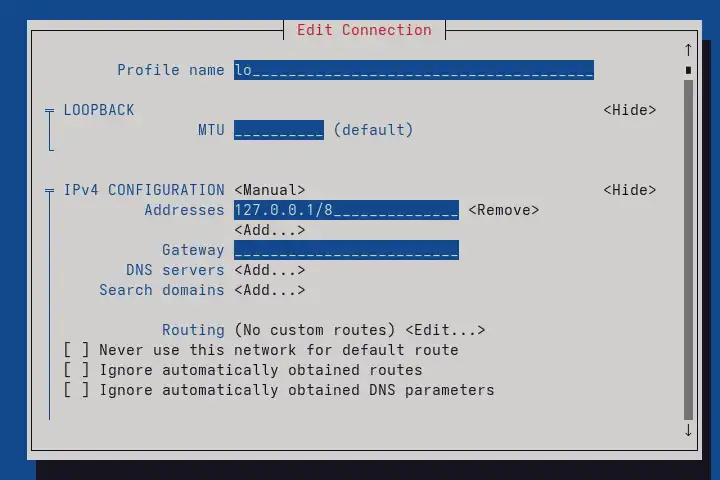
Loopback configuration in nmtui

It is now possible to configure the loopback interface via nmtui:
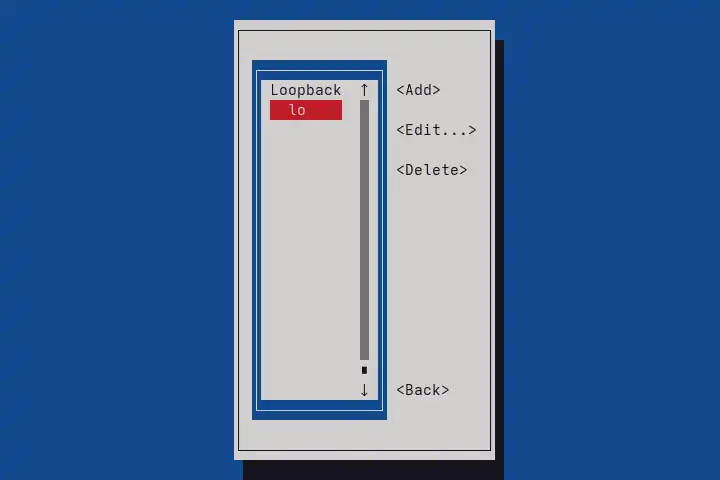
The loopback interface is available in the connections list in nmtui

Available properties for loopback connection

WireGuard firewall configuration

When activating a WireGuard connection to an IPv6 endpoint, NetworkManager now creates firewall rules to ensure that the incoming packets are not dropped by kernel reverse path filtering.

Similarly to wg-quick, NetworkManager now creates rules in nft or iptables, depending on availability. When a tunnel is brought up, the generated rules might look something like this:

table ip6 nm-wg-wg1 {
	chain preraw {
		iifname != "wg1" ip6 daddr 2600::1 fib saddr type != local drop
	}

	chain premangle {
		type filter hook prerouting priority mangle; policy accept;
		meta l4proto udp meta mark set ct mark
	}

	chain postmangle {
		type filter hook postrouting priority mangle; policy accept;
		meta l4proto udp meta mark 0x0000cb20 ct mark set meta mark
	}
}

IPv6 prefix delegation

The new version introduces a new prefix-delegation setting which configures how to handle prefix delegation on interfaces.

The prefix-delegation setting includes a subnet-id property that specifies the subnet to choose on the downstream interface when using IPv6 prefix delegation.

NBFT parser in initrd-generator

The nm-initrd-generator utility can now detect and parse a network configuration specified by the NVMe Boot Firmware Table (NBFT) during early boot, and create the necessary connections without additional manual setup.

This allows for more complex configurations, such as booting the system from a remote storage using NVMe over Fabrics.

What else?

  • Most of the properties of ovs-bridge and ovs-port connections can now be reapplied at runtime without bringing the connection down.
  • Added a new “sriov.preserve-on-down” property that controls whether NetworkManager preserves the SR-IOV parameters set on the device when the connection is deactivated, or whether it resets them to their default value.
  • Introduced a new “ovs-dpdk.lsc-interrupt” property to configure the Link State Change (LSC) detection mode for OVS DPDK interfaces.
  • Added systemd services to provide networking in the initrd ( NetworkManager-initrd.service, NetworkManager-config-initrd.service, NetworkManager-wait-online-initrd.service).

Acknowledgements

Many thanks to all contributors who provided feedback, ideas or patches.

Antonio Alvarez Feijoo, Beniamino Galvani, Fernando Fernandez Mancera, Filip Pokryvka, Florian Schmaus, Friedrich Altheide, Gris Ge, Herman Semenov, Íñigo Huguet, Jan Tojnar, Jan Vaclav, Kyle Ouellette, Lubomir Rintel, Michael Biebl, NorwayFun, Piotr Drąg, Tomas Bzatek, Tomas Korbar, Vladimír Beneš and Wen Liang.

Also thanks to our Quality Engineers from Red Hat for all the testing: Vladimír Beneš, Filip Pokryvka and Mingyu Shi.

Join us on our GitLab project.

Get the new release

As usual, the next release of your favorite Linux distribution will surely ship the new version.

In case you’re too impatient to wait, or you are, in fact, responsible for keeping NetworkManager up to date in a distribution, get the tarball from our download page.

Thanks for tuning in and goodbye!