






You can find a Chinese translation of this article on infoq.cn
When I started using containers back in 2015, my initial understanding was that they were just lightweight virtual machines with a subsecond startup time. With such a rough idea in my head, it was easy to follow tutorials from the Internet on how to put a Python or a Node.js application into a container. But pretty quickly, I realized that thinking of containers as of VMs is a risky oversimplification that doesn't allow me to judge:
Since the "container is a VM" abstraction turned out to be quite leaky, I had to start looking into the technology's internals to understand what containers really are, and Docker was the most obvious starting point. But Docker is a behemoth doing a wide variety of things, and the apparent simplicity of docker run nginx can be deceptive. There was plenty of materials on Docker, but most of them were:
So, it took me a while to pave my way through the containerverse.
I tried tackling the domain from different angles, and over the years, I managed to come up with a learning path that finally worked out for me. Some time ago, I shared this path on Twitter, and evidently, it resonated with a lot of people:
— Ivan Velichko (@iximiuz) August 7, 2021How to grasp Containers and Docker (Mega Thread)
When I started using containers back in 2015, I thought they were tiny virtual machines with a subsecond startup time.
It was easy to follow tutorials from the Internet on how to put your Python or Node.js app into a container...
This article is not an attempt to explain containers in one go. Instead, it's a front-page for my multi-year study of the domain. It outlines the said learning path and then walks you through it, pointing to more in-depth write-ups on this same blog.
Mastering containers is no simple task, so take your time, and don't skip the hands-on parts!
Level up your server-side game — join 20,000 engineers getting insightful learning materials straight to their inbox.
I find the following learning order particularly helpful:
A container is an isolated (namespaces) and restricted (cgroups, capabilities, seccomp) process.
The above explanation helped me a lot in understanding containers. Of course, it's not super accurate, as you'll see closer to the end of this article, but at the beginning, it suits the learning objective really well.
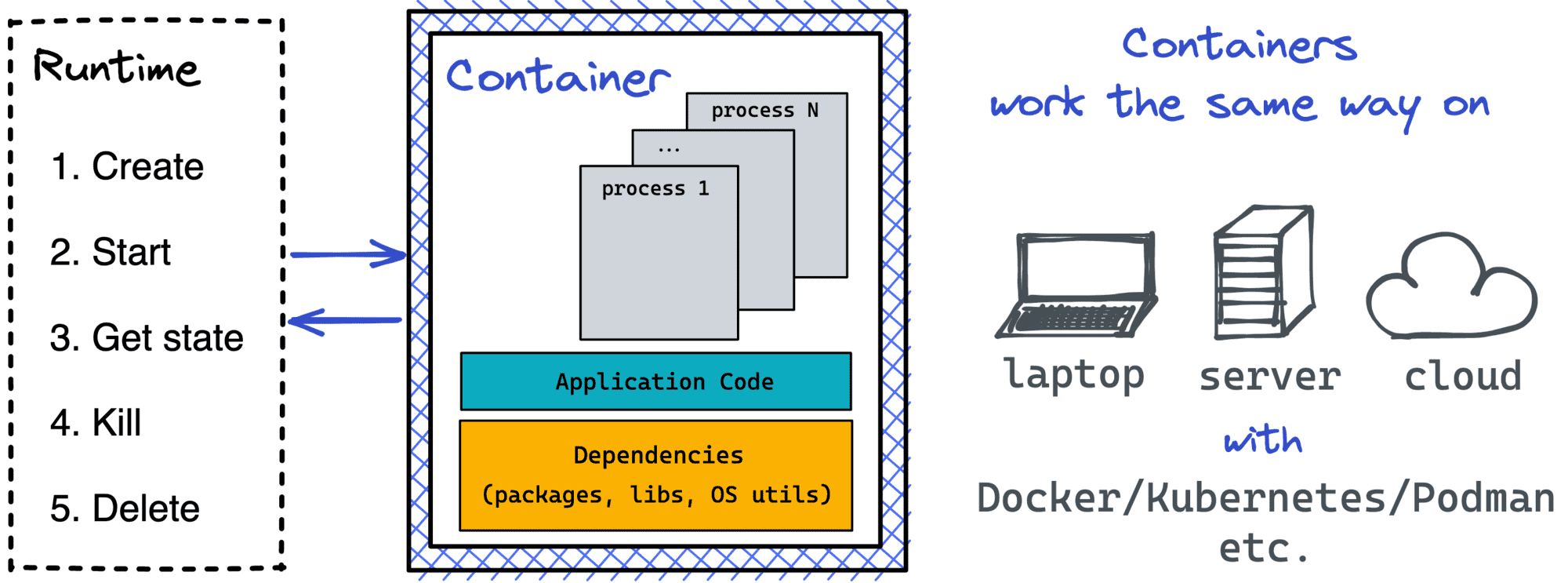
To start a process on Linux, you need to fork/exec it. But to start a containerized process, first, you need to create namespaces, configure cgroups, etc. Or, in other words, prepare a box for a process to run inside. A Container Runtime is a special kind of (rather lower-level) software to create such boxes. A typical container runtime knows how to prepare the box and then how to start a containerized process in it. And since most of the runtimes adhere to a common specification, containers become a standard unit of workload.
The most widely used container runtime out there is runc. And since runc is a regular command-line tool, one can use it directly without Docker or any other higher-level containerization software!
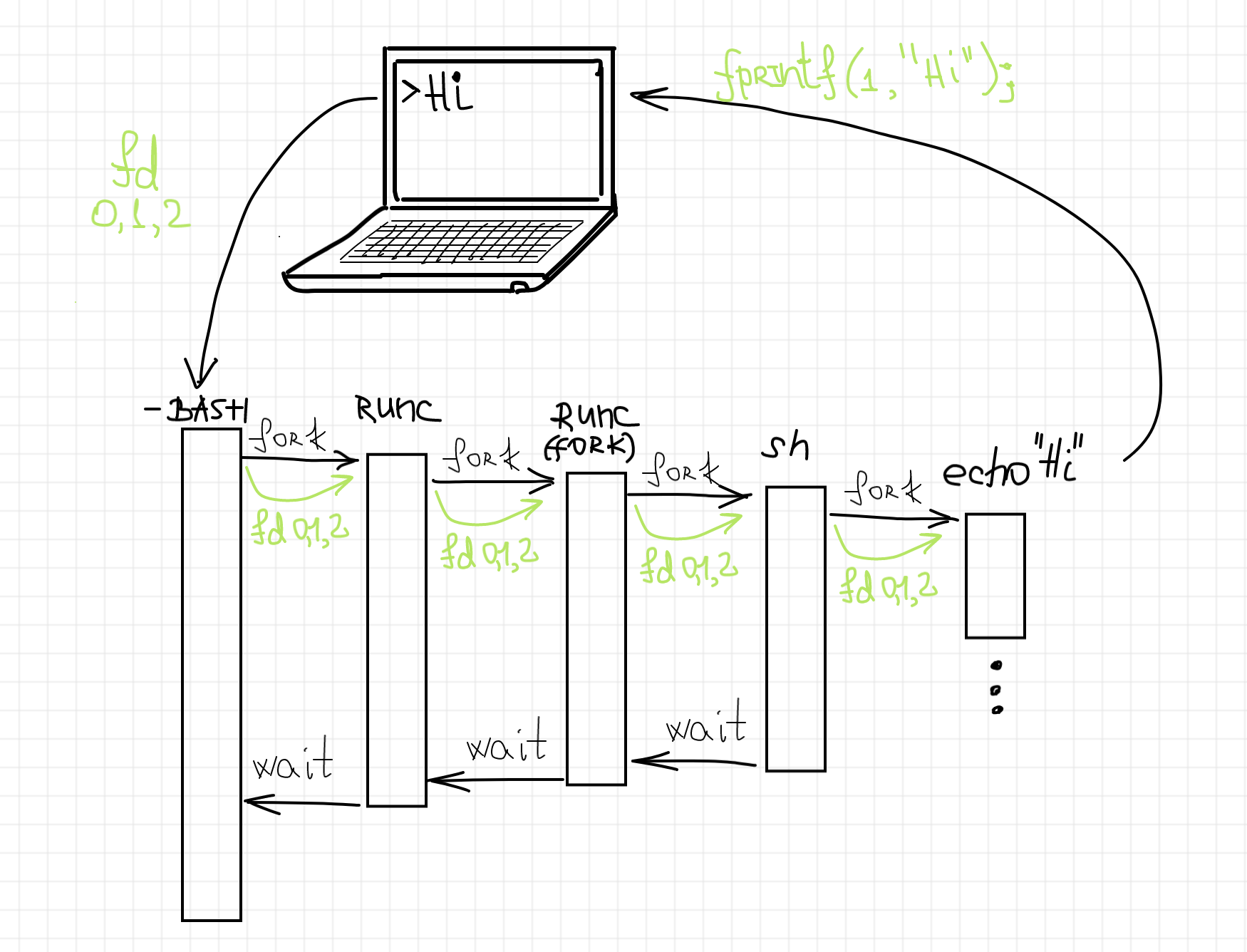
How runc starts a containerized process.
I got so fascinated by this finding that I even wrote a whole series of articles on container runtime shims. A shim is a piece of software that resides in between a lower-level container runtime such as runc and a higher-level container manager such as containerd. Since a shim needs to understand all the runtime's quirks really well, the series starts from the in-depth analysis of the most widely used container runtime.

Container runtime shim in the wild.
... but containers are needed to build images 🤯
For folks familiar with how runc starts containers, it's clear that images aren't really a part of the equation. Instead, to run a container, a runtime needs a so-called bundle that consists of:
config.json file holding container parameters (path to an executable, env vars, etc.)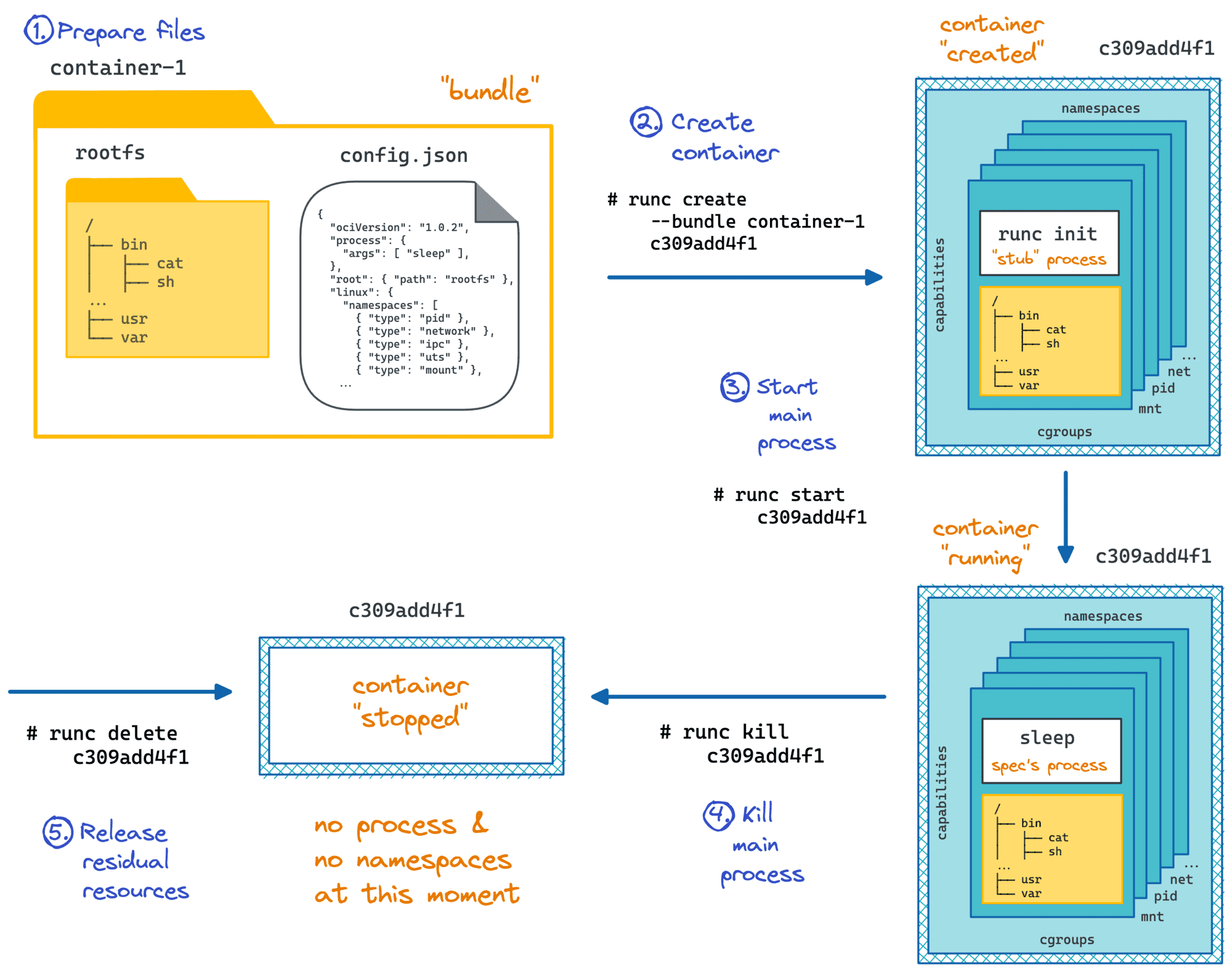
Oftentimes, a bundle folder contains a file structure resembling a typical Linux distribution (/var, /usr, /lib, /etc, ...). When runc launches a container with such a bundle, the process inside gets a root filesystem that looks pretty much like your favorite Linux flavor, be it Debian, CentOS, or Alpine.
But such a file structure is not mandatory! So-called scratch or distroless containers are getting more and more popular nowadays, in particular, because slimmer containers leave fewer chances for security vulnerabilities to sneak in.
Check out this article where I show how to create a container that has just a single Go binary inside:
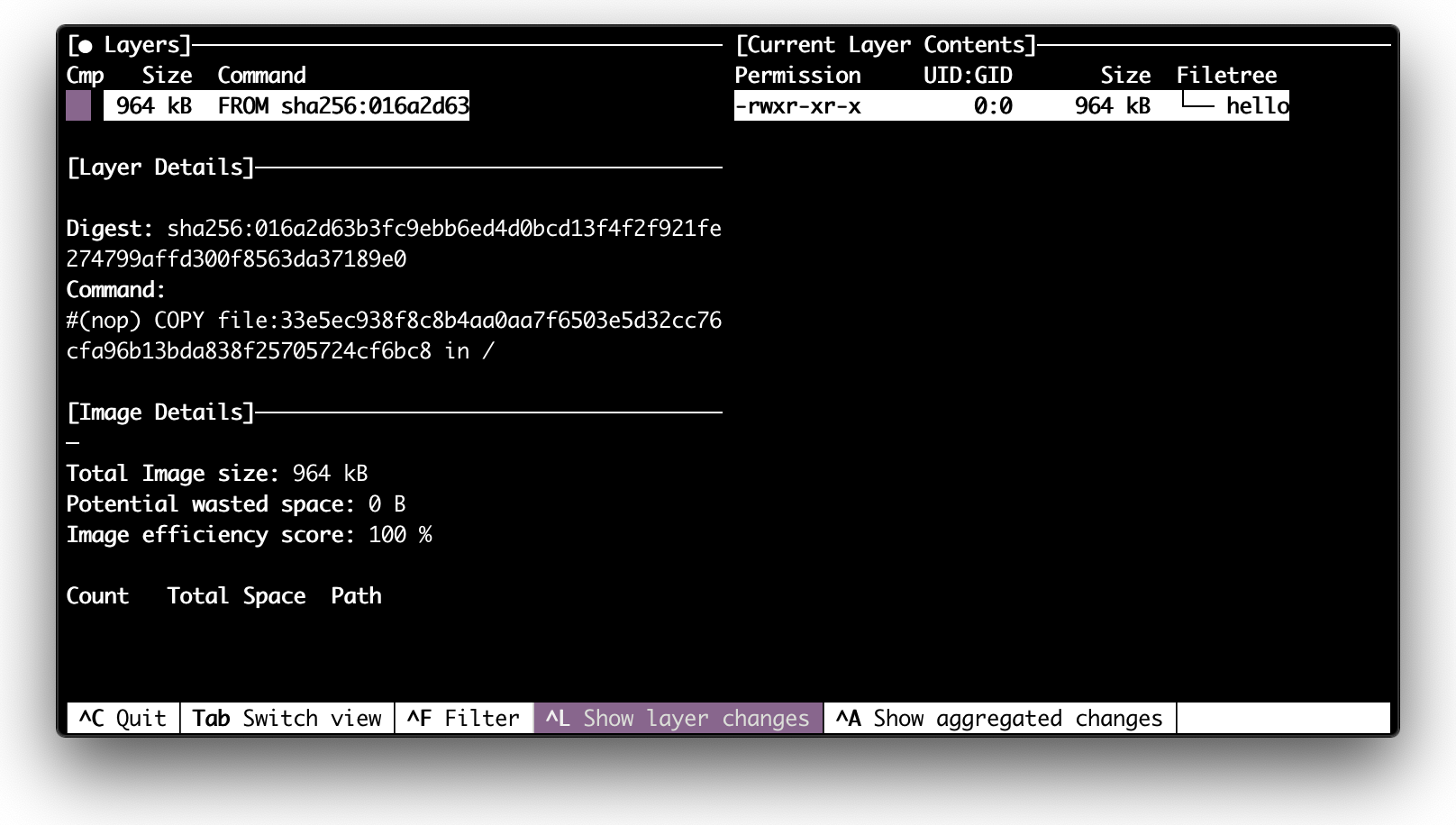
Inspecting a scratch image with dive.
So, why do we need container images if they are not required to run containers?
When every container gets a multi-megabyte copy of the root filesystem, the space requirements increase drastically. So, images are there to solve the storage and distribution problems efficiently. Intrigued? Read here how.
Have you ever wondered how images are created?
The workflow popularized by Docker tries to make you think that images are primary and that containers are secondary. With docker run <image> you need an image to run a container. However, we already know that technically it's not true. But there is more! In actuality, you have to run (temporary and ephemeral) containers to build an image! Read here why.
Much like real containers that were invented to increase the amount of stuff a typical ship could take on board, containers are meant to increase resource utilization of our servers.
A typical server now runs tens or hundreds of containers. Thus, they need to coexist efficiently. If a container runtime focuses on a single container lifecycle, a Container Manager focuses on making many containers happily coexist on a single host.
The main responsibilities of a container manager include pulling images, unpacking bundles, configuring the inter-container networking, storing container logs, etc.
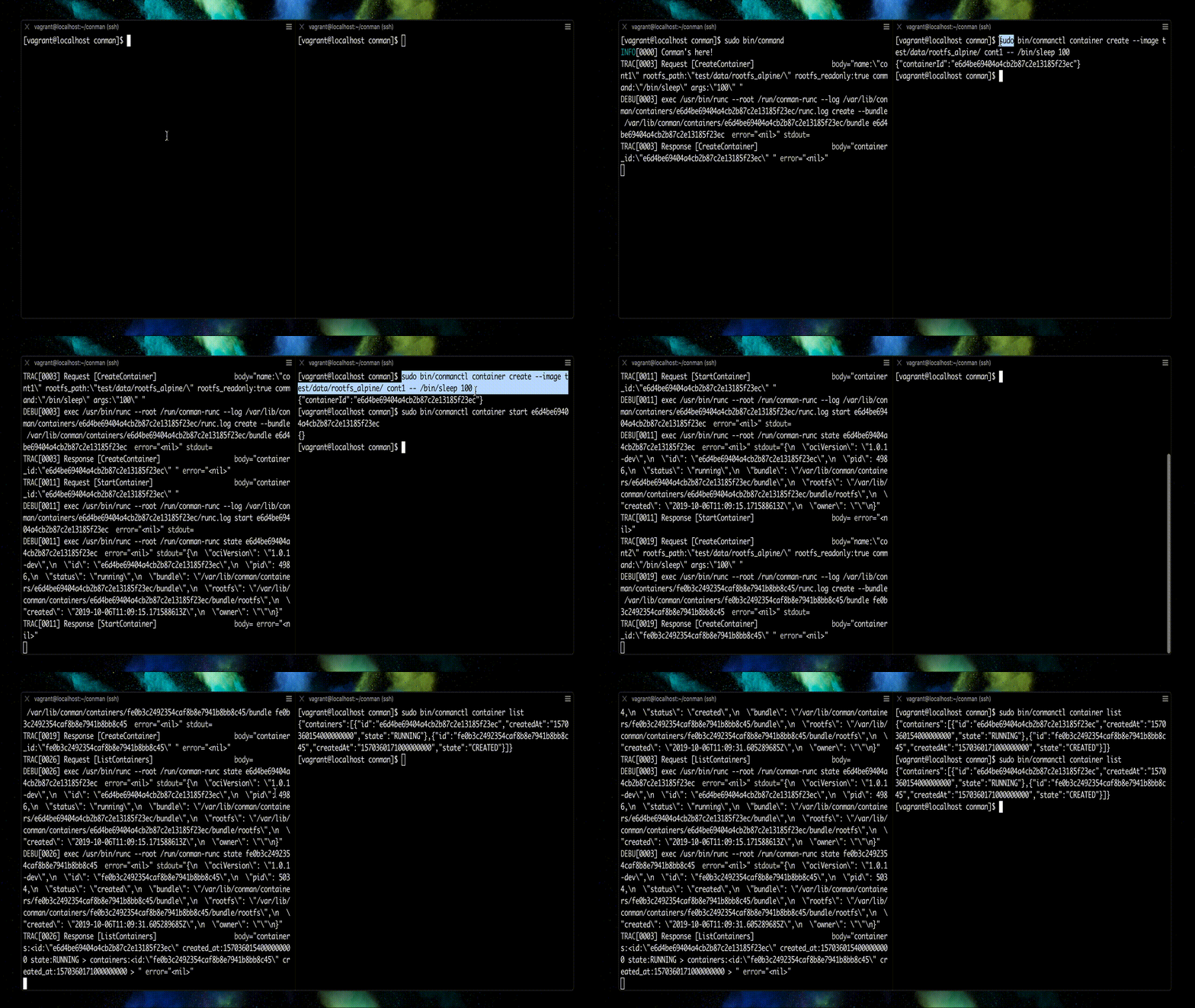
At this point, you probably think that Docker is a good example of such a manager. However, I find containerd a much more representative candidate. Much like runc, containerd started as a component of Docker but then was extracted into a standalone project. Under the hood, containerd can use runc or any other runtime that implements the containerd-shim interface. And the coolest part about it is that with containerd you can run containers almost as easily as with Docker itself.
Check out this post on how to use containerd from the command line - it's a great hands-on exercise bringing you closer to the actual containers.
If you want to know more about container manager internals, check out this article showing how to implement a container manager from scratch:
Finally, we are ready to understand Docker! If we omit the (now deprecated) Swarm thingy, Docker can be seen as follows:
dockerd - a higher-level daemon sitting in front of the containerd daemondocker - a famous command-line client to interact with dockerd.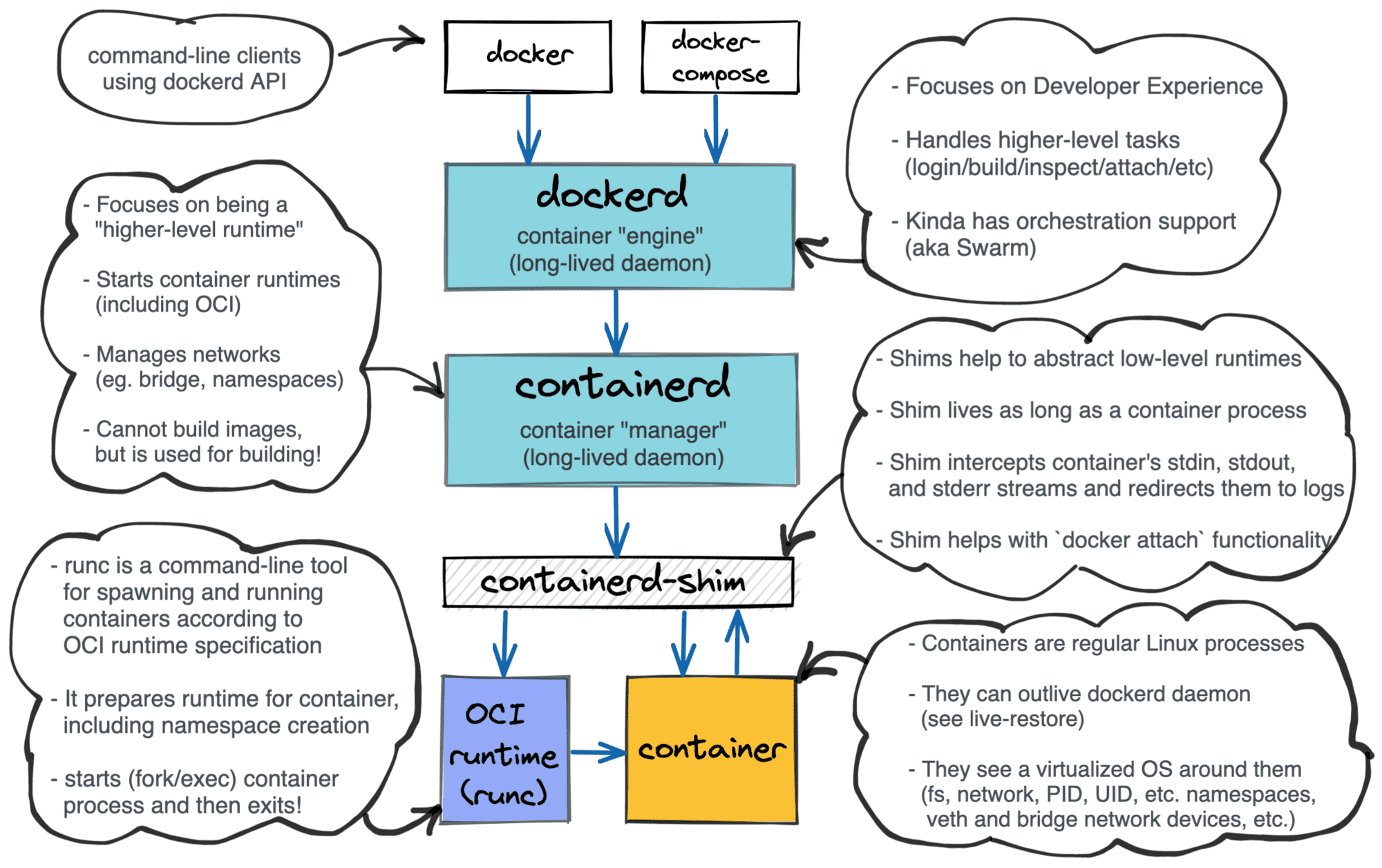
Layered Docker architecture.
From my point of view, Docker's main task currently is to make the container workflows developer-friendly. To make developer's life easier, Docker combines in one piece of software all main container use cases:
...but by 2021, almost every such use case got written a tailored piece of software (podman, buildah, skopeo, kaniko, etc.) to provide an alternative, and often better, solution.
Coordinating containers running on a single host is hard. But coordinating containers across multiple hosts is exponentially harder. Remember Docker Swarm? Docker was already quite monstrous when the multi-host container orchestration was added, bringing one more responsibility for the existing daemon...
Omitting the issue with the bloated daemon, Docker Swarm seemed nice. But another orchestrator won the competition - Kubernetes! So, since ca. 2020, Docker Swarm is either obsolete or in maintenance mode, and we're all learning a couple of Ancient Greek words per week.
Kubernetes joins multiple servers (nodes) into a coordinated cluster, and every such node gets a local agent called kubelet. Among other things, kubelet is responsible for launching Pods (coherent groups of containers). But kubelet doesn't do it on its own. Historically, it used dockerd for that purpose, but now this approach is deprecated in favor of a more generic Container Runtime Interface (CRI).
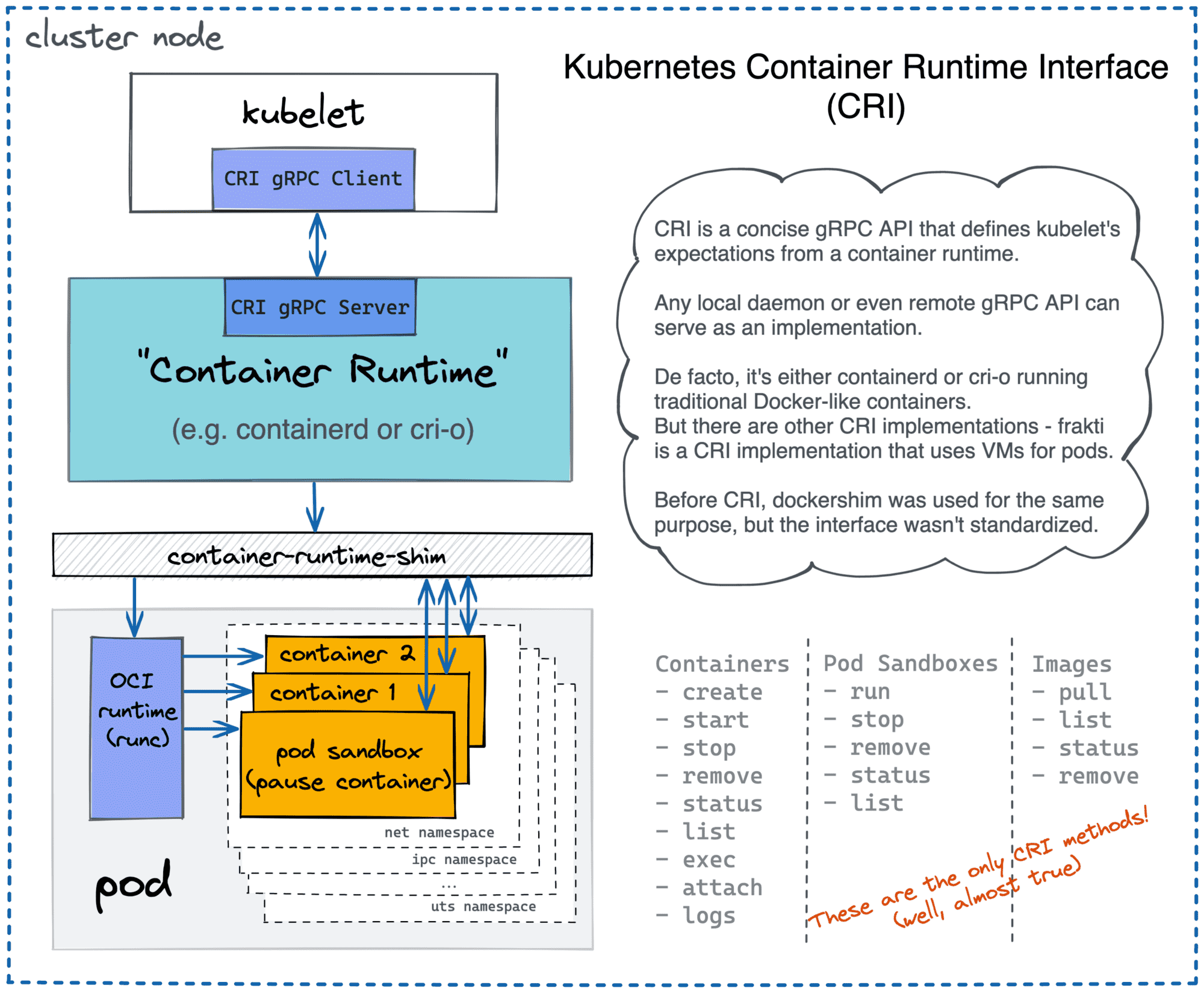
Kubernetes can use containerd, cri-o, or any other CRI-compatible runtime.
There is a lot of tasks for the container orchestrator.
Kubernetes, and other orchestrators like Nomad or AWS ECS, enabled teams to create isolated services more easily. It helped to solve lots of administrative problems, especially for bigger companies. But it created lots of new tech problems that didn't exist on the traditional VM-based setups! Managing lots of distributed services turned out to be quite challenging. And that's how a Zoo of Cloud Native projects came to be.
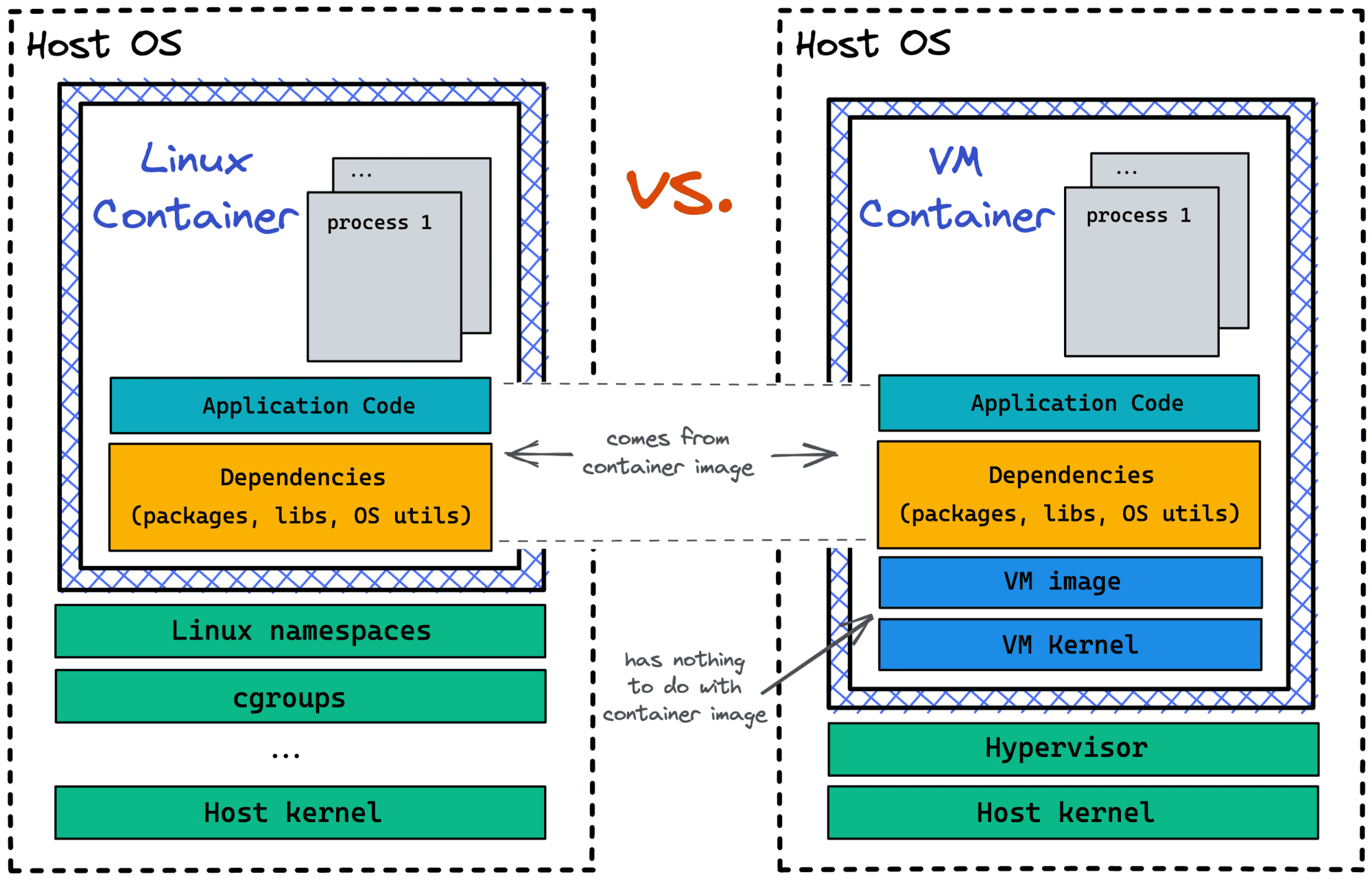
Now, when you have a decent understanding of containers - from both the implementation and usage standpoints - it's time to tell you the truth. Containers aren't Linux processes!
Even Linux containers aren't technically processes. They are rather isolated and restricted environments to run one or many processes inside.
Following the above definition, it shouldn't be surprising that at least some containers can be implemented using mechanisms other than namespaces and cgroups. And indeed, there are projects like Kata containers that use true virtual machines as containers! Thankfully to the open standards like OCI Runtime Spec, OCI Image Spec, or Kubernetes CRI, VM-based containers can be used by higher-level tools like containerd and Kubernetes without requiring significant adjustments.
For more, check out this article on how the OCI Runtime Spec defines a standard container:
Learning containers by only using high-level tools like Docker or Kubernetes can be both frustrating and dangerous. The domain is complex, and approaching it only from one end leaves too many grey areas.
The approach I find helpful starts from taking a broader look at the ecosystem, decomposing it on layers, and then tackling them one by one starting from the bottom, and leveraging the knowledge obtained on every previous step:
⭐ - the post hit the front-page of Hacker News.
Level up your server-side game — join 20,000 engineers getting insightful learning materials straight to their inbox:
此内容由惯性聚合(RSS阅读器)自动聚合整理,仅供阅读参考。 原文来自 — 版权归原作者所有。