






Exploring Kubernetes Operator Pattern
Don't miss new posts in the series! Subscribe to the blog updates and get deep technical write-ups on Cloud Native topics direct into your inbox.
I've been using Kubernetes for almost a year now and, to be honest, I like the experience so far. Most of my use cases were rather trivial and thanks to its declarative approach, Kubernetes makes deploying and scaling stateless services pretty simple. I usually just describe my application in a YAML file as a set of interconnected services, feed it to Kubernetes, and let the built-in control loops bring the state of the cluster closer to the desired state by creating or destroying some resources for me automagically.
However, many times I've heard that the real power of Kubernetes is in its extensibility. Kubernetes brings a lot of useful automation out of the box. But it also provides extension points that can be used to customize Kubernetes capabilities. The cleverness of the Kubernetes design is that it encourages you to keep the extensions feel native! So when I stumbled upon the first few Kubernetes Operators on my Ops way, I could not even recognize that I'm dealing with custom logic...
In this article, I'll try to take a closer look at the Operators pattern, see which Kubernetes parts are involved in operators implementation, and what makes operators feel like first-class Kubernetes citizens. Of course, with as many pictures as possible.
Everything in Kubernetes seems to revolve around objects and controllers.
Kubernetes objects such as Pods, Namespaces, ConfigMaps, or Events are persistent entities in the Kubernetes system. Kubernetes uses these entities to represent the state of your cluster. Objects are also used as "records of intent." By creating (or removing) objects one can describe the desired state of the Kubernetes cluster.
Objects are like data structures.
On the other hand, controllers are infinite loops that watch the actual and the desired states of your cluster. When these two states diverge, controllers start making changes aiming to bring the current state of the cluster closer to the desired one.
Controllers are like algorithms.
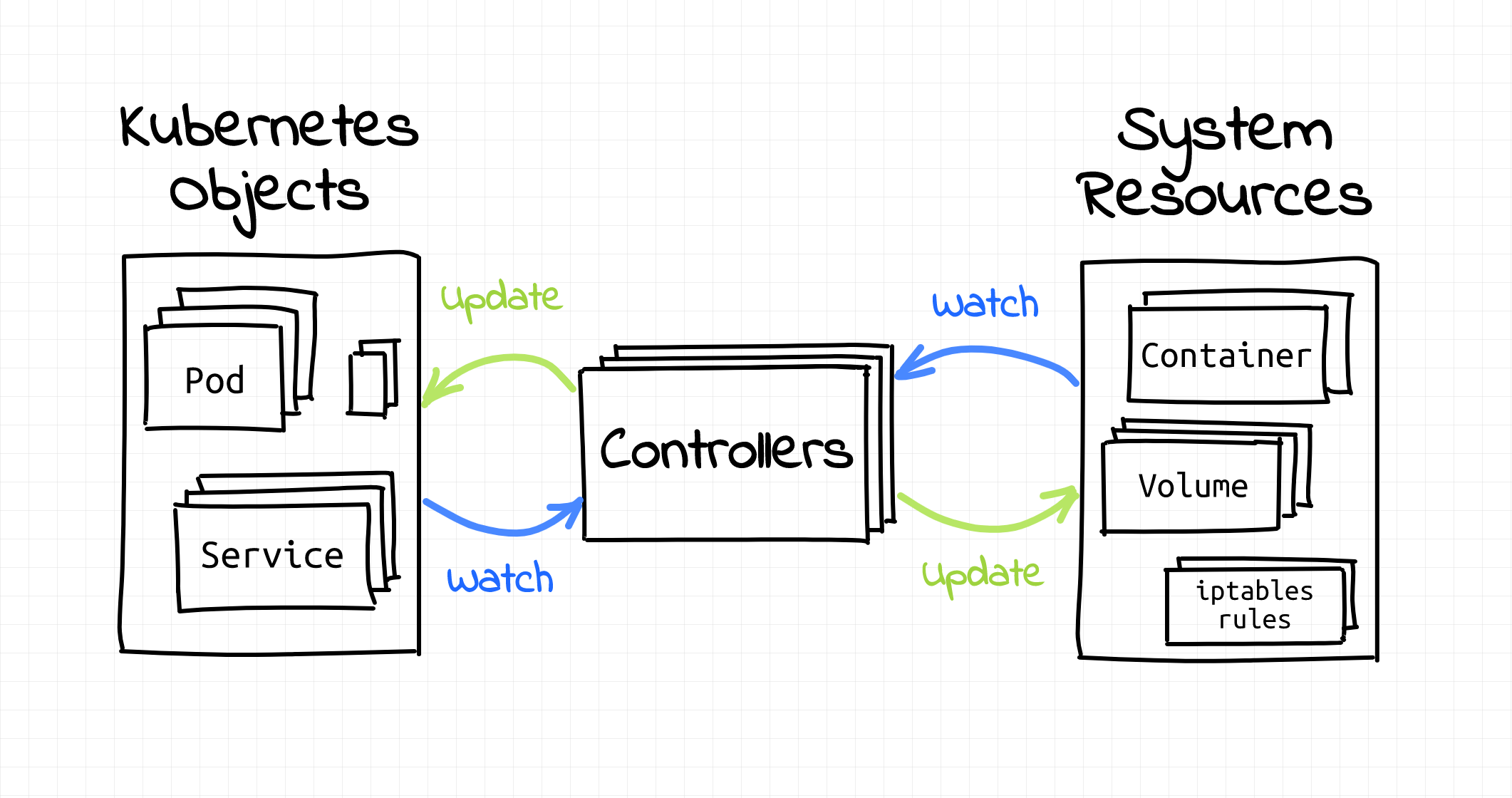
I'll get to the controllers part later in this article and now let's focus on the objects.
All interactions with Kubernetes objects, directly or indirectly, happen through Kubernetes API - a highly structured masterpiece of software design.
There is a ton of documentation written on Kubernetes API and related topics and I spent quite some time digesting it. Since we are going to talk about the Kubernetes Operator pattern which heavily depends on the capabilities of the Kubernetes API, it's important to familiarize ourselves with the API design principles first. Following is my super-condensed take on the Kubernetes API docs.
Kubernetes offers a RESTful declarative HTTP API. Still remember those Kubernetes objects? A collection of objects of a certain kind form an API resource:
A resource is an endpoint in the Kubernetes API that stores a collection of API objects of a certain kind; for example, the built-in pods resource contains a collection of Pod objects.
You can always check the list of available API resources using kubectl api-resources command:
$ kubectl api-resources
NAME          SHORTNAMES   APIVERSION   NAMESPACED   KIND
namespaces    ns           v1           false        Namespace
nodes         no           v1           false        Node
pods          po           v1           true         Pod
deployments   deploy       apps/v1      true         Deployment
jobs                       batch/v1     true         Job
...
OK, great, we've got resources. But Kubernetes evolves quickly. What if a new attribute needs to be added to an existing resource definition? API versioning is always hard.
API groups to the rescue! A bunch of related resources forms an API group:
To make it easier to evolve and to extend its API, Kubernetes implements API groups that can be enabled or disabled.
You can also check the list of available API groups and their versions using kubectl api-versions command:
$ kubectl api-versions
admissionregistration.k8s.io/v1
admissionregistration.k8s.io/v1beta1
apiextensions.k8s.io/v1
apiextensions.k8s.io/v1beta1
apiregistration.k8s.io/v1
apiregistration.k8s.io/v1beta1
apps/v1
...
In Kubernetes, objects of the same kind are distinguished by their names. So, if you start two Pods, both should get a unique name. But clusters can be pretty big and since names are supposed to be unique within a cluster, we need a mechanism to prevent collisions. Something like lots of logical clusters within one physical cluster. Allow me to introduce you to namespaces!
Kubernetes supports multiple virtual clusters backed by the same physical cluster. These virtual clusters are called namespaces.
...
Namespaces provide a scope for names. Names of resources need to be unique within a namespace, but not across namespaces. Namespaces cannot be nested inside one another and each Kubernetes resource can only be in one namespace.
Thus, API objects are fully qualified by their API group, resource type, namespace (unless cluster-scoped), and name.
Have you become totally confused yet? No, worries, I've got a simple diagram for you 🙈
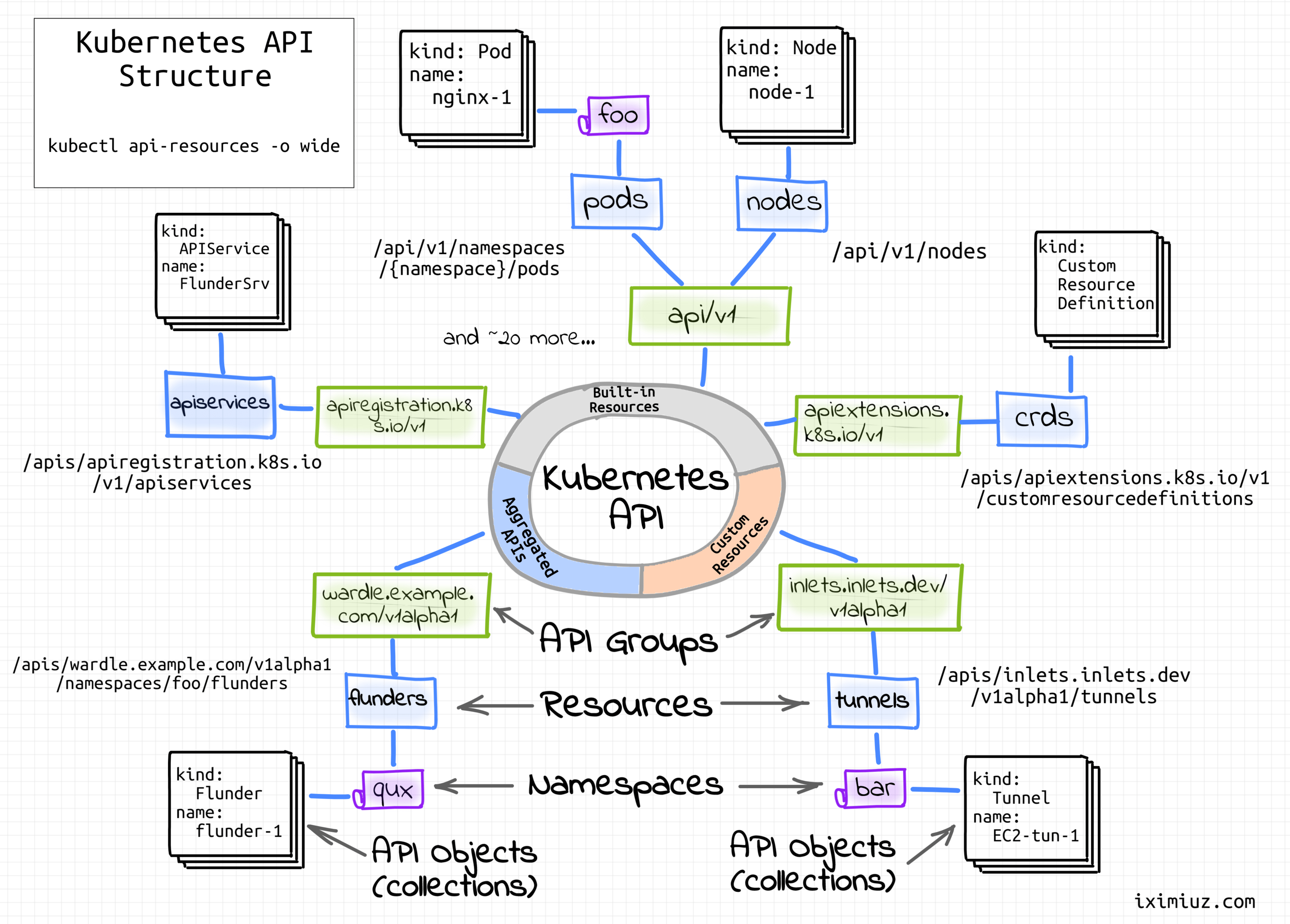
Kubernetes API structure.
So, a quick summary - we've learned about objects, resources, groups, and namespaces. But what's up with the promised customization?
It seems like there is a great deal of effort in keeping the Kubernetes API coherent but extensible.
What do I mean by coherent here? Kubernetes API consists of endpoints called resources. These API resources adhere to a set of common requirements - they are nouns and manipulated in a declarative manner (RESTful CRUD), they should be updated relatively infrequently and be reasonably small in size, their names should be valid DNS subdomains, etc.
These restrictions allow unifying the resource workflows. For instance, you can get, describe, or update a collection of Pods in pretty much the same way as a collection of Services, Nodes, or RBAC roles:
$ kubectl get pods
$ kubectl get services
$ kubectl get roles

$ kubectl describe pods  # or services, or roles

$ kubectl edit pods  # or services, or roles
Not only kubectl benefits from this uniformity. Here is a full list of common features enabled by the unified design:
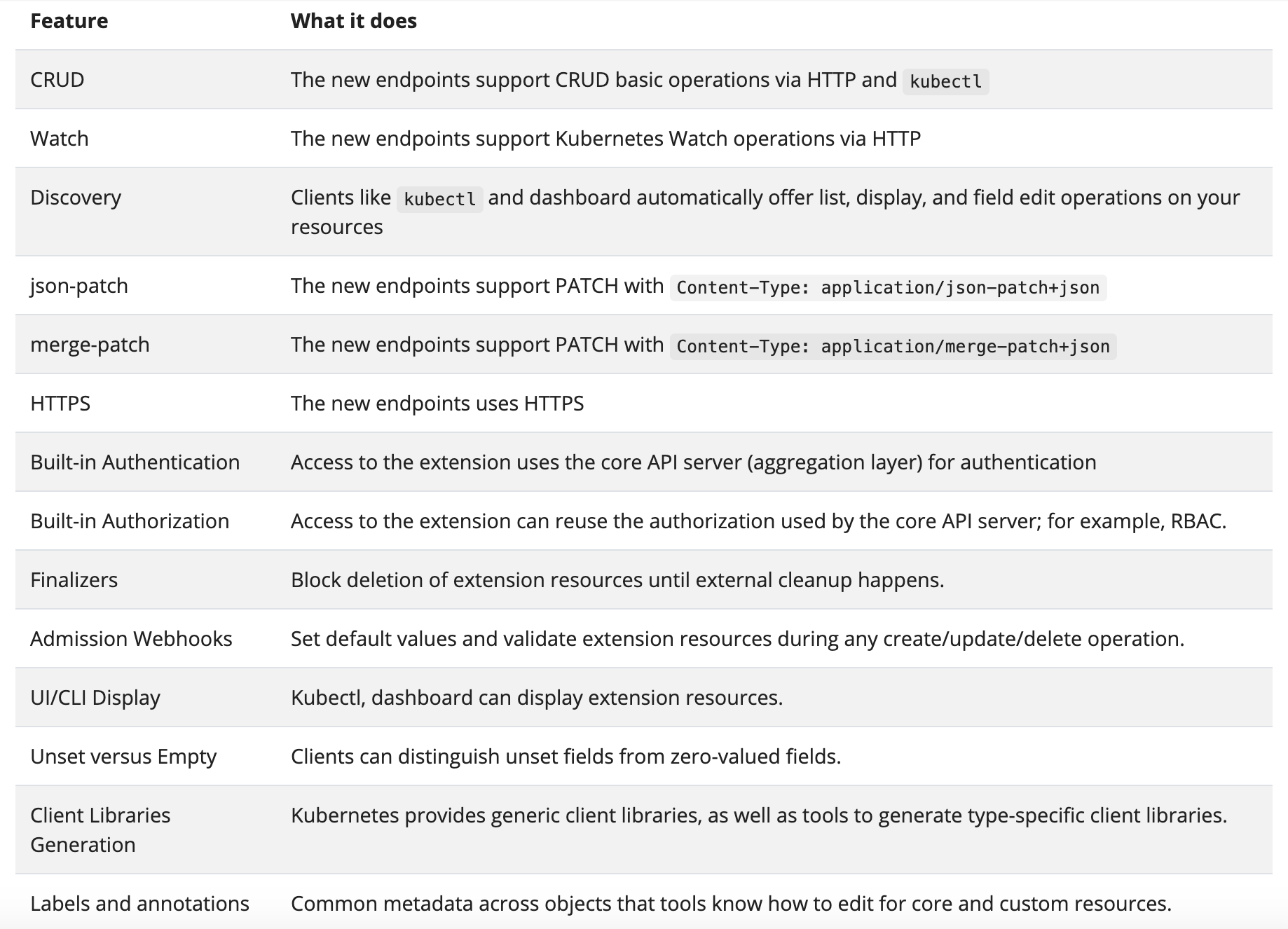
It's pretty handy, isn't it?
So, if I were to extend the API, it'd be reasonable for me to expect that my endpoints would benefit from this common functionality as well. But that would mean that the API extension should be done by adding more resources!
And indeed, in Kubernetes, one can easily register custom resources. The procedure is fully dynamic and doesn't require restarting or updating the API server.
How such a custom resource can be added? Well, again, it's Kubernetes! Of course, by interacting with another, already existing resource! There is a special API resource called CustomResourceDefinition (CRD):
The CustomResourceDefinition API resource allows you to define custom resources. Defining a CRD object creates a new custom resource with a name and schema that you specify.
And from another documentation page:
When you create a new CustomResourceDefinition (CRD), the Kubernetes API Server creates a new RESTful resource path for each version you specify.
Let's try to create a custom resource. Remember, a resource specifies a certain kind of Kubernetes object. Canonically, objects possess some attributes. So, our CustomResourceDefinition should be mostly concerned with describing the attributes of our future resource. Additionally, it's good to know that custom resources can be either namespaced or cluster-scoped. This is specified in the CRD's scope field.
apiVersion: apiextensions.k8s.io/v1
kind: CustomResourceDefinition
metadata:
  name: blogposts.iximiuz.com
spec:
  group: iximiuz.com
  names:
    kind: BlogPost
    listKind: BlogPostList
    plural: blogposts
    singular: blogpost
  scope: Namespaced
  versions:
  - name: v1alpha1
    schema: ...
...
kubectl apply -f - <<EOF
apiVersion: apiextensions.k8s.io/v1
kind: CustomResourceDefinition
metadata:
  name: blogposts.iximiuz.com
spec:
  group: iximiuz.com
  names:
    kind: BlogPost
    listKind: BlogPostList
    plural: blogposts
    singular: blogpost
  scope: Namespaced
  versions:
  - name: v1alpha1
    schema:
      openAPIV3Schema:
        description: BlogPost is a custom resource exemplar
        type: object
        properties:
          apiVersion:
            description: 'APIVersion defines the versioned schema of this representation
              of an object. Servers should convert recognized schemas to the latest
              internal value, and may reject unrecognized values. More info: https://git.k8s.io/community/contributors/devel/sig-architecture/api-conventions.md#resources'
            type: string
          kind:
            description: 'Kind is a string value representing the REST resource this
              object represents. Servers may infer this from the endpoint the client
              submits requests to. Cannot be updated. In PascalCase. More info: https://git.k8s.io/community/contributors/devel/sig-architecture/api-conventions.md#types-kinds'
            type: string
          metadata:
            type: object
          spec:
            description: BlogPostSpec is the spec for a BlogPost resource
            type: object
            properties:
              title:
                type: string
              author:
                type: string
          status:
            description: BlogPostStatus is the status for a BlogPost resource
            type: object
            properties:
              publishedAt:
                type: string
    served: true
    storage: true
    subresources:
      status: {}
status:
  acceptedNames:
    kind: ""
    plural: ""
  conditions: []
  storedVersions: []
EOF
To create a custom resource, feed the YAML definition from above to kubectl apply.
You can easily validate that the resource has been created:
$ kubectl api-resources --api-group=iximiuz.com
NAME        SHORTNAMES   APIVERSION             NAMESPACED   KIND
blogposts                iximiuz.com/v1alpha1   true         BlogPost

$ kubectl explain blogpost
KIND:     BlogPost
VERSION:  iximiuz.com/v1alpha1

DESCRIPTION:
     BlogPost is a custom resource exemplar

FIELDS:
   apiVersion   <string>
     APIVersion defines the versioned schema of this representation of an
     object. Servers should convert recognized schemas to the latest internal
     value, and may reject unrecognized values. More info:
     https://git.k8s.io/community/contributors/devel/sig-architecture/api-conventions.md#resources

   kind <string>
     Kind is a string value representing the REST resource this object
     represents. Servers may infer this from the endpoint the client submits
     requests to. Cannot be updated. In PascalCase. More info:
     https://git.k8s.io/community/contributors/devel/sig-architecture/api-conventions.md#types-kinds

   metadata <Object>
     Standard object's metadata. More info:
     https://git.k8s.io/community/contributors/devel/sig-architecture/api-conventions.md#metadata

   spec <Object>
     BlogPostSpec is the spec for a BlogPost resource

   status   <Object>
     BlogPostStatus is the status for a BlogPost resource
At this point, we already can create objects of kind BlogPost:
$ kubectl apply -f - <<EOF
apiVersion: iximiuz.com/v1alpha1
kind: BlogPost
metadata:
  name: blog-post-1
spec:
  title: Kubernetes makes me scream at night
  author: Ivan Velichko
EOF

blogpost.iximiuz.com/blog-post-1 created
And manipulate the created objects:
$ kubectl get blogposts
NAME          AGE
blog-post-1   62s

$ kubectl describe blogposts
Name:         blog-post-1
Namespace:    default
Labels:       <none>
Annotations:  <none>
API Version:  iximiuz.com/v1alpha1
Kind:         BlogPost
Metadata:
  Creation Timestamp:  2021-01-25T21:32:38Z
...
  Self Link:         /apis/iximiuz.com/v1alpha1/namespaces/default/blogposts/blog-post-1
  UID:               3a50dac6-46b6-45e8-ad70-f7663ddf88cb
Spec:
  Author:  Ivan Velichko
  Title:   Kubernetes makes me scream at night
Events:    <none>

$ kubectl delete blogpost/blog-post-1
blogpost.iximiuz.com "blog-post-1" deleted
So, we were able to extend Kubernetes API by dynamically registering a custom resource that looks exactly like built-in resources. And we can do that by creating new CRD objects, i.e. by interacting with a dedicated built-in resource. For me, it sounds almost as great as recursion 😍
Apparently, registering CRDs is not the only way to extend the Kubernetes API. It can be also done with aggregation layers and the result would look like a set of custom resources as well. However, I could find neither good real-world applications of this technique nor any fresh tutorials on how to implement an aggregation layer. The only two examples are the Service Catalog API extension (UPD: the project first switched to a new CRDs-based architecture and then got completely retired) and this stale sample-apiserver GitHub project.
— Ivan Velichko (@iximiuz) February 6, 2022Are there some prominent examples when the Kubernetes API was extended using the Aggregation Layer?
Or it's always Custom Resources paired with admission hooks and controllers?
The documentation also mentions that it's possible to extend Kubernetes by adding a stand-alone API that doesn't need to be declarative. However, it would not be following the resource conventions. Hence, the common resource features would not be supported by such an API. Hence, it would not be possible to automatically integrate it with kubectl, Kubernetes UI, or default API clients.
Convention over configuration principle rules!
Custom resources are neat but useless in isolation. You need some custom code to interact with them:
On their own, custom resources simply let you store and retrieve structured data. When you combine a custom resource with a custom controller, custom resources provide a true declarative API.
As you probably remember, logic in Kubernetes is organized in form of controllers. There is an extensive set of built-in controllers watching the built-in resources and applying changes to the clusters. But how can we get some custom controllers?
Well, apparently, it's a simple as just starting a Pod. I.e. everything you need is to program a control loop logic in a language of your choice (it'd be wise to use one of the official API clients though), pack this program into a [Docker] image, and deploy it to your cluster.
So, what is a Kubernetes Operator? Citing the official docs one more time, "an operator is a client of the Kubernetes API that acts as a controller for a Custom Resource." As simple as just that. Of course, you can deviate from this definition a bit by, say, adding multiple Custom Resources, but one of the best practices of writing operators states that you'd need to introduce multiple control loops (i.e. a controller per resource) to keep the implementation clear.
What kind of logic is a good fit for an operator? Guessing on the name of the pattern, it should have something to do with operating [an application]. Originally, operators were meant to automate human beings out of the application management. The Operator Pattern page mentions some example use cases:
You can also find lots of real-world operators on OperatorHub.io. However, in my opinion, your imagination is the only thing that bounds what an operator could do.
Let's take a look at one of my favorite operators - inlets-operator. This operator is a good example of out-of-the-box thinking. The operator is meant to expose your local cluster deployments to the Internet by assigning them public IPs. It does so by actively watching Kubernetes Services of type LoadBalancer. For every new such service, it provisions a tiny VM on a cloud provider of your choice (Digital Ocean ❤️) using inletsctl tool. Upon VM readiness, the operator wires it with an auxiliary deployment using Inlets Tunnel. That essentially brings cloud-like Services of type LoadBalancer to your local Kubernetes cluster.
Here is a super-short instruction on how to reproduce the setup from the diagram using arkade helper (for more detailed tutorial you can check the official docs):
# 1. Install arkade cli tool.
$ curl -sLS https://dl.get-arkade.dev | sudo sh

# 2. Prepare playground cluster (https://github.com/kubernetes-sigs/kind).
$ arkade get kind
$ arkade get kubectl
$ kind create cluster

# 3. Install inlets-operator into your playground cluster.
$ arkade install inlets-operator \
 --provider digitalocean \
 --region lon1 \
 --token-file ${DO_API_TOKEN} \
 --license-file ${INLETS_PRO_LICENSE}

# 4. Deploy nginx demo application.
$ kubectl apply -f - <<EOF
apiVersion: apps/v1
kind: Deployment
metadata:
  name: nginx-1
  labels:
    app: nginx
spec:
  replicas: 1
  selector:
    matchLabels:
      app: nginx
  template:
    metadata:
      labels:
        app: nginx
    spec:
      containers:
      - name: nginx
        image: nginx:1.14.2
        ports:
        - containerPort: 80
EOF

# 5. Expose nginx demo app to the outside world.
$ kubectl expose deployment nginx-1 --port=80 --type=LoadBalancer
Inlets-operator introduces a new type of resource - a Tunnel:
$ kubectl get crds
NAME                        CREATED AT
tunnels.inlets.inlets.dev   2021-01-31T11:26:20Z
The operator relies on tunnel objects internally to track the state of the system. Try out the following commands (in two terminal tabs) while setting up the playground:
# Terminal 1
$ kubectl get tunnel/nginx-1-tunnel -o wide -w
NAME             SERVICE   TUNNEL   HOSTSTATUS     HOSTIP         HOSTID
nginx-1-tunnel   nginx-1            provisioning                  229417838
nginx-1-tunnel   nginx-1            active         68.xxx.xx.84   229417838
nginx-1-tunnel   nginx-1            active         68.xxx.xx.84   229417838

# Terminal 2
$ kubectl get services/nginx-1 -o wide -w
NAME      TYPE           CLUSTER-IP       EXTERNAL-IP                     PORT(S)        AGE   SELECTOR
nginx-1   LoadBalancer   10.102.125.133   <pending>                       80:30835/TCP   3s    app=nginx
nginx-1   LoadBalancer   10.102.125.133   68.xxx.xx.84                    80:30835/TCP   57s   app=nginx
nginx-1   LoadBalancer   10.102.125.133   68.xxx.xx.84,68.xxx.xx.84       80:30835/TCP   57s   app=nginx
Conveniently, tunnel objects also can be used by end-users as a mean of interaction with the operator. For instance, one can run kubectl delete for the tunnel object to trigger reprovisioning of the inlets exit-server on the cloud provider side:
# Terminal 1
$ kubectl delete tunnel/nginx-1-tunnel
tunnel.inlets.inlets.dev "nginx-1-tunnel" deleted

# Terminal 2
$ kubectl logs deploy/inlets-operator -f
... deprovision existing VM
... provision new VM
Another great thing about the inlets-operator is that its code is pretty straightforward and very well written. It can be a great starting point for those who wants to start writing operators. In under a thousand lines of code one can find usage examples of Kubernetes API informers, CRD generated code, workqueue, and other typical operator constructs.
When it comes to operators, there is a lot of buzz. But actually, most of the time it's just a pod (or a few pods) running a custom controller and one or more custom resources to interact with it.
In this article, we learned that the Kubernetes API is probably the main contributor to the Kubernetes extensibility. You can put whatever logic into your operators. But interaction with it will be happening through native-like API resources. Hence, standard tooling such as kubectl will be supported out of the box and the workflow will look familiar to other Kubernetes users. And even more - it should be possible to build operators on top of existing operators or make different operators interact with one another reusing the exact same mechanism of custom API resources.
Exploring Kubernetes Operator Pattern
Don't miss new posts in the series! Subscribe to the blog updates and get deep technical write-ups on Cloud Native topics direct into your inbox.
此内容由惯性聚合(RSS阅读器)自动聚合整理,仅供阅读参考。 原文来自 — 版权归原作者所有。