






For a long time, serverless has been just a synonym of AWS Lambda for me. Lambda offered a convenient way to attach an arbitrary piece of code to a platform event like a cloud instance changing its state, a DynamoDB record update, or a new SNS message. But also, from time to time, I would come up with a piece of logic that is not big enough to deserve its own service and at the same time doesn't fit well with the scope of any of the existing services. So, I'd often also put it into a function to invoke it later with a CLI command or an HTTP call.
I moved away from AWS a couple of years ago, and since then, I've been missing this ease of deploying serverless functions. So I was pleasantly surprised when I learned about the OpenFaaS project. It makes it simple to deploy functions to a Kubernetes cluster, or even to a VM, with nothing but containerd.
Intrigued? Then read on!
Level up your server-side game — join 20,000 engineers getting insightful learning materials straight to their inbox.
Serverless has become a buzzword, and it's not clear what it actually means.
Lots of modern platforms can be considered serverless. Deploying containerized services on AWS Fargate or GCP Cloud Run? Serverless! Using a managed database like Firebase/Supabase? Serverless! Running an application on Heroku? Probably also serverless.
At the same time, I prefer to consider FaaS a concrete design pattern. Following the FaaS paradigm, you deploy snippets of code, called functions that are executed in response to some external events. These functions are like callbacks you'd normally find in an event-driven program but run on someone else's server(s). And since you operate in terms of functions, not servers, FaaS is, by definition, serverless.
— Ivan Velichko (@iximiuz) November 29, 2021FaaS is serviceless serverless.
Serverless is anything when you don't need to manage servers. FaaS is when you don't need to manage services.
Making an OOP analogy:
- Services are Objects.
- API Endpoints are Methods.
- FaaS are pure Callback Functions.
The OpenFaaS project aims to take a piece of lower-level infra like a Kubernetes cluster or a standalone VM and turn it into a higher-level platform to manage serverless functions.
From the developer's standpoint, such a platform looks truly serverless - all you need to know is that there is a certain CLI/UI/API to deal with the function abstraction. But from the operator's standpoint, of course, you need to understand how exactly OpenFaaS uses servers to run those functions.
Since, in my case, I'm often a developer and an operator at the same time, below I'll try to cover both perspectives. However, I believe we should clearly differentiate between them when evaluating the UX.
Having been created in 2016, there are now many tutorials for how to get started with OpenFaaS. I won't repeat it here, but you can check the following links out:
Instead, I'll try to describe my mental model of OpenFaaS. I hope, it'll help some folks to evaluate wether the technology solves their problems, and some others - to use the technology more efficiently.
Before jumping to actual code writing, it's probably a good idea to understand its future execution environment, aka runtime. Or, to put it simply:
OpenFaaS comes with more than one runtime mode, and modes are tailored for different use cases. So, the answers to the above questions will vary slightly between them.
OpenFaaS functions are run in containers, and every such container must conform to a simple convention - it must act as an HTTP server listening on a predefined port (8080 by default), assume ephemeral storage, and be stateless.
However, OpenFaaS offloads the need to write such servers from users through the function watchdog pattern. A function watchdog is a lightweight HTTP server with the knowledge on how to execute the actual function's business logic. So, everything installed in a container plus such a watchdog as its entrypoint will constitute the function's runtime environment.
Starting from the simplest, or as it's sometimes called classic watchdog:
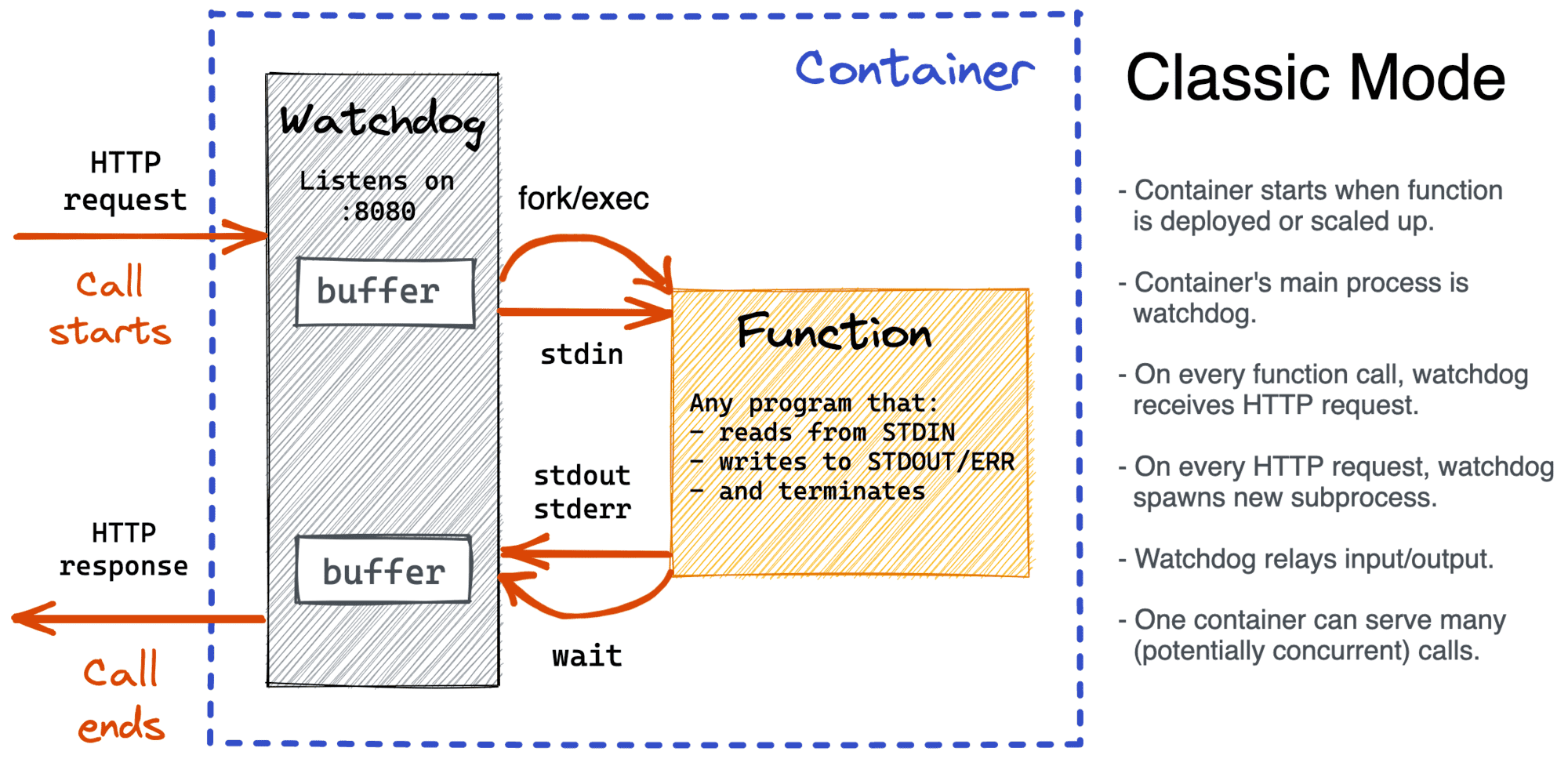
In this case, the watchdog starts up a tiny HTTP server listening on 8080 and on every incoming HTTP request (i.e., a function call):
The above algorithm resembles the good old Common Gateway Interface (CGI) approach. On the one hand, it doesn't sound very efficient to start a separate process per function call, but on the other hand, it's super convenient because absolutely any program (including your favorite CLI tools) that just uses its stdio streams for the I/O handling can be deployed as an OpenFaaS function.
Speaking of isolation, we need to differentiate between functions and calls:
So, with the classic watchdog, functions are isolated at the container level, then each invocation is isolated further at the process level.
If the classic runtime resembles CGI, this runtime mode resembles its historical successor - FastCGI. Instead of spawning a process on every function call, a runtime expects a long-running HTTP server behind the watchdog. And this essentially turns the watchdog component into a reverse proxy:
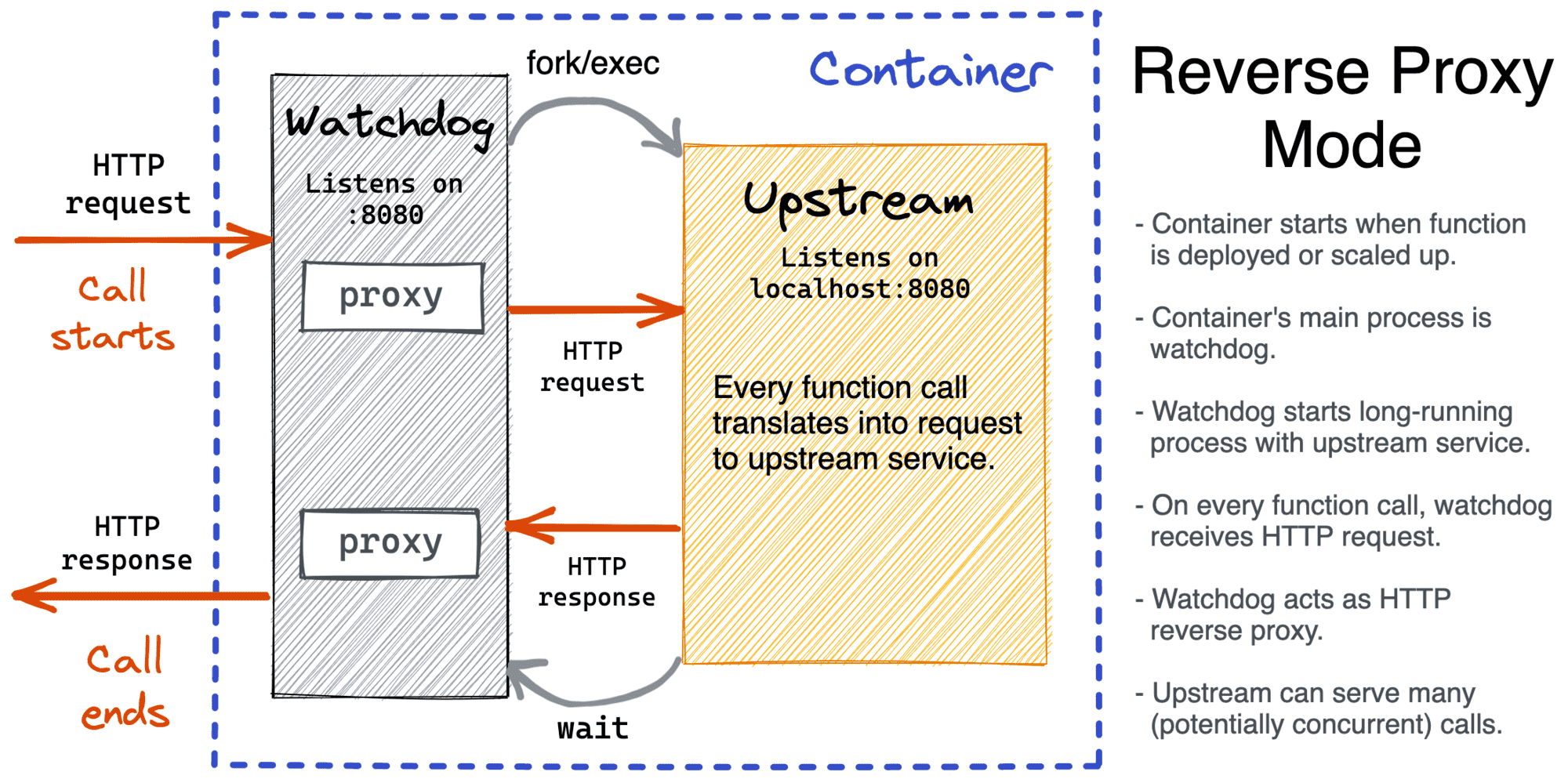
When a container starts, the reverse proxy watchdog also spins up a tiny HTTP server on port 8080. However, unlike the classic watchdog, the reverse proxy watchdog spawns the function's process only once - expecting it to become a (long-running) upstream server. Function calls are then translated into HTTP requests to such an upstream.
The reverse proxy mode it's not meant to be a replacement for the classic mode, though. The super-power of the classic mode is that it's extremely simple to write functions for it. It's also the only choice for code that has no HTTP server available i.e. functions written in Cobol, bash or PowerShell scripts, etc.
When to use the reverse proxy runtime mode:
So, with the reverse proxy approach, functions can be seen as an opinionated way to deploy microservices. It's handy, quick, and simple. But using stateful functions, beware of the caveats caused by the fact that multiple calls may end up in one process now:
The classic runtime mode buffers the whole response from the function before sending it back to the caller. But what if the size of the response is beyond the RAM capacity of the container? OpenFaaS offers an alternative runtime mode that still forks a process per call but adds response streaming.
Another interesting use case is serving static files from functions. And OpenFaaS has a solution for it as well.
That's probably it for the built-in runtime modes. But if you feel like your needs aren't covered, OpenFaaS is an open-source project! Take a look at the existing watchdogs (1 & 2) - they are concise and clear. So, you can always make a pull request or raise an issue, and let the whole community benefit from your contribution.
At this point, we already know that functions are run in containers equipped with function watchdogs. So, what does the minimal possible function look like?
The following example wraps a simple shell script into an OpenFaaS function:
########################################################
# WARNING: Not for Production - No Security Hardening! #
########################################################

# This FROM is just to get the watchdog executable.
FROM ghcr.io/openfaas/classic-watchdog:0.2.0 as watchdog

# FROM this line the actual runtime definion starts.
FROM alpine:latest

# Mandatory step - put the watchdog.
COPY --from=watchdog /fwatchdog /usr/bin/fwatchdog

# Optionally - install extra packages, libs, tools, etc.

# Function's payload - script echoing its STDIN, a bit transformed.
RUN echo '#!/bin/sh' > /echo.sh
RUN echo 'cat | rev | tr "[:lower:]" "[:upper:]"' >> /echo.sh
RUN chmod +x /echo.sh

# Point the watchdog to the actual thingy to run.
ENV fprocess="/echo.sh"

# Start the watchdog server.
CMD ["fwatchdog"]
When built, deployed, and invoked, the above function will act as an echo-server reversing and capitalizing its input.
A slightly more advanced example - a Node.js Hello World script as a function:
########################################################
# WARNING: Not for Production - No Security Hardening! #
########################################################

FROM ghcr.io/openfaas/classic-watchdog:0.2.0 as watchdog

FROM node:17-alpine

COPY --from=watchdog /fwatchdog /usr/bin/fwatchdog

RUN echo 'console.log("Hello World!")' > index.js

ENV fprocess="node index.js"

CMD ["fwatchdog"]
So, to write a simple function, you just need to throw into one Dockerfile:
Then just point the watchdog to that script (or executable) and make the watchdog an entry point. This is kinda cool because:
But there is a significant downside of the above approach - a production-ready Dockerfile could take a hundred lines. And if I just want to run a simple Node.js/Python script or a tiny Go program as a function, why on earth should I deal with Dockerfiles? Can't I just have a placeholder to paste my code snippet into and call it a day?
The beauty of OpenFaaS is that we can do both - low-level tinkering with Dockerfiles or high-level scripting in your target language! Thanks to a rich function template library!
$ faas-cli template store list
NAME                     SOURCE             DESCRIPTION
csharp                   openfaas           Classic C# template
dockerfile               openfaas           Classic Dockerfile template
go                       openfaas           Classic Golang template
java8                    openfaas           Java 8 template
...
node14                   openfaas           HTTP-based Node 14 template
node12                   openfaas           HTTP-based Node 12 template
node                     openfaas           Classic NodeJS 8 template
php7                     openfaas           Classic PHP 7 template
python                   openfaas           Classic Python 2.7 template
python3                  openfaas           Classic Python 3.6 template
...
python3-flask            openfaas           Python 3.7 Flask template
python3-http             openfaas           Python 3.7 with Flask and HTTP
...
golang-http              openfaas           Golang HTTP template
...
The above function templates are carefully crafted by OpenFaaS authors and the community. A typical template comes with an elaborate Dockerfile pointing to a dummy handler function. The templates are used by the faas-cli new command when a new function is bootstrapped. For instance:
$ faas-cli new --lang python my-fn
Folder: my-fn created.
Function created in folder: my-fn
Stack file written: my-fn.yml

$ cat my-fn/handler.py
def handle(req):
    """ PUT YOUR BUSINESS LOGIC HERE """
    return req
So, with templates the task of writing a function boils down to simply putting your business logic into the corresponding handler file.
When using templates, it's important to understand what watchdog and mode are used:
What is your best function? Right, the one you didn't need to write! OpenFaaS embraces this mindset fully and brings a function store - "curated index of OpenFaaS functions which have been tested by the community and chosen for their experience."
The store contains some interesting functions that you can deploy in one-click to your existing OpenFaaS setup:
$ faas-cli store list

FUNCTION                        DESCRIPTION
NodeInfo                        Get info about the machine that you'r...
alpine                          An Alpine Linux shell, set the "fproc...
env                             Print the environment variables prese...
sleep                           Simulate a 2s duration or pass an X-S...
shasum                          Generate a shasum for the given input
Figlet                          Generate ASCII logos with the figlet CLI
curl                            Use curl for network diagnostics, pas...
SentimentAnalysis               Python function provides a rating on ...
hey                             HTTP load generator, ApacheBench (ab)...
nslookup                        Query the nameserver for the IP addre...
SSL/TLS cert info               Returns SSL/TLS certificate informati...
Colorization                    Turn black and white photos to color ...
Inception                       This is a forked version of the work ...
Have I Been Pwned               The Have I Been Pwned function lets y...
Face Detection with Pigo        Detect faces in images using the Pigo...
Tesseract OCR                   This function brings OCR - Optical Ch...
Dockerhub Stats                 Golang function gives the count of re...
QR Code Generator - Go          QR Code generator using Go
Nmap Security Scanner           Tool for network discovery and securi...
ASCII Cows                      Generate a random ASCII cow
YouTube Video Downloader        Download YouTube videos as a function
OpenFaaS Text-to-Speech         Generate an MP3 of text using Google'...
Docker Image Manifest Query     Query an image on the Docker Hub for ...
face-detect with OpenCV         Detect faces in images. Send a URL as...
Face blur by Endre Simo         Blur out faces detected in JPEGs. Inv...
Left-Pad                        left-pad on OpenFaaS
normalisecolor                  Automatically fix white-balance in ph...
mememachine                     Turn any image into a meme.
Business Strategy Generator     Generates a Business Strategy (using ...
Image EXIF Reader               Reads EXIF information from an URL or...
Open NSFW Model                 Score images for NSFW (nudity) content.
Identicon Generator             Create an identicon from a provided s...
These functions are essentially container images stored in public registries like Docker Hub or Quay that you can reuse for free.
Example use cases:
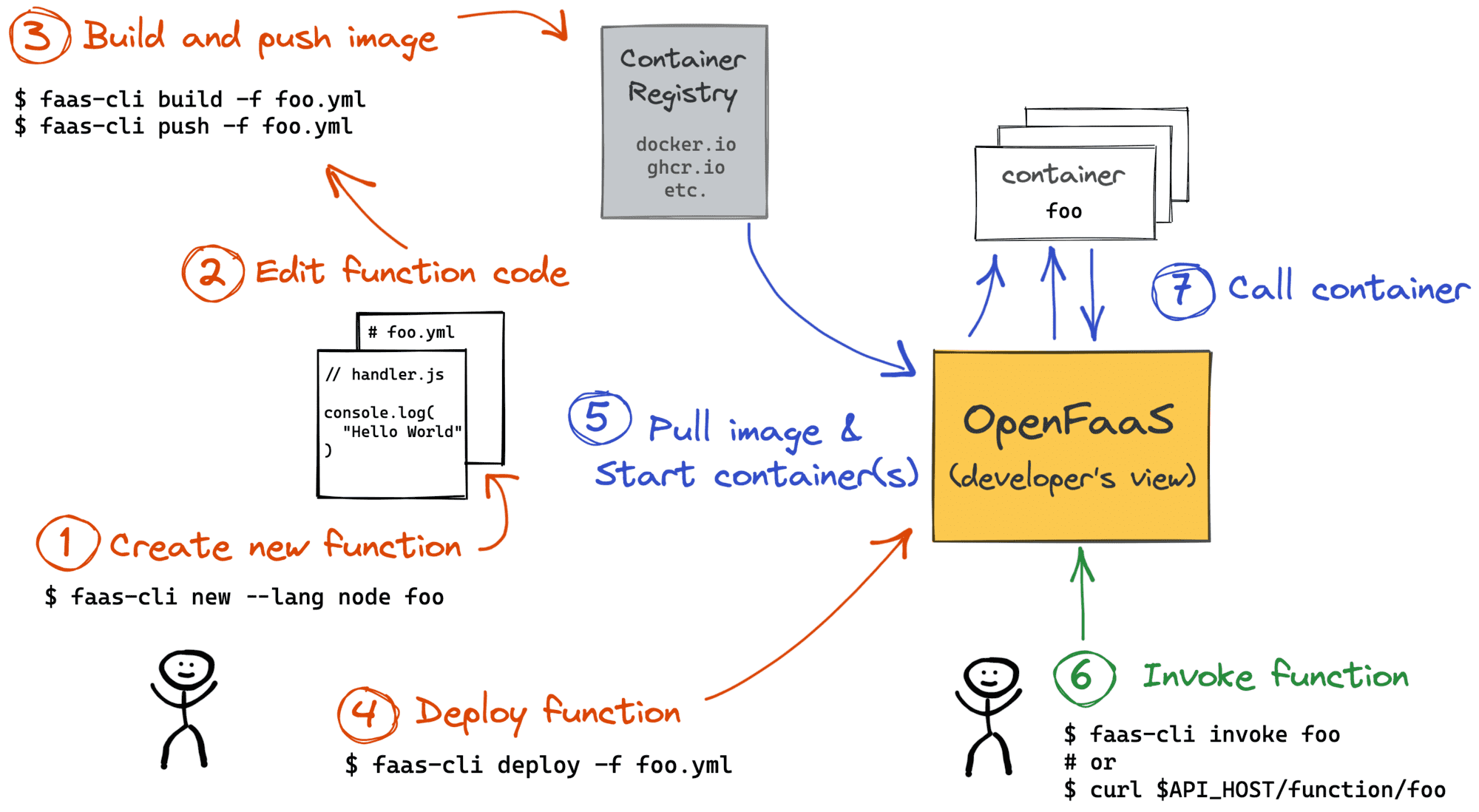
env function to debug HTTP headers received by a functioncurl function to test connectivity from inside of your OpenFaaS deploymenthey from a function running several replicas to multiply the load.Since functions run in containers, someone (or something) needs to build images for these containers. And like it or not, the responsibility lies on developers. OpenFaaS provides a handy faas-cli build command but no server-side builds. So, you either need to run faas-cli build manually (from a machine running Docker) or teach your CI/CD how to do it.
Built images then need to be pushed with faas-cli push to a registry. Obviously, such a registry should be reachable from the OpenFaaS server-side as well. Otherwise, trying to deploy a function with faas-cli deploy will fail.
The overall developer's workflow can be depicted as follows:
When a function is deployed, you can invoke it by sending a GET, POST, PUT, or DELETE HTTP request to an endpoint like $API_HOST:$API_PORT/function/<fn-name>. The most common ways to call a function are:
faas-cli invokeThe first two options are rather straightforward. It's handy to use functions as ad-hoc webhooks handlers (GitHub, IFTTT, etc.), and every function developer already has faas-cli installed, so it can become an integral part of day-to-day scripting.
But what is an event connector?
I started this post from my warm memories of the AWS Lambda tight integration with the AWS platform events. Remember, you can call Lambdas in response to a new SQS/SNS message, a new Kinesis record, an EC2 instance lifecycle event, etc. Does something similar exist for OpenFaaS functions?
Obviously, OpenFaaS can't be tightly integrated with any ecosystem right out of the box. However, it offers a universal solution called Event Connector Pattern.
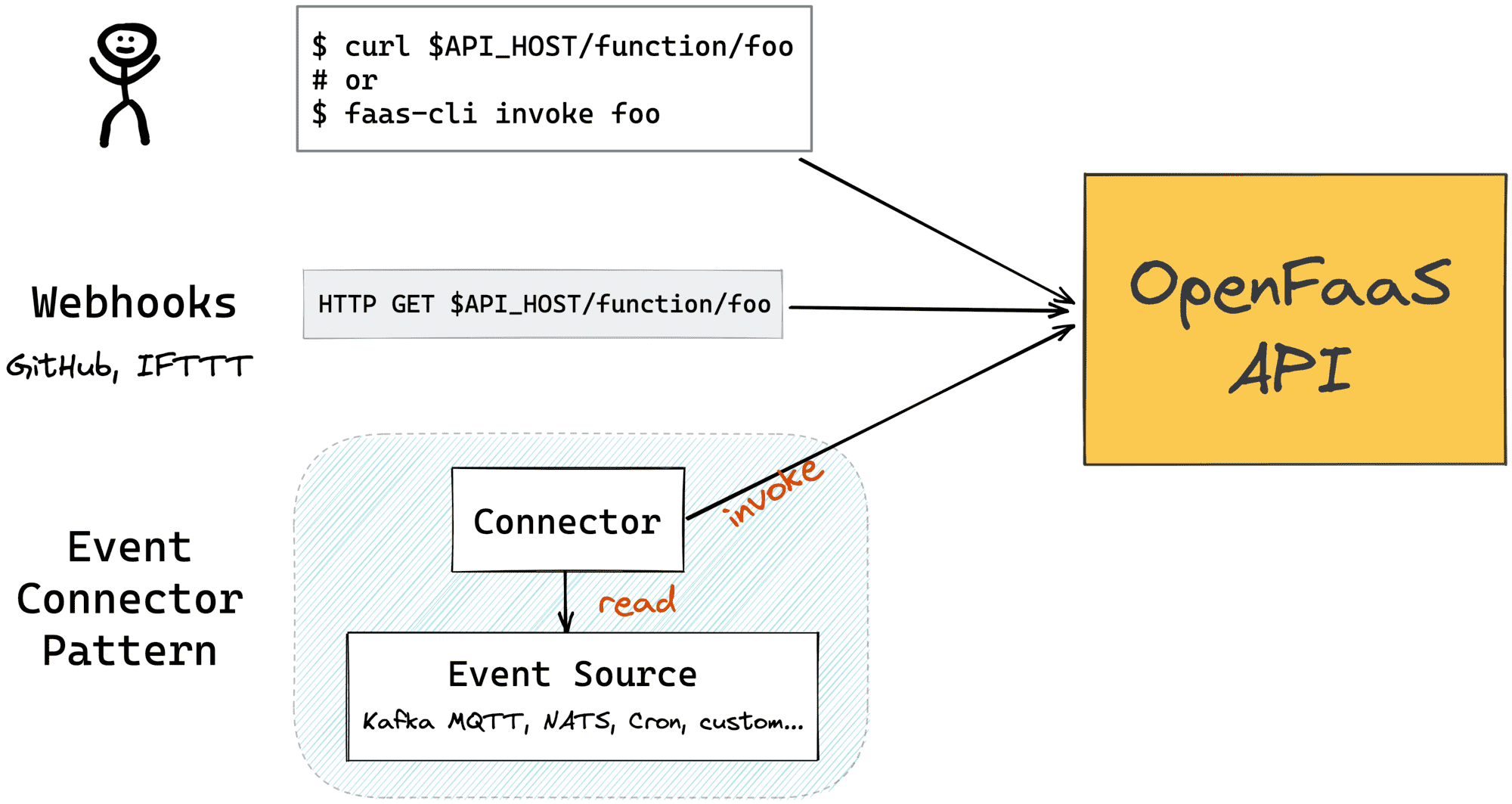
There is a bunch of officially supported connectors:
And OpenFaaS also has a tiny connector-sdk library to ease the development of new connectors.
From the developer's perspective, OpenFaaS can be seen as a black box offering a simple API to deploy and invoke functions. However, operators will probably benefit from understanding a little bit of the OpenFaaS internals.
OpenFaaS has a simple but powerful architecture that allows it to use different kinds of infrastructure for its back-end. If you already have a Kubernetes cluster, you can easily turn it into a FaaS solution by deploying OpenFaaS on it. But if you just have a good old virtual (or physical) machine, you still can install OpenFaaS on it and get a smaller FaaS solution with comparable capabilities.
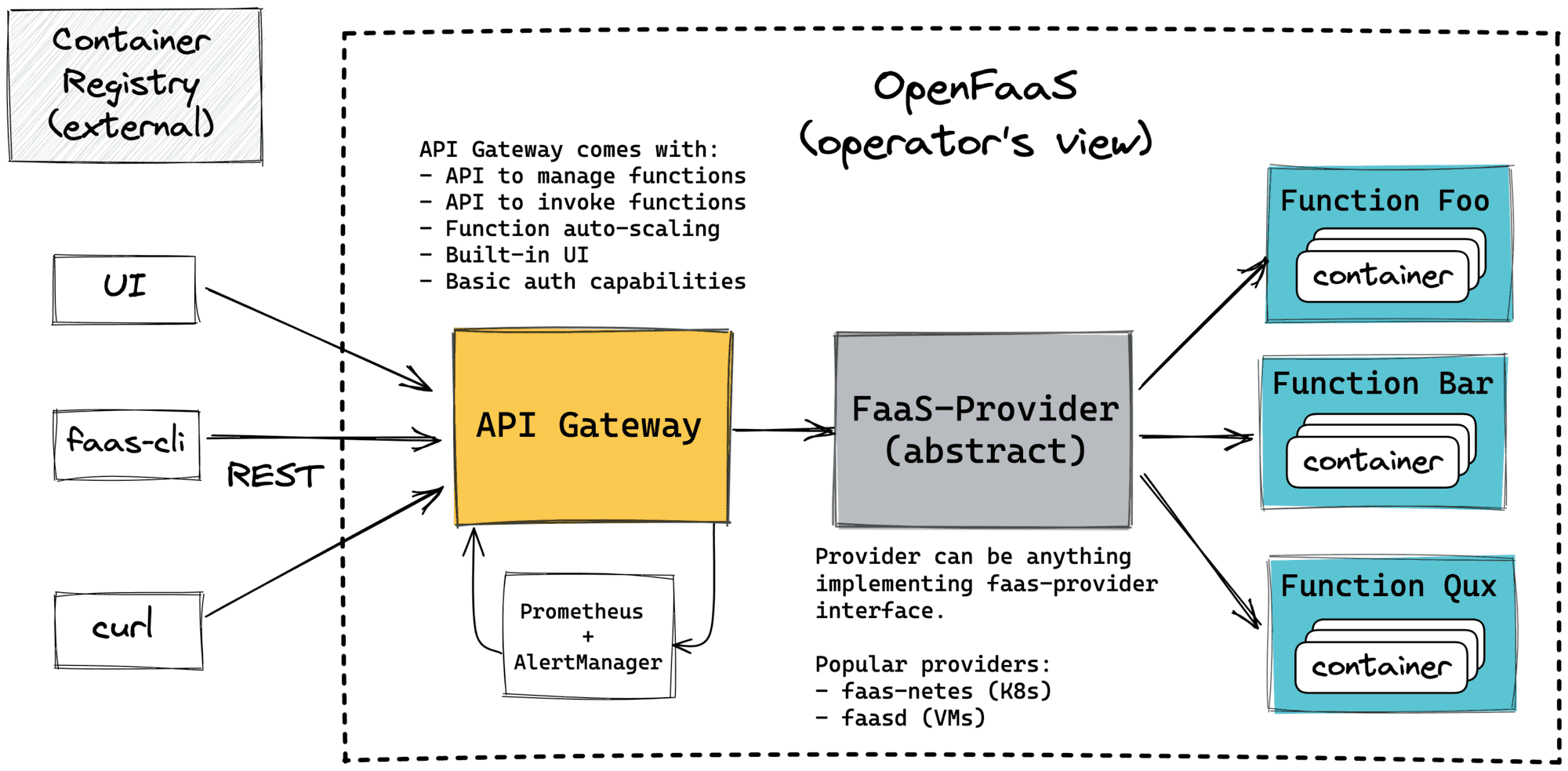
The only user-facing component on the above architecture is the API Gateway. The OpenFaaS API Gateway:
Thus, when a developer runs something like faas-cli deploy, faas-cli list, or a function is invoked with curl $API_URL/function/foobar, a request is sent to the said API Gateway.
Another important component on the diagram above is the faas-provider. It's not a concrete component but more like an interface. Any piece of software implementing the (pretty concise) provider's API can be a provider. OpenFaaS Provider:
The two most prominent providers are faas-netes (OpenFaaS-on-Kubernetes) and faasd (OpenFaaS-on-containerd). Below, I'll briefly touch upon their implementations.
When deployed on Kubernetes, OpenFaaS leverages the powerful primitives this platform provides out of the box.
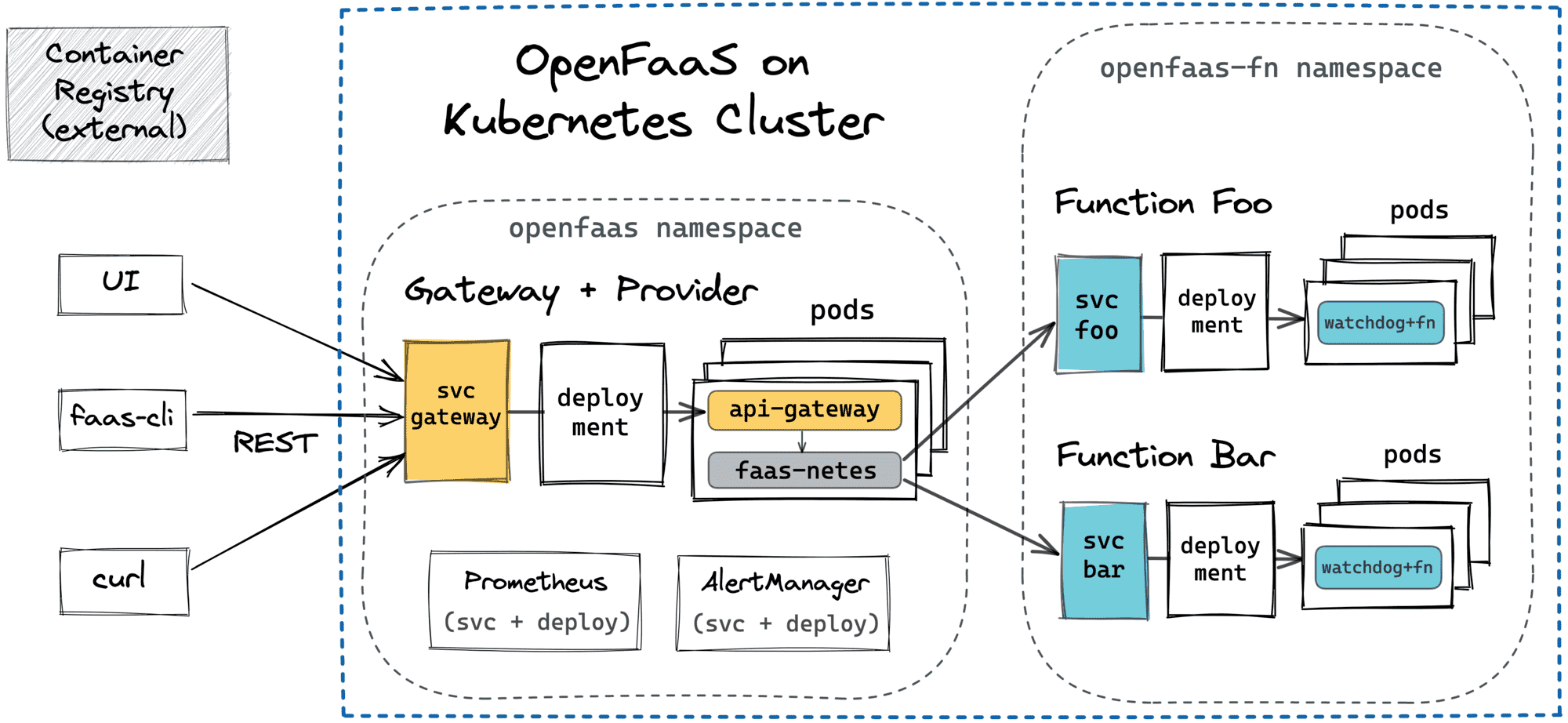
Key takeaways:
faas-cli list to get the list of currently deployed functions, the faas-netes just translates it to the corresponding Kubernetes API query.For folks who don't have a Kubernetes cluster at their disposal, OpenFaaS offers an alternative, lightweight provider called faasd. It can be installed on a (virtual or physical) server, and it leverages containerd to manage containers. As I already was writing before, containerd is a lower-level container manager used under the hood of Docker and Kubernetes. Combined with CNI plugins, it becomes a handy building block for writing your own container schedulers, and OpenFaaS' faasd is a great case study:
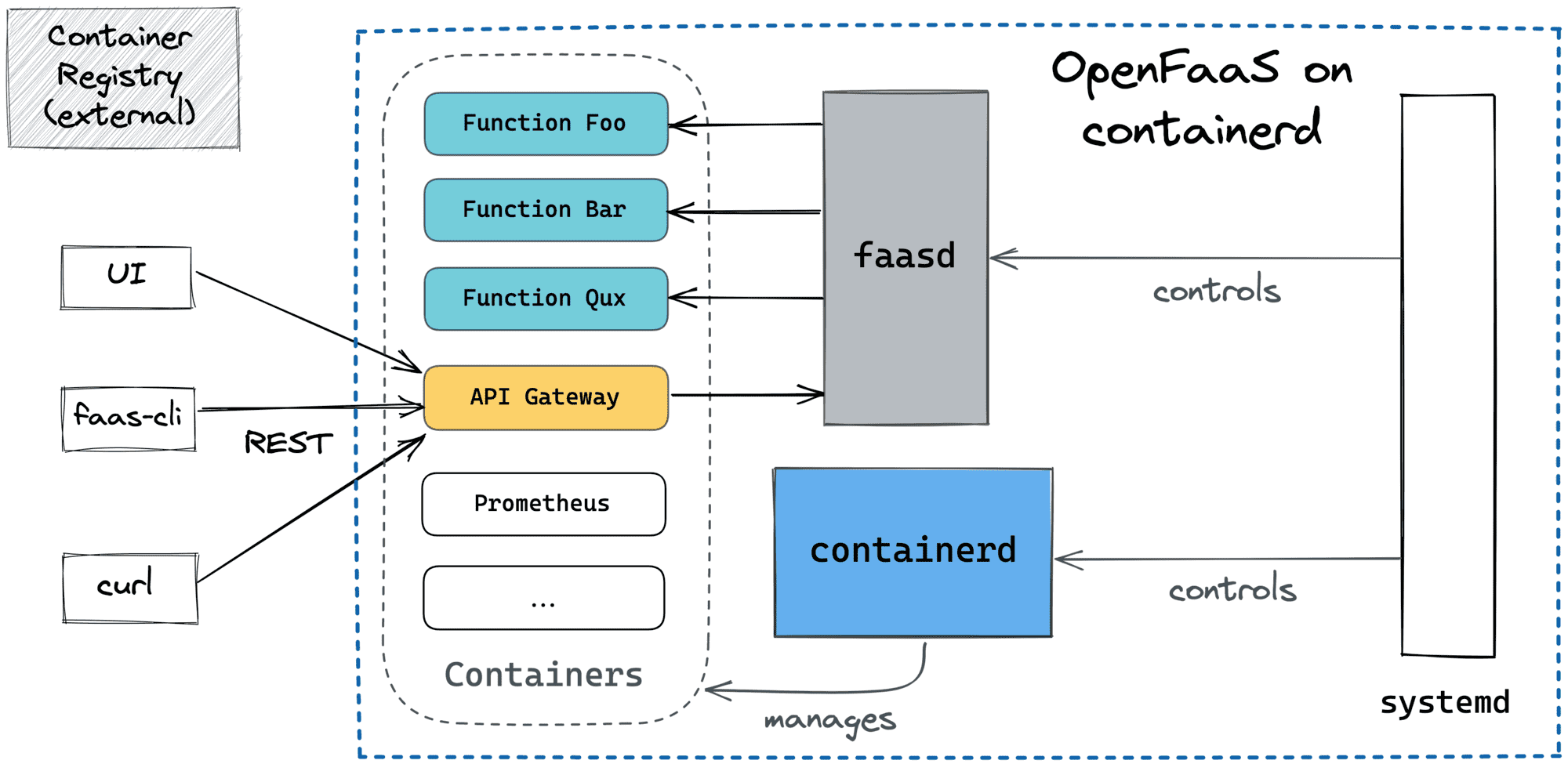
Key takeaways:
pause (via cgroup freezers) and super quick function cold starts.faas-cli list becomes something like ctr container list), so if the server dies, the whole state is lost, and every function will need to be redeployed.And probably the coolest part about faasd, is that it can be considered as a container orchestrator (kinda simplified Kubernetes) because it exposes a high-level API to schedule functions and even stateful services like Grafana, InfluxDB, NATS, or Prometheus.
Having a good mental model of a piece of software that you use, or going to use, is always beneficial - it increases dev efficiency, prevents unidiomatic use cases from happening, and eases troubleshooting.
In the case of OpenFaaS, it's probably a good idea to differentiate the developer's and operator's views of the system. From the developer's standpoint, it's a simple yet powerful serverless solution, mostly focused on FaaS use cases. The solution consists of a concise API to manage and invoke functions, a command-line tool covering main developer workflows, and a function template library. Serverless functions are executed in containers using different runtime modes (CGI-like, Reverse Proxy, etc.) with different isolation and statefulness guarantees.
From the operator's standpoint, OpenFaaS is a modular system with a flexible architecture that can be deployed on different kinds of infrastructure, starting from Raspberry Pi's and going to bare-metals or virtual machines, and full-blown Kubernetes, OpenShift, or Docker Swarm clusters. Of course, every alternative comes with its pros and cons, and trade-offs need to be carefully evaluated. But even if none of the existing options is suitable for you, the simple faas-provider abstraction allows developing your own back-ends to run serverless functions.
The above materials were mostly focused on the OpenFaaS basics. However, OpenFaaS has some advanced features as well. Follow the links below to learn more about:
Level up your server-side game — join 20,000 engineers getting insightful learning materials straight to their inbox:
此内容由惯性聚合(RSS阅读器)自动聚合整理,仅供阅读参考。 原文来自 — 版权归原作者所有。