






This article is about the internals of the attach and exec commands. For the higher-level explanation of the commands, see - Containers 101: attach vs. exec - what's the difference?
Have you ever been wondering how docker (or kubectl) attach command is implemented under the hood? If so, you're in the right place! This article covers the basics of Linux pseudoterminal capabilities and continuously shows how attach-like feature can be implemented in a ridiculously small amount of code.
Level up your server-side game — join 20,000 engineers getting insightful learning materials straight to their inbox.
When a user starts a normal program in the console usually its stdin, stdout, and stderr streams will be connected to the controlling terminal of the session. It means that everything the user types in on the console goes to the program's standard input and everything the program prints goes back to the console:
me@host ~ $ cat
hi there
hi there
Apart from that, the controlling terminal is also responsible for signal handling. When a user presses Ctrl-C on his keyboard, no keystroke is usually delivered to the foreground program. The terminal operating in a conventional mode just omits the input byte sequence and instead sends a SIGINT signal to the foreground program (or more precisely the foreground process group):
me@host ~ $ cat
press Ctrl-C to kill me
press Ctrl-C to kill me
^C
me@host ~ $
A much better explanation of the terminal subsystem can be found in this article.
On the other hand, when a user wants to start a daemon the good old double fork technique is needed (or more precisely fork -> setsid -> fork). And the main purpose of it is to detach the daemon from the controlling terminal of the session.
But what if we need a daemonized process controlled by a terminal? Look at this perfectly legit docker use case:
$ docker run -it -d debian:latest bash
b1f7dab2d0629b1094e72fb6aff9f95cffab4643e8c7765185a4101694b148ff

$ docker attach b1f7dab2d062
root@b1f7dab2d062:/# ping ya.ru
PING ya.ru (87.250.250.242) 56(84) bytes of data.
64 bytes from ya.ru (87.250.250.242): icmp_seq=1 ttl=61 time=39.0 ms
64 bytes from ya.ru (87.250.250.242): icmp_seq=2 ttl=61 time=50.8 ms
64 bytes from ya.ru (87.250.250.242): icmp_seq=3 ttl=61 time=39.5 ms
^C
--- ya.ru ping statistics ---
3 packets transmitted, 3 received, 0% packet loss, time 15ms
rtt min/avg/max/mdev = 39.030/43.097/50.781/5.441 ms
Even though we started a container completely detached from the console, we managed to connect to it later and even delivered a SIGINT by pressing Ctrl-C. Under the hood of this trick lies Linux pseudoterminal interface (PTY):
A pseudoterminal (sometimes abbreviated "pty") is a pair of virtual
character devices that provide a bidirectional communication channel.
One end of the channel is called the master; the other end is called
the slave.  The slave end of the pseudoterminal provides an interface
that behaves exactly like a classical terminal.  A process that
expects to be connected to a terminal, can open the slave end of a
pseudoterminal and then be driven by a program that has opened the
master end.  Anything that is written on the master end is provided
to the process on the slave end as though it was input typed on a
terminal.  For example, writing the interrupt character (usually
control-C) to the master device would cause an interrupt signal
(SIGINT) to be generated for the foreground process group that is
connected to the slave.  Conversely, anything that is written to the
slave end of the pseudoterminal can be read by the process that is
connected to the master end.
The master end of the PTY pair is just a file descriptor. When docker launches bash process in the example above, it allocates a PTY pair and sets the slave end as a controlling terminal for bash. When a user attach-es to the running container, docker just binds his stdin & stdout to the master file descriptor. Nothing restricts us actually from implementing a client-server system here. The PTY pair may reside on the server-side when the user's console be on a local machine and the data transfer can easily go over the network. Let's try to implement it!
Remote:
    +----------+                                      +----------------+
    |   shim   | <-- [pty] -- read/write -- [pts] --> |   ping ya.ru   |
    +----------+                                      +----------------+
          |
          |
      [network]
          |
Local:    |
    +----------+
    |  client  | <-- [terminal in RAW mode] --> user via xterm (iterm2, etc).
    +----------+
We are going to start with the server-side. Let's create a PTY pair (as usually error handling is omitted for brevity and the full version of the code can be found on GitHub). To be as lightweight as possible or server shim is written in C:
#define PTSNAME_SIZE 1024

struct pt_info {
  int master_fd;
  char slave_name[PTSNAME_SIZE];
};

void create_pt(struct pt_info *p) {
  p->master_fd = posix_openpt(O_RDWR);
  grantpt(p->master_fd);
  unlockpt(p->master_fd);
  ptsname_r(p->master_fd, p->slave_name, PTSNAME_SIZE);
}
And start a process controlled by the pseudoterminal:
void run_slave(struct pt_info *pti, char *const command[]) {
  close(pti->master_fd);  // we don't need it on the slave side
  setsid();               // new terminal => new session

  int fds = open(pti->slave_name, O_RDWR);
  if (fds >= 0) {
      dup2(fds, 0);  // bind stdin to termianl
      dup2(fds, 1);  // bind stdout to termianl
      dup2(fds, 2);  // bind stderr to termianl
      close(fds);
      execv(command[0], command);
  } else {
      perror("open(pts_name) failed");
  }
  _exit(127);
}

int main(int argc, char *argv[]) {
    struct pt_info pti;
    create_pt(&pti);

    pid = fork();
    if (pid == 0) {
      run_slave(&pti, argv + 2);
    } else {
      // run master code...
    }
    return 0;
}
The only missing part at the moment is binding of the master fd with the incoming socket connections. Let's start a server socket, and for each accepted connection we will be forwarding bytes from it to the master fd and bytes read from the master fd back to the connection:
int socket_listen(const char *port) {
  // sock = socket() && bind() && listen()
  return sock;
}

int write_all(int fd, const void *buf, size_t count) {
  // while remain > 0: write(fd, buf, remain)
  return 0;
}

int epoll_add_fd(int epoll, int fd) {
  struct epoll_event ev;
  ev.data.fd = fd;
  ev.events = EPOLLIN;
  return epoll_ctl(epoll, EPOLL_CTL_ADD, fd, &ev);
}

struct atsock {
  int fd;
  struct atsock *next;
};

struct atsock *atsock_new(int conn_fd) {
  /* allocate new bucket */
}

struct atsock *atsock_save(struct atsock *head, struct atsock *new) {
  /* add new bucket to linked list */
}

struct atsock *atsock_erase(struct atsock *head, int conn_fd) {
  /* remove bucket from linked list */
}

void run_master(struct pt_info *pti, const char *port) {
  int attach_sock = socket_listen(port);

  int epoll = epoll_create1(0);
  epoll_add_fd(epoll, pti->master_fd);
  epoll_add_fd(epoll, attach_sock);

  struct atsock *head = NULL;
  struct epoll_event evlist[64];
  while (1) {
    int nready = epoll_wait(epoll, evlist, 64, -1);

    for (int i = 0; i < nready; i++) {
      int fd = evlist[i].data.fd;
      if (evlist[i].events & EPOLLIN == 0) {
        continue;
      }

      if (fd == pti->master_fd) {
        // read from pty and forward data to each attached socket
        char buf[1024];
        int nread = read(fd, buf, 1024);
        struct atsock *cur = head;
        while (nread && cur) {
          write_all(cur->fd, buf, nread);
          cur = cur->next;
        }
        continue;
      }

      if (fd == attach_sock) {
        // accept incoming connection
        int conn = accept(fd, NULL, NULL);
        head = atsock_save(head, atsock_new(conn));
        epoll_add_fd(epoll, conn);
        printf("accepted new sock conn\n");
        continue;
      }

      // read from attached socket and forward to pty
      char buf[1024];
      int nread = read(fd, buf, 1024);
      if (nread == 0) {
        // hanndle disconnect
        head = atsock_erase(head, fd);
        epoll_ctl(epoll, EPOLL_CTL_DEL, fd, NULL);
        printf("disconnected sock\n");
        continue;
      }

      write_all(pti->master_fd, buf, nread);
    }
  }

  // cleanup code
}
Finally, we can run our code with a simple telnet session as a client:
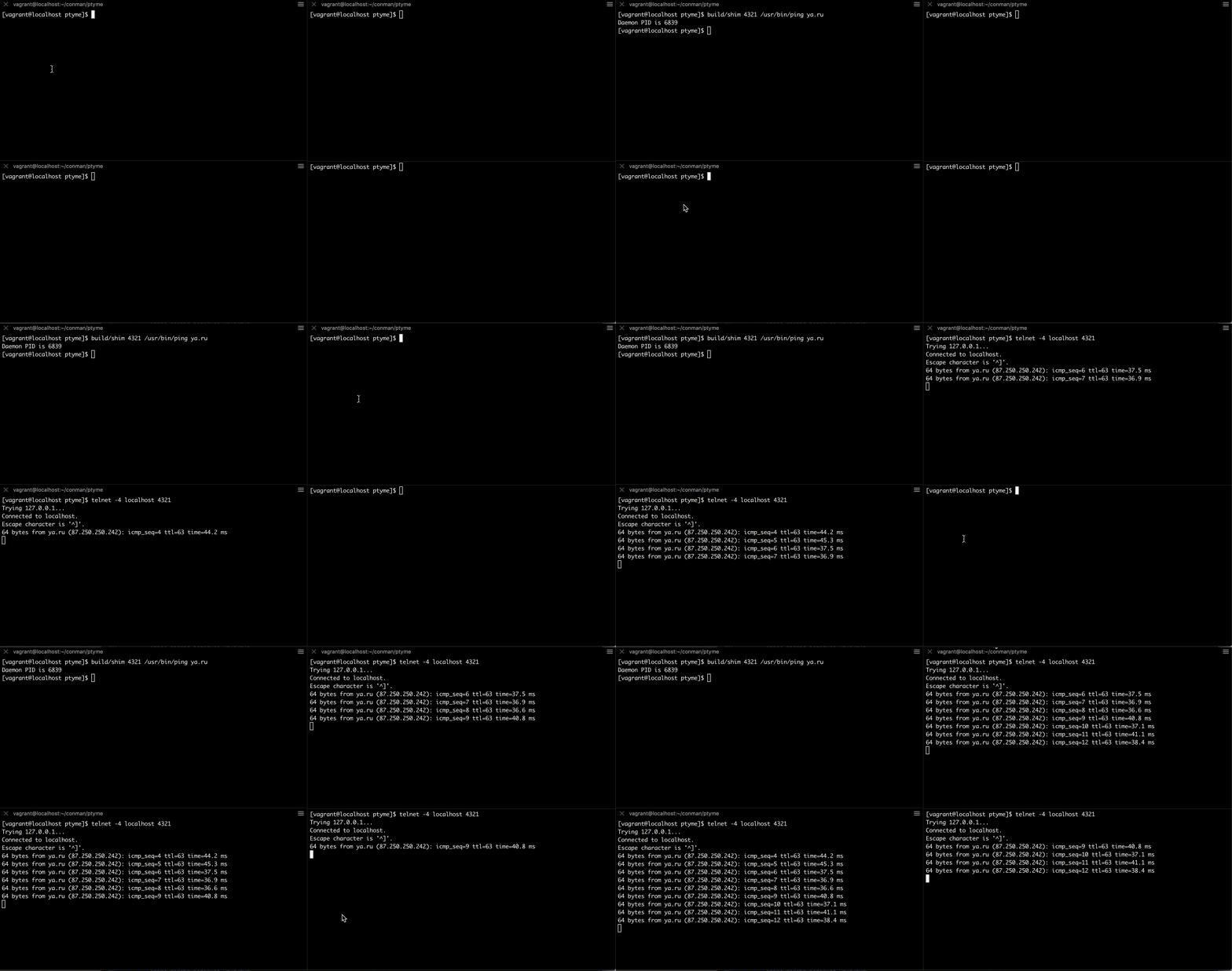
Looks like our server-side works fine but the telnet client is not that handy. We can switch it to character mode, but we still need to disable echoing of the user input and maybe apply some more adjustments.
Let's hack a tiny yet much more usable client. The idea is simple - since the process we want to attach is already controlled by an instance of PTY on the server-side, we need to disable user input handling capabilities of the terminal on the client-side. I.e. switch it from the conventional (or baked) to the raw mode. More on the technique can be read here.
Since we don't care much about the footprint of the client-side the code is going to be in Go:
package main

import (
  "io"
  "net"
  "os"
  "sync"

  "golang.org/x/sys/unix"
)

func main() {
  saved, err := tcget(os.Stdin.Fd())
  if err != nil {
    panic(err)
  }
  defer func() {
    tcset(os.Stdin.Fd(), saved)
  }()

  raw := makeraw(*saved)
  tcset(os.Stdin.Fd(), &raw)

  conn, err := net.Dial("tcp", os.Args[1])
  if err != nil {
    panic(err)
  }

  var wg sync.WaitGroup
  wg.Add(2)

  go func() {
    io.Copy(conn, os.Stdin)
    wg.Done()
  }()

  go func() {
    io.Copy(os.Stdout, conn)
    wg.Done()
  }()

  wg.Wait()
}

func tcget(fd uintptr) (*unix.Termios, error) {
  termios, err := unix.IoctlGetTermios(int(fd), unix.TCGETS)
  if err != nil {
    return nil, err
  }
  return termios, nil
}

func tcset(fd uintptr, p *unix.Termios) error {
  return unix.IoctlSetTermios(int(fd), unix.TCSETS, p)
}

func makeraw(t unix.Termios) unix.Termios {
  t.Iflag &^= (unix.IGNBRK | unix.BRKINT | unix.PARMRK | unix.ISTRIP | unix.INLCR | unix.IGNCR | unix.ICRNL | unix.IXON)
  t.Oflag &^= unix.OPOST
  t.Lflag &^= (unix.ECHO | unix.ECHONL | unix.ICANON | unix.ISIG | unix.IEXTEN)
  t.Cflag &^= (unix.CSIZE | unix.PARENB)
  t.Cflag &^= unix.CS8
  t.Cc[unix.VMIN] = 1
  t.Cc[unix.VTIME] = 0
  return t
}
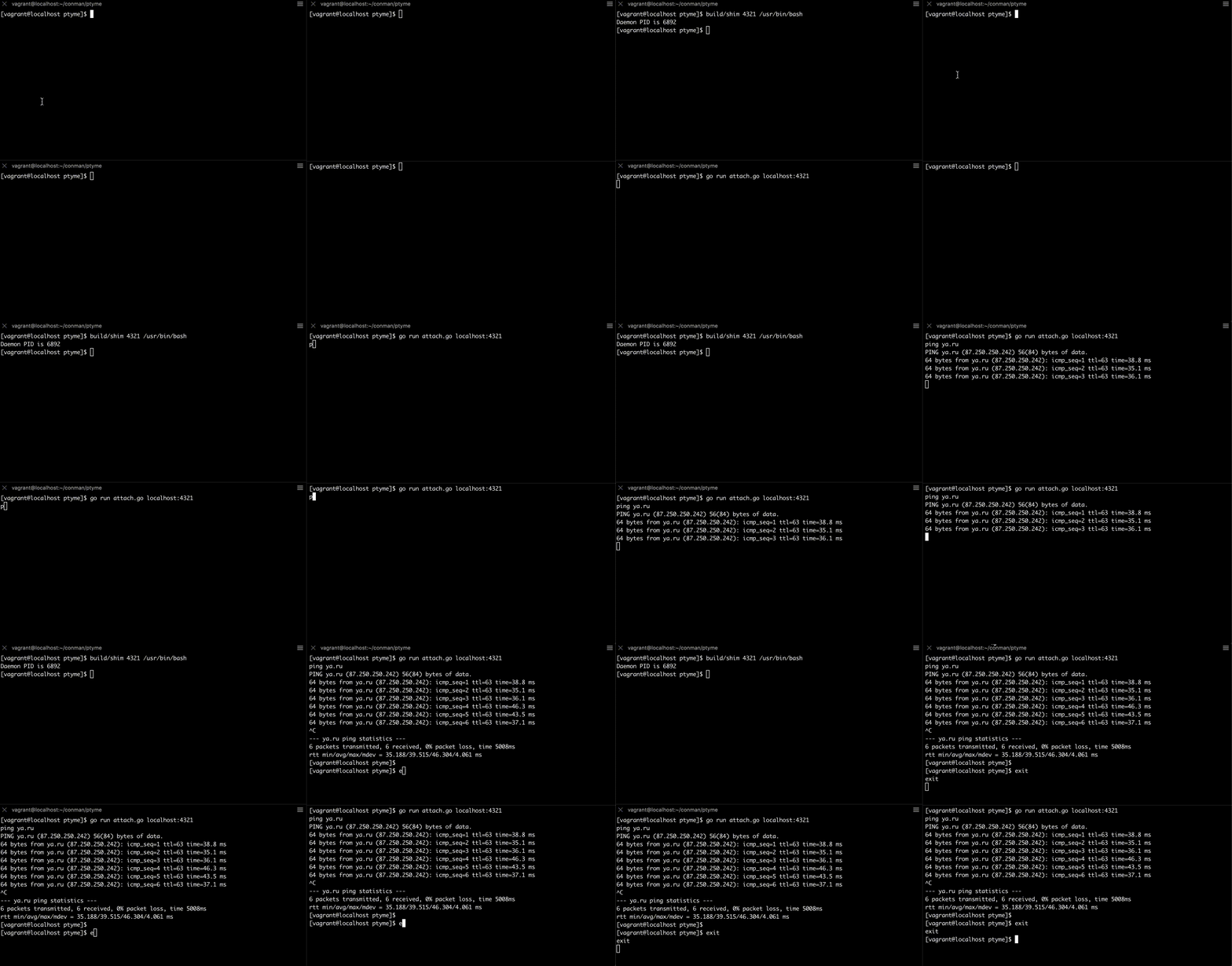
Basically, we switch local terminal to raw mode, connect to the server socket and bind stdin & stdout to the connection file descriptor.
Let's try to use it:
Linux is awesome, and PTY is yet another example of its powerful capabilities driving the containerization revolution.
For the full version of the code check out the project on GitHub - ptyme.
Level up your server-side game — join 20,000 engineers getting insightful learning materials straight to their inbox:
此内容由惯性聚合(RSS阅读器)自动聚合整理,仅供阅读参考。 原文来自 — 版权归原作者所有。