






Traefik is The Cloud Native Edge Router yet another reverse proxy and load balancer. Omitting all the Cloud Native buzzwords, what really makes Traefik different from Nginx, HAProxy, and alike is the automatic and dynamic configurability it provides out of the box. And the most prominent part of it is probably its ability to do automatic service discovery. If you put Traefik in front of Docker, Kubernetes, or even an old-fashioned VM/bare-metal deployment and show it how to fetch the information about the running services, it'll automagically expose them to the outside world. If you follow some conventions of course...
If you have a fairly small deployment, up to a single-digit number of machines, and for some reason, you cannot jump into the clouds and enjoy the serverless containers, combining Docker and Traefik is an ideal choice. For deployments of such scale using a full-fledged orchestrator like Kubernetes or Mesos would be overkill due to the resource requirements and the inherent complexity of the orchestrator itself. But the fact that we are going to stick with the poor man's solution doesn't mean that we don't want to benefit from the modern development best practices.
So, for simplicity, imagine, we have just one machine. There is a Docker daemon running on it and a traefik container listening on the host's port 80 (or 443, whatever). And we want to deploy our service on that machine. However, we would also like to release the new versions safely by applying the canary deployment technique:
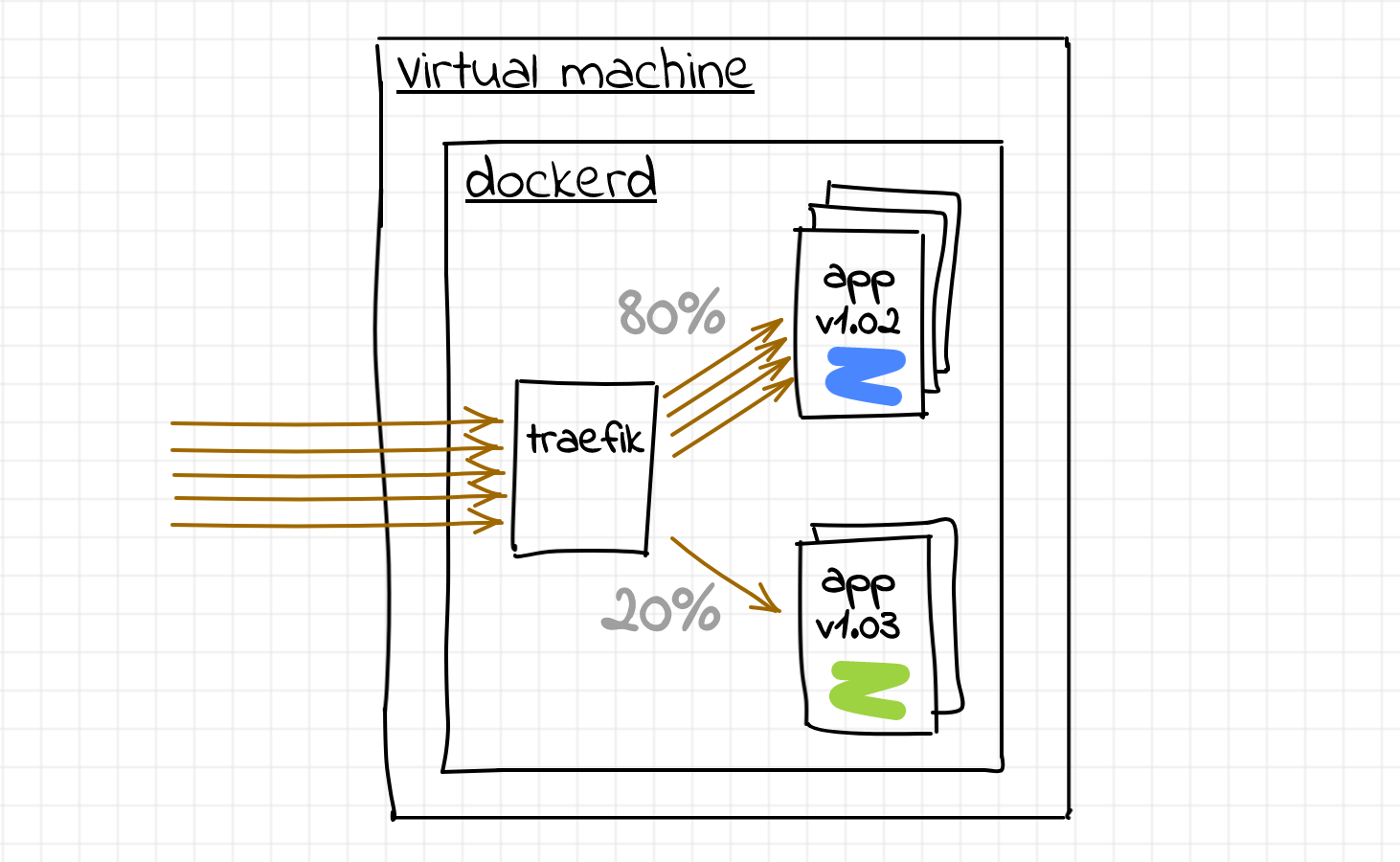
Thus, we need to get Traefik to do the weighted load balancing between the Docker containers of the same service. If we could solve the load balancing problem on a single machine, we would simply scale it out to the rest of the fleet:
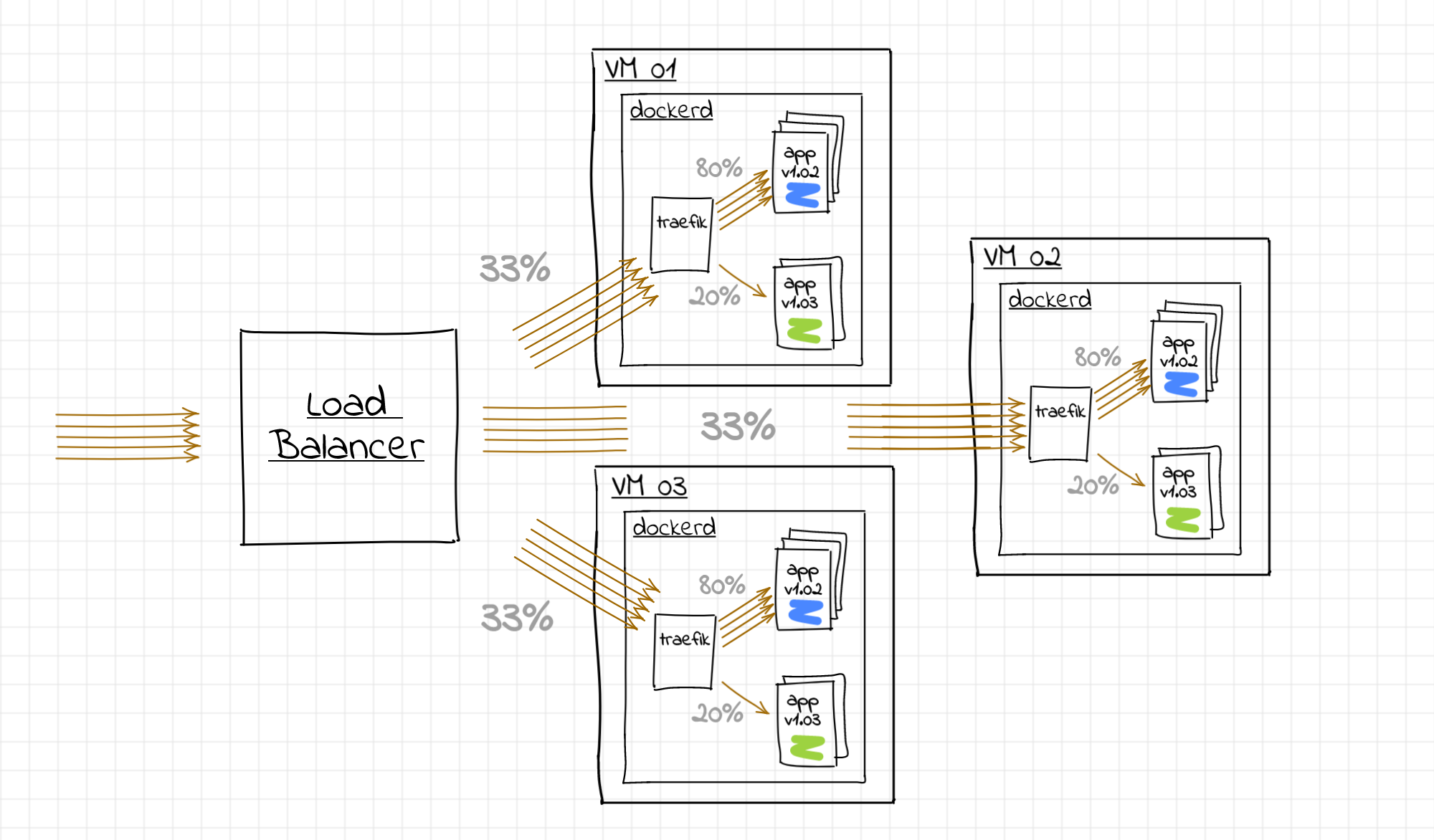
If every instance of the traefik proxy gets more or less the same number of requests we could achieve the desired share of the canary requests across the whole fleet.
All that proxy kind of software architecturally looks more or less the same. There is always:
Every service proxy calls these parts in its own way (entrypoint, server, virtual host, listener, filter, middleware, upstream, endpoint, etc) but Traefik folks went even further...
Historically, Traefik was using entrypoint -> frontend -> backend model:
However, in 2019 the new Traefik major version has been announced bringing a breaking configuration change and a refined approach:
So, in Traefik 2 instead of frontends and backends, we now have routers and services. And there is also an explicit layer of middleware components dealing with extra request transformations. Well, makes perfect sense! But if the v1 documentation basically starts from the architectural overview making the further reading much simpler, in the case of v2 you need to dig down to the Routing or Middleware concepts to get the first decent diagrams (even though I found all the preceding illustrations very entertaining).
For the newcomers trying to configure Traefik following blog posts on the Internet (well, how doesn't?), beware - as of Q3 2020 most of the articles show the Traefik v1 examples. Config snippets from those articles will simply not work with the Traefik v2 release (often silently). There is a migration page in the official documentation, although IMO it lacks visual representation of the change.
Apparently, it is was super simple. First, run the traefik:v1.7 container with Docker provider:
docker run -d --rm \
  --name traefik-v1.7 \
  -p 9999:80 \
  -v /var/run/docker.sock:/var/run/docker.sock \
  traefik:v1.7 \
    --docker \
    --docker.exposedbydefault=false
And since it's a v1, we'd need to think in terms of frontends and backends. Apparently, every container would become a server of a particular backend. Conveniently, the weight of the server could be assigned using traefik.weight label:
# Run the current app version (weight 40)
docker run -d --rm --name app_normal \
  --label "traefik.enable=true" \
  --label "traefik.backend=app_weighted" \
  --label "traefik.frontend.rule=Host:example.local" \
  --label "traefik.weight=40" \
  nginx:1.19.1

# Run the contender version (weight 10)
docker run -d --rm --name app_canary \
  --label "traefik.enable=true" \
  --label "traefik.backend=app_weighted" \
  --label "traefik.frontend.rule=Host:example.local" \
  --label "traefik.weight=10" \
  nginx:1.19.2
Send some traffic, just to make sure that it works:
for i in {1..100}; do curl -s -o /dev/null -D - -H Host:example.local localhost:9999 | grep Server; done | sort | uniq -c

>  80 Server: nginx/1.19.1
>  20 Server: nginx/1.19.2
Perfect, 20 out of 100 requests have been served by the canary release container. And if we don't need the canary at some point in time, we can simply stop the container:
docker stop app_canary
Now, if you repeat the traffic probe, 100% of the requests will be served by the app_normal container:
for i in {1..100}; do curl -s -o /dev/null -D - -H Host:example.local localhost:9999 | grep Server; done | sort | uniq -c

>  100 Server: nginx/1.19.1
Easy-peasy, right?
And that's where things start getting more complicated... After thoroughly studying the v2 docs, I could not find the weight directive anymore. The closest thing I was able to find was the Weighted Round Robin Service (WRR):
The WRR is able to load balance the requests between multiple services based on weights.
But there is a couple of limitations with it:
- This strategy is only available to load balance between services and not between servers.
- This strategy can be defined currently with the File or IngressRoute providers.
I.e. no Docker provider support and no direct weight assignment to servers (i.e. containers).
Well, let's try to be creative. Excluding IngressRoute provider (sounds like a Kubernetes thing), we basically have only one option to define WRR service - the File provider. What if we combine it with the Docker provider?
First, define a WRR service in the file:
cat << "EOF" > file_provider.yml
---
http:
  routers:
    router0:
      service: app_weighted
      rule: "Host(`example.local`)"
  services:
    app_weighted:
      weighted:
        services:
          - name: app_normal@docker  # I'm not defined yet
            weight: 40
          - name: app_canary@docker  # Neither do it
            weight: 10
EOF
Notice, that we haven't defined any servers (i.e. containers) there. Instead, we defined an app_weighted service in terms of its sub-services - app_normal and app_canary (there is @docker suffix to say that these services are expected to be defined by the Docker provider).
Let's start the traefik:v2.5 container with the Docker and file providers:
docker run -d --rm --name traefik-v2.5 \
  -p 9999:80 \
  -v /var/run/docker.sock:/var/run/docker.sock \
  -v `pwd`:/etc/traefik_providers \
  traefik:v2.5 \
    --providers.docker \
    --providers.docker.exposedbydefault=false \
    --providers.file.filename=/etc/traefik_providers/file_provider.yml
Now, it's time to launch the application containers. Since it's the v2, we need to think in terms of routers and services while configuring the container labels:
# Run the current app version (weight 40)
docker run -d --rm --name app_normal_01 \
  --label "traefik.enable=true" \
  --label "traefik.http.services.app_normal.loadbalancer.server.port=80" \
  --label "traefik.http.routers.app_normal_01.entrypoints=traefik" \
  nginx:1.19.1

# Run the contender version (weight 10)
docker run -d --rm --name app_canary_01 \
  --label "traefik.enable=true" \
  --label "traefik.http.services.app_canary.loadbalancer.server.port=80" \
  --label "traefik.http.routers.app_canary_01.entrypoints=traefik" \
  nginx:1.19.2
Let's try to understand the reasoning behind these labels. In general, launching a container means creating a single-server service. If we don't ask otherwise, Traefik 2 implicitly creates such a service using the container's name (replacing _ with - for some reasons). On top of that, it adds a routing rule Host(`<container-name-goes-here>`).
But in our case, we don't want to have arbitrary services for our containers. Instead, we know exactly the name of the service for the normal app containers (app_normal) and the name of the service for the canary app containers (app_canary). Thus, we need to somehow bind the containers (i.e. servers) to the desired services. And a somewhat hacky way of doing that is by using traefik.http.services.<service-name>.loadbalancer.server.port=80 label. We don't really need to specify the port here because Traefik would figure it out by itself. But doing so allows us to introduce the app_normal and app_canary services and put the containers in there.
For the second label, remember the default routing rule Host(`<container-name-goes-here>`) that gets assigned to every container automatically? To avoid these containers being accidentally exposed to the outside world, we use the label traefik.http.routers.<stub>.entrypoints=traefik. It's just another hack, binding the containers to the internal entrypoint called traefik. This entrypoint is used for the Traefik's admin API and dashboard and should not be exposed publicly in production environments.
Finally, let's send some traffic, just to make sure that it works:
for i in {1..100}; do curl -s -o /dev/null -D - -H Host:example.local localhost:9999 | grep Server; done | sort | uniq -c

>  80 Server: nginx/1.19.1
>  20 Server: nginx/1.19.2
Great! But what if we need to stop the canary containers? If we just do it right away, the app_weighted@file service will stop functioning due to the disappeared app_canary service. Likely, even the File is a dynamic provider in the Traefik world! First, we need to update the app_weighted service removing the app_canary mentioning:
cat << "EOF" > file_provider.yml
---
http:
  routers:
    router0:
      service: app_weighted
      rule: "Host(`example.local`)"
  services:
    app_weighted:
      weighted:
        services:
          - name: app_normal@docker  # I'm not defined yet
            weight: 40
          # - name: app_canary@docker  # Neither do it
          #  weight: 10
EOF
Traefik will pick up the change automatically (beware, mounting a single file instead of its parent folder will break the Traefik's file watcher and it'll never notice the change). Once the change is applied, we can safely stop the canary containers:
docker stop app_canary_01
Check it out, just to make sure:
for i in {1..100}; do curl -s -o /dev/null -D - -H Host:example.local localhost:9999 | grep Server; done | sort | uniq -c

>  100 Server: nginx/1.19.1
No moral here. Carefully read the official docs and don't copy and paste the snippets from the Internet blindly 🙈
此内容由惯性聚合(RSS阅读器)自动聚合整理,仅供阅读参考。 原文来自 — 版权归原作者所有。