








This is the first post in the series of articles on how to work with the Kubernetes API from code. The Kubernetes API is a bit more advanced than just a bunch of HTTP endpoints thrown together. Therefore, it's vital to understand the Kubernetes API structure and be fluent in the terminology before trying to access it from code. Otherwise, the attempt will be quite painful - the official Go client comes with so many bells and whistles that trying to wrap your head around the client and the API concepts simultaneously might overwhelm you quickly.
The Kubernetes API is massive - it has hundreds of endpoints. Luckily, it's pretty consistent, so one needs to understand just a limited number of ideas and then extrapolate this knowledge to the rest of the API. In this post, I'll try to touch upon the concepts I found the most fundamental. I'll favor simplicity and digestability over academic correctness and completeness of the material. And as usual, I just share my understanding of things and my way of thinking about the topic - so, it's not an API manual but a record of personal learning experience.
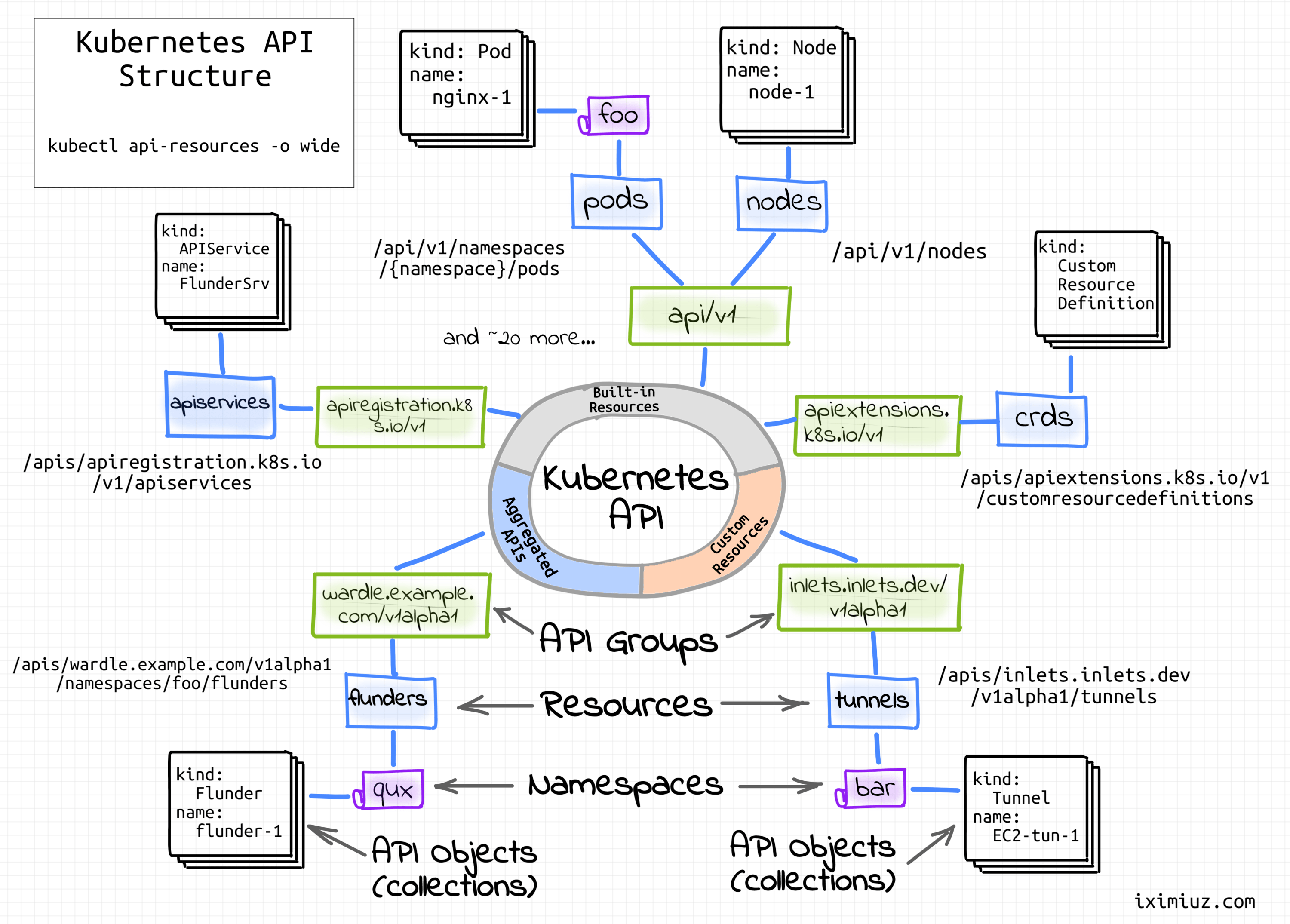
Kubernetes API structure.
Since it's a RESTful land, we'll be operating in terms of resources (loosely, objects of a certain structure) and verbs (actions on these objects).
When resources are discussed, it's important to differentiate a resource as a certain kind of objects from a resource as a particular instance of some kind. Thus, Kubernetes API endpoints are officially named resource types to avoid ambiguity with the resource instances. However, in the wild, endpoints are often called just resources, and the actual meaning of the word is derived from the context.
For extensibility reasons, resource types are organized into API groups, and the groups are versioned independently from each other:
$ kubectl api-resources
NAME                     SHORTNAMES   APIVERSION   NAMESPACED   KIND
bindings                              v1           true         Binding
componentstatuses        cs           v1           false        ComponentStatus
configmaps               cm           v1           true         ConfigMap
endpoints                ep           v1           true         Endpoints
events                   ev           v1           true         Event
limitranges              limits       v1           true         LimitRange
namespaces               ns           v1           false        Namespace
nodes                    no           v1           false        Node
persistentvolumeclaims   pvc          v1           true         PersistentVolumeClaim
persistentvolumes        pv           v1           false        PersistentVolume
pods                     po           v1           true         Pod
...
If you're curious how kubectl api-resources command builds such a list of supported resources, here is a nice trick showing what API calls were made by any kubectl command:
$ kubectl api-resources -v 6  # -v 6 means "extra verbose logging"
...
I0108 ... GET https://192.168.58.2:8443/api?timeout=32s 200 OK in 10 milliseconds
I0108 ... GET https://192.168.58.2:8443/apis?timeout=32s 200 OK in 1 milliseconds
I0108 ... GET https://192.168.58.2:8443/apis/apiregistration.k8s.io/v1?timeout=32s 200 OK in 7 milliseconds
I0108 ... GET https://192.168.58.2:8443/api/v1?timeout=32s 200 OK in 13 milliseconds
I0108 ... GET https://192.168.58.2:8443/apis/authentication.k8s.io/v1?timeout=32s 200 OK in 13 milliseconds
I0108 ... GET https://192.168.58.2:8443/apis/events.k8s.io/v1?timeout=32s 200 OK in 15 milliseconds
I0108 ... GET https://192.168.58.2:8443/apis/apps/v1?timeout=32s 200 OK in 14 milliseconds
I0108 ... GET https://192.168.58.2:8443/apis/autoscaling/v2beta1?timeout=32s 200 OK in 16 milliseconds
I0108 ... GET https://192.168.58.2:8443/apis/policy/v1beta1?timeout=32s 200 OK in 14 milliseconds
I0108 ... GET https://192.168.58.2:8443/apis/scheduling.k8s.io/v1?timeout=32s 200 OK in 14 milliseconds
I0108 ... GET https://192.168.58.2:8443/apis/batch/v1?timeout=32s 200 OK in 13 milliseconds
I0108 ... GET https://192.168.58.2:8443/apis/batch/v1beta1?timeout=32s 200 OK in 43 milliseconds
...
Seems like the Kubernetes API is extremely meta. Apparently, you can list existing (and even register new resource types) by reading (or creating) other resources! For instance, the above list was obtained by calling the special /api and /apis/<group-name> resources.
You can easily call the above resources (meaning API endpoints) using a standard HTTP client like curl and examine the returned resources (meaning JSON objects, pun intended):
# Make Kubernetes API available on localhost:8080
# to bypass the auth step in subsequent queries:
$ kubectl proxy --port=8080 &

# List all known API paths
$ curl http://localhost:8080/
# List known versions of the `core` group
$ curl http://localhost:8080/api
# List known resources of the `core/v1` group
$ curl http://localhost:8080/api/v1
# Get a particular Pod resource
$ curl http://localhost:8080/api/v1/namespaces/default/pods/sleep-7c7db887d8-dkkcg

# List known groups (all but `core`)
$ curl http://localhost:8080/apis
# List known versions of the `apps` group
$ curl http://localhost:8080/apis/apps
# List known resources of the `apps/v1` group
$ curl http://localhost:8080/apis/apps/v1
# Get a particular Deployment resource
$ curl http://localhost:8080/apis/apps/v1/namespaces/default/deployments/sleep
Speaking of the verbs, i.e., actions on resources, all the standard CRUD operations with their traditional mapping onto HTTP methods are there. Additionally, patching (selective field modification) and watching (stream-like collections' reading) of resources are supported. From sig-architecture/api-conventions.md:
API resources should use the traditional REST pattern:

GET /<resourceNamePlural> - Retrieve a list of type <resourceName>, e.g. GET /pods returns a list of Pods.
POST /<resourceNamePlural> - Create a new resource from the JSON object provided by the client.
GET /<resourceNamePlural>/<name> - Retrieves a single resource with the given name, e.g. GET /pods/first returns a Pod named 'first'. Should be constant time, and the resource should be bounded in size.
DELETE /<resourceNamePlural>/<name> - Delete the single resource with the given name. DeleteOptions may specify gracePeriodSeconds, the optional duration in seconds before the object should be deleted. Individual kinds may declare fields which provide a default grace period, and different kinds may have differing kind-wide default grace periods. A user provided grace period overrides a default grace period, including the zero grace period ("now").
DELETE /<resourceNamePlural> - Deletes a list of type <resourceName>, e.g. DELETE /pods a list of Pods.
PUT /<resourceNamePlural>/<name> - Update or create the resource with the given name with the JSON object provided by the client.
PATCH /<resourceNamePlural>/<name> - Selectively modify the specified fields of the resource. See more information below.
GET /<resourceNamePlural>?watch=true - Receive a stream of JSON objects corresponding to changes made to any resource of the given kind over time.
The word kind pops up here and there periodically. For instance, in the kubectl api-resources output, you could see that persistentvolumes resource has a corresponding PersistentVolume kind.
For quite some time, my interactions with Kubernetes were limited to blindly feeding it with manifests using kubectl apply. That made me think that kind always contains a PascalCase name of a resource like Pod, Service, Deployment, etc.
$ cat <<EOF | kubectl apply -f -
apiVersion: apps/v1
kind: Deployment
metadata:
  name: my-deployment
spec:
  replicas: 1
  selector:
    ...
EOF
In reality, though, Kubernetes data structures that are not resources can have kinds too:
apiVersion: audit.k8s.io/v1
kind: Policy
rules:
- level: Metadata
And resources that aren't Kubernetes Objects (i.e., persistent entities) also have kinds:
$ kubectl get --raw /api | python -m json.tool
{
    "kind": "APIVersions",
    "versions": [
        "v1"
    ],
    ...
}
So, what is a kind?
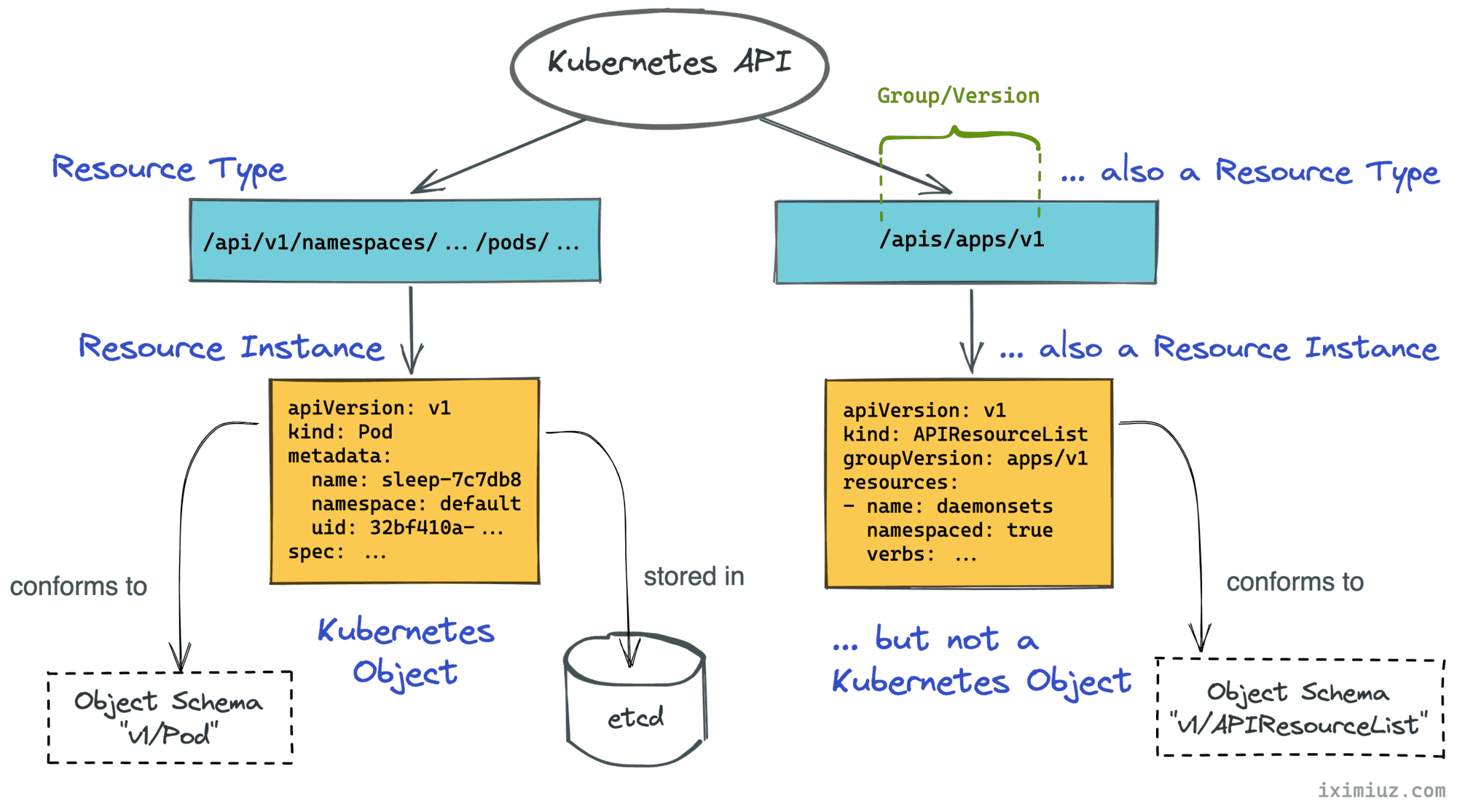
Turns out, in Kubernetes, a kind is the name of an object schema. Like the one you'd typically describe using a JSON schema vocabulary. In other words, a kind refers to a particular data structure, i.e. a certain composition of attributes and properties.
As per sig-architecture/api-conventions.md, kinds are grouped into three categories:
Pod, Service, etc) - persistent entities in the system.PodList, APIResourceList, etc) - collections of resources of one or more kinds.status, scale, etc.) or non-persistent auxiliary entities (ListOptions, Policy, etc).Most of the objects used in Kubernetes, including all JSON objects returned by the API, have the kind field. It allows clients and servers to serialize and deserialize these objects properly before sending them over the wire or storing them on disk.
Much like resource, the word object in Kubernetes parlance is overloaded. In a broad sense, an object can mean any data structure - an instance of a resource type such as APIGroup, a piece of configuration such as an audit policy, or a persistent entity such as a Pod. However, in this section, I'm going to talk about objects in a narrow, well-defined sense. So, I'll use the capitalized word Object instead.
Entities like ReplicaSet, Namespace, or ConfigMap are called Kubernetes Objects. Objects are persistent entities in the Kubernetes system that represent an intent (desired state) and the status (actual state) of the cluster.
Most of the Kubernetes API resources represent Objects. Unlike other forms of resources mandating only the kind field, Objects must have more field defined:
kind - a string that identifies the schema this object should haveapiVersion - a string that identifies the version of the schema the object should havemetadata.namespace - a string with the namespace (defaults to "default")metadata.name - a string that uniquely identifies this object within the current namespacemetadata.uid - a unique in time and space value used to distinguish between objects with the same name that have been deleted and recreated.Additionally, the metadata dictionary may include labels and annotations fields, as well as some versioning and timestamp information.
Example - Pod Object (truncated output):
$ kubectl get --raw /api/v1/namespaces/default/pods/sleep-7c7db887d8-dkkcg | python -m json.tool
{
    "apiVersion": "v1",
    "kind": "Pod",
    "metadata": {
        "namespace": "default",
        "name": "sleep-7c7db887d8-dkkcg",
        "uid": "32bf410a-0009-484e-adac-21179ec28f0f",
        "labels": {
            "app": "sleep",
            "pod-template-hash": "7c7db887d8"
        },
        "creationTimestamp": "2022-01-08T18:10:04Z",
        "resourceVersion": "465766"
    },
    "spec": { ... },
    "status": { ... }
}
As in the above example, it's typical for Kubernetes Objects to have the spec (desired state) and status (actual state) fields. But it's not always the case. Compare the above output with the ConfigMap Object below:
$ kubectl get --raw /api/v1/namespaces/default/configmaps/informer-dynamic-simple-wzgmx | python -m json.tool
{
    "apiVersion": "v1",
    "kind": "ConfigMap",
    "data": {
        "foo": "bar"
    },
    "metadata": {
        "namespace": "default",
        "name": "informer-dynamic-simple-wzgmx",
        "uid": "74471398-0244-4686-b490-7007f6246a63",
        "creationTimestamp": "2022-01-06T21:45:04Z",
        "generateName": "informer-dynamic-simple-",
        "resourceVersion": "418185"
    }
}
Dealing with the Kubernetes API from code involves a lot of Object manipulation, so having a solid understanding of a common Object structure is a must. The kubectl explain command can help you with that. The coolest part about it is that it can be called not only on resources but also on the nested fields:
$ kubectl explain deployment.spec.template
KIND:     Deployment
VERSION:  apps/v1

RESOURCE: template <Object>

DESCRIPTION:
     Template describes the pods that will be created.

     PodTemplateSpec describes the data a pod should have when created from a
     template

FIELDS:
   metadata <Object>
     Standard object's metadata. More info:
     https://git.k8s.io/community/contributors/devel/sig-architecture/api-conventions.md#metadata

   spec <Object>
     Specification of the desired behavior of the pod. More info:
     https://git.k8s.io/community/contributors/devel/sig-architecture/api-conventions.md#spec-and-status
Resources in Kubernetes parlance can mean both - resource types and resource instances. Resource types are organized into API groups, and API groups are versioned. Every resource representation follows a certain schema defined by its kind. While every resource follows a concrete structure defined by its kind, not every resource represents a Kubernetes Object. Objects are persistent entities representing a record of intent. Objects of different kinds have different structures, but all Objects carry common metadata attributes like namespace, name, uid, or creationTimestamp.
Got better at the theoretical part of the Kubernetes API? Great! Now go and call it with a simple HTTP client - turns out it's no easy task with plenty of pitfalls.
When theory and practice are on par, I'd recommend taking a look at k8s.io/api and k8s.io/apimachinery modules - these are the two main dependencies of the official Go client. The api module defines Go structs for the Kubernetes Objects, and the apimachinery module brings lower-level building blocks and common API functionality like serialization, type conversion, or error handling. Here is my illustrated overview of both modules.
P.S. Talk is cheap, show me the code? Then check out my collection of Kubernetes client-go examples on GitHub 😉
此内容由惯性聚合(RSS阅读器)自动聚合整理,仅供阅读参考。 原文来自 — 版权归原作者所有。