


UPD: Apparently, in 2021 there are still some big use cases for the Gevent library - check out this amazing r/RedditEng post.
One day you were hired by a startup to build yet another web site service. The problem sounded similar to numerous back-ends you had been doing before. So, you decided to move with python to be conservative enough and pick flask to be lightweight but yet powerful enough. Nobody was fired for buying IBM starting things in python, wise man's choice.

Level up your server-side game — join 20,000 engineers getting insightful learning materials straight to their inbox.
After 3 months of intensive development, an MVP was done and two more weeks of fixes later it was deployed to production. What a gorgeous time! Everybody except customers was happy. However, the happiness was caused not so much by finished in time development but rather by the rapid growth of the user base.
Three months, one million users, and 10 KLOC later you started noticing some poor performance of the most loaded endpoints. Occasionally, HTTP response durations might grow up to a second for some short minutes. But afterward, the system had been recovering by itself and all the responses had been going down to 100-200 ms. However, such situations were pretty rare, CPU load was really low and 1 second to respond used to be an acceptable delay. So, you decided to continue development without starting an investigation.
Three more months, two million users, and 20 KLOC later the service suddenly went down. HTTP request/response chart spiked. At first, the response duration started growing. Then, after some short delay similar spike appeared on the HTTP requests chart indicating the growing number of page loads. And the number of successfully served requests dropped almost to zero. But CPU and memory usage were still under a reasonable threshold.
The investigation finally started. First off all the storage layer was checked. However, both the database and Redis servers were almost idling. Eventually, the circle of suspects was reduced to a single dude - external services. Instead of dealing with our own storage layer, or starving for the CPU time on the application servers, we were basically hanging waiting for the 3rd party services. An unforeseen requirement turned into an architectural flaw. Luckily, by the end of the investigation, the system automagically recovered itself, as usually... However, this time with plenty of timed-out/rejected requests.
It turned out that the communication with external services, such as social networks or SaaS providers, is a primary activity of our service. To serve an arbitrary HTTP request we need to issue on average 3 requests to systems which aren't under our control. At the same time, our setup was as follows: a few application servers running uWSGI behind a single nginx load balancer. Each uWSGI instance had 8 processes (proportionally to the number of cores on the machine) and each such process had a pool of 40 worker-thread synchronously serving HTTP requests. Kinda reasonable setup, wasn't it?
But when a 3rd party service starts experiencing some degradation causing it to slow down, the number of simultaneous requests might go above the total number of workers. With two applications servers, we had 2 x 8 x 40 = 640 threads to serve HTTP requests. With a request rate of 300 rps and the average response time of 2 seconds, we were at the limit of our capacity. A tiny increase in the number of requests or more growing of the 3rd party response time would lead to the queuing of the incoming requests.
What usually happens when the service is slow? Users start to refresh the page after a few seconds of waiting leading to an avalanche effect. The service experiences performance degradation due to a high number of requests, users are refreshing pages without waiting for the responses making the number of requests even higher, leading to even worse performance. On the other hand, when your 3rd party is at a scale of a social network, most probably its slowness is caused not by the number of your requests, but rather by some unlucky canary deployment or network connectivity problems. Hence, the best way to decrease your waiting time would be to send the next request to the 3rd part as soon as possible. However, if you are already out of spare workers and started queuing incoming HTTP requests, the delay for such requests will be a sum of the time being queued and the time waiting for the 3rd parties to respond.
However, 95% of the time the 3rd parties are fast enough and only one third of our 640 worker-threads are busy serving requests. But during the unhappy hours minutes we might need to scale our threads number from 640 to maybe something like 2000 to cope with the load forced idling and the avalanche effect. And this number of threads for a total of 16 cores doesn't sound good.
At this moment you are starting to suspect that the synchronous approach based on python and flask may be not such a good choice... The situation seems like a perfect fit for something asynchronous, similar to Node.js or python's asyncio since it doesn't limit you in the number of simultaneous requests. But we already have 42 KLOC written in a completely synchronous manner! What shall we do?! Re-implementing everything in something asynchronous would cost us almost a year of work.

Python is extremely powerful and dynamic language. But can we really trick the whole codebase and force the sync code to use async I/O while keeping its structure flat? Is it even legal to start benefiting from having an event loop without ubiquitous callbacks or async/await magic? Due to 42 KLOC we are really in the great necessity of such a miracle.
After a few days of desperate looking for a new job solution... Gevent to the rescue! From the library description:
What is gevent?
gevent is a coroutine-based Python networking library that uses greenlet to provide a high-level synchronous API on top of the libev or libuv event loop.
So, it's a library that provides a synchronous API on top of the event loop! Seems like it's exactly a thing we needed and the match is 100%!
But we don't believe in miracles. What is greenlet? How does it work under the hood?

Greenlet is an implementation of green threads for python. While normal python threads are full-fledged operating system threads following preemptive multitasking approach, green threads are lightweight thread-alike beasts using cooperative multitasking. I.e. in the green thread world the execution of any given piece of code will not be interrupted until it explicitly released the control flow. Obviously, to achieve such behavior, the context switching should be done completely by the library and not by the operating system. Hence, all the execution must reside within a single OS thread.
And greenlet is basically a C extension module for the python interpreter making such cooperative multitasking possible without any extra syntax. From greenlet usage example:
from greenlet import greenlet

def test1():
  print(12)
  gr2.switch()
  print(34)

def test2():
  print(56)
  gr1.switch()
  print(78)  # will never be printed since nobody switches to this line

gr1 = greenlet(test1)
gr2 = greenlet(test2)
gr1.switch()

# Code above prints:
# 12
# 56
# 34
The snippet above looks pretty good. However, greenlet doesn't provide you with any means of scheduling:
A “greenlet”, on the other hand, is a still more primitive notion of micro-thread with no implicit scheduling; coroutines, in other words. This is useful when you want to control exactly when your code runs. You can build custom scheduled micro-threads on top of greenlet.
But we don't really want to put all these switches to our codebase manually... And here gevent and its glorious monkey patching comes into play.
After adding these lines to your code from gevent import monkey; monkey.patch_all(), some python standard components (most importantly threading and socket) will be replaced with the corresponding gevent implementations.
Let's take a look at the patched socket module:
class socket(object):
  ...
  def recv(self, *args):
    while True:
      try:
        return _socket.socket.recv(self._sock, *args)
      except error as ex:
        if ex.args[0] != EWOULDBLOCK or self.timeout == 0.0:
          raise
        self._wait(self._read_event)
It seems that the underlying socket operates in the non-blocking (i.e. async) mode. And once we got EWOULDBLOCK exception, we just do some misterious waiting. But if we dive deeper into the gevent source code, we will see that _wait relies on Waiter class, which is:
... a wrapper around greenlet's
switch()andthrow().
So, basically, gevent replaces threading with greenlet-based green threads making all your code running in a single thread. But it also switches the I/O to async mode. If a call to a function may lead to a blocking I/O operation, gevent switches the context to another green thread. And once the data is ready to be read, gevent switches back to the suspended greenlet. Hence, gevent also does the scheduling for you.
And all these things you can have wihtout changing any single line of the existing code!
Do you remember that we use uWSGI? This bright piece of software supports gevent out of the box. And it's kind enough to even monkey patch the app for us if the option --gevent-monkey-patch was provided.
It's really easy to unleash the full power of the async approach. Let's try to hack a simple setup to prove the concept. Make a directory called demo and put the following files in it:
app.py:
# python3
from flask import Flask
app = Flask(__name__)

@app.route("/")
def hello():
    from time import sleep
    sleep(1)
    return "Hello World!"
Dockerfile:
FROM python:3.7

RUN pip install gevent uwsgi flask

COPY app.py /app.py

EXPOSE 3000

ENTRYPOINT ["uwsgi", "--http", ":3000", "--master", "--module", "app:app"]
Then build the container with docker build -t uwsgi_demo .. We are ready to perform some load testing!
First, run the normal threaded HTTP server with docker run -p 3000:3000 uwsgi_demo --threads 10. From a separate terminal tab run docker exec -it <container_id> top -H. You will see something similar to this:
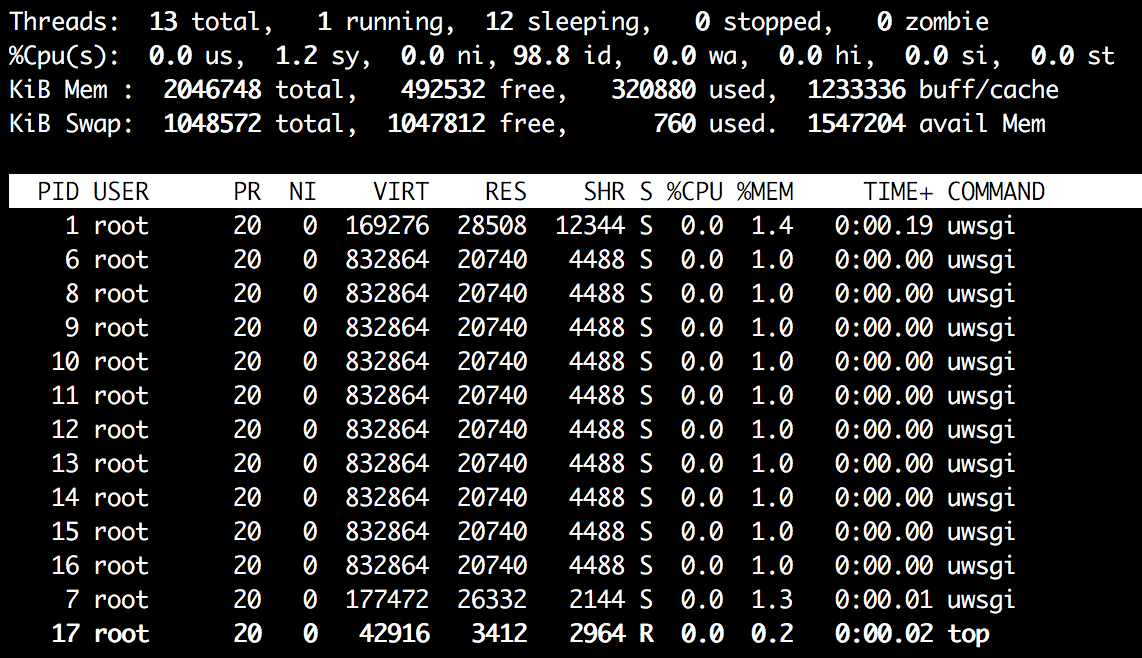
The output of the top -H command shows that we have in total 13 threads in our system and 12 out of them belong to uWSGI. Now start the load test:
ab -c 10 -n 100 http://localhost:3000/

...

> Concurrency Level:      10
> Time taken for tests:   10.098 seconds
> Complete requests:      100
> Failed requests:        0
> Total transferred:      9100 bytes
> HTML transferred:       1200 bytes
> Requests per second:    9.90 [#/sec] (mean)
> Time per request:       1009.751 [ms] (mean)
> Time per request:       100.975 [ms] (mean, across all concurrent requests)
> Transfer rate:          0.88 [Kbytes/sec] received

...
So, we can see that 10 worker-threads successfully served our 100 concurrent HTTP requests in about 10 seconds.
Now repeat the test, but use docker run -p 3000:3000 uwsgi_demo --gevent 10 --gevent-monkey-patch to start the server. The output of the top -H command:
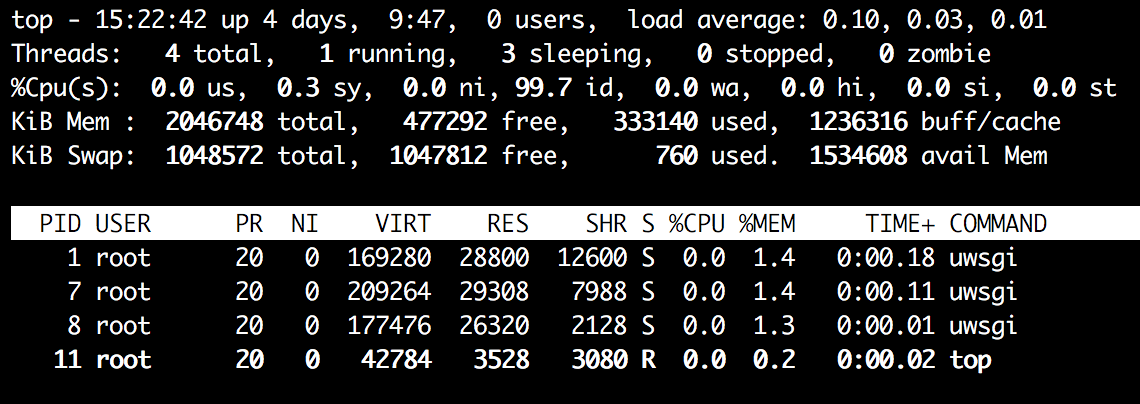
We have only the necessary uWSGI processes running, nothing similar to 12 threads from above. Run the load test:
ab -c 10 -n 100 http://localhost:3000/

...

> Concurrency Level:      10
> Time taken for tests:   10.114 seconds
> Complete requests:      100
> Failed requests:        0
> Total transferred:      9100 bytes
> HTML transferred:       1200 bytes
> Requests per second:    9.89 [#/sec] (mean)
> Time per request:       1011.380 [ms] (mean)
> Time per request:       101.138 [ms] (mean, across all concurrent requests)
> Transfer rate:          0.88 [Kbytes/sec] received

...
From the test results it's clear that we achieved the same concurrency level without spawning any extra threads.
And now let's have some fun. Try to compare the performance of --threads 1000 vs --gevent 1000 under ab -c 1000 -n 2000. On my machine the results are as follows:
# 1000 worker-threads
> Concurrency Level:      1000
> Time taken for tests:   35.667 seconds
> Complete requests:      2000

# 1000 greenlets
> Concurrency Level:      1000
> Time taken for tests:   5.143 seconds
> Complete requests:      2000
Enjoy!
Level up your server-side game — join 20,000 engineers getting insightful learning materials straight to their inbox:
此内容由惯性聚合(RSS阅读器)自动聚合整理,仅供阅读参考。 原文来自 — 版权归原作者所有。