











A short one today. Just wanted you to meet my new favorite Go library to work with Kubernetes - k8s.io/cli-runtime. It's probably the most underappreciated package in the whole k8s.io/* family based on its value to the number of stars ratio.
Here is what the README file says about it:
Set of helpers for creating kubectl commands, as well as kubectl plugins.

This library is a shared dependency for clients to work with Kubernetes
API infrastructure which allows to maintain kubectl compatible behavior.
If the above description didn't sound too impressive, let me try to decipher it for you - with the cli-runtime library, you can write CLI tools that behave like and are as potent as the mighty kubectl!
Here is what you actually can achieve with just a few lines of code using the cli-runtime library:
--kubeconfig|--context|--namespace|--server|--token|... and pass their values to one or more client-go instances.deploy for deployments or po for pods.Interested? Then have a look at the usage examples below 😉
The de-facto standard solution for the command-line flags processing in Go is cobra. The k8s.io/cli-runtime library embraces it and builds its functionality on top of cobra.
Here is a mini-program that uses typical Kubernetes CLI flags to create a client-go instance for further Kubernetes API access:
package main

import (
    "fmt"

    "github.com/spf13/cobra"
    "k8s.io/cli-runtime/pkg/genericclioptions"
    "k8s.io/client-go/kubernetes"
)

func main() {
    // 1. Create a flags instance.
    configFlags := genericclioptions.NewConfigFlags(true)

    // 2. Create a cobra command.
    cmd := &cobra.Command{
        Use: "kubectl (well, almost)",
        Run: func(cmd *cobra.Command, args []string) {

            // 4. Get client config from the flags.
            config, _ := configFlags.ToRESTConfig()

            // 5. Create a client-go instance for config.
            client, _ := kubernetes.NewForConfig(config)

            vinfo, _ := client.Discovery().ServerVersion()
            fmt.Println(vinfo)
        },
    }

    // 3. Register flags with cobra.
    configFlags.AddFlags(cmd.PersistentFlags())

    _ = cmd.Execute()
}
Now, let's see what flags are available:
$ go run main.go --help
Usage:
  kubectl (well, almost) [flags]

Flags:
      --as string                      Username to impersonate for the operation. User could be a regular user or a service account in a namespace.
      --as-group stringArray           Group to impersonate for the operation, this flag can be repeated to specify multiple groups.
      --as-uid string                  UID to impersonate for the operation.
      --cache-dir string               Default cache directory (default "/home/vagrant/.kube/cache")
      --certificate-authority string   Path to a cert file for the certificate authority
      --client-certificate string      Path to a client certificate file for TLS
      --client-key string              Path to a client key file for TLS
      --cluster string                 The name of the kubeconfig cluster to use
      --context string                 The name of the kubeconfig context to use
  -h, --help                           help for kubectl
      --insecure-skip-tls-verify       If true, the server's certificate will not be checked for validity. This will make your HTTPS connections insecure
      --kubeconfig string              Path to the kubeconfig file to use for CLI requests.
  -n, --namespace string               If present, the namespace scope for this CLI request
      --request-timeout string         The length of time to wait before giving up on a single server request. Non-zero values should contain a corresponding time unit (e.g. 1s, 2m, 3h). A value of zero means don't timeout requests. (default "0")
  -s, --server string                  The address and port of the Kubernetes API server
      --tls-server-name string         Server name to use for server certificate validation. If it is not provided, the hostname used to contact the server is used
      --token string                   Bearer token for authentication to the API server
      --user string                    The name of the kubeconfig user to use
Quite powerful, isn't it? And only 3 lines of code (well, 4 with the import line) were needed.
You probably know that kubectl employs a bunch of tricks to make working with resources a bit more user-friendly:
# Get resources using shortcuts
$ kubectl get po
$ kubectl get pods
$ kubectl get cm
$ kubectl get configmaps

# Get resources by singular and plural names
$ kubectl get service
$ kubectl get services

# Get multiple resource types at once
$ kubectl get po,deploy,svc

# Search by kind instead of resource name
$ kubectl get ServiceAccount

# Get an object by name
$ kubectl get service kubernetes
$ kubectl get service/kubernetes
$ kubectl get svc kubernetes
$ kubectl get svc/kubernetes

# Get resources from all namespaces
$ kubectl get pods --all-namespaces
Turns out, this handiness is actually implemented by the cli-runtime library, and it's fully reusable! You just need to instantiate a resource.Builder and let it parse the command-line argument(s) for you:
package main

import (
    "fmt"
    "os"

    "github.com/spf13/cobra"
    "k8s.io/cli-runtime/pkg/genericclioptions"
    "k8s.io/cli-runtime/pkg/resource"
    "k8s.io/client-go/kubernetes/scheme"
)

func main() {
    // Already familiar stuff...
    configFlags := genericclioptions.NewConfigFlags(true)

    cmd := &cobra.Command{
        Use: "kubectl (even closer to it this time)",
        Args: cobra.MinimumNArgs(1),
        Run: func(cmd *cobra.Command, args []string) {

            // Our hero - The Resource Builder.
            builder := resource.NewBuilder(configFlags)

            namespace := ""
            if configFlags.Namespace != nil {
                namespace = *configFlags.Namespace
            }

            // Let the Builder do all the heavy-lifting.
            obj, _ := builder.
                // Scheme teaches the Builder how to instantiate resources by names.
                WithScheme(scheme.Scheme, scheme.Scheme.PrioritizedVersionsAllGroups()...).
                // Where to look up.
                NamespaceParam(namespace).
                // What to look for.
                ResourceTypeOrNameArgs(true, args...).
                // Do look up, please.
                Do().
                // Convert the result to a runtime.Object
                Object()

            fmt.Println(obj)
        },
    }

    configFlags.AddFlags(cmd.PersistentFlags())

    _ = cmd.Execute()
}
Now you can use the above mini-program much like the kubectl get command:
$ go run main.go --help
$ go run main.go po
$ go run main.go pod
$ go run main.go pods
$ go run main.go services,deployments
$ go run main.go --namespace=default service/kubernetes
$ go run main.go --namespace default service kubernetes
Interesting that the actual magic happens not so much in the builder itself but rather in the Scheme and RESTMapper modules. These are two tenants of another Kubernetes wonderful Go library called k8s.io/apimachinery. Both are kinda sorta registries utilizing the Kubernetes API Discovery information - the Scheme maps object kinds to Go structs representing Kubernetes Objects, and the RESTMapper maps resource names to kinds and vice versa.
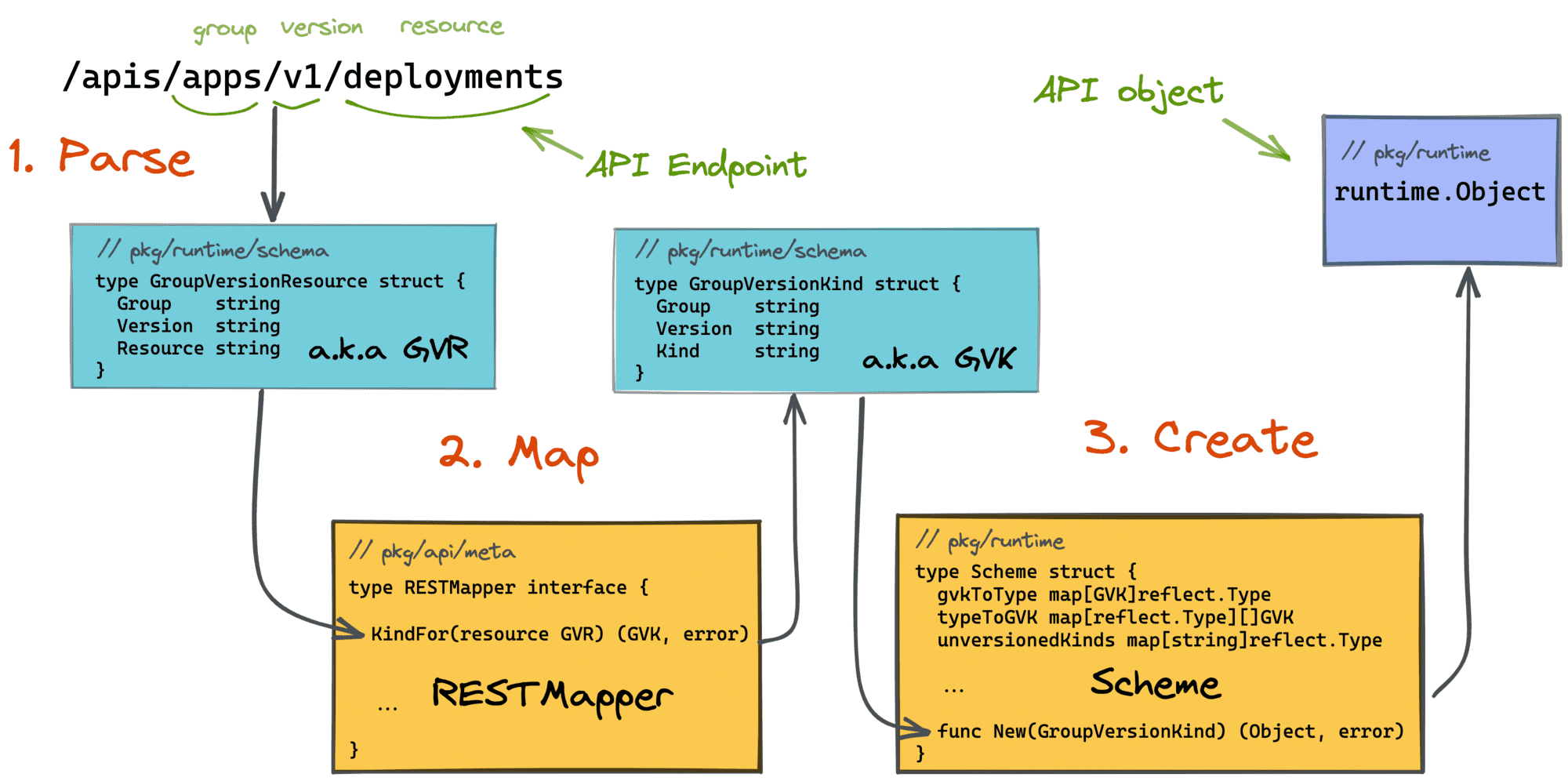
Another interesting exemplar in the above mini-program is the runtime.Object returned by the Builder. It's a generic interface to abstract a concrete k8s.io/api struct representing a certain Kubernetes object (like Pod, Deployment, ConfigMap, etc.):
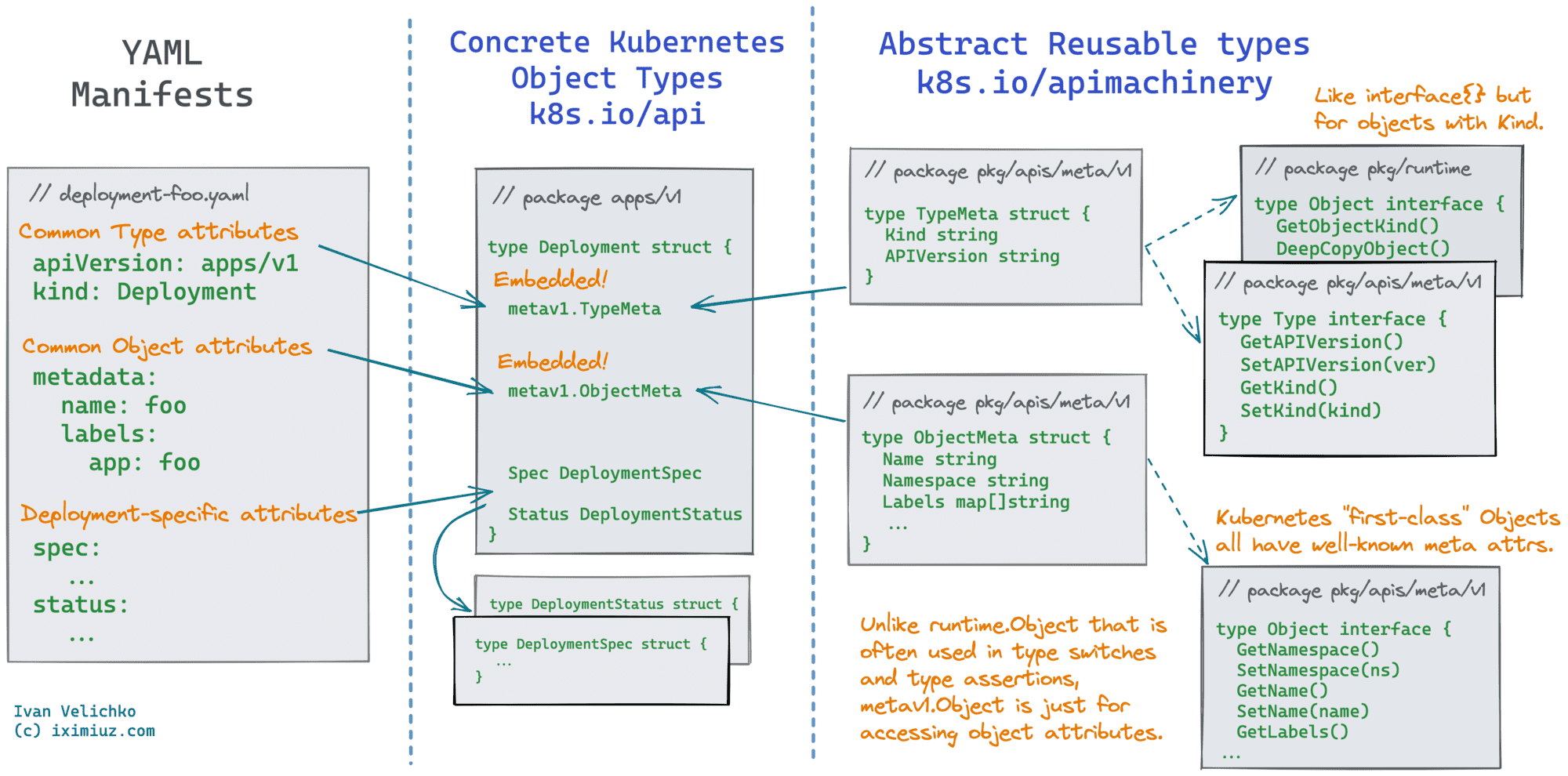
You can read more about Objects, Schemes, and Mappers in my previous article:
👉 How To Call Kubernetes API from Go - Types and Common Machinery
Much like with searching for cluster objects, the resource.Builder can be used to read YAML/JSON Kubernetes manifests from files, URLs, or even the stdin. The only difference is the method used to point the builder to the data source - instead of ResourceTypeOrNameArgs(), you'd need to call the method FilenameParam() supplying a resource.FilenameOptions{Filenames []string, Recursive bool, Kustomize bool} parameter:
package main

import (
    "os"

    "github.com/spf13/cobra"
    "k8s.io/cli-runtime/pkg/genericclioptions"
    "k8s.io/cli-runtime/pkg/resource"
    "k8s.io/client-go/kubernetes/scheme"
)

func main() {
    configFlags := genericclioptions.NewConfigFlags(true)

    cmd := &cobra.Command{
        Use:  "kubectl (not really)",
        Args: cobra.MinimumNArgs(1),
        Run: func(cmd *cobra.Command, args []string) {
            builder := resource.NewBuilder(configFlags)

            namespace := ""
            if configFlags.Namespace != nil {
                namespace = *configFlags.Namespace
            }
            enforceNamespace := namespace != ""

            _ = builder.
                WithScheme(scheme.Scheme, scheme.Scheme.PrioritizedVersionsAllGroups()...).
                NamespaceParam(namespace).
                DefaultNamespace().
                FilenameParam(
                    enforceNamespace,
                    &resource.FilenameOptions{Filenames: args},
                ).
                Do().
                Visit(func(info *resource.Info, _ error) error {
                    fmt.Println(info.Object)
                    return nil
                })
        },
    }

    configFlags.AddFlags(cmd.PersistentFlags())

    _ = cmd.Execute()
}
If the additional namespace parameter is provided and (some) objects in the manifests miss the namespace, it'll be populated from that parameter. The enforceNamespace flag can be used to make the builder fail if the supplied namespace value differs from the (explicitly set) values in the manifest(s).
If you tried the above mini-programs, you probably noticed how poor was the output formatting. Luckily, the cli-runtime library has a bunch of (pretty-)printers that can be used to dump Kubernetes objects as YAML, JSON, or even human-readable tables:
package main

import (
    "fmt"
    "os"

    corev1 "k8s.io/api/core/v1"
    "k8s.io/cli-runtime/pkg/printers"
    "k8s.io/client-go/kubernetes/scheme"
)

func main() {
    obj := &corev1.ConfigMap{
        Data: map[string]string{"foo": "bar"},
    }
    obj.Name = "my-cm"

    // YAML
    fmt.Println("# YAML ConfigMap representation")
    printr := printers.NewTypeSetter(scheme.Scheme).ToPrinter(&printers.YAMLPrinter{})
    if err := printr.PrintObj(obj, os.Stdout); err != nil {
        panic(err.Error())
    }

    fmt.Println()

    // JSON
    fmt.Println("# JSON ConfigMap representation")
    printr = printers.NewTypeSetter(scheme.Scheme).ToPrinter(&printers.JSONPrinter{})
    if err := printr.PrintObj(obj, os.Stdout); err != nil {
        panic(err.Error())
    }

    fmt.Println()

    // Table (human-readable)
    fmt.Println("# Table ConfigMap representation")
    printr = printers.NewTypeSetter(scheme.Scheme).ToPrinter(printers.NewTablePrinter(printers.PrintOptions{}))
    if err := printr.PrintObj(obj, os.Stdout); err != nil {
        panic(err.Error())
    }

    fmt.Println()

    // JSONPath
    fmt.Println("# ConfigMap.data.foo")
    printr, err := printers.NewJSONPathPrinter("{.data.foo}")
    if err != nil {
        panic(err.Error())
    }

    printr = printers.NewTypeSetter(scheme.Scheme).ToPrinter(printr)
    if err := printr.PrintObj(obj, os.Stdout); err != nil {
        panic(err.Error())
    }

    fmt.Println()

    // Name-only
    fmt.Println("# <kind>/<name>")
    printr = printers.NewTypeSetter(scheme.Scheme).ToPrinter(&printers.NamePrinter{})
    if err := printr.PrintObj(obj, os.Stdout); err != nil {
        panic(err.Error())
    }

    fmt.Println()
}
Notice how all the PrintObj() methods accept the already familiar runtime.Object type making the printing functionality generic.
Congrats! Now you're well-armed to start writing your own Kubernetes CLIs! Feel otherwise? 🙈 Then check out more mini-programs from my extended client-go collection on GitHub 😉
Good luck!
此内容由惯性聚合(RSS阅读器)自动聚合整理,仅供阅读参考。 原文来自 — 版权归原作者所有。