


惯性聚合 高效追踪和阅读你感兴趣的博客、新闻、科技资讯
阅读原文 在惯性聚合中打开

推荐订阅源

The Cloudflare Blog
Microsoft Security Blog
Threat Intelligence Blog | Flashpoint
L
LangChain Blog
W
WeLiveSecurity
P
Proofpoint News Feed
月光博客
月光博客
NISL@THU
NISL@THU
L
LINUX DO - 最新话题
Webroot Blog
Webroot Blog
T
Threatpost
Y
Y Combinator Blog
www.infosecurity-magazine.com
T
Threat Research - Cisco Blogs
Vercel News
Vercel News
Jina AI
Jina AI
阮一峰的网络日志
阮一峰的网络日志
S
Schneier on Security
J
Java Code Geeks
让小产品的独立变现更简单 - ezindie.com
小众软件
小众软件
MyScale Blog
MyScale Blog
N
News and Events Feed by Topic
Stack Overflow Blog
Stack Overflow Blog
有赞技术团队
有赞技术团队
The Hacker News
The Hacker News
Schneier on Security
K
KPMG report finds enterprise disconnect between AI and its ROI | CIO
Help Net Security
Help Net Security
Recent Announcements
S
Security @ Cisco Blogs
C
CXSECURITY Database RSS Feed - CXSecurity.com
S
Securelist
T
The Exploit Database - CXSecurity.com
云风的 BLOG
云风的 BLOG
C
Cisco Blogs
雷峰网
雷峰网
量子位
Google DeepMind News
OSCHINA 社区最新新闻
OSCHINA 社区最新新闻
Spread Privacy
Spread Privacy
L
Lohrmann on Cybersecurity
I
Intezer
T
The Blog of Author Tim Ferriss
G
GRAHAM CLULEY
D
DataBreaches.Net
V
Vulnerabilities – Threatpost
P
Privacy & Cybersecurity Law Blog
cs.AI updates on arXiv.org
罗磊的独立博客

Ivan on Containers, Kubernetes, and Server-Side

A grounded take on agentic coding for production environments Server-Side Playgrounds Reimagined: Build, Boot, and Network Your Own Virtual Labs [not a] Kubernetes 101 - Pods, Deployments, and Services As an Attempt To Automate Age-Old Infra Patterns JavaScript or TypeScript? How To Benefit From the Dichotomy On Software Design... and Good Writing Building a Firecracker-Powered Course Platform To Learn Docker and Kubernetes How To Publish a Port of a Running Container What Actually Happens When You Publish a Container Port A Visual Guide to SSH Tunnels: Local and Remote Port Forwarding Debugging Containers Like a Pro Docker: How To Debug Distroless And Slim Containers How To Extract Container Image Filesystem Using Docker | iximiuz Labs In Pursuit of Better Container Images: Alpine, Distroless, Apko, Chisel, DockerSlim, oh my! How To Start Programming In Go: Advice For Fellow DevOps Engineers Kubernetes Ephemeral Containers and kubectl debug Command How To Develop Kubernetes CLIs Like a Pro Docker Container Commands Explained: Understand, Don't Memorize | iximiuz Labs Learning Docker with Docker - Toying With DinD For Fun And Profit How To Extend Kubernetes API - Kubernetes vs. Django The Influence of Plumbing on Programming How To Call Kubernetes API from Go - Types and Common Machinery How To Call Kubernetes API using Simple HTTP Client Kubernetes API Basics - Resources, Kinds, and Objects OpenFaaS - Run Containerized Functions On Your Own Terms Learning Containers From The Bottom Up Docker Containers vs. Kubernetes Pods - Taking a Deeper Look | iximiuz Labs Learn-by-Doing Platforms for Dev, DevOps, and SRE Folks How HTTP Keep-Alive can cause TCP race condition How to Work with Container Images Using ctr | iximiuz Labs Multiple Containers, Same Port, no Reverse Proxy... Exploring Go net/http Package - On How Not To Set Socket Options Disposable Local Development Environments with Vagrant, Docker, and Arkade DevOps, SRE, and Platform Engineering My Choice of Programming Languages Prometheus Is Not a TSDB How to learn PromQL with Prometheus Playground Prometheus Cheat Sheet - Basics (Metrics, Labels, Time Series, Scraping) Rust - Writing Parsers With nom Parser Combinator Framework pq - parse and query log files as time series Prometheus Cheat Sheet - Moving Average, Max, Min, etc (Aggregation Over Time) Prometheus Cheat Sheet - How to Join Multiple Metrics (Vector Matching) The Need For Slimmer Containers Understanding Rust Privacy and Visibility Model Bridge vs. Switch: Takeaways from a Real Data Center Tour | iximiuz Labs From LAN to VXLAN: Networking Basics for Non-Network Engineers | iximiuz Labs KiND - How I Wasted a Day Loading Local Docker Images Go, HTTP handlers, panic, and deadlocks Exploring Kubernetes Operator Pattern Making Sense Out Of Cloud Native Buzz Service Discovery in Kubernetes: Combining the Best of Two Worlds API Developers Never REST How Container Networking Works: Building a Bridge Network From Scratch | iximiuz Labs Traefik: canary deployments with weighted load balancing Service Proxy, Pod, Sidecar, oh my! You Need Containers To Build Images You Don't Need an Image To Run a Container Working with container images in Go Master Go While Learning Containers Implementing Container Runtime Shim: Interactive Containers How to use Flask with gevent (uWSGI and Gunicorn editions) My 10 Years of Programming Experience Implementing Container Runtime Shim: First Code Implementing Container Runtime Shim: runc Kubernetes Repository On Flame Dealing with process termination in Linux (with Rust examples) conman - [the] Container Manager: Inception Journey From Containerization To Orchestration And Beyond Linux PTY - How docker attach and docker exec Commands Work Inside Illustrated introduction to Linux iptables From Docker Container to Bootable Linux Disk Image Пишем свой веб-сервер на Python: протокол HTTP 9001 способ создать веб-сервер на Python Explaining async/await in 200 lines of code Explaining event loop in 100 lines of code Save the day with gevent Пишем свой веб-сервер на Python: процессы, потоки и асинхронный I/O Truly optional scalar types in protobuf3 (with Go examples) Node.js Writable streams distilled Node.js Readable streams distilled How to on starting processes (mostly in Linux) Дайджест интересных ссылок – Июль 2016 Пишем свой веб-сервер на Python: сокеты Наследование в JavaScript Мастерить!
Not Every Container Has an Operating System Inside
Ivan Velichko · 2020-05-07 · via Ivan on Containers, Kubernetes, and Server-Side

Not every container has an operating system inside, but every one of them needs your Linux kernel.

Before going any further it's important to understand the difference between a kernel, an operating system, and a distribution.

  • Linux kernel is the core part of the Linux operating system. It's what originally Linus wrote.
  • Linux OS is a combination of the kernel and a user-land (libraries, GNU utilities, config files, etc).
  • Linux distribution is a particular version of the Linux operating system like Debian or CentOS.

To be technically accurate, the title of this article should have sounded something like Does container image have a whole Linux distribution inside? But I find this wording a bit boring for a title 🤪

The majority of Docker examples out there explicitly or implicitly rely on some flavor of the Linux operating system sitting inside a container. I tried to quickly compile a list of the most prominent samples.

Running an interactive shell in the debian jessie distribution:

$ docker run -it debian:jessie

Running an nginx web-sever in a container and examine its config using cat utility:

$ docker run -d -P --name nginx nginx:latest
$ docker exec -it nginx cat /etc/nginx/nginx.conf

Building an image based on Alpine Linux:

$ cat <<EOF > Dockerfile
FROM alpine:3.7
RUN apk add --no-cache mysql-client
ENTRYPOINT ["mysql"]
EOF

$ docker build -t mysql-alpine .
$ docker run mysql-alpine

And so on and so forth...

For the newcomers learning the containerization through hands-on experimentation, this may lead to a false impression that containers are somewhat indistinguishable from full-fledged operating systems and that they are always based on well-known and wide-spread Linux distributions like debian, centos, or alpine.

At the same time, approaching the containerization topic from the theoretical side (1, 2, 3) may lead to a rather opposite impression that containers (unlike the traditional virtual machines) are supposed to pack only the application (i.e. your code) and its dependencies (i.e. some libraries) instead of a trying to ship a full operating system.

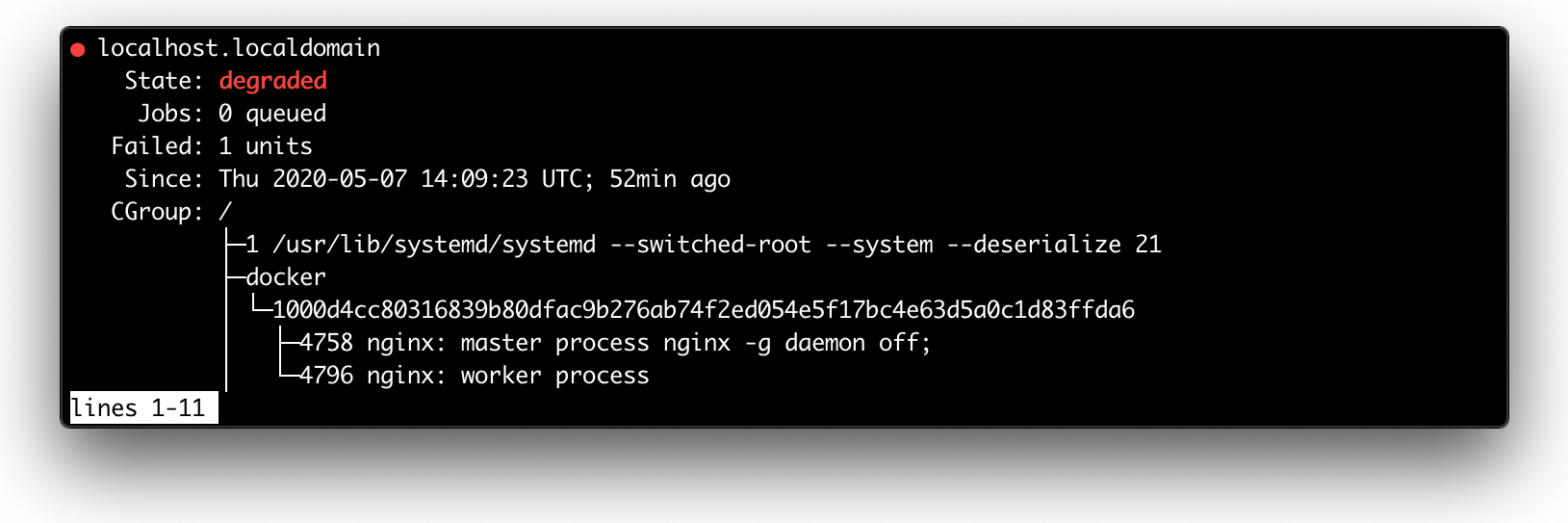
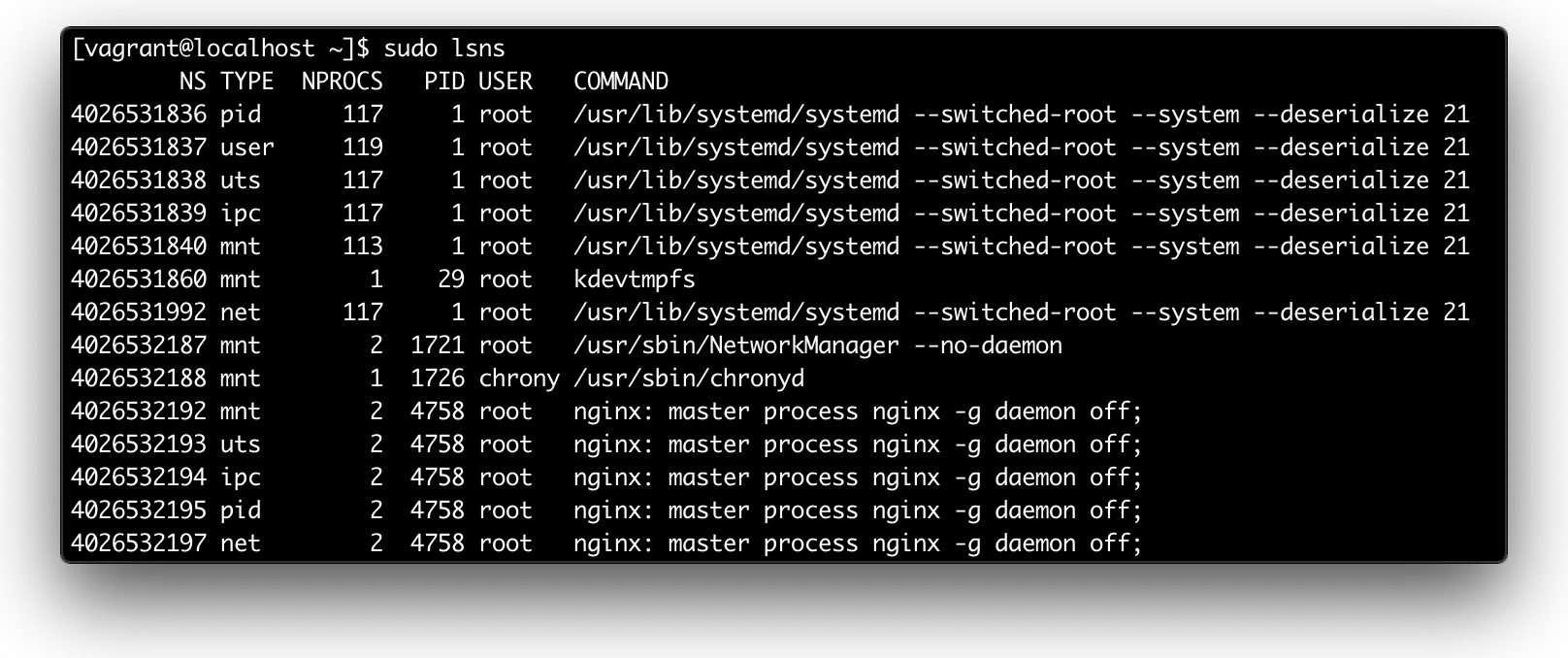
As it usually happens, the truth lies somewhere in between both statements. From the implementation standpoint, a container is indeed just a process (or a bunch of processes) running on the Linux host. The container process is isolated (namespaces) from the rest of the system and restricted from both the resource consumption (cgroups) and security (capabilities, AppArmor, Seccomp) standpoints. But in the end, this is still a regular process, same as any other process on the host system.

Just run docker run -d nginx and conduct your own investigation:

ps axf output (excerpt)
ps axf output (excerpt)

systemctl status output (excerpt)
systemctl status output (excerpt)

sudo lsns output

sudo lsns output

Well, if a container is just a regular Linux process, we could try to run a single executable file inside of a container. I.e. instead of putting our application into a fully-featured Linux distribution, we will try to build a container image consisting of a folder with a single file inside. Upon the launch, this folder will become a root folder for the containerized environment.

Create a Container from scratch (with a single executable binary inside)

If you have Go installed on your system, you can utilize its handy cross-compilation abilities:

// main.go
package main

import "fmt"

func main() {
    fmt.Println("Hello from OS-less container (Go edition)")
}

Build the program from above using:

$ GOOS=linux GOARCH=amd64 go build -ldflags="-w -s" -o hello
$ file hello
> hello: ELF 64-bit LSB executable, x86-64, version 1 (SYSV), statically linked
Click here to see how to compile a similar C program.
// main.c
#include <stdio.h>

int main() {
    printf("Hello from OS-less container (C edition)\n");
}

Compile it using the following builder container:

# Dockerfile.builder
FROM gcc:4.9
COPY main.c /main.c
CMD ["gcc", "-std=c99", "-static", "-o", "/out/hello", "/main.c"]
$ docker build -t builder -f Dockerfile.builder .
$ docker run -v `pwd`:/out builder
$ file hello
> hello: ELF 64-bit LSB executable, x86-64, version 1 (GNU/Linux), statically linked, for GNU/Linux 2.6.32

Finally, let's build the target container using the following trivial Dockerfile:

FROM scratch
COPY hello /
CMD ["/hello"]
$ docker build -t hello .
$ docker run hello
> Hello from OS-less container (Go edition)

If we now inspect the hello image with the wonderful dive tool, we will notice that it consists of a directory with the single executable file in it:
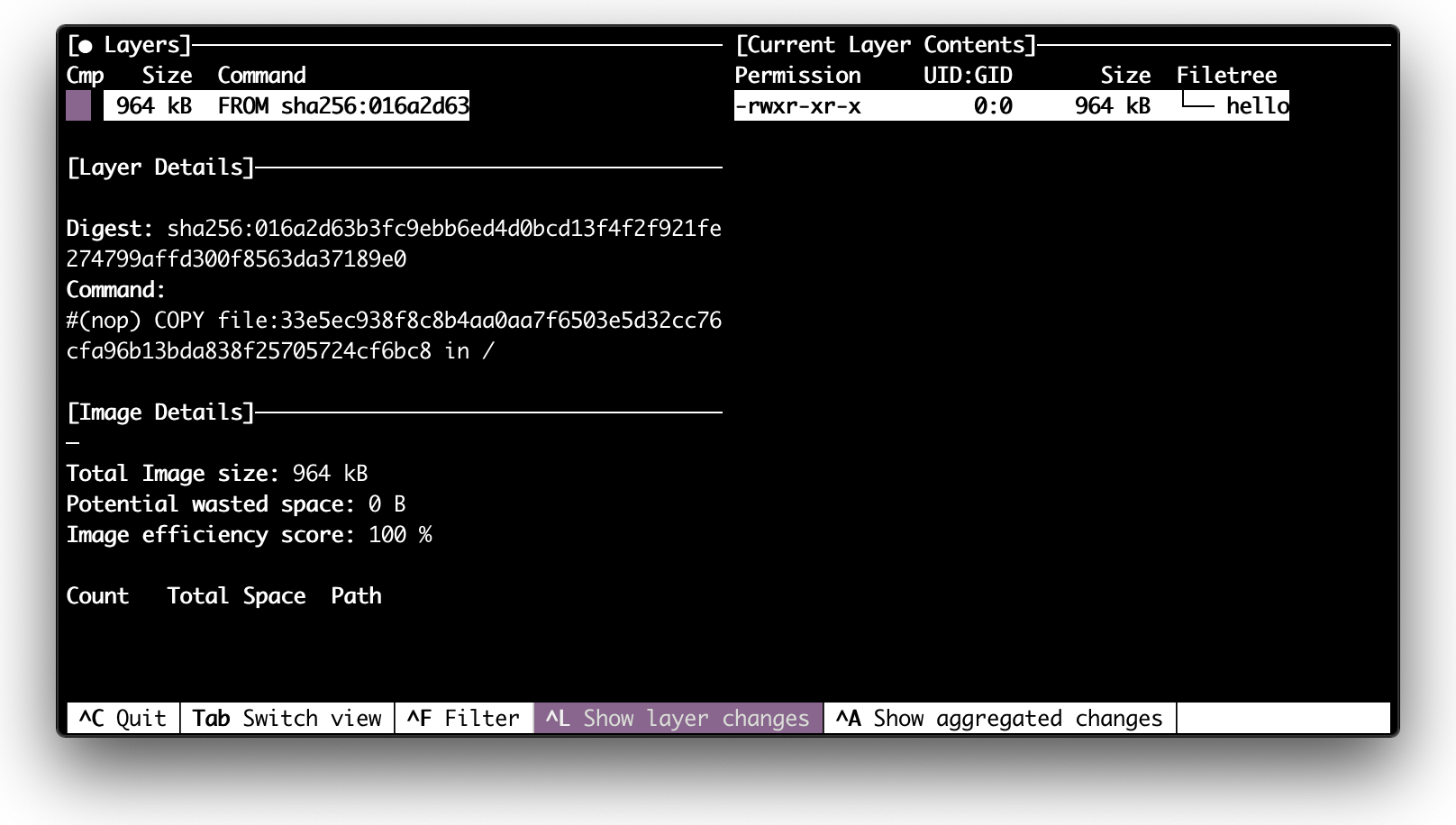
Inspecting hello image with dive tool (screenshot)

dive hello

This exercise is roughly what the Docker's hello-world example does. There are two key moments here. First, we based our image on a so-called scratch image. This is just an empty image, i.e. the building starts from the empty folder and then just copies the executable file hello into it. Second, we used a statically linked binary file. I.e. there is no dependency on some shared libraries from the system. So, a bare Linux kernel is enough to execute it.

Now, what if we inspect the nginx image which we used at the beginning of this article?
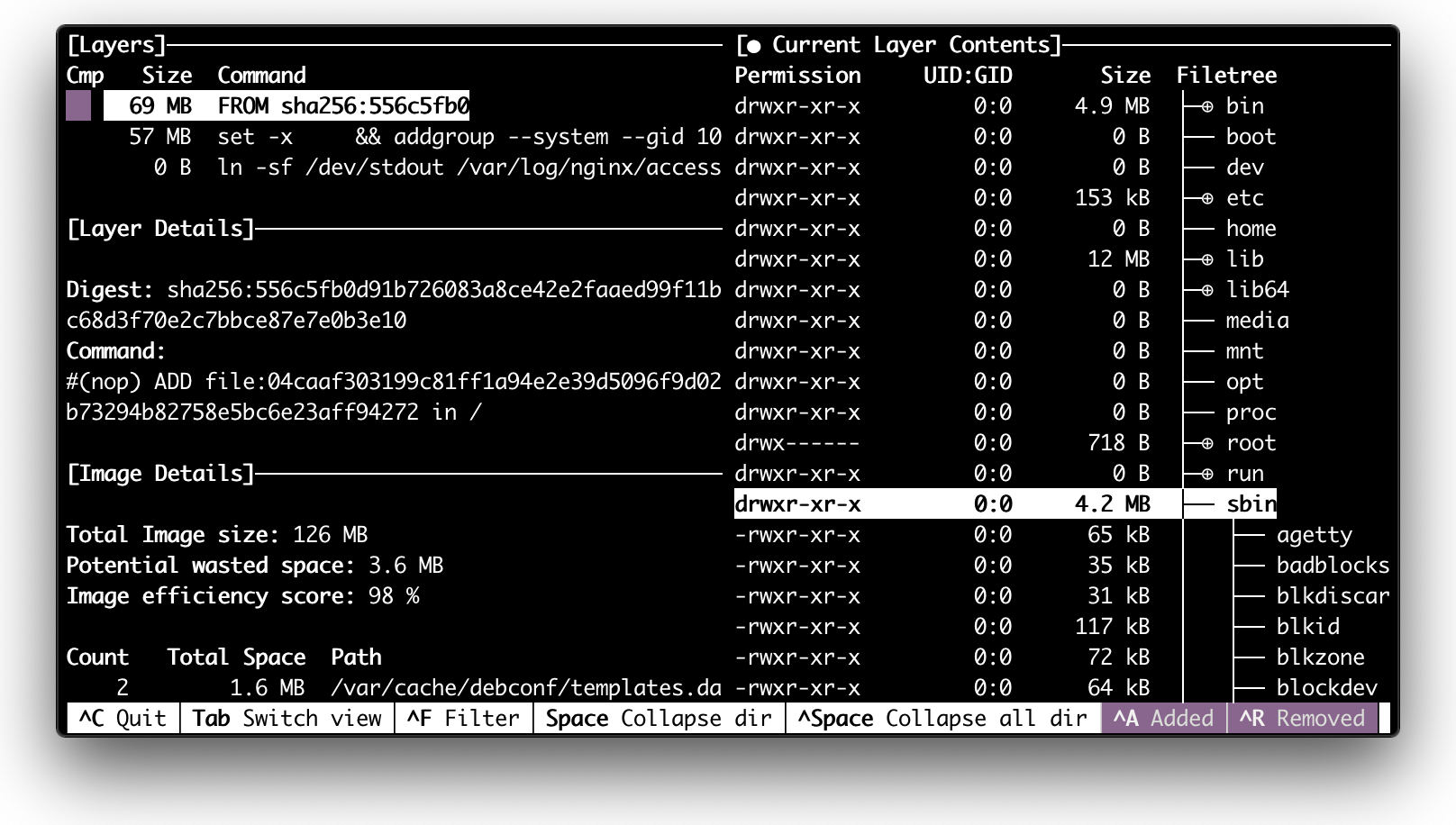
Inspecting nginx image with dive tool (screenshot)

dive nginx

Well, the directory tree looks like a root filesystem of some Linux distribution. If we take a look at the corresponding Dockerfile we can notice that nginx image is based on debian:

FROM debian:buster-slim

LABEL maintainer="NGINX Docker Maintainers <docker-maint@nginx.com>"

ENV NGINX_VERSION   1.17.10
ENV NJS_VERSION     0.3.9
ENV PKG_RELEASE     1~buster

...

And if we dive deeper and examine debian:buster-slim Dockerfile we will see that it just copies a root filesystem to an empty folder:

FROM scratch
ADD rootfs.tar.xz /
CMD ["bash"]

Combining Debian's user-land with the host's kernel containers start resembling fully-featured operating systems. With nginx image we can use the shell to interact with the container:
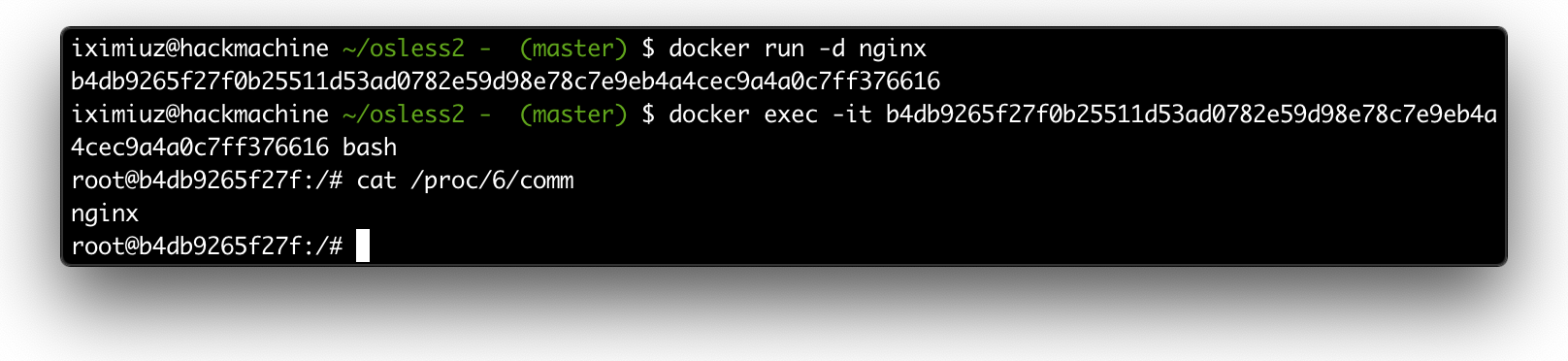
Interactive shell with running nginx container.

Interactive shell with running nginx container.

Can we do the same for our slim hello container? Obviously not, there is no bash executable inside:
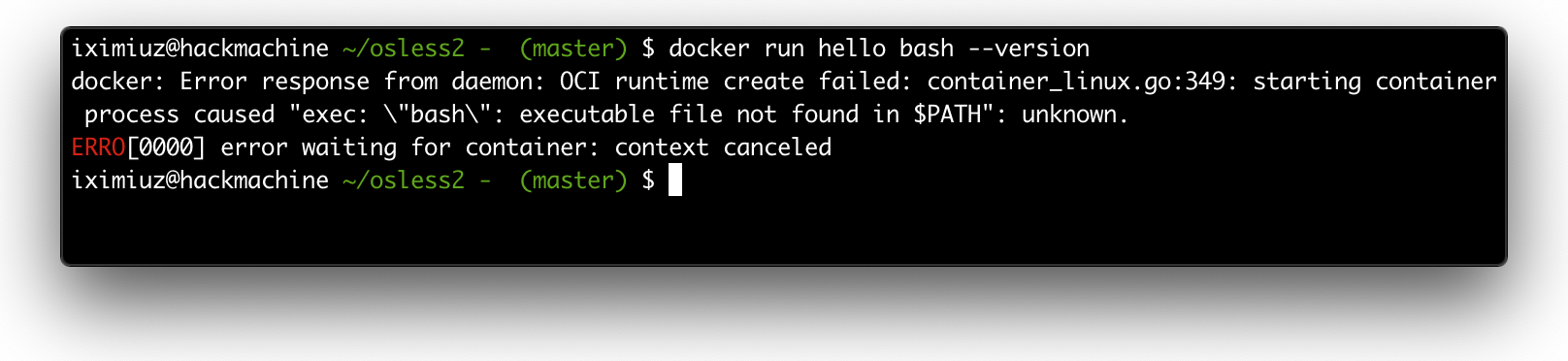
Demonstraiting that hello container doesn't have bash inside.

hello container doesn't have bash inside.

Wrapping up

So, what should be the conclusion here? The virtualization capabilities of the modern operating systems, namely Linux, turned out to be so powerful that people started packing fully-featured user-lands like debian (or more lightweight alternatives like alpine) into isolated and restricted VM-like execution environments called containers. By virtue of this ability:

  • We can play with various Linux distribution using a simple docker run -it fedora bash.
  • We can use OS commands including package managers like yum or apt while building our images.
  • We can interact with running containers using various OS utilities.

But with great power comes great responsibility. Huge containers carrying lots of unnecessary tools slow down deployments and increase the surface of potential cyberattacks. So, it's good to remember that having a full-blown Linux distro in your container is not technically mandatory. Keep your container images slim!