


pipe()Readable stream is an abstraction for some data source. Which could be hard to grasp and even harder to use...
Everybody knows that readable streams support two modes of operating (flowing and paused) and piping to writable streams. It's not that easy to understand the purposes of these mechanisms and behavioral differences though. Since one readable stream abstraction stands for multiple usage modes its public interface (i.e. the set of methods and events) is a bit inconsistent. Usage of readable streams might be totally confusing without the understanding of the underlying ideas. In this article, we will make an attempt to justify the abstraction of readable streams trying to implement our own file reader. Also, we will have a look at some nicer ways to consume readable streams.
Level up your server-side game — join 20,000 engineers getting insightful learning materials straight to their inbox.
All images in the article were created using draw.io.
I usually tend to think about a program I'm developing in terms of processes. Even though in Node.js execution of the code is happening in a single thread, we might usually pick out independent logical processes our program consists of.
Let's try to think about some reading procedure (eg. reading a big file from disk). What would be the ways to organize it?
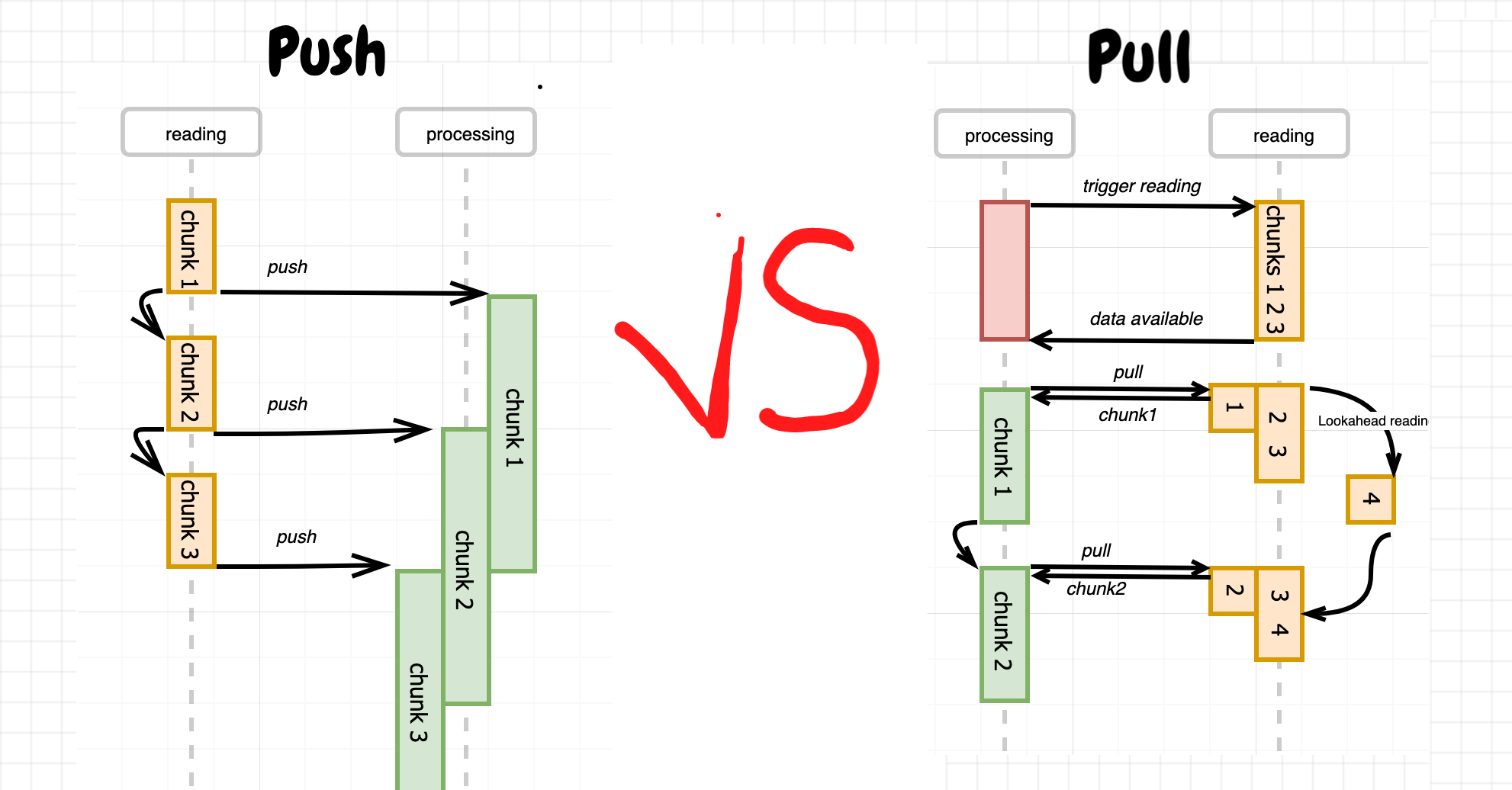
One option would be to assign a dedicated process for reading. The reading procedure will be driven then by this process, so the data from the file will be sequentially (asynchronously though) read in chunks and every chunk immediately (but synchronously) pushed to the remaining part of the program. Once pushing is done an asynchronous reading of the next chunk will be triggered.
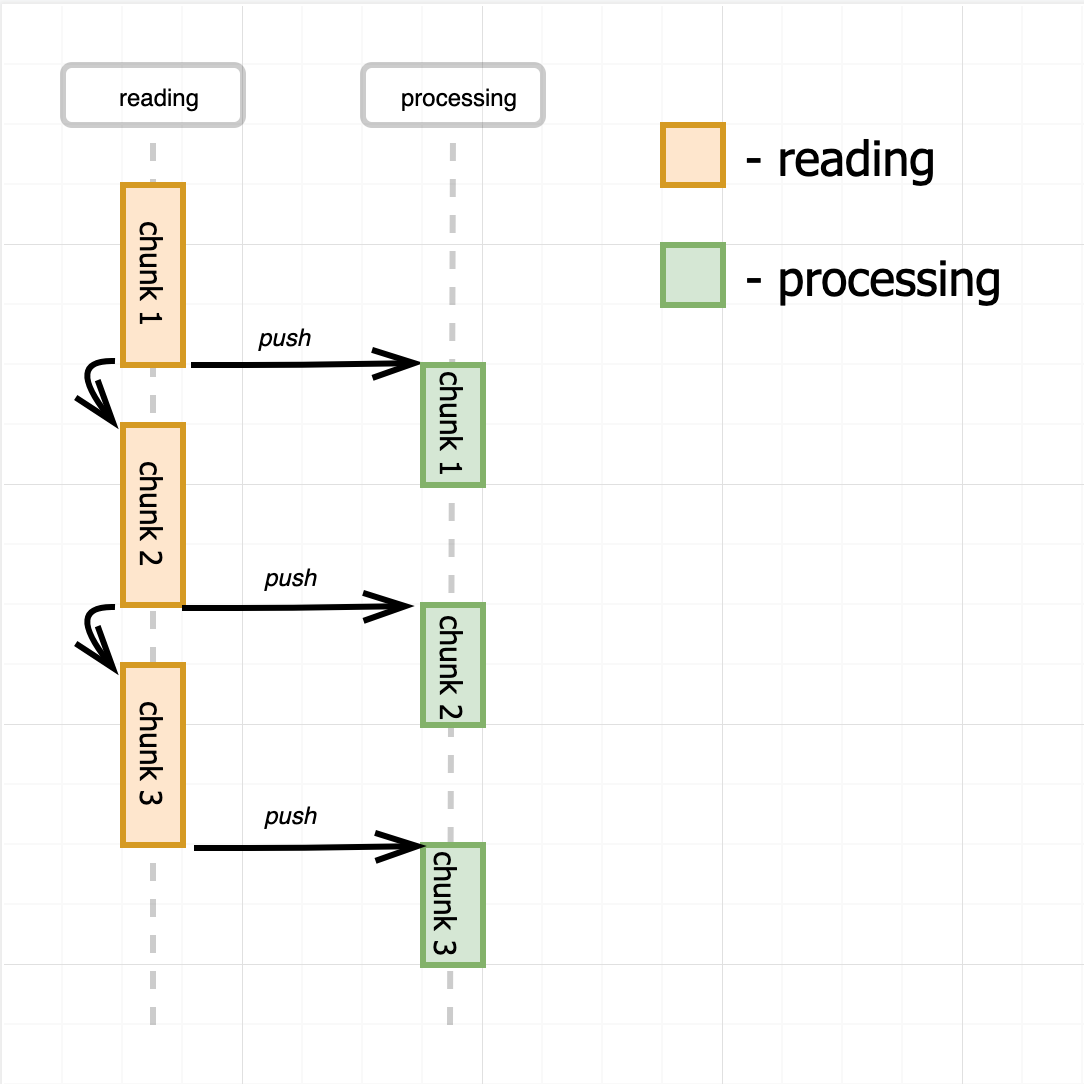
Pseudo-code for the approach from above:
const fs = require('fs');
const { EventEmitter } = require('events');

class Reader extends EventEmitter {
  constructor(filename, chunkSize = 1024) {
    this.filename = filename;
    this.chunkSize = chunkSize;
    this.offset = 0;
  }

  read() {
    fs.read(this.filename, this.offset, this.chunkSize, (err, chunk) => {
      if (err) {
        this.emit('error', err);
      } else {
        this.emit('data', chunk);  // Synchronous!
        if (chunk !== null) {
          this.offset += chunk.length;
          this.read();
        }
      }
    });
  }
}


// Usage:
const reader = new Reader(<path/to/some/file>);
reader.on('data', chunk => asyncHandle(chunk));  // to keep producer reading
reader.read()
The push model is extremely easy to implement and at first glance pretty simple to work with. Just subscribe for the data event and consume the file chunk by chunk. However, the consuming side doesn't have a way to control the pace of data producing. If our consumer is slower than the producer, we might need to introduce (i.e. scale up) more consumers to cope with the data flow.
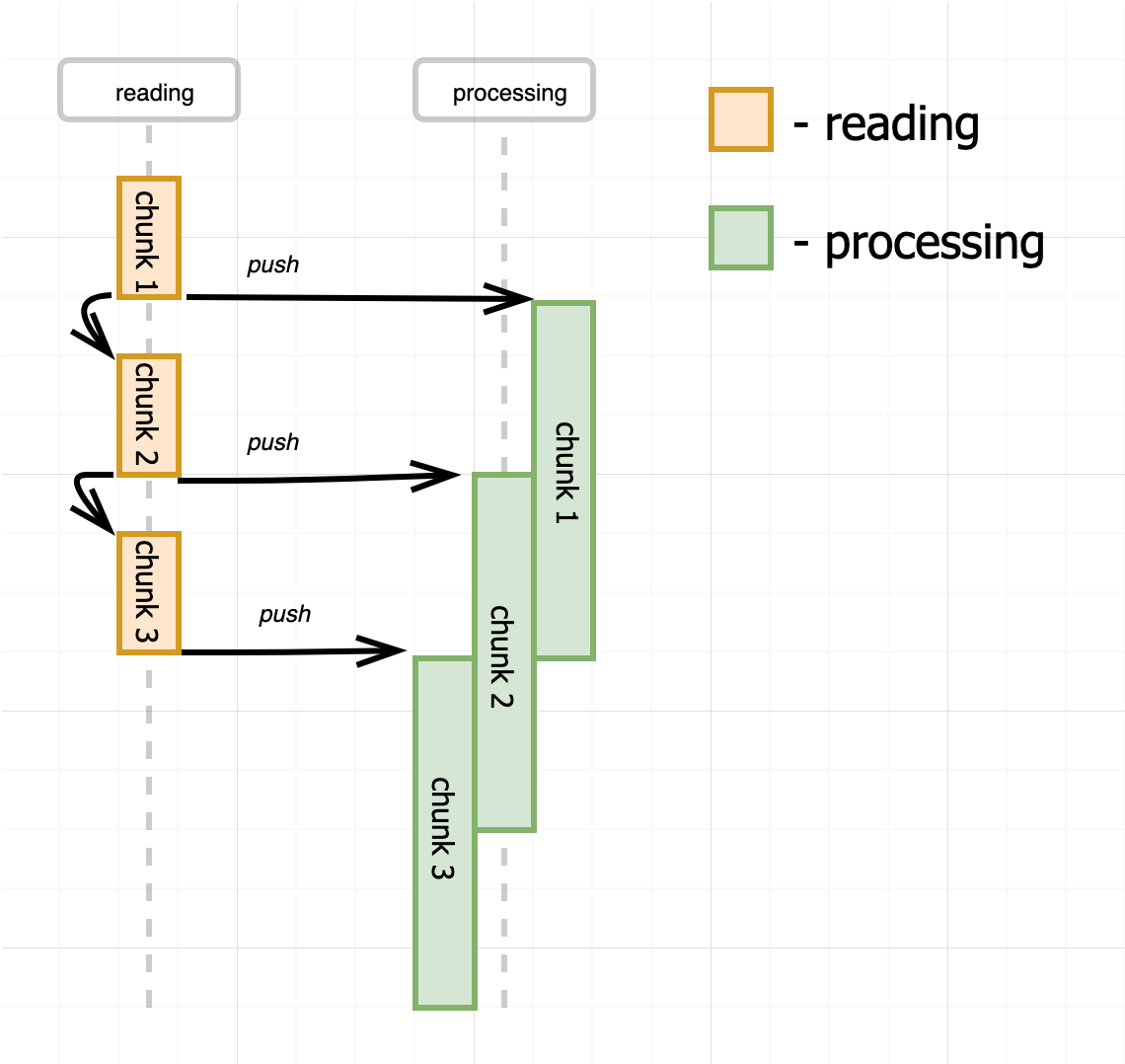
The math is simple. If the reader produces a chunk of data every 3 seconds, and consuming of a chunk takes 6 seconds, at any given point in time except the very beginning and end of processing we need to have 2 parallel consumers (for the sake of simplicity we assume 100% speedup of consuming by increasing the number of instances from one to two). We can even come up with a generalized formula for a number of consumers: ceil(Th/Tr) where Tr is a time to read a chunk and Th is a time to handle a chunk. It means that if the consuming if faster than reading we will have just one consumer, but in the opposite situation, we have to have proportionally more consumers than readers.
Another way to handle the situations with fast producer and a slow consumer could be buffering of unprocessed chunks in memory on the consumer side.
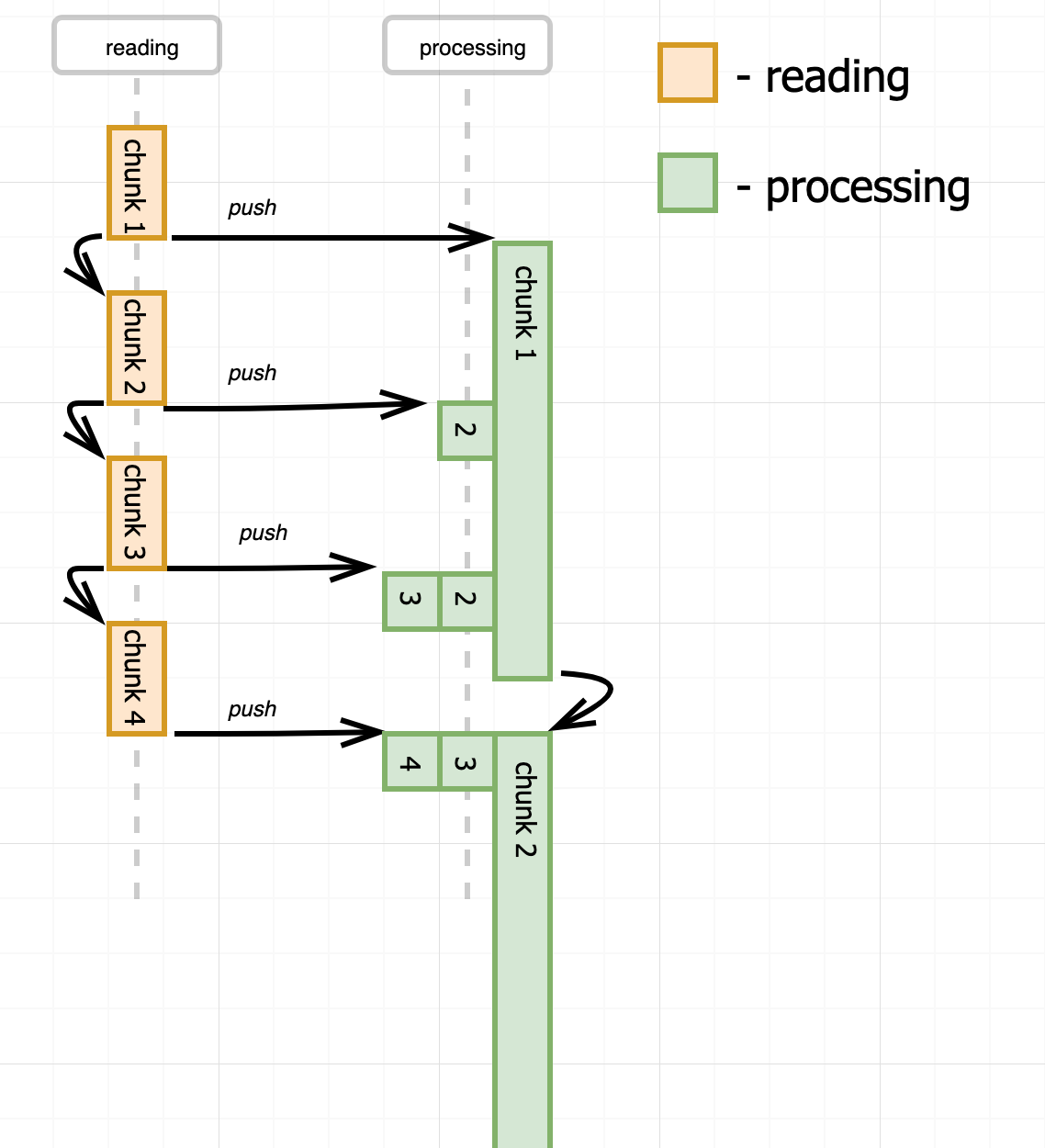
However, it leads to infinite buffer growth and uncontrolled memory usage, so we need to introduce some backpressure mechanism.
It turns out that the model described above is exactly what the flowing mode of Node.js Readable streams is. In flowing mode a readable stream participates as an active part of the program driving the reading procedure and constantly pushing read chunks (without any buffering) to the listeners of data event. See the following real code example:
const fs = require('fs');
const stream = fs.createReadStream('/path/to/file');

// subscribing to `data` event moves stream to flowing mode
stream.on('data', chunk => {
  queue.push(chunk);
  if (queue.length > MAX_INFLIGH_CHUNKS) {
    stream.pause();  // poor man's backpressure
    queue.on('drain', () => stream.resume());
  }
});

// ... separate consuming process
while (queue.size()) {
  await process(queue.deque());
}
queue.emit('drain');
Aspects of the readable stream abstraction relevant to the flowing mode:
'data'pause()resume()Aspects of the readable stream abstraction irrelevant to the flowing mode:
highWaterMark'readable'read()While it is still possible to specify the highWaterMark or call read() on a stream in flowing mode, it might be useless (in the first case) or even harmful (in the case of explicit read() call). So, approximately half of the public interface should be avoided. Say hi to another great example of the Separation of concerns principle violation and the consequences.
The queue + pause()/resume() pattern above is a simplification of pipe()-ing - a mechanism to consume readable streams with built-in backpressure support. But to use stream piping consumers have to be organized as writable streams, which is not always the case. Also, it's 2019 and async/await is there for quite some time. Everybody's trying to utilize async/await as much as possible making the code seems flat and synchronous-like. So, let's think about alternatives.
Another option is to make the reading procedure driven by a consuming process. It basically means that there is no dedicated reading process at all. Each read operation will be issued by the consuming code and data will be read from the file no faster than it's being consumed. In other words, the data will be pulled out from the stream by the consuming process.
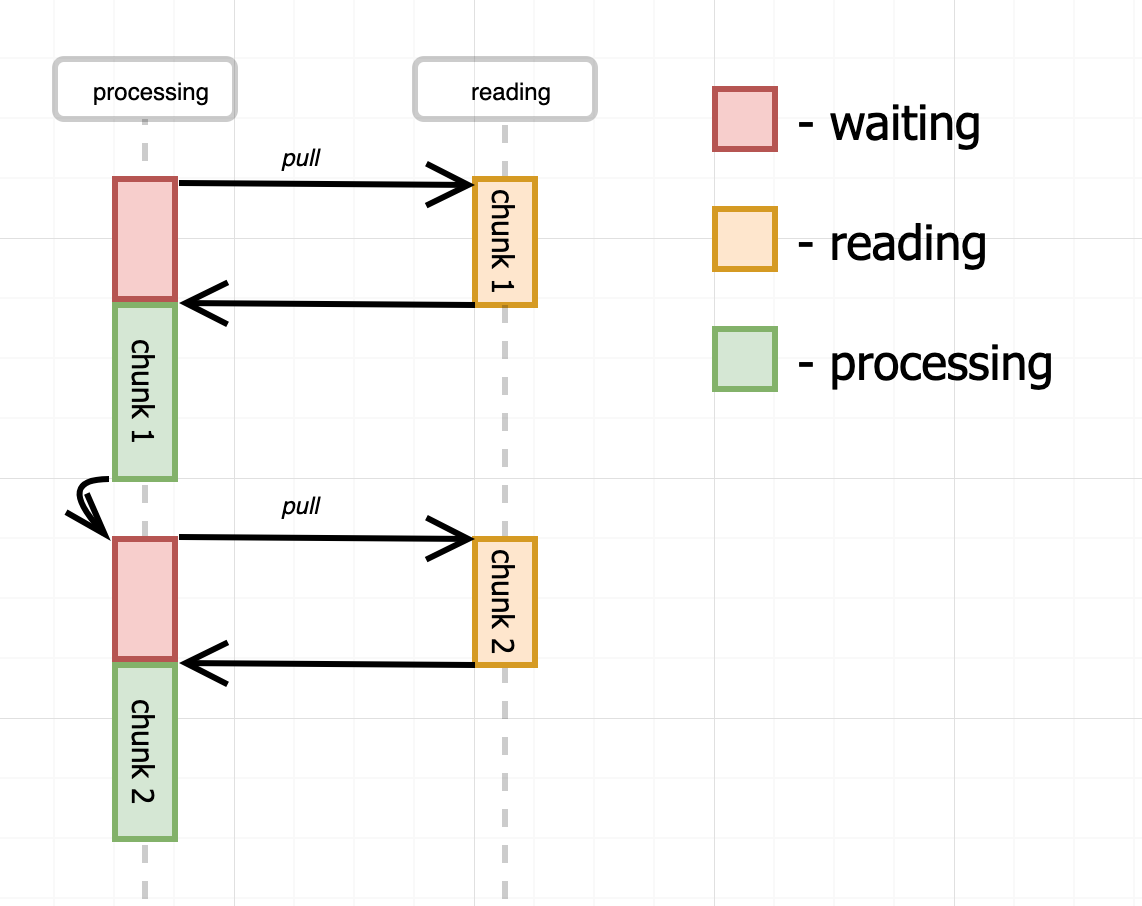
Pseudo-code for the approach from above:
const fs = require('fs');

class Reader {
  constructor(filename, chunkSize = 1024) {
    this.filename = filename;
    this.chunkSize = chunkSize;
    this.offset = 0;
  }

  read() {
    return new Promise((resolve, reject) => {
      fs.read(this.filename, this.offset, this.chunkSize, (err, chunk) => {
        if (err) {
          return reject(err);
        }
        if (chunk !== null) {
          this.offset += chunk.length;
        }
        resolve(chunk);
      });
    });
  }
}

const reader = new Reader(<path/to/some/file>);
while (true) {
  const chunk = await reader.read();
  await asyncHandle(chunk);
}
Both, implementation and the usage looks pretty simple. However, the diagram shows that there is an inefficiency in our consuming process. The consumer is idling every time a chunk is being read from the file. And there is no reading activity during the processing of the chunks since there is no dedicated reading process. Let's see how we can eliminate this problem.
We can introduce a buffer on the reading side and use a lookahead reading technique. Instead of reading one chunk at a time, the reader will read buffer_capacity/chunk_size chunks during the first reading operation. And every time the consumer pulls out a chunk (or multiple chunks) from the reader, the reader makes another (but just single) reading attempt to fill the freed buffer space. Thus, the consumer has to trigger the initial reading and then every pulling of the chunk will trigger one more background reading.
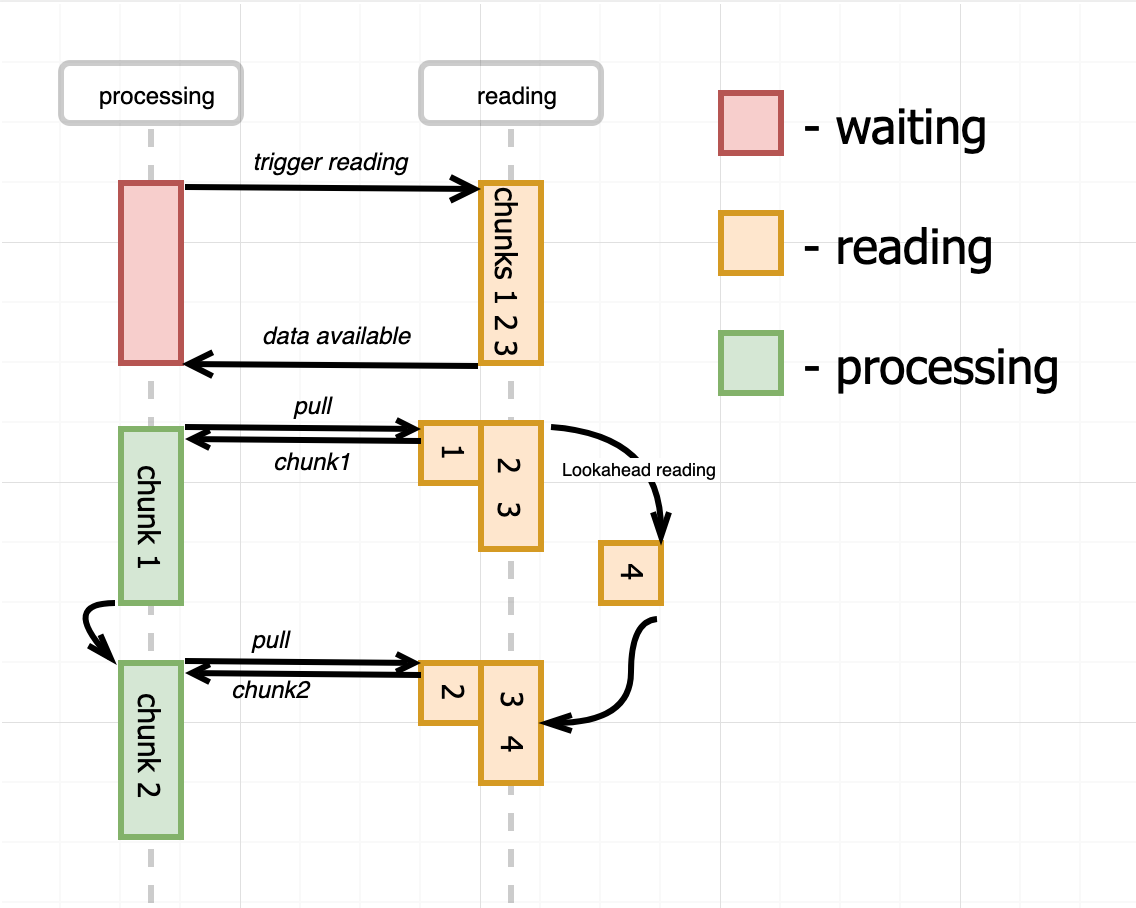
And that's exactly what the paused mode of Node.js Readable streams is doing. In paused mode, the readable stream is a passive part and the reading procedure is driven by the consumer's process. However, to eliminate the potential inefficiency, the buffer and lookahead reading is used under the hood by the readable stream. Let's look at the real code example.
const fs = require('fs');
const stream = fs.createReadStream('/path/to/file', {
  highWaterMark: 64 * 1024,  // internal buffer size
});

// Stream created in paused mode by default,
// but subscribing for the `readable` event
// triggers initial read() call.
stream.once('readable', consume);

async function consume() {
  let chunk;
  while (
    // next line is synchronous, but it also
    // triggers an async background reading!
    (chunk = stream.read()) !== null
  ) {
    await asyncHandle(chunk);
  }
  stream.once('readable', consume);
}

async function asyncHandle(chunk) {
  console.log(chunk);
}
While it's extremely efficient to organize the consuming in such a way the code looks a bit awkward. Soon we will see how to consume paused readable streams using lovely async/await style.
Aspects of the readable stream abstraction relevant to the paused mode:
highWaterMark - this is the size of the underlying buffer.'readable' - occurs when there is some data to read or at the end of stream.read() - synchronous and is guaranteed to return some data when is called on readable event.Aspects of the readable stream abstraction irrelevant to the paused mode:
'data' - still emited but pretty useless.pause() and resume().We just learned that the paused mode poses both efficiency (lookahead reading with buffering) and convenience (pull model) properties. However, handling of 'readable' event requires some memorization and may be error-prone. Let's try to simplify consumer's code and get rid of callbacks.
Since the generators support was introduced in Node.js 4.0, one has a possibility to keep the code callback-less. Thanks to the ability of yield-ing a promise from a generator function, await-ing its result via old-school then() and catch() calls, and sending it back to the Generator, mimicking async/await style. Kinda poor man's async/await support. At the same time, a readable stream just perfectly fits an idea of generators (even without async/await tricks), since it's an arbitrary long producer of data.
Summing up the above let's try to wrap a readable stream in a generator and then use co to run the code.
function* streamgen(readable) {
  let ended = false;
  const onEnded = new Promise((res, rej) => {
    readable.once('error', rej);
    readable.once('end', () => {
      ended = true;
      res();
    });
  });

  while (!ended) {
    const chunk = readable.read();
    if (chunk !== null) {
      yield chunk;
      continue;
    }

    const onData = new Promise(res => {
      readable.once('readable', () => {
        const chunk = readable.read();
        if (chunk !== null) {  // On 'end' there is still a 'readable' event, ignore it.
          res(chunk);
        }
      });
    });
    yield Promise.race([onEnded, onData]);
  }
}
Basically, we have an infinite loop yielding us every chunk of data from the stream. The only complication in the code is the concurrent event handling. Just because we need to terminate the reading of the stream once either error or end of the stream is faced. Otherwise, we might get stuck listening for the next readable event forever.
The consuming part is pretty and flat (except the fact that it must reside inside of a generator):
const co = require('co');
const fs = require('fs');

function* main() {
  const stream = fs.createReadStream('/path/to/file', {
    highWaterMark: 1,
    encoding: 'utf8',
  });
  const chars = [];
  for (const char of streamgen(stream)) {
    chars.push(yield char);
    // To test an error case: process.nextTick(() => stream.emit('error', new Error()));
  }
  return chars.join('');
}

co(main)
  .then(value => console.log(value))
  .catch(err => console.error(err));
That is, we can consume the stream following the pull model and having the consuming part flat, i.e. callback-less.
The code above looks much better than the code based on callbacks. But let's try to get rid of co and utilize the power of async/await. Node.js 10 introduces a very nice mechanism of async iterators. Just well-known iterators but with an ability to await inside of a next() function. Obviously, invocations of the next() function has to be awaited on the caller side. And the best part here is - generators are iterators too and now they also can be async.
Let's try to implement our wrapper using shiny new async generators!
async function* streamgen(readable) {
  let ended = false;
  const onEnded = new Promise((res, rej) => {
    readable.once('error', rej);
    readable.once('end', () => {
      ended = true;
      res();
    });
  });

  while (!ended) {
    const chunk = readable.read();
    if (chunk !== null) {
      yield chunk;
      continue;
    }

    const onReadable = new Promise(res => readable.once('readable', res));
    await Promise.race([onEnded, onReadable]);
  }
}
The snippet above uses the same idea as the plain generator-based wrapper from the previous section. And the consuming code now can be just any native async function:
const fs = require('fs');

async function main() {
  const stream = fs.createReadStream('/path/to/file', {
    highWaterMark: 1,
    encoding: 'utf8',
  });
  const chars = [];
  for await (const char of streamgen(stream)) {
    chars.push(char);
  }
  console.log(chars.join(''));
}

main();
It turns out that the pattern from above is so useful that all readable streams starting from Node.js 10 just expose async iterator interface out of the box. I.e. they have a property Symbol.asyncIterator and conform to the iterating protocol. Basically, starting from Node.js 10 we can just do the following to pull data from the readable stream:
async function main() {
  const stream = fs.createReadStream('/path/to/file');
  for await (const chunk of stream) {
    console.log(chunk);
  }
}

main();
One can check the implementation of this feature in Node.js repository on GitHub. It's much more verbose due to the need for handling different edge cases and un-happy flows and is based on async iterators (while our example code was based on async generators). But the idea is still exactly the same as in our tiny streamgen wrapper.
pipe()pipe()-ing is another important and extremely useful way to use readable streams. It's used to stream data from a readable source to writable destination utilizing internal support of backpressuring. However, I would keep it out of scope since it deserves its own article.
I liked the idea of async iterators so much that I wanted to implement something good using this feature. Just because every time I see somebody's using GNU readline to read a stream line by line in Node.js I want to cry, I decided to implement my own line reader. By the way, it turns out to be something around 20-30% faster than the aforementioned readline package. Fill free to check out my project readlines-ng on GitHub.
Level up your server-side game — join 20,000 engineers getting insightful learning materials straight to their inbox:
此内容由惯性聚合(RSS阅读器)自动聚合整理,仅供阅读参考。 原文来自 — 版权归原作者所有。