







In the previous articles, we discussed the scope of the container runtime shim and drafted the minimum viable version. Now, it's time to move on and have some fun with more advanced scenarios! Have you ever wondered how docker run -i or kubectl run --stdin work? If so, this article is for you! We will try to replicate this piece of functionality in our experimental container manager. And as you have probably guessed, the container runtime shim will do a lot of heavy lifting here again.
conman - interactive container demo
What does interactive container actually mean?
As we already know, a container is just a fancy word for an isolated Linux process. Every process has an stdin stream to read input data from and stdout/stderr streams to print the produced output to. So does the container.
We learned from the previous articles that when we create a container, its stdout and stderr become controlled by the corresponding runtime shim process. Normally, the content of these streams is forwarded to the container log file. A mind-reader could also notice, that the stdin stream of the container was just silently set to /dev/null.
But what if we want to send some data to the container's stdin and stream back its stdout and/or stderr at runtime? It could be very useful, at least during debugging sessions.
Luckily, docker (and kubectl) implements interactive runs:
[root@localhost ~]$ docker run --interactive alpine sh  # or kubectl run alpine --image=alpine --stdin -- sh
hostname
1d41fee3cc9d
date
Fri Jan 24 18:32:59 UTC 2020
exit
[root@localhost ~]$
When we run docker command-line client with --interactive, -i flag, the underlying shim doesn't close container's stdin. Instead, it keeps it open and provides an IPC mechanism to the corresponding container management component(s) to forward data in and out of the container's stdio streams. Then, this data gets forwarded further, from the container manager, to [eventually] the command-line client at your disposal.
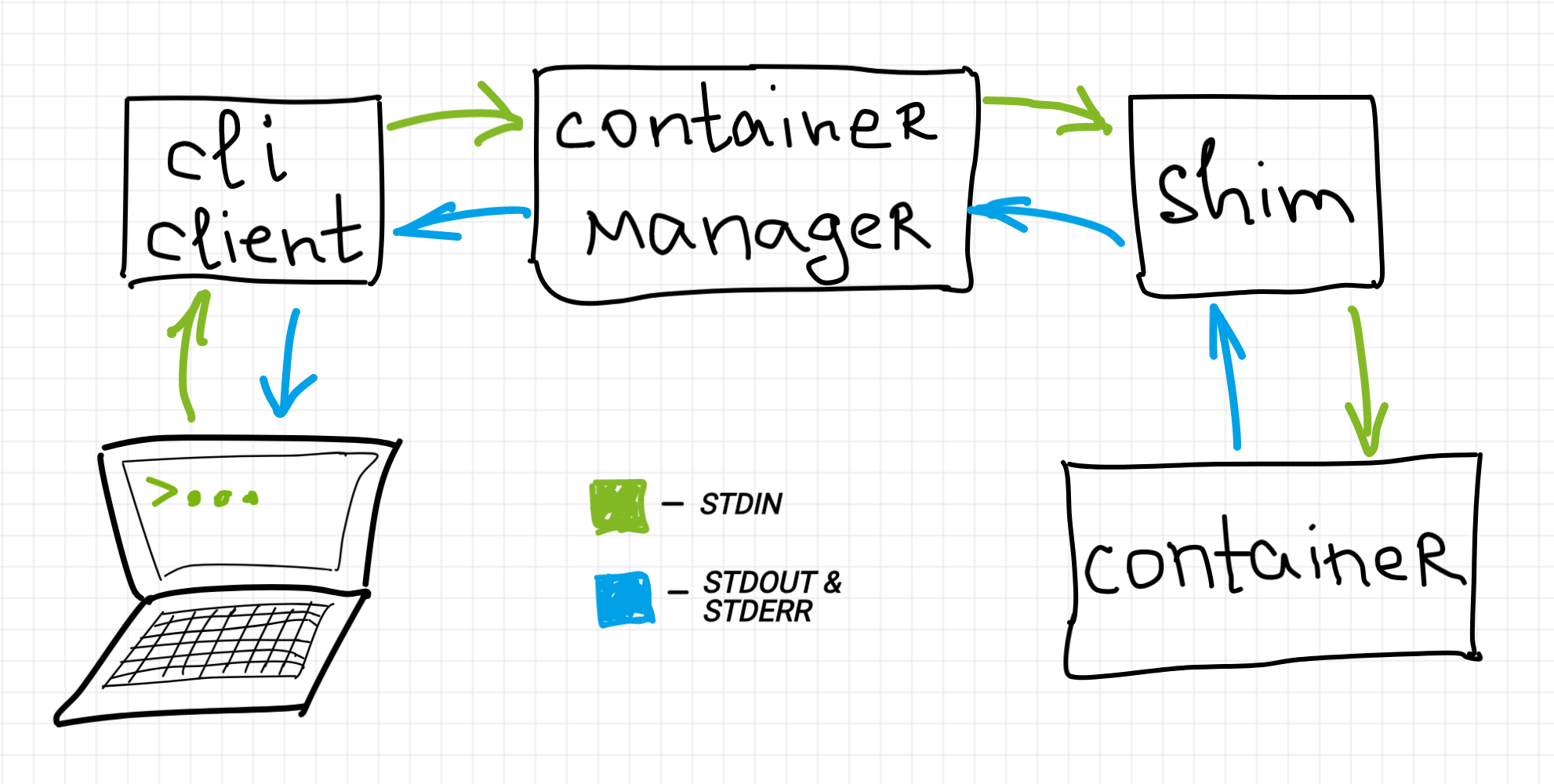
Note that the diagram from above is rather a simplification. Due to Docker (or Kubernetes) layered design there could be more intermediary components on the way of streamed data, thus the container manager on the diagram should be treated as some pretty high-level abstraction of the container management software. The closest to the diagram real-world setup would be crictl (as a command-line client) interacting with cri-o (as a CRI-compatible container manager), but this pair is probably not as widespread as docker or kubectl-based scenarios.
We can spot the same interactive containers technique applied in the wild at least in the following cases:
# Docker
docker run -i   # or --interactive
docker attach   # interactive by default
docker exec -i  # or --interactive

# Kubernetes
kubectl run --stdin     # or -i
kubectl run --attach
kubectl attach --stdin  # or -i
kubectl exec --stdin    # or -i

# ctr (containerd CLI)
ctr run  # interactive by default

# CLI for kubelet CRI
crictl attach --stdin
Beware, that the interactive mode itself doesn't mean that the underlying container process gets the controlling [pseudo]terminal. We just keep its stdio streams (transitively) connected to our command-line client. If the container process needs the controlling terminal, we need to use --tty flag and this mode we will try to cover in the next article.
Let's get back to our experimental container manager. To replicate the interactive containers functionality in conman, the following components require additional development:
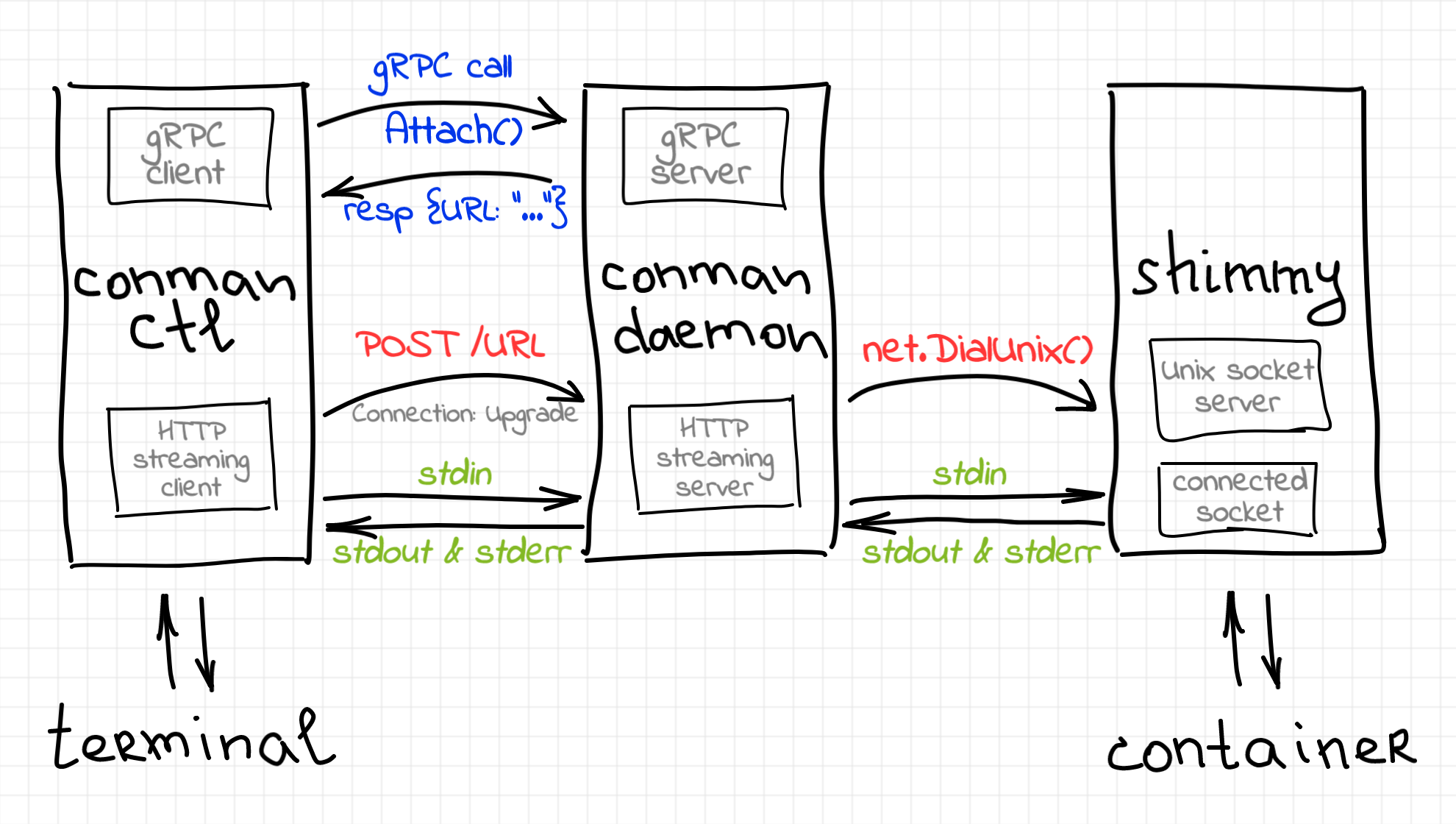
The diagram above shows one of the possible designs of the interactive containers. Notice, that since we are striving to make conman CRI-compatible, only one new method called Attach() has to be added to its gRPC API. That is if we needed to implement conmanctl container run --stdin command, we would combine the basic methods (ContainerCreate(), then Attach(), then ContainerStart()) solely on the client side.
Notice also, that other designs are possible. For instance, containerd-shim utilizes Linux named pipes (FIFO) to expose container I/O from the shim. Thus, containerd communicates with the shim by opening FIFO files instead of connecting to a socket server.
In the rest of the article, I'll try to explain the bits from the diagram above in more detail.
Well, the most surprising part of the manager's change was the introduction of... an HTTP server! As you probably remember, conmand has been shaped as a daemon with a built-in gRPC server. However, if we take a look at the specification of the new Attach() method we could notice something strange:
service Conman {
    // ...
    rpc Attach(AttachRequest) returns (AttachResponse) {}
}

message AttachRequest {
    string container_id = 1;
    bool tty = 2;
    bool stdin = 3;
    bool stdout = 4;
    bool stderr = 5;
}

message AttachResponse {
    string url = 1;
}
What exactly is this url in the AttachResponse? It turned out, that in accordance with the Kubernetes CRI specification, the streaming of the containers' stdio should be done separately from the main gRPC API. The response of the Attach() method contains the URL of the streaming endpoint, but we need a component to serve it! Thus, we need to incorporate another server into the container manager daemon. This time, it's going to be an HTTP streaming server.
Historically, the HTTP protocol was message based. How come that we could stream something using HTTP? Right, we need to switch to HTTP/2 SPDY! This upgrade of the protocol allows us to have multiple streams of data multiplexed within a single TCP connection. These streams can be used to forward container's stdin, stdout, and stderr, as well as some controlling data.
While all this streaming stuff sounds very cool, implementing it from scratch could become too much of a hassle. Luckily, Kubernetes already has everything done for us. It seems like Kubernetes developers are on their way of moving self-sufficient and/or reusable components to separate repositories, but by the moment of writing this article, it's still a common practice to have a dependence on the huge github.com/kubernetes/kubernetes repository even if you need only a tiny fraction of its code. In particular, we are interested in the part of kubelet under a very relevant path pkg/kubelet/server/streaming/server.go:
// Server is the library interface to serve the stream requests.
type Server interface {
    http.Handler

    // Get the serving URL for the requests.
    GetAttach(req *runtimeapi.AttachRequest) (*runtimeapi.AttachResponse, error)

    // ... skipped ...

    // Start the server.
    Start(stayUp bool) error

    // Stop the server, and terminate any open connections.
    Stop() error
}

// Runtime is the interface to execute the commands and provide the streams.
type Runtime interface {
    // ... skipped ...

    Attach(
        containerID string,
        in io.Reader,
        out io.WriteCloser,
        err io.WriteCloser,
        tty bool,
        resize <-chan remotecommand.TerminalSize,
    ) error
}
If we take a closer look at this module, we will notice, that Runtime is just an interface, but Server has a default implementation as well. However, the creation of the server requires an instance of the runtime to be passed in as a dependency.
The default implementation of the Server interface can be used in conman as an HTTP streaming server. But we still need to implement the Runtime interface ourselves. In particular, if we implement Runtime.Attach method, then in, out, and err parameters will be representing the client side of the attach session (eg. conmanctl attach running in the terminal). Thus, the data read from in should be forwarded by conman to the corresponding shim endpoint, and the data received from the shim should be written to either out or err streams to be forwarded by the streaming server to the client.
To implement streaming.Runtime, we need to recall that conman has a cri.RuntimeService abstraction aiming to be a facade for the CRI runtime service functionality. Since the Attach() method is a part of the CRI runtime service abstraction, we can extend conman's cri.RuntimeService by adding kubelet/server/streaming.Runtime to it:
// see https://github.com/iximiuz/conman/blob/v0.0.3/pkg/cri/runtime_service.go#L54

type RuntimeService interface {
    // I'm here!!!
    streaming.Runtime

    CreateContainer(ContainerOptions) (*container.Container, error)
    StartContainer(container.ID) error
    StopContainer(id container.ID, timeout time.Duration) error
    RemoveContainer(container.ID) error
    ListContainers() ([]*container.Container, error)
    GetContainer(container.ID) (*container.Container, error)
}
The complete source code of the streaming.Runtime implementation is a bit verbose, but I'll try to excerpt the main idea:
// see https://github.com/iximiuz/conman/blob/v0.0.3/pkg/cri/streaming_service.go

func (rs *runtimeService) Attach(
    containerID string,
    stdin io.Reader,
    stdout io.WriteCloser,
    stderr io.WriteCloser,
    _tty bool,
    _resize <-chan remotecommand.TerminalSize,
) error {
    cont, _ := rs.GetContainer(container.ID(containerID))
    if cont.Status() != container.Created && cont.Status() != container.Running {
        return errors.Errorf("cannot connect to %v container", cont.Status())
    }

    conn, _ := net.DialUnix(
        "unix",
        nil,
        &net.UnixAddr{Name: rs.containerAttachFile(cont.ID()), Net: "unix"},
    )
    defer conn.Close()

    doneOut := make(chan error)
    if stdout != nil || stderr != nil {
        go func() {
            doneOut <- forwardOutStreams(conn, stdout, stderr)
        }()
    }

    doneIn := make(chan error)
    if stdin != nil {
        go func() {
            _, err := io.Copy(conn, stdin)
            doneIn <- err
        }()
    }

    select {
    case err := <-doneIn:
        return err
    case err := <-doneOut:
        return err
    }
    return nil
}

func forwardOutStreams(conn io.Reader, stdout, stderr io.Writer) error {
    // The implementation is close to just
    // io.Copy(stdout, conn) && io.Copy(stderr, conn)
    // see the "Container runtime shim" section for the explanation.
}
First off, we connect to the Unix socket server provided by the container runtime shim (see Container runtime shim section). If the connection was successful, we just keep forwarding bytes back and forth until some of the streams get closed or an error occurs.
The conmanServer now has to be augmented with the streaming.Server instance and the streaming.Server.GetAttach() method will be powering the gRPC Attach() implementation.
That's turned out to be quite some new code, but luckily the scope of the change is well-defined and fairly limited. It's time to move on and review the corresponding client change.
This is my favorite! Thanks to another Kubernetes module (client-go), the client-side part of the change is extremely simple and small (excerpt):
// see https://github.com/iximiuz/conman/blob/v0.0.3/ctl/cmd/containers/attach.go

var attachCmd = &cobra.Command{
    Use:   "attach <container-id>",
    Run: func(cmd *cobra.Command, args []string) {
        client, _ := cmdutil.Connect()
        resp, err := client.Attach(
            context.Background(),
            &server.AttachRequest{
                ContainerId: args[0],
                Tty:         false,
                Stdin:       opts.Stdin,
                Stdout:      true,
                Stderr:      true,
            },
        )

        executor, _ := remotecommand.NewSPDYExecutor(
            // ...
            "POST",
            resp.Url,
        )

        streamOptions := remotecommand.StreamOptions{
            Stdin:  os.Stdin,
            Stdout: os.Stdout,
            Stderr: os.Stderr,
            Tty:    false,
        }
        executor.Stream(streamOptions)
    },
}
First, we make a gRPC Attach() call to obtain the streaming endpoint URL. Then we create an instance of SPDYExecutor and call Stream() on it, supplying the stdio streams of our process. Under the hood, the executor sends an HTTP request to the specified URL with the protocol upgrade header. Once the handshake and protocol negotiation is done, the executor starts reading the supplied stdin (i.e. the stdin of our process) and writing it to the established SPDY connection. Similarly, the data read from the connection gets written to either stdout or stderr of the conmanctl process.
The shim's part of the change is probably the most interesting one. The main idea is fairly easy to explain though. We just need to create a socket server listening for the incoming connections from the container manager. Once a connection is established, the shim needs to write any stdout and stderr data from the container to the connection. At the same time, if there is some incoming data on the connected socket, the shim has to forward it to the container's stdin.
The complexity arises when we start considering multiple concurrent attach connections. The previous version of the shim already has been forwarding the container's output to the log file. However, now we need to broadcast stdout and stderr of the container to the log file and to every connected socket.
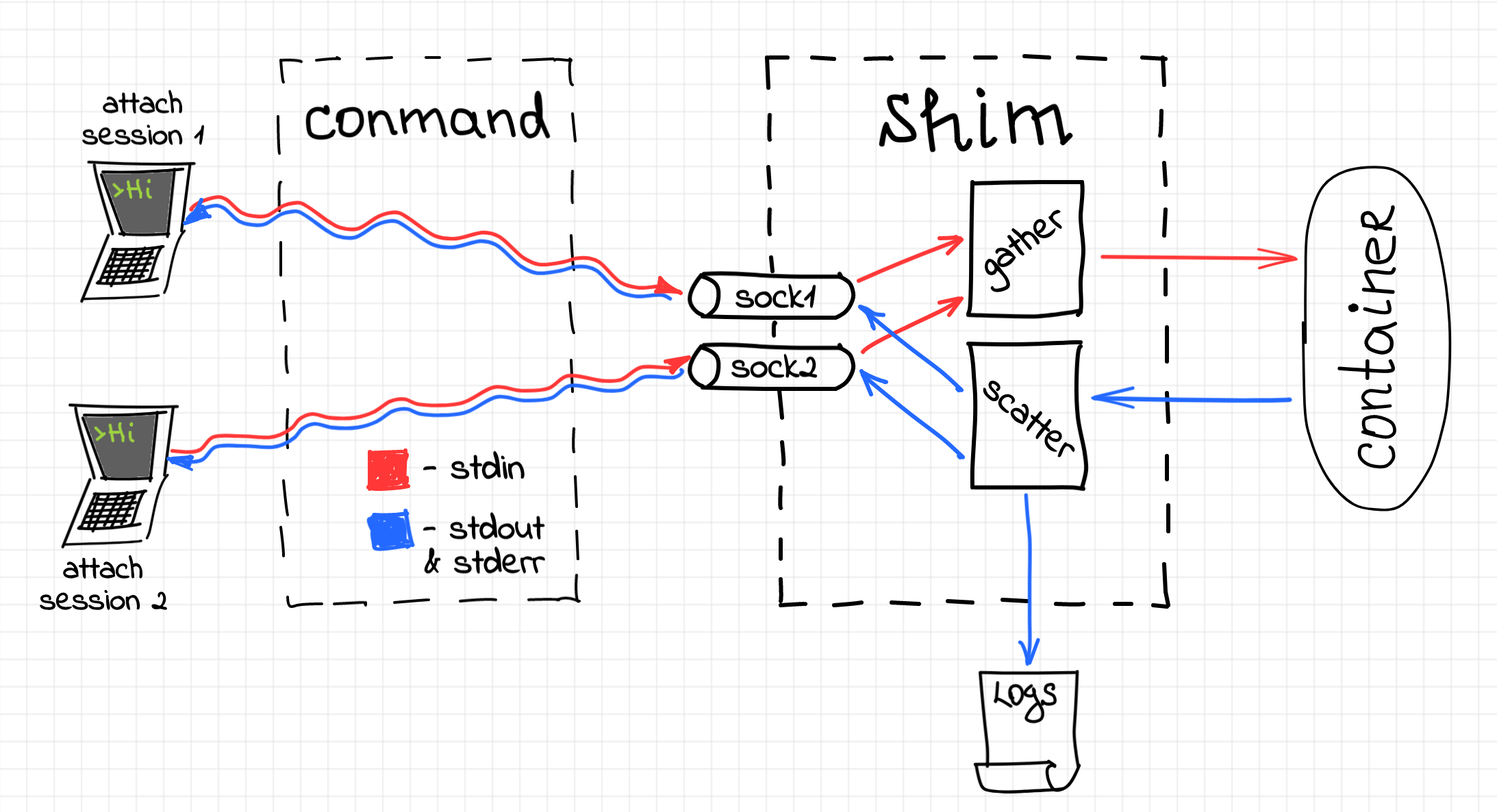
A similar problem has to be solved for the stdin stream. However, instead of broadcasting, we rather need to be gathering all the input data from all the connected attach sockets and writing it to a single file descriptor corresponding to the container's stdin.
Luckily, there is a well-known design pattern called scatter-gather. To limit the complexity of the code, two new abstractions have been introduced. The first abstraction is a Scatterer struct. There is always a single shared scatterer object per a shim process. The scatterer has a single source (of data) and multiple sinks. The source of data is either stdout or stderr stream of the container. A sink can be any writable (i.e. implements std::io::Write trait) object. Once a new socket connection is accepted by the shim server, its writable end gets registered as a new sink.
// https://github.com/iximiuz/shimmy/blob/v0.2.0/src/container/io.rs#L70-L129

pub struct Scatterer {
    kind: ScattererKind,
    source: IStream,
    sinks: HashMap<usize, Rc<RefCell<dyn Write>>>,
    // ...
}

impl Scatterer {
    pub fn stdout(source: IStream) -> Self {
        Self::new(ScattererKind::STDOUT, source)
    }

    pub fn stderr(source: IStream) -> Self {
        Self::new(ScattererKind::STDERR, source)
    }

    fn new(kind: ScattererKind, source: IStream) -> Self {}

    pub fn add_sink(&mut self, sink: Rc<RefCell<dyn Write>>) {
        self.sinks.insert(next_sink_seq_no, sink);
    }

    pub fn scatter(&mut self) -> Result {
        // read from the source to some buffer
        // for each sink:
        //    write (kind, buffer) tuple to the sink
    }
}
In the case of the socket connection, we have to use the same write end of the connection for both stdout and stderr data. Thus, we need to apply a multiplexing technique by prefixing every chunk of data with the type (kind) of the stream (using a single extra byte). Obviously, on the client-side (i.e. the streaming server implementation in conmand) we have to parse the data read from the socket and demultiplex it:
// see https://github.com/iximiuz/conman/blob/v0.0.3/pkg/cri/streaming_service.go#L101-L134

const PipeTypeStdout = 1
const PipeTypeStderr = 2

func forwardOutStreams(conn io.Reader, stdout, stderr io.Writer) error {
    buf := make([]byte, BufSize+1)

    for {
        nread, err := conn.Read(buf)
        if nread > 0 {
            var dst io.Writer
            switch buf[0] {
            case PipeTypeStdout:
                dst = stdout
            case PipeTypeStderr:
                dst = stderr
            }

            if dst != nil {
                src := bytes.NewReader(buf[1:nread])
                io.Copy(dst, src)
            }
        }
        // ...
    }
}
One of the advantages of having sinks represented by Write trait objects is the ability to reuse the scatterer for writing logs. With a tiny Writer wrapper for the Logger struct, we can easily register the logger as a permanent sink.
The second abstraction is a Gatherer struct. Oppositely, the gatherer has a single sink and multiple sources (of data). The sink is represented by the stdin stream of the container. Once a new socket connection is accepted, its readable end gets registered as a source for the gatherer. Once again, there is a single life-long gatherer instance per a shim process.
// https://github.com/iximiuz/shimmy/blob/v0.2.0/src/container/io.rs#L23-L68

pub struct Gatherer {
    sink: OStream,
    sources: HashMap<Token, Rc<RefCell<dyn Read>>>,
}

impl Gatherer {
    pub fn new(sink: OStream) -> Self {}

    pub fn add_source(&mut self, token: Token, source: Rc<RefCell<dyn Read>>) {
        self.sources.insert(token, source);
    }

    pub fn gather(&mut self, token: Token) -> Result {
        // read from the source corresponding to the token
        // write to the sink
    }
}
The problem space of the shim is event-driven. The shim has to deal with events (signals, file I/O, etc) occurring concurrently and to reduce the complexity of the code the reactor pattern is used. With the introduction of the socket server and stdin stream handling, we got a lot of new events to react on. In the second version of the shim, the reactor code has been significantly redesigned. Here is an excerpt of the new reactor implementation:
// see https://github.com/iximiuz/shimmy/blob/v0.2.0/src/container/reactor.rs

pub struct Reactor {
    stdin_gatherer: Option<io::Gatherer>,
    stdout_scatterer: Option<io::Scatterer>,
    stderr_scatterer: Option<io::Scatterer>,
    signal_handler: signal::Handler,
    attach_listener: UnixListener,
    // ...
}

impl Reactor {
    pub fn run(&mut self) -> TerminationStatus {
        while self.signal_handler.container_status().is_none() {
            if self.poll_once() == 0 {
                debug!("[shim] still serving container");
            }
        }
        // ...
        self.signal_handler.container_status().unwrap()
    }

    fn poll_once(&mut self) -> i32 {
        let mut events = Events::with_capacity(128);
        self.poll.poll(&mut events, Some(self.heartbeat));

        let mut event_count = 0;
        for event in events.iter() {
            event_count += 1;
            match event.token() {
                TOKEN_STDOUT => self.handle_stdout_event(event),
                TOKEN_STDERR => self.handle_stderr_event(event),
                TOKEN_SIGNAL => self.signal_handler.handle_signal(),
                TOKEN_ATTACH => self.handle_attach_listener_event(event),
                _ => self.handle_attach_stream_event(event),
            }
        }
        event_count
    }

    fn handle_stdout_event(&mut self, event: Event) {
        match self.stdout_scatterer.as_mut().unwrap().scatter() {
            Ok(nbytes) => (),
            Err(err) => error!("failed scattering container's STDOUT: {:?}", err),
        }
    }

    fn handle_stderr_event(&mut self, event: Event) {
        // same as stdout
    }

    fn handle_attach_listener_event(&mut self, event: Event) {
        match self.attach_listener.accept() {
            Ok((stream, _)) => {
                if let Some(ref mut stdin_gatherer) = self.stdin_gatherer {
                    stdin_gatherer.add_source(token, stream);
                }

                if let Some(ref mut stdout_scatterer) = self.stdout_scatterer {
                    stdout_scatterer.add_sink(stream);
                }

                if let Some(ref mut stderr_scatterer) = self.stderr_scatterer {
                    stderr_scatterer.add_sink(stream);
                }
            }
            Err(err) => error!("..."),
        }
    }

    // ...
}
After you've built conman and shimmy (see corresponding README files), the following series of steps can be used to play with the new attach functionality:
Terminal 1:
# Start conman daemon
$ bin/conmand
> INFO[0000] Conman's here!
Terminal 2:
#  Create a container
$ bin/conmanctl container create --stdin \
$    --image test/data/rootfs_alpine/ mycont -- sh
> {"containerId":"bed09f6bf466444695e5e976fb4cec95"}

# Attach to the container
$ bin/conmanctl container attach --stdin bed09f6bf466444695e5e976fb4cec95
Terminal 3:
# Start the container
$ bin/conmanctl container start bed09f6bf466444695e5e976fb4cec95
> {}
Terminal 2 again:
# Execute `date` command in the container
$ date
> Sun Jan 26 14:56:03 UTC 2020
Notice the --stdin flag used for both container create and container attach commands. Without the flag, the stdin of the container will be redirected to /dev/null since it's the default behavior.
Slightly more advanced demo (the video from the Introduction section):
conman - interactive container demo
In the next article, we will finally see how to add support for PTY-controlled containers. This change will enable interactive shell-based use cases, similar to the handy docker run -it ubuntu bash command.
Until then and take care!
此内容由惯性聚合(RSS阅读器)自动聚合整理,仅供阅读参考。 原文来自 — 版权归原作者所有。