


From time to time I use kind as a local Kubernetes playground. It's super-handy, real quick, and 100% disposable.
Up until recently, all the scenarios I've tested with kind were using public container images. However, a few days ago, I found myself in a situation where I needed to run a pod using an image that I had just built on my laptop.
One way of doing it would be pushing the image to a local or remote registry accessible from inside the kind Kubernetes cluster. However, kind still doesn't spin up a local registry out of the box (you can vote for the GitHub issue here) and I'm not a fan of sending stuff over the Internet without very good reasons.
Usually, I prefer to stick with the official installation guides. However, when it comes to testing or prototyping things quickly it could be too much of an overhead to skim through all these lengthy pages every time I need a new playground. Also, in the case of kind, you'd probably need to install kubectl separately, because kind doesn't have it included. So, here is a hundred more pages to digest.
arkade to the rescue! Arkade is "The Open Source Kubernetes Marketplace". Or, to put it simply, a single command-line executable that allows you to download and install other Cloud Native tools such as kind, kubectl, or helm. And all this goodness is just one command away from you.
# Install arkade.
$ curl -sLS https://dl.get-arkade.dev | sudo sh

# Create playground.
$ arkade get kind
$ arkade get kubectl
$ kind create cluster
The tool is so cool that every playground on iximiuz Labs has it preinstalled. Thus, you can experiment with kind right in your browser using the online Docker playground and the tiny snippet from above.
Luckily, kind provides an alternative - it allows one to load a local docker image into cluster nodes!
$ kind load help
Loads images into node from an archive or image on host

Usage:
  kind load [command]

Available Commands:
  docker-image  Loads docker image from host into nodes
  image-archive Loads docker image from archive into nodes
First, let's prepare a test image:
$ cat > Dockerfile <<EOF
FROM debian:buster-slim

CMD ["sleep", "9999"]
EOF

# You probably could do the same with podman
$ docker build -t sleepy:latest .
Initially, I thought that loading it would be as simple as just that:
$ kind load docker-image sleepy:latest

Image: "sleepy:latest" with ID "sha256:9c8c52..." not yet present on node "kind-control-plane", loading...
Ok, let's try it out!
$ kubectl apply -f - <<EOF
apiVersion: v1
kind: Pod
metadata:
  name: sleepy
spec:
  containers:
  - name: sleepy
    image: sleepy:latest
EOF

pod/sleepy created
Did it work?
$ kubectl get pods -w
NAME     READY   STATUS              RESTARTS   AGE
sleepy   0/1     ContainerCreating   0          3s
sleepy   0/1     ErrImagePull        0          3s
sleepy   0/1     ImagePullBackOff    0          18s
sleepy   0/1     ErrImagePull        0          32s
sleepy   0/1     ImagePullBackOff    0          43s
Oops... Kubernetes couldn't find the sleepy:latest image. Wtf?
Since I had a slight idea of how things may work under the hood, my next step was to take a closer look at the kind's cluster node.
By design, kind puts its Kubernetes clusters into docker containers. Every such cluster has only one node. And every such node from the host machine standpoint looks like a single docker (or podman) container.
$ docker ps
CONTAINER ID   IMAGE                  COMMAND                  CREATED        STATUS        PORTS                       NAMES
ad43e2ba6a0f   kindest/node:v1.19.1   "/usr/local/bin/entr…"   20 hours ago   Up 20 hours   127.0.0.1:45645->6443/tcp   kind-control-plane
We can easily get into this node container by running something like docker exec -it kind-control-plane bash. And if we inspect the running processes from inside the container, we will finally see where all the Kubernetes stuff is hidden:
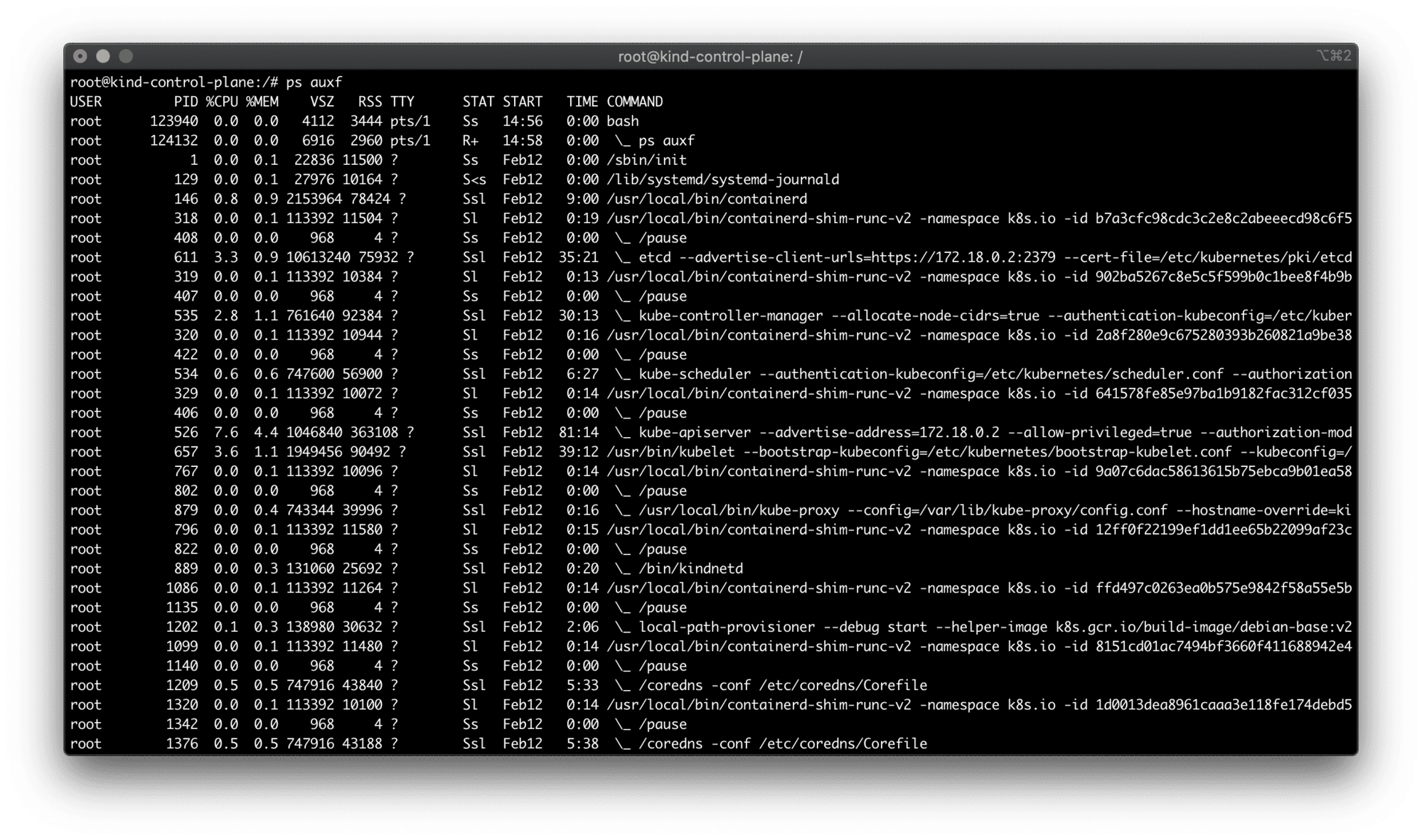
ps auxf from inside the kind node container.
All the standard cluster processes (kube-scheduler, kube-controller-manager, kube-apiserver, etc) reside inside this container. But you also may have noticed, that kind uses containerd as a CRI implementation to deal with Pods (and hence - containers).
There is no docker command inside this container to list the images. Well, there is no dockerd either. But since containerd is a CRI-compatible container runtime, we could try looking for crictl inside the container. crictl to any CRI runtime is what docker command-line tool to the dockerd daemon. And indeed, it's there!
$ crictl images
IMAGE                                      TAG                  IMAGE ID            SIZE
docker.io/kindest/kindnetd                 v20200725-4d6bea59   b77790820d015       119MB
docker.io/library/sleepy                   latest               9c8c523a3a192       72.5MB
docker.io/rancher/local-path-provisioner   v0.0.14              e422121c9c5f9       42MB
k8s.gcr.io/build-image/debian-base         v2.1.0               c7c6c86897b63       53.9MB
k8s.gcr.io/coredns                         1.7.0                bfe3a36ebd252       45.4MB
k8s.gcr.io/etcd                            3.4.13-0             0369cf4303ffd       255MB
k8s.gcr.io/kube-apiserver                  v1.19.1              8cba89a89aaa8       95MB
k8s.gcr.io/kube-controller-manager         v1.19.1              7dafbafe72c90       84.1MB
k8s.gcr.io/kube-proxy                      v1.19.1              47e289e332426       136MB
k8s.gcr.io/kube-scheduler                  v1.19.1              4d648fc900179       65.1MB
k8s.gcr.io/pause                           3.3                  0184c1613d929       686kB
Ok, among ancillary Kubernetes images we can clearly see the image we loaded on the previous step docker.io/library/sleepy. Weird...
My first guess was to use the fully-qualified image name in the pod's manifest:
apiVersion: v1
kind: Pod
metadata:
  name: sleepy
spec:
  containers:
  - name: sleepy
    image: docker.io/library/sleepy:latest  # <--- HERE
But it didn't make any difference. After scratching my head, removing and redeploying the pod gazillion times in a row, and scratching my head again, I decided to stop and think for a bit. Why Kubernetes would want to pull the image despite the local copy of it already being there?
Oh, stupid me! I haven't specified the version!
Since I was using latest tag, the de facto image pull policy was Always:
If you would like to always force a pull, you can do one of the following:
- set the imagePullPolicy of the container to Always.
- omit the imagePullPolicy and use :latest as the tag for the image to use.
- omit the imagePullPolicy and the tag for the image to use.
- enable the AlwaysPullImages admission controller.
So, there are [at least] two ways to make it work.
First, I could have used a concrete tag value while building and loading the image:
$ docker build -t sleepy:0.1.0 .
$ kind load docker-image sleepy:0.1.0

$ kubectl apply -f - <<EOF
apiVersion: v1
kind: Pod
metadata:
  name: sleepy
spec:
  containers:
  - name: sleepy
    image: sleepy:0.1.0
EOF

$ kubectl get pods -w
NAME     READY   STATUS    RESTARTS   AGE
sleepy   1/1     Running   0          4s
Or, I could have set the imagePullPolicy to either IfNotPresent or Never and sticked with the latest tag:
apiVersion: v1
kind: Pod
metadata:
  name: sleepy
spec:
  containers:
  - name: sleepy
    image: sleepy:latest
    imagePullPolicy: Never  # or IfNotPresent
Both strategies would do.
As a terminal guy, the only piece of documentation I've read was kind load help. But if I have taken a look at the kind Quick Start guide section on image loading, I'd probably notice this warning:
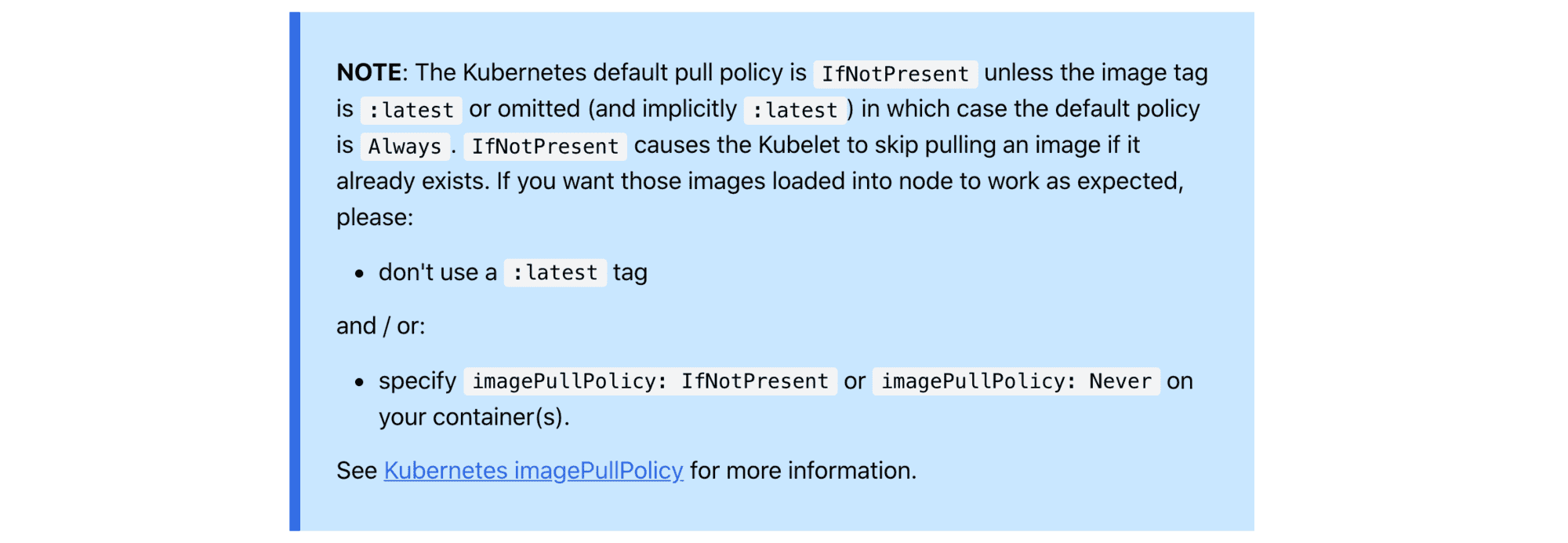
So, a couple of things here:
help output is thorough enough.Insanity: doing the same thing over and over again and expecting different results.
此内容由惯性聚合(RSS阅读器)自动聚合整理,仅供阅读参考。 原文来自 — 版权归原作者所有。