
惯性聚合 高效追踪和阅读你感兴趣的博客、新闻、科技资讯
阅读原文 在惯性聚合中打开

推荐订阅源

N
News | PayPal Newsroom
P
Proofpoint News Feed
Cyberwarzone
Cyberwarzone
C
Cisco Blogs
SecWiki News
SecWiki News
Know Your Adversary
Know Your Adversary
cs.AI updates on arXiv.org
Vercel News
Vercel News
freeCodeCamp Programming Tutorials: Python, JavaScript, Git & More
罗磊的独立博客
NISL@THU
NISL@THU
WordPress大学
WordPress大学
Hacker News - Newest:
Hacker News - Newest: "LLM"
T
Threat Research - Cisco Blogs
AI
AI
Simon Willison's Weblog
Security Archives - TechRepublic
有赞技术团队
有赞技术团队
L
LINUX DO - 热门话题
Hacker News: Ask HN
Hacker News: Ask HN
V
V2EX
G
GRAHAM CLULEY
TaoSecurity Blog
TaoSecurity Blog
Hugging Face - Blog
Hugging Face - Blog
D
Darknet – Hacking Tools, Hacker News & Cyber Security
F
Fortinet All Blogs
博客园 - 叶小钗
博客园 - 三生石上(FineUI控件)
云风的 BLOG
云风的 BLOG
Recorded Future
Recorded Future
Latest news
Latest news
The Hacker News
The Hacker News
aimingoo的专栏
aimingoo的专栏
T
Troy Hunt's Blog
S
Schneier on Security
I
Intezer
Google DeepMind News
A
Arctic Wolf
Apple Machine Learning Research
Threat Intelligence Blog | Flashpoint
T
Threatpost
爱范儿
爱范儿
The Register - Security
S
SegmentFault 最新的问题
Blog — PlanetScale
Blog — PlanetScale
博客园 - 聂微东
宝玉的分享
宝玉的分享
Recent Commits to openclaw:main
美团技术团队
B
Blog RSS Feed

Ivan on Containers, Kubernetes, and Server-Side

A grounded take on agentic coding for production environments Server-Side Playgrounds Reimagined: Build, Boot, and Network Your Own Virtual Labs [not a] Kubernetes 101 - Pods, Deployments, and Services As an Attempt To Automate Age-Old Infra Patterns JavaScript or TypeScript? How To Benefit From the Dichotomy On Software Design... and Good Writing Building a Firecracker-Powered Course Platform To Learn Docker and Kubernetes What Actually Happens When You Publish a Container Port A Visual Guide to SSH Tunnels: Local and Remote Port Forwarding Debugging Containers Like a Pro Docker: How To Debug Distroless And Slim Containers How To Extract Container Image Filesystem Using Docker | iximiuz Labs In Pursuit of Better Container Images: Alpine, Distroless, Apko, Chisel, DockerSlim, oh my! How To Start Programming In Go: Advice For Fellow DevOps Engineers Kubernetes Ephemeral Containers and kubectl debug Command How To Develop Kubernetes CLIs Like a Pro Docker Container Commands Explained: Understand, Don't Memorize | iximiuz Labs Learning Docker with Docker - Toying With DinD For Fun And Profit How To Extend Kubernetes API - Kubernetes vs. Django The Influence of Plumbing on Programming How To Call Kubernetes API from Go - Types and Common Machinery How To Call Kubernetes API using Simple HTTP Client Kubernetes API Basics - Resources, Kinds, and Objects OpenFaaS - Run Containerized Functions On Your Own Terms Learning Containers From The Bottom Up Docker Containers vs. Kubernetes Pods - Taking a Deeper Look | iximiuz Labs Learn-by-Doing Platforms for Dev, DevOps, and SRE Folks How HTTP Keep-Alive can cause TCP race condition How to Work with Container Images Using ctr | iximiuz Labs Multiple Containers, Same Port, no Reverse Proxy... Exploring Go net/http Package - On How Not To Set Socket Options Disposable Local Development Environments with Vagrant, Docker, and Arkade DevOps, SRE, and Platform Engineering My Choice of Programming Languages Prometheus Is Not a TSDB How to learn PromQL with Prometheus Playground Prometheus Cheat Sheet - Basics (Metrics, Labels, Time Series, Scraping) Rust - Writing Parsers With nom Parser Combinator Framework pq - parse and query log files as time series Prometheus Cheat Sheet - Moving Average, Max, Min, etc (Aggregation Over Time) Prometheus Cheat Sheet - How to Join Multiple Metrics (Vector Matching) The Need For Slimmer Containers Understanding Rust Privacy and Visibility Model Bridge vs. Switch: Takeaways from a Real Data Center Tour | iximiuz Labs From LAN to VXLAN: Networking Basics for Non-Network Engineers | iximiuz Labs KiND - How I Wasted a Day Loading Local Docker Images Go, HTTP handlers, panic, and deadlocks Exploring Kubernetes Operator Pattern Making Sense Out Of Cloud Native Buzz Service Discovery in Kubernetes: Combining the Best of Two Worlds API Developers Never REST How Container Networking Works: Building a Bridge Network From Scratch | iximiuz Labs Traefik: canary deployments with weighted load balancing Service Proxy, Pod, Sidecar, oh my! You Need Containers To Build Images You Don't Need an Image To Run a Container Not Every Container Has an Operating System Inside Working with container images in Go Master Go While Learning Containers Implementing Container Runtime Shim: Interactive Containers How to use Flask with gevent (uWSGI and Gunicorn editions) My 10 Years of Programming Experience Implementing Container Runtime Shim: First Code Implementing Container Runtime Shim: runc Kubernetes Repository On Flame Dealing with process termination in Linux (with Rust examples) conman - [the] Container Manager: Inception Journey From Containerization To Orchestration And Beyond Linux PTY - How docker attach and docker exec Commands Work Inside Illustrated introduction to Linux iptables From Docker Container to Bootable Linux Disk Image Пишем свой веб-сервер на Python: протокол HTTP 9001 способ создать веб-сервер на Python Explaining async/await in 200 lines of code Explaining event loop in 100 lines of code Save the day with gevent Пишем свой веб-сервер на Python: процессы, потоки и асинхронный I/O Truly optional scalar types in protobuf3 (with Go examples) Node.js Writable streams distilled Node.js Readable streams distilled How to on starting processes (mostly in Linux) Дайджест интересных ссылок – Июль 2016 Пишем свой веб-сервер на Python: сокеты Наследование в JavaScript Мастерить!
How To Publish a Port of a Running Container
Ivan Velichko · 2022-11-30 · via Ivan on Containers, Kubernetes, and Server-Side

The only "official" way to publish a port in Docker is the -p|--publish flag of the docker run (or docker create) command. And it's probably for good that Docker doesn't allow you to expose ports on the fly easily. Published ports are part of the container's configuration, and the modern infrastructure is supposed to be fully declarative and reproducible. Thus, if Docker encouraged (any) modification of the container's configuration at runtime, it'd definitely worsen the general reproducibility of container setups.

But what if I really need to publish that port?

For instance, I periodically get into the following trouble: there is a containerized Java monster web service that takes (tens of) minutes to start up, and I'm supposed to develop/debug it. I launch a container and go grab some coffee. But when I'm back from the coffee break, I realize that I forgot to expose port 80 (or 443, or whatever) to my host system. And the browser is on the host...

There are two (quite old) StackOverflow answers (1, 2) suggesting a bunch of solutions:

Tiny bit of theory

Container port publishing is a form of port forwarding, i.e., good old socket address redirection. It can be implemented with either modification of the packet's destination address (on L3) or by using an intermediary proxy process forwarding only the payload data:
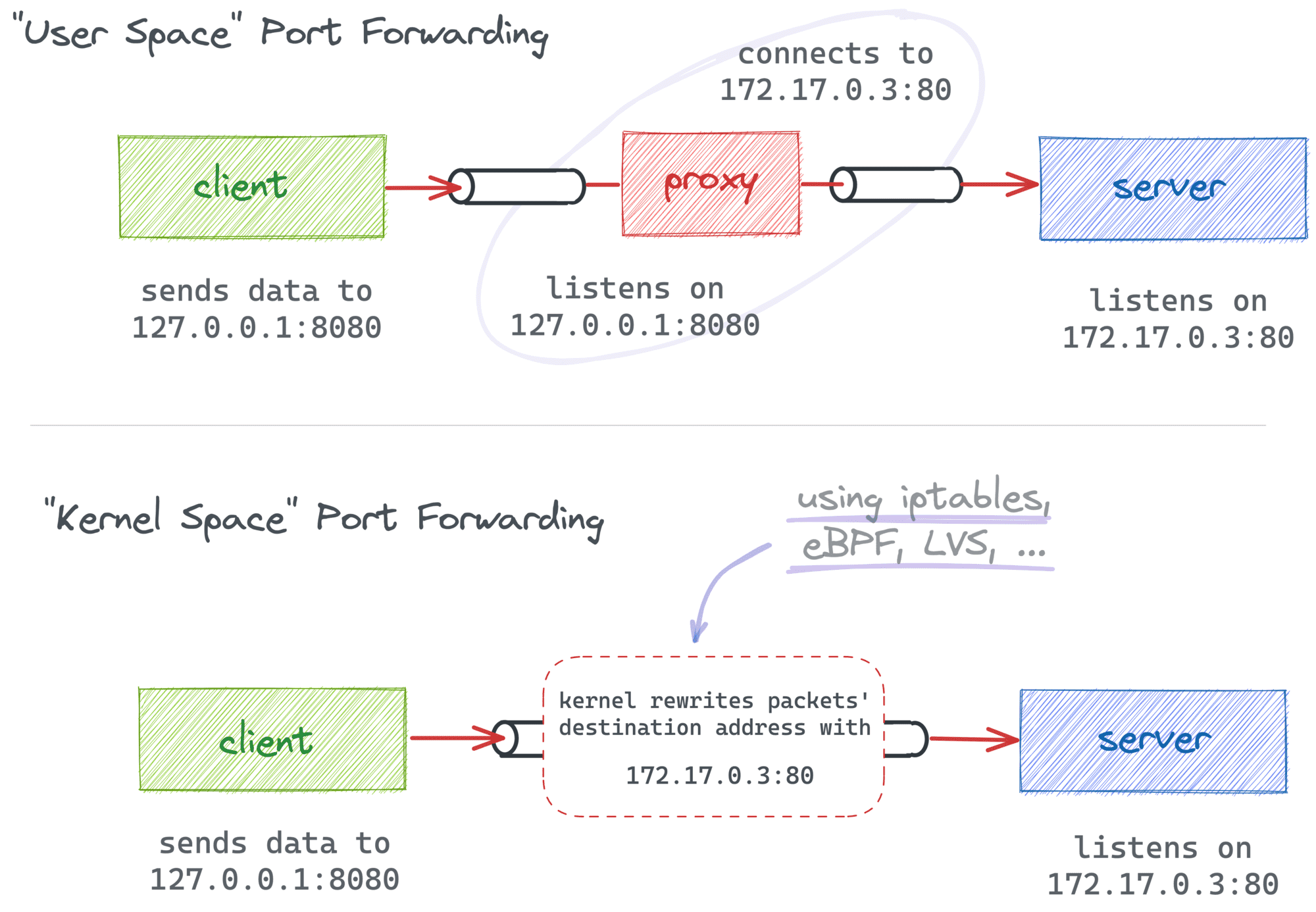
Types of port forwarding.

In the case of Docker port publishing, it's actually a combination of both approaches. Traditionally, Docker Engine relies on in-kernel packet modification (with iptables rules), while Docker Desktop adds a higher-level proxy on top of that, making the implementation work on non-Linux systems too:
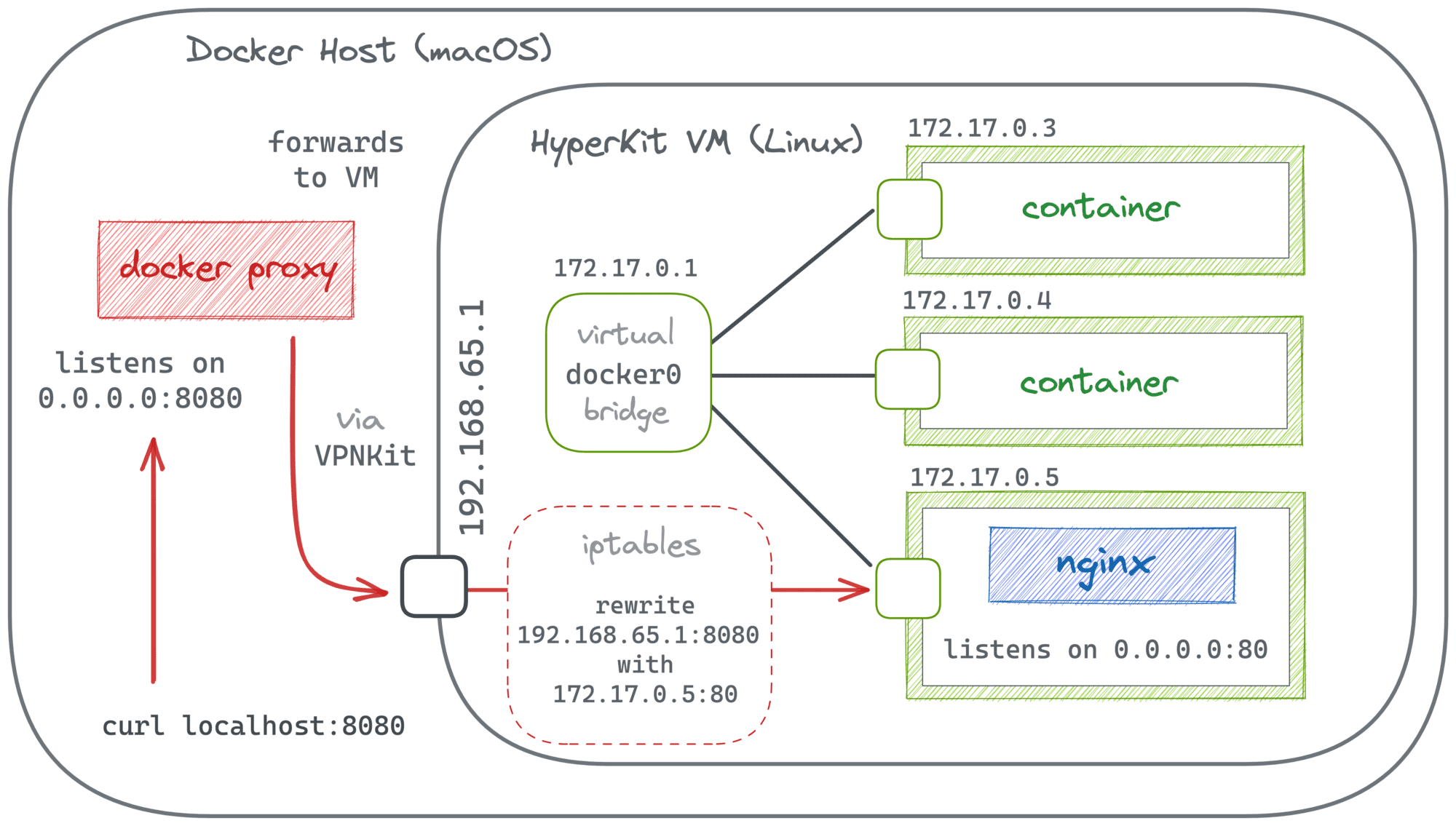
Publishing container ports in Docker.

Last but not least, for that "proxy" solution to work, we should be able to start a new container that can talk to the target container (using its IP address). But this is generally not a problem when both containers reside in the same Docker network.

The solution

The trick is to start a new auxiliary container attached to the same network the target container resides in and ask Docker to publish one (or many) of its ports. It does not establish immediate connectivity with the target's port. However, we can create it by launching a tiny proxy process inside of the container we just launched that will be forwarding not network packets but the actual data:
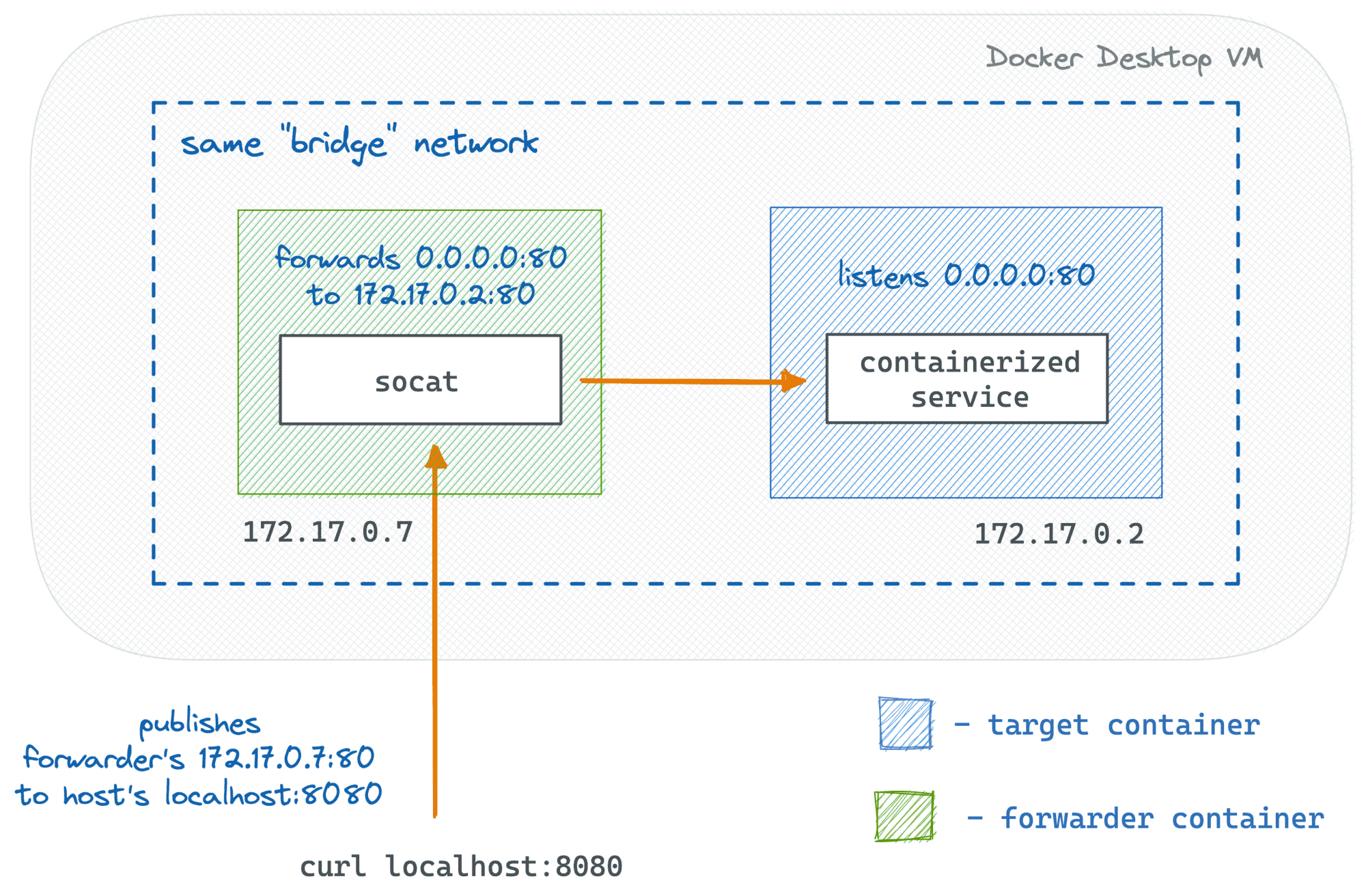
Publishing a port of a running container using a forwarder sidecar.

Let's try to reproduce this experiment. First, we'll need to start the target container. For simplicity, I'll use nginx (it listens on 0.0.0.0:80 inside of the container):

$ TARGET_PORT=80
$ HOST_PORT=8080

$ docker run -d --name target nginx

Now, we need to get the target's IP address and the network name:

$ TARGET_IP=$(
  docker inspect \
    -f '{{range.NetworkSettings.Networks}}{{.IPAddress}}{{end}}' \
    target
)

$ NETWORK=$(
  docker container inspect \
    -f '{{range $net,$v := .NetworkSettings.Networks}}{{printf "%s" $net}}{{end}}' \
    target
)

Finally, let's start the forwarder container with a tiny socat program inside:

$ docker run -d \
  --publish ${HOST_PORT}:${TARGET_PORT} \
  --network ${NETWORK} \
  --name forwarder nixery.dev/socat \
    socat TCP-LISTEN:${TARGET_PORT},fork TCP-CONNECT:${TARGET_IP}:${TARGET_PORT}

And it works!

$ curl localhost:${HOST_PORT}
<!DOCTYPE html>
<html>
<head>
<title>Welcome to nginx!</title>
...

Notice that the forwarder's port 80 is now published to the host's port 8080, so you can access it as usual, including opening localhost:8080 in your favorite browser. The socat program will take care of the rest. It listens on the forwarder's port 80 and transfers any incoming data to the (unexposed to the host) target's port 80 using its IP address. So, from the outside, it looks like the target's port is actually published to the host.

For me, this solution has two significant advantages:

  • It doesn't require a restart of the target container, so it can be fast(er).
  • It relies only on the standard means: the ability to publish a port of a (not started yet) container and the ability of containers residing in the same network to intercommunicate.

It means the solution will work in Docker Engine, Docker Desktop, and even with Docker Compose.

The Docker Compose compatibility is actually very handy. Often, in a multi-service setup, you'll have only the "public" services' port mapped. So, next time you'll need to access a helper service like a database from the host system, feel free to apply this trick and map those ports without restarting the whole compose file.

Automating the solution

The downside of the solution is that it requires a few extra steps. You need to determine the target's IP and network name, come up with a simple but correct socat program, launch the forwarder container, etc.

At the same time, when automated, the solution can be really fast and handy. And it's generic enough to be used with other container runtimes too, including containerd and Kubernetes. So, I ended up writing a special port-forward command for my experimental container debugging tool:

cdebug port-forward <target> -L 8080:80

Go give it a try!