惯性聚合 高效追踪和阅读你感兴趣的博客、新闻、科技资讯
阅读原文 在惯性聚合中打开

推荐订阅源

Vercel News
Vercel News
The GitHub Blog
The GitHub Blog
博客园 - 【当耐特】
Cyber Security Advisories - MS-ISAC
Recent Announcements
D
Docker
GbyAI
GbyAI
酷 壳 – CoolShell
酷 壳 – CoolShell
WordPress大学
WordPress大学
The Cloudflare Blog
雷峰网
雷峰网
A
About on SuperTechFans
小众软件
小众软件
博客园 - Franky
博客园 - 聂微东
F
Full Disclosure
大猫的无限游戏
大猫的无限游戏
C
Check Point Blog
MongoDB | Blog
MongoDB | Blog
G
Google Developers Blog
Microsoft Azure Blog
U
Unit 42
freeCodeCamp Programming Tutorials: Python, JavaScript, Git & More
V
V2EX
Engineering at Meta
Engineering at Meta
宝玉的分享
宝玉的分享
aimingoo的专栏
aimingoo的专栏
量子位
P
Proofpoint News Feed
Hugging Face - Blog
Hugging Face - Blog
博客园_首页
罗磊的独立博客
Martin Fowler
Martin Fowler
D
DataBreaches.Net
cs.CL updates on arXiv.org
S
Secure Thoughts
Project Zero
Project Zero
L
LangChain Blog
阮一峰的网络日志
阮一峰的网络日志
C
Cybersecurity and Infrastructure Security Agency CISA
T
Tailwind CSS Blog
S
Schneier on Security
Blog — PlanetScale
Blog — PlanetScale
The Hacker News
The Hacker News
Spread Privacy
Spread Privacy
Security Latest
Security Latest
NISL@THU
NISL@THU
奇客Solidot–传递最新科技情报
奇客Solidot–传递最新科技情报
C
CXSECURITY Database RSS Feed - CXSecurity.com
J
Java Code Geeks

Eson Wong's Blog

我为什么开发 AI 英语听力生成器:Im-Listening Playwright E2E 测试框架入门教程 如何使用 LlamaIndex 构建一个 RAG 检索系统 批评 Milvus 入门教程 怎么在网页中实现自动调整视频的清晰度 什么是检索增强生成(Retrieval-Augmented Generation)? Phonics 自然拼读常见规则 - 辅音字母的发音规律 ESP8266EX 自动下载电路 浅聊 esp8266 墨水屏 Todo List 制作教程 2023 年我买过的最好用的商品 转变自我的密码:《Atomic Habits》读后感 Phonics 自然拼读常见规则 - 音节和元音字母的发音规律 使用 v4l 采集摄像头 怎么解决 Prettier 和 ESLint 在 VSCode 里的冲突? 《微习惯》 - 读书笔记 在 iPad 使用 VS Code 写代码 在 Macbook 上运行 ChatGLM-6B
怎么用 Github Actions 部署 Next.js 项目到服务器
本文作者: Eson Wong · 2023-10-09 · via Eson Wong's Blog

怎么用 Github Actions 部署 Next.js 项目到服务器?

最近开发一个项目 Next.js,部署到 Vercel 上在国内访问速度和稳定性都不太好,所以想部署到自己的服务器上。经过实践后,分享一下怎么用 Github Actions 部署 Next.js 项目到 Linux 服务器上。

服务器环境配置

在服务器要安装 Node.js 和 PM2,然后配置 Nginx。

安装 Node.js

推荐使用 fnm 来安装 Node.js,以后可以方便的使用不同版本的 Node.js。

1
curl -fsSL https://fnm.vercel.app/install | bash

安装好后重新 SSH 连接到服务器终端,用 fnm 安装 Node.js。

1
fnm install 18

安装 PM2

我们使用 PM2 来管理 Node.js 进程。以便在服务器重启后自动启动项目。

用 npm 安装 PM2:

1
npm install pm2 -g

Nginx 配置

Node.js 项目默认运行在 3000 端口,我们使用 Nginx 来反向代理到 3000 端口。这样就可以使用 80 或 443 端口来访问项目。

在 nginx 配置文件夹 /etc/nginx/sites-available 中创建一个配置文件 example.com

1
2
3
4
5
6
7
8
9
10
11
12
server {
listen 80;
server_name example.com;

location / {
proxy_pass http://localhost:3000;
proxy_http_version 1.1;
proxy_set_header Upgrade $http_upgrade;
proxy_set_header Connection "upgrade";
proxy_set_header Host $host;
}
}

然后在 sites-enabled 文件夹中创建一个软链接。

1
sudo ln -s /etc/nginx/sites-available/example.com /etc/nginx/sites-enabled/example.com

然后重新加载 Nginx 配置文件:

1
sudo nginx -s reload

生成 SSL 证书

安装 certbot 来生成证书并修改 Nginx 配置文件以使用证书。

生成证书:

1
sudo certbot  --nginx

命令执行后会提示输入邮箱,然后选择同意条款,最后选择要生成证书的域名,然后就会自动的生成证书并修改 Nginx 配置文件和重新加载。

代码拉取 SSH 密钥配置

  1. 生成 SSH 密钥

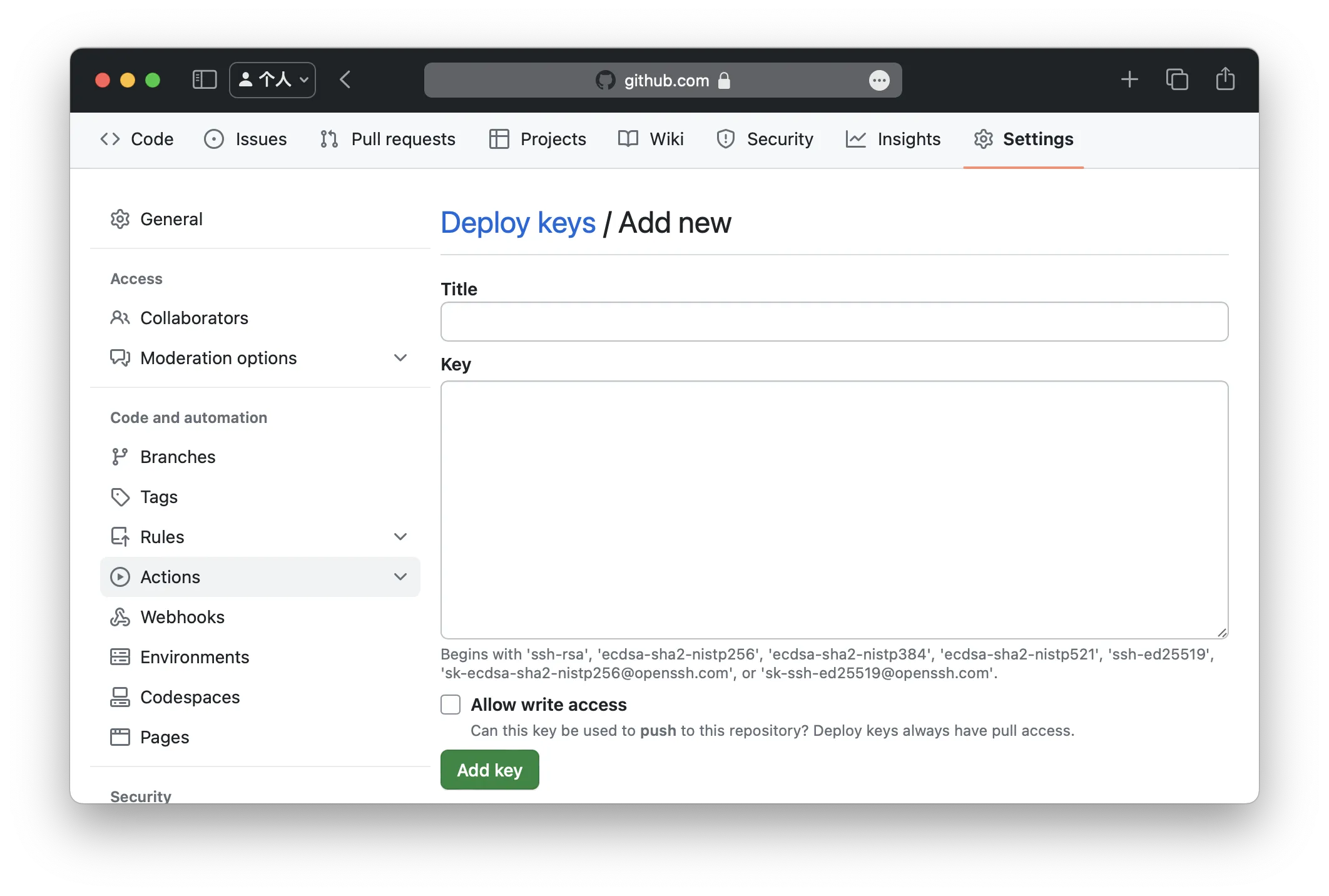
  2. 把公钥添加到 Github 仓库的 Deploy keys 中

    添加公钥

  3. 把私钥到放到服务器的用于发布项目的用户的 ~/.ssh/id_rsa 路径,以便 Github Actions 用 SSH 连接服务器拉取 Github 上的代码。

    1
    echo "private-key" >> ~/.ssh/id_rsa

我们使用 appleboy/ssh-action@master 这个 Github Action 用 ssh 来连接服务器,然后执行命令来部署项目。为了安全起见,我们把服务器 host 和端口,还有 ssh 密钥都配置到 Github 仓库的 Secrets 中,这样就不会把服务器的信息暴露到配置文件中。

准备部署 SSH 密钥

  1. 生成 SSH 密钥对用于发布项目

  2. 把公钥添加到服务器的 ~/.ssh/authorized_keys 文件中

    1
    echo "public-key" >> ~/.ssh/authorized_keys
  3. 在 Github 仓库的 Settings -> Secrets -> Actions 中添加名为 key 的 secret,值为私钥。
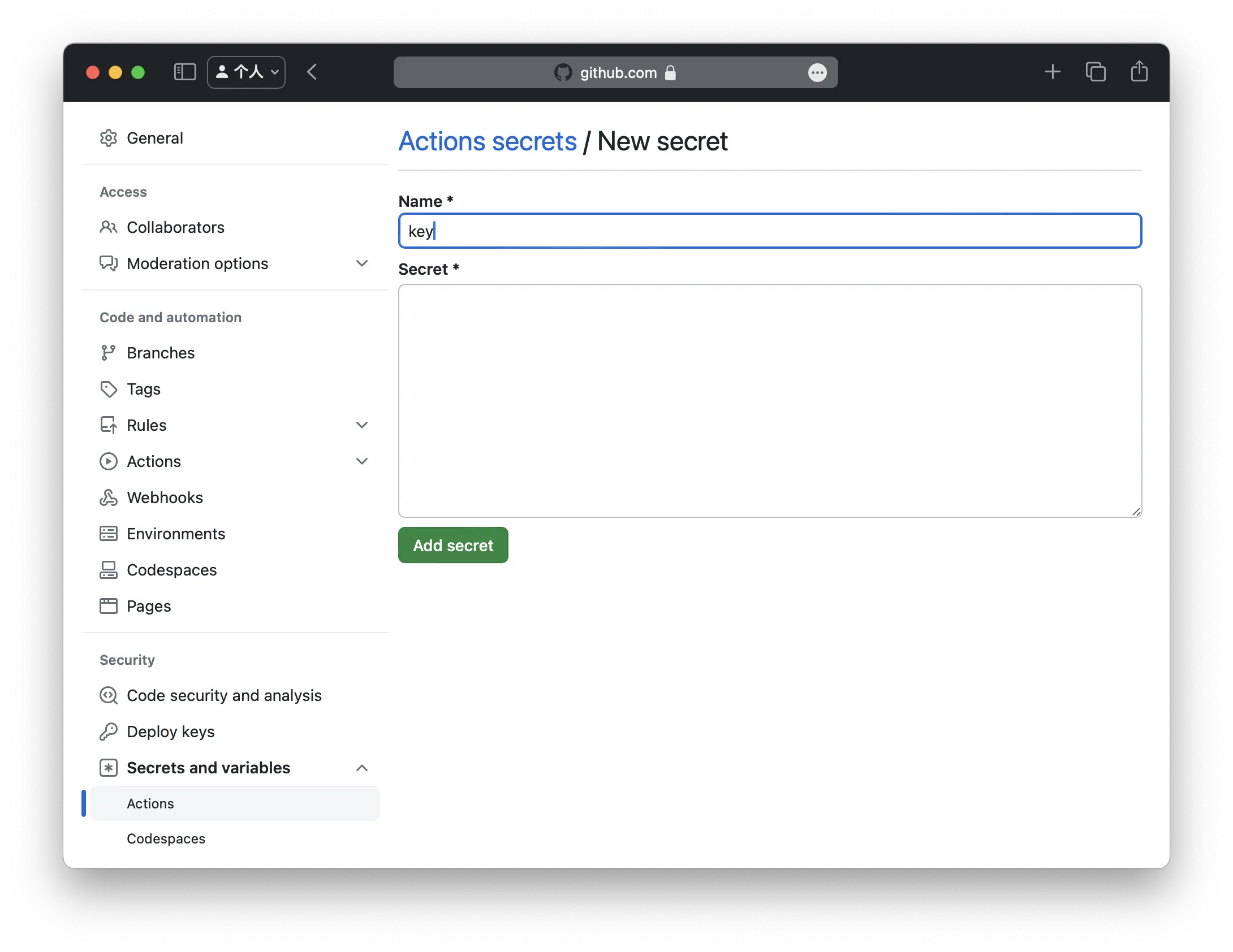
    添加私钥

设置 host 和端口

同样在 Github 仓库的 Settings -> Secrets -> Actions 中添加 hostport

创建 Github Actions 配置文件

在仓库的根目录中创建文件夹 .github/workflows。在此文件夹中创建一个 .yml 后缀的文件。

在配置文件中指定main分支在 push 时触发 Github Actions,然后指定一个 job 名为 deploy,在这个 job 中使用 appleboy/ssh-action@master 这个 Github Action 来连接服务器,然后执行部署脚本。在 Github Actions 中可以使用 Secrets 中的变量,这样就不会把服务器的信息暴露到配制文件中。

部署脚本首先用 git clone 拉取代码, 然后安装依赖,最后使用 PM2 启动项目。最后用 pm2 save 保存项目配置,以便在服务器重启后自动启动项目。

1
2
3
4
5
6
7
8
9
10
11
12
13
14
15
16
17
18
19
20
21
on:
push:
branches:
- main
jobs:
deploy:
runs-on: ubuntu-latest
steps:
- name: Deploy
uses: appleboy/ssh-action@master
with:
host: ${{ secrets.host }}
username: ${{ secrets.username }}
key: ${{ secrets.key }}
port: ${{ secrets.port }}
script: |
git clone ${{ github.repository }} /home/username/project
cd /home/username/project
npm install
pm2 start npm --name "project" -- start
pm2 save

此后每次 push 到 main 分支时,Github Actions 就会自动部署项目到服务器上。

参考