





Vega-lite 是一个基于 VEGA 的高级可视化库,旨在简化数据可视化的过程。它通过简单的 JSON 规范来描述数据与视觉元素之间的映射关系,支持多种图表类型,如条形图、散点图和折线图等。Vega-lite 的设计使得用户无需编写复杂的 JavaScript 代码即可创建交互式和美观的可视化效果,特别适合数据科学家、记者和研究人员使用。它还支持多种编程语言,方便集成到各种环境中,如 Web 页面和 Jupyter Notebook。
下面就是我最近实验课DSC结果,通过csv文件生成的图形。
{
  "$schema": "https://vega.github.io/schema/vega-lite/v6.json",
  "description": "Temperature vs DTG/DSC/TG (curves)",
  "width": 820,
  "height": 380,
  "data": {
    "url": "/usr/uploads/data/ExpDat_1_clean.csv",
    "format": {
      "type": "csv",
      "parse": {
        "Temp_C": "number",
        "DTG": "number",
        "DSC": "number",
        "TG": "number"
      }
    }
  },
  "encoding": {
    "x": {
      "field": "Temp_C",
      "type": "quantitative",
      "title": "Temperature (°C)"
    }
  },
  "layer": [
    {
      "mark": {
        "type": "line",
        "interpolate": "monotone",
        "color": "#e11d48",
        "strokeWidth": 2
      },
      "encoding": {
        "y": {
          "field": "DTG",
          "type": "quantitative",
          "title": "DTG (%/min)",
          "axis": {
            "orient": "left",
            "titleColor": "#e11d48",
            "labelColor": "#e11d48"
          }
        }
      }
    },
    {
      "mark": {
        "type": "line",
        "interpolate": "monotone",
        "color": "#2563eb",
        "strokeWidth": 2
      },
      "encoding": {
        "y": {
          "field": "DSC",
          "type": "quantitative",
          "title": "DSC (mW/mg)",
          "axis": {
            "orient": "right",
            "offset": 0,
            "titleColor": "#2563eb",
            "labelColor": "#2563eb"
          }
        }
      }
    },
    {
      "mark": {
        "type": "line",
        "interpolate": "monotone",
        "color": "#16a34a",
        "strokeWidth": 2
      },
      "encoding": {
        "y": {
          "field": "TG",
          "type": "quantitative",
          "title": "TG (%)",
          "axis": {
            "orient": "right",
            "offset": 58,
            "titleColor": "#16a34a",
            "labelColor": "#16a34a"
          }
        }
      }
    }
  ],
  "resolve": {
    "scale": {
      "y": "independent"
    }
  }
}
可以对比机器结果: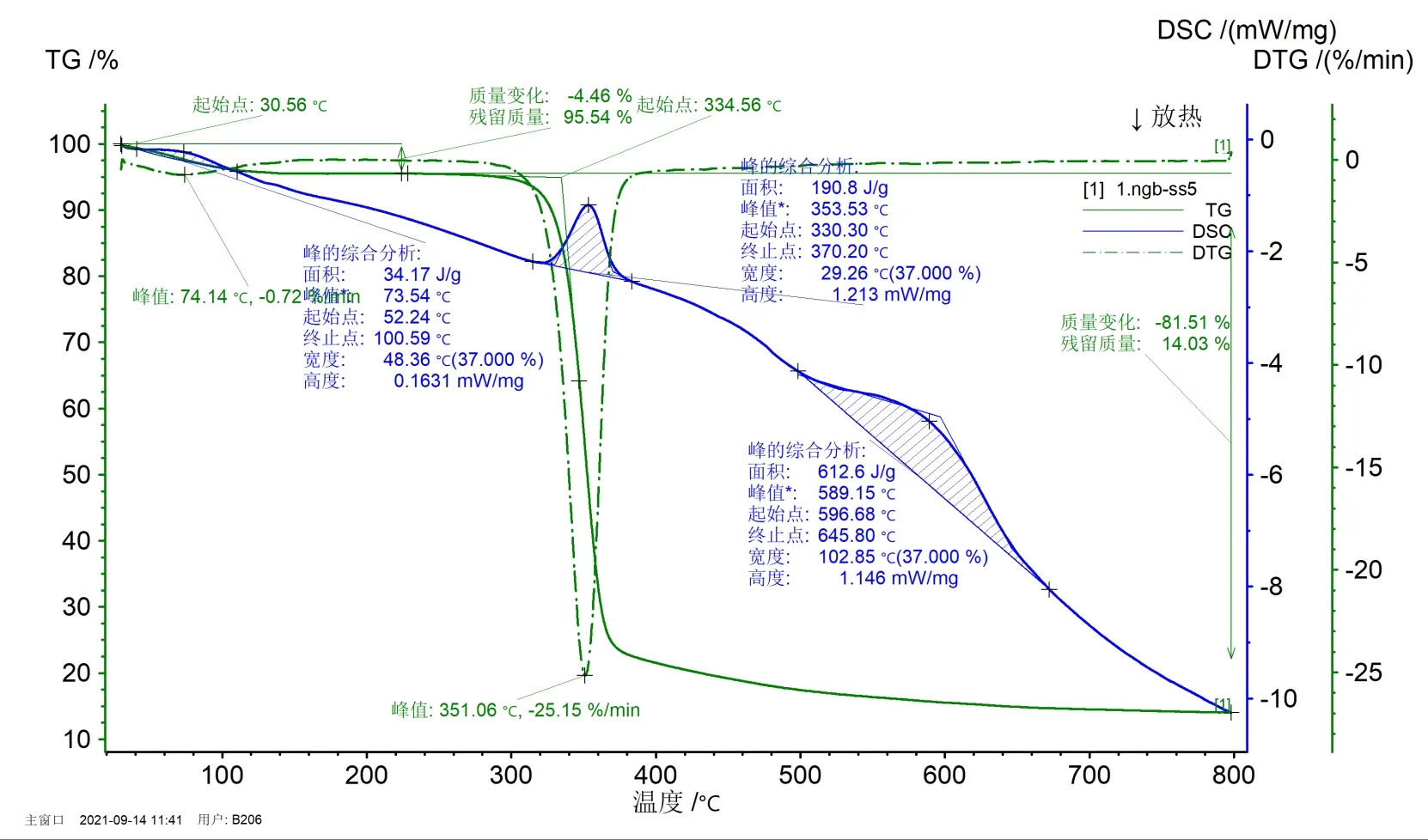
下面是实际的Markdown代码:
{
  "$schema": "https://vega.github.io/schema/vega-lite/v6.json",
  "description": "Temperature vs DTG/DSC/TG (curves)",
  "width": 820,
  "height": 380,
  "data": {
    "url": "/usr/uploads/data/ExpDat_1_clean.csv",
    "format": {
      "type": "csv",
      "parse": {
        "Temp_C": "number",
        "DTG": "number",
        "DSC": "number",
        "TG": "number"
      }
    }
  },
  "encoding": {
    "x": {
      "field": "Temp_C",
      "type": "quantitative",
      "title": "Temperature (°C)"
    }
  },
  "layer": [
    {
      "mark": {
        "type": "line",
        "interpolate": "monotone",
        "color": "#e11d48",
        "strokeWidth": 2
      },
      "encoding": {
        "y": {
          "field": "DTG",
          "type": "quantitative",
          "title": "DTG (%/min)",
          "axis": {
            "orient": "left",
            "titleColor": "#e11d48",
            "labelColor": "#e11d48"
          }
        }
      }
    },
    {
      "mark": {
        "type": "line",
        "interpolate": "monotone",
        "color": "#2563eb",
        "strokeWidth": 2
      },
      "encoding": {
        "y": {
          "field": "DSC",
          "type": "quantitative",
          "title": "DSC (mW/mg)",
          "axis": {
            "orient": "right",
            "offset": 0,
            "titleColor": "#2563eb",
            "labelColor": "#2563eb"
          }
        }
      }
    },
    {
      "mark": {
        "type": "line",
        "interpolate": "monotone",
        "color": "#16a34a",
        "strokeWidth": 2
      },
      "encoding": {
        "y": {
          "field": "TG",
          "type": "quantitative",
          "title": "TG (%)",
          "axis": {
            "orient": "right",
            "offset": 58,
            "titleColor": "#16a34a",
            "labelColor": "#16a34a"
          }
        }
      }
    }
  ],
  "resolve": {
    "scale": {
      "y": "independent"
    }
  }
}embed{% vega src="/usr/uploads/vega/sales.json" height=360 renderer=svg actions=off %}{
"$schema": "https://vega.github.io/schema/vega-lite/v6.json",
"data": {"values":[{"x":"A","y":28},{"x":"B","y":55}]},
"mark": "bar",
"encoding": {
"x": {"field":"x","type":"nominal"},
"y": {"field":"y","type":"quantitative"}
}
}{% ... %}。key=value、单双引号值。vega 短代码渲染成占位节点:<section class="vega-embed-shortcode"
data-embed-type="vega"
data-vega-src="/usr/uploads/vega/sales.json"
data-vega-renderer="svg"
data-vega-actions="false">
<div class="vega-embed-stage" data-vega-stage data-vega-height="360"></div>
</section>比如:
{% vega src="/uploads/vega/sales.json" height=360 renderer=svg actions=off %}
{
  "data": {
    "url": "https://evil.com/data.json"
  },
  "mark": "bar"
}
此内容由惯性聚合(RSS阅读器)自动聚合整理,仅供阅读参考。 原文来自 — 版权归原作者所有。