






Software engineering teams often face an important decision: "Should all projects live in one repository or be split across multiple repositories?" This decision impacts build times, CI/CD pipelines, dependency management, and even documentation accuracy.
Some teams prefer a monorepo because they believe it streamlines code sharing, simplifies dependency management, and keeps documentation aligned. Others opt for multi-repos because they value independent workflows and more granular control over access management.
This guide will help you decide whether a monorepo or multi-repo is right for your team by weighing collaboration efficiency, documentation consistency, and build performance.
A monorepo is more than "all your code in one repository."
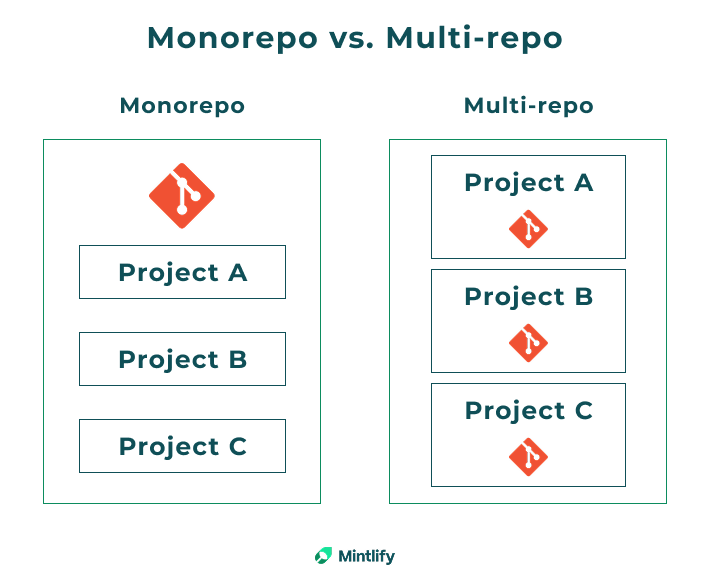
Monorepos are single, centralized repositories where all the code for various projects is stored together. Instead of having separate repositories for each project, everything is managed in one place. The key difference from a standard multi-project repository is the deliberate sharing of build systems, tooling configurations, and dependencies across these projects.
Large organizations use massive monorepos to manage their codebases. Depending on your team's size and needs, a monorepo may or may not be the best option. Let's look at the different solutions available.
When comparing monorepos to multi-repo setups, opinions often differ. Many teams rely on monorepos because they centralize all code in a single repository. This approach makes it easier to manage shared libraries and enforce consistent coding standards, and it enables cross-project collaboration. In this collaborative environment, updating a common module benefits every project that relies on it, reducing version mismatches and easing large-scale refactoring.
This approach has been used by organizations like:
However, not every team finds this approach appealing. Some teams argue that housing everything in one repository can introduce performance issues and increased complexity. As a monorepo grows, everyday operations like cloning, searching, or reviewing code may become more difficult to manage.
The preferences for monorepo or multi-repo structures can vary based on team size, project complexity, and organizational needs. Here's a breakdown:
Small Teams (1-5 Developers)
Medium Teams (6-20 Developers)
Large Enterprises (20+ Developers)
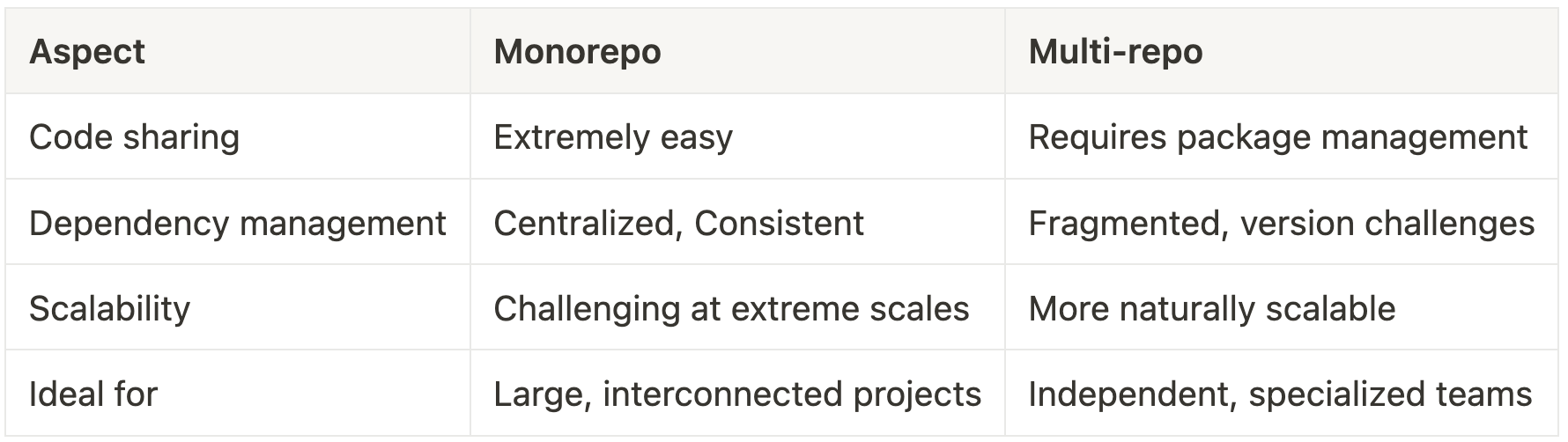
Below is a clear, side-by-side comparison of key aspects for choosing between a monorepo and a multi-repo, helping you see how each approach fits different team sizes and project requirements.
Code sharing
In a monorepo, every project is stored in one repository, which makes it easy to share components. For example, if you have a custom UI widget used by several applications, you update it once, and every project immediately benefits from the change.
In a multi-repo setup, the same widget must be published as a separate library and then integrated into each project individually. This extra step means managing library versions and coordinating releases, which can slow down development and introduce inconsistencies.
Dependency management
Managing dependencies is simpler in a monorepo because any change to a shared library automatically applies to all projects that depend on it. Imagine updating an authentication module to fix a security issue; in a monorepo, the fix is instantly available across all services.
In contrast, with a multi-repo structure, each repository maintains its own version of the library. After an update, every project must be updated separately, which can lead to version mismatches if the process is not carefully coordinated.
Scalability
Scaling a monorepo can become challenging as the codebase grows. Tasks like cloning the repository, performing global searches, or running builds on the entire codebase may slow down and require advanced tools to maintain performance. For instance, a large monorepo might need an incremental build system to avoid unnecessary rebuilds.
On the flip side, a multi-repo approach allows each project to scale independently, reducing the load on any single repository. However, this isolation may also lead to inconsistent practices across teams if not managed properly.
Ideal for
Monorepos work best for organizations with closely related projects that require frequent collaboration and shared resources. When all code lives in one repository, teams can easily coordinate changes, share common components, and enforce unified standards across projects. This centralized approach is particularly useful when multiple projects rely on the same libraries and tools, ensuring that updates are applied consistently across the board.
On the other hand, multi-repos are more suitable for organizations with independent products or teams that need tight control over access and deployment. For instance, a company that develops separate mobile apps and web platforms may choose a multi-repo strategy. This allows each team to manage its own release cycles and enforce specific access controls, ensuring that changes in one repository do not affect others.
Let's take a look at some key benefits of using a monorepo.
In a monorepo, you'll have a single source of truth for dependencies. There's no more "but it works on my machine" because of slightly different dependency versions across repositories. Everyone uses the same tooling, the same libraries, and the same versions.
This consistency is particularly helpful for complex software development processes where multiple teams contribute to interconnected components. The documentation process also benefits, as there's only one place to track how different dependencies relate to each other.
Monorepos bring all related projects into one place, making it easier to share code across different teams and components. Need to update a logging library used by five services? You can refactor it once, test it against all dependent projects immediately, and deploy the changes in time.
With everything in one repository, you no longer have to juggle pull requests across multiple repositories or guess which version of a library another team is using.
When your source code documentation lives alongside your code in a monorepo, it's more likely to be updated with each code change. For teams who value keeping technical documentation up to date, this alignment between code changes and documentation updates can improve accuracy over time. Keeping technical documentation consistent becomes much easier when there's a single repository acting as the source of truth.
While monorepos offer great benefits, this approach also comes with some challenges. Here are some of the areas where monorepos tend to struggle.
One challenge with monorepos is the burden they place on build systems and continuous integration and deployment(CI/CD) pipelines. Because all projects live in one repository, even a minor change to one module can prompt the CI/CD system to process a large portion of the codebase. This often results in lengthy build and test cycles, which delay feedback and slow down development.
The system must scan the entire repository to identify which components need rebuilding or retesting. Without effective incremental build strategies, every commit can trigger extensive rebuilds, even for code that hasn't changed. This not only delays the integration of new code but also consumes more resources and increases the risk of bottlenecks during peak development periods.
Centralizing all code in a single repository creates difficulties when managing who has access to what. In a multi-repo setup, each project can have its own repository with clearly defined access rights, making it straightforward to restrict sensitive code to specific teams. In contrast, a monorepo houses everything together, which makes it challenging to implement granular access controls.
Setting up detailed access restrictions in a monorepo often requires complex configurations or specialized tools. Even when such systems are in place, ensuring that only the appropriate teams or individuals can modify critical sections of the code remains a significant challenge. Without proper controls, there's an increased risk of unintended changes.
Because a monorepo houses multiple projects in one place, developers may find themselves navigating unfamiliar parts of the codebase or being pulled into tasks outside of their primary focus. This constant switching between different projects can reduce productivity and increase the cognitive load, making it harder to maintain focus on the task at hand.
Another challenge is the strain on local development environments. When the codebase is extensive, setting up and running the local environment may become slow and resource-intensive. Developers might experience longer startup times, sluggish builds, and delays in testing, which can slow down the software development process.
Documentation is a critical component of any development process, especially in a monorepo architecture. Adopting a docs-as-code approach, where documentation is maintained with the same discipline and version control as source code, ensures that your technical documentation stays aligned with the latest changes.
When all your code lives in one repository, versioning and syncing documentation is more straightforward. For example, changes to your code can trigger automated updates to your documentation through Git Sync. This means that if you update a function or library, your docs are updated immediately to reflect the change, keeping everything consistent and current.
Here is a typical example:
class User(models.Model):
    """
    Represents an application user.
    Fields:
        email (str): Unique user email.
        last_login (datetime): Timestamp of most recent login.
    """
    email = models.EmailField(unique=True)
    last_login = models.DateTimeField(auto_now=True)  # New field
A developer commits the change to the monorepo's main branch.
Git sync workflow:
The User model docs now display the last_login field within seconds of the commit.
This workflow ensures that your documentation stays aligned with your code changes without requiring manual intervention.
One benefit of the monorepo approach is the unified versioning system and consistent documentation across all projects. A key recommendation for teams using a monorepo is to invest in automation and fine-tune build strategies to manage increased scale as the repository grows.
In a multi-repo setup, each project maintains its own documentation independently. This gives each team the flexibility to customize their documentation process, but it also introduces challenges in keeping documentation consistent across repositories. For instance, if you have separate repositories for an authentication service and a payment service, each will need its own documentation update workflow. One repository might have a GitHub Action like this:
name: Update Auth Documentation
on:
  push:
    paths:
      - 'src/**'
jobs:
  update-docs:
    runs-on: ubuntu-latest
    steps:
      - uses: actions/checkout@v2
      - name: Run Documentation Sync
        run: ./scripts/update-docs.sh
A similar process would need to be set up in the payment repository. Although this independence allows teams to work according to their own schedules, it requires extra coordination to ensure that documentation remains consistent and aligned across all projects. One way to address this challenge is by setting up centralized software documentation tools/hub or use custom actions to periodically sync documentation from each repository.
The advantage is that teams can work independently, but the tradeoff is the extra effort required to coordinate documentation across separate projects.
Deciding between a monorepo and multiple repositories depends on your organization's specific needs and workflows. Here's a simple framework to guide your decision:
Choose a monorepo if you need:
Go for multi-repo if you value:
Your decision should reflect your workflow and organizational needs. If your projects rely on shared code and consistent tools, a monorepo can simplify collaboration and maintenance. If your teams need to work independently with tailored CI/CD and strict access controls, separate repositories may be a better fit.
To experience how API documentation tools like Mintlify can improve your process, you can try for free today.
此内容由惯性聚合(RSS阅读器)自动聚合整理,仅供阅读参考。 原文来自 — 版权归原作者所有。